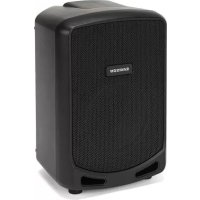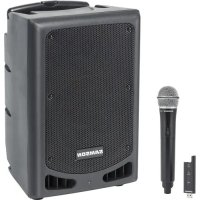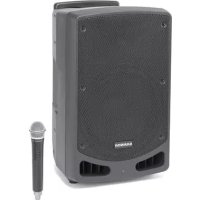
Expedition XP106w - Hi-fi system SAMSON - Free user manual and instructions
Find the device manual for free Expedition XP106w SAMSON in PDF.

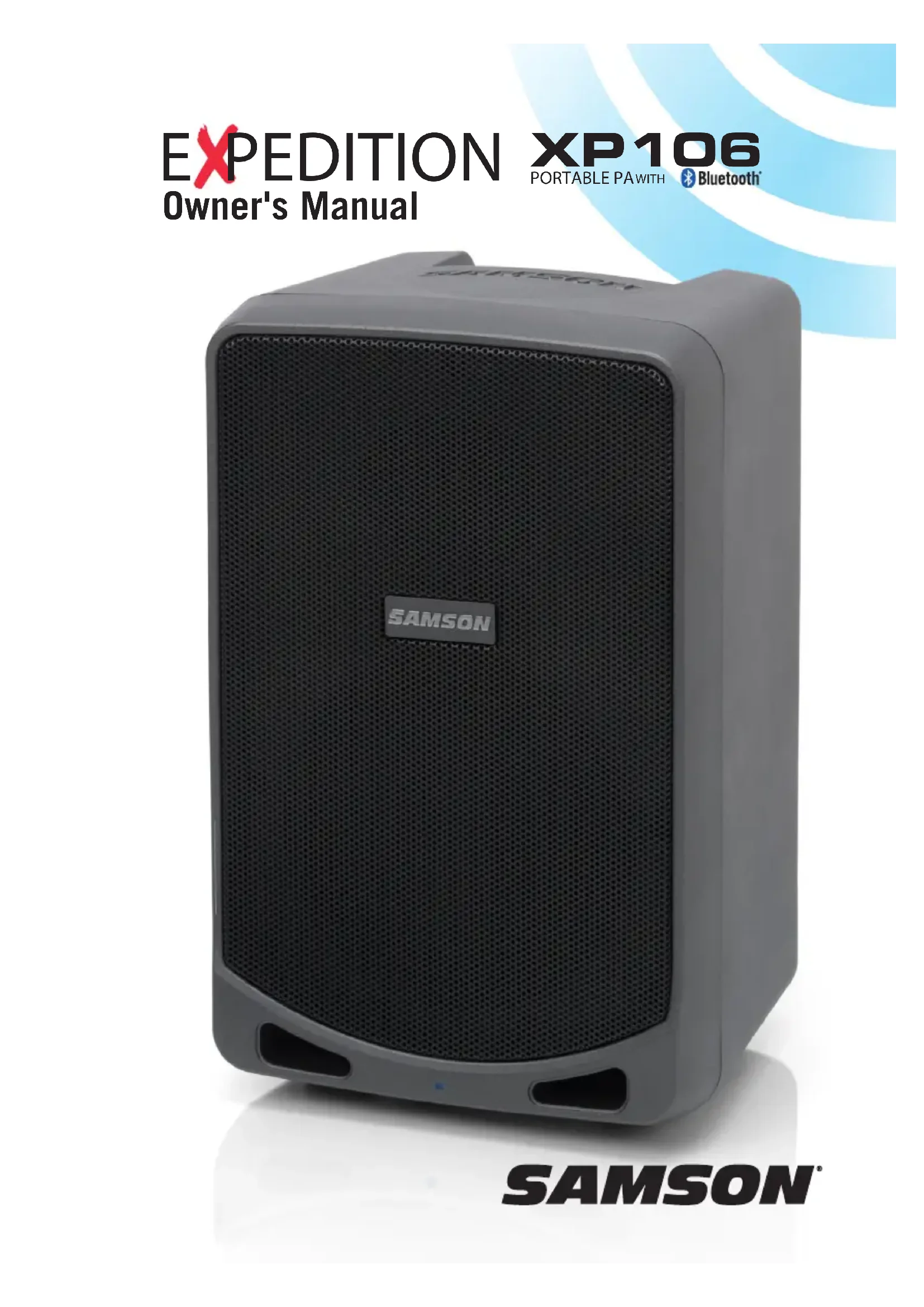


| Product Type | Portable battery-powered PA system |
| Brand | Samson |
| Model | Expedition XP106w |
| Dimensions (W x D x H) | 240 x 230 x 360 mm |
| Weight | 7.4 kg |
| Mains Power | AC/DC adapter: input 100-240 V, 50/60 Hz, output 18 V / 1.5 A |
| Built-in Battery | 12 V / 7.5 Ah, sealed lead-acid, rechargeable |
| Battery Life | Up to 20 hours |
| Charging Time | Approximately 4 to 8 hours |
| Output Power | 100 W |
| Frequency Response | 75 Hz - 15 kHz ±3 dB |
| Speakers | 6" (152 mm) woofer + 1" (25 mm) tweeter, 2-way |
| Wireless Connectivity | Bluetooth 3.0, A2DP; USB 2.4 GHz receiver for Stage XPD1 wireless microphone (included) |
| Audio Inputs | MIC/INST: XLR/6.35 mm combo; LINE: 6.35 mm; AUX: 3.5 mm; USB for wireless receiver |
| Audio Outputs | LINE OUT: 6.35 mm TS |
| Controls | 4 channel level controls, Speech/Music selector |
| Indicators | PEAK LED (distortion), battery LED, Bluetooth LED |
| Speaker Support | Standard 35 mm (1" 3/8) pole mount |
| Carrying Handle | Integrated ergonomic handle |
| Enclosure Material | Polypropylene with internal bracing |
| Grille | Perforated steel with powder coating |
| Care and Cleaning | Clean with a dry cloth. Do not expose to water or moisture. |
| Safety | Follow instructions: do not open, avoid heat sources, disconnect during storms, repair by qualified personnel. |
| Spare Parts and Repairability | Replacement battery available via Samson support. Use only recommended accessories. |
Frequently Asked Questions - Expedition XP106w SAMSON
User questions about Expedition XP106w SAMSON
0 question about this device. Answer the ones you know or ask your own.
Ask a new question about this device
Download the instructions for your Hi-fi system in PDF format for free! Find your manual Expedition XP106w - SAMSON and take your electronic device back in hand. On this page are published all the documents necessary for the use of your device. Expedition XP106w by SAMSON.
USER MANUAL Expedition XP106w SAMSON
natural_image
Exterior view of a gray SAMSON audio amplifier speaker with mesh grille and front panel (no visible text or symbols beyond brand name)SAMSON®
Copyright 2013
v2
Samson Technologies Corp.
45 Gilpin Avenue
Hauppauge, New York 11788-8816
Phone: 1-800-3-SAMSON (1-800-372-6766)
Fax: 631-784-2201
www.samsontech.com
The Bluetooth® word mark and logos are registered trademarks owned by Bluetooth SIG, Inc. and any use of such marks by Samson Technologies is under license. Other trademarks and trade names are those of their respective owners."
Important Safety Information

text_image
CAUTION RISK OF ELECTRIC SHOCK DO NOT OPENAVIS RISQUE DE CHOC ÉLECTRONIQUE - NE PAS OUVRIR
WARNING: TO REDUCE THE RISK OF ELECTRIC SHOCK, DO NOT REMOVE COVER (OR BACK) AS THERE ARE NO USER-SERVICEABLE PARTS INSIDE. REFER SERVICING TO QUALIFIED SERVICE PERSONNEL.

This lightning flash with arrowhead symbol within an equilateral triangle is intended to alert the user to the presence of non-insulated “dangerous voltage” within the product’s enclosure that may be of sufficient magnitude to constitute a risk of electric shock.

The exclamation point within an equilateral triangle is intended to alert the user to the presence of important operating and maintenance instructions in the literature accompanying the appliance.
If you want to dispose this product, do not mix it with general household waste. There is a separate collection system for used electronic products in accordance with legislation that requires proper treatment, recovery and recycling.
Private household in the 28 member states of the EU, in Switzerland and Norway may return their used electronic products free of charge to designated collection facilities or to a retailer (if you purchase a similar new one).
For Countries not mentioned above, please contact your local authorities for a correct method of disposal.
By doing so you will ensure that your disposed product undergoes the necessary treatment, recovery and recycling and thus prevent potential negative effects on the environment and human health.
Important Safety Information
- Read these instructions.
- Keep these instructions.
- Heed all warnings.
- Follow all instructions.
- Do not use this apparatus near water.
- Clean only with dry cloth.
- Do not block any ventilation openings. Install in accordance with the manufacturer's instructions.
- Do not install near any heat sources such as radiators, heat registers, stoves, or other apparatus (including amplifiers) that produce heat.
- Do not defeat the safety purpose of the polarized or grounding type plug. A polarized plug has two blades with one wider than the other. A grounding type plug has two blades and a third grounding prong. The wide blade or the third prong are provided for your safety. If the provided plug does not fit into your outlet, consult an electrician for replacement of the obsolete outlet.
- Protect the power cord from being walked on or pinched particularly at the plugs, convenience receptacles, and at the point where they exit from the apparatus.
- Only use attachments/accessories specified by the manufacturer.
-
Use only with the cart, stand, tripod, bracket, or table specified by the manufacturer, or sold with the apparatus. When a cart is used, use caution when moving the cart/apparatus combination to avoid injury from tip-over.
-
Unplug the apparatus during lightening storms or when unused for long periods of time.
- Refer all servicing to qualified personnel. Service is required when the apparatus has been damaged in any way, such as power supply cord or plug is damaged, liquid has been spilled or objects have fallen into the apparatus has been exposed to rain or moisture, does not operate normally, or has been dropped.
- This appliance shall not be exposed to dripping or splashing water and that no object filled with liquid such as vases shall be placed on the apparatus.
- Caution-to prevent electrical shock, match wide blade plug wide slot fully insert.
- Please keep a good ventilation environment around the entire unit.
- To prevent injury, this apparatus must be securely attached to the stand in accordance with the installation instructions.
- WARNING: The battery (battery or batteries or battery pack) shall not be exposed to excessive heat such as sunshine, fire or the like.
- CAUTION: Danger of explosion if battery is incorrectly replaced. Replace only with the same or equivalent type.

natural_image
Symbolic illustration of a person climbing a ladder inside a circle (no text or symbols)Important Safety Information
FCC Notice
- This device complies with Part 15 of the FCC Rules. Operation is subject to the following two conditions:
(1) This device may not cause harmful interference.
(2) This device must accept any interference received, including interference that may cause undesired operation.
- Changes or modifications not expressly approved by the party responsible for compliance could void the user's authority to operate the equipment.
FCC Statement
This equipment has been tested and found to comply with the limits for a Class B digital device, pursuant to Part 15 of the FCC Rules. These limits are designed to provide reasonable protection against harmful interference in a residential installation.
This equipment generates uses and can radiate radio frequency energy and, if not installed and used in accordance with the instructions, may cause harmful interference to radio communications. However, there is no guarantee that interference will not occur in a particular installation. If this equipment does cause harmful interference to radio or television reception, which can be determined by turning the equipment off and on, the user is encouraged to try to correct the interference by one or more of the following measures:
- Reorient or relocate the receiving antenna.
- Increase the separation between the equipment and receiver.
- Connect the equipment into an outlet on a circuit different from that to which the receiver is connected.
- Consult the dealer or an experienced radio/TV technician for help.
RF Warning Statement
The device has been evaluated to meet general RF exposure requirement. The device can be used in portable exposure condition without restriction.
This device complies with RSS-310 of Industry Canada. Operation is subject to the condition that this device does not cause harmful interference.
C€0700
Table of Contents
Introduction 7
Features 8
Control Panel Features 9
Quick Start 11
Pairing with a Bluetooth® device .....12
Charging the Battery. . . . . . . . . . . . . . . . . . . . . . . . . . . . . . . . . 13
Speaker Placement 14
Avoiding Feedback. 15
Quick Start - Stage XPD1 Wireless System ..... 16
Stage HXD1 Handheld Transmitter Controls ..... 18
Stage RXD1 Receiver Controls ..... 19
Using the LINE IN/OUT Jack . . . . . . . . . . . . . . . . . . . . . . . . . . 20
Making Connections 21
XP106 Specifications 22
Introduction
Thank you for purchasing the XP106 battery-powered portable sound system, featuring wireless Bluetooth® connectivity, to stream audio from your smart phone, tablet, or computer. The XP106 is a complete all-in-one solution providing the flexibility of a four-channel mixer (with inputs for a microphone and line level devices), a line output for linking multiple speakers, and a Music/Speech tone switch.
For added flexibility, the XP106 mixer has a USB jack for connecting the Samson Stage XPD1 digital handheld wireless system, creating a completely cordless performance.
Lightweight and compact, the XP106 features 100 watts of power weighing less than 20lbs, makes it an excellent complement to any mobile speaker application. The internal battery provides up to 20 hours of audio on a full charge. The XP106 can also be powered by the included AC adaptor for continuous audio.
Whether you are looking for a sound system for use outdoors, in the classroom, for karaoke, for presentations, or performing live music, the XP106 provides high quality, portable audio in a small self-powered package.
We recommend you keep the following records for reference, as well as a copy of your sales receipt.
Serial number: ____
Date of purchase: ____
Dealer name: ____
With proper care and maintenance, your XP106 will operate trouble-free for many years. Should your speaker ever require servicing, a Return Authorization (RA) number must be obtained before shipping your unit to Samson. Without this number, the unit will not be accepted. Please call Samson at 1-800-3SAMSON (1-800-372-6766) for an RA number prior to shipping your unit. Please retain the original packing materials and, if possible, return the unit in its original carton. If your XP106 was purchased outside of the United States, contact your local distributor for warranty details and service information.
Features
natural_image
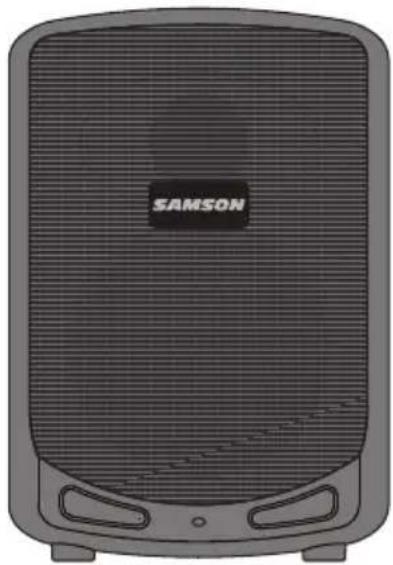
Front view of a black Siemens air conditioner unit (no visible text or symbols on body)• Lightweight, 100 watt PA system that weighs under 20 pounds
- Bluetooth connectivity to connect wireless music sources
- 2-way speaker enclosure with 6-inch woofer and 1-inch high frequency driver
- Four channel mixer with microphone, line level, and USB wireless receiver inputs.
- Integrated 1 3/8-inch speaker stand mount
• Ergonomic top carry handle
- Internal rechargeable battery for up to 20 hours of continuous use
- System equalization contour switch for music and spoken word applications
- Link output for expanding your sound system
Accessories
- XP106 - Dynamic handheld microphone with XLR cable
- XP106w - Stage XPD1 digital handheld wireless system with USB receiver and handheld transmitter
Control Panel Features
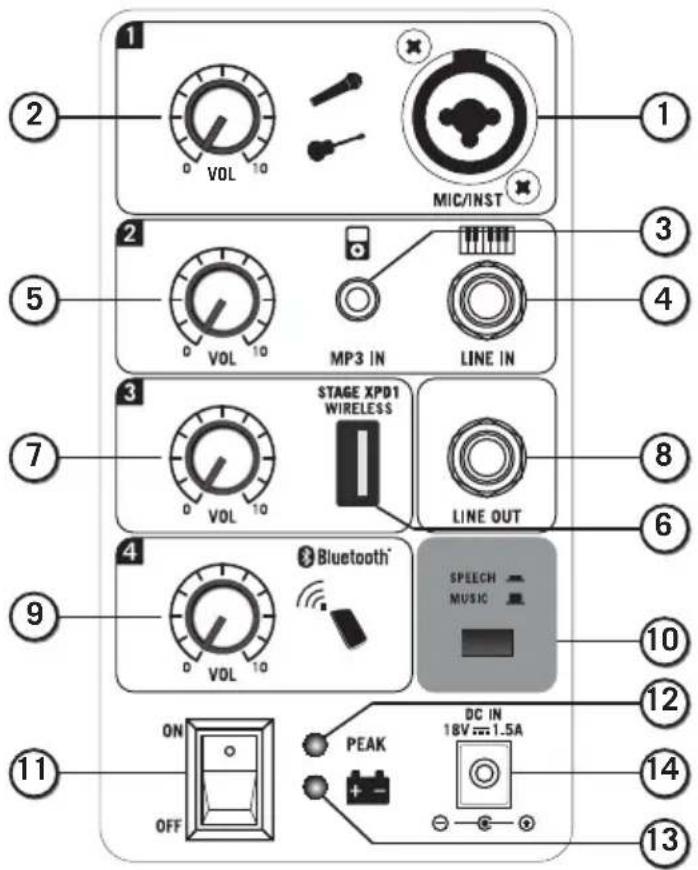
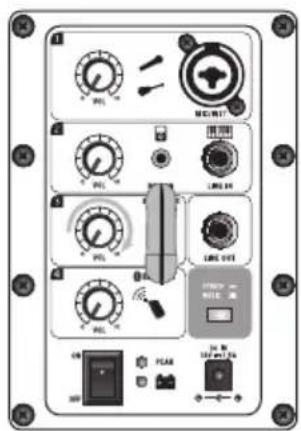
- MIC/INST Input - Use this XLR/ 14 " input for microphone, instrument with and active preamp or a line signal.
- LEVEL (CHANNEL 1) - Used to control the level of the CHANNEL 1 Mic/Line input.
- AUX IN - Connect a line level device using a 3.5mm audio cable.
- LINE Input - 14 " input used to connect instrument or line level signals.
- LEVEL (CHANNEL 2) - Used to control the level of the MP3 IN and LINE inputs.
- 2.4GHz WIRELESS Input* - Connect the Samson Stage XPD1 digital wireless USB receiver
to this input. The wireless receiver gets its power from the XP106, so no additional power supply is needed.
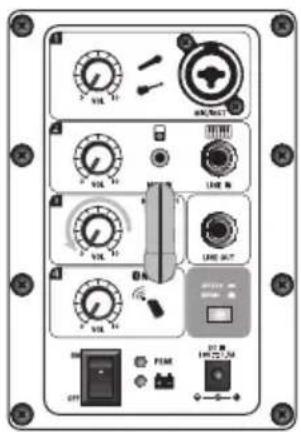
- LEVEL (WIRELESS) - Used to control the level of the 2.4GHz WIRELESS input.
- LINE OUT - 1/4" output connector to link multiple XP106 systems together
- LEVEL (BLUETOOTH ^ ) - Used to control the level of the Bluetooth input.
- SPEECH/MUSIC Switch - This switch is used to change the overall frequency response, or tone contour, for the XP106 sound system. If your application is mainly for music, leave the switch up to select the MUSIC response curve. If your application is mainly for spoken word, press the switch down to select the SPEECH response curve.
- Power - Switches on the main power.
- PEAK LED - The Red LED illuminates at the level where distortion occurs.
- Battery Indicator - Displays the status of the battery charge level.
- DC IN - Connect the supplied power adapter here.
* The USB connector is for the Stage XPD1 receiver only. The connector is not designed to charge smartphones, tablets, or similar devices.
text_image
1 2 VOL 10 MIC/INST 3 5 2 VOL 10 MP3 IN LINE IN 4 7 3 VOL 10 STAGE XPDT WIRELESS LINE OUT 6 9 4 VOL 10 Bluetooth® SPEECH MUSIC 10 11 ON OFF PEAK DC IN 18V=1.5A 12 14 13Control Panel Features
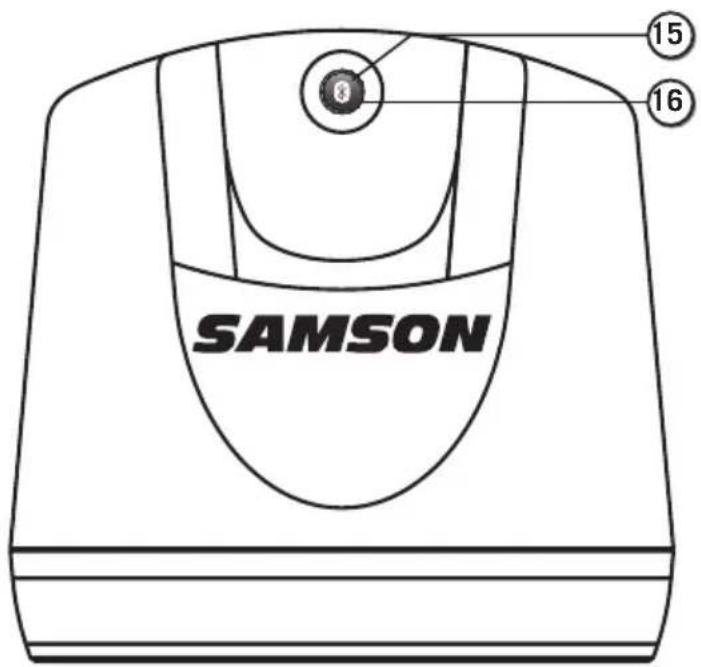
- Pairing Indicator - Displays the Bluetooth status of the XP106 system.
- Pairing Button - Press this button to enable pairing mode in order to connect to a Bluetooth audio device.
text_image
SAMSON 15 16Quick Start
Follow these steps below to quickly get started using your XP106 portable sound system.
- Set the XP106's power switch to the OFF position, and fully turn all of the LEVEL controls counterclockwise to 0.
- If an outlet is available, connect the included power adaptor to the DC IN of the speaker, and plug it into an AC socket.
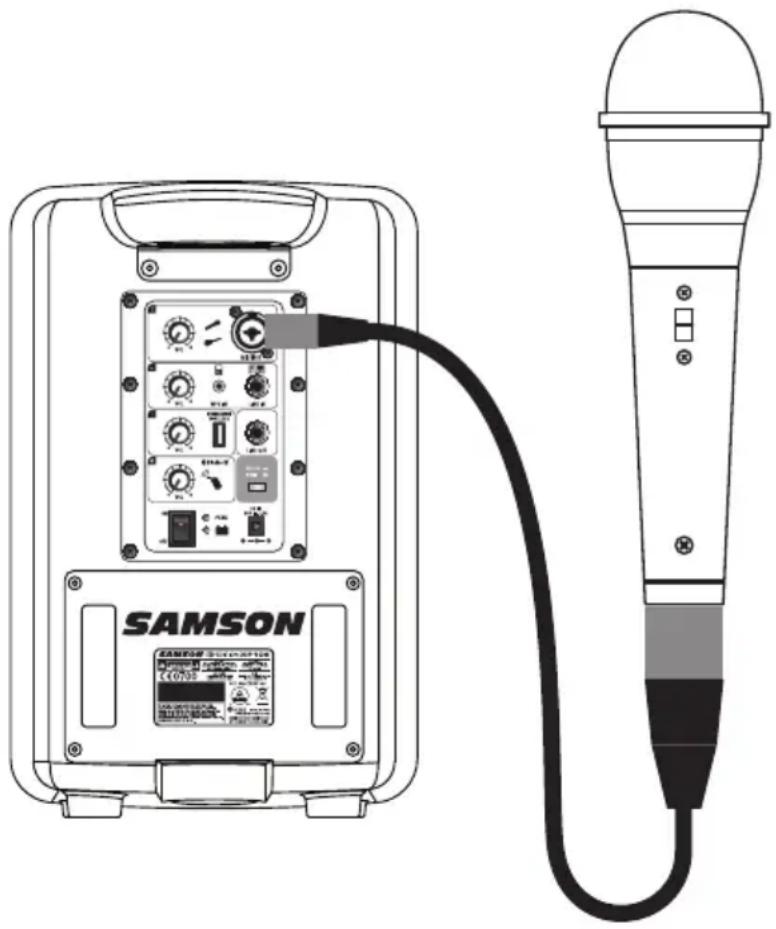
- Connect a microphone using a standard XLR cable, line level equipment using a 14 " instrument cable, or portable audio device using a 18 " cable.
- Switch on the XP106 power.
- While speaking into the microphone or playing music from a line level audio source, slowly raise the channel LEVEL until you have reached the desired level.
NOTE: If not using the channel 1 input, turn the LEVEL control all the way down to keep out any unwanted noise.
Setting a Good Level
Use the Channel LEVEL controls to set the individual volume of your microphone, line level and Bluetooth ^® devices.
The PEAK light illuminates when the signal sending to the internal amplifier begins to reach a level where distortion occurs. If the PEAK lights stay on, your mix is too hot and you need to lower the LEVEL controls. It is okay for the PEAK light to occasionally light, however it should go off quickly and should not constantly stay on.
natural_image
Line drawing of a SAMSON audio recording device connected to a microphone (no text or symbols on main body)Pairing with a Bluetooth® device
Bluetooth ^® is a wireless communication technology that allows for connectivity between a wide range of devices. The XP106 uses Bluetooth to stream high quality audio from your Bluetooth enabled device without the need for connecting any cables. In order for your device to work with the XP106 it must first be paired.
- Turn all channel VOL controls down counterclockwise to 0.
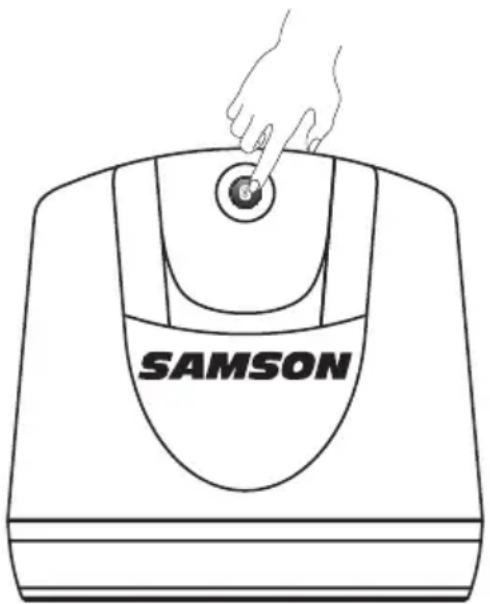
- With the XP106 and your Bluetooth device powered on; press the PAIR button on the top panel of the XP106 speaker to make the speaker discoverable. The Bluetooth indicator will slowly flash blue.
-
In the settings of your Bluetooth device, set it to "discover" available devices.
-
From the Bluetooth device list, select the "Samson XP106" device.
-
If your device asks for a passkey, enter digits 0000 (four zeros) and press OK. Some devices may also ask you to accept the connection.
-
As the XP106 is connecting to your device, the Bluetooth indicator will quickly flash blue.
-
The XP106 speaker indicates that pairing is complete when the indicator turns steady blue. You can now stream audio from your device to the XP106 speakers.
-
With the volume control on your Bluetooth device turned up, play some music, and slowly raise the XP106 BLUETOOTH channel VOL control until you have reached the desired level.
natural_image
Line drawing of a Samsung washing machine with a hand adjusting its button (no text or symbols on the device itself)
natural_image
Illustration of a smartphone with wireless signal waves (no text or symbols)Charging the Battery
The XP106 has an internal, rechargeable battery capable of up to 20 hours of continuous audio on a full charge. Even though the system may have some charge when first taken out of the box, we recommend fully charging your XP106 before first using the system.
To charge the battery:
- Set the power switch to the "OFF" position.
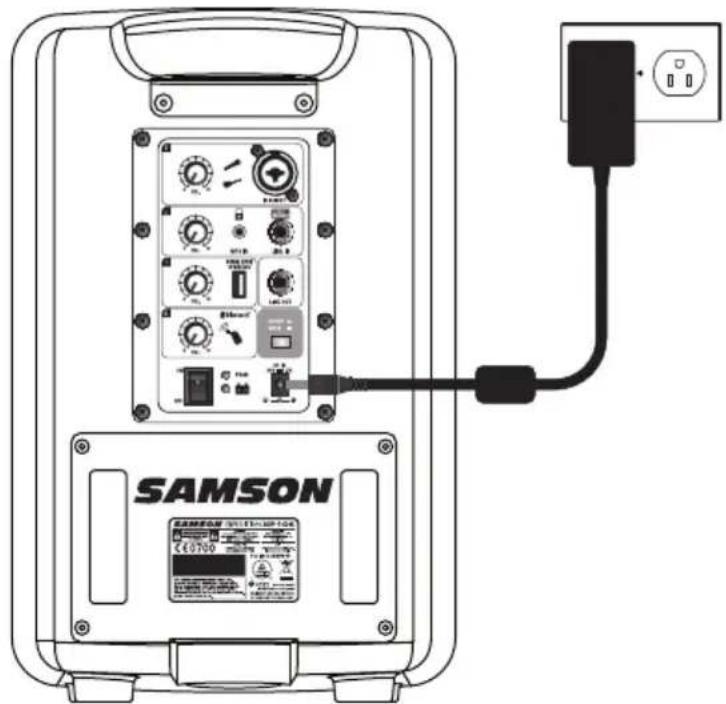
- Connect the XP106 to an AC power outlet using the included power adapter.
- Keep the system plugged in until the Battery indicator changes to green, indicating the battery is fully charged.
text_image
SAMSON SAMSOS VILLIUMBER 100 ©0700The XP106 utilizes a sealed lead-acid gel cell battery. When not in use, the battery will slowly self-discharge. If you are planning not to use the XP106 for a long period of time, it is advised to fully charge the unit before storing. It is also important to charge the unit every six months when not used. This will ensure a healthy battery and extend its life. If the battery is left with a very low charge for an extended period of time, it is possible to recharge the battery to working condition, but the charge time can take over 24 hours.
If you find that the operation time of the XP106 becomes noticeably decreased, even after fully charging, the battery should be replaced. Contact Samson customer service or your local distributor for a replacement battery.
Speaker Placement
The XP106 provides three different placement options for your specific situation.
For maximum sound coverage the XP106 can be used with a standard 1 ^3/8 " speaker stand. The speaker should be raised above the heads of the listening audience. Take care when placing the speaker on a stand, to ensure that it is on a level, steady surface and will not tip over.

natural_image
Silhouette of a person at a podium and a standing stand with a speaker on top (no text or symbols visible)Take care when placing the XP106 in direct sunlight for long periods of time, as this may discolor or damage the unit.
Do not place the speaker on wet surfaces, as it can cause malfunction. If you notice condensation on the unit, dry the speaker before using or storing.
Avoiding Feedback
Feedback is the annoying howling and squealing that can heard when the microphone picks up sound from the speaker. The sound is then re-amplified back through the speaker again, creating a feedback loop. Follow these steps to minimize the likelihood of feedback:
- Avoid pointing the microphone directly at the speaker. In general it is recommended that the microphone be positioned behind the speaker enclosure. This uses the directional characteristics of the speaker and microphone to your advantage.
- Keep the microphone as far from the speaker as possible. This will help achieve isolation between the speaker and the microphone, and allow you to increase the output of the XP106.
- Position the microphone as close to the sound source as possible. This will enable the microphone to pick up more direct sound, and allow you to reduce the microphone input gain control.
- Reduce the overall level of the speaker.
Quick Start - Stage XPD1 Wireless System
text_image
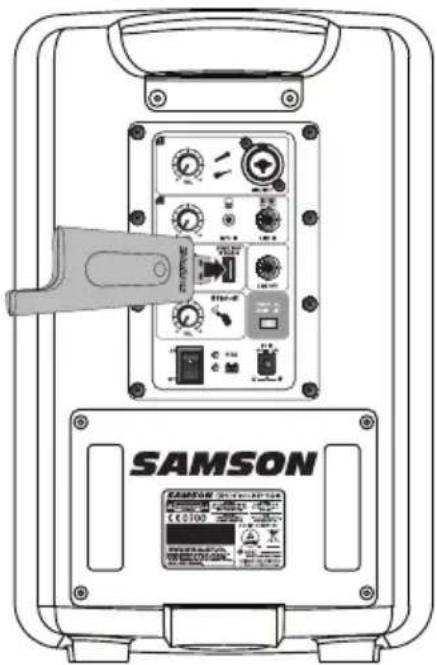
SAMSON C60100Plug the RXD1 USB receiver into the USB jack labeled 2.4GHz WIRELESS.
text_image
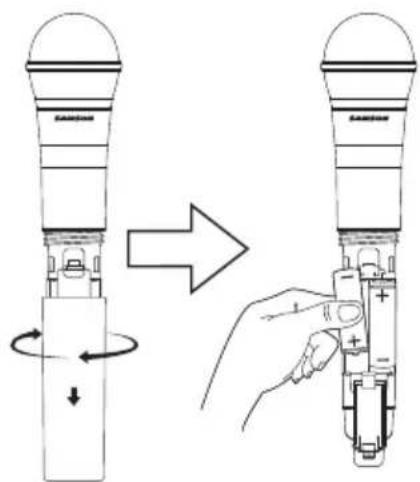
Diagram illustrating the process of inserting a device into a battery, showing rotation and change steps.On the wireless handheld transmitter, unscrew the bottom section of the microphone by turning it counterclockwise and then slide it off. Place a fresh set of AA (LR6) batteries in the transmitter battery holder, taking care to observe the polarity markings, then replace the cover.
text_image
Control panel interface with labeled meters, switches, and a digital display showing 'LINE OUT' and 'OFF'Turn the WIRELESS LEVEL knob on the XP106 completely counterclockwise to 0, then turn the POWER siwtch on the XP106 to the ON position.
natural_image
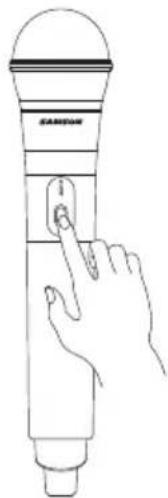
Line drawing of a hand interacting with a Samsung microphone (no text or symbols)Turn on the power to the transmitter by pressing and holding Power switch; the indicator LED will light amber.
Quick Start - Stage XPD1 Wireless System
text_image
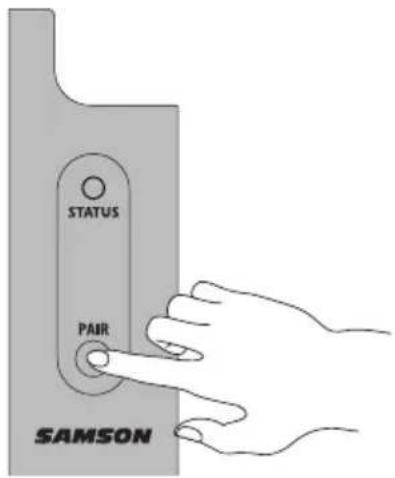
STATUS PAIR SAMSONIf the handheld transmitter and receiver have not been previously paired, press and hold the button on the RXD1 receiver for >5 seconds, until it begins to flash.
text_image
Control panel interface with multiple dials, meters, and buttons labeled in ChineseSpeak or sing into the mic at a normal performance level and raise the WIRELESS LEVEL control until the desired level is reached.
natural_image
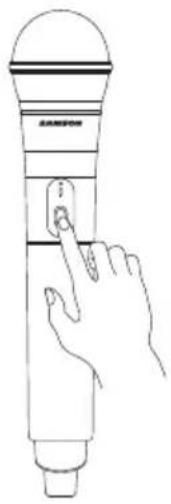
Line drawing of a hand interacting with a microphone (no text or symbols)Press and hold the Power button on the handheld transmitter >5 seconds.
This will put both components into pairing modes. Once the receiver and transmitter communicate and sync, the LEDs on both units will light steady and will be ready for operation.
If you hear distortion check the rear panel PEAK LED. If it is lit red, turn down the WIRELESS LEVEL on the XP106 until it lights only occasionally during loud sounds. If you still hear distortion, unscrew the microphone body and use the supplied plastic screwdriver to turn the Gain control in the HXD1 transmitter slowly counterclockwise until the distortion disappears.
Conversely, if you hear a weak, noisy signal at the desired volume level (and with the WIRELESS control of the XP106 turned fully clockwise), use the supplied plastic screwdriver to turn the Gain control in the HXD1 transmitter slowly clockwise until the signal reaches an acceptable level.
Stage HXD1 Handheld Transmitter Controls
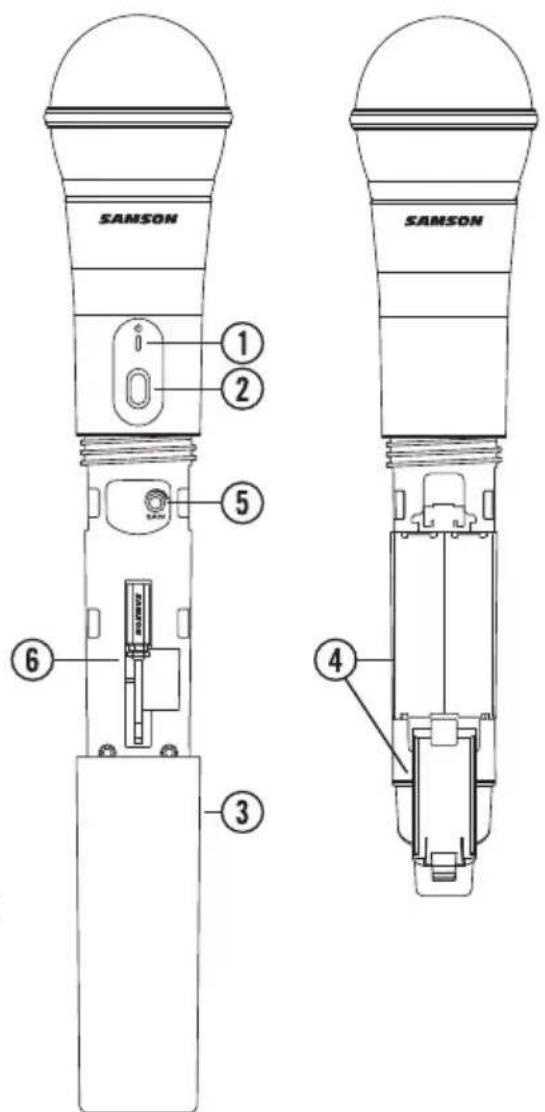
- Status Indicator - This LED displays the operation mode:
| Amber Normal Operation | |
| Flashing Amber | Pairing/Low Battery |
-
Power/Pair Switch - Press <5 seconds to turn the unit on or off. Press >5 seconds to enter pairing mode.
-
Battery Cover - Unscrew the battery cover and slide down to open the HXD1 battery compartment.
-
Battery Holder - Open the battery holder by pressing the tab and lifting the cover. Insert two standard AA (LR6) batteries here, being sure to observe the plus and minus polarity markings shown. Although rechargeable Ni-Cad batteries can be used, they do not supply adequate current for more than four hours. WARNING: Do not insert the batteries backwards; doing so can cause severe damage to the HXD1 and will void your warranty.
-
Input GAIN Control - This control adjusts the transmitter input sensitivity. This input sensitivity control has been factory preset to provide optimum level for the particular microphone capsule provided with the Stage XPD1 system and so we recommend that this not be adjusted manually. If necessary, however, you can use the supplied plastic screwdriver to raise or lower the input level.
text_image
SAMSON SAMSON 1 2 5 6 3 4Stage RXD1 Receiver Controls
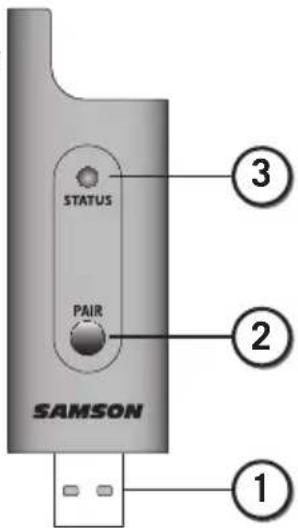
-
USB Connector - Plugs into the USB 2.4GHz Wireless jack on the rear panel of the XP106. The receiver can also plug directly into a computer USB port and will be recognized as a USB audio device. The unit passes audio to the device and receives power from the device through this connector.
-
PAIR Switch - Press >5 seconds to enter pairing mode.
-
STATUS Indicator - This LED displays the operation mode:
| Amber Normal Operation | |
| Flashing Amber Pairing | |
| No Light | Not Paired; Transmitter Out Of Range; No Power |
text_image
STATUS PAIR SAMSON ① ② ③Using the LINE OUT Jack
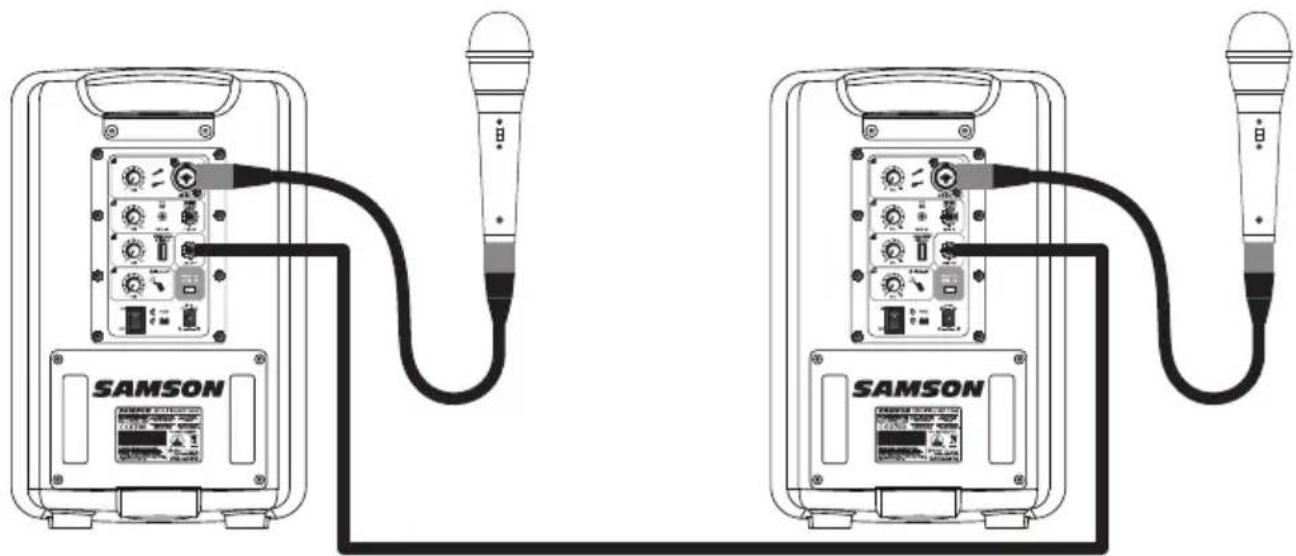
The XP106 LINE OUT jack allows you to connect the XP106 with any powered speaker to expand your system or link two XP106 systems together and share all inputs between the two units. You can also use the jack to receive audio from another speaker without using an input channel.
Daisy Chain Speaker
Using a standard shielded 14 instrument cable, connect the LINE OUT on the XP106 to a line level input of second powered speaker. The XP106 will send a mix of all inputs, including Bluetooth® audio. Each channel LEVEL will control corresponding output level to the LINE OUT jack.
Linking Two XP106 Systems
To use two XP106's as one system is simple. Just connect each side using a standard 14 " Shielded instrument cable to the LINE OUT jack located on each XP106 rear panel. Both mixers and the microphones or instruments connected to each of the individual XP106 systems will be heard in both speakers.
natural_image
Two identical SAMSON audio equipment setups connected by a black cable, no text or symbols visible.Auxiliary Line Input
The LINE OUT jack can be used to accept any line level input source. This input does not have a level control, so you must utilize the output level of the connected device to control the level of the audio in the XP106.
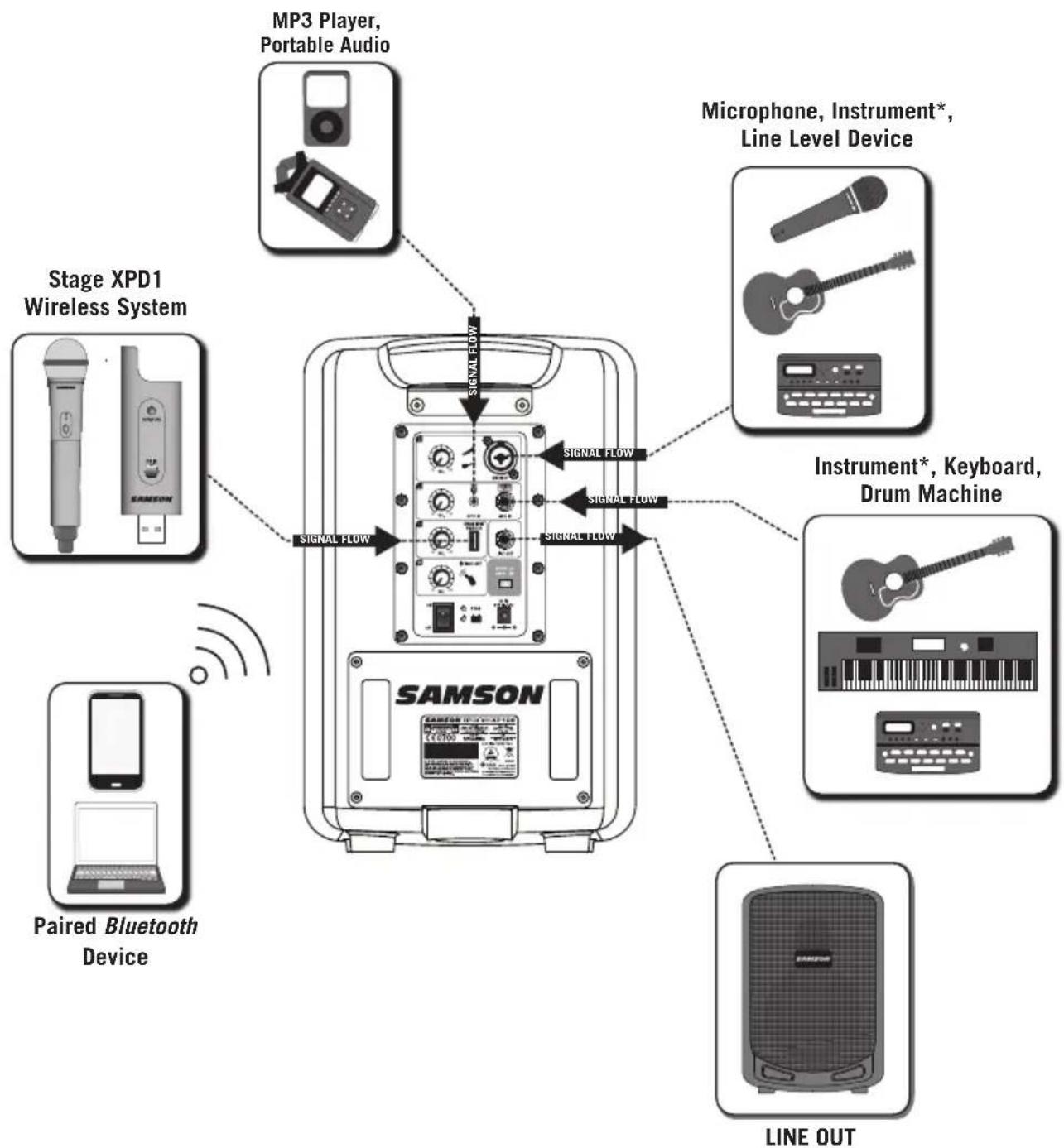
Making Connections
flowchart
graph TD
    A["MP3 Player, Portable Audio"] --> B["SAMSON"]
    C["Microphone, Instrument*, Line Level Device"] --> B
    D["Instrument*, Keyboard, Drum Machine"] --> B
    E["Paired Bluetooth Device"] --> B
    F["Line OUT"] --> B
    G["Stage XPD1 Wireless System"] --> B
    H["Signal Flow"] --> B
    I["Signal Flow"] --> B
    J["Signal Flow"] --> B
* An active preamp is needed in order to use acoustic instruments with the XP106.
XP106 Specifications
Power Output ..... 100 watts
Frequency Response ..... 75 Hz to 15kHz +/-3dB
Mic/Instrument Input . . . . XLR / 1/4" combo connector
Line Input ^1/4
Aux Input . . . . . . . . . . 18 "
Wireless Input ..... USB
LEVEL Controls ..... Mic/Inst, Line/Aux, Wireless, Blutooth
Tone Control . . . . . . . . . Speech/Music switch
Line Input/Output ..... 14 " TS
Bluetooth . . . . . . . . . . Bluetooth 3.0, A2DP
Speakers. . . . . . . . . . . 6" Woofer + 1" HF Driver
Built-in Battery. . . . . . . 12V / 8AH, Rechargeable & Sealed
Operation ..... Up to 20 hours subject to operating conditions
Battery Charging . . . . . . . Approx. 4-8 hours for a single charge
AC/DC Adapter . . . . . . . SMPS AC100\~240V, 50\~60Hz/ DC18V-1.5A
Construction . . . . . . . . Polypropylene, internally ribbed
Grill . . . . . . . . . . . . . . . Perforated Steel Grill, powder coated
Mounting . . . . . . . . . . Integral 1 3/8-inch Pole Mount Receptacle
Operating Temperature ..... -10°C \~ +40°C
Dimensions (LxDxH) ..... 9.5" x 9" x 14.2"
240 mm x 230 mm x 360 mm
Weight. 16.3 lb
7.4 kg
Stage XPD1 Specifications
Simultaneous Systems ..... 2
Working Range . . . . . . . . . 100' line of sight
Working Frequency ..... 2.404\~2.476GHz
Modulation type . . . . . . . . . GFSK
Audio Frequency Response ..... 20HZ - 16KHZ
T.H.D <0.1% (at 1KHz, -10dBu)
Signal to Noise. . . . . . . . . . >85 dB
Operating Temperature ..... -10°C \~ +40°C
Stage HXD1
Microphone Element . . . . . . . Q6 Dynamic
RF Power .... <10 mW EIRP
Power Requirements . . . . . . Two AA (LR6) alkaline batteries
Battery Life ..... 20 hours
Dimensions . . . . . . . . . . 10.2" x ∅2.1"
260 mm x ∅54 mm
Weight. 0.5lb
218 g
Stage RXD1
Max. Analog Audio Output Level. . 0 dBu
Audio Output Impedance ..... 100 Kohms
USB audio sample rate ..... 32 KHZ
USB audio support . . . . . . . Vista, Win7, Win8, Mac OSX without driver
Operating Voltage ..... 5V DC
Dimensions (LxDxH) ..... 3.5" x 0.9" x .31"
89 mm x 23 mm x 8 mm
Weight. 0.35oz
10 g
AVIS RISQUE D'ÉLECTROCUTION - NE PAS OUVRIR
AVERTISSEMENT POUR ÉVITER TOUT RISQUE D'ÉLECTROCUTION, NE RETIREZ PAS LE COUVERCLE (NI LE DOS) DU BOITIER. CET APPAREIL NE CONTIENT PAS DE PIECES REMPLACABLES PAR L'UTILISATEUR. CONFIEZ TOUTES LES RÉPARATIONS A UN TECHNICIEN DE S.A.V. QUALIFIÉ.

natural_image
Symbolic illustration of a person climbing a ladder inside a circle (no text or symbols)natural_image
Front view of a black Siemens air conditioner unit (no visible text or symbols on body)natural_image
Line drawing of a SAMSON audio recording device connected to a microphone (no text or symbols on the device body)natural_image
Illustration of a smartphone with wireless signal waves (no text or symbols)natural_image
Silhouette of a person at a podium and a standing stand with a speaker on top (no text or symbols visible)text_image
Diagram illustrating the process of moving a device into a battery, showing rotation and adjustment steps.text_image
Control panel interface with labeled meters, switches, and a digital display showing power input and output portsnatural_image
Line drawing of a hand interacting with a handheld device (no text or symbols)text_image
Control panel interface with labeled meters, switches, and buttons for electrical measurement or controlnatural_image
Line drawing of a hand pressing a button on a microphone (no text or symbols)text_image
STATUS PAIR SAMSON ① ② ③natural_image
Line drawing of two identical SAMSON charging station modules connected via a cable, no text or symbols present.Dimensions 10,2" x ∅2,1"
260 mm x ∅54 mm
Poids 0.5lb
218 g
Stage RXD1
natural_image
Symbolic illustration of a person climbing a ladder inside a circle (no text or symbols)natural_image
Front view of a gray electronic device labeled 'SAMSON' with grid pattern and control buttons (no readable text beyond branding)Follow these steps below to quickly get started using your XP106 portable sound system.
natural_image
Line drawing of a SAMSON audio recording device connected to a microphone (no text or symbols on the device body)natural_image
Line drawing of a Samsung washing machine with a hand adjusting its button (no text or symbols on the device itself)
natural_image
Illustration of a smartphone with wireless signal waves (no text or symbols)Laden der Batterie
natural_image
Silhouette of a person at a podium and a standing stand with a speaker on top (no text or symbols visible)text_image
Control panel interface with labeled meters, switches, and a digital display showing power supply and control buttonstext_image
Diagram illustrating the process of a device's rotation and battery adjustment, showing before-and-after states with directional arrows.natural_image
Line drawing of a hand interacting with a microphone (no text or symbols)text_image
Control panel interface with labeled knobs, gauges, and buttons for PLC or motor controlnatural_image
Line drawing of a hand pressing a button on a microphone (no text or symbols)text_image
STATUS PAIR SAMSON ① ② ③The XP106 LINE OUT jack allows you to connect the XP106 with any powered speaker to expand your system or link two XP106 systems together and share all inputs between the two units. You can also use the jack to receive audio from another speaker without using an input channel.
natural_image
Line drawing of two identical SAMSON charging station modules connected via cables (no text or symbols visible)USB audio sample rate ..... 32 KHZ
USB audio support . . . . . . . Vista, Win7, Win8, Mac OSX ohne Treiber
natural_image
Symbolic illustration of a person climbing a ladder inside a circle (no text or symbols)natural_image
Front view of a black Siemens air conditioner unit (no visible text or symbols on body)natural_image
Line drawing of a Samsung washing machine with a hand adjusting its button (no text or symbols on the device itself)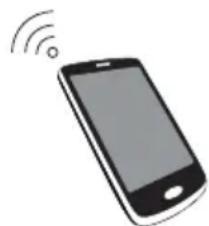
natural_image
Illustration of a smartphone with wireless signal waves (no text or symbols)Carga de la Batería
text_image
SAMSON SAMSOMnatural_image
Silhouette of a person at a podium and a standing-mounted device on a tripod (no text or symbols visible)text_image
SAMSON SAMSOStext_image
Control panel interface with labeled knobs, gauges, and buttons for voltage, current, and power controltext_image
Diagram illustrating the process of inserting a microphone into a battery, showing rotation and adjustment steps.natural_image
Line drawing of a hand interacting with a microphone (no text or symbols)text_image
Control panel interface with labeled knobs, dials, and buttons for PLC or PCAM displaynatural_image
Line drawing of a hand pressing a button on a microphone (no text or symbols)Controles del Receptor Stage RXD1
text_image
STATUS PAIR SAMSON ① ② ③Uso del Conector LINE OUT
natural_image
Two identical SAMSON charging station cables connected via a cable, no text or symbols visiblenatural_image
Symbolic illustration of a person climbing a ladder inside a circle (no text or symbols)natural_image
Front view of a gray electronic device labeled 'SAMSON' with grid pattern and control buttons (no readable text beyond branding)natural_image
Line drawing of a SAMSON audio recording device connected to a microphone (no text or symbols on the device body)natural_image
Line drawing of a Samsung washing machine with a hand adjusting its button (no text or symbols on the device itself)