MD2 Pro - Hi-fi system SAMSON - Free user manual and instructions
Find the device manual for free MD2 Pro SAMSON in PDF.




| Product type | Passive stereo direct box |
| Frequency response | 18 Hz to 40 kHz ±0.1 dB |
| Maximum input | +20 dB, 0.35% THD |
| Dynamic range | > 100 dB @ balanced output |
| Noise floor | -117 dB |
| Total harmonic distortion | < 0.03% from 20 Hz to 40 kHz |
| Input impedance | 400 kΩ (stereo), 10 kΩ (mono) |
| Output impedance | 250 Ω ±20% |
| Transformer | Two STLX Faraday shielded transformers |
| Transformer ratio | 15:1 |
| Input PAD switch | 0 dB, -10 dB, -20 dB |
| Ground Lift switch | Disconnects XLR pin 1 (output) |
| Stereo/Mono switch | Stereo: independent inputs; Mono: input summing |
| Input connectors | 6.35 mm unbalanced jack (In & Thru) |
| Output connectors | Balanced XLR (Balanced Output) |
| Construction | 14-gauge steel chassis |
| Power | Passive (no power required) |
| Key features | Converts high-impedance unbalanced signals to low-impedance balanced signals; eliminates hum and RF interference; balanced output for long distances |
| Maintenance and cleaning | Clean with a dry cloth; do not use solvents |
| Repairability | Repairable subject to obtaining an RA number from Samson |
| Warranty | Contact dealer or Samson for details |
Frequently Asked Questions - MD2 Pro SAMSON
User questions about MD2 Pro SAMSON
0 question about this device. Answer the ones you know or ask your own.
Ask a new question about this device
Download the instructions for your Hi-fi system in PDF format for free! Find your manual MD2 Pro - SAMSON and take your electronic device back in hand. On this page are published all the documents necessary for the use of your device. MD2 Pro by SAMSON.
USER MANUAL MD2 Pro SAMSON
Quick Start Guide

If you want to dispose this product, do not mix it with general household waste. There is a separate collection system for used electronic products in accordance with legislation that requires proper treatment, recovery and recycling.
Private household in the 28 member states of the EU, in Switzerland and Norway may return their used electronic products free of charge to designated collection facilities or to a retailer (if you purchase a similar new one).
For Countries not mentioned above, please contact your local authorities for a correct method of disposal.
By doing so you will ensure that your disposed product undergoes the necessary treatment, recovery and recycling and thus prevent potential negative effects on the environment and human health.
Copyright 2016, Samson Technologies Corp.
v3
Samson Technologies Corp.
45 Gilpin Avenue
Hauppauge, New York 11788-8816
Phone: 1-800-3-SAMSON (1-800-372-6766)
Fax: 631-784-2201
www.samsontech.com
Introduction
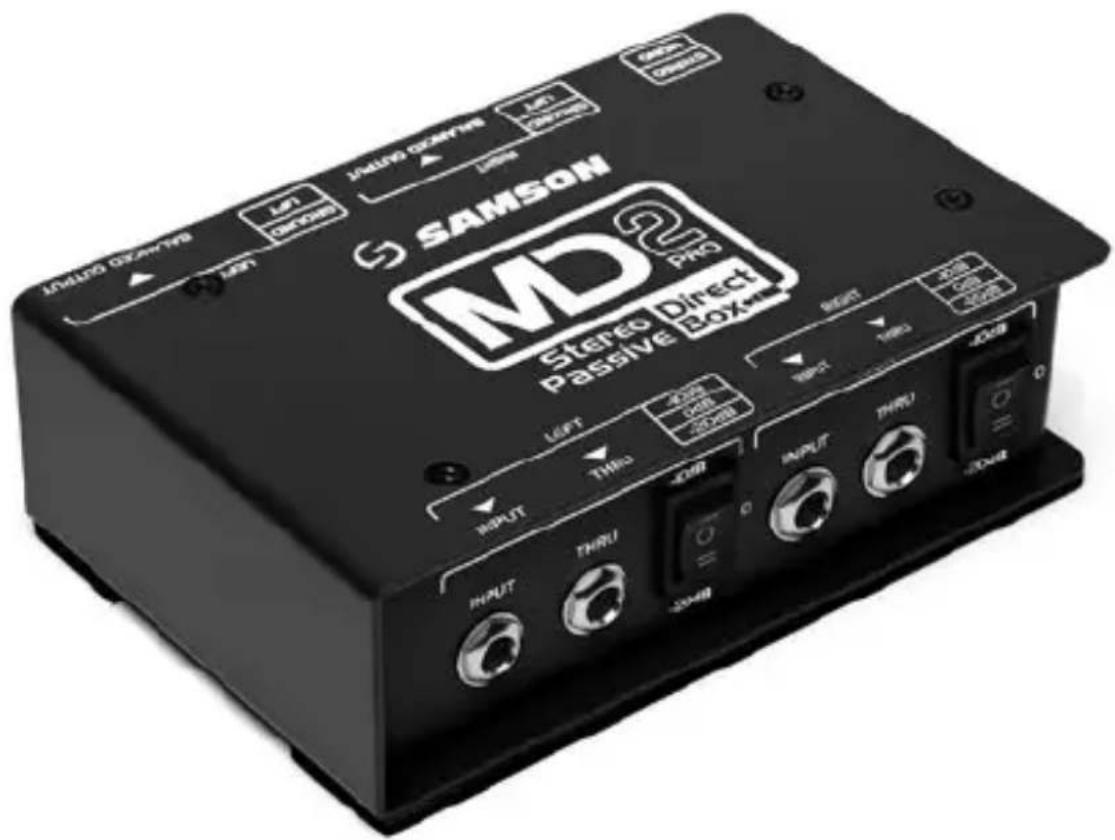
A direct insertion box, or DI box, converts unbalanced, high impedance, signals to balanced, low impedance signals providing the facility for connecting audio into a mixer's microphone input. Samson's S-Max Direct Boxes combines premium sound circuitry with durable, roadworthy construction to provide high-quality signal connection solutions for live and studio applications. The Samson MD2 Pro Professional Stereo Passive Direct Box offers a variety of DI solutions for live sound and recording applications. You can connect all kinds of audio signals like those from keyboards, drum machines, mixers, guitars, and outboard signal processors.
Featuring two of Samson's STLX Faraday shielded transformer, which deliver an extended, flat frequency response, ultra-low distortion, and eliminates hum and RF interference. The MD2 Pro balanced output provide a clean signal, that is less susceptible to noise when compared to an unbalanced cable, which allows for running longer lengths of cables. Another benefit from a balanced connection is CMR (Common Mode Rejection), which provides cancellation of interference (hums and buzzes), while leaving the original signal pure.
The THRU jacks enables you to tap off the signal from the input and pass the signal to an amplifier or monitor without affecting the original sound. This can eliminate the need for miking the guitar amplifier, which in many cases is preferable, especially as more bands are using in-ear monitors. The Stereo/Mono switch mixes the two input channels together for situations where the number of audio channels is at a premium.
With proper care and maintenance, your MD2 Pro will operate trouble-free for many years. Should your direct box ever require servicing, a Return Authorization (RA) number must be obtained before shipping your unit to Samson. Without this number, the unit will not be accepted. Please call Samson at 1-800-3SAMSON (1-800-372-6766) for an RA number prior to shipping your unit. If your direct box was purchased outside of the United States, contact your local distributor for warranty details and service information.
Callouts
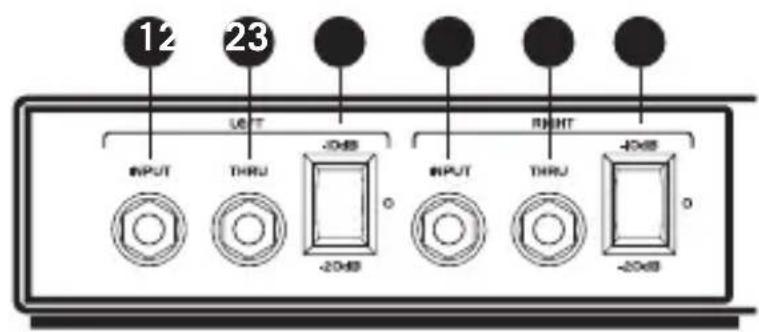
Front
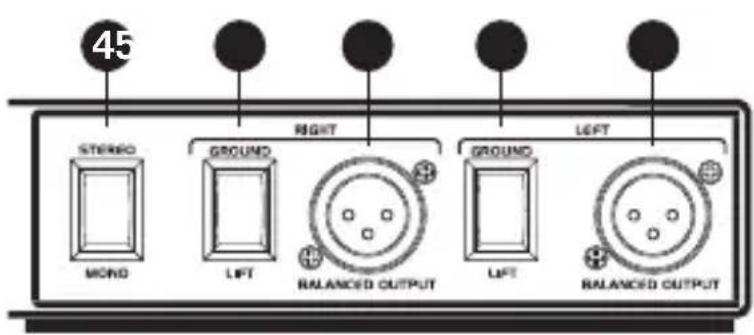
Rear
- INPUT Jacks – 1/4" hi-Z input jacks for connecting for instrument, and line level signals.
- THRU Jacks – 1/4" outputs for passing the input signal through to a stage amplifier or monitor system.
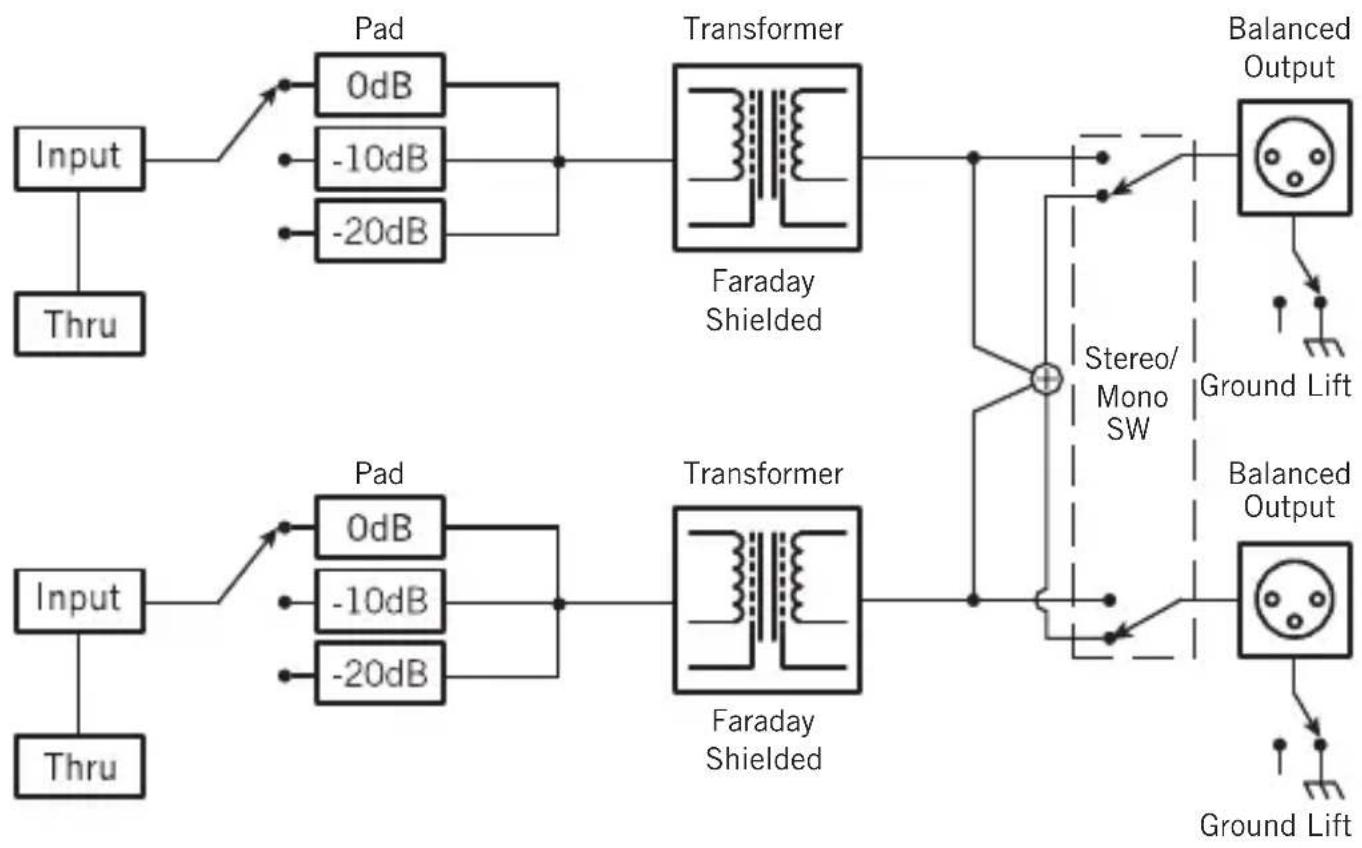
- -10dB / -20dB Pad switch – When engaged, the input level is attenuated by either -10dB or -20dB to prevent distortion.
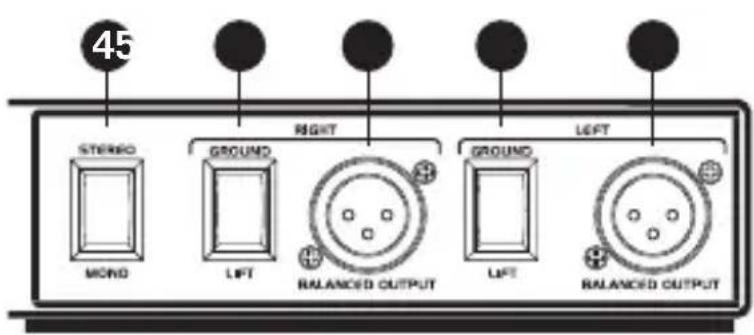
- STEREO/MONO Switch – When the switch is in the STEREO position, each input is routed to its corresponding output. In the MONO position, the Left and Right input signals are summed together and fed to both Left and Right Output jacks.
- GROUND LIFT Switches – When the switch is engaged, the input ground (shield) is disconnected.
- BALANCED OUTPUT Jacks – Male XLR low-Z connectors.
Setup
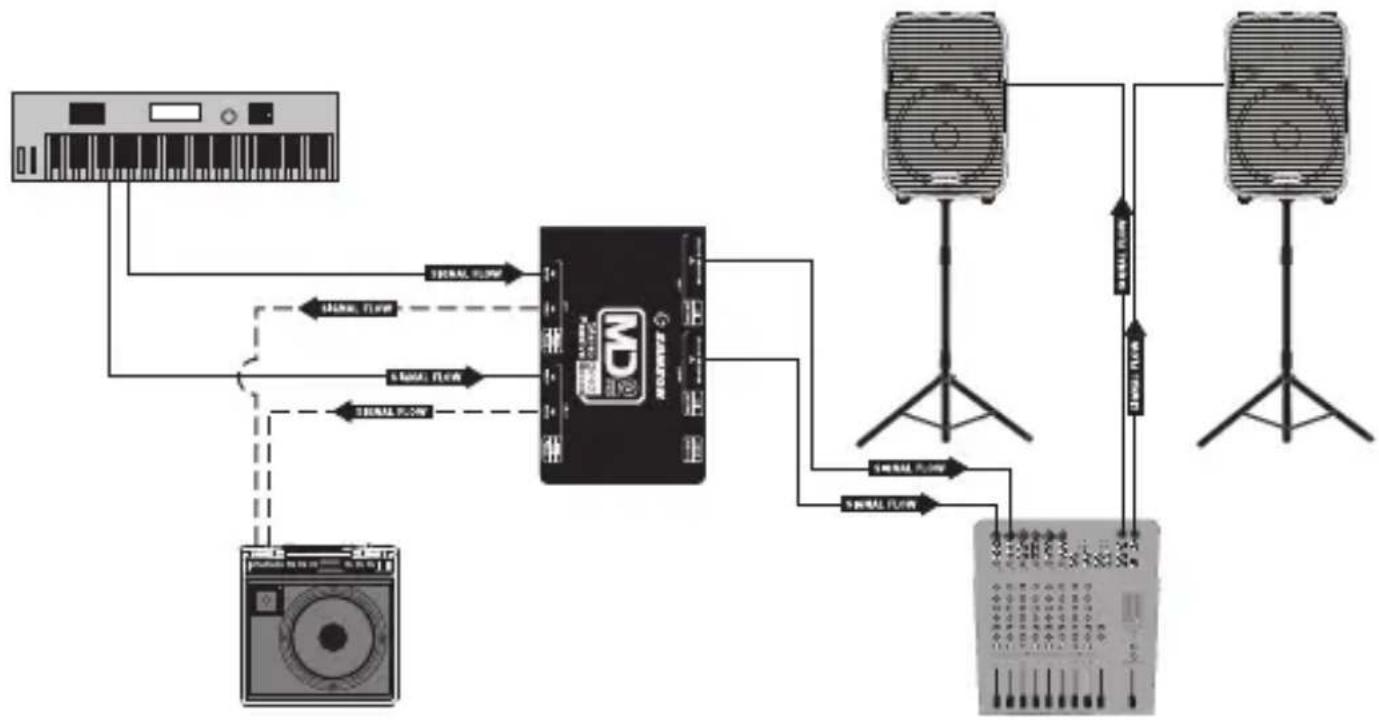
The MD2 Pro can be quite useful on stage or in the studio for connecting unbalanced audio sources or instruments with pickups. By utilizing the MD2 Pro, the signal can be sent cleanly for long distances while benefiting from the low noise and common mode rejection provided by the balanced low-level output. The diagram following shows a typical hook-up for a stereo keyboard connected to a keyboard amplifier and a
flowchart
graph TD
    A["Audio Input"] --> B["CD"]
    B --> C["Speaker 1"]
    B --> D["Speaker 2"]
    B --> E["Speaker 3"]
    C --> F["Output"]
    D --> F
    E --> F
    B --> G["Signal Flow"]
    B --> H["Signal Flow"]
    B --> I["Signal Flow"]
    B --> J["Signal Flow"]
    B --> K["Signal Flow"]
    B --> L["Signal Flow"]
    B --> M["Signal Flow"]
    B --> N["Signal Flow"]
    B --> O["Signal Flow"]
    B --> P["Signal Flow"]
PA system.
- Set the volume controls of your audio system to the off position.
- Connect your instrument or other audio source to the MD2 Pro INPUT jacks.
- Connect the THRU outputs to a monitor speaker or sub-mixer.
- Connect the BALANCED OUTPUT jacks to the microphone inputs of a mixer or other audio device.
- Raise the level of the audio system to the appropriate level.
- If you hear a hum or buzz set the GROUND LIFT switch to the LIFT position.
- If you hear distortion, set the pad switch to either the -10dB or -20dB position. You may need to adjust the input level of the mixer to make up for the attenuated signal.
Specifications
Type Stereo Passive Direct Box
Frequency Response 18Hz to 40kHz ±0.1dB
Maximum Input +20dBu 0.35% THD
Dynamic Range >100dB @ Balanced Output
Noise Floor -117dB
Total harmonic distortion <0.03% from 20Hz to 40kHz
Input impedance 400kΩ (Stereo Switch Position)
10k (Mono Switch Position)
Output Impedance 250Ω ±20%
Transformer Two STLX Faraday Shielded Transformers
Transformer Ratio 15:1
Input PAD Switch 0dB, -10dB, -20dB
Ground Lift Switch Disconnects XLR pin-1 (Output)
Stereo/Mono Switch Sums stereo inputs to both outputs
Connectors 1/4" Phone Jack, unbalanced (In & Thru)
XLR, balanced (Output)
Construction 14 gauge steel chassis
Dimensions 6.1" x 3.93" x 1.92"
155mm x 100mm x 49mm
Weight 2.08lb
946g
Block Diagram
flowchart
graph LR
    A["Input"] --> B["Thru"]
    B --> C["Pad 0dB"]
    B --> D["-10dB"]
    B --> E["-20dB"]
    C --> F["Transformer"]
    D --> F
    E --> F
    F --> G["Faraday Shielded"]
    G --> H["Stereo/Mono SW"]
    H --> I["+"]
    I --> J["Balanced Output"]
    J --> K["Ground Lift"]
    I --> L["Transformer"]
    L --> M["Balanced Output"]
    M --> N["Ground Lift"]

Dimensions 6.1" x 3.93" x 1.92"
155 mm x 100 mm x 49mm
Poids 2.08lb
946g
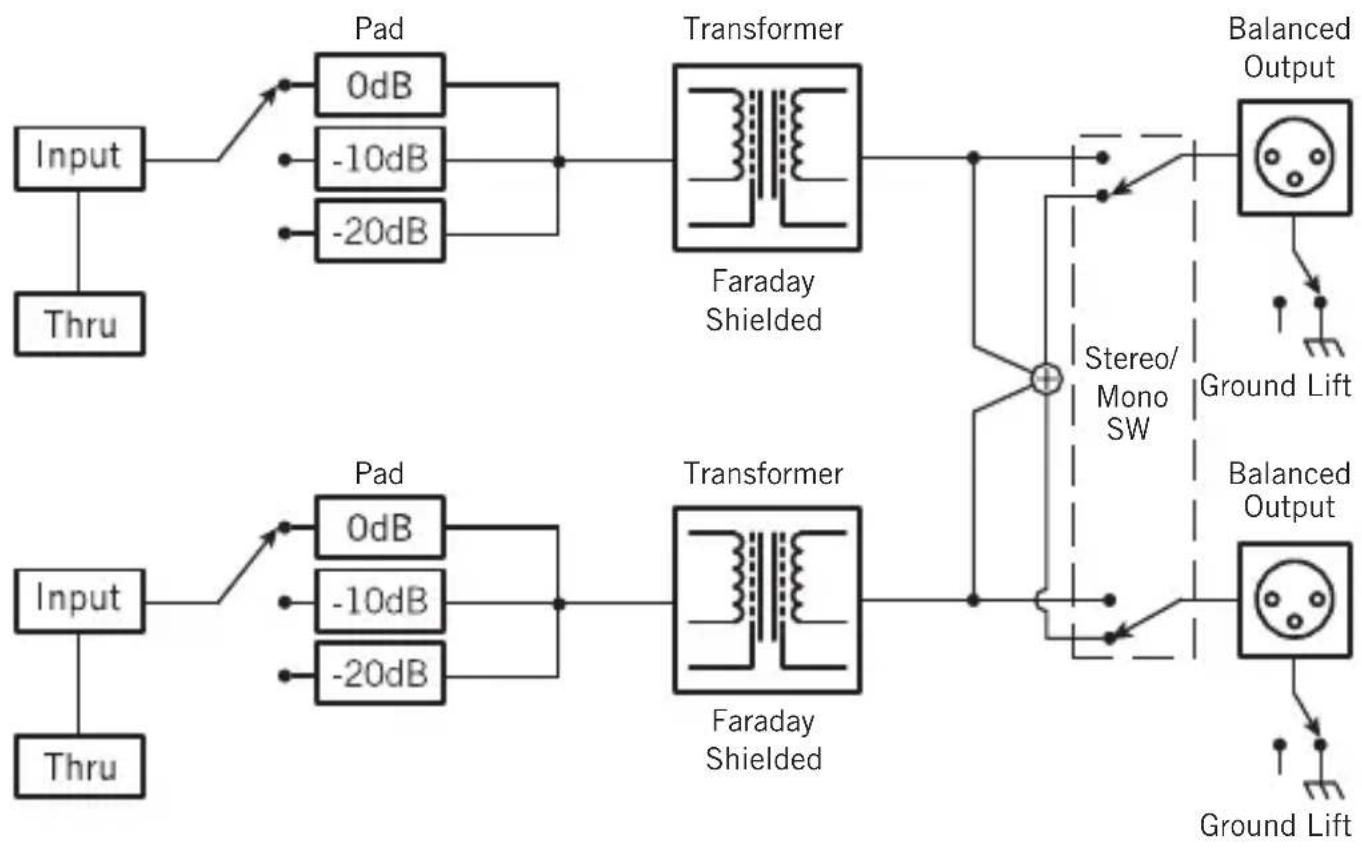
Schéma fonctionnel
flowchart
graph LR
    A["Input"] --> B["Thru"]
    B --> C["Pad 0dB"]
    B --> D["-10dB"]
    B --> E["-20dB"]
    C --> F["Transformer"]
    D --> F
    E --> F
    F --> G["Faraday Shielded"]
    G --> H["Stereo/Mono SW"]
    H --> I["+"]
    I --> J["Balanced Output"]
    J --> K["Ground Lift"]
    I --> L["Transformer"]
    L --> M["Balanced Output"]
    M --> N["Ground Lift"]
flowchart
graph LR
    A["Input"] --> B["Thru"]
    B --> C["Pad 0dB"]
    B --> D["-10dB"]
    B --> E["-20dB"]
    C --> F["Transformer"]
    D --> F
    E --> F
    F --> G["Faraday Shielded"]
    G --> H["Stereo/Mono SW"]
    H --> I["+"]
    I --> J["Balanced Output"]
    J --> K["Ground Lift"]
    I --> L["Transformer"]
    L --> M["Balanced Output"]
    M --> N["Ground Lift"]

Dimensiones 6,1" x 3,93" x 1,92" 155mm x 100mm x 49mm
Peso 2,08lb 946g
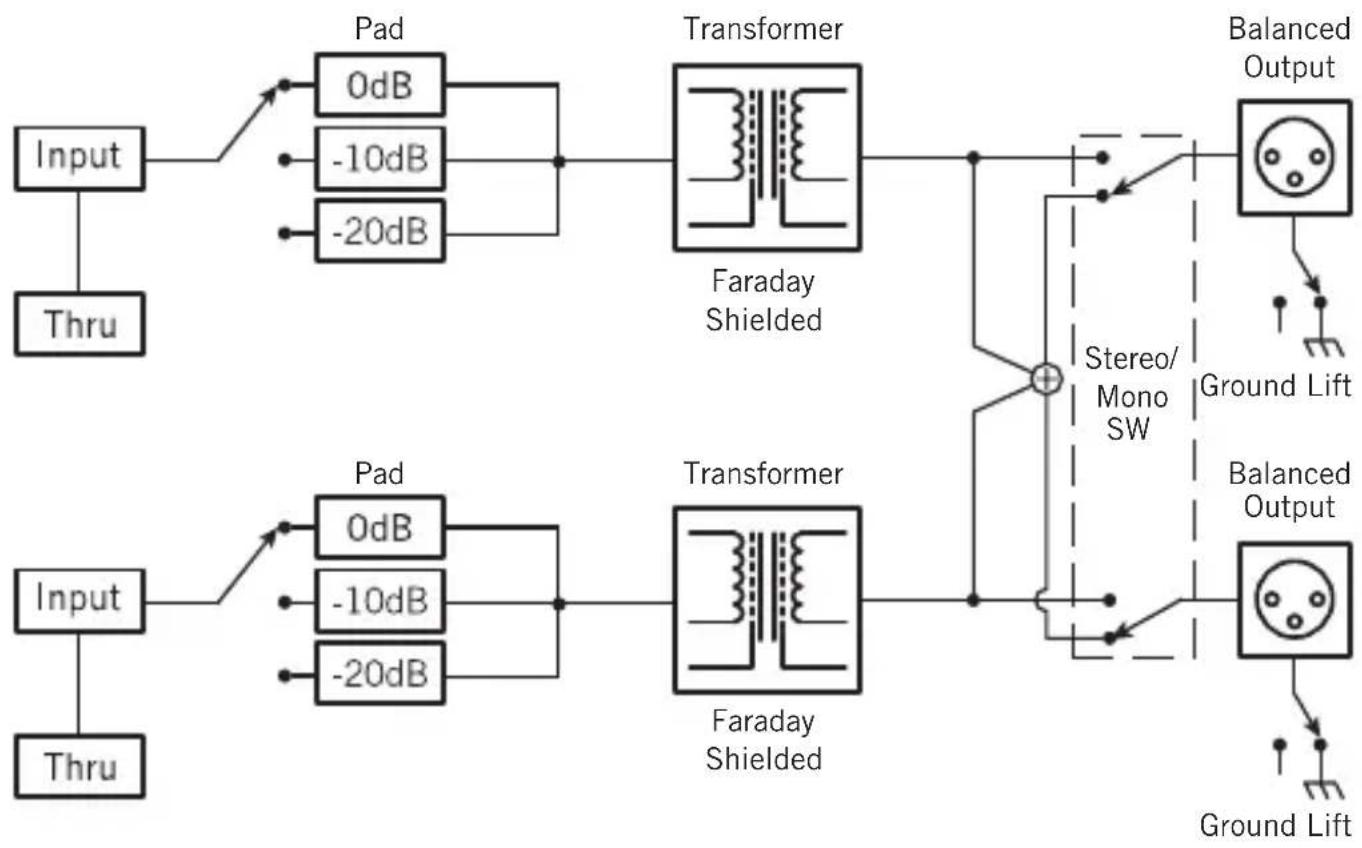
Diagrama de bloques
flowchart
graph LR
    A["Input"] --> B["Thru"]
    B --> C["Pad 0dB"]
    B --> D["-10dB"]
    B --> E["-20dB"]
    C --> F["Transformer"]
    D --> F
    E --> F
    F --> G["Faraday Shielded"]
    G --> H["Stereo/Mono SW"]
    H --> I["+"]
    I --> J["Balanced Output"]
    J --> K["Ground Lift"]
    I --> L["Transformer"]
    L --> M["Balanced Output"]
    M --> N["Ground Lift"]

Pannello anteriore
Pannello posteriore
flowchart
graph LR
    A["Input"] --> B["Thru"]
    B --> C["Pad 0dB"]
    B --> D["-10dB"]
    B --> E["-20dB"]
    C --> F["Transformer"]
    D --> F
    E --> F
    F --> G["Faraday Shielded"]
    G --> H["Stereo/Mono SW"]
    H --> I["+"]
    I --> J["Balanced Output"]
    J --> K["Ground Lift"]
    I --> L["Transformer"]
    L --> M["Balanced Output"]
    M --> N["Ground Lift"]
Samson Technologies Corp.
45 Gilpin Avenue
Hauppauge, New York 11788-8816
Phone: 1-800-3-SAMSON (1-800-372-6766)
Fax: 631-784-2201
www.samsontech.com

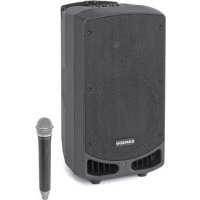
Brand : SAMSON
Model : MD2 Pro
Category : Hi-fi system