DNX800 - Mixer DENON - Free user manual and instructions
Find the device manual for free DNX800 DENON in PDF.



| Product type | Professional DJ mixer |
| Brand | Denon |
| Model | DN-X800 |
| Dimensions (W x H x D) | 482 x 105 x 177 mm (without feet) |
| Weight | 5.5 kg |
| Power supply | 230 V AC ±10%, 50 Hz |
| Power consumption | 26 W |
| Operating temperature | 5 °C to 35 °C |
| Operating humidity | 25 % to 85 % without condensation |
| Number of channels | 4 channels (CH1 to CH4) |
| Analog inputs | 8 line (RCA), 3 phono (RCA), 2 mic (1 combo XLR/Jack, 1 6.35 mm jack) |
| Digital inputs | 4 coaxial SPDIF inputs (RCA) |
| Analog outputs | Balanced main outputs (XLR), unbalanced main outputs (RCA), balanced zone (XLR), booth (RCA), tape (RCA), subwoofer (6.35 mm mono jack), headphones (6.35 mm stereo jack) |
| Digital output | 1 coaxial SPDIF output (RCA), 16 bits / 44.1 kHz |
| Channel EQ | 3-band (Hi, Mid, Low) with adjustable gain: Hi ±26 dB at 13 kHz, Mid ±26 dB at 1 kHz, Low ±26 dB at 100 Hz |
| Main mic EQ | 3-band (Hi, Mid, Low) ±12 dB |
| Crossfader | Assignable to channels, adjustable contour, integrated fader start (compatible with Denon players) |
| Special functions | X-Effect (sampler, Hot Start, Brake/Platter), channel fader start and crossfader start, external effects loop |
| Rack mount | 19 inches, 4 units |
| Included accessories | User manual, 2 stereo mini-jack cables 3.5 mm |
| Maintenance | Clean with a soft dry cloth; do not use solvents, benzene, or insecticides |
| Safety | Do not expose to moisture, do not insert foreign objects, unplug if not in use for extended periods |
| Repairability index | Spare parts available (crossfader replaceable without full disassembly); professional repair recommended |
Frequently Asked Questions - DNX800 DENON
User questions about DNX800 DENON
0 question about this device. Answer the ones you know or ask your own.
Ask a new question about this device
Download the instructions for your Mixer in PDF format for free! Find your manual DNX800 - DENON and take your electronic device back in hand. On this page are published all the documents necessary for the use of your device. DNX800 by DENON.
USER MANUAL DNX800 DENON
The lightning flash with arrowhead symbol, within an equilateral triangle, is intended to alert the user to the presence of uninsulated "dangerous voltage" within the product's enclosure that may be of sufficient magnitude to constitute a risk of electric shock to persons.

The exclamation point within an equilateral triangle is intended to alert the user to the presence of important operating and maintenance (servicing) instructions in the literature accompanying the appliance.
WARNING: TO PREVENT FIRE OR SHOCK HAZARD, DO NOT EXPOSE THIS APPLIANCE TO RAIN OR MOISTURE.
CAUTION:
1. Handle the power supply cord carefully
Do not damage or deform the power supply cord. If it is damaged or deformed, it may cause electric shock or malfunction when used. When removing from wall outlet, be sure to remove by holding the plug attachment and not by pulling the cord.
2. Do not open the top cover
In order to prevent electric shock, do not open the top cover.
If problems occur, contact your DENON dealer.
3. Do not place anything inside
Do not place metal objects or spill liquid inside the DJ mixer.
Electric shock or malfunction may result.
Please, record and retain the Model name and serial number of your set shown on the rating label.
Model No. DN-X800 Serial No. ____
- DECLARATION OF CONFORMITY
We declare under our sole responsibility that this product, to which this declaration relates, is in conformity with the following standards:
EN60065, EN55013, EN55020, EN61000-3-2 and EN61000-3-3.
Following the provisions of 73/23/EEC, 89/338/EEC and 93/68/EEC Directive.
Allow that sufficient heat resistance when applied on work.
- Handle the power port carefully.
Hold the plug when unplugging the cord.
- Keep the set free from moisture, water, and rain
- Unplug the power cord when not using the set for long periods of time.
8 For sets with ventilator holes
• 1500 pts all v and trisopropions.
- Never disagree or modify the set in any way.
| 1 | Main features | 4 |
| 2 | Installation | 4 |
| 3 | Part names and functions | 4, 5 |
| 4 | Connections | 6 |
| 5 | Feder start | 7 |
| 6 | X-effect | 8 |
| 7 | Replacing the crossfader | 9 |
| 8 | Specifications | 9 |
- ACCESSORIES
Please check to make sure the following items are included with the main unit in the carton:
| 1 Operating instructions....1 | 2 Connection cords (3.5 mm stereo mini cord)....2 |
1 MAIN FEATURES
CONGRATULATIONS! You have purchased the DENON DN-X800 DJ-mixer from DENON.
1. X-Effect
The X-Effect is a unique feature which is designed to work with the DENON DN-2100F and DN-2600F CD players. The fader start of the below functions can be used with the Crossfader.
Sampler, Hot start brake/platter; Hot start 1, 2 (each drive).
2. CH. Fader and Crossfader start
The CD player can be started or stopped simply by increasing or decreasing the level of the CH fader or by using the cross fader left to right or right to left. (This function can only be used when the DENON CD players DN-1800F, DN-2100F or DN-2600F is connected to the DN-X800.)
3. Digital outputs
The Dn-X800 allows you to record directly to CD-R, MiniDisc or a hard disk device through it's exclusive coaxial digital outputs.
The digital outputs maintain a constant 16 b1 / 44.1 kHz signal.
4. Digital inputs
The DN-X800 accepts up to 4 digital inputs. Such as our family of performers, DN-1800F, DN-2100F, DN-2600F, DP-DJ151 or any device with a digital output. The sampling frequency range can be 32 kHz, 44.1 kHz or 48 kHz.
2 INSTALLATION
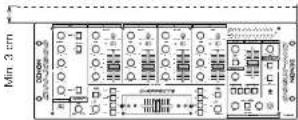
When the DN-X800 is mounted inside a cuff or DJ booth, we recommend leaving a 3 cm blank space above the mixer if passive.
5. Enhanced input/output terminals (Analog)
8 Line, 3 Phono, 2 microphone systems, 2 Main outputs, Zone output, Booth output, Sub woofer output and tape output are provided independently. Effect input terminals are also provided for a external effects processor.
6. 3-Band equalizer/Gain
Bass, Md, Treble and Gain controls are available on every input channel.
7. Crossfader contour
This feature allows adjusting the "shape" of the Crosstader response from a gentle curve for smooth, long running fades, to the sleep pitch required for top performance cut and scratch effects.
8. Mic post
This feature will pass the Vain Mic signal into the Zone, Booth, Tape output and Digital output signal paths.
In the OFF mode, the MIC signal will not be routed through the above outputs.
3 PART NAMES AND FUNCTIONS
(1) Front Panel
① MIC EQ controls
- Contour the frequency response of the Main Mic input -12 dB to +12 dB
HI
- Adjusts high-tone microphone sound -12 dB to +12 dB.
At the center position, sound is flat.
MID
- Adjusts micro-tone microphone sound -12 dB to +12 dB At the center position, sound is fat
LOW
- Adjust is low lone microphone sound - 12 dB to - 12 dB. At the center position, sound is fat.
② MAIN MIC level control
- Adjusts the level of the Main Mic input.
③ MAIN MIC ON/OFF button
- Puts the Main Mic signal into the Main outputs signal path.
- When the button is pressed, the Main Mic is on and the adjacent orange indicator lights.
4 MIC POST ON/OFF button
- Puts the Main Mic signal into the Zone, Booth Tape and Digital out signal path.
- When the button is pressed, the adjacent green indicator lights.
⑤ AUX MIC level control
- Adjusts the level of the Aux Mic input.
6 AUX MIC ON/OFF button
- Puts the Aux Mic signal into the mixer signal path. - When the button is pressed, the Aux Mic is on and the adjacent orange indicator lights.
⑦ Source EQ controls
- Contour the frequency response of the selected inputs.
HI
- Adjusts the high-tone sound -25 dB to -10 dB. At the center position, sound is flat.
MID
- Adjust is the m-o-tore sound -26 dB to +10 dB. At the center position, sound is flat.
LOW
- Adjusts the low-tone sound -25 dB to +10 dB. At the center position, sound is fat.
NOTE:
Clipping may occur if adjustments are set to harsh
10 LINE/DIGITAL input select switch
- Selects either a Line (analog) or Digital input for the Source.
- The adjacent green indicator flashes when the digital signal is unlocked and remains it when the digital signal is locked.
NOTE:
You must first set the pitch slider to zero % of the digital output source (CD, MD) before it's power is turned on. If the green digital indicator is flashing on the mixer, please perform the above steps.
⑪ Source input fader (Ch. fader)
- Controls the level of the selected input.
12 ZONE level control
- Adjust the level of the Zone outputs.
13 ZONE METER button
- When this button is pressed down and head, the motor indicates the stereo level in the LEFT and RIGHT meter output. The adjacent green indicator lights.
14 BOOTH LEVEL control
- Adjusts the level of the Boot outputs.
15 MASTER LEVEL fader
- Adjusts the level of the Main outputs. Signals from the channels selected with the Assign switches will be output using the Source input fader (Ch. fader) and the Crossfeder, while signals from other channels will be outputs using the Source input fader (Ch. fader).
16 Peak dB CUE/PROGRAM meter
- Displays the output level following Master Level adjustment, the peak level is held for 1 second. Display range: -20 dB to +8 dB.
- Can switch between two display mode. See below 23.
17 SUBWOOFER frequency control
- Adjusts the cut off frequency of the low pass filter 40 Hz to 200 Hz.
- The low adjustment, will effect the Subwoofer output.
18 EFFECT LOOP MAIN button
- Routes the Main signal through the external processor attached to the EFFECT connectors on the rear. - When the button is pressed in, the adjacent orange indicator lights. (When the processor Ian t attached, indicator blinks.)
19 EFFECT LOOP MIC button
- Routes the Main Mic signal through the external processor attached to the EFFECT connectors on the rear.
- When the button is pressed in, the adjacent orange indicator lights. (When the processor isn't attached, indicator blinks.)
NOTE:
When the Effect Loop Main and Mic are on, the signal of Mic is output to all the outputs regardless of setting the Main Mic and the Post Mic.
20 RESET switch
- Returns to initial settings when this switch is pressed.
21 HEADPHONE output jack
- Accepts 1/4" stereo headphone plugs.
22 HEADPHONE level control
- Adjusts the volume for the headphones.
23 HEADPHONE mode button
- In the STEREO mode, this button feeds STEREO Program and Cue to both earcups, in the MONO mode, the Headphone circuit provides MONO Cue to the left ear and MONO Program to the right.
- In the STEREO mode, the meter indicates the stereo level in the LEFT and RIGHT Main Outputs. In the MONO mode, mono CUE level is displayed on the Left meter and mono PROGRAM level is displayed on the Right meter.
- In the MONO mode, the adjacent green indicator lights.
24 HEADPHONE PAN control
- Serves two purposes...In the STEREO mode it changes the relative levels of the Cue and Program mixed together in both groups. In the MONO mode it changes the balance between the Mono Cue in the left ear cup and the Mono Program in the right.
25 CUE buttons
- Pressing in any or all of the CUE buttons routes the respective Source to the Headphone and Meter Cue sections. Pressing multiple buttons makes it possible to derive mixed sound from the selected sources. The adjacent rod indicator illuminates when the button is depressed.
26 CROSSFADE ASSIGN A, B switches
- Assigns the Crossfader to any of the four Input Channels and Off.
OFF
Select when not using the crossfader.
1 to 4
Select whel channels (CH-1 to CH-4) to assign to A and B.
Channels not assigned to A or B are output without passing through the crossfader.
27 CROSSFADER
- Controls the relative output level from the summed A and B Mixes. When the fader is at its far left, only the A Mix is heard from the Outputs. As the fader is moved toward the right, the amount of B Mix is increased and the amount of A Mix is decreased. When the fader is centered, equal amounts of A and B Mixes are routed to the Outputs. Fully right is all B Mix at the Outputs.
28 CROSSFADER CONTOUR control
- Allows adjusting the "shape" of the Crossfader response from a gentle curve for smooth, long running fades, to the steep pitch required for top performance cut and scratch effects.
29 CROSSFADER START A, B buttons
- The function to start the performance of CD Player with Crossfader automatically is turned on/off.
- When the button is pressed in, the Crosslader Start is on and the adjacent orange indicator lights.
30 X-EFFECT function buttons
The Fader Start is executed by connecting the Expansion Jack of the RC of the DN-2100F and the DN-2600F, the item that is executed by Crosstader and Ch. foder are selected by the button in each Ch.. It is not possible to use when the RC is not connected.
SAMP. buttons
This function will start the Sampler of the DN-2600F by using Crossfader and Ch. fader are turned on/off.
H/S BRAKE buttons
This button provides 2 functions, Brake and Platter-S. You first need to load a Hot Start(s) to activate this feature.
By pressing either H/S Brake button once, will activate H/S Brake mode (orange indicator is lit).
By pressing the same button once more, this will activate H/S Flatter-S mode (indicator is flashing). A third press will turn this function OFF.
See "X-EFFECT" to use this feature on page 8.
H/S 1.2 buttons
This function will start the Hot Start of the DN-2100F and the DN 2600F by using Crossfader and Ch. lader are turned on/off.
31 CH. FADER START switches
- This function will start the performance of CD Player with Ch. fader automatically is turned on/off.
32 POWER indicator
- When the rod indicator is lit, the DIN-X800 is ready to go.
(2) Rear Panel
53 POWER switch
- Press the switch to turn the power on.
34 MAIN OUT (BALANCED) connectors
• These XLR type connectors provide a balanced line level output.
- Connect these connectors to the balanced analog input connectors on an amplifier or console.
- Pin layout 1. Common 2. Hot 3. Cold
- Applicable connector: Cannon XLR-3-31 or equivalent. NOTE:
Do not short-circuit the hot or cold pin with the common pin.
35 MAIN OUT (UNBALANCED) jacks
- This stereo pair of RCA jacks provide a unbalanced line level output.
- Connect these jacks to the unbalanced analog input jacks on an amplifier or console.
36 DIGITAL OUT 1, 2 jacks
- These RCA jacks provide a digital output data. The signal is unaffected by the Master Level fader. Output is controlled by Ch. fader volume.
• We recommend using a 75Qohm RCA card for best digital transfer, levallable from any audio/video retailer!
37 ZONE OUT (BALANCED) connectors
- These XLR type connectors provide a balanced line-level output with independent front panel Zone Level controls and are not affected by the Master Level control.
- Connect these connectors to the balanced analog input connectors on an amplifier or console.
- Pin layout 1. Common 2. Hot 3. Cold
- Applicable connector: Cannon XLR-3-31 or equivalent. NOTE:
Do not short-circuit the hot or cold pin with the common pin.
38 BOOTH OUT jacks
- This stereo pair of RCA jacks provide a unbalanced line-level output with independent front panel Booth Level controls and are not affected by the Master Level control.
- Connect these jacks to the unbalanced analog input jacks on an amplifier or console.
39 X-EFFECTS JACK
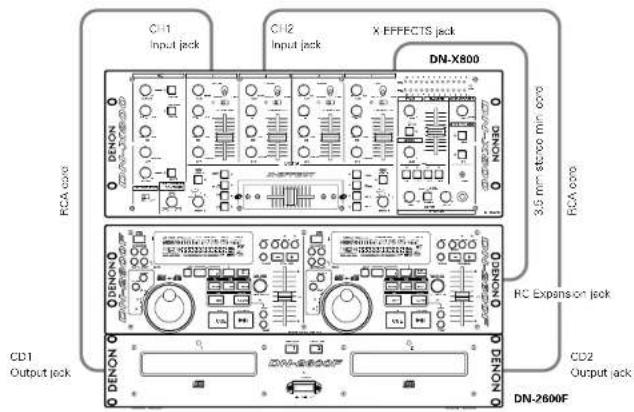
- Connect this jack to the remote of the DN-2100F and the DN-2600F using the 3.5 mm stereo mini cord.
40 SUBWOOFER output jack
- This 1/4" mono jacks provide a mono line level output of Main Out. The signal is affected by the Master Level fader.
- Connect this jacks to the subwoofer input jack on an amplifier.
41 TAPE OUT jacks
- This stereo pair of RCA jacks provide a line level output. The signal is unaffected by the Master Level fader. Output is controlled by Ch. fader volume.
- It is intended for use with a tape recorder, but is not restricted to that purpose. Output is controlled by Ch. feder volume.
42 EFFECT jacks
- These 1/4" stereo jacks allow stereo external processing of the Program signal.
- These are switching jacks — always complete the loop when connecting a send and return, or no sound will be heard.
43 DIGITAL 1, 2, 3, 4 input jacks
- These RCA jacks are Inputs for any digital output device.
- We recommend using a 75Ω/ohm RCA cord for best digital transfer. (available from any audio/video retailer)
44 LINE 2, 4, 6, 7, 8 input jacks
• These stereo pairs of unbalanced RCA jacks are Inputs for any line level device.
45 Ch 3, 4 FADER output jacks
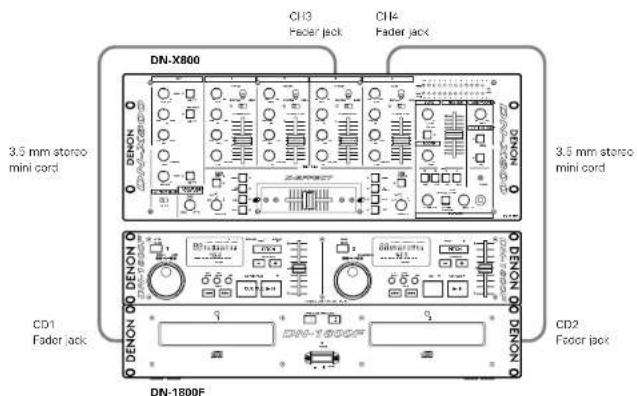
- Connect these jacks to the Fader input jacks of the DN-1800F, the DN-2100F and the DN-2600F using the 3.5 mm stereo mini cord.
46 PHONO 1, 2, 3 / LINE 1, 3, 5 Input jacks
- These stereo pairs of unbalanced RCA jacks are Inputs for a Prono (RIAA) stage for magnetic IMMI cartridges or a Line stage suitable for any device, such as a CD player.
47 PHONO 1, 2, 3 / LINE 1, 3, 5 switches
• These switches charge the input from Phone to a Line level inputs.
- These switches set a Line level inputs when Turntable is not connected.
43 Phono Ground screw
- This screws provide a place to connect the ground wire from a turntable.
This terminal is exclusively for a turntable grounding and not a safety earth ground.
49 MAIN MIC input connector
- Neutrik combo jack.
- Accepts either a balanced microphone with an XLR connector or an unbalanced microphone with 1/4" mono jacks.
50 AUX MIC input jack
- Accepts an unbalanced microphone with 1/4^ mono jacks.
ENGLISH
4 CONNECTIONS
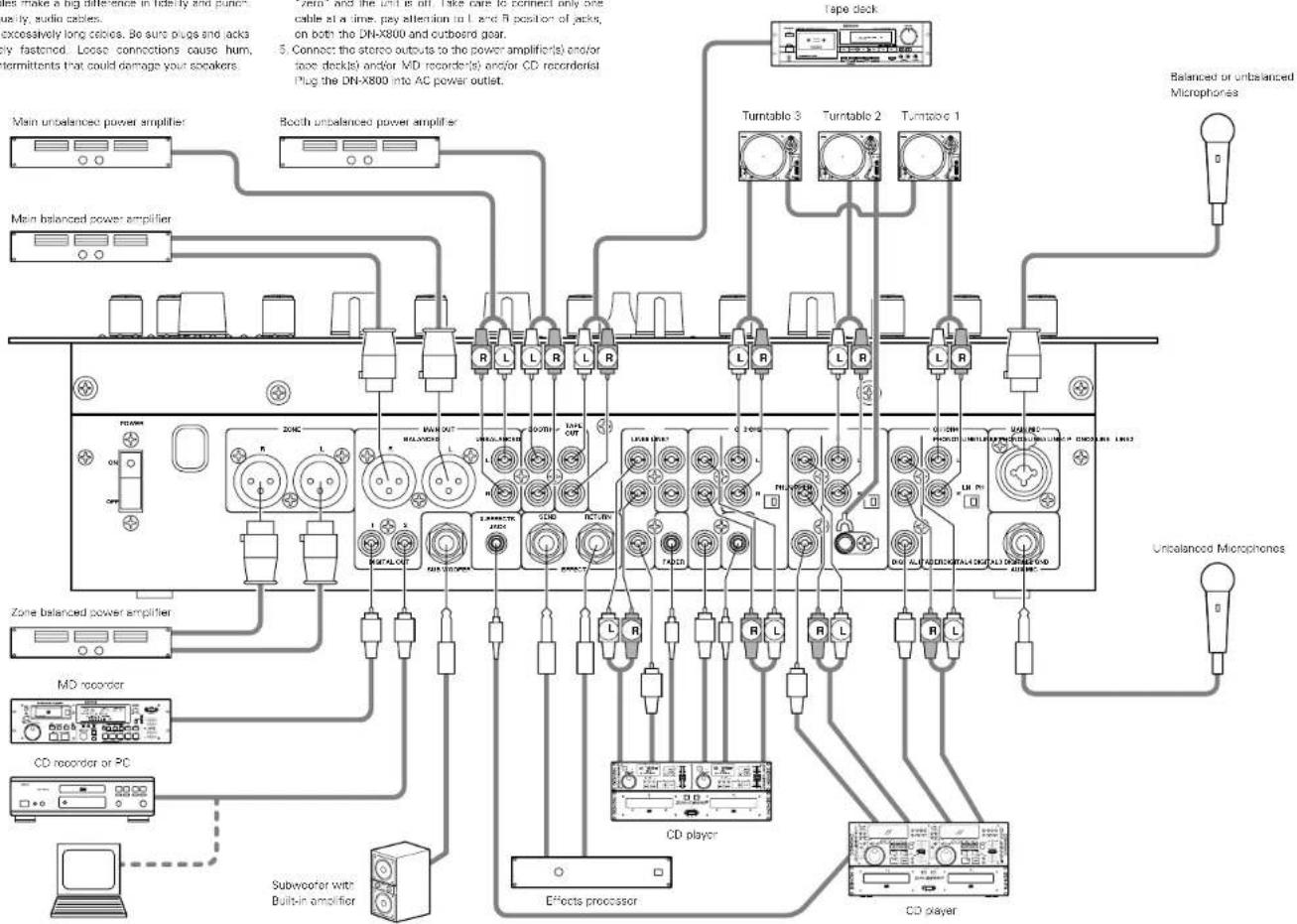
Refer to the Connection Diagram below.
- Make certain AC power is off while making connections.
- Quality cables make a big difference in fidelity and punch. Use high quality, audio cables.
-
Do not use excessively long cables. Be sure plugs and lacks are securely fastened. Loose connections cause hum, noise, or intermittents that could damage your speakers.
-
Connect all stereo input sources. Then connect any effects into the stereo effect, if used. Connect your Microphone(s) and monitor hexophones. Make sure all faders are at "zero" and the unit is off. Take care to connect only one cable at a time, pay attention to L and B position of jacks, on both the DN-X800 and outboard gear.
- Connect the stereo outputs to the power amplifier(s) and/or face deck(s) and/or MD recorder(s) and/or CD recorder(s). Plug the DN-X800 into AC power outlet.
NOTE:
Always switch on your audio input sources such as CD players first, then your mixer, and finally any amplifiers. When turning off, always reverse this operation by turning off amplifiers, then your mixer, and then input units.
text_image
Main unbalanced power amplifier Booth unbalanced power amplifier Main balanced power amplifier Tape deck Turntable 3 Turntable 2 Turntable 1 Balanced or unbalanced Microphones Unbalanced Microphones Zone balanced power amplifier MD recorder CD recorder or PC Subwoofer with Built-in amplifier Effects processor CD player CD player
FADER START
If the separately sold DN-1500F, DN-2100F and DN-2600F players are connected to CH-3 or CH-4, they can be started using the source input factor (Ch. fader) or Crossfader, as long as the 3.5 mm stereo mini cords have been connected.
text_image
DN-X800 3.5 mm stereo mini cord CD1 Fader jack DN-1800F 3.5 mm stereo mini cord CD2 Fader jackNOTE:
Use the analog inputs/outputs when the DN-1800F, the DN-2100F and the DN-2600F are moved by FADER START.
Channel Fader Start
| 1 | Turn on the Ch. faster start switch. |
| 2 | Move the source input faster ICh. fader of Ch-3 or Ch-4 control all the way to the bottom. |
| 3 | DN-1800F Set the cue point on either drive. DN-2100F and DN-2600F Set the A-1 or A-2 point on either drive. |
| 4 | When you want to start the player, move up the source input fader ICh. fader) and the CD player will begin playing. |
NOTES:
- Channels selected with the Crossfader Assign A, B switches and the Crossfader Start A, B buttons cannot be started with the source input fader (Ch. fade).
- Ch. Fader Start and Cross Fader Start for the same source will not operate simultaneously. You must select from either one. If both Ch. Fader and Cross Fader switches are ON, priority will be the cross fader.
Crossfader Start
| 1 | Using the Crossfader Assign A. B switches, select the channel (CH-3 or CH-4) that the CD player is connected. |
| 2 | Press the Crossfader Start A. B buttons of the channel connected to the CD player to be controlled. |
| 3 | |
| 4 | DN-1800FSet the cue point on the left driveDN-2100F and DN-2600FSet the A 1 or A 2 point on the left drive. |
| 5 | Use the Crossfader Contour control to control the cross rotor startup curve. |
| 6 |
ENGLISH
ENGLISH
6 X-EFFECT
If the separately sold DN 2100F and DN 2600F players are connected below, they can be started using the source input factor (Ch._footort) or Crossfoster.
The below function can be started using the source input fader (Ch. fader) or Crossfader by setting it with CD PLAYER Sampler (DN-2600H), Hot Start Brake Platter (DN-2100F and DN-2600H), Hot Start IDN-2100F and DN-2600H
text_image
C11 Input jack C12 Input jack X EFFECTS jack DN-X800 RCA core 3.5 mm stereo min core RCA core DC1 Output jack CD2 Output jack DN-2600FNOTE:
Use the analog inputs/cuts:puts when the DN-2600F and the DN-2100F are moved by X-EFFECT
(1) Selecting the mode
| 1 | The sound for the Sampler is recorded with the DN-2600F.When the sound is recorded, the adjacent green indicator lights. |
| 2 | Press the SAMP button.[IMAGE] |
00F)
| 1 | Set the Hot Start 1 and/or 2 point of the CD player. • When set the Hot Start point, the adjacent orange indicator lights. |
| 2 | Press the H/S 1, 2 button. |
Hot Start Brake Platter (DN-2100F and DN-2600F)
| 1 | Press the H/S BRAKE button, and the adjacent orange indicator lights |
The function for the Brake stop is done by using Crossfader and source input fader (Ch, fader). Ch Fader must be set and left in the up position.
The indicator of H/S 1, 2 and SAMP, change automatically if Assign switches are changed to CH-1 or CH-2.
flowchart
graph TD
    A["Input"] --> B["X-EFFECT"]
    B --> C["Output"]
    subgraph Input
        D["XT 2.1"] --> E["XT 2.7"]
        F["XT 3.1"] --> G["XT 4.1"]
        H["XT 5.1"] --> I["XT 6.1"]
        J["XT 7.1"] --> K["XT 8.1"]
        L["XT 9.1"] --> M["XT 10.1"]
        N["XT 11.1"] --> O["XT 12.1"]
        P["XT 13.1"] --> Q["XT 14.1"]
        R["XT 15.1"] --> S["XT 16.1"]
        T["XT 17.1"] --> U["XT 18.1"]
        V["XT 19.1"] --> W["XT 20.1"]
    end
    subgraph Output
        X["XT 2.1"] --> Y["XT 2.7"]
        Z["XT 3.1"] --> AA["XT 4.1"]
        AB["XT 5.1"] --> AC["XT 6.1"]
        AD["XT 7.1"] --> AE["XT 8.1"]
        AF["XT 9.1"] --> AG["XT 10.1"]
        AH["XT 11.1"] --> AI["XT 12.1"]
        AJ["XT 13.1"] --> AK["XT 14.1"]
        AL["XT 15.1"] --> AM["XT 16.1"]
        AN["XT 17.1"] --> AO["XT 18.1"]
        AP["XT 19.1"] --> AQ["XT 20.1"]
    end
    style Input fill:#f9f,stroke:#333
    style Output fill:#ccf,stroke:#333
    style Input fill:#cfc,stroke:#333
    style Output fill:#fcc,stroke:#333
    style Input fill:#ffc,stroke:#333
    style Output fill:#cfc,stroke:#333
    style Input fill:#fcc,stroke:#333
    style Output fill:#cfc,stroke:#333
(2) Starting with Fader Start
| Channel Fader Start | |
| 1 | Turn on the Ch. fader start switch. |
| 2 | Move the source input faster (Ch. fader) of CH-1 or CH-2 control all the way to the bottom. |
| 3 | When you want to start: the player, move up the source input faster (Ch. fader) and the CD player will begin playing. |
NOTES:
- Channels selected with the Crossfader Assign A, B switches and the Crossfader Start A, B buttons cannot be started with the source input fader (Ch. fader).
- Ch. Fader Start and Cross Fader Start for the same source will not operate simultaneously. You must select from either one. If both Ch. Fader and Cross Fader switches are ON, priority will be the cross fader.
Crossfader Start
| 1 | Using the Crossfader Assign A, B switches, select the channel ICH-1 or CH-2i that the CD player is connected. |
| 2 | Press the Crossfader Start A, B buttons of the channel connected to the CD player to be controlled. |
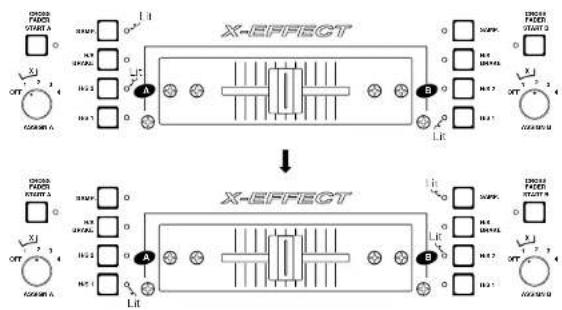
| 3 | Slide the Crossfader all the way in direction opposite the source you want to start. ( In the following example, startup is done with the CD player connected to CH-1 set to Assign A ) 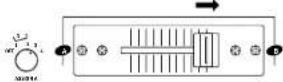 |
| 4 | Use the Crossfader Contour control to control the cross fador startup curve. |
| 5 | When the Crossfader is sold in the opposite direction as in "3", CD player will begin. 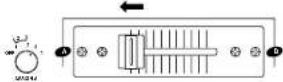 |
ENGLISH
7 REPLACING THE CROSSFADER
The Crossfader may be removed without any disassembly of the DN XB00 itself, and may be performed while the unit is operating with no interruption of the audio signals.
- Remove the two (2) outer screws attaching the crossfader assembly to the front panel.
- Pull the Crosfader Assembly forward and unplug the ribbon from the connector on the panel board.
- Install the replacement assembly by reversing the above instructions.
8 SPECIFICATIONS
GENERAL
Dimensions: 482 (W) x 105 (H) x 177 (D) mm (without feet)
Installation: 19-inch rack mountable 4U
Mass: 6.5 kg
Power supply: 230 V AC ±10%, 50 Hz (Europe mode)
220 V AC ±10%, 50 Hz (China model)
Power consumption: 26 W
Environmental conditions:
Operational temperature: 5 to 35°C (41 to 95°F)
Operational humidity: 25 to 85% (no condensation) Storage temperature: -20 to 60°C (4 to 140°F)
■ AUDIO SECTION
Input Sensitivity & Impedance
| Main Mic | 54 dBV | (2.0 mV) | 10 kΩ/kohms |
| Aux Mic | -60 dBV | (1.0 mV) | 10 kΩ/kohms |
| Effect (Return) | -14 dBV | (200 mV) | 50 kΩ/kohms |
| 3-Phono | -50 dBV | (3.0 mV) | 50 kΩ/kohms |
| 8-Line | -14 dBV | (200 mV) | 50 kΩ/kohms |
| Output level & Impedance: | |||
| Main (Balanced) | 4 dBm | (1.23 V) | 600 Q/ohms load |
| Main (Unbalanced) | 0 dBV | (1.0V) | 1 kΩ/kohms |
| Zone (Balanced) | 4 dBm | (1.23 V) | 600 Q/ohms load |
| Booth (RCA) | 5 dBV | (2.0 V) | 1 kΩ/kohms |
| Tape (RCA) | -10 dBV | (316 mV) | 1 kΩ/kohms |
| Effect (Send) | -14 dBV | (200 mV) | 1 kΩ/kohms |
| Subwoofer | 2 dBV | (500 mV) | 1 kΩ/kohms |
| Headphone | 4 dBV | (530 mV) | 150 Q/ohms |
Frequency Response:
| Line | 20 to 20 kHz | ±2 dB |
| Phono | 20 to 20 kHz | RMA ±2 dB |
| Mic | 20 to 20 kHz | +2 dB |
| Signal to Noise ratio: | ||
| Line | 80 dB | 0 dBm, 1 kHz, EO flat |
| Phono | 75 dB | 0 dBm, 1 kHz, EO flat |
| Main Mic | 65 dB | 0 dBm, 1 kHz, EO flat |
Total harmonic distortion rate:
| Line | Below 0.05% |
| Phono | Below 0.05% |
| Cross talk: | Over 70 dB |
Channel equalizer:
| HI | -10 dB, -26 dB (13 kHz) |
| Mld +10 dB, -26 dB (1 kHz) | |
| Low | -10 dB, -26 dB (100 Hz) |
Microphone equalizer:
| Hi | +12 dB, -12 dB (10 kHz) |
| Mld +12 dB, -12 dB (1 kHz) | |
| Low | +12 dB, -12 dB (100 Hz) |
Digital input:
| Input sensitivity | -20 dBV (100 mV) |
| Signal format | SPDIF |
| Output level | 0.5 Vp-p 75 Ω/ohms |
Digital output:
| Signal format | IEC958 Type II |
| Output level | 0.5 Vpp 75 Ω/ohms |
| Output signal level | -6 dB |
* Specifications and design are subject to change without notice for purpose of improvement.
DEUTSCH
- INHALT -
| Line | 80 dB | 0 dBm, 1 kHz, EO flash |
| Phono | 75 dB | 0 dBm, 1 kHz, EO flash |
| Mikro | 65 dB | 0 dBm, 1 kHz, EQ flash |
③ Touche MAIN MIC ON/OFF
36 Prises DIGITAL OUT 1, 2
120 V c.a. ±10%, 60 Hz
Consumo de corriente: 26 W
③ MAIN ON/OFF-tangent
Total harmonisk distorsion:
| Line | Under 0,05 % |
| Phono | Under 0,05 % |
| Överhörning: | Över 70 dB |
| Equalizer: | |
| Hi | -10 dB, -26 dB (13 kHz) |
| Mid | -10 dB, 26 dB (1 kHz) |
| Low | +10 dB, 26 dB (100 Hz) |
| Mikrofon-equalizer: | |
| Hi | -12 dB, -12 dB (10 kHz) |
| Mid | -12 dB, -12 dB (1 kHz) |
| Low | -12 dB, 12 dB (100 Hz) |
| Digital Ingång: | |
| Inkänslighet | -20 dBV (100 mV) |
| Signalformat | SPDIF |
| Utnivå | 0,5 Vt-1.75 Uohm |
| Digital utgång: | |
| Signalformat | IEC988 typ II |
| Utnivå | 0,5 Vt-1.75 Uohm |
| Utsignalniv | 6 dB |
Printed in Japan 511 3769 000