7545 - Dishwasher ORANIER - Free user manual and instructions
Find the device manual for free 7545 ORANIER in PDF.



| Product type | Dishwasher |
| Brand | Oranier |
| Model | 7545 |
| Capacity | 10 place settings (EN 50242 standard) |
| Available programs | Soak, Light, Eco, Auto 60-70, Intensive |
| Water consumption (min) | 5 litres (soak program) |
| Water consumption (max) | 20 litres (intensive program) |
| Energy consumption (min) | 0,03 kWh |
| Energy consumption (max) | 1,50 kWh |
| Program duration | 9 to 175 minutes |
| 3/1 function (all-in-one) | Yes |
| Start delay | Up to 9 hours |
| Water softener | Adjustable (6 levels) |
| Anti-overflow safety | Aquastop |
| Display | Indicator lights |
| Power supply | 220-240 V / 50 Hz |
| User manual | 68 pages |
| Maintenance | Regular cleaning of filters and spray arms |
Frequently Asked Questions - 7545 ORANIER
User questions about 7545 ORANIER
0 question about this device. Answer the ones you know or ask your own.
Ask a new question about this device
Download the instructions for your Dishwasher in PDF format for free! Find your manual 7545 - ORANIER and take your electronic device back in hand. On this page are published all the documents necessary for the use of your device. 7545 by ORANIER.
USER MANUAL 7545 ORANIER
- Description of the controls 16
- Troubleshooting 24
Thank you for choosing one of our products.
You are advised to read this manual carefully; it contains all the information you need about the right conditions for the proper, safe use of your dishwasher.
The individual sections are laid out to provide you with a step-by-step guide to all your appliance's functions; the texts are easy to understand and are complete with detailed illustrations.
This user-friendly manual will provide answers to all your questions about use of the dishwasher.
For any other information about use and maintenance of the dishwasher, read the enclosed manual carefully.

USER INSTRUCTIONS: useful information is provided for the use of the washing programs and all the dishwasher's functions.
1. Description of the controls
1.1 Upper panel
All the dishwasher controls are grouped on the upper panel. Switch-on, programming, switch-off etc. procedures are only possible when the door is open.

text_image
2 3 4 5 7 6 9 8 1PP # ECO # 60-70 S *
#n □ ○ □ ○ ①| 1 | ON/OFF BUTTONPressing this button energises the appliance. |
| 2 | SELECTED PROGRAM INDICATOR LIGHTS Illumination of this light denotes the program selected and the occurrence of a fault (troubleshooting). |
| 3 | PROGRAM SELECTION BUTTONBy pressing this button in sequence it is possible to select the desired program. |
| 4 | SALT WARNING LIGHTIllumination of this light signals that salt container is empty. |
| 5 | RINSE AID WARNING LIGHTIllumination of this light signals that rinse aid dispenser is empty. |
| 6 | "3/1" OPTION BUTTONPress this button to activate the option for use of 3/1 products. |
| 7 | "3/1" OPTION LIGHTIlluminates to indicate that the function is activated. |
| 8 | PROGRAM DELAY BUTTONPress this button to delay the start of the program by up to 9 hours. |
| 9 | INFORMATION DISPLAY |
SETTING THE WASHING PROGRAM AND SWITCHING ON
To select the most suitable program for the dishes to be washed refer to the table below, which indicates the most appropriate program according to dish type and degree of soiling.
After using the table to identify the most appropriate washing program:
- press theON/OFF button (1) and wait for the PROGRAM INDICATOR LIGHT (2) to illuminate;
- keep pressing PROGRAM SELECTION button (3) until the indicator light corresponding to the desired program illuminates;
- close the door; after about 2" the program will start. While it is in progress, the relative LIGHT will flash (indicating that the program is being executed).

text_image
2 3 4 5 7 6 9 8 1 end 3/7| PROGRAMME, NUMBER & SYMBOL | LOAD CROCKERY AND CUTLERY | PROGRAM PROGRESS | DURATION CONSUMPTION | ||||
| MINUTES (2) | WATER LITRES (1) | POWER KWh (2) | |||||
| 1 |  | SOAK | Pans and dishes awaiting a further wash | Cold prewash | 9' 5 0,03 | ||
| 2 | [KOZH] | LIGHT | Wash immediately after use for dishes with light dirt | Wash at 45°C Cold rinse Rinse at 68°C Dry | 59' 12 0,90 | ||
| 3 |  | ECO (*) EN 50242 | Wash immediately after use for dishes with normal dirt | Wash at 55°C Cold rinse Rinse at 66°C Dry | 175' 13 1,01 | ||
| 4 |  | AUTO 60-70 | Dishes with normal dirt | Cold prewash Wash at 50°C Wash at 65°C Cold rinse Rinse at 70°C Dry | (**) (**) (**) | ||
| 5 | [KOXA] | INTENSIVE | Very dirty pans and dishes (except delicate items) | Prewash at 45°C Wash at 70°C 2 cold rinses Rinse at 70°C Dry | 105' 20 1,50 | ||
Only run the soak program with half loads.
(*) Reference program as per EN 50242 standard.
(**) When the "AUTO 60-70" program is selected, the dishwasher recognises the type of dirt and automatically adjusts the washing parameters as appropriate.
(1) Average power consumption with the softener set on level 2.
(2) The cycle duration and power consumption may vary according to the water and room temperatures, and the type and amount of dishes.

The washing cycle will not take place if the dishwasher door is left open or not properly closed.
TABLE FOR CERTIFICATION BODIES
| Reference standard EN 50242 | |
| Reference program ECO | |
| Load 10 place-settings | |
| Type of detergent B | |
| Amount of detergent 25 g | |
| Rinse aid setting 5/6 |
1.2 Washing programs

Before starting a washing program make sure that:
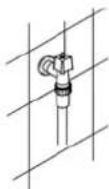
•The water supply tap is open.
•The correct amount of detergent has been added to the dispenser.
•The baskets have been correctly loaded.
•The spray arms are able to rotate freely and without obstruction.
•The dishwasher door is securely closed.
"3/1" OPTION BUTTON
(available in all programs except the soak program)
By pressing the button (6) you activate the "3/1" option, confirmed when the relative light comes on. This option has been studied for the use of dishwashing powder or tablets with integrated substances in place of regenerating salt or rinse-aid known on the market as "3 in 1" or "triple action" products; in this case the dishwasher will use the product in an optimal way avoiding salt and rinse-aid consumption, which could already be found in the dishwasher.
Note: When selecting the "3/1" button, it is normal that the salt and rinse-aid lights remain on, if their containers are empty.
DELAYING THE PROGRAM
The PROGRAM DELAY button (8) can be pressed to delay the start of the program by up to 9 hours. This means that the dishwasher can be operated at the time of day of your choice. Press the button several times in succession and the display will show the delay with which the appliance will start, beginning from 9 hours.

text_image
2 3 4 5 7 6 9 8 1 end SnCANCELLING THE CURRENT PROGRAM
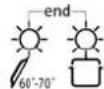
- To cancel the currently selected program, open the door and hold down the PROGRAM SELECTION (3) button for a few seconds until the indicator lights for programs 4 and 5 illuminate simultaneously (the word "end" is displayed on the window).

- Close the door.
- After approximately 1 minute the dishwasher will advance to the end of cycle.
CHANGING THE PROGRAM
To change the program in progress, simply open the door and select a new program. When the door is closed the dishwasher will automatically select the new program.

TO SAVE ON ENERGY! ... AND PROTECT THE ENVIRONMENT
•Always try to run the dishwasher fully loaded.
- Do not wash the dishes in running water.
- Use the washing program that is most appropriate for each type of load.
- Do not carry out any preliminary rinsing.
- If available, connect the dishwasher to a hot water supply up to 60^ .
TO CUT DOWN ON DETERGENT CONSUMPTION! ... AND PROTECT THE ENVIRONMENT
The phosphates contained in dishwasher detergents are harmful to the environment. To avoid using excessive amounts of detergent and to save on electricity, observe the following:
- separate the more delicate items from dishes that are more resistant to aggressive detergents and high temperatures;
• do not pour the detergent directly on the dishes.

If the door has to be opened while washing is in progress, the program will be interrupted. The relative light will keep flashing and a beeper will signal that the cycle has not been completed. You must wait about 1 minute before closing the door to restart the program. When the door is closed the program will continue from where it was interrupted. This operation should only be carried out if strictly necessary, because it might cause problems in execution of the program.
END OF CYCLE
At the end of the program the beeper sounds briefly and the lights of programs 4 and 5 flash (the word "end" is displayed on the window).
To switch off the dishwasher, open the door and press the ON/OFF button (1).


REMOVING THE DISHES
At the end of the washing program, wait at least 20 minutes before removing the dishes, to allow them to cool down. To prevent any water droplets on the upper basket from falling on the dishes in the lower basket, it is advisable to unload the lower basket first, and then the upper basket.
ADJUSTING THE WATER SOFTENING SYSTEM
N.B.: for the setting below to be possible, a washing program other than the soak program must be set.
Press the PROGRAM DELAY button (8) and keep it pressed until the preset value appears followed by a full stop (normally3.).
Release the button then press it again in succession to display the value required, referring to the table.
The 6 setting levels available will appear in this order:
3., 4., 5., 0., 1., 2..
When the value required appears on the display, release the button; after 5 seconds the system automatically returns to setting of the program delay, and the setting will be made with the chosen value.
N.B.: the display shows the water hardness setting and the program delay. The dot (.) after the number indicates that the water hardness setting is being displayed. If the dot (.) does not appear, the program delay is being displayed.
WATER HARDNESS TABLE
| WATER HARDNESS | SETTING | |
| German Degrees (°dH) French Degrees (°dF) | ||
| 0 - 5 0 - 9 0. | ||
| 6 - 11 10 - 19 1. | ||
| 12 - 21 20 - 36 2. | ||
| 22 - 33 37 - 59 3. | ||
| 34 - 45 60 - 79 4. | ||
| 46 - 53 80 - 107 5. | ||
Contact your local water board for information on the hardness of your water supply.
2. Troubleshooting
The dishwasher is capable of signalling a number of faults through the simultaneous illumination of several indicator lights, with the following meanings:
| FAULT DESCRIPTION | |||||
| E1 |  |  |  |  |  |
| E3 |  |  |  |  |  |
| E4 |  |  |  |  |  |
| E5 |  |  |  |  |  |
| E6 |  |  |  |  |  |
E1
If an alarm occurs the appliance interrupts the program in progress and signals a fault.
• Alarms E1, E3, E4 interrupt the current program immediately.
- The E5, E6 alarms interrupts the running program once the cause is resolved, it will bring bach the execution of the program.
To "reset" an alarm is necessary:
- Open and close the door, or turn off and on the machine. At this point is possible to program the dishwasher again.

If the malfunction persists, contact your authorised Service Centre.