NSP330 - Speakers YAMAHA - Free user manual and instructions
Find the device manual for free NSP330 YAMAHA in PDF.


| Product Type | 5.1/6.1 Channel Speaker System |
| Brand | YAMAHA |
| Model | NSP330 |
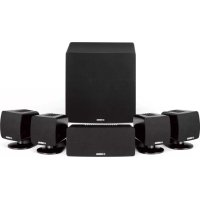
| Configuration | 4 satellite speakers, 1 center speaker, 1 subwoofer (5.1 channels) |
| Satellite Speakers | NX-S200 (2-way, acoustic suspension, magnetic shielding) |
| Center Speaker | NX-C200 (2-way, acoustic suspension, magnetic shielding) |
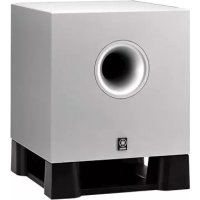
| Subwoofer | SW-P330 (Advanced YAMAHA Active Servo Technology) |
| Power Handling | Satellite: 30 W nominal / 100 W max; Center: 30 W / 100 W; Subwoofer: 100 W (100 Hz, 5 Ω, THD 10%) |
| Impedance | Satellite and center: 6 Ω |
| Frequency Response | Satellite and center: 100 Hz - 40 kHz (-10 dB); Subwoofer: 30 Hz - 200 Hz |
| Sensitivity | Satellite and center: 85 dB/2.83 V/m |
| Dimensions (W × H × D) | Satellite: 72 × 230 × 81 mm; Center: 300 × 72 × 81 mm; Subwoofer: 232 × 415 × 388 mm |
| Weight | Satellite: 1.0 kg; Center: 1.1 kg; Subwoofer: 9.6 kg |
| Power Supply | 230 V~50 Hz (Europe model) or 120 V~60 Hz (USA/Canada model) |
| Power Consumption (subwoofer) | 85 W |
| Main Features | Advanced YAMAHA Active Servo Technology, magnetic shielding, Helmholtz resonator |
| Maintenance and Cleaning | Dry, clean cloth; do not use chemical products |
| Safety | Do not expose to rain or moisture; do not disassemble; observe cable polarity; keep away from heat sources |
| Package Contents | 4 or 5 satellite speakers, 1 center speaker, 1 subwoofer, cables (4 m and 15 m), mounting brackets, screws, non-slip pads |
Frequently Asked Questions - NSP330 YAMAHA
User questions about NSP330 YAMAHA
0 question about this device. Answer the ones you know or ask your own.
Ask a new question about this device
Download the instructions for your Speakers in PDF format for free! Find your manual NSP330 - YAMAHA and take your electronic device back in hand. On this page are published all the documents necessary for the use of your device. NSP330 by YAMAHA.
USER MANUAL NSP330 YAMAHA
1 To assure the finest performance, please read this manual carefully. Keep it in a safe place for future reference.
2 Install the speakers in a cool, dry, clean place - away from windows, sources of heat, sources of excessive vibration, dust, moisture or cold. Avoid sources of electrical humming (e.g., transformers and motors). To prevent fire or electric shock, do not expose the speakers to rain or water.
3 To prevent the enclosure from warping or discoloring, do not expose the speakers to direct sunlight or excessive humidity.
4 Avoid installing the speakers where foreign objects may fall onto them and/or where they may be exposed to liquid dripping or splashing.
5 Do not place the following objects on top of the speakers: - Other components, as they might damage or discolor the surface of the speakers;
- Burning objects (e.g., candles), as they might cause fire, damage to the speakers or personal injury;
- Containers of liquid, as they might spill and cause electric shock to the user or damage to the speakers.
6 Do not place the speakers where they are liable to be knocked over or struck by falling objects. Stable placement will also ensure better sound.
7 Placing the speakers on the same shelf or rack as the turntable can result in feedback.
8 Secure placement or installation is the owner's responsibility. YAMAHA is not liable for accidents caused by improper placement or installation of speakers.
9 If you note distortion, reduce the volume control on your amplifier. Do not drive your amplifier to the point of "clipping". Otherwise, the speakers may be damaged.
10 When using an amplifier with a rated output power higher than the nominal input power of the speakers, care should be taken not to exceed the speakers' maximum input.
11 Do not clean the speakers with chemical solvents as this might damage the finish. Use a clean, dry cloth.
12 Do not attempt to modify or fix the speakers. Contact qualified YAMAHA service personnel when service is needed. Do not open the cabinet under any circumstances.
13 Please read the "Troubleshooting" section regarding common operating errors before concluding that the speakers are faulty.
For the SW-P330
1 Do not operate this unit upside down. It may overheat, possibly causing damage.
2 Do not use excessive force on switches, controls or connection wires. When moving this unit, first disconnect the power plug and the wires connected to other equipment. Never pull the wires themselves.
3 Since this unit has a built-in power amplifier, heat radiates from the rear panel. Place the unit away from walls, allowing at least 20cm of space above, behind and on both sides of the unit to prevent fire or damage. Furthermore, do not position the unit with the rear panel facing down on the floor or other surfaces.
4 When using a humidifier, be sure to avoid condensation inside this unit by allowing enough space around the unit and avoiding excess humidification. Condensation might cause fire, damage to the unit, or electric shock.
5 Do not cover the rear panel of this unit with a newspaper, tablecloth, curtain, etc. to avoid obstructing heat radiation. If the temperature inside the unit rises, it may cause fire, damage to the unit, or personal injury.
6 Do not plug this unit into a wall outlet until all connections are complete.
7 The voltage to be used must match that specified on the rear panel. Using this unit with a voltage higher than specified is dangerous and may cause fire, damage to the unit, or personal injury. YAMAHA is not responsible for damage resulting from use of this unit with a voltage other than specified.
8 To prevent damage from lightning, disconnect the AC power plug during electric storms.
9 Super-bass frequencies reproduced by this unit may cause a turntable to generate audio feedback. In this case, move the unit away from the turntable.
10 This unit may be damaged if certain sounds are continuously output at high volume level. For example, if 20Hz - 50Hz sine waves from a test disc or bass sounds from an electronic instrument, etc. are continuously output, or if a turntable stylus touches the surface of a disc, reduce the volume level to prevent the unit from being damaged.
11 If you hear distorted noise (i.e., unnatural, intermittent "rapping" or "hammering" sounds) from this unit, reduce the volume level. Extremely loud movie soundtrack low frequency, bass-heavy sounds, or similarly loud popular music passages can damage the speaker system.
12 Vibration generated by super-bass frequencies may distort images on a TV. In this case, move the unit away from the TV set.
13 When disconnecting the power cord from the wall outlet, grasp the plug; do not pull the cord.
14 When you plan not to use this unit for a long period of time (i.e., vacation, etc.) disconnect the AC power plug from the wall outlet.
15 Do not place much pressure against the subwoofer net. It may break the net or the unit may fall, resulting in injury.
16 Do not place anything fragile beside the subwoofer. The air pressure produced by the subwoofer may break the objects and cause malfunction or injury.
FOR CANADIAN CUSTOMERS
To prevent electric shock, match wide blade of plug to wide slot and fully insert.
This Class B digital apparatus complies with Canadian ICES-003.
WARNING
TO REDUCE THE RISK OF FIRE OR ELECTRIC SHOCK, DO NOT EXPOSE THIS APPLIANCE TO RAIN OR MOISTURE.
IMPORTANT
Please record the serial number of this unit in the space below.
MODEL:
Serial No.:
The serial number is located on the rear or the bottom of this unit.
Retain this Owner's Manual in a safe place for future reference.
This product is a speaker package consisting of the components shown on the table.
Please check to make sure that all of the components listed in the table are included.
| Model name Category | Category No. of pcs | ||
| NS-P330 | NX-S200 | Satellite speakers (for front/surround) | 4 |
| NX-C200 C | Center speaker 1 | ||
| SW-P330 S | Subwoofer 1 | ||
| NS-P336 | NX-S200 | Satellite speakers (for front/surround) | 5 |
| NX-C200 C | Center speaker 1 | ||
| SW-P330 S | Subwoofer 1 | ||

Advanced
Y·S·T
Active Servo Processing Subwoofer System with built-in power amplifier.
This subwoofer system (SW-P330) employs Advanced YAMAHA Active Servo Technology which YAMAHA has developed for reproducing higher quality super-bass sound.
This super-bass sound adds a more realistic, theater-in-the-home effect to your stereo system.
For U.K. customers
If the socket outlets in the home are not suitable for the plug supplied with this appliance, it should be cut off and an appropriate 3 pin plug fitted. For details, refer to the instructions described below.
Note
The plug severed from the mains lead must be destroyed, as a plug with bared flexible cord is hazardous if engaged in a live socket outlet.
Special Instructions for U.K. Model
IMPORTANT
THE WIRES IN MAINS LEAD ARE COLOURED IN ACCORDANCE WITH THE FOLLOWING CODE:
Blue: NEUTRAL
Brown: LIVE
As the colours of the wires in the mains lead of this apparatus may not correspond with the coloured markings identifying the terminals in your plug, proceed as follows:
The wire which is coloured BLUE must be connected to the terminal which is marked with the letter N or coloured BLACK. The wire which is coloured BROWN must be connected to the terminal which is marked with the letter L or coloured RED.
Making sure that neither core is connected to the earth terminal of the three pin plug.
Table of Contents
Introduction 2
About this manual 2
Package Contents. 2
Roles and Layout of Speakers 3
Placing the Speakers. 3
Placing the center speaker. 3
Placing the subwoofer. 4
Placing the front and surround speakers 4
Connecting the speakers.. 6
Connecting speaker cables. 7
Using the subwoofer (SW-P330) 8
Advanced Yamaha Active Servo Technology (on the SW-P330). 9
Troubleshooting 10
Specifications 11
Introduction
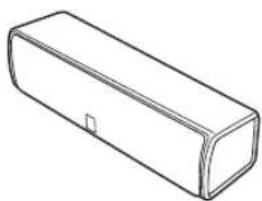
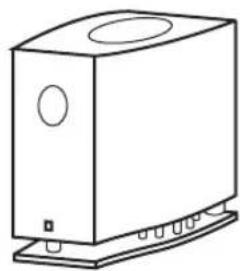
"NS-P330/NS-P336" consists of four/five satellite speakers (front/surround), a center speaker, and a subwoofer. Please take great pleasure in real sounds with the YAMAHA 5.1ch/6.1ch speaker system "NS-P330/NS-P336".
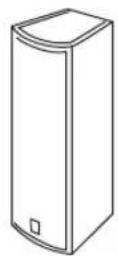
Satellite speakers (front/surround/ surround back*) NX-S200
Center speaker NX-C200 (1 unit)
Subwoofer SW-P330 (1 unit)
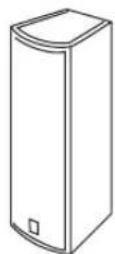
4 units : NS-P330
5 units : NS-P336
- for NS-P336
About this manual
- This manual provides only information on installation methods or specifications for the speakers. For information about how to connect the speakers to your YAMAHA amplifier, refer to the manual for amplifier.
- This manual was printed before final product development. Due to operational upgrades and other reasons, the specifications of the actual product or packaging may differ from the contents of this manual.
Package Contents
This product includes the following items. Before installing the speakers, please check that you received all of the following parts.
Cables and installation parts
Subwoofer cable (1 pin, 5 m, 1 unit)
Mounting brackets (for front/surround speakers)
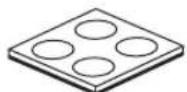
Non-skid pads (for subwoofer, 1 set: 4 units)
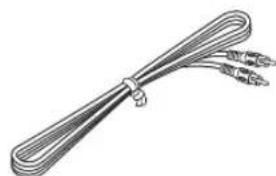
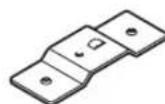
4 units: NS-P330
5 units: NS-P336
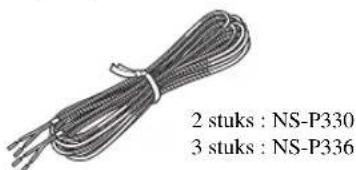
Speaker Cables (4 m/3 units)
Screws (M4× 10) (for front/surround speakers)
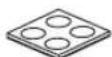
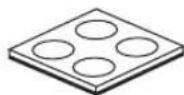
Non-skid pads (for front/surround speakers)

4 units: NS-P330
5 units: NS-P336
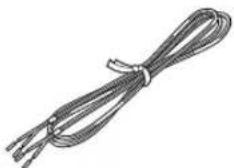
Fasteners (for center speaker, 2 units)
4 sets (16 units): NS-P330
5 sets (20 units): NS-P336
(15m)

2 units: NS-P330
3 units: NS-P336
Roles and Layout of Speakers
Each speaker has different roles based on the types of sound each produces. This section explains the main role/s of each speaker and the recommended speaker layout.
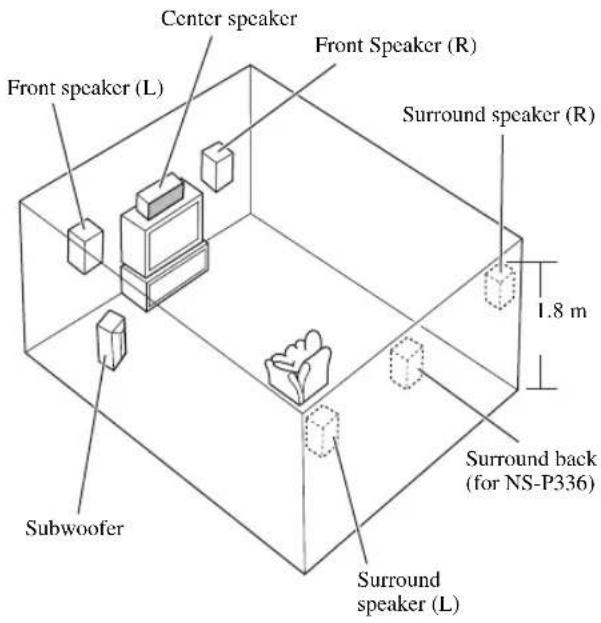
Center Speaker
Place on top of the TV or inside the TV rack so that the speaker and TV are aligned vertically.
Main role: Produces sounds oriented toward the center of the screen such as dialogues or vocal sounds.
Front Speakers (L, R)
Place the front left/right speakers on both sides of your TV at equal distances.
Main roles: Produces front channel (stereo) sounds and effect sounds.
Surround Speakers (L, R)
Place the surround left/right speakers behind the listening position. (We recommend placing them at a height of 1.8m (6 feet) and pointing them at the listening position.)
Main roles: Produces surround sounds and effect sounds.
Surround back speaker (for NS-P336 systems only)
Position the surround back speaker behind your listening position, precisely between the surround speakers, about 1.8m above the floor.
Subwoofer
Place the subwoofer near a front speaker and turn it slightly toward the center of the room to reduce wall reflections.
Main roles: Produces bass sounds and low frequency (LFE) sounds contained in Dolby Digital or DTS.
Notes
- If the speakers interfere with TV reception, noises may appear on the TV screen. In such a case, move the speakers a little away from the TV.
- Bass sounds produced by the subwoofer may be heard differently depending on the listening position and subwoofer location. To enjoy desired sounds, try to change the location of the subwoofer according to the listening position.
Placing the Speakers
To enjoy quality sounds thoroughly, you need to place the speakers in their appropriate positions and install them correctly. After deciding the speaker layout (see "Roles and Layout of Speakers" above), follow the procedure below to install the speakers.
Placing the center speaker
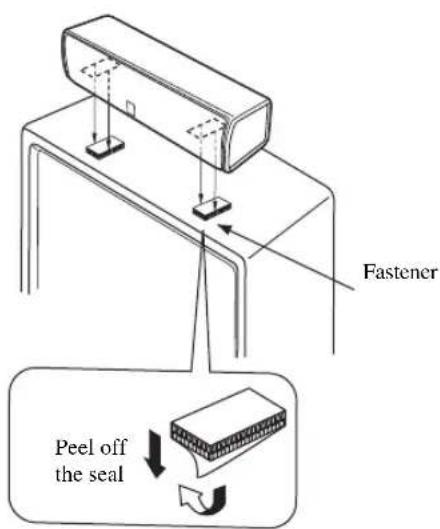
When placing the center speaker on top of the TV, use the supplied fasteners to secure the speaker.
Notes
- Do not place the speaker on the TV if the top of the TV is not level or if it is narrower than the bottom surface of the speaker. Doing so may cause the speaker to fall. In this case, place the speaker inside a TV rack or on a level floor.
- Before attaching the fasteners to the TV, clean the surface with a dry cloth. A dirty or wet surface may weaken the adhesive force and cause the speaker to fall.
- Do not touch the bonding surfaces of the fasteners after peeling off the seals. Doing so may weaken the adhesive force and cause the speaker to fall.
Placing the subwoofer
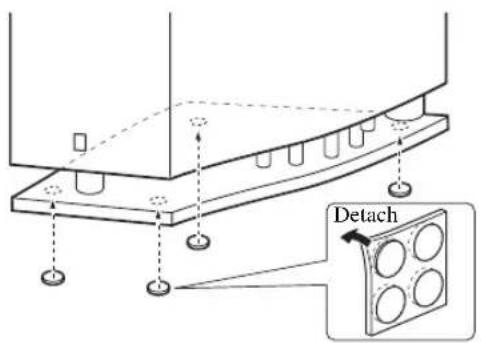
Attach the non-skid pads to the bottom of the subwoofer, and then place the subwoofer on a level hard floor.

Using non-skid pads prevents the subwoofer from sliding when it vibrates, and ensures quality sound production.
Placing the front and surround speakers
You can place the front and surround speakers on the floor or a rack, or attach them to a wall. Also, you can mount them on YAMAHA speaker stands "SPS-200" or commercially available speaker stands. Please select an installation method that suits your room layout.
To place on the floor or a rack
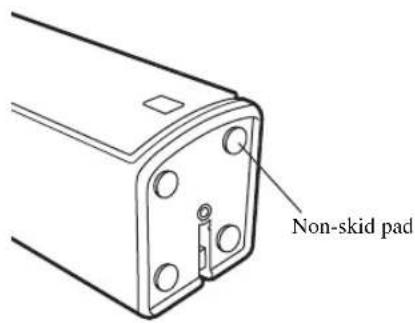
Attach the non-skid pads to the bottom of each speaker, and then place them on level hard surfaces.

Using non-skid pads prevents the speakers from sliding when they vibrate, and ensures quality sound production.
To attach to a wall
Screws (Diameter: 3.5 to 4 mm (1/8" to 5/32"), commercially available)
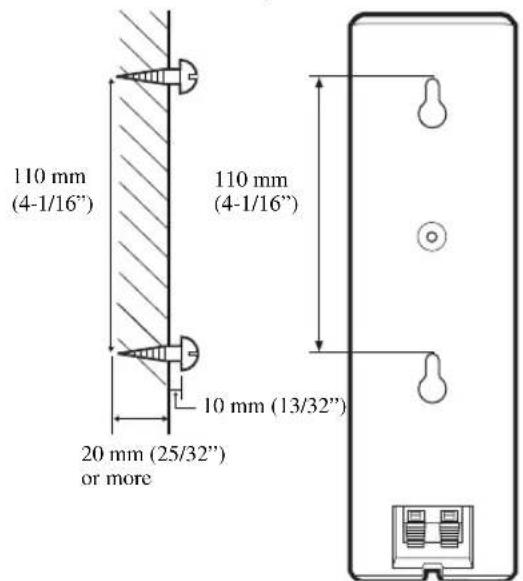
You can attach the speakers to a wall using commercially available screws (Diameter: 3.5 to 4mm (1/8'' to 5/32'') , Length: 20mm (25/32'') or more). One speaker requires two screws. To attach all speakers to a wall, you need to prepare eight screws.
1 Install two screws in the wall where you want to place the speaker.
2 Hang the speaker on the screws using the holes in the back of the speaker.
Notes
- One speaker weighs about 1.0kg (2 lbs 3 oz). To attach a speaker to a wall using screws, the wall must be firm. Do not attach a speaker to a wall that is made of weak materials such as plaster or veneered woods. Doing so may cause the speaker to fall.
Make sure you use specified screws to attach a speaker to a wall. Using clamps other than specified screws, such as short screws, nails, or two-sided tape, may cause the speaker to fall. - When connecting the speakers, fix the speaker cables in place so that cables do not loosen. If your foot or hand accidentally gets caught on a loose speaker cable, the speaker may fall.
After attaching each speaker, check that the speaker is fixed securely. YAMAHA will bear no responsibility for any accidents caused by improper installations.
To mount on a speaker stand
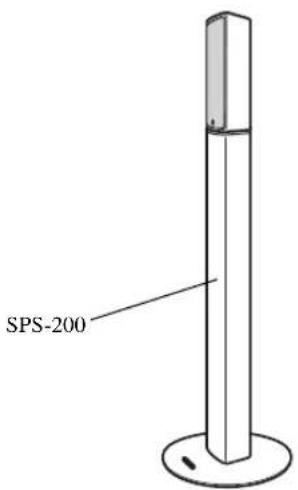
You can mount the speakers on YAMAHA speaker stands "SPS-200" (set of two, optional) or commercially available speaker brackets. When using commercially available speaker brackets, follow the procedure below to attach the supplied mounting bracket to the speaker. When using YAMAHA speaker stands "SPS-200", you do not need the following procedure.
For information on how to mount a speaker on the speaker bracket, refer to the manual for the speaker brackets you want to use.
YAMAHA speaker stand "SPS-200" (set of two, optional)
To attach to a bracket
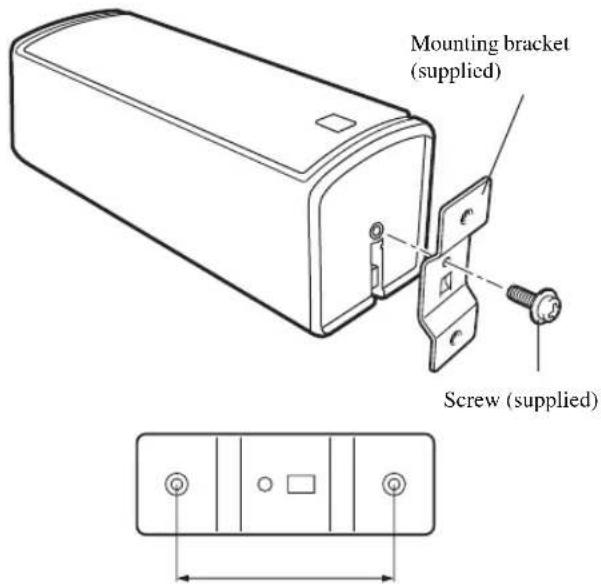
60 mm (2-3/8")
To mount a speaker on the YAMAHA speaker stand "SPS-200", refer to manual for the speaker stand.
- This product may not be available in certain regions. For information, contact the store where you purchased the product or your nearest YAMAHA dealer.
1 Attach the mounting bracket to the speaker using the supplied screw.
The jutting part of the bracket should fit to the groove at the speaker base.
2 Mount the speaker on the speaker bracket using the holes on the mounting bracket.
To mount a speaker on a commercially available speaker bracket, you need two screws (Diameter: 4mm (5 / 32^ ) , spring washers, and washers. For more information, refer to the manual for the speaker bracket you want to use.

Connecting the speakers
Note
Do not connect the power cord of the subwoofer and other audio/video components into an AC outlet until all cable connections are completed.
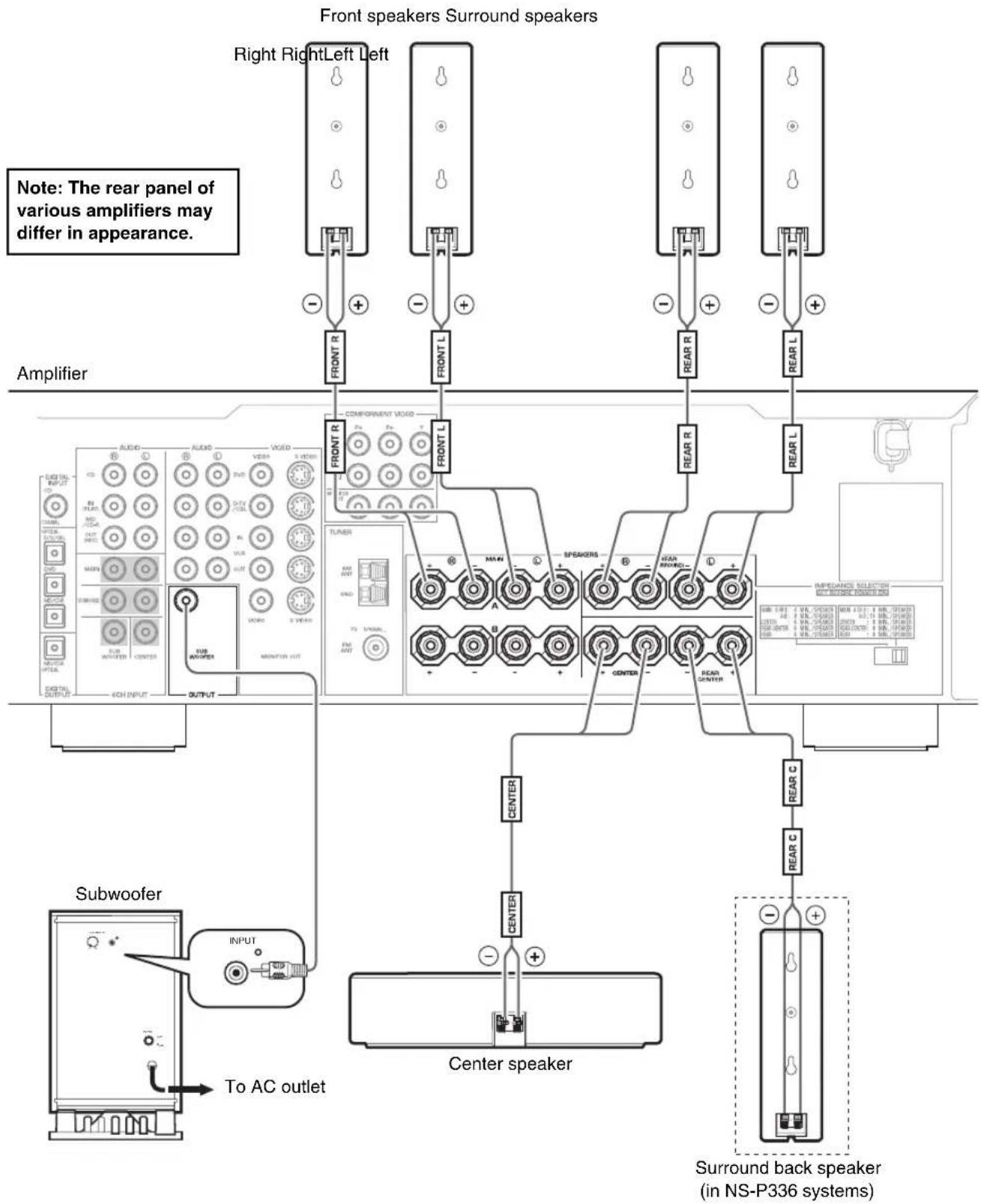
Connecting speaker cables
Keep the speaker cables as short as possible. Do not bundle or roll up excess cable. If the connections are faulty, you will hear no sound from the speakers.
Before connecting
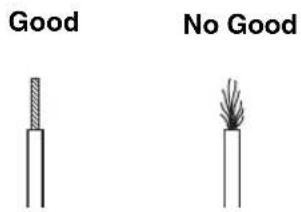
Remove the insulation coating at the extremity of each speaker cable by twisting the coating off.
Front speakers / Center speaker
Use the provided speaker cables (4m) .One side of the speaker cable is red and the other side is black. Connect the (+) terminals on both the speaker and the amplifier using the red side of the cable. Connect the (-) terminals on both components using the black side.
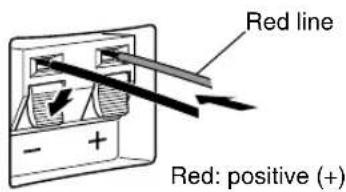
Black: negative (-)
Rear speakers /
Rear center speaker (for NS-P336)
Use the provided speaker cables (15 m). One side of the speaker cable has a gray line and the other side has no line. Connect the (+) terminals on both the speaker and the amplifier using the side with a gray line. Connect the (-) terminals on both components using the side with no line.
Black: negative (-)
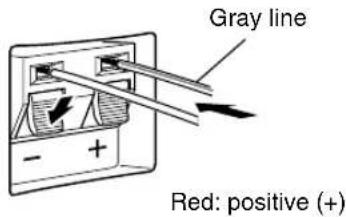
Note
Do not let uninsulated speaker wires touch each other as this could damage the speaker or the amplifier.
Connections:
-
Connect the front, center and surround speakers (and surround back speaker for the NS-P336) to the speaker output terminals on your amplifier using the included speaker cables.
-
The included speaker cables have labels marked FRONT L, FRONT R, CENTER, REAR L, REAR R (and REAR C for NS-P336). Connect each speaker cable to the corresponding speaker as illustrated in the figure on page 6.
- Connect each speaker making sure not to reverse the polarity (+, -) . If the speaker is connected with reversed polarity, the sound will be unnatural and lack bass.
-
For the front and surround speakers only, connect one speaker to the left (marked L) terminals on your amplifier, and the other speaker to the right (marked R) terminals.
-
Connect the subwoofer to the line output (pin jack) terminal(s) on the amplifier.
-
To connect to a Yamaha DSP amplifier (or AV receiver), connect the SUBWOOFER (or LOW PASS, etc.) terminal on the rear of the DSP amplifier (or AV receiver) to the INPUT terminal on the subwoofer.
Connecting components and the subwoofer to AC power
After you complete all speaker and subwoofer connections, plug the amplifier, other audio/video components, and the subwoofer into an AC outlet of appropriate voltage.
Using the subwoofer (SW-P330)
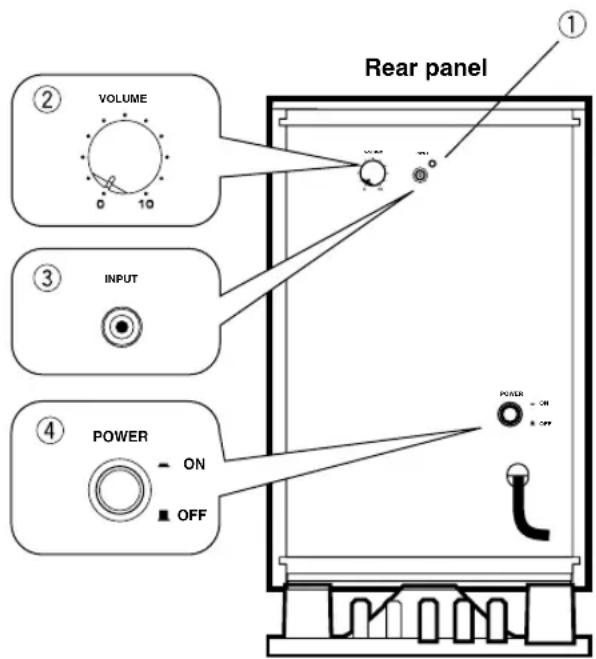
① Power indicator
Lights up GREEN when the POWER switch (4) is turned ON; turns off when the POWER switch is turned OFF.
② VOLUME control
Adjusts the volume level. Turn the control clockwise to increase the volume, and counterclockwise to decrease the volume.
③INPUT terminal
Input terminal for line level signals from the amplifier.
④ POWER switch
Press this switch to the ON position to turn on the power to the subwoofer. When the power of the subwoofer is on, the power indicator (1) on the rear panel lights up green. Press this switch again to set it to the OFF position to turn off the power of the subwoofer.
Pre-adjusting the subwoofer volume
Before you use the subwoofer, first adjust the volume balance between the subwoofer and the front speakers by following the procedure below.
1 Set the VOLUME control to minimum (0).
2 Turn on the power to all other components.
3 Press the POWER switch to the ON position. The power indicator on the rear panel lights up green.
4 Play a source that contains low-frequency sounds. Adjust the amplifier's volume control to the desired listening level.
5 Increase the volume gradually to adjust the volume balance between the subwoofer and the front speakers. In most cases, set the control to a level at which you hear slightly more bass than when the subwoofer is not used.
6 Adjust the volume of the entire sound system using the amplifier's volume control.
- If you replace the front speakers (NX-P200) with other speakers, you must again balance the subwoofer and surround speaker volume.
For more information on adjusting the VOLUME control, refer to "Frequency characteristics" on page 11.
Advanced Yamaha Active Servo Technology (on the SW-P330)
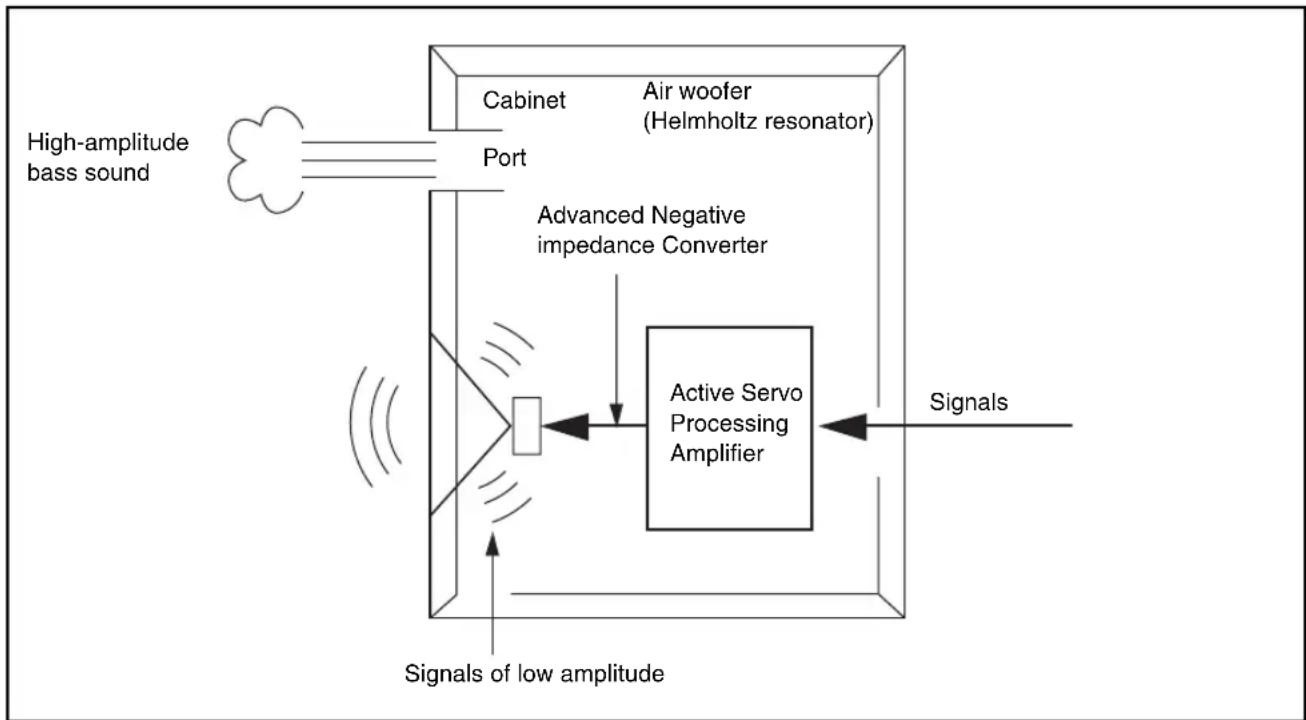
The theory behind Yamaha Active Servo Technology is based on two factors: the Helmholtz resonator and negative-impedance drive. Active Servo Processing speakers reproduce the bass frequencies through an "air woofer," which is a port or opening in the speaker's cabinet.
This opening is used instead of, and performs the functions of, a woofer in a conventionally designed speaker system.
Thus, signals of low amplitude within the cabinet can, according to Helmholtz resonance theory, be output from this opening as waves of great amplitude if the size of the opening and the volume of the cabinet are in proportion to satisfy a certain ratio. In order to accomplish this, moreover, the amplitudes within the cabinet must be both precise and of sufficient power because these amplitudes must overcome the "load" presented by the air in the cabinet.
This problem is resolved by a design in which the amplifier supplies special signals. If the electrical resistance of the voice coil could be reduced to zero, the movement of the speaker unit would become linear with respect to signal voltage. To accomplish this, the system utilizes a special negative-impedance output-drive amplifier that subtracts the output impedance of the amplifier.
By employing negative-impedance drive circuits, the amplifier is able to generate precise, low-amplitude, low frequency waves with superior damping characteristics.
These waves are then radiated from the cabinet opening as high-amplitude signals. The system can, therefore, by employing the negative-impedance output drive amplifier and a speaker cabinet featuring a Helmholtz resonator, reproduce an extremely wide range of frequencies with outstanding sound quality and low distortion.
The features described above combine to create the fundamental structure of conventional Yamaha Active Servo Technology.
Our new Active Servo Technology - Advanced Yamaha Active Servo Technology - adopts Advanced Negative Impedance Converter (ANIC) circuits, which allow the conventional negative impedance converter to dynamically vary to select an optimum value for speaker impedance variation. With these new ANIC circuits, Advanced Yamaha Active Servo Technology provides a more stable performance and improved sound pressure compared to conventional Yamaha Active Servo Technology, resulting in more natural and dynamic bass reproduction.
Troubleshooting
If there is any problem with your speakers, check the following items. If you cannot solve your problem with the following remedies or if your problem is not listed below, contact the store where you purchased the product or your nearest YAMAHA dealer and ask for assistance.
| Problem Cause What to do | ||
| The speakers make no sound. | The volume is set to minimum level. | Adjust the volume on the A/V equipment connected to the speakers. |
| The mute function is enabled. Disable the mute function on the A/V equipment connected to the speakers. | ||
| The input setting is improper. Select the proper input setting on the A/V equipment connected to the speakers. | ||
| The cables are not connected properly. | Check the cable connections in your system. For details, refer to “Connecting the speakers” (page 6). | |
| A particular speaker makes no sound. | Since each speaker has different roles based on the types of sound each produces, some speakers do not produce sound in some cases. | For details, refer to “Roles and Layout of Speakers” (page 3). |
| Depending on the speaker settings or the playback modes used on the A/V equipment connected to the speakers, some speakers do not make sounds in some cases. | For details, refer to the manual for the A/V equipment. | |
| The volume for the speaker is set to minimum level. | Adjust the volume on the A/V equipment connected to the speaker. | |
| The cable is connected improperly. Check the cable connection between the speaker and the A/V equipment. | ||
| The subwoofer makes strange sounds. | The subwoofer is not placed properly. | For details, refer to “Roles and Layout of Speakers” (page 3). |
| The subwoofer cable is connected improperly. | Check the cable connection between the subwoofer and the A/V equipment. | |
| Sound level is too low. You are playing a sound source that includes inadequate bass frequencies. | Play a sound source that includes more bass frequencies. | |
| Power is not supplied even though the POWER switch is set to the ON position. | The power plug is not securely connected. | Turn the power switch OFF, then connect the power plug securely. |
Specifications
Satellite speakers (Front/Surround)
Model name NX-S200
- Type 2 way acoustic suspension magnetic shielding type
- Driver
...Tweeter: 2.5cm (1 inch) balanced dome, magnetic shielding type Woofer: 5cm (2 inch) cone, magnetic shielding type × 2
Nominal Input Power. 30 W
Maximum Input Power. 100 W
Impedance. 6Ω
- Frequency Response 100 Hz - 40 kHz
Sensitivity .85 dB/2.83 Vm
- Dimensions (W × H × D) 72 × 230 × 81 mm (Approx. 2 13/16" × 9 1/16" × 3 3/16")
Weight. 1.0 kg (Approx. 2 lbs 3 oz)
Center speaker
Model name NX-C200
- Type 2 way acoustic suspension magnetic shielding type
- Driver
...Tweeter: 2.5cm (1 inch) balanced dome, magnetic shielding type
Woofer: 5cm (2 inch) cone, magnetic shielding type × 2
Nominal Input Power. 30 W
Maximum Input Power. 100 W
Impedance. 6Ω
Frequency Response 100 Hz -40 kHz
Sensitivity .85 dB/2.83 Vm - Dimensions (W × H × D) 300 × 72 × 81 mm (Approx. 11 13/16" × 2 13/16" × 3 3/16")
Weight. 1.1 kg (Approx. 2 lbs 6 oz)
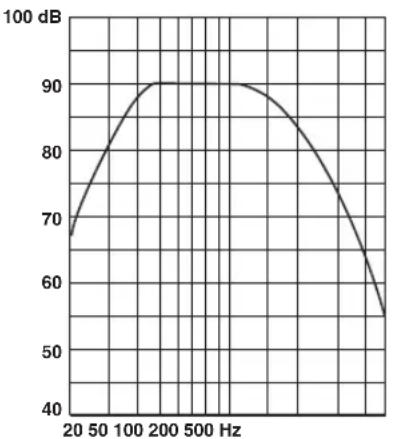
Frequency characteristics
The following graph* displays the frequency characteristics of the SW-P330 subwoofer.
Subwoofer
Model name SW-P330
- Type.... Advanced YAMAHA Active Servo Technology System
-
Driver 20 cm (8") cone, magnetic shielding type
Output Power 100 W (10% THD, 100 Hz, 5 Ω)
Frequency Response. 30 Hz -200 Hz -
Power Supply U.S.A. and Canada models AC 120 V, 60 Hz Australia model AC 240 V, 50 Hz U.K. and Europe models AC 230 V, 50 Hz Asia model AC 220-240 V, 50/60 Hz Korea model AC 220 V, 60 Hz General (Taiwan) model AC 110-120 V, 50/60 Hz
Power Consumption. 85 W - Dimensions (W × H × D) 232 × 415 × 388 mm (Approx. 9 1/8" × 16 11/32" × 15 9/32")
Weight 9.6 kg (Approx. 21 lbs 3 oz)
General
- Operating Temperature range. +5^ to +35^ (41°F to 95°F)
- Operating Humidity Range 5 to 90% (No Condensation) The above specifications are subject to change without notice.
The following graph* displays the frequency characteristics of the SW-P330 subwoofer combined with NX-S200 speakers.
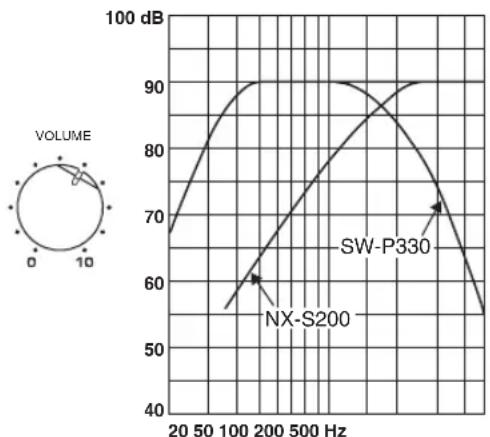
- This diagram does not depict actual frequency response characteristics accurately.
ATTENTION: VEUILLEZ LIRE CE QUI SUIT AVANT D'UTILISER L'APPAREIL.
(for front/surroundhögtalare)
Glidskydd
(for subwoofer, 1
(for front/surroundhögtalare)
Glidskydd
(for front/surroundhögtalare)

4 stycken: NS-P330
5 stycken : NS-P336
Fustanordning
Satellithogtalare(front/surround)
Modellnamn NX-S200
Satellite speakers (front/surround/ surround retro *NX-S200
4 pezzo: NS-P330
5 pezzo: NS-P336
- per l' NS-P336
Frequency characteristics
4 sets (16 stuks): NS-P330
5 sets (20 stuks): NS-P336
(15m)
This product mainly uses lead-free solder.
© 2004 YAMAHA CORPORATION All rights reserved.