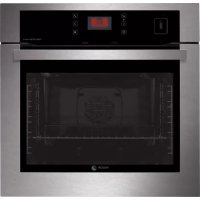
USER MANUAL 6H876ATCX FAGOR
Important! Read the entire manual before using the oven. The documentation and accessories are inside the oven.
The texts in the manual correspond to the numbered diagrams.
Safety

Important
Keep this manual with the appliance. If you sell or give the appliance to another person, make sure you also pass on the user manual. Read these instructions carefully when using and installing the appliance. They are designed to protect your own and others' safety.
- The electrical installation that feeds the oven must have circuit breakers installed in accordance with current local installation regulations.
- The oven must be installed by an authorized installer in accordance with the manufacturer's instructions and diagrams.
- The electrical installation must be dimensioned for the maximum power indicated on the reference plate and the electrical socket must have a regulatory earth connection.
- If the power cord is damaged, it must be replaced by the after-sales technical service or by similarly qualified staff, to avoid hazard.
- Ensure the appliance is unplugged from the mains before replacing the oven lamp, to avoid electric shock.
- Do not use abrasive cleaning products or metal scouring pads to clean the oven door, as they could scratch the surface and cause the glass to shatter.
- During operation, some accessible parts may become hot.
Children under the age of 8 must not go near the appliance unless under permanent supervision.
- Do not touch the heating elements inside the oven.
- This appliance can be used by children aged from 8 years and above and persons with reduced physical, sensory or mental capabilities or lack of experience and knowledge if they have been given supervision or instruction concerning use of the appliance in a safe way and understand the hazards involved. Children shall not play with the appliance. Cleaning and user maintenance shall not be made by children without supervision.
- This appliance is designed for normal household use only. Do not use it for commercial or industrial purposes. Use exclusively for cooking food products.
- Do not try to modify the characteristics of the appliance. It could be dangerous.
- During cleaning by pyrolysis, surfaces become hotter than during normal use. Keep out of reach of children.
- Before cleaning with pyrolysis, remove all cooking items and significant overflows.
- Do not put heavy weights on the oven door and make sure that children do not climb or sit on it.
- Always make sure that the oven is switched off before cleaning.
- After using the oven, make sure that all the controls are in the off position.
- Do not use the oven as a larder or to store accessories after use.
- Do not use steam or high pressure devices to clean the device (electrical device safety reasons).
- The oven door should always be kept closed when working, for all programmes, including the grill.
1.1 Unpacking. Remove all the protective packaging elements. 1.2 Connection to the mains. Always take the information on the specifications plate into account (1.2.1). The appliance must be connected to the mains using a fixed, single-phase connection, in which the neutral earth connection (blue) must be ensured (1.2.2). Caution. We accept no liability in case of accident or incident due to a lack of a connection with earth or a defective connection.
Installation in the cupboard. The oven can be installed either under a worktop or column style in a piece of furniture. Always take the measurements of the piece of furniture into which the oven will be installed into consideration (1.2.3, 1.2.4). Insert the oven into the centre of the space, making sure that any excess cable is not on top (1.2.5, 1.2.6). Secure it to the piece of cupboard with the two screws supplied (1.2.7). The fitted furniture or its surface must be heat-resistant. The time must be set in order to finish the installation. After a period of inactivity, the machine will turn to standby and its brightness will diminish or the screen will switch off, depending on the model.

Tip: To ensure the appliance is fitted safely, do not hesitate to use an electrical appliance specialist.
Before using your new oven for the first time, heat it up while empty (with no food in it and with the control turned to , for 30 minutes at 250°C ). It may produce some smoke or a bad smell (this is normal and is caused by the oven heating up grease residue etc.). When it has cooled down, pre-clean it by wiping the inside with a damp cloth.
2.0 Controls.
A) Go back to previous level.
B) Confirmation control. C) Selection controls. D) Stop or programme oven. E) Drawer opening control.
You may browse the oven menu display and configure it as you wish and/or use the different buttons for cooking. n-cancel. Browse the different menu options. Verify an option. Return to previous display. Drawer opening control.
2.1 Accessories. Depending on the model there is a Deep Tray (2.1.1), Flat Tray (2.1.2) and Multifunctional Grill (2.1.3) that work separately. It is also possible to combine either tray with the Multifunctional Grill (2.1.4) to make a set. All the accessories or sets can be used directly or mounted on the Partial Extraction Grill (2.1.5) or the Total Extraction Grill (2.1.6, 2.1.7), (2.1.8). If you have the partial extraction tray, it can be used separately or together with trays (3 types) (2.1.9). The Simple Grill is used separately (2.1.10). If you have telescopic rails, remove the tray before installing them in the oven (2.1.11). The telescopic rails extend automatically due to the weight of the tray when the oven is opened (2.1.12). Food must always be placed on a tray on the telescopic rails (2.1.13). Bear in mind the position of the grills when installing them. There are anti-tipping stops at the sides (2.1.14).
2.2 Accessory positions. The accessories can be fitted in 5 different positions. 2.3 Selecting a language. When you switch on the oven for the first time or when the electricity returns after a power cut, the language selection display will appear. Press or the desired language is highlighted and press to validate (2.3.1). 2.4 Adjusting the time and date. After the language has been validated, the date and time adjustment display will appear (2.4.1). Press the Time appears (2.4.2). Validate by pressing The time will flash (2.4.3). Press to change the time (2.4.4). After adjusting the time, press validate (2.4.5). Repeat the same sequence to adjust the date and the 12/24 hour mode. When all these items have been set, press validate (2.4.6).
Note: You may choose to view the clock in analogue (2.4.7) or digital (2.4.8) mode.
2.5 Changing the language. Press TAfter the starting animation, the menu display will appear (2.5.1). Press until Settings appears, and press to validate (2.5.2). Press to select the Language and press to validate
(2.5.3). Follow the sequence to change the language (2.3.1).
2.6 Changing the time and date. Select Settings and validate (2.5.2). Press to select the Time / Date. Press to validate (2.6.1). Follow the sequence to change the time (2.4.1 - 2.4.6). 2.7 Beeper function. Press to access the menu (2.5.1). Press to select the Minute minder. Press to validate (2.7.1). Press to enter the time. Press to validate (2.7.2). The time will start to count down and when it reaches zero a beep will sound. Press to stop the beep. 2.8 Button sound adjustment. Select Settings and validate (2.5.2). Select Sound and validate (2.8.1). Select the Bip on or Bip off option. Validate (2.8.2). 2.9 Display contrast adjustment. Select Settings and validate (2.5.2). Select Display and validate (2.9.1). Adjust the contrast and validate (2.9.2).
Note: After a certain time has elapsed the screen switches off to save energy. To view the display press
2.10 Interior oven light function: When the oven is in power saving mode, the light only comes on for a few seconds, when you press ① . You can deactivate this function so that the light remains permanently on during cooking if you wish. To do this, with the oven switched off, press the 选 \ 选 buttons simultaneously and hold them down until you hear a beep. To return to power saving mode, repeat the operation.
2.11 Celeris Function. It quickly achieves the required temperature. Recommended for recipes that require a pre-heated oven. Choose Settings and confirm (2.5.2). Choose Celeris with and confirm (2.11.1). Switch the function on or off and confirm (2.11.2). When it reaches the temperature desired, the oven will beep and resume the cooking function you have chosen. Put the food into the oven. Start booking.
2.12 Electricity consumption adjustment.
This function allows you to check the oven's electricity consumption. With an "economy hours" contract you can consult the details of consumption at these times. Select Settings and validate (2.5.2). Select Consumption and validate (2.12.1). The consumption data display will appear. Validate (2.12.2). Use
to adjust the start and end time for the economy bands. When you have changed all the desired parameters, press to validate (2.12.3).
Note: If you have entered the economy band times in the pyrolysis function, the oven will suggest starting the cleaning process at the nearest available time. If you wish to start pyrolysis immediately, you will need to cancel the economy band time programming.
2.13 Fagor Services. This option enables you to obtain the contact details for the customer service and after-sales departments. Select Settings and validate (2.5.2). Select Info and validate (2.13.1). You will access the information display. To exit, press ✓ (2.13.2). 2.14 Child safety. Use this to prevent children from accessing the controls or manipulating the oven. With the oven closed, press and display the key (2.14.1). To unblock, press until the display shows that the appliance is unblocked. To remove the lock choose unlock and confirm (2.14.2).
Note: The oven cannot be locked once cooking has been programmed.
COOKING (Expert Mode)
2.15 Immediate cooking. Press and to access the "Expert" screen (2.15.1). Press to choose the type of cooking from the following list. With choose the
mode required and confirm (2.15.2). Defrost. Rapidly thaws any kind of food. Traditional heat. For bread, cakes, cakes with filling and lean meat. High base heat. The heat from the oven base is evenly distributed. Ideal for paellas or pizzas. Low grill. For hamburgers, toast and food with a small surface area. High grill. For browning pasta, soufflés and béchamel sauce. Fanned high grill. This browns the food, distributing the heat evenly. Ideal for large-sized roasts. Turbo plus. The heat is produced by the central element. Traditional fanned heat. For any kind of dish. Several dishes may be cooked at once without their flavours or smells mixing. Delicate foods. For yoghurt or dried foods (dried mushrooms, for example). 3D heat. This enables you to cook several trays of food at the same time. 4-level grill. The browning time is longer than with a standard grill.

Keep warm function. This keeps already-cooked food warm.
After validating the cooking function, you may change the suggested temperature by pressing Press to validate (2.15.3). Press again for cooking to start (2.15.4). You may change the temperature by pressing (2.15.5). You may switch off the oven by pressing (2.15.6).
Time functions
Setting the time. After selecting the cooking function, you may also change the time functions. Select and enter the cooking duration (2.15.7). When the selected time has elapsed, the oven will switch off and a beep will sound. To stop the beep, press
Setting the end of cooking time. Select
on the cooking options display and enter the desired cooking time. Then select Θ and enter the end of cooking time (2.15.8).
Validate. The oven will then go into wait mode until cooking begins (2.15.9).
GRATIN + option. This function is for browning food. It comes on 5 minutes before the end of cooking (2.15.10).
Gratin + cannot be used in some cooking modes, e.g. defrost, maintenance and delicate food.
2.16 Recipe cooking. This function is for cooking recipes, adjusting the desired amounts according to the number of people you are cooking for.
Select Recipes on the menu and validate (2.16.1). 6 types of food are available: White meat, Red meat, Fish, Vegetables, Cakes, Tarts/Quiches.
Select the desired food using the knob and validate (2.16.2). Select the recipe and validate (2.16.3). Enter the weight and validate (2.16.4). The oven will recommend a level (2.16.5). Place the tray at the level and validate. The oven will automatically make the necessary calculations and the end of cooking time will appear (2.16.6). When cooking is complete a beep will sound and the display will indicate that the dish is ready (2.16.7).
You may change the end of cooking time if you wish. Press and select Change the time using validate.
2.17 Combo-Steam Cooking.
- For tender food with all its vitamins and minerals
- Maintains crunchiness
- Food does not dry out. Gentle cooking preserves flavours.
Filling the tank. Before cooking, fill the tank with water. The maximum capacity is 1 litre. Only use tap water. Press and the filling drawer will come out (2.17.1). Fill the tank. Make sure that the tank is completely full (2.17.2). Close the drawer manually (2.17.3). The oven is now ready for Combi-Steam use.

Tip. When you fill the water tank it takes a few seconds to stabilise. Adjust the level if necessary.
Emptying the water tank.
Manual emptying. Open the oven door to empty the tank. Press and the filling drawer will come out. Put a container under the drawer to collect the water (2.17.4). Hold in the control to empty the tank for about 3 minutes for 1 litre of water.
Automatic emptying. After steam cooking, the oven will tell you to empty the tank. There are two options, Speed and Auto (2.17.5). Choose Auto and press the button to start emptying (2.17.6). When the screen shows 00 minutes, emptying is complete. Close the drawer by pushing it in manually.
If you choose the Speed option, the tank will not empty fully.
Caution. You must empty the tank every time after Combi-Steam cooking.
Combo-Steam cooking mode. The oven has three combined steam functions. Access the "Expert steam" display (2.17.7) and use choose one of these modes.

Traditional + steam. The food is cooked by the upper and lower elements and steam.

Turbo grill + steam. The food is cooked by the upper element, the fan to move the air and steam.

Turbo plus + steam. The food is cooked by the element at the back of the oven with the fan to move the air and steam.
Cooking immediately. Once you have chosen the function and confirmed with, the oven will recommend steam and temperature settings (2.17.8). There is an option to adjust these. Press and the drawer will open. Completely fill the water tank. Close the drawer and the oven will start working (2.17.9).
Adjusting temperature and steam percentage during cooking. Press, with to access the "modify" box (2.17.10), confirm. Use to access the temperature box, confirm. Use to adjust the temperature box, confirm. Use to access the steam box, confirm. Use to access the steam percentage, confirm. Press again and the oven will start working. When it has finished, it will beep and the screen will tell you that the dish is ready. To stop cooking press Empty the tank.
Cooking using programmed cooking and end time. See chapter on "Setting times" and "Cooking end time".
Removing lime scale from the steam boiler. Access the cleaning display (2.17.11) with and choose descending (2.17.12), confirm. It will display Lime scale level. Start. Confirm and following the four steps shown.
STEP 1. Emptying. Put a container under the drawer to collect the water.
STEP 2. Cleaning. Add 110 ml of white vinegar. Close the drawer. The descending process will begin. At the end of the cycle the oven will beep and the drawer will open automatically. The descending process has ended.
STEP 3. Rinsing. Completely fill and drain the water tank.
STEP 4. Emptying. Fill the water tank again and drain again. After these steps, the screen will tell you that descending is complete.
Note: The oven will advise you to descale after you have used the steam cooking function a certain number of times (2.17.13). If you choose Start the descending process will start immediately. Follow the above four steps. If you choose Later you will be able to steam cook a further five times. Then you will have to descale the appliance.
2.18 Steam recipes.
Choose Steam recipes on the menu and confirm (2.18.1). The oven has programmes for six types of foods: Pork, poultry, bread, cakes, processed foods, defrosting. Choose the appropriate food with <, > (2.18.2) confirm. Pick the recipe and confirm (2.18.3). Enter the weight and confirm (2.18.4). The drawer will open. Completely fill the water tank. Close the drawer and the oven will recommend where you should position the tray. The oven will automatically make the necessary calculations and display cooking duration and finish time (2.18.5). When it has finished, it will beep and the screen will tell you that the dish is ready. Empty the tank.
Note: Some recipes require pre-heating. Confirm with and CELERIS will appear on the screen. The oven will quickly reach the required temperature. Once at the right temperature, the oven will beep and will tell you where to position the tray. To achieve optimal results, you should put the food into the oven as soon as you hear the beep.
2.19 Residual heat If the oven is still hot after it has been switched off, will appear on the display. It will only disappear when the temperature inside the oven drops below 60°C
2.20 Automatic switch-off. If you forget to switch off the oven, it will switch off automatically after a certain time. If the temperature is lower than 100°C, the oven will switch off after 10 hours. If the temperature is higher than 100°C, it will switch off after 3 hours.
2.21 Memory function. This function enables 3 modes to be stored in the cooking function. Select Memories on the menu and validate (2.21.1). Select Last programme and validate (2.21.2). The parameters for the last dish cooked will appear. Validate (2.21.3). Select Save and validate (2.21.4). Select one of the three memories to store the parameters in, and validate (2.21.5). (2.21.6) will appear. Validate. Settings stored (2.21.7) will appear. The adjustments have now been stored and you may start the cooking process by pressing + validate, or exit by pressing 0
To use one of the memories stored, select Memories on the menu and validate
(2.21.8). Select the number of the memory you wish to use and validate (2.21.9). If the data are correct, validate (2.21.10) and the oven will start up (2.21.11).
3
Maintenance and cleaning

3.1 Cleaning the accessories. The accessories are dishwasher-safe. To wash them up by hand, use ordinary detergent. Leave them to soak for easier cleaning.
3.2 Pyrolysis cleaning
- The cleaning process consists of the dirt being burnt at high temperatures.
- The smoke and smells are eliminated by a catalyser.
- There is no need to wait until the oven has accumulated a large amount of grease to perform the cleaning process. After pyrolysis, when the oven has cooled down, wipe it with a damp cloth to remove the white ash residue.
- Before starting the pyrolysis process, take all the accessories out of the oven, including the cooking accessories and the telescopic runners.
- If any substances are stuck to the inside of the oven due to spill-overs, remove them before carrying out the pyrolysis process as they could catch fire or give off large amounts of smoke.
- During the pyrolysis process the surfaces become hotter than during normal use. Keep children away from the oven.
3.3 Pyro-turbo. This process takes two hours and guarantees thorough, intense cleaning of the inside of the oven. Select Cleaning and pyrolysis on the menu and validate (3.3.1). Select PYRO TURBO and validate (3.3.2). (3.3.3) will appear. Validate. The door will be locked for safety reasons (3.3.4) and the pyrolysis process will begin. When the cleaning process is complete, (3.3.5) will appear. When the door is unlocked, the oven will indicate that the cleaning process is complete.
Notes: The temperature and time parameters are set parameters and cannot be changed.
The enamelled tray can be cleaned with this pyrolysis option. Firstly remove any excess
grease from the tray and then place it at level 2.
3.4 Autopyro. This function automatically calculates the cleaning time depending on how dirty the oven is. Select Cleaning and pyrolysis on the menu and validate (3.3.1). Select AUTO PYRO and validate (3.4.1). (3.4.2) will appear. Validate. The oven will begin to calculate the duration according to how dirty it is. The door will be blocked for safety reasons (3.4.4).
3.5 After pyrolysis (depending on model). Take out the side runners and clean off any grease or ash that has been left after the cleaning processes. Depending on the models, the side runners are fixed in two ways, either without a support (3.5.1, 3.5.2) or with a support (3.5.4, 3.5.5). When you have removed them, use a damp cloth to clean the side walls (3.5.3, 3.5.6). When you have cleaned the oven walls, replace the runners. If your oven has a fold-down grill, pull upwards and press to fold it down (3.5.7) and clean the top wall with a damp cloth (3.5.8).
3.6 Cleaning the glass
Cleaning the outside of the glass: Use a soft cloth soaked in a glass cleaning product.
Cleaning the inside of the glass: If the inside of the glass is dirty, you can remove it for cleaning.
When the oven has cooled down, open the door as wide as possible (3.6.1) and fix it in place with the red stop supplied in the accessories bag (3.6.2). Use the remaining sheet accessory on one side of the glass to raise up the glass like a lever. Do the same on the other side of the glass. Remove the red stop and close the door (3.6.3). Remove the glass (3.6.4), clean it and dry it with a cloth (3.6.5). If necessary, remove the whole glass panel unit inside the door. This unit consists of either one or two glass panels, depending on the model, with a black stop in each corner. To remove them, place your hand under the door and pull upwards (3.6.6). When you have taken out the unit, remove the stops to clean the glass panels (3.6.7).
When the glass panels are clean (3.6.8) fit them onto the rubber stops again, with the stud facing upwards (3.6.9) and replace the
Place the glass panels so that the letters "L" (left) and "R" (right) are beside the hinges (3.6.10). Lastly, place the remaining glass panel so that the word PYROLYTIC can be read (3.6.11). Remove the stops (3.6.12) and close the door.
Warnings:
- Make sure the oven is switched off.
- Allow the glass to cool down before removing it.
- Never use steam cleaning machines.
3.7 Cleaning the outside of the oven: Use neutral cleaning products. Dry the oven well with a soft cloth.
4
Troubleshooting
Q
You can solve the following problems yourself:
4.1 The oven is not heating up. Check it is plugged in and switched on and that the fuse has not blown. Select a higher temperature setting. 4.2 The interior light is not working. Change the bulb or replace the fuse. 4.3 Smoke is coming out during cooking. Turn the temperature down and/or clean the oven. 4.4 The pyrolysis cleaning process is not being carried out. Ensure the door is correctly closed. Locking system or temperature sensor failure. Call the Technical Service. 4.5 A beep is sounding. The selected temperature setting has been reached. The cooking cycle is complete. 4.6 The oven blocked key appears. This occurs during normal functioning. Unblock it by pressing the key. 4.7 The oven makes a noise after cooking. This is normal, as the fan keeps running until the temperature inside and outside the oven is reduced. 4.8 Failure warnings.
F01 Temperature sensor failure. F02 Door blocked (4.7.1). F03 Pyrolysis cannot be carried out. F04 Door block failure. F05 Communication cut. Resume. F07 Steam generator failure. F10 Power cut during cooking.
AUTO-STOP The oven automatically switches off as it has been functioning for several hours (4.7.2).

Do not try to repair the oven yourself. Call the technical assistance service.
4.9 Demo function: Press at the same time +' , -' and 'back' touches during 5 seconds. To deactivate, repeat the same operation.
5
The Environment

This oven has been designed with environmental protection in mind.
Respect the environment. Only preheat the oven when necessary (see table). Use dark coloured cake tins whenever possible. For long cooking times, switch off the oven 5 or 10 minutes before the end of cooking time.
Management of waste electrical and electronic equipment.
The symbol indicates that the appliance must not be disposed of in traditional bins for domestic waste.
Take your oven to a special collection centre. Recycling domestic appliances will prevent negative consequences for health and the environment and will allow savings on energy and resources.
For further information, contact the local authorities or the shop where you bought the oven.
Cooking Table
| Food | Programme and temperature | Time | Position | Preheat | Accessories |
| beef 1,5 Kg | 190°C | 210°C 1 | 50 - 60 min no | | |
| pork 1,5 Kg | 150°C | 180°C | 85 - 95 min | 2 | no |
| lamb 1,2 Kg | 200°C | 220°C | 40 - 50 min | 2 | no |
| turkey 4 Kg | 170°C | 190°C | 115 - 125 min | 1 | no |
| chicken 1,25 Kg | 210°C | 230°C | 50 - 60 min | 1 | no |
| roasted red peppers 1,25 Kg | 190°C | 210°C | 30 - 40 min | 2 | no |
| stuffed tomat-oes 4 servings | 200°C | 220°C | 15 - 19 min | 2 | no |
| baked hake/ baked cod 1,5 Kg | 210°C | 230°C | 7 - 9 min | 2 | yes |
| roasted lobster 1 Kg | 220°C | 240°C | 4 - 5 min | 4 | yes |
| pizza | 200°C | 220°C | 18 - 22 min | 1 | yes |
| defrosting, all types of food | 75°C | | | 2 | no |
| Fermenting dough for bread/cakes | 40°C - 50°C | 40°C - 50°C | 25 - 30 min | 0 | no |
| 8.4.1 Butter cookies | | 200°C | 19 min | 3 | yes |
| 8.4.2 Fairy cakes | | 200°C | 20 min | 2 | yes |
| 200°C | 18 min | 1 | yes |
| 8.5.1 Fat-free sponge cake | | 180°C | 35 min | 1 | no |
| 180°C | 40 min | 1 | no |
| 8.5.2 Apple tart | | 180°C | 40 min | 1 | no |
| 180°C | 50 min | 1 | no |
| 9.1 Surface browning | | 275°C | 1-2 min | 4 | Pre-heat for 5 min |
IEC 60350. Amendment proposal for steam oven and combined steam oven features. Does not affect this appliance
F07 Defect stoogenerator.