Twintalker 3300 - Baby monitors TOPCOM - Free user manual and instructions
Find the device manual for free Twintalker 3300 TOPCOM in PDF.



User questions about Twintalker 3300 TOPCOM
0 question about this device. Answer the ones you know or ask your own.
Ask a new question about this device
Download the instructions for your Baby monitors in PDF format for free! Find your manual Twintalker 3300 - TOPCOM and take your electronic device back in hand. On this page are published all the documents necessary for the use of your device. Twintalker 3300 by TOPCOM.
USER MANUAL Twintalker 3300 TOPCOM
This product is in compliance with the essential requirements and other relevant provisions of the R&TTE directive 1999/5/EC.
The Declaration of conformity can be found on :
http://www.topcom.net/support/declarations/
ENGLISH
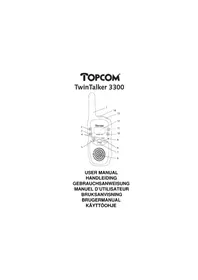
1. DESCRIPTION
(see front cover)
- Antenna
- Flashlight button
- Lock button
- Up/Down button
- Call button
- Speaker
-
Talk button
-
Monitor button
- Microphone
- Menu button
- On/Off button
- LCD display
- Flashlight
- Ear/mic/charger
2. INSTALLATION
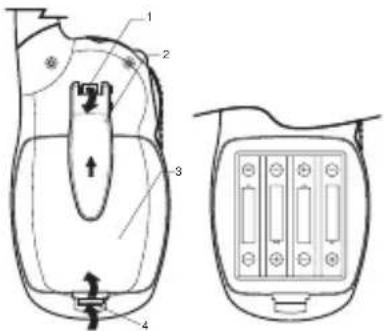
text_image
Technical diagram of a device with labeled parts and internal components, including a top view and side view.2.1. Removing/Installing the Belt Clip
- To remove the clip from the unit, push up on the belt clip while pulling the clip tab. (1)
- When re-installing the belt clip, a click indicates the BeltClip is locked into position.
2.2. Battery Installation
- Remove the belt clip (2).
- Pull the Battery Cover Tab (4) and remove the Battery Cover (3).
• Install four 'AAA' alkaline or rechargeable batteries following the polarity as shown. - Re-install the Battery Cover (3) and Belt Clip (2).
ENGLISH
3. LCD SCREEN
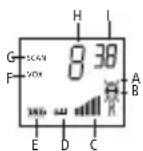
A. RX icon. Displayed when receiving a signal.
B. TX icon. Displayed when transmitting a signal.
C. Displays the current VOLUME LEVEL.
D. Button lock symbol
E. The current battery level charge.
F. Displays during the VOX mode.
G. Displayed during the channel scan.
H. Channel number.
I. CTCSS code.
4. GETTING STARTED
4.1.Turning the Unit ON/OFF
To activate; press and hold the POWER button ⏻. The unit will "beep" and the LCD Screen will display the current channel.
To switch off; press and hold the POWER ⏻ button again. The unit will "beep" and the LCD Screen will turn blank.
4.2. Adjusting Speaker Volume
The Speaker Volume can be adjusted using ▲/. The Speaker Volume level is displayed on the LCD.
4.3. Receiving a Signal
The unit is continuously in the RECEIVE mode when the unit is ON and not transmitting. When you receive a signal on the current channel, the RX icon is displayed.
4.4. Transmitting a Signal
- Press and hold the TALK button to TRANSMIT.
- Hold the unit in a vertical position with the MICROPHONE 5 cm from the mouth and speak into the microphone.
- Release the TALK button when you have finished transmitting.
IMPORTANT: In order for other people to receive your transmission, they must also be on the same channel and have set the CTCSS code you are currently using. Refer to the 'Changing Channels'
5. OPERATION
5.1. Changing Channels
The PMRS has 8 available channels.
To change channels:
- Press the MENU button () once, the current channel number flashes on the LCD Screen.
- Press the UP ( ) or DOWN button ( ) to change the channel.
- Press the MENU button () to confirm the channel selection and go to CTCSS SUB-CHANNEL SELECTION mode, or press the TALK button to select the desired channel and return to NORMAL mode.
5.2. CTCSS (ContinuousTone Coded Squelch System)
The 2 digit CTCSS code corresponds to a specific tone frequency the radio emits. Two users, with the same channel and CTCSS set can hear one another. They will not be able to hear anyone else on the channel unless the other radios have the same exact CTCSS code enabled. The Twintalker 3300 has 38 CTCSS codes available.
- Press the MENU button () twice, the CTCSS code will flash
- Press the UP () or DOWN button () to move to another code.
- Press the TALK button to confirm your selection and return to the NORMAL mode.
- To confirm and shift to the next option, press the MENU button
NOTE: Any PMR set on the same channel can receive and listen to the conversation, also when the other use a CTCSS code.
5.3. Monitor
You can use the MONITOR feature to check for weaker signals in the current channel.
- Press the MONITOR button for normal monitoring .
- Press and hold the MONITOR button. After 3 seconds you can release the button. You are now continuous monitoring the channel until you push the TALK button.
ENGLISH
5.4. Button Lock
Press and hold the LOCK button ( ) for 3 seconds to activate or deactivate the BUTTON LOCK mode. The BUTTON LOCK icon is displayed on the LCD Screen. Press and hold the LOCK button ( ) again to deactivate BUTTON LOCK
5.5.VOX Selection
The PMR is capable of voice activated (VOX) transmission. In VOX mode, the radio will transmit a signal when it is activated by your voice or other sound around you. VOX operation is not recommended. If you plan to use your radio in a noisy or windy environment.
- Press the MENU button 3 times.
- Press the UP button to turn the VOX feature ON. Press the UP button to select the VOX sensitivity level which is indicated in the right corner of the display. Press the DOWN button until OF appears on the display, to turn VOX OFF.
- In the VOX mode, the VOX icon will be displayed.
- To confirm your selection and return to the NORMAL mode, press the TALK button.
5.6. Channel Scan
CHANNEL SCAN performs searches for active signals in an endless loop from channel 1 to 8.
- Press and hold the UP button. Press the MENU button briefly to start scanning.
- Release the buttons.
- When an active signal (one of 8 channels) is detected, CHANNEL SCAN pauses and you will hear the active signal.
- Press the TALK button to communicate through the active signal channel. Press the MENU button to deactivate channel scan.
- When an active signal (one of 8 channels) is detected, press the UP or DOWN button to bypass the current channel and continue to search for another active channel
5.7. Battery Charge Level/Low Battery Indication
- The BATTERY CHARGE LEVEL is indicated by the number of squares present inside the BATTERY icon on the LCD Screen. When the BATTERY CHARGE LEVEL is low, the BATTERY icon will flash to indicate that the batteries need to be replaced or recharged.
5.8. Using rechargeable batteries
IMPORTANT: Do not charge this unit using an AC/DC ADAPTER with regular "AAA" alkaline batteries installed. Only use the optional AC/DC ADAPTER with "AAA" rechargeable batteries (not included).
To use the PMR with an AC/DC ADAPTER and rechargeable batteries do the following:
- Insert four (4) "AAA" rechargeable batteries (not included).
- Plug the 7,5 V DC / 200 mA ADAPTER (not included) into the EAR/MIC/CHARGER JACK on the top of the unit and turn it ON by pressing the POWER button.
NOTE: The unit cannot transmit calls while the batteries are being charged. It takes approximately 8 to 10 hours to fully charge the batteries.
5.9. Headset use
You can operate the PMR using a headset (not included). Plug the headset into the EAR/MIC jack (5).
5.10. Sending Call Tones
You can use Call Tones to alert the other user to identify yourself. You can also use Call Tones to signal the beginning or the end of a transmission.
- Press and release the CALL button. The CALL TONE continues for 3 seconds.
- Your CALL TONES will transmit to nearby receivers set to the same channel.
5.11. Flashlight
Press and hold the Flashlight button to activate the light.
- SPECIFICATIONS
| ChannelsCTCSS Sub-channelOutput Power (TX)Range | 8 Channels38 for each ChannelOutput Power :0.5W (Maximum)Up to 3 Km (open field) |
ENGLISH
7. SAFETY INSTRUCTIONS
7.1. Damage antenna
Do not use any communicator that has a damaged Antenna. If a damaged antenna comes in contact with the skin, a minor burn may result.
7.2. Batteries
As batteries can cause property damage and/or bodily injury such as burns if conductive material such as jewelry, keys or beaded chains touches exposed terminals. The material may complete an electrical circuit (short circuit) and become quite hot. Exercise care in handling any charged battery, particularly when placing it inside a pocket, purse or other container with metal objects. Do not replace or charge batteries in a potentially explosive atmosphere. Contact sparking may occur while installing or removing batteries and cause an explosion.
7.3. For vehicles with air bag
Do not place your Communicator in the area over an air bag or in the air bad deployment area. Air bags inflate with great force. If a communicator is placed in the bag deployment area and the air bag inflates, the communicator may be propelled with great force and cause serious injury to the occupants of vehicle.
7.4. Potentially Explosive Atmospheres
Turn your communicator off when in any area with a potentially explosive atmosphere, unless it is a type specifically qualified for such use. Sparks in such areas could cause an explosion or fire resulting in bodily injury or even death.
ENGLISH
7.5. Blasting caps and areas
To avoid possible interference with blasting operation, turn your communicator off near electrical blasting caps or in a ‘blasting area’ or in areas
posted: 'Turn off two way radio'. Obey all signs and instructions.
NOTE : Areas with potentially explosive atmospheres are often, but not always, clearly marked. They include fueling areas such as below deck on boats, fuel or chemical transfer or storage facilities; areas where the air contains chemicals or particles, such as grain, dust or metal powders; and any other area where you would normally be advised to turn off your vehicle engine.
7.6. Electromagnetic Interference/Compatibility
Nearly every electronic device is susceptible to electromagnetic interference (EMI) if inadequately shielded, designed or otherwise configured for electromagnetic compatibility.
Turn your unit OFF in any facilities where posted notices instruct you to do so. Hospitals or health care facilities may be using equipment that is sensitive to external RF energy.
Turn your unit OFF when on board an aircraft when instructed to do so. Any use of the unit must be accordance with airline regulations or crew instructions.
8. CARE AND MAINTENANCE
To clean the unit, wipe with a soft cloth dampened with water. Don't use a cleaner or solvents on the unit; they can harm the case and leak inside, causing permanent damage. Battery contacts may be wiped with a dry lint-free cloth. If the unit gets wet, turn it off and remove the batteries immediately. Dry the BATTERY COMPARTMENT with a solf cloth to minimize potential water damage. Leave the cover off the BATTERY COMPARTMENT overnight or until completely dry. Do not use the unit until completely dry.
ENGLISH
9. WARRANTY
This equipment comes with a 24-month warranty. The warranty will be honoured on presentation of the original or a copy bill or receipt, provided the date of purchase and the unit type are indicated.
During the time of the warranty Topcom will repair free of charge any defects caused by material or manufacturing faults. Topcom will at its own discretion fulfil its warranty obligations by either repairing or exchanging the faulty equipment.
Any warranty claims will be invalidated as a result of intervention by the buyer or unqualified third parties.
Damage caused by inexpert treatment or operation, and damage resulting from the use of non-original parts or accessories not recommended by Topcom is not covered by the warranty.
The warranty does not cover damage caused by outside factors, such as lightning, water and fire, nor does it apply if the unit numbers on the equipment have been changed, removed or rendered illegible.
Note: Please do not forget to enclose your receipt if you return the equipment.
NEDERLANDS
1. BESCHRIJVING
(Zie voorpagina)