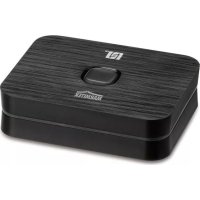
BoomBoom 93 - Bluetooth Receiver MARMITEK - Free user manual and instructions
Find the device manual for free BoomBoom 93 MARMITEK in PDF.


User questions about BoomBoom 93 MARMITEK
0 question about this device. Answer the ones you know or ask your own.
Ask a new question about this device
Download the instructions for your Bluetooth Receiver in PDF format for free! Find your manual BoomBoom 93 - MARMITEK and take your electronic device back in hand. On this page are published all the documents necessary for the use of your device. BoomBoom 93 by MARMITEK.
USER MANUAL BoomBoom 93 MARMITEK
1 Table of contents 3
2 Safety instructions. 4
3 Your product. 5
3.1 Introduction 5
3.2 Package contents 6
3.3 Product overview 6
3.4 LED status 8
4 Getting started. 8
4.1 Connecting to your audio system 8
4.1.1 Analogue 8
4.1.2 Digital 9
4.2 Power supply 9
4.3 Pairing 9
4.3.1 Pairing | First smartphone 10
4.3.2 Pairing | Up to 8 smartphones 10
4.4 Connecting 10
4.4.1 Multipair Party mode 11
4.4.2 Secure Simple Pairing (SSP) with NFC 11
4.4.3 aptX and aptX Low latency 11
4.5 Music playback 12
4.5.1 From a single smartphone 12
4.5.2 From two smartphones 12
4.6 Standby 12
4.7 Switching on/off 12
5 Product details 13
5.1 Technical specifications 13
6 Frequently asked questions (FAQs) 14
7 Notification 17
7.1 Declaration of Conformity 17
7.2 Recycling 18
7.3 Copyrights 18
2 Safety instructions
Please read these instructions thoroughly before you use the device and keep them for future reference.
- Only for indoor use.
- Do not use the product in a damp environment or near water.
- Do not expose the product to extremely high or low temperatures, strong light sources or direct sunlight.
- This product is not a toy. Keep out of reach of children.
- Connect the adapter to the mains only after you have verified that the line voltage corresponds to the value specified on the type plates.
- Never connect a power adapter if it's damaged. In such cases, please contact your supplier.
- Never open the product: the device may contain parts with deadly voltage.
- Repairs or service should only be performed by qualified personnel.
- Disconnect the AC/DC power adapter from the mains when this device is not in use for prolonged time.
- Improper use, self-installed modifications or repairs will void any and all warranties.
- Marmitek does not accept any product responsibility for incorrect use of the product or use other than for which the product is intended.
- Marmitek does not accept liability for any consequential damage other than the legal product responsibility.
3 Your product
3.1 Introduction
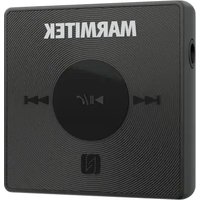
Congratulations on your purchase of the Marmitek BoomBoom 93. This Bluetooth music receiver enables you to transmit the music from a Bluetooth technology-enabled audio source (e.g. a smartphone, tablet or PC/laptop with Bluetooth dongle) wirelessly to your audio system. In this document, we will use 'smartphone' whenever we refer to such an audio source. You can then control your music via the smartphone, without having to go up to your audio system.
The BoomBoom 93 supports:
SBC
- aptX and aptX Low Latency
NFC
The BoomBoom 93 can remember 8 paired smartphones and allows simultaneous connection to 2 smartphones: Multipair Party mode. The Marmitek BoomBoom 93 provides ample range to operate music in the same or an adjacent room.
Marmitek BoomBoom 93 aptX Bluetooth music receiver:
- Listen to music or internet radio from your smartphone or (tablet) PC on your HiFi installation wirelessly.
- Suitable for all Bluetooth® enabled sound sources such as iPhone, Android phone, iPad, etc.
- Stream your music via Bluetooth to your HiFi system
- Rapid switching between up to 2 connected smartphones or tablets: Multipair Party mode.
- Listen to high-quality music through aptX ®, aptX® Low Latency and digital optical audio output.
- Works with any audio equipment, sound dock, etc with analog or digital input line.
- With NFC Quick link for a fast and easy connection.
3.2 Package contents
A. 1x BoomBoom 93
B. 1x Micro USB power cable
C. 1x USB power adapter
D. 1x Mini-jack adapter cable
E. 1x Mini-jack cable
F. 1x User manual
3.3 Product overview
A
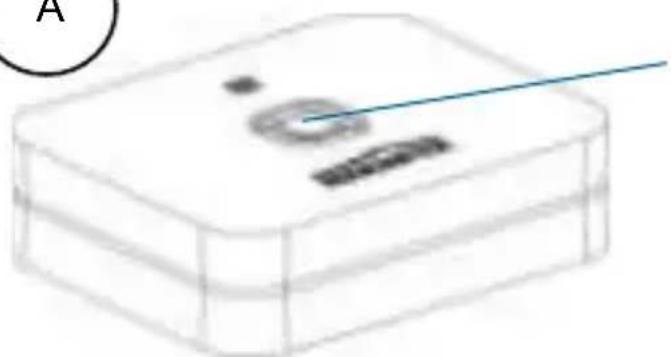
Power button

Audio cable connector
Micro USB power cable connector
TOSLINK connector
Optical/analogueswitch


Micro USB power cable
This cable enables you to power the BoomBoom 93.
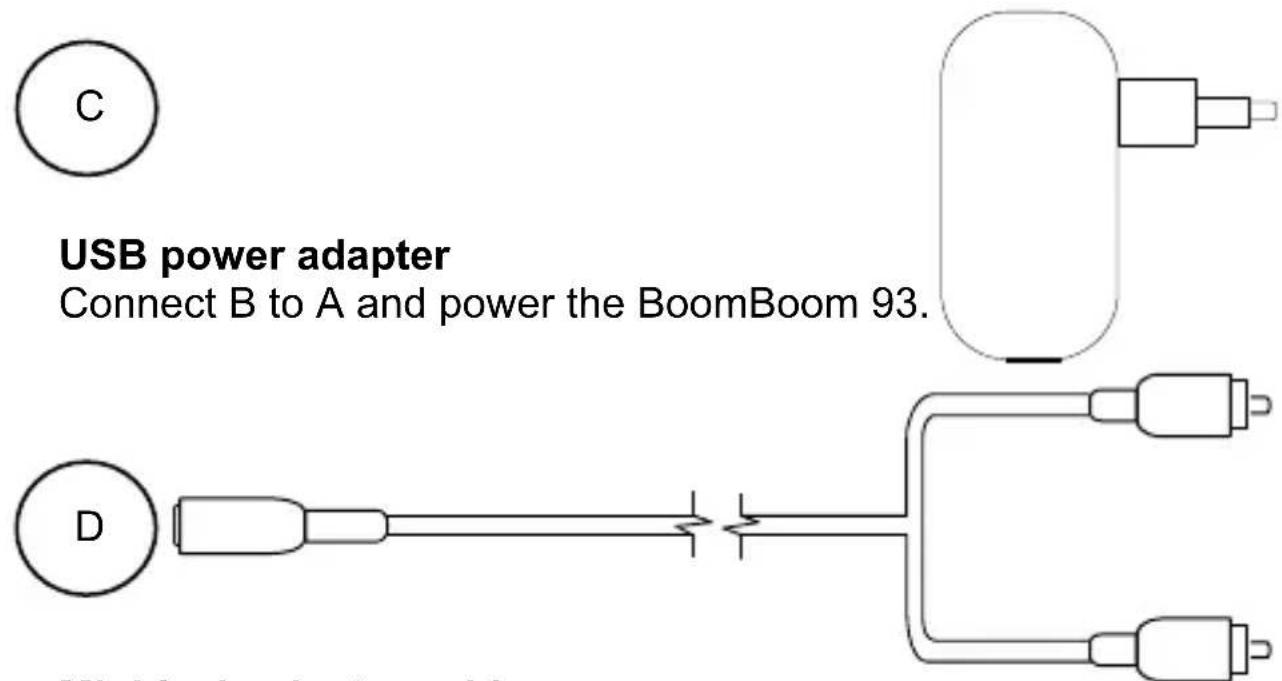
Mini-jack adapter cable
This cable enables you to connect the BoomBoom 93 to the audio input (right-left) of your TV or audio system.


Mini-jack cable
This cable is plugged into the BoomBoom 93's audio output and is then connected to D.
3.4 LED status
| LED status | Description |
| Blue LED flashing | Pairing mode |
| Blue LED lit continuously | Paired |
| Green LED flashing | aptX connection |
| Green LED lit continuously | aptX Low latency connection |
4 Getting started
Please take the following steps before using the product:
- Connect the BoomBoom 93 to your audio system
Power the BoomBoom 93 - Turn the BoomBoom 93 on
- Pair the BoomBoom 93 with a Bluetooth-enabled smartphone
- Enjoy!
We will now explain this step by step.
4.1 Connecting to your audio system
You can connect the Marmitek BoomBoom 93 in two ways: ANALOGUE or DIGITAL.
4.1.1 Analogue
- Docking speaker/radio/cd player: Use the mini-jack cable (E) to connect the BoomBoom 93 (audio output) to a docking speaker or radio/cd player (audio input: AUX IN)
- Audio system: Use the mini-jack adapter cable (D) to connect the BoomBoom 93 (audio output) to your audio system (AUX IN Cinch/RCA). Check the manual of your audio system how to do this.
Then turn the switch between the optical connection and the analogue connection to the analogue position.
4.1.2 Digital
When you want to connect the BoomBoom 93 digitally, you'll need to have a TOSLINK cable. This is not included.
- Connect one side of the TOSLINK cable to the optical output of the BoomBoom 93 and the other side to the digital audio input (TOSLINK) of your audio system. Check the manual of your audio system how to do this.
Then turn the switch between the optical connection and the analogue connection to the optical position.
4.2 Power supply
Connect the Micro USB power cable (B) to the BoomBoom 93 (power connector) and to the USB power adapter (C). Plug the USB power adapter into the wall outlet. The LED will flash slowly. The BoomBoom 93 is now ready to be paired with your smartphone.
4.3 Pairing
To pair the Marmitek BoomBoom 93, it is necessary that the BoomBoom 93 is switched on, properly connected and powered. The BoomBoom 93 can remember up to 8 paired smartphones. Re-pairing with each subsequent connection is not required. If a 9th smartphone is paired with the BoomBoom 93, the first smartphone that was paired with the BoomBoom 93 will be erased from its memory.
4.3.1 Pairing | First smartphone
- Please check that the BoomBoom 93 is switched on.
- Hold your (Bluetooth-enabled) smartphone near the BoomBoom 93 (< 1m).
- A blue LED on the front of the BoomBoom 93 will flash.
- Activate Bluetooth on your audio source and then go to its Bluetooth settings.
- Then scan for new devices and select the name "BoomBoom 93".
- If the Bluetooth pairing request asks for a password, enter "0000". The BoomBoom 93 will then pair with your smartphone and the blue LED will light up. Pairing was successful and your smartphone is now connected to the BoomBoom 93. You can now play and control audio from your smartphone on your audio system.
NOTE: Up to 2 (Bluetooth-enabled) smartphones may be connected to the BoomBoom 93 simultaneously, and you can pair up to 8 smartphones.
4.3.2 Pairing | Up to 8 smartphones
When you want to pair multiple smartphones (max. 8), you must first disconnect the Bluetooth connection of the already connected smartphone(s). Then, follow the steps at 4.4.1 Multipair Party mode. When all the desired smartphones are paired, you can re-activate the Bluetooth connection on all audio sources.
4.4 Connecting
The BoomBoom 93 does not always automatically connect to the last smartphone it was paired with, this depends on the Bluetooth audio source that is used. To connect, go to the Bluetooth settings on your audio source and select "BoomBoom 93". A connection will be established; the blue LED is lit continuously. As long as no connection is established, the blue LED will flash slowly.
4.4.1 Multipair Party mode
You can allow up to 2 devices to connect to the BoomBoom 93 simultaneously; Multipair Party mode.
First, ensure that multiple devices are paired with the BoomBoom 93, following the steps in 4.3.1 and 4.3.2. Once paired, up to 2 audio sources may connect to the BoomBoom 93.
4.4.2 Secure Simple Pairing (SSP) with NFC
The BoomBoom 93 is equipped with Near Field Communication (NFC) If your smartphone also supports NFC, you can use this. On your smartphone, tick the box allowing applications to use NFC. Then, hold your smartphone near the N logo on the BoomBoom 93. The smartphone will automatically link and establish a Bluetooth connection. When you hold your phone near the N logo again, the link will be disconnected. So, when using NFC, you do not need to follow the individual steps Pairing and Connecting.
4.4.3 aptX® and aptX Low latency®
The Marmitek BoomBoom 93 features aptX® and aptX Low Latency®. If your Bluetooth audio source also supports this, an aptX® or an aptX Low Latency® connection will be established instead of an SBC connection. With an aptX® connection, the green LED will flash slowly; with an aptX Low Latency® connection, the green LED will be lit continuously. With an SBC connection, the green LED will be off.
4.5 Music playback
4.5.1 From a single smartphone
On the smartphone, select the music you want to play and press PLAY. The music will now be played on the audio system connected to the BoomBoom 93.
4.5.2 From two smartphones
The last smartphone to start the music obtains the right to play it via the connected audio system. If you want to play music from another (connected) smartphone, you only need to select and activate the music on this smartphone. The music of the smartphone that was initially playing will stop and the new music will be played.
4.6 Standby
The Marmitek BoomBoom 93 can be put in standby mode, leaving the BoomBoom 93 always ready for use. The product is on standby if the blue LED light flashes slowly. Please note that you always need to reconnect. The BoomBoom 93 does not always automatically connect to the last smartphone it was paired with.
4.7 Switching on/off
If you want to switch the BoomBoom 93 off or on, press the button on the BoomBoom 93 for 1 second. If the light turns blue, the BoomBoom 93 is on.
5 Product details
5.1 Technical specifications
Power supply: 230VAC +10% -10% 50Hz 5V 500mA via USB
Power consumption < 2.5W
Bluetooth frequency: 2.402-2.480GHz
Bluetooth version: V3.0+EDR
Bluetooth power class: Class 2
Supported Bluetooth
profiles: A2DP
Supported codec: SBC, aptX, aptX Low Latency.
Audio delay: SBC, aptX, minimum of 150ms aptx Low Latency, maximum of 40ms
Support multiple pair: Up to 8 devices.
Support Multipair
party mode Up to 2 devices simultaneously.
NFC support: Yes
Range: Up to 10 metres with Class 2
source.
Up to 30 metres with Class 1
source.
Audio output: 1 x DC3.5 female
1 x TOSLINK digital audio output
Dimensions (L x W x H) 80 x 63 x 20 mm
Weight: 55 grams
Operational temperature: -10^ +55^
Storage temperature: -20^ +60^
Signal to Noise Ratio: ≥ 80dB
aptX
The aptX audio codec is available for high quality stereo audio over Bluetooth.
- Compression ratio: 4:1
Max Data Rates: 352kbps. - Frequency range: 10Hz to 22kHz .
- Algorithmic delay: <1.89ms @ Fs 48KHz.
- Dynamic range: 16 bit: >92dB.
- THD+N: -68.8dB
If aptX is not available, the BoomBoom 93 will connect using SBC.
With a view to further improving the product, Marmitek retains the right to change specifications and/or designs without prior notice.
6 Frequently asked questions (FAQs)
I cannot pair my BoomBoom 93.
Please note the following:
- Ensure that the mains adapter is connected and the blue LED is flashing slowly.
- Ensure that the Bluetooth feature on your mobile phone is on. (Please check your smartphone's manual for reference).
- Ensure that the distance between your smartphone and the BoomBoom 93 does not exceed 10 metres and there are no major obstacles between them.
- Make sure the BoomBoom 93 is not already connected to another device. (In which case the blue LED will be lit continuously.)
There is no sound coming from my audio system
Ensure that the audio cable is connected properly (AUX IN), the correct input is selected on your audio system, the correct output is selected using the switch at the back of the BoomBoom 93, and the volume of your audio system is set to the desired level.
Can I pair multiple devices with my BoomBoom 93?
You can pair up to 8 devices. Only 2 devices can be simultaneously connected to the BoomBoom 93.
What happens if my device is out of the BoomBoom 93's range?
If the connected Bluetooth device is out of the BoomBoom 93's range, the blue LED on the BoomBoom 93 will turn off and the connection will be broken. If you get back within the BoomBoom 93's range within 15 seconds, the connection will be automatically restored. If it takes longer than 15 seconds to get back within the BoomBoom 93's range, you must reconnect to the BoomBoom 93.
How can I disconnect the Bluetooth connection on the BoomBoom 93?
Press the button on top of the BoomBoom 93 for 1 second. The BoomBoom 93 will now switch off and your connections will be broken.
Press this button again for 1 second to turn the BoomBoom 93 back on. You can now use your device, or another Bluetooth device, to reconnect to the BoomBoom 93, using the Bluetooth manager on your device.
What is SBC?
SBC (Low Complexity Subband Coding) enables you to wirelessly listen to audio with reasonable sound quality. SBC is the standard method to send audio via Bluetooth.
What is aptX?
AptX® enables you to wirelessly listen to CD quality audio. When your device is equipped with aptX, it is no longer necessary to use the entire bandwidth to transmit music via Bluetooth. A Bluetooth connection is a sort of data pipeline between different devices. This pipeline only has a maximum width and therefore it can sometimes be difficult to send large music files through it. AptX solves this problem by reducing the size of the music files being sent wirelessly via Bluetooth. The files can be sent through the wireless pipeline without affecting the quality of the files. This allows you to use aptX to listen to CD quality music anytime, anywhere. The BoomBoom 93's green LED will start to flash slowly with an aptX connection.
What is xptX Low Latency?
aptX Low Latency ensures a very short audio delay of less than 40 ms. With a regular Bluetooth connection, this is more than 100 ms. Both the transmitter and the receiver must have aptX Low Latency to be able to use this feature. With the BoomBoom 55 and 77, the LED lights up green to indicate an aptX Low Latency connection.
Do you have any other questions that have not been resolved by the above information? Please go to www.marmitek.com
7 Notification
7.1 Declaration of Conformity
CE
Hereby, Marmitek BV, declares that this
BoomBoom 93^TM is in compliance with the essential requirements and other relevant provisions of the
following Directives:
Directive 2014/30/EU of the European Parliament and of the
Council of 26 February 2014 on the harmonisation of the laws of the Member States relating to electromagnetic compatibility (recast)
Directive 2014/35/EU of the European Parliament and of the
Council of 26 February 2014 on the harmonisation of the laws of the Member States relating to the making available on the market of electrical equipment designed for use within certain voltage limits.
Directive 2014/53/EU of the European Parliament and of the
Council of 16 April 2014 on the harmonisation of the laws of the
Member States relating to the making available on the market of radio equipment and repealing Directive 1999/5/EC.
Directive 2011/65/eu of the European parliament and of the
council of 8 June 2011 on the restriction of the use of certain hazardous substances in electrical and electronic equipment.
Commission Regulation (EC) No 278/2009 of 6 April 2009
implementing Directive 2005/32/EC of the European Parliament and of the Council with regard to eco-design requirements for no-load condition electric power consumption and average active efficiency of external power supplies.
7.2 Recycling

Environmental Information for Customers in the European Union. European Directive 2002/96/EC requires that the equipment bearing this symbol on the product and/or its
packaging must not be disposed of with unsorted municipal waste. The symbol indicates that this product should be disposed of separately from regular household waste streams. It is your responsibility to dispose of this and other electric and electronic equipment via designated collection facilities appointed by the government or local authorities. Correct disposal and recycling will help prevent potential negative consequences to the environment and human health. For more detailed information about the disposal of your old equipment, please contact your local authorities, waste disposal service, or the shop where you purchased the product.
7.3 Copyrights
Marmitek is a trademark of Pattitude B.V. BoomBoom 93^TM is a trademark of Marmitek B.V. All rights reserved. Every effort has been made to ensure that the information in this manual is accurate. Marmitek is not responsible for printing or clerical errors. Copyright and all other proprietary rights in the content (including but not limited to model numbers, software, audio, video, text and photographs) rests with Marmitek B.V. Any use of the Content, but without limitation, distribution, reproduction, modification, display or transmission without the prior written consent of Marmitek is strictly prohibited. All copyright and other proprietary notices shall be retained on all reproductions. Other company and product names mentioned herein may be trademarks of their respective companies. Mention of third-party products is for informational purposes only and constitutes neither an endorsement nor a recommendation. Marmitek assumes no responsibility with regard to the performance or use of these products.
Marmitek BV - PO Box 4257 - 5604 EG Eindhoven
The Netherlands
SBC
- aptX et aptX Low Latency
NFC
aptX Low Latency, maximum 40 ms
SBC
- aptX y aptX Low Latency
NFC
Soporta céecs: SBC, aptX, aptX Low Latency
Retraso del audio: SBC, aptX, 150 ms como minimum aptX Low Latency, 40 ms como
maximo
SBC
- aptX e aptX Low Latency
NFC