USER MANUAL Remote controller CARRIER
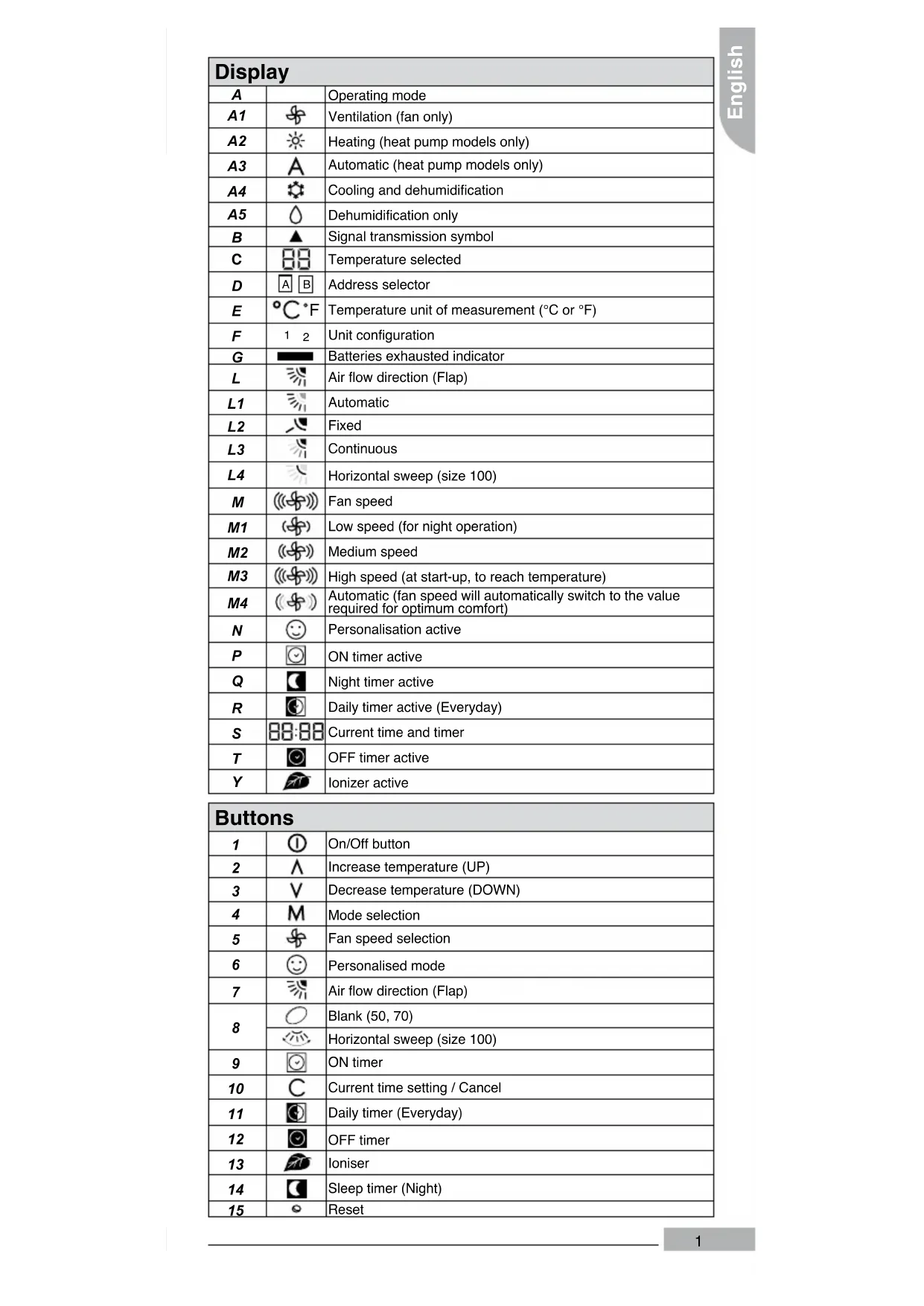
| Display |
| A | | Operating mode |
| A1 | | Ventilation (fan only) |
| A2 | | Heating (heat pump models only) |
| A3 | | Automatic (heat pump models only) |
| A4 | | Cooling and dehumidification |
| A5 | | Dehumidification only |
| B | | Signal transmission symbol |
| C | | Temperature selected |
| D | | Address selector |
| E | | Temperature unit of measurement (°C or °F) |
| F | | Unit configuration |
| G | | Batteries exhausted indicator |
| L | | Air flow direction (Flap) |
| L1 | | Automatic |
| L2 | | Fixed |
| L3 | | Continuous |
| L4 | | Horizontal sweep (size 100) |
| M | | Fan speed |
| M1 | | Low speed (for night operation) |
| M2 | | Medium speed |
| M3 | | High speed (at start-up, to reach temperature) |
| M4 | | Automatic (fan speed will automatically switch to the value required for optimum comfort) |
| N | | Personalisation active |
| P | | ON timer active |
| Q | | Night timer active |
| R | | Daily timer active (Everyday) |
| S | | Current time and timer |
| T | | OFF timer active |
| Y | | Ionizer active |
| Buttons |
| 1 | ① | On/Off button |
| 2 | ∧ | Increase temperature (UP) |
| 3 | ∨ | Decrease temperature (DOWN) |
| 4 | M | Mode selection |
| 5 | ⊗ | Fan speed selection |
| 6 | ◎ | Personalised mode |
| 7 | ∇ | Air flow direction (Flap) |
| 8 | ○ | Blank (50, 70) |
| ∇ | Horizontal sweep (size 100) |
| 9 | ◎ | ON timer |
| 10 | C | Current time setting / Cancel |
| 11 | ◎ | Daily timer (Everyday) |
| 12 | ◎ | OFF timer |
| 13 | ◎ | Ioniser |
| 14 | ◎ | Sleep timer (Night) |
| 15 | ○ | Reset |
This manual contains information on how to use the air conditioner with the infrared remote controller.
Please refer to the Installation Operation and maintenance manual of the indoor unit for routine maintenance and for additional operating info.
The maximum operating range for the remote control is approx. 5m No obstructions such as curtains or plants should be between control and unit.
Direct sun on the unit receiver may interfere with good signal reception. The control must be directed toward the unit receiver when pressing the buttons of the desired functions. An acoustical acknowledgement sound (beep) will indicate that signal has been received.
The symbol [G] in the display, indicates that the batteries are exhausted and need to be replaced.
How to change batteries
The remote control operates with two 1.5 V non-re-chargeable alkaline batteries (1.5 V, LR03x2).
Do not use used batteries or batteries of different types, as this may cause the unit to malfunction.
The average battery life during normal use is approximately one year.
1) Open the cover of the battery compartment at the back of the remote control by pushing the tab in the direction of the arrow (see picture C).
2) Remove the used batteries and insert new batteries.
3) Place the battery cover and push it to close.
4) Reset the remote control by pressing the reset button [15] with a sharp object (see picture B).
Note: If the air conditioner does not respond to the remote control, repeat the battery change operation and press the reset button [15] again after 5 seconds.
| Start / Stop |
| 1 ① |
| When the air conditioner is not in operation, the remote control readout will display the time of day only (in case other symbols are lit, turn control off by pressing button [1]). |
| 1 | Press button [1] to start the air conditioner. All selected and memorized functions will light up and appear; the unit will operate according to the functions selected. |
| 2 | Press button [1] to stop the air conditioner. All indicators on the unit will go out, and the control will display only the current time. |
| Note | The unit will only emit a “beep”, when the signals are received correctly. If the unit does not stop, turn the control on (by pressing button [1]) and repeat the operation. If button [1] (air conditioner starting) is pressed too soon after a stop, the compressor will not start for 3/5 minutes due to the inherent protection against frequent compressor cycling. |
| Setting current time |
| 10C2 3A5 V | 88:88 |
| 1 | With the remote control ON or OFF, press button [10] for at least 5 seconds.
The displayed current hour [S] figure flashes. |
| 2 | Press either button [2] or [3] to set the desired value. |
| 3 | Press button [10] to confirm. The minutes figure flashes. |
| 4 | Press either button [2] or [3] to set the desired value. |
| 5 | Once the current time is set, press button [10] to confirm. |
English
| Operating mode selection |
| 4 M1 A2 A3 A4 A5 | A 0 |
| By repeatedly pressing button [4] the available modes will be selected in sequence.
The choosen mode is shown on the display as follows, while the unit will acknowledge signal receipt with a confirming beep. |
| 1a | [A1] Ventilation (fan only) |
| 1b | [A3] Automatic (set the right mode for the desired temperature) |
| 1c | [A4] Cooling with dehumidification |
| 1d | [A5] Dehumidification only |
| 1e | [A2] Heating (if available) |
| Temperature setting |
| 2^3 ∨ E | 88 °C·F |
| Press the UP [2] and DOWN [3] buttons to increase or decrease the temperature from the previously set value. |
| Note | The unit will confirm signal receipt with a beep, and the value of the set temperature on the display will change accordingly. The temperature can be set between 17°C (63°F) and 32°C (90°F) at 1 degree intervals. In cooling mode, if the temperature selected is higher than the room temperature the unit will not start; the same applies for the heating mode, if the selected temperature is lower than the room temperature. |
| Air flow direction |
| 7 L2 L3 | |
| The air flow direction can be adjusted to optimize air distribution in the room. |
| 1 | Press button [7] repeatedly to choose one of the following louvre positions. |
| 1a | Automatic [L1 flashing] - Air direction will be set automatically. Louvre will be set to the preset position according to the operation mode. |
| 1b | Fixed [L2 fixed]- 6 positions can be chosen.
The louvre can be set to one of 6 different air flow directions. |
| 1c | Continuous [L3 swinging] - Will continuously swing up and down.
“Swing” always assures optimal even air distribution in the room. |
| Horizontal sweep |
| 8.14. | |
| 1 | Press button to start the continuous left and right horizontal swing . |
| 2 | Press button to stop the horizontal swing. The vertical flap will stop at the current position. |
| Note | Horizontal sweep can be combined with air flow direction [7]. |
| Fan speed selection |
| 501 M2 M3 M4 | () () () () () |
| The air flow intensity can be adjusted to optimize air distribution in the room. |
| 1a | [M1] Low speed (for night operation) |
| 1b | [M2] Medium speed |
| 1c | [M3] High speed (at start-up, to reach temperature) |
| 1d | [M4] Automatic (fan speed will automatically switch to the value required for optimum comfort) |
| Personalisation (myComfort) |
| 6 ② 3/4 5/7 M8 N8 | ◎ |
| Memorise the desired operating parameters of the unit, with the possibility to recall them any time.
The unit can be either off or in operation.
After 10 seconds without pressing any button, the procedure will stop and the remote control display resume its original state. |
| 1 | Press button [6] and hold it pressed for 5 seconds. On the display the icon [N] start flashing. |
| 2 | Operating mode selection.
Choose the unit operating mode with button [4] (refer to Operating mode section).
Confirm the desired mode by pressing [6]. Temperature displayed [C] start flashing. |
| 3 | Temperature selection.
Set the desired temperature with the UP [2] and DOWN [3] buttons.
Confirm the temperature by pressing [6]. Fan speed [M] start flashing. |
| 4 | Fan speed selection.
Choose the fan speed with button [5] (refer to Fan speed section).
Confirm by pressing [6]. Air flow direction [L] start flashing. |
| 5 | Air flow selection.
Choose the air flow direction with button [7] (refer to Air flow section).
Confirm by pressing [6]. Personalisation icon [N] will stop flashing. |
| 6 | Press button [6] to activate the personalisation function. Icon [E] displayed signal the daily timer activation. |
| Note | To change the parameter repeat the procedure from step 1.
To deactivate the personalisation press one of the following buttons: [2],[3],[4],[5],[13]. |
English
| ON timer procedure |
| 9 2 3/4 5/7 Mo P Sa C | |
| Program the start-up time and the desired operating parameters of the unit.
The unit can be either off or in operation. If the unit is ON, the only possible selection is the start-up time. The unit will operate with the selections shown on the display.
After 10 seconds without pressing any button, the procedure will stop and the remote control disply resume its original state. |
| 1 | Press button [9].
On the display the icon [N] and the hour value start flashing. |
| 2 | Time selection.
Set the hours with buttons [2] and [3]. Confirm by pressing [9],
the minutes value start flashing.
Set the minutes with [2] and [3]. Confirm the desired time by pressing [9]. Mode icon [A] start flashing. |
| 3 | Operating mode selection.
Choose the unit operating mode with button [4] (refer to Operating mode section).
Confirm the desired mode by pressing [9]. Temperature displayed [C] start flashing. |
| 4 | Temperature selection. Set the desired temperature with the UP [2] and DOWN [3] buttons. Confirm the temperature by pressing [9]. Fan speed [M] start flashing. |
| 5 | Fan speed selection. Choose the fan speed with button [5] (refer to Fan speed section). Confirm by pressing [9]. Air flow direction [L] start flashing. |
| 6 | Air flow selection. Choose the air flow direction with button [7] (refer to Air flow section). Confirm by pressing [9]. On timer icon [P] will stop flashing. |
| Note | During the procedure press [10] to step back and cancel the parameters inserted. To cancel timer setting push button [9] followed by button [10]. When the ON Timer function is operating, the unit senses the room air temperature 1 hour before the start-up time. The unit start might be delayed by 0 to 40 minutes, depending on the temperature difference between the room and the selected temperature. |
| OFF timer procedure |
| 12 3/0 V C | |
| Program the switch-off time of the unit.
The unit can be either off or in operation.
After 10 seconds without pressing any button, the procedure will stop and the remote control display resume its original state. |
| 1 | Press button [12].
On the display the icon [T] and the hour value start flashing. |
| 2 | Time selection.
Set the hours with buttons [2] and [3]. Confirm by pressing [9], the minutes value start flashing.
Set the minutes with [2] and [3]. Confirm the desired time by pressing [10].
Off timer icon [T] will stop flashing. |
| Note | To cancel timer setting push button [12] followed by button [10]. |
| Daily timer |
| 11 | |
| The ON and OFF timer memorization will be repeated everyday.
The unit can be either off or in operation. |
| 1 | Press button [11] to activate or activate the daily timer function.
Icon [R] displayed signal the daily timer activation. |
| Sleep timer procedure |
| 14 3 A Q V | C |
| Program the elapsing time before automatic switch off.
The unit must be in operation.
After 10 seconds without pressing any button, the procedure will stop and the remote control display resume its original state. |
| 1 | Press button [14]. On the display icon [Q] start flashing.
Time indication will change into “1 hr”. |
| 2 | Set the elapsing time with buttons [2] and [3].
The time displayed will increase or decrease accordingly by 1 hour with a maximum of 9 hours.
Confirm the desired time by pressing [14]. Sleep timer icon [Q] will stop flashing. |
| Note | When the SLEEP timer is set, the unit will control the set temperature to avoid overcooling or overheating during operation.
The set temperature will change as follows:
Cooling and dehumidification
SET TIME
Heating
30 70 110 150 TIME (MIN.) |
| Ionizer function |
| 13 | |
| 1a | With the remote control ON, press button [13] to activate the ionizer function.
The icon [Y] appear |
| 1b | Press button [13] to deactivate the ionizer function.
The icon [Y] disappear. |
The manufacturer reserves the right to change any product specifications without notice.