SC3225 - Air Conditioning ZIBRO - Free user manual and instructions
Find the device manual for free SC3225 ZIBRO in PDF.



User questions about SC3225 ZIBRO
0 question about this device. Answer the ones you know or ask your own.
Ask a new question about this device
Download the instructions for your Air Conditioning in PDF format for free! Find your manual SC3225 - ZIBRO and take your electronic device back in hand. On this page are published all the documents necessary for the use of your device. SC3225 by ZIBRO.
USER MANUAL SC3225 ZIBRO
(ON -> Stop -> Start anlaegget)
Rengoring at luftfilteret
L CONDITIONS DE GARANTIE
Congratulations on the purchase of your Zibro air conditioner. You have acquired a high
quality product that, if used responsibly, will give you many years of pleasure.
Please read these instructions for use first in order to ensure the maximum life span of your air conditioner.
On behalf of the manufacturer, we provide a 24-month guarantee on all material and
production defects and a 48-month guarantee on the compressor of the air conditioner.
Please enjoy your air conditioner.
Yours sincerely,
PVG Holding b.v.
Customer service department
- READ THE DIRECTIONS FOR USE FIRST.
- IN CASE OF ANY DOUBT, CONTACT YOUR DEALER.
GB
CONTENTS
A SAFETY INSTRUCTIONS
B. PARTS NAMES
C. OPERATING TEMPERATURE
D. MANUAL OPERATION
E. OPERATION WITH REMOTE CONTROL
F. OPTIMAL OPERATION
G. ADJUSTING AIR FLOW DIRECTION
H. HOW THE AIR CONDITIONER WORKS
I. MAINTENANCE
J. OPERATION TIPS
K. TROUBLESHOOTING TIPS
L. GUARANTEE CONDITIONS
M. TECHNICAL DATA
READ THIS MANUAL
Inside you will find many helpful hints on how to use and maintain your air conditioner properly. You will find many answers to common problems in the chapter Troubleshooting Tips. If you review chapter K "Troubleshooting Tips" first, you may not need to call for service.
A SAFETY INSTRUCTIONS
Install this device only when it complies with local/national legislation, ordinances and standards. This product is intended to be used as an air conditioner in residential houses and is only suitable for use in dry locations, in normal household conditions, indoors in living room, kitchen and garage. Check the mains voltage and frequency. This unit is on suitable for earthed sockets, connection voltage 230V /50Hz . Model S(C)3248 has to be connected directly to the supply source.

IMPORTANT
- The device MUST always have an earthed connection. If the power supply is not earthed, you may not connect the unit. The plug must always be easily accessible when the unit is connected. Read these instructions carefully and follow the instructions.
- The air conditioner contains a refrigerant and can be classified as pressurized equipment. Therefore always use an authorized air conditioning engineer for installation and maintenance of the air conditioner. The air conditioner must be inspected and serviced on an annual base by an authorized air conditioning engineer. Or the warranty might be void.
Before connecting the unit, check the following:
- The voltage supply must correspond with the mains voltage stated on the rating label.
- The socket and power supply must be suitable for the current stated on the rating label.
- The plug on the cable of the device must fit into the wall socket.
- The device must be placed and mounted on a stable surface.
The electricity supply to the device must be checked by a recognised professional if you have any doubts regarding the compatibility.
- This device is manufactured according to CE safety standards. Nevertheless, you must take care, as with any other electrical device.
- Do not cover the air inlet and outlet grill.
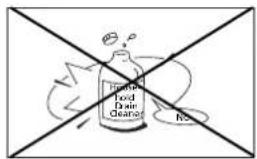
- Never allow the device to come into contact with chemicals.
- Never spray the unit with or submerge in water. Turn off the unit and disconnect the power supply if water enters the indoor unit.
- Do not insert hands, fingers or objects into the openings of the unit.
- Never use an extension cable to connect the device to the electric power supply. If there is no suitable, earthed wall socket available, have one installed by a recognised electrician.
- Have any repairs and/or maintenance only carried out by a recognised service engineer or your recognised supplier. Follow the instructions for use and maintenance as indicated in the user manual of this device.
- Always interrupt the power supply when the appliance is not in use.
- A damaged power cord or plug must always be replaced by a recognised electrician or your supplier.
- Do not operate or stop the air conditioner by inserting or pulling out the power plug. Only use the dedicated buttons on the air conditioner or on the remote control.
- Do not open the air conditioner when it is in operation. Always pull out the electrical plug when opening the device.
- Always pull out the electrical plug when cleaning or servicing the air conditioner.
- Do not place gas burners, ovens and/or stoves in the airstream.
- Do not operate the buttons or touch the air conditioner with wet hands.
- Note that the outdoor unit produces sound when in use, this could interfere with local legislation, it is the
GB
responsibility of the user to check and to make sure the equipment is in full compliance with local legislation.
- This appliance is not intended for use by persons (including children) with reduced physical, sensory or mental capabilities, or lack of experience and knowledge, unless they have been given supervision or instruction concerning use of the appliance by a person responsible for their safety.
- Children should be supervised to ensure that they do not play with the appliance.
- It is advised to stay out of the direct air stream.
- Never drink the drain water from the air conditioner.
- Do not make any modifications to the unit. Do not remove insulating material.


ATTENTION!
- Never use the device with a damaged power cord, plug, cabinet or control panel.
- Failing to follow the instructions may lead to nullification of the guarantee on this device.
B PART NAMES
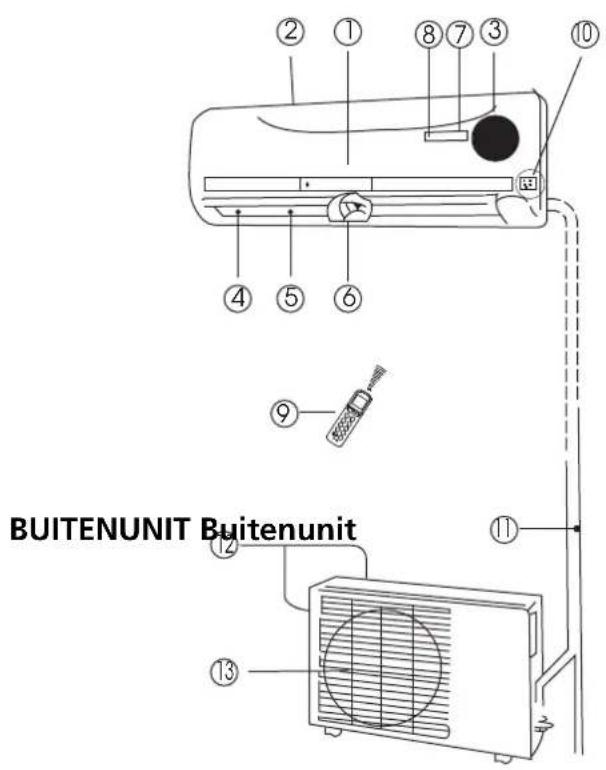
INDOOR UNIT Indoor unit
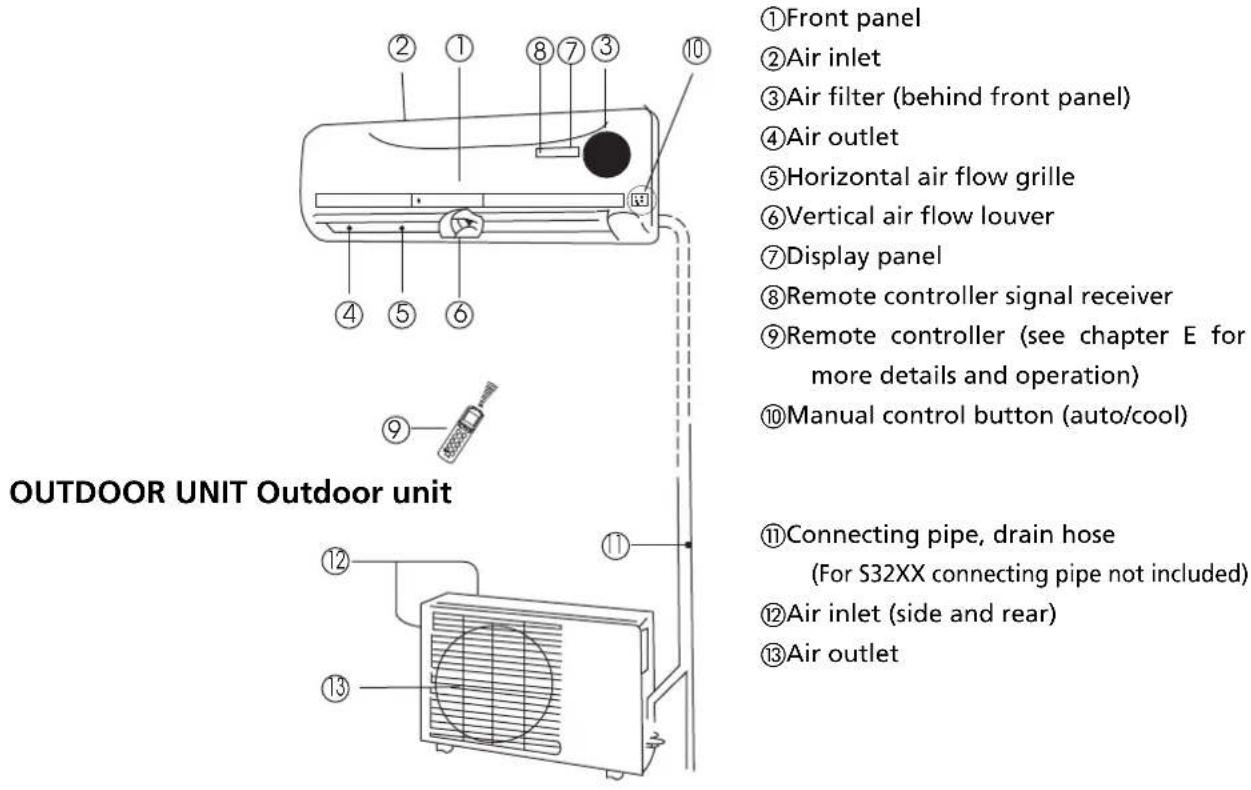
The operation indicator lights flash rapidly (five times per second) when safety protection features come into operation.
NOTE!
All the pictures in this manual and on the gift box are for explanation and indication purpose only. They may be slightly different from the air conditioner you purchased. The actual shape shall prevail.
FUNCTION INDICATORS ON INDOOR UNIT DISPLAY PANEL
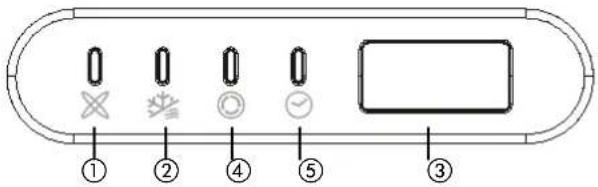
① AUTO indicator
This indicator illuminates when the air conditioner is in AUTO operation.
②DEFROST indicator
This indicator illuminates when the air conditioner starts defrosting automatically or when the warm air control feature is activated in heating operation.
③TEMPERATURE indicator
Displays the temperature settings when the air conditioner is operational.
④ OPERATIONindicator
This indicator flashes after power is on and illuminates when the unit is in operation.
⑤TIMERindicator
This indicator illuminates when TIMER is set ON/OFF.
Cooling, heating and / or dehumidifying are effective at the following indoor and outdoor temperatures:
| Temperature Mode | Cooling operation Heating operation Dehumidifying operation | |
| Room temperature 17°C - 32°C 10°C - 30°C 17°C - 32°C | ||
| Outdoor temperature 0°C - 50°C -15°C - 30°C 0°C - 50°C | ||

CAUTION
- If air conditioner is used outside of the above conditions, certain safety protection features may come into operation and cause the unit to function abnormally.
- Room relative humidity less than 80% . If the air conditioner operates in excess of a relative humidity of 80% in the room, the surface of the air conditioner may attract condensation. Please set the vertical air flow louver to its maximum angle (vertically to the floor), and set HIGH fan mode.
- For maximum effect of your air conditioner always close doors and windows when cooling or heating.
D MANUAL OPERATION
The air conditioner can be operated manually on the air conditioner itself as well as with the remote control included. For operation with the remote control please refer to chapter E "Operation with Remote Control". When operating without the remote control the air conditioner will only work in the AUTO-mode. For operation without the remote control follow these instructions:
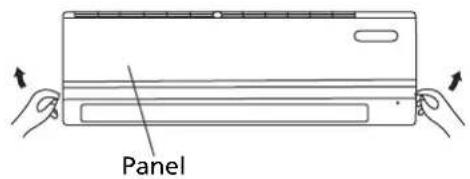
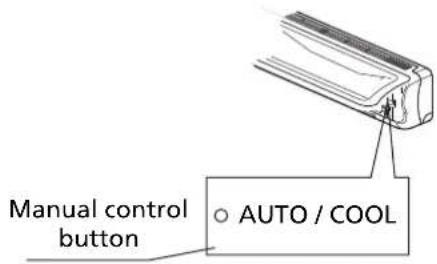
- Open and lift the front panel up to an angle until it remains fixed with a clicking sound.
- One press of the manual control button will lead to the AUTO operation.
- Close the panel firmly to its original closed position.

CAUTION
- Once you push the manual button, the operation mode is shifted in an order as: AUTO, COOL, OFF.
- Push the button twice within 5 seconds, the unit will operate in forced COOL mode. This is used for testing purposes only.
- Third press will stop the operation and turn off the air conditioner operation.
- To restore the remote controller operation, use the remote controller directly.
NOTE!
- Always aim the remote controller towards the receiver on the indoor unit and make sure there are no obstacles in between the remote control and the receiver on the indoor unit. Otherwise the remote control signal will not be picked up by the receiver and the air conditioner will not work properly.
- The maximum distance at which the remote control will work is approximately 6 to 7 meters.
NOTE!
Keep the remote controller where its signal can reach the receiver of the unit. When you select the timer operation, the remote controller automatically transmits a signal to the indoor unit at the specified time. If you keep the remote controller in a position that hinders proper signal transmissions, a time lag of up to 15 minutes may occur.
Introduction of Function Buttons on the Remote Controller
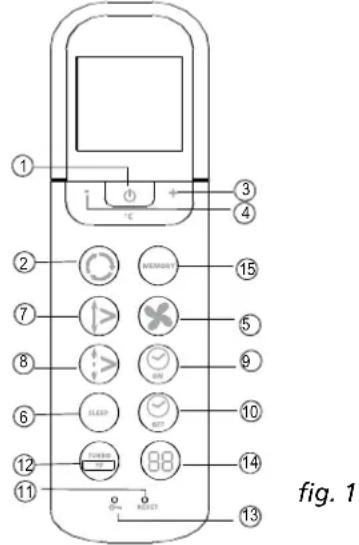
fig. 1
① On/off Button: Push this button to start the unit operation. Push the button again to stop the unit operation.
② Mode Button: Each time you press the button, a mode is selected in a sequence that goes from AUTO COOL DRY HEAT and FAN only as the following figure indicates:

③ + Button: Push the button to increase the indoor temperature setting to 30^ .
- Button: Push the button to decrease the indoor temperature setting to 17^ .
⑤ Fan Button: This button is used for selecting Fan Speed. Each time you press the button, a fan speed is selected in a sequence that goes from AUTO, LOW, MED to HIGH, then back to Auto. When you select the AUTO or DRY mode, the fan speed will be automatically controlled and you can not set the fan speed.
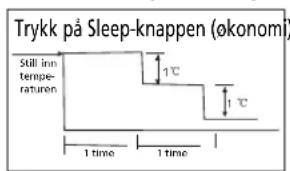
⑥ SLEEP Button: Press this button to go into the Energy-Saving operation mode. Press it again to cancel. This function can only be used on COOL, HEAT and AUTO mode and maintain the most comfortable temperature for you.
NOTE: While the unit is running under SLEEP operation mode, it would be cancelled if you press the other button.
⑦ Swing Button: Press the SWING button to activate the swing feature. Push the button again to stop.
GB
Air direction Button: Press this button to change the swing angle of the louver. The swing angle of the louver is 6^ for each press. When the louver swings at a certain angle which would affect the cooling and heating effect of the air conditioner, it would automatically change the swing direction. No symbol will appear in the display area when press this button.
⑨ Timer on Button: Press this button to initiate the auto-on time sequence. Each press will increase the auto-timed setting in 30 minutes increments. When the setting time displays 10Hr , each press will increase the auto-timed setting 60 minutes increments. To cancel the auto-timed program, continue pressing the button until 0.0 is displayed.
Timer off Button: Press this button to initiate the auto-off time sequence. Each press will increase the auto-timed setting in 30 minutes increments. When the setting time displays 10Hr , each press will increase the auto-timed setting 60 minutes increments. To cancel the auto-timed program, continue pressing the button until 0.0 is displayed.
⑪ RESET Button: When you press the recessed RESET button, all current settings are cancelled and the control will return to the initial settings.
② Indoor Freezing prevention / Turbo Button: Push this button on COOL mode, the air conditioner goes into powerful cooling operation. Push again to cancel the TURBO function. Upon pressing this button (> 2 seconds) the unit will go into the freezing prevention mode. The unit will overrule the indoor temperature setting and will set it to approx 8^ . In this way preventing your home from freezing during cold periods at the lowest possible energy consumption. When this mode is selected the indoor unit display will show "FP". This button can only be operated in heating mode. To leave the Home Freezing Prevention Mode: simply press the button once again.
③ LOCK Button: When you press the recessed LOCK button, all current settings are locked in and the remote controller does not accept any operation except that of the LOCK. Press again to cancel the LOCK mode.
④ LED DISPLAY Button: Press this button to clear the digit display in the air conditioner, press it again to activate it (Not applicable to units without this function).
念 Memory Button: Used to restore the manufacturing default setting or to resume a memorised setting. - when the remote control is not yet programmed by the user the manufacturer default memory is "auto" mode at 24^ with "auto" fan speed. Upon pressing the memory button the unit will change its setting to "auto" mode at 24^ with "auto" fan speed
-
after the user has changed the setting to his choice (for example heating, low fan and 25^ ) this user setting can be placed in the memory of the Remote control by pressing the memory button by more than 2 seconds.
-
when the indoor unit is in any random setting, pressing the memory button for less than 2 seconds will have the result that the indoor unit will move to the setting as programmed in the remote control memory
Names and Functions of indicators on Remote Controller
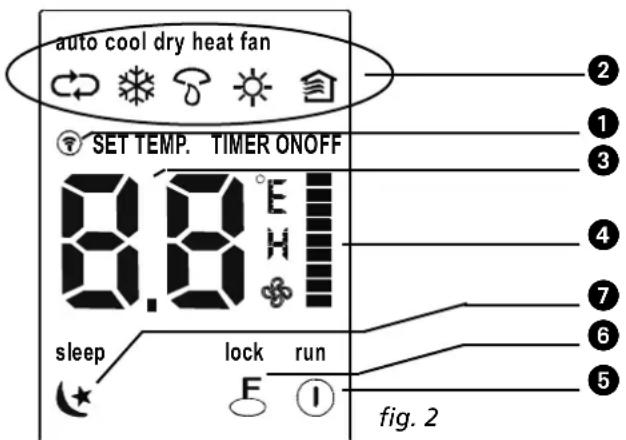
① Transmission indicator: This transmission indicator lights when remote controller transmits signals to the indoor unit.
② Mode display: Displays the current operation mode. Including Auto 心 , Cool 心 , Dry 心 , Heat 心 (Not applicable to cooling only models), Fan 心
③ Temp. / Timer display: Displays the temperature setting (17^ 30^) . When you set the operating mode to FAN, no temperature setting is displayed. And if in the TIMER mode, shows the ON and OFF settings of the TIMER.
④ Fan speed display: Displays the selected fan speed, AUTO (no display), LOW , MED I and HIGH I. The fan speed is AUTO when the operating mode is either AUTO or DRY.
ON/OFF display. Displayed by pressing the ON/OFF button. Press the ON/OFF button again to remove.
⑥Lock display: Displayed when LOCK mode is activated.
⑦ Sleep display. Displayed under sleeping operation. Press the SLEEP button again to remove.
NOTE!
All items are shown in the Fig. 2 for the purpose of clear presentation. But during the actual operation only the relative functional items are shown on the display panel.
Operating the Remote Controller
Install / Replace Batteries
Use two dry alkaline batteries (AAA/LR03).
Do not use rechargeable batteries.
- Remove the battery cover on the back of the Remote Control by pulling it according to the arrow direction shown on the cover.
- Insert new batteries making sure that the (+) and (-) of battery are installed correctly.
- Reattach the cover by sliding it back into position.
NOTE!
- When the batteries are removed, the remote controller erases all programming. After inserting new batteries, the remote controller must be reprogrammed.
- When replacing batteries, do not use old batteries or a different type battery. This may cause the remote controller to malfunction.
- If you do not use the remote controller for several weeks remove the batteries. Otherwise battery leakage may damage the remote controller.
- The average battery life under normal use is about 6 months.
- Replace the batteries when there is no answering beep from the indoor unit or if the Transmission Indicator light fails to appear.
- Never mix new and old batteries. Never use different battery types (e.g. alkaline and manganese dioxide) simultaneously.
AUTOMATIC Operation
When the air conditioner is ready for use (check if unit is plugged in and whether electrical power is available), switch on the power and the OPERATION indicator lamp on the display panel of the indoor unit starts flashing.
- Use the Mode select button to select AUTO.
- Push the + or - button to set the desired room temperature.
- Push the On/off button to start the air conditioner. The OPERATION lamp on the display panel of the indoor unit lights. The operating mode is AUTO. The FAN SPEED is automatically controlled.
- Push the On/off button again to stop the unit operation.
GB
NOTE!
- In the AUTO mode, the air conditioner can logically choose the mode COOL, FAN, HEAT and DRY by sensing the difference between the actual ambient room temperature and the set temperature on the remote controller.
- If the AUTO mode is not comfortable for you, the desired mode can be selected manually.
COOL, HEAT, and FAN ONLY Operation
- If the AUTO mode is not comfortable, you may manually override the settings by using COOL, DRY, HEAT (HEAT PUMP units only), or FAN ONLY modes by pressing button ②.
- Push the + or - button (③ and ④) to set the desired room temperature. When in COOLING mode, the most comfortable settings are 21^ C or above.
- Push the Fan button ⑤ to select the FAN mode of AUTO, HIGH, MED or LOW.
- Push the On/off button ①. The operation lamp lights and the air conditioner starts to operate per your settings. Push the On/off button ① again to stop this unit operation.
NOTE!
The FAN ONLY mode cannot be used to control the temperature. In this mode, only steps 1, 3 and 4 are applicable.
DRY Operation
- Push the Mode button ② to select DRY.
- Push the + or - button (3 and 4) to set the desired temperature.
- Push the On/off button ①. The operation lamp lights and the air conditioner starts to operate in the DRY mode. Push the On/off button ① again to stop this unit operation.
NOTE!
Due to the difference of the set temperature of the unit and the actual indoor temperature, the air conditioner when in DRY mode will automatically operate many times without running the COOL and FAN mode.
TIMER Operation
Push Timer on/off button (9) and (10) to set the on and off times of the unit. The effective operation time set by the remote controller for the timer function is limited to a period of between 0.5 and less than 24 hours.
1. To set the STARTING time.
1.1 Push the Timer on button ⑨ , then the remote controller display shows ON TIMER, the last set time for the starting operation and the signal "h" will be shown on the Timer display area. You are now ready to reset the time to START the operation.
1.2 Push the Timer on button ⑨ again to set desired unit start time.
1.3 After setting the Timer on, there will be half a second delay before the remote controller transmits the signal to the air conditioner.
2. To set the STOPPING time.
2.1 Push the Timer off button ⑩ and the remote controller display will show OFF TIMER and the last set time for the timer off operation in hours will be shown on the Timer display area. You are now ready to reset the time of the STOP operation.
2.2 Push the Timer off button ⑩ again to set the time you want to stop the operation.
2.3 After setting the Timer off, there will be half a second delay before the remote controller transmits the signal to the air conditioner.
GB
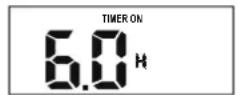
Example of timer setting
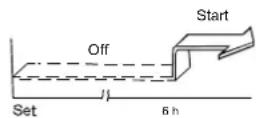
To start the air conditioner in 6 hours.
- Press the TIMER ON button, the last setting of starting operation time and the signal "h" will show on the display area.
- Press the TIMER ON button to display "6:0h".
- Wait for one second and the digital display area will show the temperature again. The "TIMER ON" indicator remains on and this function is activated.
Combined timer
(setting both ON and OFF timers simultaneously)
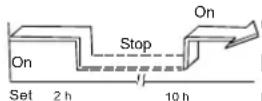
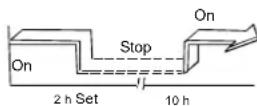
(On --> Stop --> Start operation)

This feature is useful when you want to stop the air conditioner after you go to bed, and start it again in the morning when you wake up or when you return home.
Example:
To stop the air conditioner 2 hours after setting and start it again 10 hours after setting.
- Press the TIMER OFF button.
- Press the TIMER OFF button again to display 2.0h on the TIMER OFF display
- Press the TIMER ON button
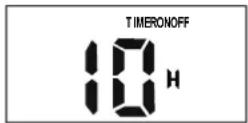
- Press the TIMER ON button again to display 10h on the TIMER ON display
- Wait for one second and the digital display area will show the temperature again. The TIMER ON OFF indicator remains on and this function is activated.
NOTE!
- If the same time is set for both START and STOPPING settings, the stopping time will automatically increase 0.5hr (the set time displays less than 10hr) or one hour (the set time displays 10hr or more).
- To change the Timer on/off time, just press the corresponding TIMER button and reset the time.
- The setting time is relative time. That is the time set is based on the delay of the current time.

WARNING
- Keep the remote controller away from all liquids.
- Protect the remote controller from high temperatures and exposure to radiation.
- Keep the indoor receiver out of direct sunlight or the air conditioner may malfunction.
- Never mix new and old batteries. Never use different battery types (e.g. alkaline and manganese dioxide) simultaneously.
F OPTIMAL OPERATION
To achieve optimal performance, please note the following:
- Adjust the air flow direction correctly so that it is not directly directed to people.
- Adjust the temperature to achieve the highest comfort level. Do not adjust the unit to excessive temperature levels.
- Close doors and windows otherwise the desired effect may be reduced.
- Use TIMER ON button on the remote controller to select a time you want to start your air conditioner.
- Do not put any object near air inlet or air outlet, as the efficiency of the air conditioner may be reduced and the air conditioner may stop running. Make sure there are no obstacles blocking the air flow. The air stream must be allowed to reach the entire room unhindered. Also the air stream must be allowed to reach the air conditioner unhindered.
- Clean the air filter periodically, otherwise cooling or heating performance may be reduced. It is advised to clean the filters every two weeks.
- Do not operate unit with horizontal louvre in closed position.
G ADJUSTING AIR FLOW DIRECTION
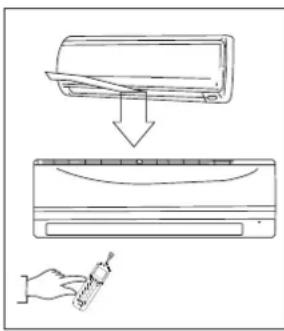
- Adjust the air flow direction properly otherwise, it might cause discomfort or cause uneven room temperatures.
- Adjust the horizontal louver using button ⑧ on the remote controller.
- Adjust the vertical louver manually.
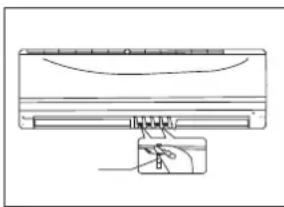
Adjusting the horizontal Air Flow Direction (up - down)
The air conditioner automatically adjusts the horizontal air flow direction in accordance with the operating mode.
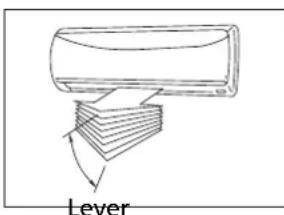
To set the horizontal air flow direction
Perform this function while the unit is in operation. Keep pressing the AIR DIRECTION button ⑧ on the remote controller to move the louver to the desired direction.
- Adjust the horizontal air flow direction to the desired direction.
- In subsequent operations, the horizontal air flow is automatically set in the direction to which you adjusted the louver by pressing the AIR DIRECTION button.
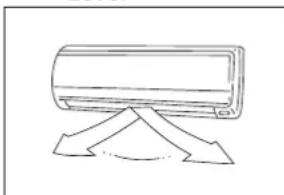
To set the vertical air flow direction (left - right)
Adjust the vertical louver manually using the lever on the left or right side of the vertical louver arm (depending on model). When the air conditioner is in operation and the vertical louver is in a specific position, move the lever at left (or right, depending on model) end of the air outlet to the desired position.

CAUTION!
Take care, do not touch the fan behind the vertical louvers!
NOTE!
All the pictures in this manual and on the gift box are for explanation and indication purpose only. They may be slightly different from the air conditioner you purchased. The actual shape shall prevail.
To automatically swing the air flow direction (up - down)
Perform this function while the air conditioner is in operation.
- Press the SWING ⑦ button on the remote controller.
- To stop the function, press the SWING button ⑦ again. Press AIR DIRECTION ⑧ button to lock louver in desired position.

CAUTION
- The AIR DIRECTION and SWING buttons will be disabled when the air conditioner is not in operation (including when the TIMER ON is set).
- Do not operate the air conditioner for long periods with the air flow direction set downward in cooling or dry mode. Otherwise, condensation may occur on the surface of the horizontal louver causing moisture to drop.
- Do not move the horizontal louver manually. Always use the AIR DIRECTION ⑧ or SWING button ⑦. If you move this louver manually, it may malfunction during operation. If the louver malfunctions, stop the air conditioner once and restart it.
- When the air conditioner is started immediately after it was stopped, the horizontal louver might not move for approximately 10 seconds.
- Open angle of the horizontal louver should not be set too small, as COOLING or HEATING performance may be impaired due to too restricted air flow area.
- Do not operate unit with horizontal louver in closed position.
- When the air conditioner is connected to power (initial power), the horizontal louver may generate a sound for 10 seconds, this is a normal operation.
COOLING
HEATING
DEHUMIDIFYING
AUTOMATIC OPERATION
- When you set the air conditioner in AUTO mode (button 2 on the remote controller), it will automatically select COOLING, HEATING or FAN only operation depending on what temperature you have selected and the room temperature.
- The air conditioner will control room temperature automatically round the temperature point set by you.
- If the AUTO mode is uncomfortable, you can select desired conditions manually.
SLEEP/ECONOMIC OPERATION
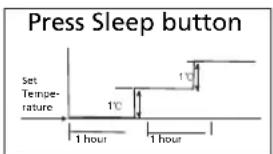
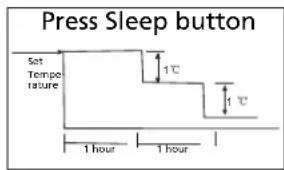
- When you push SLEEP button ⑥ during COOLING, HEATING or AUTO operation, the air conditioner will automatically increase (cooling) or decrease (heating) 1^ C per hour. The set temperature will be steady 2 hours later and remains steady for 5 hours. After 5 hours the unit will stop. The fan speed will be automatically controlled.
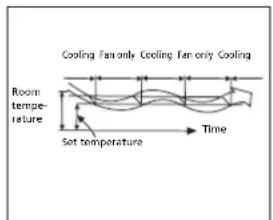
- The dehumidifying mode will automatically select the dehumidifying operation based on the difference between the set temperature and the actual room temperature.
- The temperature is regulated while dehumidifying by repeatedly turning on and off of the cooling operation or fan only. The fan speed is controlled automatically.
- In normal cooling operation the air conditioner will also dehumidify the air.
NOTE
When the air conditioner is dehumidifying it is likely that the room temperature will decrease. It is therefore normal that a hygrostat will measure a higher relative humidity. The absolute humidity in the room will however be lowered, depending on the amount of moisture produced in the room (cooking, people etc).
WARNING
It is necessary to stop the air conditioner and disconnect the power supply before cleaning.
Cleaning the indoor unit and remote controller
CAUTION
- Use a dry cloth to wipe the indoor unit and remote controller.
- A cloth dampened with cold water may be used on the indoor unit if it is very dirty.
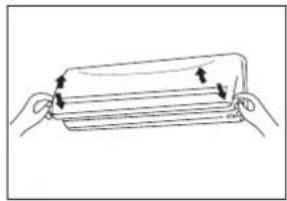
- The front panel of the indoor unit can be removed and cleaned with water. Then wipe it with a dry cloth.
- Do not use a chemically treated cloth or duster to clean the unit.
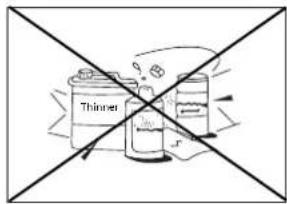
- Do not use benzine, thinner, polishing powder, or similar solvents for cleaning. These may cause the plastic surface to crack or deform.
Cleaning the filter
A clogged air filter reduces the cooling efficiency of this unit. Clean the filter once every 2 weeks.
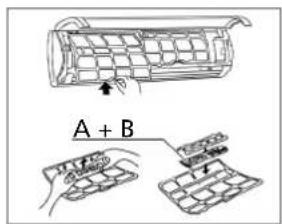
- Lift the indoor unit panel up to an angle until it stops with a clicking sound.
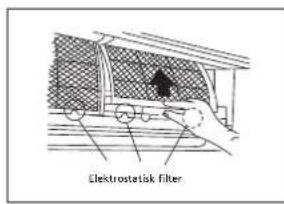
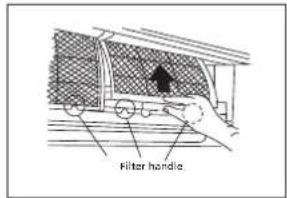
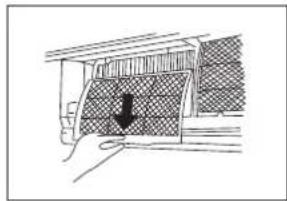
- Take hold of the handle of the screen filter and lift it up slightly to take it out from the filter holder, then pull it downwards.
-
Remove the screen filter from the indoor unit.
-
Clean the screen filter once every two weeks.
-
Clean screen filter with a vacuum cleaner or water.
-
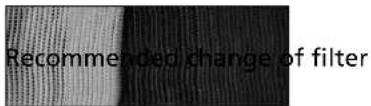
The black active carbon filter cannot be cleaned. This filter will simply not filter unpleasant odours anymore once dirty. At that moment this filter needs to be replaced by a new filter. (available at your dealer). It is advised to exchange this filter twice every season.
- The green coloured 3M HAF filter will show clear signs of dirt on and in the filter once dirty. When dirty this filter cannot be cleaned and needs to be replaced by a new filter (available at your dealer). It is advised to exchange this filter twice every season.
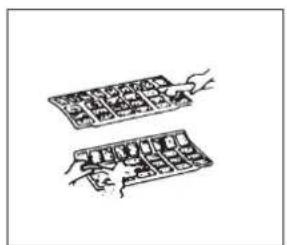
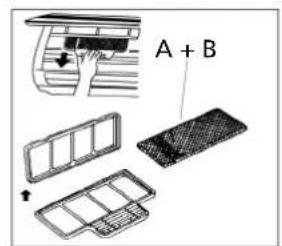
A+B=Active Carbon and/or 3M HAF Filter.
New filter
- After replacing the active carbon filter and the 3M HAF filter in the filter holder on the screen filter, the screen filter can be replaced into the air conditioner.
- Ensure before replacing that the filter is completely dry and has no defects.
- Install the air freshening filter back into position.
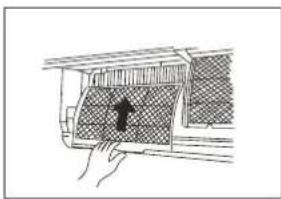
- Insert the upper portion of air filter back into the unit taking care that the left and right edges line up correctly and place filter into position.
GB
Maintenance
If you plan to idle the unit for a long time, perform the following:
-
Operate the fan for about 6 hours to dry the inside of the unit.
-
Stop the air conditioner and disconnect power. If model S(C)3248 is used, interrupt the power supply. Remove the batteries from the remote controller.
-
The outdoor unit requires periodic maintenance and cleaning. This should only be done by an authorized airconditioning engineer.
Checks before operation
- Check that the wiring is not broken or disconnected.
- Check that the air filter is installed.
- Check if the air outlet or inlet is not blocked after the air conditioner has not been used for a long time.
CAUTION
- Do not touch the metal parts of the unit when removing the filter. Injuries can occur when handling sharp metal edges.
- Do not use water to clean inside the air conditioner. Exposure to water can destroy the insulation, leading to possible electric shock.
- When cleaning the unit, first make sure that the power and circuit breaker are turned off.
J OPERATION TIPS
The following events may occur during normal operation.
- Protection of the air conditioner.
Compressor protection
- The compressor cannot restart for 3 minutes after it stops.
Anti-cold air
- The unit is designed not to blow cold air on HEAT mode, when the indoor heat exchanger is in one of the following three situations and the set temperature has not been reached.
A. When heating has just started.
B. Defrosting.
C. Low temperature heating
Defrosting
- The indoor or outdoor fan stops running when defrosting.
- Frost may be generated on the outdoor unit during heat cycle when outdoor temperature is low and humidity is high resulting in lower heating efficiency of the air conditioner.
During this condition air conditioner will stop heating operation periodically and start defrosting automatically. - The time to defrost may vary from 4 to 10 minutes according to the outdoor temperature and the amount of frost buildup on the outdoor unit.
GB
2. A white mist coming out from the indoor unit.
- A white mist may generate due to a large temperature difference between air inlet and air outlet on COOL mode in an indoor environment that has a high relative humidity.
- A white mist may generate due to moisture generated from defrosting process when the air conditior restarts in HEAT mode operation after defrosting.
3. Low noise of the air conditioner.
- You may hear a low hissing sound when the compressor is running or has just stopped running. This sound is the sound of the refrigerant flowing or coming to a stop.
- You can also hear a low "squeak" sound when the compressor is running or has just stopped running. This is caused by heat expansion and cold contraction of the plastic parts in the unit when the temperature is changing.
- A sound may be heard due to Louver restoring to its original position when power is first turned on.
4. Dust is blown out from the indoor unit.
- This is a normal condition when the air conditioner has not been used for a long time or during first use of the unit.
5. A peculiar smell comes out from the indoor unit.
This is caused by the indoor unit giving off smells permeated from building material, from furniture, or smoke.
6. The air conditioner turns to FAN only mode from COOL or HEAT mode.
-
When indoor temperature reaches the temperature setting on air conditioner, the compressor will stop automatically, and the air conditioner turns to FAN only mode. The compressor will start again when the indoor temperature rises on COOL mode or falls on HEAT mode to the set point.
-
Dripping water may generate on the surface of the indoor unit when cooling in a high relatively humidity (relative humidity higher than 80% ). Adjust the horizontal louver to the maximum air outlet position and select HIGH fan speed.
8. Heating mode
- The air conditioner draws in heat from the outdoor unit and releases it via the indoor unit during heating operation. When the outdoor temperature falls, heat drawn in by the air conditioner decreases accordingly. At the same time, heat loading of the air conditioner increases due to larger differences between indoor and outdoor temperature. If a comfortable temperature cannot be achieved by the air conditioner, it is advised to use a supplementary heating device.
9. Auto_restart function.
- Power failure during operation will stop the unit completely.
The air conditioner is equipped with Auto_restart feature, when the power restores, the unit restarts automatically with all the previous settings preserved by the memory function.
10. Refrigerant leak detection
- The air conditioner is provided with a Refrigerant leak detection system.
When the outdoor unit detects a shortage of refrigerant, the air conditioner will stop and the indoor unit shows the alarm EC on the display.
When this alarm occurs, do not restart the air conditioner and contact your supplier.
Malfunctions and Solutions
TROUBLE
Stop the air conditioner immediately if one of the following faults occur. Disconnect the power and contact your supplier.
- Fuse blows frequently or circuit breaker trips frequently.
- Other objects or water penetrate the air conditioner.
- The remote controller won't work or works abnormally.
- Other abnormal situations.
- Operation indicator flashes 5 times every second, even after mains electricity has been disconnected and reconnected.
| ProblemCauseSolution | ||
| Unit does not start | Power cut Wait for power to be restored. | |
| Unit may have become unplugged. | Check that plug is securely in wall receptacle. | |
| Fuse may have blown. | Replace fuse / reset relay / reset circuitbraker | |
| Battery in Remote controller may have been exhausted. | Replace the battery. | |
| Distance remote controller to receiver on the indoor unit is more than 6 to 7 meters, or there are obstacles in between the remote controller and the receiver. | Shorten the distance. Remove possible obstacles. Aim the remote controller towards the receiver on the indoor unit. | |
| The time you have set with timer is incorrect. | Wait or cancel timer setting. | |
| Unit stops and doesn't start anymore | Possible shortage of refrigerant Contact your supplier | |
| Unit not cooling or heating room very well while air flowing out from the air conditioner | Inappropriate temperature setting. | Set temperature correctly. For detailed method please refer to "operation with remote control" chapter E. |
| Air filter is blocked. Clean the air filter. | ||
| Doors or windows in room are open. Close | the doors or windows. | |
| Air inlet or outlet of indoor or outdoor unit has been blocked. | Clear obstructions away first, then restart the unit. | |
| Compressor 3 minutes delay protection has been activated. | Wait. | |
| Defrosting of outdoor unit being performed. | ||
| Fan speed cannot be changed | Airconditioner is in automode | Fan speed can only be changed in HEAT, COOL and FAN mode |
| Airconditioner is in dry mode | ||
| TEMP. Indicator is not shown | Airconditioner is in fan mode Temperature | cannot be set in FAN mode |
If the trouble has not been corrected, please contact your supplier. Be sure to inform them of the detailed malfunctions and unit model.
NOTE!
Reparation of the device should only be done by an authorized air conditioning engineer.
L GUARANTEE CONDITIONS
The air conditioner is supplied with a 48-month guarantee on the compressor and a 24-month guarantee on other components, commencing on the date of purchase. The following rules apply:
- We expressly refuse all further damage claims, including claims for collateral damage.
- Repairs to or replacement of components within the guarantee period will not result in an extension of the guarantee.
- The guarantee is invalidated if any modifications have been made, non genuine parts are fitted or repairs are carried out by third parties.
- Components subject to normal wear, such as the filter, are not covered by the guarantee.
- The guarantee is valid only when you present the original, dated purchase invoice and if no modifications have been made.
- The guarantee is invalid for damage caused by neglect or by actions that deviate from those in this instruction booklet.
- Transportation costs and the risks involved during the transportation of the air conditioner or air conditioner components shall always be for the account of the purchaser.
- Damage caused by not using suitable filters is not covered by the guarantee.
- Refrigerant loss and/or leakage because of incompetent (dis)connecting of the units and/or (dis-) connection of the units by not qualified personnel is not covered by the guarantee conditions applicable to this product. Damage to units which are mounted, connected and/or disconnected not following local law and/or legislation and/or not following the guidelines in this manual is not covered by the guarantee conditions applicable to this product.
Consult your dealer for repairs if these instructions do not provide a solution. Make sure that in the unlikely case of needed disconnection, that disconnection is always done by qualified, authorized personnel and according to your local laws and legislation.
M TECHNICAL DATA
| Model S 3225 | SC 3225 S 3231 | SC 3231 S 3246 SC 3248 | ||||||
| Type air-conditioner Wall mounted split | Wall mounted split Wall mounted split | Wall mounted split Wall mounted split | ||||||
| Cooling capacity* W 2500 (820 - 3370) | 2500 (790 - 3280) | 3100 (880 - 4040) | 3100 (850 - 3920) | 4800 (1470 - 6150) | 4500 (1320 - 5530) | |||
| EE Class* Average season | A | A | A | A | A+ | A+ | ||
| SEER* | 5.5 | 5.3 | 5.4 | 5.1 | 5.6 | 5.6 | ||
| Heating capacity* | W | 2900 (820 - 3460) | 2700 (800 - 3350) | 3300 (880 - 4160) | 3200 (850 - 4050) | 4900 (1520 - 6590) | 4900 (1470 - 6390) | |
| Heating performance average season | A | A | A | A | A | A | A | |
| SCOP* | 3.4 | 3.4 | 3.4 | 3.4 | 3.4 | 3.4 | 3.4 | |
| Dehumidifying capacity (at 32°C/80%)** / *** | L / 24 h | 24 | 24 | 26 | 26 | 41 | 41 | |
| Design load (capacity) in cooling mode | kW | 0.92 | 0.92 | 1.10 | 1.11 | 1.77 | 1.77 | |
| Design load (capacity) in heating mode | kW | 0.92 | 0.92 | 1.15 | 1.15 | 1.50 | 1.50 | |
| Indicative annual electricity consumption during cooling season (Qce) / heating season | kWh | 165 / 1187 | 175 / 1210 | 199 / 1373 | 222 / 1374 | 303 / 2000 | 281 / 2018 | |
| Power supply | V / Hz / Ph | 230/- / 50 / 1 | 230/- / 50 / 1 | 230/- / 50 / 1 | 230/- / 50 / 1 | 230/- / 50 / 1 | 230/- / 50 / 1 | |
| Current (nom.) cooling / heating | A | 4 / 4 | 4 / 3.8 | 4.8 / 5.0 | 4.8 / 5.0 | 7.7 / 6.5 | 7.7 / 6.5 | |
| Max. Current | A | 9 | 9 | 11 | 11 | 12 | 12 | |
| Air flow** | m3/h 500 | 450/400 | 400/350/320 | 550/440/380 | 500/400/350 | 800/750/610 | 730/680/560 | |
| For rooms up to** | m3 | 60-85 | 60-85 | 80-100 | 80-100 | 125-145 | 125-145 | |
| Declared suitable regions (W/A/C) | W / A / C | W / A / C | W / A / C | W / A / C | W / A / C | W / A / C | ||
| Compressor type | Rotary | Rotary | Rotary | Rotary | Rotary | Rotary | ||
| Fan speeds | 3 | 3 | 3 | 3 | 3 | 3 | ||
| Thermostatic range | °C | 0-50 | 0-50 | 0-50 | 0-50 | 0-50 | 0-50 | |
| Operating range | °C | -15 - +30 | -15 - +30 | -15 - +30 | -15 - +30 | -15 - +30 | -15 - +30 | |
| Controls manual / mechanical / electronic | Electronic remote | Electronic remote | Electronic remote | Electronic remote | Electronic remote | Electronic remote | ||
| Remote control Yes / No | Y | Y | Y | Y | Y | Y | ||
| Air filter type(s) | Screen, Active car- bon, 3M HAF | Screen, Active car- bon, 3M HAF | Screen, Active car- bon, 3M HAF | Screen, Active car- bon, 3M HAF | Screen, Active car- bon, 3M HAF | Screen, Active car- bon, 3M HAF | ||
| Refrigerant type / charge | K / g | R410A / 730 | R410A / 700 | R410A / 800 | R410A / 800 | R410A / 1250 | R410A / 1250 | |
| Refrigerant GWP | 1975 | 1975 | 1975 | 1975 | 1975 | 1975 | ||
| Refrigerant pipe diameter Liquid - Gas | mm | 6.35 / 9.53 | Quick Connector 635 / 9.53 | Quick Connector 635 / 12.7 | Quick Connector | |||
| Normal pressure suction / discharge (excess- ve) | bar | 8 / 26 (15 / 42) | 8 / 26 (15 / 42) | 8 / 26 (15 / 42) | 8 / 26 (15 / 42) | 8 / 26 (15 / 42) | 8 / 26 (15 / 42) | |
| Dimensions indoor unit (w x h d) | mm | 710x250x190 | 710x250x190 | 790x275x196 | 790x275x196 | 930x275x198 | 930x275x198 | |
| Dimensions outdoor unit (w x h d) | mm | 780x540x250 | 780x540x250 | 780x540x250 | 780x540x250 | 760x590x285 | 760x590x285 | |
| Net weight indoor unit | kg | 7 | 13 | 8 | 14 | 9 | 14 | |
| Net weight outdoor unit | kg | 30 | 30 | 30 | 30 | 35 | 35 | |
| Gross weight indoor unit | kg | 9 | 15 | 10 | 16 | 12 | 19 | |
| Gross weight outdoor unit | kg | 32 | 32 | 32 | 32 | 37 | 37 | |
| Sound power level indoor unit*** | dB(A) | 53 | 53 | 54 | 54 | 57 | 58 | |
| Sound power level outdoor unit*** | dB(A) | 62 | 62 | 61 | 61 | 65 | 65 | |
| Sound power level indoor unit*** | IP | IP20 | IP20 | IP20 | IP20 | IP20 | IP20 | |
| Unit protection indoor | ||||||||
| Unit protection outdoor | IP | IP24 | IP24 | IP24 | IP24 | IP24 | IP24 | |
| Fuse rating | T3.15A / 250V | T3.15A / 250V | T3.15A / 250V | T3.15A / 250V | T3.15A / 250V | T3.15A / 250V | ||
- EN 14511-2011/EN 14825
To be used as indication
* Moisture removal at 32^, 80% RH
*** EN 12108-2008
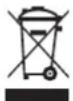
Waste electrical products and batteries should not be disposed with household waste. Please recycle where facilities exist. Check with your local authority or retailer for recycling advice.
Environmental information: This equipment contains fluorinated greenhouse gases covered by the Kyoto Protocol. It should only be serviced or dismantled by professional trained personnel.
This equipment contains R410A refrigerant in the amount as stated in the table above. Do not vent R410A into atmosphere: R410A, is a fluorinated greenhouse gas with a Global Warming Potential (GWP) = 1975
Internet:
For your convenience you can download the latest version of the user-, installation- and/or service manual on www.zibro.com
Gentile signora, egregio signore,
-(On -> Stop -> Start)
(Pa -> Stopp -> Start)
HEATING (OPPVARMING)
BINNENUNIT Binnenunit
(Aan -> Stop -> Start)
(Pa -> Stopp -> Starta drift)
(On -> Stop -> Start operation)
Customer service department
- ÖNCE KULLANMA TALIMATLARINI OKUYUN.
- HERHANGI SÜPHE DURUMUNDA, BAYINIZLE TEMAS KURUN.
TR
ICINDEKILER
A. GÜVENLIK TALIMATLARI
B. PARÇA ISIMLERI
C. ISLEM SICAKLIGI
D. ELLE CAlISTIRMA
E. UZAKTAN KUMANDAYLA ÇALISTIRMA
F. OPTIMAL ISLEM
G. HAVA AKIS YÖNUNUN AYARLANMASI
H. KLIMA NASIL ÇALİŞIR
I. BAKIM
J. CALISMA IPUCLARI
K. ARIZA BULMA IPUCLARI
L. GARANTI KOSULLARI
M. TEKNIK VERILER
SLEEP/EKONOMIK CALISMA
K ARIZABULMA iPUCLARI
ArzalarveCzumleri