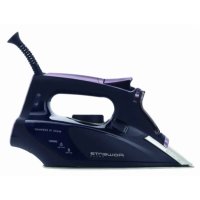
Focus DW5130 - Iron ROWENTA - Free user manual and instructions
Find the device manual for free Focus DW5130 ROWENTA in PDF.

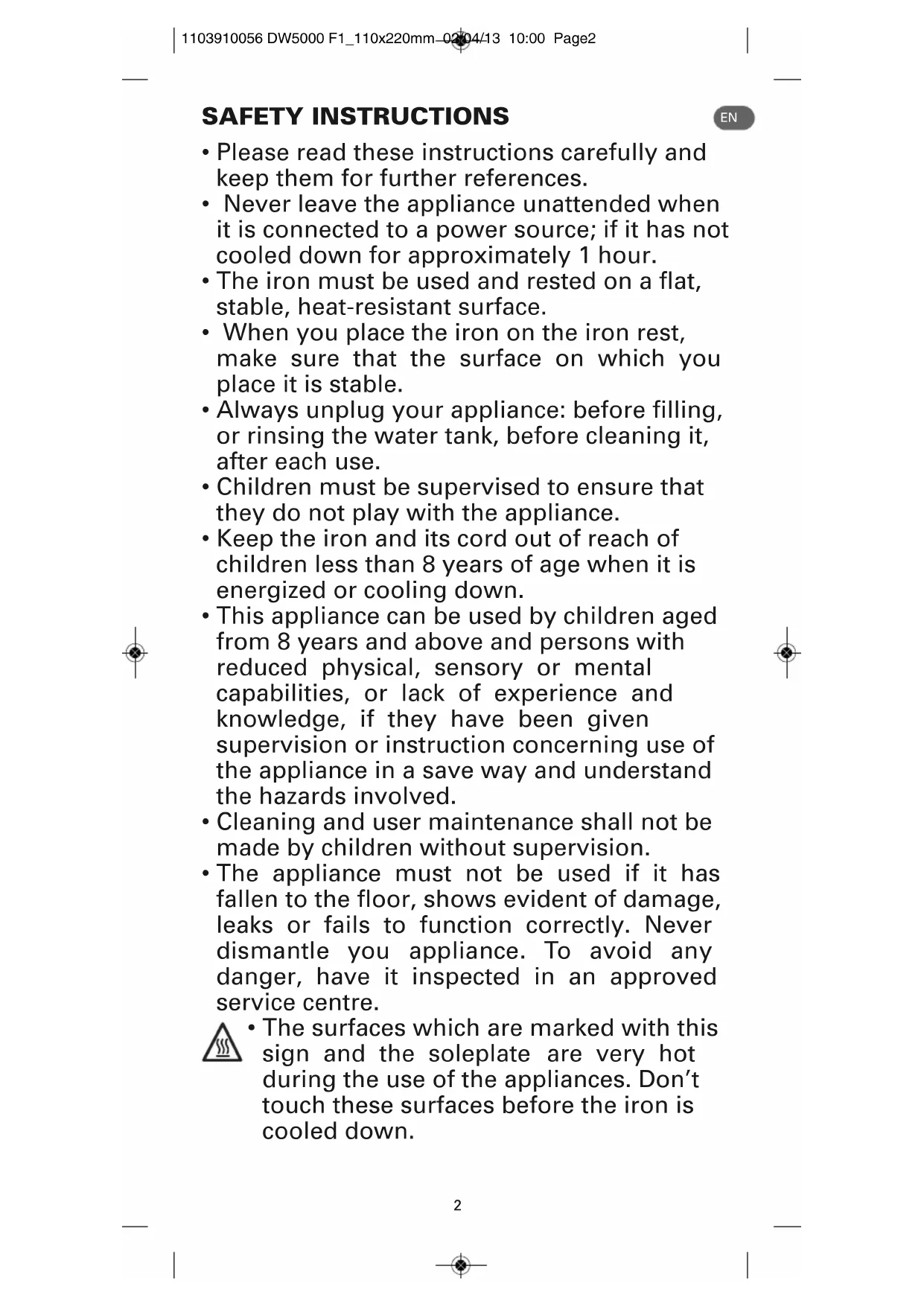


| Product type | Clothes iron |
| Brand | Rowenta |
| Model | Focus DW5130 |
| Power supply | 220-240 V, 16 A, grounded plug |
| Power | Not specified (estimate 2000-2400 W) |
| Water tank capacity | Approximately 300 ml (not specified, estimate) |
| Soleplate | Smooth soleplate (material not specified, estimate stainless steel or ceramic) |
| Anti-scale system | Integrated anti-scale cartridge, non-replaceable |
| Steam functions | Adjustable steam, steam burst, vertical steam burst, spray |
| Self-cleaning | Self Clean function (flushing the steam chamber) |
| Anti-drip | Anti-drip system preventing leaks at low temperature |
| Auto-off | 30 s on soleplate/side, 8 min on base |
| Recommended water type | Tap water up to 17°f, otherwise 50/50 mix with distilled water |
| Maintenance | Self Clean every 2 weeks, clean soleplate with damp cloth |
| Repairability | Have it inspected by an authorized Rowenta service center; do not disassemble yourself |
| Dimensions (L x W x H) | Not specified (estimate 30 x 12 x 15 cm) |
| Weight | Not specified (estimate 1.2 kg) |
| Color | Not specified |
| Warranty | Standard manufacturer's warranty (subject to conditions) |
Frequently Asked Questions - Focus DW5130 ROWENTA
User questions about Focus DW5130 ROWENTA
0 question about this device. Answer the ones you know or ask your own.
Ask a new question about this device
Download the instructions for your Iron in PDF format for free! Find your manual Focus DW5130 - ROWENTA and take your electronic device back in hand. On this page are published all the documents necessary for the use of your device. Focus DW5130 by ROWENTA.
USER MANUAL Focus DW5130 ROWENTA
- Please read these instructions carefully and keep them for further references.
- Never leave the appliance unattended when it is connected to a power source; if it has not cooled down for approximately 1 hour.
- The iron must be used and rested on a flat, stable, heat-resistant surface.
- When you place the iron on the iron rest, make sure that the surface on which you place it is stable.
- Always unplug your appliance: before filling, or rinsing the water tank, before cleaning it, after each use.
Children must be supervised to ensure that they do not play with the appliance. - Keep the iron and its cord out of reach of children less than 8 years of age when it is energized or cooling down.
- This appliance can be used by children aged from 8 years and above and persons with reduced physical, sensory or mental capabilities, or lack of experience and knowledge, if they have been given supervision or instruction concerning use of the appliance in a save way and understand the hazards involved.
- Cleaning and user maintenance shall not be made by children without supervision.
- The appliance must not be used if it has fallen to the floor, shows evident of damage, leaks or fails to function correctly. Never dismantle you appliance. To avoid any danger, have it inspected in an approved service centre.

- The surfaces which are marked with this sign and the soleplate are very hot during the use of the appliances. Don't touch these surfaces before the iron is cooled down.
IMPORTANT RECOMMANDATIONS
- The voltage of your electrical installation must correspond to that of the iron (220-240V). Always plug your iron into an earth socket. Connecting to the wrong voltage may cause irreversible damage to the iron and will invalidate the guarantee.
If you are using a mains extension lead, ensure that it is corrected rated (16A) with an earth, and is fully extended. - If the electric power cord is damaged, it must be replaced by an Approved Service Centre in order to prevent any danger.
- Do not unplug your appliance by pulling on the cord.
- Never immerse your steam iron in water or any other liquid. Never hold it under the water tap.
- Never touch the electric cord with the soleplate of the iron.
- Your appliance gives off steam, which may cause burns, especially when you are ironing close to the edge of your ironing board.
- Never direct the steam towards people or animals.
- For your safety, this appliance conforms to the applicable standards and regulations (Low Voltage, Electromagnetic Compatibility, Environmental Directives).
- This product has been designed for domestic use only. Any commercial use, inappropriate use or failure to comply with the instructions, the manufacturer accepts no responsibility and the guarantee will not apply.
ENVIRONMENT PROTECTION FIRST!
① Your appliance contains valuable materials which can be recovered or recycled.
Leave it at a local civic waste collection point.
Keep these instructions
DESCRIPTION
1 Spray nozzle
2 Filling inlet
(with slide-button opening)
3 Variable steam control
a Dry ironing
b Steam max. position
4 Self Clean
5 Spray button
6 Shot of steam button
7 Cord
8 Handle
9 Thermostat control light
10 Temperature control dial
11 Water tank
12 Maximum water level indicator
13 Soleplate
14 Auto-Off
BEFORE USE
WARNING! Remove any labels from the soleplate before heating up the iron.
WARNING! Before using your iron with the steam function for the first time, we recommend that you operate it in a horizontal position for a few moments, away from your linen, i.e. press the Shot of Steam button a few times.
Upon the first use, you may notice small particles coming out of the soleplate. This is parf of manufacturing process and is not harmful to you or your garments. It will disappear after several uses. You may accelerate this by using the self cleaning function (fig 5a - 5b) and shaking the iron gently.
1·What water may be used?
Your iron has been designed to operate using untreated tap water. If in doubt, check with your local water authority. However, if your water is very hard, you can mix 50% untreated tap water with 50% distilled or demineralised water.
IMPORTANT Heat concentrates the elements contained in water during evaporation. The types of water listed below contain organic waste or mineral elements that can cause spitting, brown staining or premature wear of the appliance : water from clothes dryers, scented or softened water, water from refrigerators, batteries or air conditioners, pure distilled or demineralised water or rain water should not be used in your iron. Also do not use boiled, filtered or bottled water.
IRONING BOARD: Due to the powerful steam output, a mesh type ironing board must be used to allow any excess steam to escape and to avoid steam venting sideways.
USE
2·Filling the water tank
IMPORTANT Before filling the water tank, unplug the iron and set the steam control to dry position.
Tilt the iron. Open the filling inlet (fig.6). Pour in water up to the max mark (fig.7). Close the filler inlet (fig.8) and return the iron to the horizontal.
3 - Temperature and steam adjustment
Set the iron temperature to suit the type of material using the temperature control dial (fig.3).
Temperature control*: The temperature control light indicates that the soleplate is heating up. When the temperature control light goes off (fig.10), the set temperature is reached and you can begin ironing.
| Ironing label Fabric | Temperature control | |
| Synthetic fibres, e.g. viscose, polyester... | ● | |
| Silk, wool | ●● | |
| Cotton, linen | ●●● | |
IMPORTANT The iron takes longer to cool down than to heat up. We recommend that you start with fabrics to be ironed at a low temperature.
For mixed fabrics set the temperature for the most delicate fabric.
TIP Always spray starch onto the reverse side of the fabric to be ironed.
4. Dry ironing
Set the variable steam control to (fig.11) and set the temperature to suit the type of material (care points · ,· · ,· · ·
5·Steam ironing
You can steam iron from temperature setting upwards.
Steam function*: The steam quantity can be set to between no steam (minimum steam quantity) and maximum steam quantity (fig.12).
We recommend setting to maximum steam quantity only when the iron is at temperature setting ·s .
6 - Shot of steam
(from temperature setting · · upwards)
Press the shot of steam button to generate a powerful jet of steam (fig.13).
Wait a few seconds between each shot before pressing the button again.
7 - Vertical shot of steam
(from temperature setting · · upwards)
TIP Hold the iron 10 to 20 centimetres away from the garment to avoid burning delicate fabrics.
Hold the iron to the vertical and press the shot of steam button (fig.14) to remove creases from suits, jackets, skirts, hanging curtains etc.
Wait a few seconds between each shot before pressing the button again.
IMPORTANT Never direct the steam at persons or animals!
8·Spray
Press the spray button to dampen stubborn creases (fig.15).
9 - Anti-Drip system*
This prevents water escaping from the soleplate when the temperature is too low.
10 • Automatic electronic 3-position cut-off*
If, although switched on, the appliance is not moved, it will automatically switch off and the auto off light will blink after the following intervals:
-
After 30 sec., if the iron is left resting on the the soleplate or lying on its side.
-
After 8 mins., if the iron is left resting on its heel.
To switch the iron back on, move the iron gently.
EN
AFTER USE
11·Emptying
Unplug the iron (fig.4), pour away remaining water (fig.16) and set steam control to
Open and close the steam control several times (fig.16) to prevent the valve hole into the steam chamber from scaling or blocking up.
12·Storing
Allow the appliance to cool down before storing the iron standing on its heel (fig.17/18).
IMPORTANT Do not wind the cord around the hot soleplate. Never store your iron placed down on the soleplate.
MAINTENANCE AND CLEANING
important Unplug and allow the iron to fully cool down before maintenance and cleaning.
13 - Anti-scale system
Your iron contains an anti-scale cartridge to reduce scale deposits. This considerably prolongs the operational life of your iron.
The anti-scale cartridge is an integral part of the water tank and does not need to be replaced.
14 • Self Clean function
(prolongs the life of the iron)
The Self Clean function flushes dirt and scale particles out of the steam chamber.
IMPORTANT Do not use descending agents, as these damage the lining of the steam chamber and so may impair the steam function.
Fill the water tank with untreated tap water up to the max mark and heat the iron to the ·s temperature. Unplug the iron and hold it over a sink horizontally. Hold the steam control into the Self Clean position (fig.5) and shake the iron gently: steam will now begin to build up. After a few seconds water will emerge from the soleplate, rinsing dirt and scale particles out of the steam chamber.
Move the steam control to position after approx. 1 minute.
Plug in the iron and allow the iron to heat up again. Wait until the remaining water has evaporated. Unplug from the mains and allow the iron to fully cool down.
When cool, the soleplate can be wiped with a damp cloth.
TIP Use the Self Clean function approx. every 2 weeks.
If the water is very hard, clean the iron weekly.
15 · Cleaning the iron
When the appliance has cooled down, wipe it down with a damp cloth or sponge, as required.
Remove the dirt from the soleplate with a damp cloth or sponge.
IMPORTANT Do not use sharp or abrasive cleaning agents or objects to clean soleplate and other parts of the iron. If the appliance has been standing unused for long periods, use the Self Clean function (see § 14).
PROBLEMS?
| Problems Cause | Solution | |
| The iron is plugged in, but the soleplate of the iron remains cold. | No mains supply. Check that | the mains plug is properly inserted or try plugging the iron into a different socket. |
| Temperature control set too low. | Set the temperature control to a higher temperature. | |
| The automatic electronic cut-off* is active. | Move your iron. | |
| Steam control set on dry position | Turn the steam control to the required setting area. | |
| Not enough water in the water tank. | Fill the water tank. | |
| Anti-Drip* is active (§ 11). | Wait for the soleplate to reach the correct temperature. | |
| Brown streaks come through the holes inthe soleplate and stain the linen. | Residues in the steam chamber or on the soleplate. | Use the Self Clean function then clean your iron. |
| Use of chemical descaling agents. | Do not add any descaling agents to the water in the water tank. Use the Self Clean function and clean your iron. | |
| Fabric fibres have accumulated in the holes of the soleplate and are burning. | Clean the soleplate with a non-metallic sponge. Vacuum the holes of the soleplate from time to time. | |
| Your linen is not rinsed sufficiently or you have ironed a new garment before washing it. | Ensure linen is rinsed thoroughly to remove any soap deposits or chemicals on new garments which may be sucked by the iron. | |
| Use of starch. Always spray | starch onto the reverse side of the fabric to be ironed and clear your iron soleplate. | |
| Pure distilled / demineralised or softened water is being used. | Only use untreated tap water or mix half tap water with half distilled/demineralised water. Use the Self Clean function and clean your iron. | |
| Iron is leaking. | Overuse of shot of steam button. | Allow more time between each shot. |
| Soleplate temperature too low. | Set the temperature control to a higher temperature. |
If you have any product problems or queries please contact our Customer Relations Team first for expert help and advice:
0845 602 1454 - UK (01) 677 4003 - Ireland or consult our website - www(rowenta.co.uk
Subject to modifications!
CONSIGNES DE SECURITE
RECOMMANDATIONS IMPORTANTES
FR
3 Ovladani regulace pary
a Bez napaovani
BEZBEDNOSNA UPUTSTVA
BAKHO Hkora He HacoBaIe Ctpyra napa KbM Xopa nn JINXJNBOTHN!
8·ПьбkaHe
HaTnCHete 6yToHa 3a npbckaHe, 3a da HabnaXHnte ynpntu TbHKn (fHr.15).
9·ПрOTиВОКанКОВа сИСТЕм\*
THe IIO3BOJRAHa BOJATA Da I3JIe3e OT IIOUaTa, KOraTo TEMIpePaTypaTe TbbpDe Hncka.
(★)B3aBnCmOCTOTMOJena
10·ABTomatuHoe eJeKtpoHHo n3KJIIOUbaHe - 3 no3nun
Ako ypeIbTe BkIOUeH, HO He CE DnIKN, TOI aBtOMaTHUHO Ce N3KIOUBa, KATO JAMnTa 3a ABTOMaTHUHO N3KIOUBaHe IpemIRBa, CJIeD OJyNOCOeHnte nepNOu OT Bpeme:
- Cnei 30 cekyn, ako IOTnra e octaBeHa B xOpn3oHTaHa nO3uNc R nIoUaTa HApOJy nn Jexn HactpaH.
- CnE 8 MmHyTu, aKO IOTnTa e OCTaBeHa BBB BepTnKaJHa No3nLna.
3a Da BKNIOHHTe IOTnRA OTHOBO, JIeKo InpemecTeTe.
CJIeIyIOTPEBA
11·N3npa3BaHe
N3KIOUeTe IOTMA TOT KOHTAKTa (Φur.4), N3JIeNeTcOCTaHAnata BODa (Φur.16) N noCTaBeTe 6yToHa 3a perynipane Ha napata B no3uun . OTBopTe N 3aTBopTe 6yToHa 3a perynipane Ha napata HnKoJIko nbTN (Φur.16), 3a da npedotbpaTne 6pa3yBaHTo Ha bapOBNK nI3aNyUBaHTo Ha OTBopa Ha KJanaHa B Kamepata 3a npa.
12·CbxpaHHeHne
OctaBeTe ypeNa Da ce Oxna, npeN da ro npnbepete 3a cbxpaHHe BbB BepTnKaHa no3u (fNr.21).
BAXHO He HabuBaIte Ka6eJa OKoLo ropeaTa nloa. HnKora He cbxpaHbAitBaWata IOTNA B XOpu3OHTaHa No3uNc C nloyata HaDoy.
ПОЧИСТВАЕ И ПОДДРБЖKA
BAXHO Ppei nouCTBaHe n noDpBxKa n3KnOyTe IOTnra OT KOHTaKTa n octabeTe da ce OxlaHnHbJHo.
13·ANTINBAPOBIKOBA CNTeMa
BaataOTnBcIbPka aHTNBAOBKOBa Kaceta, KOrTO cNoMara 3a HAMJIbaHTo Ha BapOBNKOBITE OTlaraHn. Ta 3HaHTeJHO yIbJIkaba Cpoka Ha EKCIIIOaTaun HA Baata IOTnR.
ANTIBAPOBIKOBATA Kaceta BbrpdaHa B pe3epBoapa 3a BOa n He e Hne6xOIMO da CE CMeHr.
BAXHO He n3noI3BaIte npenapaTn 3a npemaxBaHe Ha BapOBNK, TbKATO Te nobpeXdAT Kamepata 3a npa I NO To3n HauH MOrat Da BLOwAt FyHKUraTa 3a rlaede He c npa.
14·ФункцязacAMONOCHTbaHe
BHIMAHHE: neped TEM, KaHarpeb yIor, ydaJIte cero noDoWBb BCE npblk.
BHUMAHNE: nepei nepbblm nCnoB3OBAHnem yTIOA C fYHKUneI rnaKeHnC napom peKOMeHN dyETc BKNIOHTb ERO B TROP3OHTaJIbHOM NIOXKeHn HecKOJIbKO pa3, He NCNOJB3yraTKaHn, T. e., HaxaTb KHOJky npoBOrO ydapa HeCKOJIbKO pa3. PnHaayAbHOM NCNOBJ3OBAHn Ha NOOWBEM OMYT NOBtCBsMeIKHe qACTNUbI. 3TO - CoCTABJIOUaa Ipouecca o6pa6OTKn, KOtpar He ppeCTabJREt OnaCHOCTN dJa NIOB3OBeTeNe iIN ODExbl. 3TO RaJIeHne Ncye3HET B npoceCE HeCKOJIbKnx NCNoJB3OBAHn yCTPOINCTBa. YCKOpNTb 3TOT npoceCC MoXHO NCNOJIb3yra FyHKUIO camooHnCTKn (fig 5a - 5b) n CIERKa BCTPRAXBnAR yTIOr.
1·KakyIO BODY INCNoB3OBaTb?
Ipyo yTOA NOxOHT HeOHUeHHa BOONPOBOHAR BOa. B Cnyae BO3HKnHOBHeH N COMHeH, OpaTInTeb B MeCThBI BOOKaHaJI. Ondako, ecIN BOa CnNtKOM TBepdA, MOXHO pa36abNTb HeOHUeHHyO BOONPOBOHyO BOyC DnCTnllnpOBaHHO nn DEMHepaun3OBaHHo BOoB nponopu 50/50.
BAKHO: BO Bpemr nCnapeHn TEnIcNo CnOcObCTByET KOHcHTpaun CoepkauXcB BOe BeueCTB. HxkepeuNCHeHbIe TINb BOdi COepKAT OprAHueckne OTXoDbI INMHepaNBHe CoIN, KOTOpBle MOyT pInBeCTN K NOBLeHNIO 6pbIsR, KopHHeBix NOTEKOB INIpexJeBpeMeHHOMy N3HOCY yCTPOiCTBa: HeIb3A NCNOJb3OBaTB BOdy IN3 CyUINbHbIX MaUNH IJIg 6BJy, apomatn3npOBaHHyIO INL CMrYeHHyIO BOy, BOdy IN3 XOLOINbHNKOB, AKKMyIaTOP0B INL KOHdNIOHOEP0B, OOnJEHHIO INCTNJINpOBaHHyIO, DEMHepaIN3OBaHHyIO INI DoXJDeBYIO BOy. TaKke HeIb3A NCNOJb3OBaTB KINPaeHyIO, OTNlTpOBaHHyIO INI ByTNIPOBaHHyIO BOy.
TJADNJbHAR DOCKA: 3-3a TORO, YTO BbIeJIeTc MOHb NOTOK npa, CNeDyET NCIOJB3OBATB TnADINbHyIO DOCKY C MetaJIInueckOcETKo, YTO6bI ObecneHTb NCnapHeNJIshero npa I npedOTbpaNTb paCbnIEHnE npa No CTOpOHAM.
3KcπJIyATAUZIa
2·3aNoJIHeHne EMKOCtI JIA BODbI
BAKHO: npeTem, kak 3aONHHTb EMKOCTb IIN BODbl, OTKIOUHTe yTOIOT NITAHN INyCTaHOBNTpepyJrTOP npapa B NOIOXeHne rnaKKn 6e3 npapa
IpebeepHte yTIOr. OTKpoTe eMKoCTb Ira BOIy (fig.6). HaneiTe BOy DO MaKcMaJIbHOI OTMeTkn (fig.7). 3aKpoTe OTBepCTne Ira 3aJIbBa BOIy (fig.8) n pebeepHte yTIOr BROP3OHTaJIbHOe NOLOXHeHne.
3·PergunpoBka TempepaTpyn npapa
YctaHObIte TempeAtpy yTIOra corlaacHO TnIy MaTePnAna npn nomou n peYJrToPA TeMnePaTpybl (fig.3).
PeryIaTOp TemnepaTypb*: INHdkatop KOHTpOJI TemnepaTybl yka3bIaBaeT Ha To, YTO NOoWba YtIora HarpeBaETc. INHdkatop KOHTpOJI TemnepaTypb IoracHeT (fig.10), KaK TOIbKO yCTaHOBJIeHHa TEmnepaTypa 6yJeT DOCTUHyTa.
Kaptpn3aunb0tHaKNINRAJIETcHHeOTbEMMeMOHaCTbIO EMKOCTN DnBODI HTepe6yeT 3aMeHbl.
BAXHO: He nCnoIb3yIte CpeICTBa IJRA ydaJIeHnHaKnn, TAK KAK OHN MOryt NOBpeIITb napOByIO kAmepy N COOTBETCTBEHNO fYHKUIO npaYTOrA.
14·ФункцяCAMOQUHCTKN
(cnooc6ctByeT npdoJIeHIO cpoKa 3KcIIyatauynyIora)
3a cHT cyHKUIM caMOOuHCTKN 13 napOBou KaMepb BblmbBaIOTc BCE 3aqr3HeHHN IeNoHbE OTIOKeHn.
HanoJIHnTe eMKoCTb HeOuIeHHo BODoPBOHO BDOJ Do MAKcIMaJIbHO OMTKN HArpeYe yTOr Do TemnepaTybl ... .OTKnIOHTe yTOr OT NtAHHN UyDepXnBaIe erO Ha paKOBnHO B rOp3OHaJIbHOM NOLOXeHN. YdepXnBaIe peYrIaTnp napa B noLOXeHN cAmooHCTkn (fig.5) n CJIeRk a NotpyCIne yTIORm: nap NaHET nCnapraTbc. Yepe3 HeckoBko CEkyHn I3 NoOoiBbHaHHT BbIeJIbTBc BOda, CMbIBa 3arp3HeHN uAcTIu b HaKnIN C npAOBn KaMepbl. NobepHnTE peryIaTOp npa B noLOXeHN . npImepHo yepe3 1 MInHyTu. NOKIouHte yTOK nITAHIO n HarpeTe erO eue pa3. DoxNITecb nCnapeHN ocTaTKOB Bobl. OTKIOHTe yTOr OT NtAHN IN DOxNITecb erO nONHO oxJaXdeHN. Ipotpnte OXlaXJeHHyIO NOOswBy yTORa BlaxHO TprIKoN.
KaTToJIbKOyIgnoJIHOCTbOoxJaNTcR, npOTpnteeroNooOByBnaXHOITpIKNo.
COBET: noIb3yIteCb fynKUnei cAmooHCTKn npImepHo KaKdIe 2 HeJeN. EcIn BOa CInuKOM TBePdA, OunuAte yTIO KaKdyIO HeJeIO.
15·OuNTka yTiora
Pn Heo6xOaMOCt npOTpIte OXnaJdeHHOyeCTPOCTBO BnaKHO TpRKO Hnn r6ko. YdaNITE 3arpa3HeHnC NOnoUbBy yTOrA MOKpo TpRKO Hnn r6ko.
BAXHO: He nCnoJIb3yIte arpeCCnBHe IIN abpa3nBHe YCTaIe CpeCTBa IJRA OYCTKn IIOOWBbl yTOrA n Dpyrnx DetaneE yTOrA. EcIn yCTpoIcTBo He INCNoJIb3OBALOCb dIITeNBHe Bpem, nCnoJIb3yIte FyHKUIO CAMOOHcTKn (CM. nyHKT 14).
YIIOrN 3JIeKTPnueckne c napoyBnaJxHHeHem TopROBOI MapKN ROWENTAMoJeIN DW5xxx xx.
H3rotobIeHOB FepMaHH DJI XoJINHra "Fpynna CEB",ΦpaHcNIA
PynCE5,UM3HIOIINbByaJe4M-B17269134KIOCedeKcΦpaHC
Ondak, kku npncpiyBIMKHeHO, ane biH nepe6yBaE B HepyXOMomy nonoXeHHi, BH BIMKHeTbCRA BATOMaTHHO, aIHdkaTOP aBTOMaTHOROBIMKHeHH 6yde 6nMaTN 3a NEBHn Yac:
-3a 30 c., kku npacka 3aJnWatmEtbcB peKMI 6e3iJaHbHOCTI B rOpN3OHTaJIbHOMy noJoxehHI a6o Ha 6oui.
- 3a 8 XB.,Якшо npacka 3HaxoДNTIMETbCЯ B pexmI 6e3ДяЛьНOCtI B BePTnKaJIbHOMy nIoJoxehHi.
U6 yBIMKHytn npacky 3HOby, 3Mihitb ii noIOxehnH8e3 3actocybaHHcnn.
ПИСЛЯЕКСПЛУATAUJI
11·CnpoxKHeHHcEMHOCTi
BmKHTb KINBENHn npackn (fig.4), BnIyIe BoDy (fig.20) i BCTaHOItb peryIaTOp npn B noIOxEHn BIdkPnTe n 3akpnTe peryIaTOp npn KInbKa pa3iB (fig.16), uO5 3ano6irTu TBOpeHHIO HAKNpy Ta 3abuBaHHo OTBOPy KlnanaHa napoBoi KaMepn.
12·36epiraHHN
36epiraTe oxoJokKeHH npncTpiy y BeptnkaHomy noJoxKeHHi (fig.21).
BAXJIINBO: He HaMoTyIe 5Hyp XnBHeHHHaBkoI npaack.
3a6b0pHeHO 36epiratnpackyB rOpHOrTaIbHOMy nOIOXeHHI.
OBCLYTOBVAHNNI OCHUENHH
BAXJIINBO: BIMKHTb JxNBLeHHn IpaCKn, DOneKaItec II NOBHOrO OxJIOxKeHH, NOTIM p03NoHHaTe OcbNyROyBaHH Ta OHUeHH.
13·CnCTema 3axncty BiHaKny
Ipacka ochaueHa KaptpnJxem 3axncty BiH hKnny, kN 3anobirae yTBOpEHNO HKnny. 3abqKu bomy, TepMIH eKCNyataui npackn npodBkyetbcra.
Kaptpnck 3axncTy BiH hakiny E HebiE MHOIO qACTNHOIO EMHOCTI DnB BOu Ta He NOTpe6ye 3aMIHN.
BAKJIINBO: He BnKOpncToBnyTe 3ac06n IaIbIaJIeHHaKaIpy, OckIbKn BOHMOKyTB NOUKOJITN napOBy kamepy i BiIDIOHIO FOHKUIO npi npackn.
14·Функцяcamоочишнг.
(cnpnepnoDObXeHHIO TePMHy EKcIpyataaII npackn)
3aBnKyHKuCaMOOuHHeHH 3 npoBOi KaMepn BmmbaIbCBA Cbi 3abpydHeHH i lyxHi BiKlaeHH.
HanobHtB EMHicb HeOuNueHO BOIOO 3 BOIOO HDO MAKcMaaJIbHOI No3HaKn Ta HarpInTe npacky do TemnepaTpyn. BImKHTb XINBHeHH Npackn yTpymmyte II naD paKOBnHOIOB ropn3oHTaJIbHOMy NOIOXeHHI. YtpmMyte peryJrTop npap B NOIOXeHHI cMoOuHneHH (fig.5) Ta 3JERka NotpyciB npacko: npapa NoYhe BUNAPOByBaTncs. 3a KINbKa CeKyHd 3 niDOWBnNoOHe BNDJIaTNCB ODa Ta 3MNBAtn 3a6pydHeHHN YacTHNKn HAKNY 3 napBOoi kamep. CToPiKA18 19 NobepHbpeYrJrTop npap y NOIOXeHH. .npnbIz3Ho 3a 1 XBNHy. YbIMKHITb XINBHeHH Npackn Ta HarpIte II ue pa3. DooekaTeC, DOKN 3aJIuWKn BOi BNnapyIObC. BIMKHITb XINBHeHH Npackn Ta DOOeKaIteCg II nobHoro OxONOJxKeHH.
PpOpiB oxoJoxKeHy NiOuBy npackn 3a DonomoroIO BOIoroI raHupKn.
IOnno npacka oxoJone, npotpiB ii niOowBy BonoTo raHupkoio.
IOPAIA: BnKOpNCToBvIte FyHKUcMoOuNueHH np6bN3HO uo DBA TnxHi. KaIO BOda 3aHaTTO TBepa, OUnuaiTe npacky UOTxHJ.
15·OuHueHH npackn
3a notpe6n npotpiB oxoJOnKeHn npncpti 3a donOMOIO BOIOROI raHcipKn a60 ry6Kn. Bnuaiit 3abpydHeHH 3 niDowBn npackn 3a donOMOIO BOIOROI raHcipKn a60 ry6Kn.
BAXJIINBO: He BnKOpNCToByTe arpeCnBHi a6o abpa3nBHi 3acobn dIra OHHHn iIOuBn npackn TaIHnx Detanei npackn.
KIO pIcTpiH He BnKOpNCTOByOTbC BnpoDBx TpBaIoro Yacy, BnKOpNCTOByTe yHKUIO cAMooHmueHHA (INB. nyHKT 14).
HECπPABHOCTI?