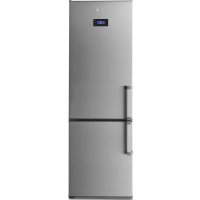
FFK6735X - Fridge FAGOR - Free user manual and instructions
Find the device manual for free FFK6735X FAGOR in PDF.



| Product Type | Combined refrigerator with freezer compartment |
| Brand | Fagor |
| Model | FFK6735X |
| Supply Voltage | 220-240 V ~ 50 Hz with earth connection |
| Bulb Type | E14, 220-240 V, 15/25 W |
| Charcoal Filter | Yes, replacement recommended every 6 months |
| S.P.A. accessory (optional) | Maintains humidity in the vegetable drawer, filter change every 2 years |
| Refrigerant | R600A (environmentally friendly) |
| Recommended refrigerator temperature | 4-5 °C |
| Recommended freezer temperature | -18 °C (up to -24 °C for quick freezing) |
| Refrigerator quick cooling function | Activates the coldest temperature for 6 hours |
| Freezer quick cooling function | Activates the coldest temperature for 52 hours |
| Holiday function | Maintains low consumption, ideal for prolonged absence |
| ECO function | Stabilizes temperature at -17 °C to save energy |
| Quick Cooling function | Cools bottles for 15 minutes, then sound alarm |
| Alarms | Door open (after 2 min), high freezer temperature |
| Door reversibility | Yes, detailed instructions in the manual |
| Interior cleaning | Damp sponge with water and baking soda, no steam or abrasive products |
| Exterior cleaning | No steam machines, rear grille vacuumed once a year |
| Dishwasher accessories | No, hand washing recommended |
| Safety instructions | Do not damage the refrigeration circuit, do not use electrical appliances inside |
| After-sales service | Contact authorized Fagor technical service |
Frequently Asked Questions - FFK6735X FAGOR
User questions about FFK6735X FAGOR
0 question about this device. Answer the ones you know or ask your own.
Ask a new question about this device
Download the instructions for your Fridge in PDF format for free! Find your manual FFK6735X - FAGOR and take your electronic device back in hand. On this page are published all the documents necessary for the use of your device. FFK6735X by FAGOR.
USER MANUAL FFK6735X FAGOR
# # # # # # # # # # # # # # # # # # # # # # # # # # # # # # # # # # # # # # # # # # # # # # # # # # # # # # # # # # # # # # # # # # # # # # #
#
#
#
#
#
#
#
#
#
#
#
#
#
#
#
#
#
#
#
#
#
#
#
#
#
#
#
#
#
#
#
#
#
#
#
#
#
#
#
#
#
#
#
#
#
#
#
#
#
#
... • • • • • • • • • • • • • • • • • • • • • • • • • • • • • • • • • • • • • • • • • • • • • • • • • • •
2.3 Seleção de temperatura. Rode o commando (2.3.1, 2.3.2) ou pressione as teclas + , - primeiro do recinto congelador e depois do recinto refrigerador (2.3.3), ou pressione T° para o recinto congelador e para o recinto refrigerador (2.3.4, 2.3.5).
Very important: Read this manual carefully before using your refrigerator.
This manual is designed with texts corresponding to drawings.

Identification

Identify the model of your refrigerator ("a", "b", "c", "d", "e", "f") by comparing the control panel with the illustrations.
1
Installation
1.1 Unpacking. Remove all protective elements.
1.2 Placement. Place the refrigerator away from heat sources and protect it from direct sunlight in order to conserve energy.
Do not install the refrigerator in the open air or where it is exposed to rain.
Air should be able to circulate behind the refrigerator. Leave 25mm between the rear of the refrigerator and the wall. Do not enclose the space between the refrigerator and the floor or ceiling with any object.
Level the refrigerator to prevent vibration and noise. Remember that if the refrigerator is situated next to a wall or cupboard, it could make some noise.
In addition, make sure that the trays are correctly placed and position the containers with a space between them to prevent vibration.
1.3 Connecting to power. Let the refrigerator sit in a upright position for at least 2 hours before connecting it. Check the information on the specifi cation plate (220-240V with ground wire) (1.3.1, 1.3.2).
Do not use adapters or extension leads.
Prevent the cord from coming in contact with the motor or getting trapped beneath it.
1.4 Changing the side that the door opens from. Disconnect the refrigerator from the power outlet and empty the inside of the door.
Remove the screws (1.4.1) and take out the top
hinge and the rotation bushing with the aid of a screwdriver (1.4.2).
Disconnect by pressing the connector tab. (1.4.3). Remove the refrigerator door (1.4.4). Remove the controls with a screwdriver, prying it away using the grooves placed for that purpose (1.4.5).
Make a notch for the cable on the opposite side, as marked on the casing (1.4.6). Remount the control panel passing the cable through the notch you made (1.4.7)
Remove the screw cover from the centre hinge, loosen the screws and remove the hinge (1.4.8). Move the freezer door up (1.4.9).
Loosen the screws of the lower hinge and remove it. Change the position of the hinge axis and place it on the opposite side.
Place the lower freezer handle on the refrigerator door and the lower refrigerator handle on the freezer door, rotated 180^ . Place the vertical handles on the opposite side rotating them 180^ (1.4.11).
Rotate the self-closures and place the one from the refrigerator on the freezer and vice versa (1.4.12).
Position the freezer door (1.4.13) and attach the central hinge (1.4.14). Position the refrigerator door (1.4.15).
Place the closing cap in the space for the top hinge on the opposite side (1.4.16). Press the connector to plug it into the door (1.4.17).
Fit the top hinge and the rotation bushing, threading the excess cable into the control panel (1.4.18), and screw in the screws (1.4.19).
2
Operation

2.1 Switching on the refrigerator. Press ON-OFF (2.1.1), ① (2.1.3) or the plus + or - keys until you see a number in the display (2.1.2). The Mini LCD models lock automatically (2.1.3). To unlock, press any key for 3 seconds.
2.2 Selecting the compartment. In combination refrigerators, the refrigeration compartment and the freezer compartment operate independently. On model a, the two compartments work together
2.3 Temperature selection. Turn the control (2.3.1, 2.3.2) or press the +, - keys, first for the freezer compartment and then for the refrigerator compartment (2.3.3), or press for the freezer compartment and the refrigerator compartment (2.3.4, 2.3.5).
Once the temperature is selected, you can see the current temperature of the compartment with the lighted indicator (2.3.6) or by pressing the + - , T° or T' keys of the appropriate compartment for 5 seconds. The compartment temperature will blink. This function is not available on model a
Recommendation: The recommended temperature for the refrigeration compartment is 4 and the freezer compartment 19 already frozen food. If you want to freeze, the recommended temperature is -24
Remember that the interior temperature depends on the temperature of the environment, placement, and frequency with which the door is opened.
2.4 Refrigerator functions.
Rapid cooling mode: This function sets refrigeration to the coldest temperature for 6 hours. It should be used if you put a large quantity of food in the refrigerator.
To activate and deactivate: Press (2.4.2) or (2.4.3).
Holiday mode: The vacation function is very useful when the refrigerator will not be used for a long period of time, but you want to keep food in the freezer. With this function, your refrigerator will use little power and smells won't develop in its interior. Model does not have this function.
Warning: To use this function, the refrigerator door must be closed.
To activate and deactivate: Press HOLIDAY (2.4.4) or the + keys until you see on the display (2.4.5) or seconds (2.4.6). To cancel, repeat this operation. Some models allow the refrigeration compartment to be shut off.
Press ON-OFF (2.4.7), or the , — (2.4.8) or T° (2.4.9), keys, until no number can be seen.
2.5 Freezer functions.
Rapid cooling mode: This function sets the coldest freezer temperature for 52 hours. The function should be activated 24 hours before putting a large quantity of food in the freezer.
To enable and disable this function: Hold down SUPER for 3 seconds (2.5.1), press SUPER (2.5.2, 2.5.3), or × (2.5.4).
Quick cooling function: Place the bottle(s) in the freezer and hold down for a few seconds, until the icon appears on the display (2.5.5). The freezer will cool down for 15 minutes. The function will then be complete and will flash on the display and a beep will sound for 20 minutes. The alarm can be disabled by pressing any button. If there is a power outage and this function is cut off, when the power returns the function will be considered finished and the beep will sound.
ECO function: The ECO function allows the freezer to remain at a stable temperature of -17 ^ C providing signifi cant power savings. This function continues to run even if the electricity supply is cut off.
To enable / disable it, press ECO (2.5.6).
Connecting / disconnecting the freezer: Press ON-OFF key (2.5.7, 2.5.8), the +, - keys (2.5.9) until no temperatura can be seen on the display, or for 3 seconds (2.5.10). Shutting off the freezer also shuts off the refrigeration comopartment.
2.6 Usage recommendations.
- Don't leave the door open more time than necessary and don't put hot foods in the refrigerator. This will provide the most efficienl use of the refrigerator and avoid increasing power consumption.
If your refrigerator is of the NO FROST variety, don't block the ventilation grille and try leave space between food items so that air circulates around them. - Don't put carbonated drinks or glass bottles containing liquid in the freezer, they can burst.
- Store food in hermetically sealed containers to prevent drying.
- Do not eat extremely cold ices or food as they can produce burns in the mouth.
3
Maintenance and cleaning
3.1 Interior cleaning. To clean the interior, use a sponge or cloth soaked in water with bicarbonate in order to prevent odours developing. In no case use steam cleaning machines, solvents, or abrasive detergents.
3.2 Exterior cleaning. Do not clean the screens with a steam cleaning machine.
It is advisable to clean the back vent once a year with a vacuum cleaner.
3.3 Cleaning the accessories. Accessories are not suitable for automatic dishwashers. Clean them by hand with a sponge or cloth.
3.4 Changing the lamp. In the case that the lamp goes out: disconnect the refrigerator. Remove the cover by pressing the tab (3.4.1, 3.4.3) and remove the burnt out lamp (3.4.2, 3.4.4). Replace it with another with the same type of thread, E14, 220-240V, 15/25W or according to fixture instructions.
3.5 Changing the carbon filter. The refrigerator may incorporate a carbon filter that absorbs the odours of certain foods and retains microorganisms (fungus and bacteria) circulating in the air.
The fi iter keeps its properties for 6 months. After that time, it is recommended to replace it. Its location varies based on model.
To activate the fi Iter: Press the tab and remove the cover to access the fi Iter (3.5.1, 3.5.3). Separate the fi Iter from the tab (3.5.2, 3.5.4) and remove the seals (3.5.5).
Press the BIOFILTER viewer until hearing a click (3.5.6) and in a few seconds the duration scale will become coloured. Place the new filter in the original location.
Keep the old fi iters and the replacements out of the reach of children: Ingesting a large quantity could be dangerous.
Don't get the fi Iter wet, as it will lose it properties.
3.6 S.P.A. salus per aquam (optional)
Your refrigerator may incorporate the S.P.A. accessory which maintains a constant level
of humidity in the vegetable compartment, preventing drying.
It is located in the vegetable compartment drawer separator. It consists of a receptacle with a pouring container and a fullness level indicator. When the S.P.A. needs water, the level will become hidden. Take out the container (3.6.2) and use it to refill the receptacle.
The fi iter should be changed every 2 years (3.6.4).

Diagnostics

4.1 Door open. If the door stays open for more than 2 minutes, an alarm will sound and the refrigerator light will go off. The alarm is disconnected when the door is closed.
4.2 Freezer not cold enough.
If the temperature of the freezer is unusually high, a warning light will appear (4.2.1, 4.2.2) or a blinking icon (4.2.3) as well as a beeping alarm. Press SUPER or to manually shut off the beeping (4.2.4, 4.2.5, 4.2.6). Press SUPER to switch off the beeper manually (4.2.4, 4.2.5, 4.2.6).
- The first time the refrigerator is connected, the icon or the warning light will appear, but the alarm won't sound.
4.3 Loss of electrical power
Open the refrigerator doors as little as possible. When the power returns, check if the frozen food has thawed.
4.4 Normal refrigerator noises
It is perfectly normal for your refrigerator to make certain noises while it is running and you should not worry about them.
- The coolant gas can make a bubbling sound as it circulates.
- The compressor may make humming or tapping sounds, especially at start-up.
-
The expansion and contraction of material used may make clicking or creaking sounds.
-
The air that moves the freezer ventilator may generate a light background sound.
Don't try to repair the refrigerator. Call technical service.
5
Safety

- Keep the ventilation grille uncovered.
- Be careful not to damage refrigeration circuits.
- Don't use electrical devices in the interior of the refrigerator, unless they are recommended by the manufacturer.
- Don't use mechanical devices or means other than those recommended by the manufacturer to speed up the thawing process.
- This appliance is not intended for use by people (including children) whose physical, sensory, or mental capacities are reduced or who lack experience or knowledge, except under supervision or after receiving instruction regarding use of the appliance from a person responsible for their safety. Use by children should be supervised to prevent them playing with the appliance.
- If the power cable is damaged, it should be replaced by the manufacturer, by their after sales service, or by personnel similarly qualified in order to prevent dangerous situations.

The environment

This refrigerator was designed with environmental conservation in mind.
The appliance operates with coolant R600A, which does not damage the environment.
Respect the environment. Use the recommended temperatures for each compartment. They will depend on the mode you need for effcient use of your refrigerator.
Disconnect the refrigerator or set it to holiday mode when you will not be using it for a prolonged period. You will reduce power consumption and save energy.
Avoid leaving the doors open more time than necessary. It causes an increase in power use.
Waste management of electrical and electronic appliances.
The symbol indicates that the appliance must not be disposed of in traditional bins for domestic waste.
Deliver your refrigerator to a special collection centre.
Recycling domestic appliances prevents negative impacts on health and the environment and helps save energy and resources.
For more information, contact your local authorities or the establishment where you purchased your refrigerator.
koelcompartmentuitschakelen
jaiy jay aaiy jie ybi gaiy jiy
eill 8
:J 19. yill p, 4yll pll g c yll o rall
C yll gall yiy j J .g .j yd all
2440j Jiaiwlj
jol jlc a l l jol al qie i Y
jll jk jc g a
2.4
:
6 1 1 1 1 1 1 1 1 1 1 1 1 1 1 1 1 1 1 1 1 1 1
biol,(2.4.1) SUPERbiol:
.(2.4.3)* (2.4.2)
:JyI JgJ Lac
Jiaiui 1ie iue ayiae aie jiai yaiae i Jiaie 1ie gao bia gao jia gao jia yaiyaiyaiyaiyaiyaiyaiyaiyaiyaiyaiyaiyaiyaiyaiyaiyaiyaiyaiyaiyaiyaiyaiyaiyaiyaiyaiyaiyaiyaiyaiyaiyaiyaiyaiyaiyaiyaiyaiyaiyaiyaiyaiyaiyaiyaiyaiyaiyaiyaiyai
1
a
i 1
(2.4.4) HODIDAY bai: jy,
HJ 1-+
(2.4.6)3(2.4.5)
a 1
jllb, jllgall g
(8.4.2) ,+j(7.4.2)ON-OFF
(9.4.2)T
.25
:
Jis 1
J 24 Jx 52
aill paae aal 0
SUPER lai:
SUPER 1.5.2
(4.5.2) 串 _ 3 ^ 日 ( 3 . 5 . 2 , 2 . 5 . 2 )
g 1
jll jai jn jil ie biail g aall
(5.5.2)
g Jaki aal 15
20 20
aaiiie 100
1
Jiayjia jia jia jia jia jia jia jia jia jia jia jia jia jia jia jia jia jia jia jia jia jia jia jia jia jia jia jia jia jia jia jia jia jia jia jia jia jia jia jia jia jia jia
.
ECO ECO
17-0g
E 1
.
(6.5.2)ECO jolb/
:all Joll / jol
2j = 1
Jiawei zilai 2.6
a 1
J 1
aill 1
s
Saaabbl jnnnnaa ajjgill k
b_i = 4ab - 2b
y 1
j 1
- 点 A1,A2 皆是
Lalal yolai jilie a j
y 2

3
3.1
gcll llll 1
sall sall pall aaii
auii jai jia jia jia jia jia jia jia
a.b.c. d.e.g. f. g.
3.2
J 1
auiy
aal 3.3
.(3.5.5)aaaball all jby (3.5.4
(3.5.6)
a a
1
j 1
Jia 12 Jglua
1
jilil j
laie aill jaoeaa
()a3.6
y
ybi ysi gnsi 1e biaill 1e cluy sll
aeg aeg g aeg aeg
4.16 21
g.(3.6.1)
gall jll jol calil ① j%SUPERlal
g aolal daii jia jiaiw. aygbui jia jiai
la ydi glc xli
g j 1
aI 1
auiy jiy 1 y aaiy ySll o jy 1 dla
aallll jll llll 0j
L
J 1
aaii iiaai ai aai ai ai
jlll jai jiaai jai jai jai
aallll 1
21gal.
aallll llll 1y y
a 1
