
3FFK-6945X - Fridge FAGOR - Free user manual and instructions
Find the device manual for free 3FFK-6945X FAGOR in PDF.


| Product Type | Freestanding Fridge-Freezer |
| Brand | Fagor |
| Model | 3FFK-6945X |
| Power Supply | AC 220-240V, 50Hz, 10A fuse |
| Climate Class | SN (10°C to 32°C), N (16°C to 32°C), ST (16°C to 38°C), T (16°C to 43°C) |
| Fridge Temperature Range | +2°C to +8°C (adjustable), Super Cool mode |
| Freezer Temperature Range | -16°C to -24°C (adjustable), Super Freeze mode |
| Freezer Capacity | 4-star freezer (≤-18°C), suitable for freezing fresh food |
| Cooling Technology | Automatic defrost (no-frost) in freezer, auto defrost in fridge |
| Special Features | Natural Ion Tech, Maxi Fresh Preserver, Super Cool, Super Freeze, Economy Mode, Holiday Mode, Drink Cool Mode, Screen Saver Mode, Child Lock, Door Open Alarm |
| Control Panel | Electronic touch controls with digital display |
| Shelves | Adjustable glass shelves in fridge, wire shelves in freezer, door shelves, vegetable drawers |
| Freezer Drawers | Removable drawers for increased storage |
| Refrigerant | Isobutane (R600a) – flammable, keep away from sources of ignition |
| Installation Requirements | Place on level, stable surface; min. distances from heat sources: 30mm from electric/gas ovens, 300mm from oil/coal ovens, 50mm from built-in ovens |
| Cleaning | Mild detergent and soft cloth; do not use abrasive or solvent cleaners |
Frequently Asked Questions - 3FFK-6945X FAGOR
User questions about 3FFK-6945X FAGOR
0 question about this device. Answer the ones you know or ask your own.
Ask a new question about this device
Download the instructions for your Fridge in PDF format for free! Find your manual 3FFK-6945X - FAGOR and take your electronic device back in hand. On this page are published all the documents necessary for the use of your device. 3FFK-6945X by FAGOR.
USER MANUAL 3FFK-6945X FAGOR
EN- Table of contents
GUIDELINES CONCERNING THE SAFETY OF USE 59
INSTALLATION AND OPERATING CONDITIONS OF THE APPLIANCE 63
INSTALLATION BEFORE USING THE APPLIANCE FOR THE FIRST TIME 63
MINIMUM DISTANCES FROM THE HEAT SOURCES 63
MAINS CONNECTION 63
DISCONNECTING THE MAINS 64
CLIMATE RANGE 64
UNPACKING 65
DISPOSAL OF OLD APPLIANCE 65
CONTROLS 66
APPLIANCE CONTROLS 66
USING THE CONTROL PANEL 66
WASHING THE FRIDGE AND FREEZER CHAMBERS MANUALLY**** 77
TAKING OUT AND PUTTING IN THE SHELVES***** 77
TAKING OUT AND PUTTING IN THE DOOR SHELF***** 77
TROUBLE-SHOOTING 78
WARRANTY AND AFTER SALES SERVICE 80
WARRANTY 80
CS - Obsah
POKNY TÝKAJÍCÍ SE BEZPEČNOSTI POUŽÍVÁNÍ 82 INSTALACE A PROVOZNÍ PODMÍNKY SPOTŘEBIČE 87
INSTALACE PŘED PRVNÍM SPUŠTĚNÍM 87
MINIMÁLNÍ VZDÁLENOSTI OD TEPELNÝCH ZDROJŮ 87
PŘIPOJENÍ NAPÁJENÍ 88
ODPOJENÍ OD NAPÁJENÍ 88
KLIMATICKÁ TŘÍDA 88
VYBALENÍ LIKVIDACE OPOTŘEBOVANÝCH ZAŘÍZENÍ 89 OVLÁDACÍ PRVKY 90 89
OVLÁDÁNÍ ZAŘÍZENÍ 90
PROVOZ OVLÁDACÍHO PANELU 90
PROVOZ CHLADNIČKY S MRAZNIČKOU 90
NASTAVENÍ TEPLOTY 94
TECHNOLOGIE PŘÍRODNÍCH IONTŮ 95
TECHNOLOGIE MAXI FRESH PRESERVER PRO ZACHOVÁNÍ NEJVYŠŠÍ ČERSTVOSTI (POKUD JE K DISPOZICI) 95
OBSLUHA A FUNKCE 96
UCHOVÁVÁNÍ POTRAVIN V CHLADNIČCE A MRAZNIČCE 96
ZMRAZOVÁNÍ VÝROBKŮ** 96
JAK EKONOMICKY POUŽIVAT CHLADNIČKU 98
PRAKTICKÉ PORADY 98
CO ZNAMENAJÍ HVĚZDIČKY? 98
ZÓNY V CHLADNIČCE 98
PRODUKTY, KTERÉ BY NEMĚLY BÝT PŘECHOVÁVANÉ V CHLADNIČCE 99
ODMRAZOVÁNÍ, MYTÍ A ÚDRŽBA 100
ODMRAZOVÁNÍ CHLADNIČKY*** 100
ODMRAZOVÁNÍ MRAZNIČKY** 100
PRO ODMRAZENÍ MRAZICÍHO PROSTORU MRAZNIČKY JE TŘEBA** 100
AUTOMATICKÉ ODMRAZOVÁNÍ CHLADNIČKY**** 101
AUTOMATICKÉ ODMRAZOVÁNÍ MRAZNIČKY**** 101
RUČNÍ MYTÍ MRAZICÍHO PROSTORU CHLADNIČKY A MRAZNIČKY**** 101
VYTAHOVÁNÍ A VKLÁDÁNÍ POLIC ***** 101
VYTAHOVÁNÍ A VKLÁDÁNÍ DVERNÍHO REGÁLU ***** 101
URČOVÁNÍ ZÁVAD 102
ZÁRUKA, POPRODEJNÍ SERVIS 104
ZÁRUKA 104
KLIMATICKÁ TRIEDA 160
ROZBALENIE
161
LIKVIDÁCIA ZARIADENÍ 161
OVLÁDACIE PRVKY 162
OVLÁDANIE ZARIADENIA 162
FUNGOVANIE OVLÁDACIEHO PANELA 162
POUŽÍVANIE CHLADNIČKO-MRAZNIČKY 162
NASTAVENIE TEPLOTY 166
TECHNOLÓGIA PRÍRODNÝCH IÓNOV 167
TECHNOLÓGIA MAXI FRESH PRESERVER – ZACHOVANIE ČERSTVOSTI (AK JE DOSTUPNÁ) 167
OBSLUHA A FUNKCIE
168
UCHOVÁVANIE POTRAVÍN V CHLADNIČKE A MRAZNIČKE 168
ZMRAZOVANIE VÝROBKOV** 168
AKO EKONOMICKY POUŽÍVAT CHLADNIČKU
170
PRAKTICKÉ RADY 170
ČO ZNAMENAJÚ HVIEZDIČKY? 170
ZÓNY V CHLADNIČKE 171
PRODUKTY, KTORÉ BY NEMALI BYŤ PRECHOVÁVANÉ V CHLADNIČKE 171
ODMRAZOVANIE, UMÝVANIE A ÚDRŽBA
172
ODMRAZOVANIE CHLADNIČKY*** 172
ODMRAZOVANIE MRAZNIČKY** 172
PRE ODMRAZENIE MRAZIACEHO PRIESTORU MRAZNIČKY JE POTREBA** 173
AUTOMATICKÉ ODMRAZOVANIE CHLADNIČKY**** 173
AUTOMATICKÉ ODMRAZOVANIE MRAZNIČKY**** 173
RUČNÉ UMÝVANIE KOMORY CHLADNIČKY A MRAZNIČKY**** 173
VYŤAHOVANIE A VKLADANIE POLÍC***** 173
VYŤAHOVANIE A VKLADANIE PRIEHRADKY***** 173
LOKALIZÁCIA ZÁVAD
174
ZÁRUKA, POPREDAJNY SERVIS
176
ZÁRUKA 176
Estimado Cliente
natural_image
Recycling symbol composed of three chasing arrows forming a triangle (no text or labels)natural_image
Symbol of a trash bin crossed with a diagonal line, representing waste sorting or disposal (no text or labels)
natural_image
Hand interacting with a black device labeled 'M' (no other text or symbols visible)natural_image
Line drawing of a dormitory cabinet with two shelves and wall-mounted fixtures (no text or symbols)Ionizador
natural_image
Technical line drawing of a rectangular electronic device with internal compartments and a separate view showing internal components (no text or symbols)natural_image
Simple line drawing of a three chasing recycling symbol (no text or labels)natural_image
Symbol of a trash bin crossed out by two diagonal lines (no text or numbers present)
Utilizar o Painel de Controlo
Modo de Super Frio
This mode is used to cool drinks within an adjustable time frame. How Would It Be Used?
- Press freezer button for 3 seconds.
- Special animation will start on freezer set value screen and 05 will blink on cooler set value screen.
- Press cooler button to adjust the time (05 - 10 - 15 - 20 - 25 - 30 minutes).
- When you select the time the numbers will blink 3 times on screen and sound beep beep.
- If no button is pressed within 2 seconds the time will be set.
- The countdown starts from the adjusted time minute by minute.
- Remaining time will blink on the screen.
- To cancel this mode press freezer set button for 3 seconds.
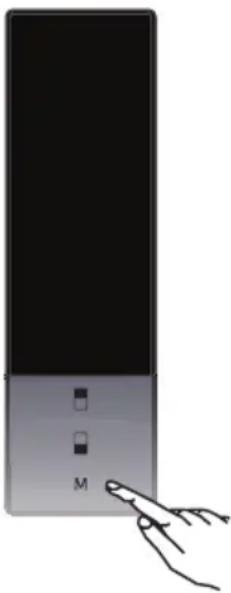
Screen Saver Mode
natural_image
Hand interacting with a black device labeled 'M' (no other text or symbols visible)This mode saves energy by switching off all control panel lighting when the panel is left inactive.
How To Use?
- This mode will be activated when you press on "MODE" button for 5 seconds.
- If no button is pressed within 5 seconds when he mode is active, lights of the control panel will go off.
- If you press any button when lights of control panel are off, the current settings will appear on the screen, and then you can make he adjustment as you want. If you neither cancel screen saver mode nor press on any button in 5 seconds, the control panel will go off again.
- To cancel screen saver mode press on "MODE" button for 5 seconds again.
- When screen saver mode is active you can also activate child lock.
- If no button is pressed within 5 seconds after child lock is activated, the lights of the control panel will turn off. You can see latest status of settings or modes after you pres any button. While control panel 's light is on, you can cancel child lock as described in the instruction of this mode.
Maxi-fresh preserver
natural_image
Technical line drawing of a rectangular electronic device with internal compartments and a side-view view showing internal components (no text or symbols)From now on, your daily housework will be easier than ever before. Your appliance is exceptionally easy to use and extremely efficient. After reading these Operating Instructions, operating the appliance will be easy.
Before being packaged and leaving the manufacturer, the appliance was thoroughly checked with regard to safety and functionality.
Before using the appliance, please carefully read these Operating Instructions. By following these instructions carefully you will be able to avoid any problems in using the appliance. It is important to keep these Operating Instructions and store them in a safe place so that they can be consulted at any time.
Follow these instructions carefully in order to avoid possible accidents.
Sincerely,
FAGOR
ELECTRODOMÉSTICO

GUIDELINES CONCERNING THE SAFETY OF USE
- The appliance is intended for household use only.
- The manufacturer reserves the right to introduce changes which do not affect the operation of the appliance.
- Some provisions in this user manual are unified for refrigerating products of different types (for a refrigerator, refrigerator-freezer or freezer)
- The Manufacturer shall not be held liable for damage arising from the failure to observe the instructions contained in this manual.
- Keep this manual for future reference, or to pass it over to the next user.
- This appliance is not intended for use by persons (including children) with limited physical or mental capabilities and persons who lack experience or familiarity with the appliance.
- Do not allow children to use the appliance. Do not allow them to play with the appliance. They must not climb inside the drawers and swing on the doors.
- The appliance operates properly at the ambient temperature (see product fiche). Do not use it in the cellar, unheated summer cottage during autumn and winter.
- When placing, moving, lifting the appliance, do not hold the door handles, do not pull the condenser at the rear part of the refrigerator and do not touch the compressor unit.
- When transporting, moving or positioning the fridge-freezer do not tilt it by more than 40^ from the vertical position. Should such a situation occur, the appliance should be switched on after minimum 2 hours from its replacement in the right position (fig.2).
- Pull the plug out from the mains socket before each maintenance activity. Do not pull on the cord, but hold the body of the plug instead.
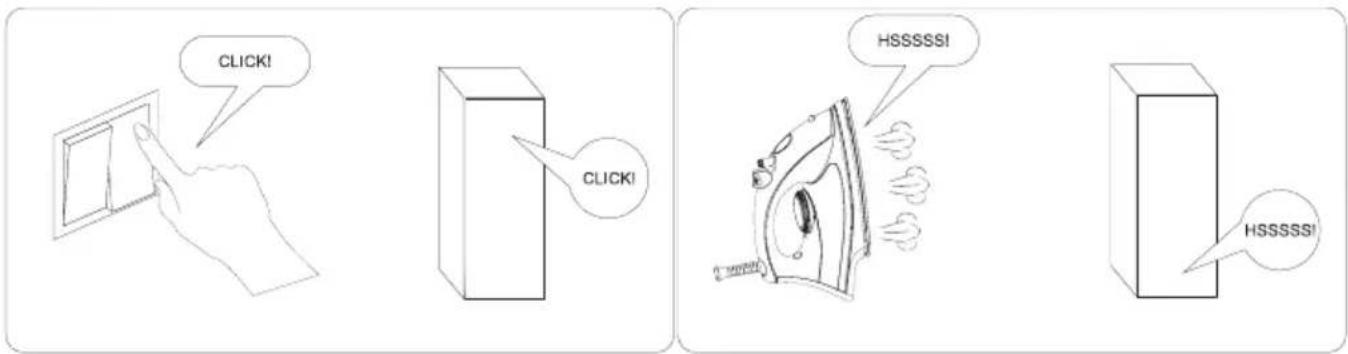
- The “cracking” sound, which the appliance may emit is caused by the expansion and contraction of parts as a result of temperature variations.
- For safety reasons do not repair the appliance yourself.
Repairs carried out by persons who do not have the required qualifications may result in serious danger for the user of the appliance.
- Air the room in which the appliance is placed for a few minutes (the size of the room for a product containing isobuthane/R600a must be at least 4m ^3 ) to avoid damage to the cooling system.
- Do not refreeze partly thawed products.
- Do not store beverages in bottles and cans, especially carbonated beverages, in the freezer chamber. The cans and the bottles may explode.
- Do not put frozen products, taken out directly from the freezer (lollies, ice cubes, etc.) into your mouth, their low temperature may cause severe frostbite.
- Make sure you do not damage the cooling system, by puncturing the refrigerant pipes in the evaporator or breaking the pipes. The refrigerant is flammable. If the refrigerant makes contact with the eyes, rinse them with clean water and call for medical assistance immediately.
- If the power wire gets broken, it should be replaced with a new one in a specialist repair shop.
- This appliance is intended for food storage, do not use it for other purposes.
- When performing activities, such as cleaning, maintenance or moving, the appliance must be completely disconnected from power supply (by pulling the plug out from the socket)
- This appliance can be used by children aged 8 years and older or by persons with physical, mental or sensory handicaps, or by those who are inexperienced or unfamiliar with the appliance, provided they are supervised or have been instructed how to safely use the appliance and are familiar with risks associated with the use of the appliance. Ensure that children do not play with the appliance. Cleaning and maintenance of the appliance should not be performed by children unless they are 8 years or older and are supervised by a competent person.
- In order to obtain more space in the freezer, you can remove the drawers and place the food directly on the shelves. This has no effect on the product mechanical
properties and cooling performance. Declared freezer capacity was calculated with the drawers removed.
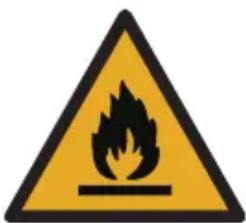
WARNING: Risk of fire / flammable materials
- Children aged from 3 to 8 years are allowed to load and unload refrigerating appliances.
To avoid contamination of food, please respect the following instructions:
- Opening the door for long periods can cause a significant increase of the temperature in the compartments of the appliance.
- Clean regularly surfaces that can come in contact with food and accessible drainage systems.
- Store raw meat and fish in suitable containers in the refrigerator, so that it is not in contact with or drip onto other food.
- Two-star frozen-food compartments are suitable for storing pre-frozen food, storing or making ice-cream and making ice cubes.
- One-, two- and three-star compartments are not suitable for the freezing of fresh food
| Compartments TYPE | Target storage temp.[°C] | Appropriate food | |
| 1 | Fridge +2≤+8 | Eggs, cooked food, packaged food, fruits and vegetables, dairy products, cakes, drinks and other foods are not suitable for freezing. | |
| 2 | Freezer *** | ≤-18 | Seafood (fish, shrimp, shellfish), freshwater aquatic products and meat products (recommended for 3 months, the longer the storage time, the worse the taste and nutrition), suitable for frozen fresh food. |
| 3 | Freezer *** | ≤-18 | Seafood (fish, shrimp, shellfish), freshwater aquatic products and meat products (recommended for 3 months, the longer the storage time, the worse the taste and nutrition), are not suitable for frozen fresh food. |
| 4 | Freezer | ≤-12 | Seafood (fish, shrimp, shellfish), freshwater aquatic products and meat products (recommended for 2 months, the longer the storage time, the worse the taste and nutrition), are not suitable for frozen fresh food |
| 5 | Freezer | ≤-6 | Seafood (fish, shrimp, shellfish), freshwater aquatic products and meat products (recommended for 1 months, the longer the storage time, the worse the taste and nutrition), are not suitable for frozen fresh food. |
| 6 | 0-star compartment | -6≤0 | Fresh pork, beef, fish, chicken, some packaged processed foods, etc. (Recommended to eat within the same day preferably no more than 3 days). Partially encapsulated processed foods (non-freezable foods) |
| 7 | Chill 2≤+3 | Fresh/frozen pork, beef, chicken, freshwater aquatic products, etc.(7 days below 0 °C and above 0 °C is recommended for consumption within that day, preferably no more than 2 days). Seafood (less than 0 for 15 days, it is not recommended to store above 0°C) | |
| 8 | Fresh Food 0≤+4 | Fresh pork, beef, fish, chicken, cooked food, etc. (Recommended to eat within the same day, preferably no more than 3 days) | |
| 9 | Wine +5≤+20 red wine,white wine,sparkling wine etc. | ||
- Note: please store different foods according to the compartments or target storage temperature of your purchased products.
- If the refrigerating appliance is left empty for long periods, switch off, defrost, clean, dry, and leave the door open to prevent mould developing within the appliance.
- Water dispenser cleaning (special for water dispenser products): Clean water tanks if they have not been used for 48 h; flush the water system connected to a water supply if water has not been drawn for 5 days.
- Pursuant to Commission Regulation (EU) 2019/2019, the minimum availability period for spare parts necessary to repair the appliance is 7 or 10 years depending on the type and purpose of the spare part.
- The list of spare parts and the ordering procedure are available on the websites of the manufacturer, importer or an authorized representative.
- For more information about the product, please refer to the EU EPREL Product Database at https://eprel.ec.europa.eu. For more information, please use your mobile device to scan the QR code on the energy label or enter the product model listed on the energy label in the EPREL search engine https://eprel.ec.europa.eu/
INSTALLATION AND OPERATING CONDITIONS OF THE APPLIANCE
This refrigeration appliance is not intended for use as a built-in appliance.
Installation before using the appliance for the first time
- Take the product out of the package, remove the scotch tape protecting the door and the equipment. Any remaining adhesive stains may be removed with a mild washing agent.
- Do not throw away the polystyrene elements of the packaging. If it is necessary to transport the fridge-freezer, pack it in the polystyrene elements and film as well as protecting it with scotch tape
- Clean the interior surface of the fridge- freezer and the elements of the equipment with a washing agent dissolved in lukewarm water, then wipe it dry.
- Place the fridge-freezer on an even, flat and stable surface, in dry, aired and shaded room, far from the heat sources such as: oven, hob, central heating radiators, central heating pipes, hot water installation, etc.
- On the exterior surface of the product may be a protective foil, this foils should be removed.
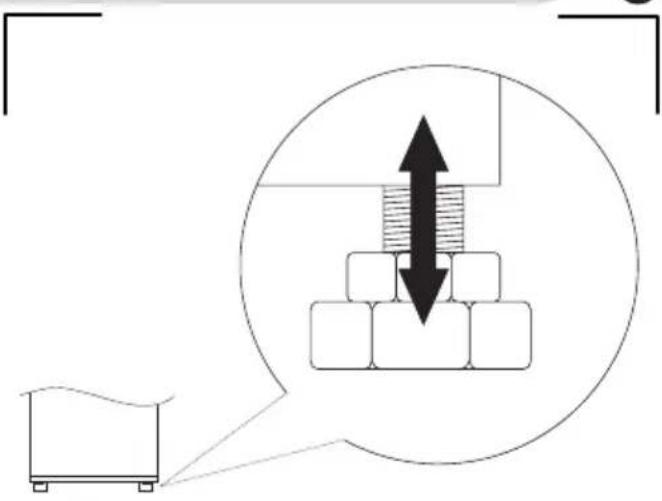
- Make sure the appliance is placed in a horizontal position by screwing in the 2 adjustable front legs (fig. 3)
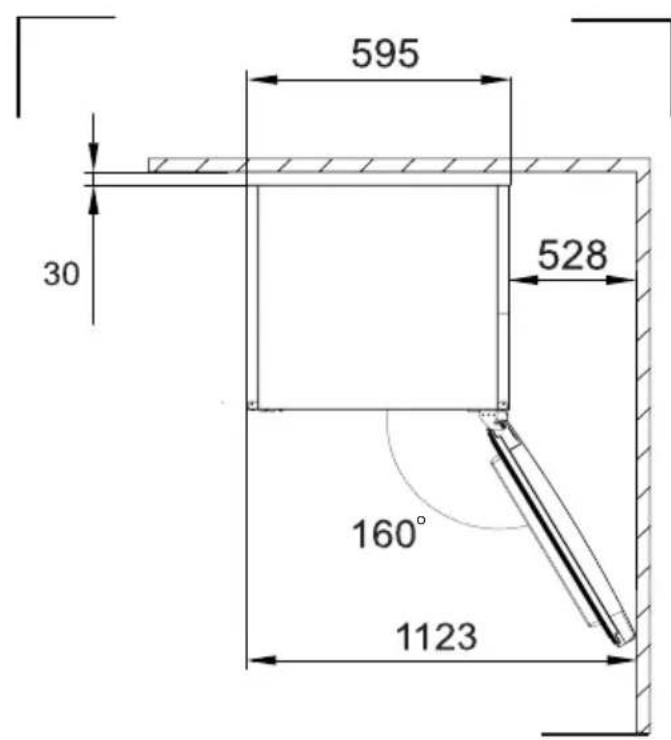
- To ensure that the door opens freely, the distance between the side of the appliance (on door hinges side) and the wall is shown on figure 5.*
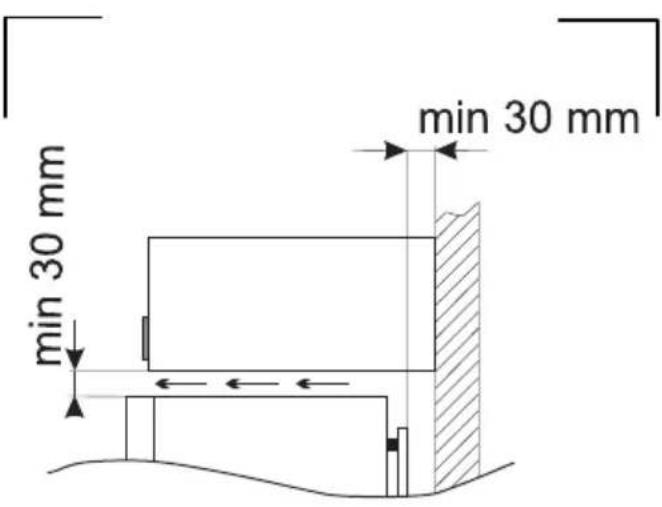
- Ensure adequate ventilation of the room and free air circulation from all sides of the appliance (fig. 6).*
Minimum distances from the heat sources
• from the electric gas and other ovens - 30 mm,
• from oil or coal fired ovens - 300 mm,
• from built-in ovens - 50 mm
If there is no possibility of ensuring the above-mentioned distances, provide an appropriate insulation board.
Warning:
- The rear wall of the refrigerator, in particular, the condenser and other elements of the cooling system must not contact other elements, which may damage them, (e.g. central heating pipes and the water supply pipes).
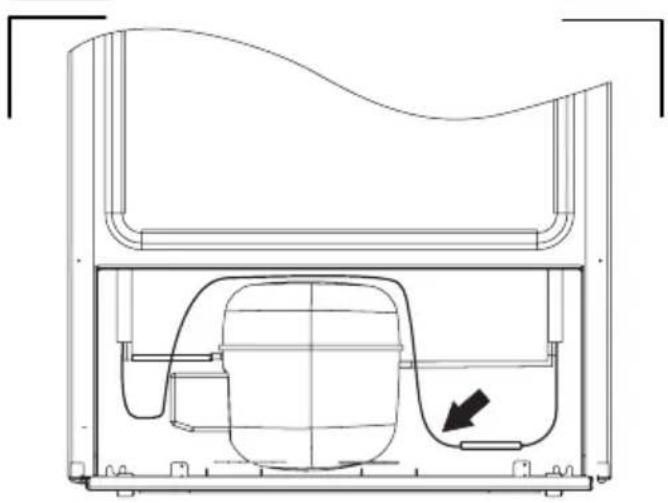
- It is forbidden to readjust or modify any parts of the unit. It is crucial not to damage the capillary tube visible in the compressor recess. The tube may not be bent, straightened or wound.
- If the capillary tube is damaged by the user the guarantee will be void (fig. 8).
- In some models the handle is put into the appliance, You should screw it with Your own screwdriver,
Mains connection
- Prior to connection, it is recommended to set the temperature control knob to an „OFF” or other position that disconnects the appliance from the power supply (See page with the control description).
-
This appliance should be connected to AC 220-240V 50Hz supply socket. The socket must be fitted properly, and must be supplied with an earthing conduit and a 10A fuse.
-
It is a legal requirement that the appliance is properly earthed. The manufacturer will not be held liable for any damage or injury which may result from the failure to fulfil this requirement.
- Do not use adapters, multiple sockets and two-wire extension leads. If it is necessary to use the extension lead, it must be equipped with a protection ring and a single socket and must have a VDE/GS safety certificate.
- If an extension lead is used (with a protection ring and safety certificate), its socket must be located at a safe distance, away from the sinks, and must not be in a place where it could be flooded by water or waste water.
- See the type plate at the lower part of the internal wall of the appliance for detailed specifications**.
Disconnecting the mains
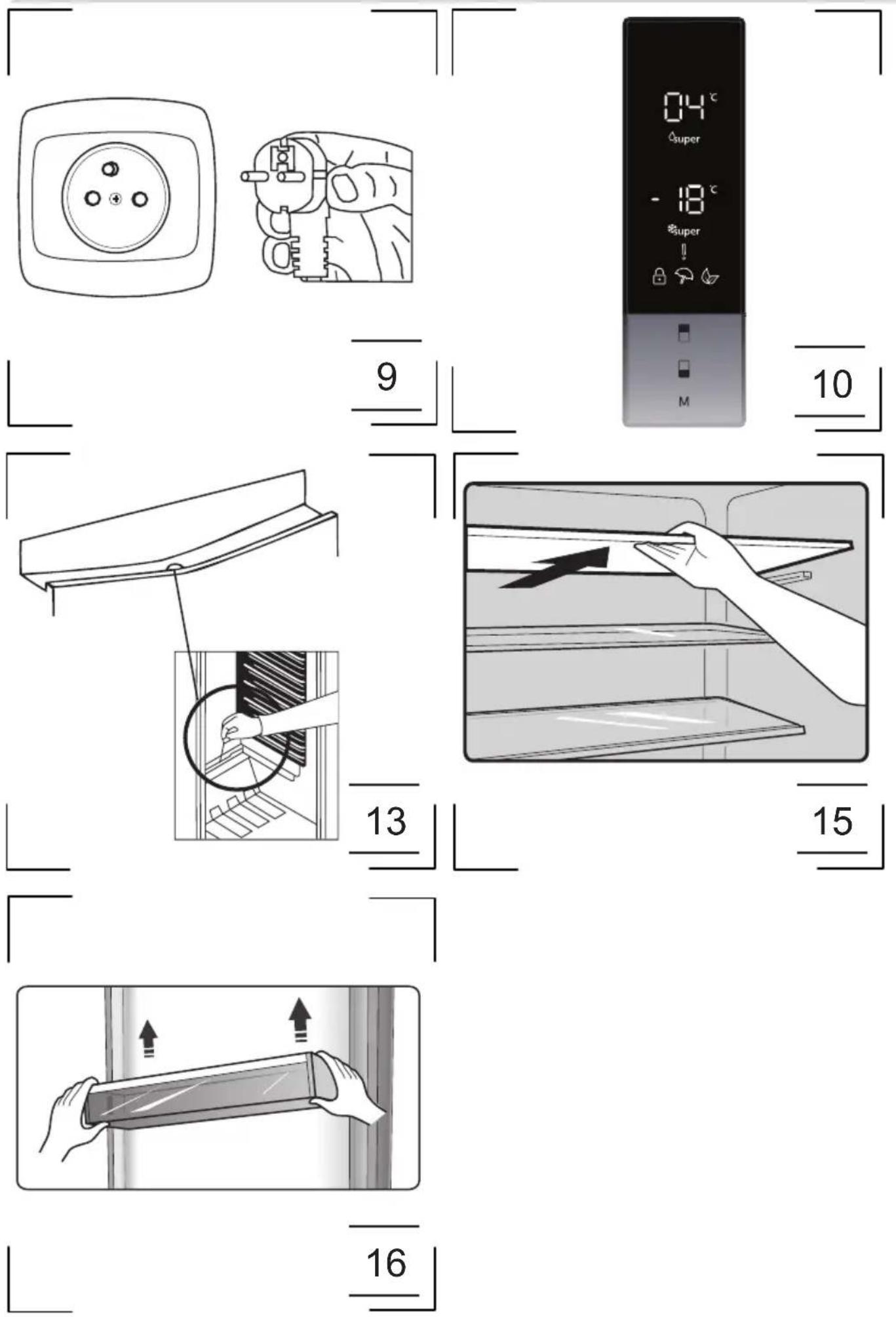
Make sure the appliance can be easily disconnected from the mains, either by pulling the plug out of the mains socket, or by switching the two-pole switch off (fig. 9).
Climate range
The information about the climate range of the appliance is provided on the rated plate. It indicates at which ambient temperature (that is, room temperature, in which the appliance is working) the operation of the appliance is optimal (proper).
Climate class Allowable ambient temperature
| SN Extended Temperate | This refrigeration appliance is intended for use at an ambient temperature ranging between 10°C and 32°C |
| N Temperate | This refrigeration appliance is intended for use at an ambient temperature ranging between 16 °C and 32°C |
| ST Subtropical | This refrigeration appliance is intended for use at an ambient temperature ranging between 16 °C and 38 °C |
| T Tropical | This refrigeration appliance is intended for use at an ambient temperature ranging between 16 °C and 43 °C |
UNPACKING

natural_image
Simple line drawing of a three chasing recycling symbol (no text or labels)During transportation, protective packaging was used to protect the appliance against any damage. After unpacking, please dispose of all elements of packaging in a way that will not cause damage to the environment.
All materials used for packaging the appli- ance are environmentally friendly; they are 100% recyclable and are marked with the appropriate symbol.
Important! Packaging materials (bags, polyethylene, polystyrene, etc.) should be kept away from children during unpacking.
DISPOSAL OF OLD APPLIANCE
natural_image
Simple line drawing of a trash bin with crossed lines indicating no waste or discharge (no text or symbols)
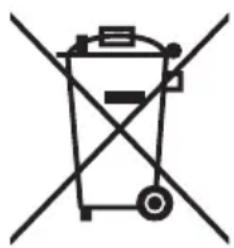
In accordance with European Directive 2012/19/EU and local legislation regarding used electrical and electronic goods, this appliance is marked with the symbol of the crossed-out waste container. This marking indicates that the appliance must not be disposed of together with other household waste after it has been used.
The user is obliged to hand it over to waste collection centre collecting used electrical and electronic goods. The collectors, including local collection points, shops and local authority departments provide recycling schemes.
Proper handling of used electrical and electronic goods helps avoid environmental and health hazards resulting from the presence of dangerous components and the inappropriate storage and processing of such goods.
CONTROLS
Appliance controls
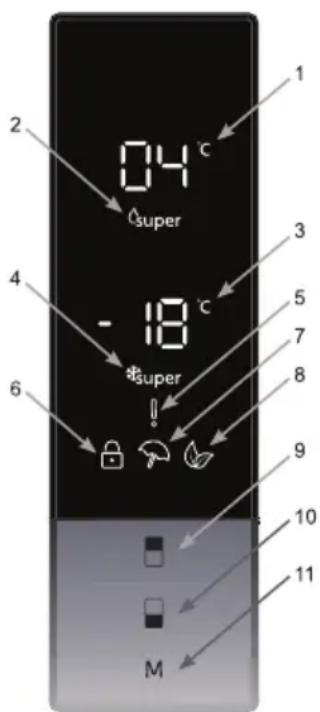
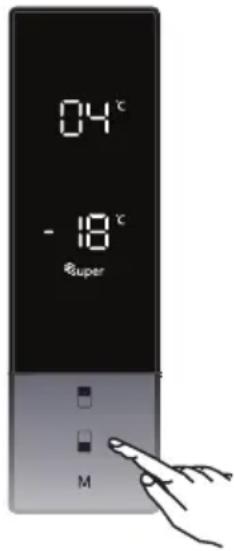
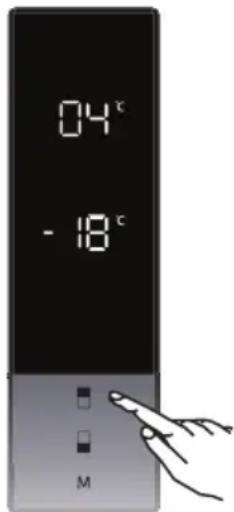
The control panel is shown in figure 10. For reference it is also shown below:
Using the Control Panel
- It is cooler set value screen.
- It is super cooling indicator.
- It is freezer set value screen.
- It is super freeze indicator.
- It is alarm symbol.
- It is child-lock symbol.
- It is holiday mode symbol.
-
It is economy mode symbol.
-
It enables the setting value of cooler to be modified and super cool mode to be activated if desired. Cooler maybe set to 8, 6, 5, 4, 2 °C super cool.
-
It enables the setting value of freezer to be modified and super freeze mode to be activated if desired. Freezer may be set to -16, -18, -20, -22, -24 °C super freeze.
-
It enables the modes (economy, holiday...) to be activated if desired.
Operating Your Fridge Freezer
Super Freeze Mode
- To freeze a large quantity of food that cannot fit on the fast freeze shelf.
• To freeze prepared foods. - To freeze fresh food quickly to retain freshness.
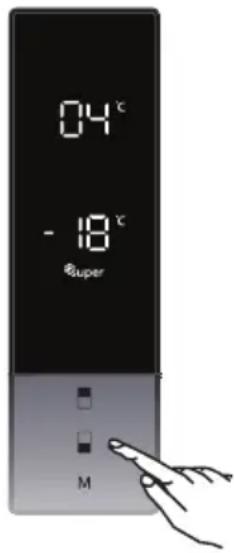
• How Would It Be Used? - Press freezer set button until Super freeze symbol will be seen on the screen. Buzzer will sound beep beep. Mode will be set. During This Mode:
- Temperature of cooler and super cool mode may be adjusted. In this case super freeze mode continues.
• Economy and Holiday mode can not be selected. - Super freeze mode can be cancelled by the same operation of selecting.
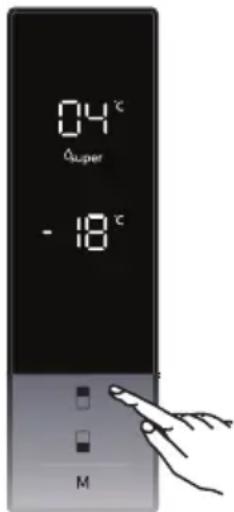
Super Cool Mode
- To cool and store a large quantity of food in the fridge compartment.
- To quickly cool drinks.
How Would It Be Used? - Press cooler set button until super cool symbol will be seen on the screen. Buzzer will sound beep beep. Mode will be set.
During This Mode: - Temperature of freezer and super freeze mode may be adjusted. In this case super cool mode continues.
• Economy and holiday mode can not be selected. - Super cool mode can be cancelled by the same operation of selecting.
Economy Mode
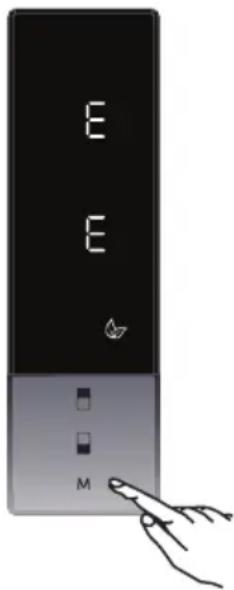
Energy savings. During periods of less frequent use (door opening) or absence from home, such as a holiday, Eco program can provide optimum temperature whilst saving power.
How Would It Be Used?
- Push "MODE" button until eco symbol appears.
- If no button is pressed for 1 second. Mode will be set. Eco symbol will blink 3 times. When mode is set, buzzer will sound beep beep.
- Freezer and refrigerator temperature segments will show "E".
- Economy symbol and E will light till mode finishes.
During This Mode:
- Freezer may be adjusted. When economy mode will be cancelled, the selected setting values will proceed.
- Cooler may be adjusted. When economy mode will be cancelled, the selected setting values will proceed.
- Super cool and super freeze modes can be selected. Economy mode is automatically cancelled and the selected mode is activated.
- Holiday mode can be selected after cancelling the economy mode. Then the selected mode is activated.
- To cancel, you will just need to press on mode button.
Holiday Mode
How Would It Be Used?
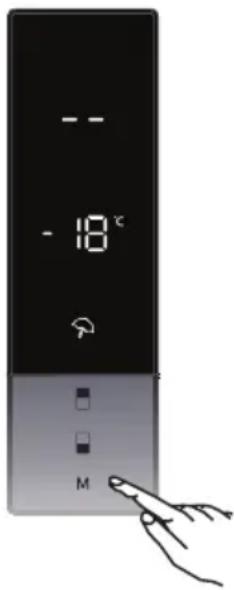
- Push "MODE" button until holiday symbol appears
- If no button is pressed for 1 second. Mode will be set. Holiday symbol will blink 3 times. When mode is set, buzzer will sound beep beep.
- Cooler temperature segment will show “--”.
- Holiday symbol and “--” will light till mode finishes.
During This Mode:
- Freezer may be adjusted. When holiday mode will be cancelled, the selected setting values will proceed.
- Cooler may be adjusted. When holiday mode will be cancelled, the selected setting values will proceed.
- Super cool and super freeze modes can be selected. Holiday mode is automatically cancelled and the selected mode is activated.
- Economy mode can be selected after cancelling the holiday mode. Then the selected mode is activated.
- To cancel, you will just need to press on mode button.
Drink Cool Mode
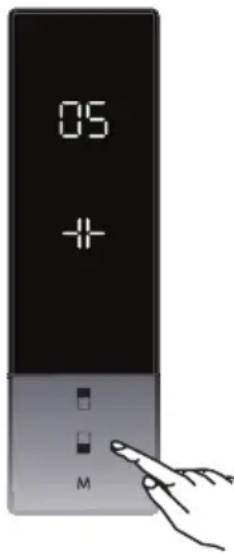
This mode is used to cool drinks within an adjustable time frame. How Would It Be Used?
- Press freezer button for 3 seconds.
- Special animation will start on freezer set value screen and 05 will blink on cooler set value screen.
- Press cooler button to adjust the time (05 - 10 - 15 - 20 - 25 - 30 minutes).
- When you select the time the numbers will blink 3 times on screen and sound beep beep.
- If no button is pressed within 2 seconds the time will be set.
- The countdown starts from the adjusted time minute by minute.
- Remaining time will blink on the screen.
- To cancel this mode press freezer set button for 3 seconds.
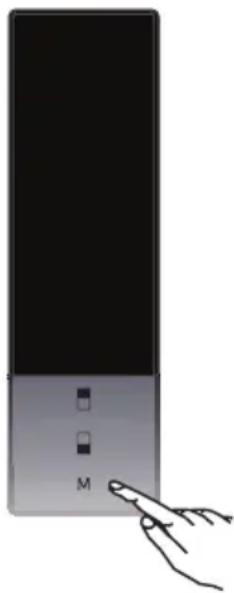
Screen Saver Mode
natural_image
Hand pointing at a black rectangular device with two small square buttons and the letter 'M' on its side (no text or symbols beyond basic labels)This mode saves energy by switching off all control panel lighting when the panel is left inactive.
How To Use?
- This mode will be activated when you press on "MODE" button for 5 seconds.
- If no button is pressed within 5 seconds when he mode is active, lights of the control panel will go off.
- If you press any button when lights of control panel are off, the current settings will appear on the screen, and then you can make he adjustment as you want. If you neither cancel screen saver mode nor press on any button in 5 seconds, the control panel will go off again.
- To cancel screen saver mode press on "MODE" button for 5 seconds again.
- When screen saver mode is active you can also activate child lock.
- If no button is pressed within 5 seconds after child lock is activated, the lights of the control panel will turn off. You can see latest status of settings or modes after you pres any button. While control panel 's light is on, you can cancel child lock as described in the instruction of this mode.
The Child Lock Function
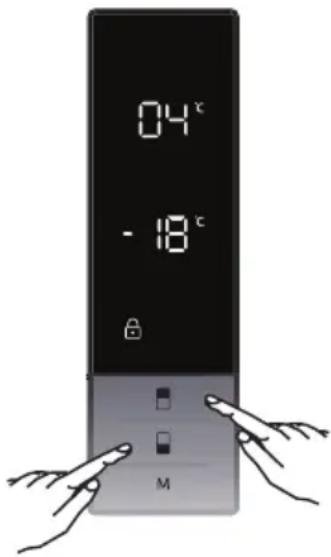
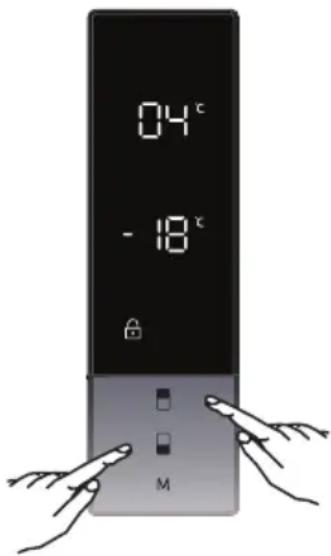
Child lock can be activated to prevent any accidental or unintentional changes being made to the appliance settings.
Activating Child Lock
Press on freezer and cooler buttons simultaneously for 5 seconds.
Deactivating Child Lock
Press on freezer and cooler buttons simultaneously for 5 seconds.
Child lock will also be deactivated if electricity is interrupted or the fridge is unplugged.
Door Open Alarm Function
If cooler or freezer door is opened more than 2 minutes, appliance sounds ‘beep beep’.
Temperature Settings
Freezer Temperature Settings
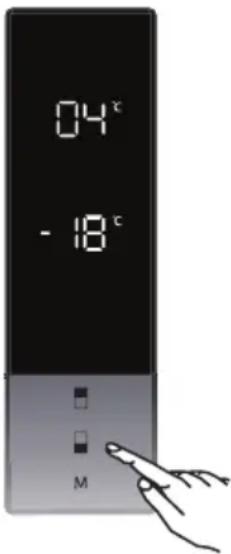
- The initial temperature value for the freezer setting indicator is -18^ .
- Press the set freezer button once.
- When you first push this button, the last set value will blink on the screen.
- Whenever you press this button, a lower temperature will be set (-16 °C, -18 °C, -20 °C, -22 °C, -24 °C, super freeze).
- When you push the set freezer button until the super freeze symbol appears, and if you do not push any other button within 1 second, super freeze will flash.
- If you continue to press it, it will restart from -16 °C.
- The temperature value selected before holiday mode, super freeze mode, super cool mode or economy mode is activated and will remain the same when the mode is over or cancelled. The appliance continues to operate with this temperature value
Cooler Temperature Settings
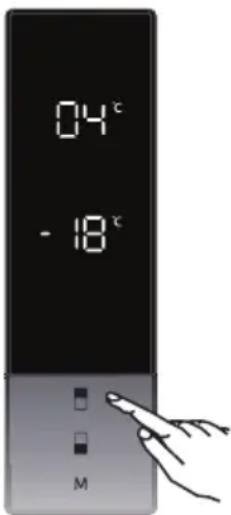
- Initial temperature value for the cooler setting indicator is +4 °C.
- Press the cooler button once.
- When you first push this button, the last value will appear on the cooler setting indicator.
- Whenever you press this button, a lower temperature will be set. (+8 °C, +6 °C, +5 °C, +4 °C, +2 °C, super cool)
- When you push the cooler set button until the super cool symbol appears, and if you do not push any button within 1 second, super cool will flash.
- If you continue to press the button, it will restart from +8 °C.
- The temperature value selected before holiday mode, super freeze mode, super cool mode or economy mode is activated and will remain the same when the mode is over or cancelled. The appliance continues to operate with this temperature value.
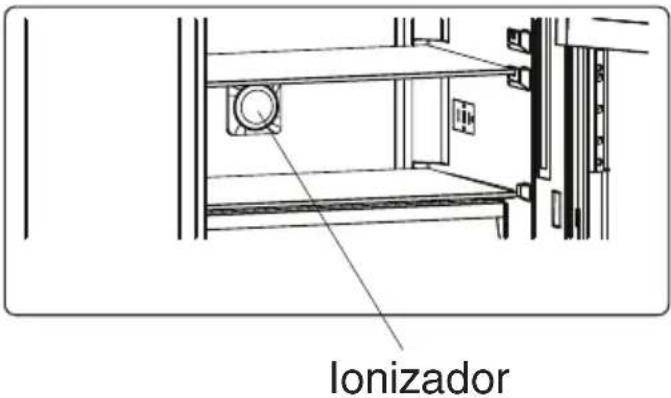
Natural Ion Tech
Natural Ion Tech spreads negative ions which neutralize particles of unpleasant smell and dust in the air.
By removing these particles from the air in the refrigerator, Natural Ion Tech improves air quality and eliminates odours.
- This feature is optional. It may not exist on your product.
- The location of your ioniser device may vary from product to product.
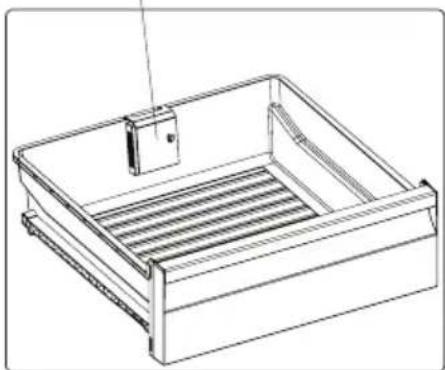
Maxi Fresh Preserver technology helps to remove ethylene gas (a bioproduct released naturally from fresh foods) and unpleasant odors from the crisper. In this way, food stays fresh for a longer time.
- Maxi Fresh Preserver must be cleaned once in a year. The filter should be waited for 2 hours at 65^ in a oven.
- To clean the filter, please remove the back cover of the filter box by pulling it in the direction of the arrow.
- The filter should not be washed with water or any detergent.
Maxi Fresh Preserver (In some models)
natural_image
Line drawing of a rectangular storage or rack system with a vertical component inserted (no text or symbols)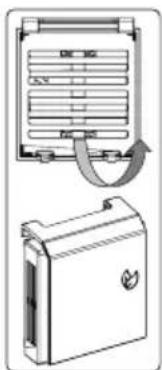
natural_image
Technical line drawing of a device with a top panel and a side view showing internal components (no text or symbols)OPERATION AND FUNCTIONS
Storage of food in the fridge-freezer
- The products should be placed on plates, in containers or packed in food wrap. Distribute them evenly over the shelves.
- If the food contacts the rear wall, it may cause frosting or wetting of the products.
- Do not put dishes with hot food into the fridge
- Products which absorb flavours easily such as butter, milk, white cheese and products with intense flavour, such as fish, smoked meat, hard cheese must be placed on shelves, packed in food wrap or in tightly sealed containers.
- The storage of vegetables containing significant quantities of water will cause the deposition of condensation on the vegetable containers, it does not impact on the proper functioning of the fridge.
- Before putting the vegetables into the fridge, dry them well.
- Excessive moisture shortens the shelf life of vegetables, especially the leafed vegetables.
- Do not wash the vegetables before storing in the refrigerator. Washing removes the natural protection, therefore it is better to wash the vegetables directly before consumption.
-
It is recommended to place the products in freezer drawers 1, 2, 3* up to natural loading capacity (Fig. 11a / 11b).**
-
Packed products
- Shelf
- Natural loading capacity
-
* * * *
-
Stacking of products on the freezer shelves is acceptable.*
- It is acceptable to place products beyond the natural loading capacity by 20-30 mm.**
- In order to increase the loading capacity of the freezer chamber and allow the stacking of products on the freezer evaporator wire shelves up to maximum height it is possible to remove drawers 1 and 2.*
Freezing food\*\*
- Practically all the food products, except for vegetables consumed raw, such as lettuce can be frozen.
- Only food products of the highest quality, divided into small portions for single use, should be frozen.
- Products should be packed in materials that are odourless, resistant to air and moisture penetration, and not susceptible to fat. Plastic bags, polyethylene and aluminium sheets are the best wrapping materials.
- The packaging should be tight and should stick to the frozen products. Do not use glass containers.
- Keep fresh and warm foodstuff at ambient temperature away from the products, which have already been frozen.
- We advise you not to place more of fresh food at a time to the freezer per day (see table witch technical specification).
- In order to maintain optimum quality of the frozen food, reorganise the food that is in the middle of the freezer, so that it does not touch the products that are not yet frozen.
- It is recommended that you move the already frozen products to one side and place the fresh products that are to be frozen on the opposite side, as close to the rear and side walls as possible.
• To freezing products, use space marked * * * *.
- Bear in mind that the temperature in the freezer is affected by several factors, including the ambient temperature and the quantity of food products in the chamber, the frequency of opening the door, the amount of frost in the freezer, and the thermostat setting.
- If you cannot open the freezer door immediately after closing it, allow 1-2 minutes for the negative pressure to compensate, and try again to open the door.
The storage time for frozen products depends on their quality before freezing when fresh, and on the storage temperature. The following storage periods are recommended when the temperature of -18^ or lower is maintained:
| Products Months | |
| Beef 6-8 | |
| Veal 3-6 | |
| Giblets 1-2 | |
| Pork 3-6 | |
| Poultry 6-8 | |
| Eggs 3-6 | |
| Fish 3-6 | |
| Vegetables | 10-12 |
| Fruit 10-12 | |
Do not store frozen food in rapid cooling chamber. Ice cubes can be prepared and stored in this chamber.
Note: If the appliance does not have a freezer compartment ( ^ ^** ), it is not suitable for freezing foodstuffs.
* Applicable to appliances with a freezer compartment at the bottom of the appliance.
** Applicable to appliances with a freezer compartment * ***
*** Not applicable to appliances with a freezer compartment marked * ***
USING
THE
REFRIGERATOR
EFFICIENTLY
Practical everyday tips
- Do not place fridges or freezers next to radiators, heaters, stoves or in direct sunlight.
- Make sure that air vents are not covered up and clean the dust off them once or twice a year.
- Select the right temperature: 6 to 8°C in your refrigerator and -18°C in your freezer is sufficient.
- When on holiday, turn up the temperature in your fridge.
- Only open your fridge or freezer when necessary. It helps if you know what food each contains and where it is located. Return food to the fridge or freezer as soon as possible after you have used it so that it does not warm up too much.
- Wipe the inside of your fridge regularly with a cloth soaked in a mild detergent. Appliances which are not self-defrosting will require regular defrosting. Do not allow frost layers thicker than 10 mm to form.
- Keep the seal around the door clean, otherwise it will not shut properly. Always replace broken seals.
Understanding the stars

Temperature is at least -6°C; sufficient to store frozen food for about a week. Drawers or compartments marked with one star used to be a feature of (mostly) cheaper fridges.

Food can be stored at -12^ C or below for 1-2 weeks without losing its taste. Not suitable for freezing food.
This rating is mainly used to store foods at -18°C or below. Can also be used to freeze up to 1 kilogram of fresh food.
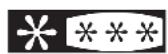
This appliance is suitable for storing foods at -18^ C or below and freezing larger quantities of fresh foods.
Practical tips
Due to the natural circulation of the air in the appliance, there are different temperature zones in the refrigerator chamber.
- The coldest area is directly above the vegetables drawers. Use this area for all delicate and highly perishable food e.g.:
- Fish, meat, poultry
- Sausage products, ready meals
- Dishes or baked goods containing eggs or cream
- Fresh dough, cake mixtures
- Pre-packed vegetable and other fresh food with a label stating it should be kept at a temperature of approx 4^ C.
- The warmest area is in the top section of the door. Use this for storing butter and cheese.
Food that should not be stored in a refrigerator
- Not all food is suitable for storing in the refrigerator, particularly:
- Fruit and vegetables which are sensitive to cold, such as bananas, avocado, papa-ya, passion fruit, aubergines, peppers, tomatoes and cucumbers.
- Fruit which is not yet ripe
- Potatoes
Warning:
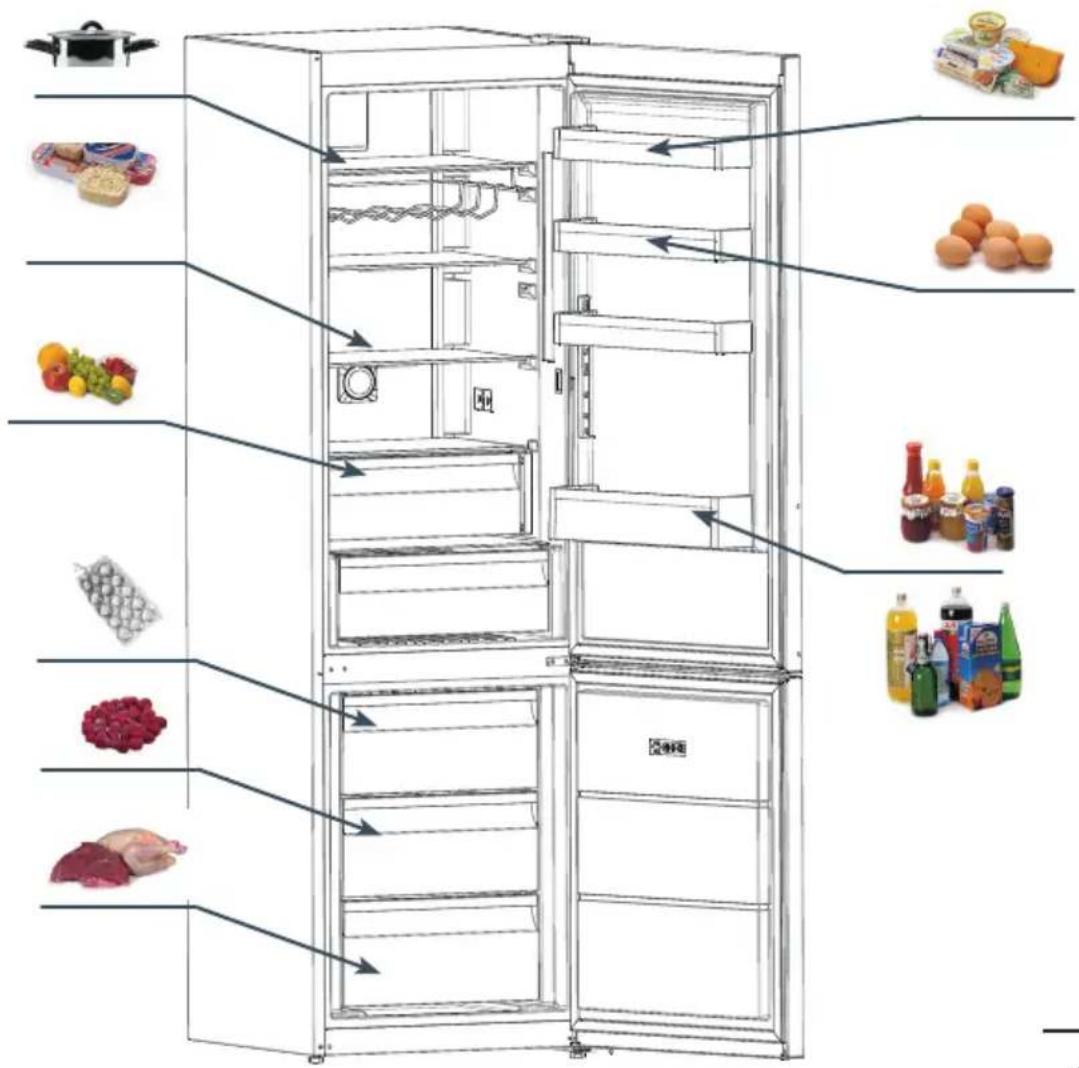
Example of storing the food - see figure 12.
To achieve the most effective food preservation for the longest possible time and to avoid wasting any food, position the products as shown in Figure 12. In addition, this figure illustrates the layout of drawers, baskets and shelves, which allows the most efficient use of energy.
Optimal temperature and storage conditions will extend product shelf life and optimize electricity consumption. Optimal storage temperature range should be stated on the food product packaging.
DEFROSTING, MAINTENANCE
WASHING
AND
Never clean the product's casing or plastic parts using solvents or strong, abrasive detergents (e.g. washing powders or creams)! Use mild liquid detergents and soft cloths only. Do not use sponges.
Defrosting the fridge\*\*\*
- Frost settles on the rear wall of the fridge chamber. It is removed automatically. During the defrosting, the condensate, which contains contaminants may clog the opening in the through. Should it occur, carefully unclog the opening with the cleaning plug (fig. 13).
- The appliance operates in cycles: it refrigerates (then the frost settles on the rear wall), and defrosts (water flows down the rear wall)
- Disconnect the appliance from the mains before cleaning by removing the plug from the mains socket or switching off the fuse. Prevent water from penetrating the control panel or the light.
- Do not use defrosting aerosols. They may cause the formation of an explosive mixture, or contain solvents which may damage the plastic components of the appliance and even be harmful to health.
- Make sure the water used for cleaning does not flow into the evaporation container through the discharge opening.
- The whole appliance, except for the door gasket must be cleaned with a mild cleaning detergent. The door gasket should be cleaned with water and wiped dry.
- Wash all the accessories (vegetable containers, door shelves, glass shelves, etc.).
Defrosting the freezer\*\*
- It is recommended to combine defrosting the appliance with washing it.
- Excessive accumulation of ice on the freezing areas impairs the appliance's freezing capacity and increases the energy consumption.
- Defrost the appliance at least once or twice a year. In case of a higher ice build-up, defrosting must be carried out more frequently.
- If there is food in the freezer, set the knob to the max. position about 4 hours before the planned defrosting. This will ensure the possibility of storing the food at the ambient temperature for a longer time.
- After taking the food out of the freezer, put it in a container, wrap it with several layers of paper, a blanket and store it at a cool place.
- The defrosting operation should last as short as possible. Long storage of food at the ambient temperature shortens their shelf life.
Defrost the freezer chamber following steps:\*\*
- Switch of the appliance using the control panel and pull the plug out from the socket..
- Open the door and remove the food from the freezer.
- Depending on the model, pull out the drainage tube located in the bottom of the freezer compartment and place a suitable vessel underneath.
- Leave the door open, this will speed up the defrost process. Additionally, a pot with hot water (not boiling) may be placed inside the freezer compartment.
- Wash the interior of the freezer and wipe it dry.
- Switch on the appliance as per the relevant point in the manual.
Automatic fridge defrosting\*\*\*\*
The fridge chamber has been equipped with an automatic defrosting function. However, frost may settle on the rear wall of the fridge chamber. This happens usually, when large quantities of fresh food products are stored in the fridge.
Automatic fridge defrosting\*\*\*\*
The freezer chamber has been equipped with an automatic defrosting function (no-frost). The food is frozen in the cooled circulation air, and the moisture from the freezer chamber is discharged outside. As a result, no ice and frost is produced in the freezer and the products do not freeze on each other.
Washing the fridge and freezer chambers manually\*\*\*\*
It is recommended to wash the fridge and freezer chambers at least once a year. This prevents the formation of bacteria and bad odours. Switch off the appliance, using button (1), remove the food from the chambers and wash them using water with a mild detergent. Then, wipe the chambers dry with a cloth.
Taking out and putting in the shelves\*\*\*\*\*
Slide the shelf out, then slide it in as much as possible so that its clamp could fit the guide groove (fig. 15).
Taking out and putting in the door shelf\*\*\*\*\*
Lift the door shelf, remove it and put it back from the top into its required position (fig. 16).
WARNING! You must not put an electric heater, a heating fan or a hair dryer into the freezer by any means.
TROUBLE-SHOOTING
Problems Possible causes Remedies
| The appliance does not work The electric circuit is disrupted | - check whether the plug is properly inserted into the socket- check whether the power cable of the appliance is not damaged- check whether there is voltage in the socket, by plugging another appliance, e.g. a night lamp- check whether the appliance is switched on by setting the thermostat to a position above 0. | |
| The lighting inside the chamber does not work | The bulb is loose or fused (only appliances with bulb lightning type) | - fit the bulb correctly or replace it (see section above “Replacing the interior light bulb) |
| The appliance works continuously | Incorrect setting of the adjustment knob | - reset the knob to a lower position |
| See. "Temperature inside the appliance is not low enough for description of other possible causes | See. "Temperature inside the appliance is not low enough for description of other possible remedies | |
| Water collects in the lower part of the appliance | The water discharge opening is clogged (depending on the model) | - clean the discharge opening (see the operating manual – chapter entitled "Defrosting the fridge") |
| Internal air circulation obstructed | - place the food and containers in such a way as that they do not touch the rear wall of the fridge | |
| The appliance generates unusual noise | Incorrect levelling of the appliance | - level the appliance properly |
| The appliance is touching furniture and/or other objects | - place the appliance at a location that ensures proper clearances around it | |
Problems Possible causes Remedies
| Temperature inside the appli-ance is not low enough or too high | Incorrect setting of the adjust-ment knob | - reset the knob to a higher position |
| The ambient temperature is higher or lower than the climate range from table with technical specification | - the appliance is adapted to op-eration in the climate range from table with technical specification. | |
| The appliance is located in a sunlit place or near heat sources | - move the appliance to another place. Observe the guidelines contained in the manual | |
| Too much warm food loaded at a time | - wait 72 hours until the food becomes cool (freezes) and the required temperature is reached inside the chamber | |
| Internal air circulation obstructed | - place the food and containers in such a way that they do not touch the rear wall of the fridge | |
| The air circulation at the back of the appliance is obstructed | - move the appliance min. 30 mm away from the wall | |
| The door of the fridge/freezer is opened too often and/or remains open for too long | - reduce the frequency of open-ing the door and/or shorten the time when door remains open | |
| The door does not close com-pletely | - place the food and containers so that they would not interfere with door closed | |
| The compressor is switched on too rarely | - check whether the ambient temperature is not lower than climate class | |
| Door gasket inserted incorrectly - press the gasket in | ||
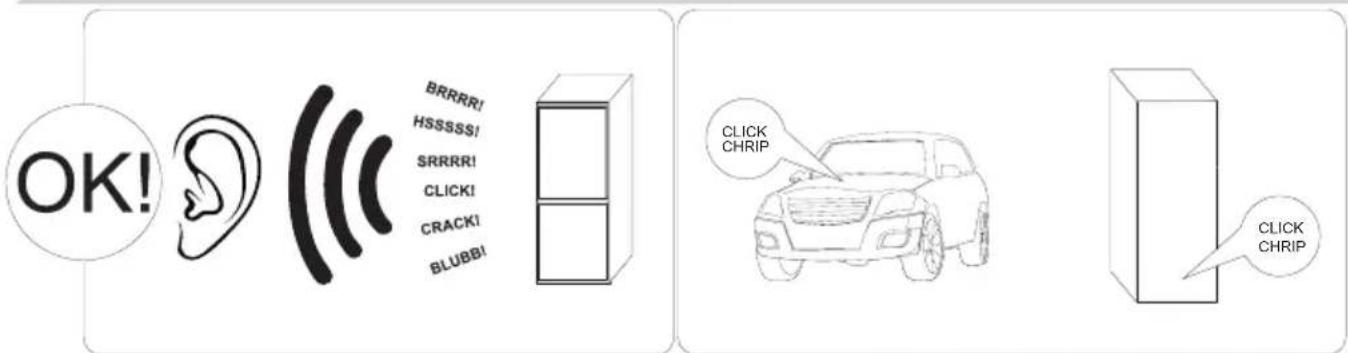
Certain sounds can be heard during normal use of the refrigerator, which do not affect its correct operation.
Sounds, which can be easily prevented:
- noise caused by the appliance which is not level - adjust the position with the adjustable turn-in front feet. Alternatively, place pads made of soft material under the rear rollers, especially when the appliance is placed on tiles.
- touching the adjacent piece of furniture - move the refrigerator away.
- creaking of the drawers or shelves - take out and put back the drawer or shelf.
- sounds of clinking bottles - move bottles apart.
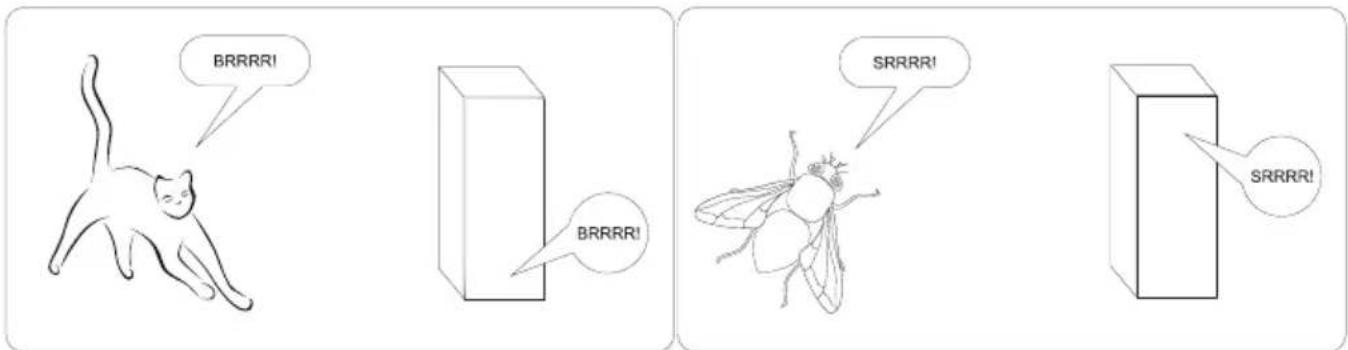
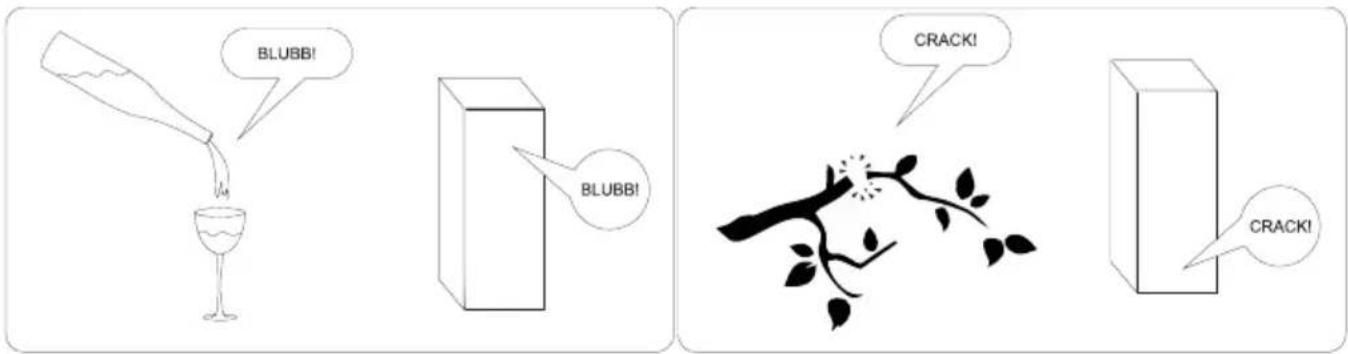
Sounds heard during normal use are mainly due to operation of the thermostat, compressor (switching on) and cooling system (thermal expansion and contraction of the radiator caused by flow of the cooling agent).
WARRANTY AND AFTER SALES SERVICE
Warranty
Warranty service as stated on the warranty card. The manufacturer shall not be held liable for any damage caused by improper use of the product.
Service
- The manufacturer recommends that all repairs and adjustments be carried out by the Factory Service Technician or the Manufacturer's Authorized Service Point. For safety reasons, repairs should be referred to professionals.
- Repairs carried out by unqualified persons may seriously endanger the appliance user.
- The minimum warranty period for the appliance offered by the manufacturer, importer or authorized representative is given in the warranty card.
- The warranty shall be void if you make any independent adaptations or alterations, tamper with seals or other appliance safety devices or its parts or interfere with the appliance contrary to operating instructions.
In the event of appliance malfunction, request assistance or repair.
If your appliance needs repair, please contact the service centre. Please see warranty card for address and contact details of our service centre. Before contacting us, please have ready the appliance serial number, which can be found on the identification sticker: For your convenience, please write it down below:
Manufacturer's Declaration
The manufacturer hereby declares that this product meets the requirements of the following European directives:
• Low Voltage Directive 2014/35/EC
• Electromagnetic Compatibility (EMC) Directive 2014/30/EC
• ErP Directive 2009/125/EC
• Directive RoHS 2011/65/EC
and has thus been marked with the symbol and been issued with a declaration of compliance made available to market regulators.
Vážený kliente,
natural_image
Recycling symbol composed of three chasing arrows forming a triangle (no text or labels)natural_image
Symbol of a trash bin crossed with a diagonal line, representing waste sorting or disposal (no text or labels)
natural_image
Hand interacting with a black rectangular device labeled 'M' (no other text or symbols visible)natural_image
Technical line drawing of a rectangular electronic device with internal compartments and a side-view view showing internal components (no text or symbols)OBSLUHA A FUNKCE
natural_image
Simple line drawing of a three chasing recycling symbol (no text or labels)natural_image
Simple line drawing of a trash bin with crossed lines indicating no waste or discharge (no text or symbols)Superkühlmodus
natural_image
Hand interacting with a black rectangular device labeled 'M' (no other text or symbols visible)Kindersicherung
natural_image
Technical line drawing of a rectangular electronic device with internal compartments and a side-view view showing internal components (no text or symbols)GARANTIE, NACHVERKAUFSERVICE
Garantie
natural_image
Recycling symbol composed of three chasing arrows forming a triangle (no text or labels)natural_image
Symbol of a trash bin crossed with a diagonal line, representing waste sorting or disposal (no text or labels)Szuperhűtési mód
natural_image
Hand interacting with a black screen displaying three square buttons labeled 'M' (no text or symbols on the screen)Gyerekzár funkció
natural_image
Line drawing of a dormitory cabinet with a circular vent and wall-mounted fixtures (no text or symbols)ionizátor
natural_image
Technical line drawing of a rectangular electronic device with internal compartments and a side-view view showing internal components (no text or symbols)KEZELÉS ÉS FUNKCIÓK
DÔLEŽITÉ BEZPEČNOSTNÉ POKYNY
VAROVANIE: Riziko požiaru / horl'avé materiá- ly
natural_image
Simple line drawing of a three chasing recycling symbol (no text or labels)natural_image
Symbol of a trash bin crossed out by two crossed lines (no text or numbers present)
Fungovanie ovládacieho panela
- Displej hodnôt chladničky.
- Ukazovatel' super chladenia.
- Displej hodnôt mrazničky.
-
Ukazovatel' super mrazenia.
-
Symbol alarmu.
-
Symbol blokády spustenia.
-
Symbol dovolenkového režimu.
-
Symbol úsporného režimu.
-
Umožňuje upraviť nastavenia chladničky a ked' je to potrebné, spustiť režim super chladenia. Chladničku môžete nastaviť na 8, 6, 5, 4, 2 °C super chladenie.
-
Umožňuje upravit nastavenia mrazničky, a ked' je to potrebné, spustit režim super mrazenia. Mrazničku môžete nastavit na -16, -18, -20, -22, -24 °C super mrazenie.
-
Ked' je to potrebné, umožňuje spustit úsporný režim, dovolenkový režim...
Používanie chladničko-mrazničky
Režim super mrazenia
Režim super chladenia
natural_image
Hand pointing at a black rectangular device with two small square buttons and the letter 'M' on its side (no text or symbols beyond basic labels)Tento režim úspory energie vypína osvetlenie riadiaceho panela, ked' sa panel práve nepoužíva.
Spôsob použitia.
Nastavenie teploty mrazničky
- Predvolená hodnota teploty mrazničky je -18 °C.
- Jedenkrát stlačte tlačidlo nastavenia mrazničky.
- Ked' stlačite toto tlačidlo, naposledy nastavená hodnota začne blikat' na displeji.
- Pri každom stlačení tohto tlačidlo sa nastaví nižšia teplota (-16 °C, -18 °C, -20 °C, -22 °C, -24 °C, super mrazenie).
- Ked' stlačíte tlačidlo nastavenia mrazničky do momentu, až sa zobrazí symbol super mrazenia, ak v priebehu 1 sekundy nestlačíte žiadne tlačidlo, symbol super mrazenia začne blikat'.
- Ak tlačidlo opät' stlačite, opät' sa spustí hodnota, začínajúc od -16 °C.
- Hodnota teploty, nastavená pred aktivovaním dovolenkového režimu, super mrazenia, super chladenia alebo úsporného režimu, zostane po skončení alebo zrušení režimu rovnaká. Zariadenie bude d'alej pracovať na danej teplote.
Nastavenie teploty chladničky
natural_image
Technical line drawing of a rectangular electronic device with internal compartments and a side-view view showing internal components (no text or symbols)OBSLUHA A FUNKCIE
natural_image
Technical line drawing of a mechanical assembly with angular dimension (40°) and support points, no text or symbols present.2
natural_image
Diagram showing a mechanical or electrical component with two arrows pointing upward and downward, enclosed in a circle (no text or symbols)3
5
6
natural_image
Technical line drawing of a mechanical component with internal structure and directional arrow (no text or symbols)8
12
natural_image
Diagram of a tool interacting with a mechanical component, showing a tool and blade assembly (no text or symbols)
natural_image
Diagram of a door frame with two hands giving thumbs-up gestures and a red dotted arrow indicating direction (no text or symbols)
natural_image
Diagram showing a mechanical assembly with a component being inserted, indicated by an arrow and magnified inset (no text or symbols present)
natural_image
Technical line drawing of a mechanical assembly with a downward arrow indicating force or motion (no text or symbols present)
natural_image
Diagram of a screwdriver inside a square frame with directional arrows indicating motion (no text or symbols)
natural_image
Diagram of a screwdriver interacting with a ladder inside a storage cabinet (no text or symbols)
natural_image
Simple line drawing of a rectangular frame with no text or symbols
natural_image
Diagram of a mechanical component with arrows indicating direction (no text or symbols)
natural_image
Simple line drawing of a mechanical lever system with two arms and a vertical support (no text or symbols)
natural_image
Diagram showing a door with a vertical handle and two hanging weights with red curved arrows indicating motion (no text or symbols)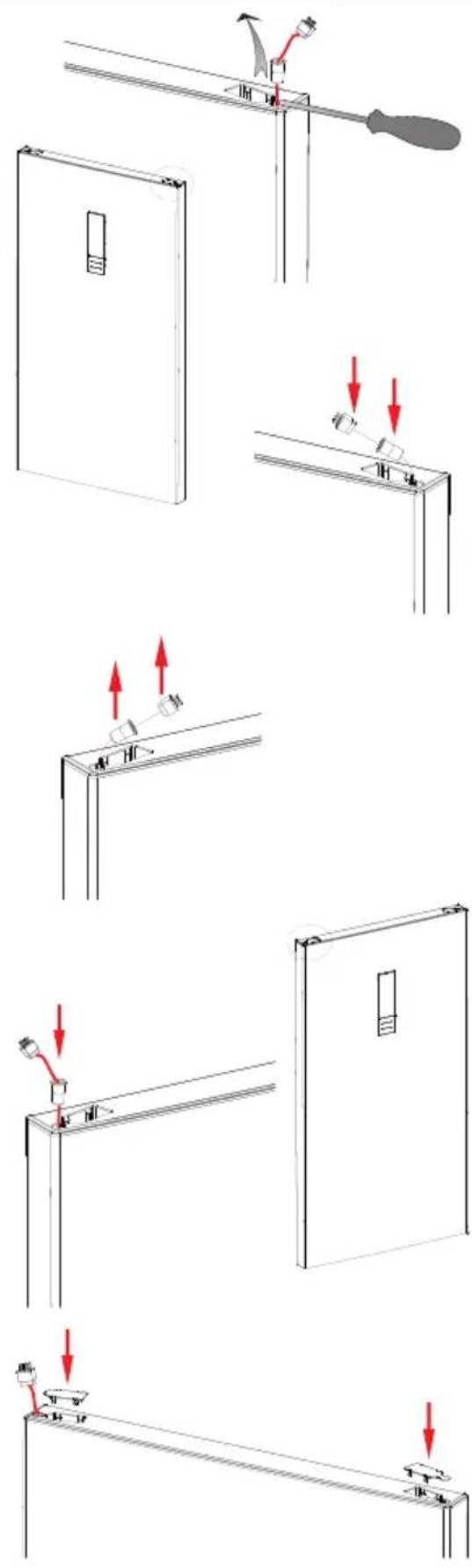
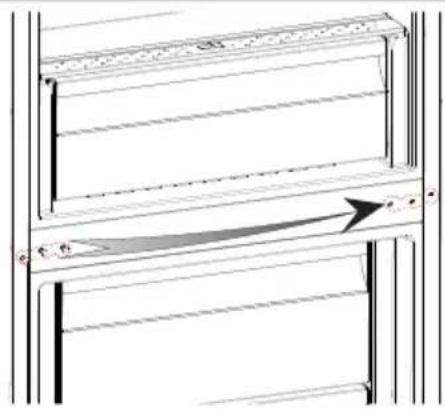
natural_image
Diagram of a mechanical or architectural component with horizontal bars and an arrow indicating direction (no text or symbols)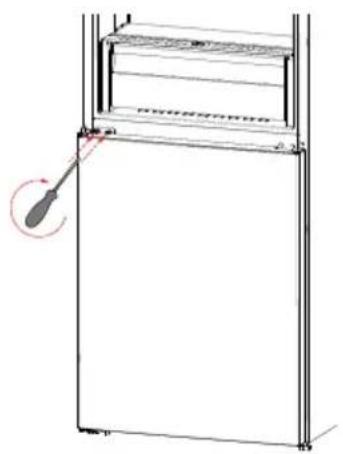
natural_image
Diagram of a refrigerator with a screwdriver inserted, showing no text or symbols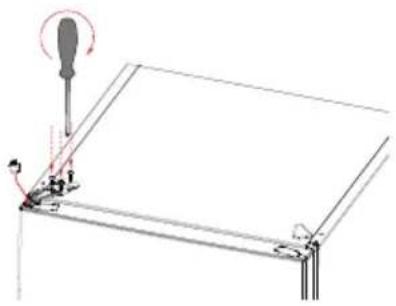
natural_image
Technical line drawing of a mechanical assembly with a screwdriver and base mount (no text or symbols)
natural_image
Technical line drawing of a mechanical assembly with no visible text or symbolsFAGOR
ELECTRODOMÉSTICO

natural_image
Abstract black circular logo with white horizontal stripes (no text or symbols)www.fagorelectrodomestico.com