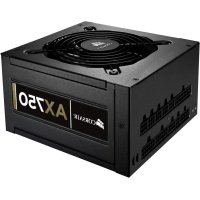
CMPSU750AX A - Power Supply (PC) CORSAIR - Free user manual and instructions
Find the device manual for free CMPSU750AX A CORSAIR in PDF.



| Product Type | PC Power Supply |
| Model | CMPSU750AX A (AX750) |
| Rated Power | 750 W |
| Efficiency Certification | 80 PLUS Gold |
| Form Factor | ATX12V 2.31, EPS12V 2.92 |
| Modularity | Fully Modular |
| Input Voltage | 90-264 V AC (Universal) |
| Fan | 140 mm, double ball bearing, ultra silent |
| Protections | Overvoltage, overload, undervoltage, short circuit |
| Warranty | 7 years |
| Capacitors | High quality Japanese |
| Dimensions (approx.) | 150 mm x 86 mm x 160 mm (W x H x D) |
| Weight (approx.) | 2.3 kg |
| Certifications | CE, UL, TUV, CCC, C-TICK, ROHS, etc. |
| Included Cables | ATX (24-pin), EPS12V (8-pin), PCI-E, SATA, peripherals, floppy |
| Maintenance | Clean with a dry cloth; do not open the casing |
| Operating Temperature | 0 to 40 °C |
Frequently Asked Questions - CMPSU750AX A CORSAIR
User questions about CMPSU750AX A CORSAIR
0 question about this device. Answer the ones you know or ask your own.
Ask a new question about this device
Download the instructions for your Power Supply (PC) in PDF format for free! Find your manual CMPSU750AX A - CORSAIR and take your electronic device back in hand. On this page are published all the documents necessary for the use of your device. CMPSU750AX A by CORSAIR.
USER MANUAL CMPSU750AX A CORSAIR
PROFESSIONAL SERIES™ GOLD
AX650
AX750
AX850
AX1200
ATX POWER SUPPLY
MANUAL·MANUEL·MANUALE·MANUELLE
Congratulations on the purchase of your new Corsair Professional Series Gold power supply.
This User Agreement (the "Agreement") is a legal agreement between you ("You"), and Corsair Memory, Inc ("Corsair"). You are agreeing to be bound by the terms of this agreement, as defined below, by using the Corsair Professional Series Gold power supply ("Product"). If you have any questions or concerns about the terms of this agreement, please contact us at http://corsair.com. If, prior to using the Product, you decide you are unwilling to agree to the terms of this agreement, promptly return the Product and the accompanying items (including written materials and binders or other containers) to Corsair or the Corsair authorized distributor from whom you obtained the Product and accompanying items. If you have already paid for the Product, provide us with your proof of purchase and we will refund to you the fees you have paid for these items.
Corsair Limited Warranty
Corsair provides a warranty to the original purchaser only that this genuine Corsair power supply, purchased from an authorized Corsair reseller, will be free from defects in material and workmanship for seven (7) years from the date of purchase.
Except where prohibited by applicable local law, this warranty is limited to the original purchaser and is non-transferable. This warranty provides you with specific legal rights, and you may have additional rights that vary under local laws. In general, this warranty means your Corsair power supply is guaranteed to operate, as specified by its datasheet and/or product documentation, and in the operating environment for which it was intended, for the life of the product or the extent of the warranty.
Remedies
Corsair's entire liability and your exclusive remedy for any breach of warranty shall be, at Corsair's exclusive discretion: 1) to repair or replace the hardware, or 2) to refund the price paid, provided that the hardware is returned to the original place of purchase, or another place as directed by Corsair, with the original sales receipt (or a valid copy thereof). You may be required to pay shipping and handling charges, as well as any applicable tariffs, duties, taxes, or other fees, except where prohibited by applicable local law. Corsair may, at its exclusive discretion, use new, or used/refurbished parts in good working condition, to repair or replace the hardware.
Any repaired or replacement hardware will be warranted for the remainder of the original warranty period, or thirty (30) days, whichever is greater, or for any additional period of time that is specified by law in your local jurisdiction.
Obsolete or discontinued products
Whenever possible, an obsolete or discontinued product will be replaced with the same product. If Corsair is unable to replace your obsolete or discontinued product with the same product, Corsair will replace that product with a new product of similar function and equal or greater value.
Exclusions
This warranty does not cover problems or damage resulting from, but not limited to, any of the following:
- Wear and tear associated with normal use
- Any modification, abuse, accident, disassembly, misapplication, or unauthorized repair
-
Removal of any manufacturer label(s) or sticker(s)
-
Any improper operation, including any use not in accordance with any supplied product instructions
- Connection to any improper voltage supply
- Use of consumables, such as replacement batteries, not supplied by Corsair, except where such restriction is prohibited by applicable local law.
- Any other cause which does not relate to a product defect in materials or workmanship
Also excluded from this warranty are counterfeit products; that is, products that Corsair, at its sole discretion, determines were not manufactured by Corsair or any of its authorized manufacturing partners.
Limitation of liability
CORSAIR SHALL NOT BE LIABLE FOR ANY SPECIAL, INCIDENTAL, INDIRECT, OR CONSEQUENTIAL DAMAGES WHATSOEVER, INCLUDING BUT NOT LIMITED TO LOSS OF PROFITS, REVENUE, OR DATA (WHETHER DIRECT OR INDIRECT) OR COMMERCIAL LOSS FOR BREACH OF ANY EXPRESS OR IMPLIED WARRANTY ON YOUR PRODUCT EVEN IF CORSAIR HAS BEEN ADVISED PREVIOUSLY OF THE POSSIBILITY OF SUCH DAMAGES. Some local laws do not allow the exclusion or limitation of special, indirect, incidental or consequential damages, so this limitation or exclusion may not apply in your jurisdiction.
Duration of implied warranties
EXCEPT AS PROHIBITED BY APPLICABLE LAW, ANY IMPLIED WARRANTY OR CONDITION OF MERCHANTABILITY OR FITNESS FOR A PARTICULAR PURPOSE ON THIS HARDWARE PRODUCT IS LIMITED IN DURATION TO THE DURATION OF THE APPLICABLE LIMITED WARRANTY PERIOD FOR YOUR PRODUCT. Some local laws do not allow limitations on how long an implied warranty may last, so this limitation may not apply in your jurisdiction.
National statutory rights
Consumers may have legal rights under applicable national legislation governing the sale of consumer goods. Such rights are not affected by the warranties in this Limited Warranty.
No other warranties
No Corsair employee, dealer, or other agent is authorized to make any modification, extension, or addition to this warranty.
How to make a warranty claim
Before submitting a warranty claim, we suggest you contact our technical support group or visit corsair.com and review the support section for technical assistance. A simple fix for your problem may be found there.
Generally, valid warranty claims should be processed through your original point of purchase during the first thirty (30) days after purchase. This period may vary depending on where you purchased your product; please verify the return policy with the retailer where you purchased your product. Any warranty claims that cannot be processed through your original point of purchase should be addressed directly to Corsair. Our customer service contact information can be found on the web at corsair.com/contact or in the documentation included with your product.
Introduction: Ideal for high-performance PCs Unprecedented power protection
The Corsair Professional Series Gold power supply pushes the state of the art for reliable delivery of clean power under imperfect conditions. If you require mission-critical stability or you simply want one of the best power supplies available, the Professional Series Gold is for you.
A true modular cabling system
All cables detach from the power supply. During installation, this gives you the flexibility of using only the cables you need for a clean system build with optimal airflow. And, when it's time to replace or upgrade your power supply, it can be removed from your system without interfering with your cabling – the cables stay in place and connect to your new fully-modular Corsair power supply.
Incredible efficiency
With 90% efficiency at 50% load, the Corsair Professional Series Gold power supply runs quieter, generates minimal excess heat, and saves you money every month. It's earned the 80 Plus* Gold seal of approval, your guarantee that you're making the right choice for smart, efficient power delivery.
Corsair Advantages
Your Corsair Professional Series Gold power supply is packed with the latest technology and features:
- It supports the latest ATX12V 2.31 and EPS 2.92 standards and is backward compatible with ATX12V 2.2 and ATX12V 2.01 systems.
- An ultra-quiet double ball-bearing fan delivers excellent airflow at an exceptionally low noise level by varying fan speed in response to temperature.
- Up to 90% energy efficiency at real world load conditions means less heat generation and lower energy bills.
- 0.99 Active Power Factor Correction provides clean and reliable power.
- Universal AC input from 90~264V. No more hassle of flipping that tiny red switch to select the voltage input!
- A dedicated single +12V rail offers maximum compatibility with the latest components.
- Over-voltage and over-power protection, under-voltage protection, and short circuit protection provide maximum safety to your critical system components.
- High-quality Japanese capacitors provide uncompromised performance and reliability.
- The completely modular cable system allows you to use only the cables you need. Power supply upgrade and replacement is easy, as the cables only need to be disconnected at the power supply.
- Low-profile, flat cable design reduces air friction and helps maximize airflow through your computer's chassis.
- A Seven year warranty and lifetime access to Corsair's legendary technical support and customer service.
Power supply specifications
- Dimensions:
AX650/750/850: 150mm (W) × 86mm (H) × 160mm (L);
AX1200: 150mm (W) × 86mm (H) × 200mm (L);
MTBF:100,000 hours
| MODEL AX650 | AX750 AX850 AX1200 | |||||||
| AC INPUT RATING | ||||||||
| AC INPUT 90-264V | ||||||||
| INPUT CURRENT | 8-4A 9-4.5A 10-5A 15A | |||||||
| FREQUENCY 50Hz~60Hz | ||||||||
| DC OUTPUT RATING | ||||||||
| Max Load | Max output | Max Load | Max output | Max Load | Max output | Max Load | Max output | |
| +3.3V 25A | 125W | 25A | 125W | 25A | 125W | 30A | 180W | |
| +5V 25A 25A 25A 30A | 25A 30A | |||||||
| +12V | 54A | 648W | 62A | 744W | 70A | 840W | 100.4A | 1204.8W |
| -12V | 0.5A | 6W | 0.5A | 6W | 0.5A | 6W | 0.8A | 9.6W |
| +5VSB | 3A | 15W | 3A | 15W | 3A | 15W | 3.5A | 17.5W |
| TOTAL POWER | 650W | 750W | 850W | 1204.8W | ||||
Package contents
- Corsair Professional Series Gold power supply unit
- AC power cord
Cable ties - Mounting screws
Corsair cable configuration
| MODEL AX650 AX750 | AX850 AX1200 | |||||||
| ATX CABLE (24-PIN) | Qty. 1 1 11 | |||||||
| Connectors per cable | 1111 | |||||||
| Length 610mm ± 25mm 610mm 610mm 610mm | ||||||||
| EPS12V CPU CABLE (8-PIN) | Qty. 1 2 2 2 | |||||||
| Connectors per cable | 1111 | |||||||
| Length 650mm ± 25mm 650mm 650mm 610mm | ||||||||
| PCI-E CABLE | Qty. | 4 | 4 | 4 | 6 | |||
| Connectors per cable | 1111 | |||||||
| Length | 600mm ± 25mm | 600mm | 600mm | 610mm | ||||
| SATA CABLE | Qty. | 2 | 2 | 2 | 2 | 2 | 3 | 2 |
| Connectors per cable | 4 | 4 | 2 | 4 | 2 | 4 | 2 | |
| Length | 850mm ± 25mm | 850mm | 550mm | 850mm | 550mm | 750mm | 500mm | |
| PERIPH-ERAL CABLE | Qty. | 2 | 2 2 3 | |||||
| Connectors per cable | 4 | 4 | 4 | 4 | ||||
| Length 850mm ± 25mm 850mm | 850mm | 850mm | 750mm | |||||
| FLOPPY ADAPTER | Qty. | 2 2 2 2 | ||||||
| Connectors per cable | 1111 | |||||||
| Length | 101mm ± 5mm | 101mm | 101mm | 101mm | ||||
Notes:
- Floppy connectors are attached to the end of the peripheral cable.
- The ATX power connector has a detachable 4-pin mechanism in order to support either a 24-pin or a 20-pin socket on the motherboard.
- The EPS12V power connector has a detachable 4-pin mechanism in order to support either an 8-pin socket or a 4-pin "P4/12V" socket on the motherboard.
Installation
Before proceeding with installation, please read this manual in its entirety.
Step A: Removing your existing power supply
If you are building a new system, skip to Step B.
- Disconnect the AC power cord from your wall outlet or UPS and from the existing power supply.
- Disconnect all the power cables from your video card, motherboard and all other peripherals.
- Follow the directions in your chassis manual and uninstall your existing power supply.
- Proceed to Step B.
Step B: Installing the Corsair Professional Series Gold power supply
- Make sure the power supply's AC power cable is not connected.
- Follow the directions in your chassis manual and install the power supply with the screws provided.
- Connect the main 24-pin power cable. The main 24-pin power cable has a detachable 4-pin mechanism in order to support either a 24-pin or a 20-pin socket on the motherboard.
a. If your motherboard has a 24-pin socket, you may connect the 24-pin main power cable from the power supply directly to your motherboard.
b. If your motherboard has a 20-pin socket, you must detach the 4-pin cable from the 24-pin connector, and then plug the 20-pin cable onto your motherboard without connecting the 4-pin connector.
- Connect the 8-pin +12V (EPS12V) cable.
a. If your motherboard has an 8-pin +12V socket, connect the 8-pin cable directly to your motherboard.
b. If your motherboard has a 4-pin socket, detach the 4-pin from the 8-pin cable, and then plug this 4-pin cable directly to your motherboard.
WARNING: The detachable 4-pin from the 24-pin main connector is not a "P4" or "+12V" connector. Serious damage can be caused if you use it in place of a "P4" or "+12V" connector.
- Connect the peripheral cables, PCI-Express cables, and SATA cables.
a. Connect the peripheral cables to your hard drive and CD-ROM/DVD-ROM power sockets.
b. Connect the SATA cables to your SATA SSD or hard drive's power sockets.
c. Connect the PCI-Express cables to the power sockets of your PCI-Express video cards if required.
d. Connect the peripheral cables to any peripherals requiring a small 4-pin connector.
e. Make sure all the cables are tightly connected.
6. Connect the AC power cord to the power supply and turn it on by pushing the switch to the ON position (marked with "I").
Congratulations! You have completed installation of your new Corsair Professional Series Gold power supply and your system is ready to go!
Important Safety Information CAUTION ELECTRIC SHOCK HAZARD!

- Install in accordance with all manufacturer instructions and safety warnings. Failure to do so may result in damage to your power supply or system, and may cause serious injury or death.
- High voltages are present in the power supply. Do not open the power supply case or attempt to repair the power supply; there are no user-serviceable components.
- This product is designed for indoor use only.
- Do not use the power supply near water, or in high temperature or high humidity environments.
- Do not install near any heat sources such as radiators, heat registers, stoves, or other apparatus that produce heat.
- Do not insert any objects into the open ventilation or fan grill area of the power supply.
- Do not modify the cables and/or connectors included with this power supply.
- If this power supply uses modular cables, use only manufacturer supplied cables. Other cables might not be compatible and could cause serious damage to your system and power supply.
- The 24-pin main power connector has a detachable 4-pin connector. This 4-pin connector is not a P4 or ATX 12V connector. Do not force this cable in the P4 or ATX +12V socket on the motherboard.
- Failure to comply with any manufacturer instructions and/or any of these safety instructions will immediately void all warranties and guarantees.
Safety and Agency Approvals
FCC FCC Rules Part 15.Class B
ICES ICES-003
CE EN 55022:2006 + A1:2007, Class B
EN61000-3-2:2006 Class D
EN61000-3-3: 1995 + A1:2001 + A2:2005
EN55024:1998 + A1:2001 + A2:2003
IEC61000-4-2:1995 + A1:1998 + A2:2000
IEC61000-4-3:2006
IEC61000-4-4:2004
IEC61000-4-5:2005
IEC61000-4-6:2003 + A1:2004 + A2:2006
IEC61000-4-8:1993 + A1:2000
IEC61000-4-11:2004
UL/CUL UL 60950-1
CSA C22.2 NO.60950-1
C-TICK AS/NZS CISPR 22:2006, CLASS B
TUV EN 60950-1
CB IEC 60950-1
CCC GB4943
GB9254
GB17625.1
BSM1 CNS14336
CNS13438
GOST R IEC 60950-1-2005
R 51318.22-99
R 51318.24-99
R 51317.32-2006
R 51317.3.3-99
ROHS 2002/95/EC, Restriction of Hazardous Substances Directive
WEEE 2002/96/EC, Waste Electrical and Electronic Equipment Directive
ROHS China Order No.39, Administration on the Control of Pollution Caused By Electronic Information Products
(China)
AX650/750/850: 150 mm (l) × 86 mm (P) × 160 mm (L)
AX1200: 150 mm( I) × 86 mm( P) × 200 mm( L)
- MTBF: 100,000 heures.
| MODELE AX65 | O AX750 AX850 AX1200 | |||||||
| ENTRÉE CA NOMINALE | ||||||||
| ENTRÉE CA 90-264V | ||||||||
| COURANT D'ENTRÉE | 8-4A 9-4.5A 10-5A 15A | |||||||
| FRéQUENCY 50Hz~60Hz | ||||||||
| SORTIE CC NOMINALE | ||||||||
| Charge Maximale | Sortie Maximale | Charge Maximale | Sortie Maximale | Charge Maximale | Sortie Maximale | Charge Maximale | Sortie Maximale | |
| +3.3V 25A | 125W | 25A | 125W | 25A | 125W | 30A | 180W | |
| +5V 25A 25A 25A 25A 25A 25A 25A 25A 25A 25A 25A 25A 25A 25A 25A 25A 25A 25A 25A 25A 25A 25A 25A 25A 25A 25 A | 25A 30A | |||||||
| +12V | 54A | 648W | 62A | 744W | 70A | 840W | 100.4A | 1204.8W |
| -12V | 0.5A | 6W | 0.5A | 6W | 0.5A | 6W | 0.8A | 9.6W |
| +5Vsb | 3A | 15W | 3A | 15W | 3A | 15W | 3.5A | 17.5W |
| PUISSANCE TOTALE | 650W | 750W | 850W | 1204.8W | ||||
ROHS 2002/95/EC, Restriction of Hazardous Substances Directive
WEEE 2002/96/EC, Waste Electrical and Electronic Equipment Directive
AX650/750/850:150mm (B) x 86mm (H) x 160mm (L)
AX1200: 150mm (B) × 86mm (H) × 200mm (L)
ROHS China Order No. 39, "Administration on the Control of Pollution
(China) Caused By Electronic Information Products" (Gesetz zur Eindammung
- AX650/750/850: 150mm (P) x 86mm (A) x 160mm (L)
AX1200: 150mm (P) × 86mm (A) × 200mm (L)
- MTBF (tempo medio tra guasti): 100,000 ore
| MODELL AX6 | 50 AX750 AX850 AX1 | 200 | ||||||
| POTENZA DI INGRESSO CA | ||||||||
| INGRESSO CA | 90-264V | |||||||
| CORRENTE DI INGRESSO | 8-4A 9-4.5A 10-5A 15 | |||||||
| FREQUENZA 50Hz~60Hz | ||||||||
| POTENZA DI USCITA CC | ||||||||
| Carico massimo | Uscita massima | Carico massimo | Uscita massima | Carico massimo | Uscita massima | Carico massimo | Uscita massima | |
| +3.3V 25A | 125W | 25A | 125W | 25A | 125W | 30A | 180W | |
| +5V 25A 25A | 25A 30A | |||||||
| +12V | 54A | 648W | 62A | 744W | 70A | 840W | 100.4A | 1204.8W |
| -12V | 0.5A | 6W | 0.5A | 6W | 0.5A | 6W | 0.8A | 9.6W |
| +5VSB | 3A | 15W | 3A | 15W | 3A | 15W | 3.5A | 17.5W |
| POTENZA TOTALE | 650W | 750W | 850W | 1204.8W | ||||
AX650/750/850: 150mm (A) × 86mm (A) × 160mm (F)
AX1200: 150mm (A) × 86mm (A) × 200mm (F)
CpeDCTBaIOpnIuYeCKo3aunTbI
O6uIoubemOTBeCTBHeHOctuKOMnauHn Corsair nBaue NCKNoHTeNbHoe cpeCTBO
Opduuecko 3aunTbB Cnyae Hapuyehnra rapaHTn coCTabnE, NO yCMOTpeHIO KOMnaHn
Corsair, cJeDyUooee: 1) pEmoHT nn 3aMeHa annapaTHoro o6ecneueHn nn 2) Bo3BpaT
BbInpauHHo ueHb, npu ycNOBn BO3Bpata annapaTHoro o6ecneueHn B oprHnAHLbHO MeCTo
NOKynu, nn npdyroe MeCTO, yka3aHnoe KomnaHnei Corsair, cOprrnHaNBbIM TObAPHBm YekOM
(IIIN erO deNCTBnTeNbHoi KOHe).OT Bac MoXET notpe6OBaTBcR OOnLaT aTOUMocTn DOCTABKn
n 60pa60TK, a TAKKe IIO6BX npImeHMbIX TapNΦOB, NOnLHN, HAnorOB INn DpyrNX BbINat, 3a
NCKIOUeHnEM cUYaEB, KOrDa 3TO 3anPeSeHO MeCTHbM 3aKOHOdaTeNbCTBOM. KomnaHn Corsair
MOxET n CBOeMy NCKIOUHTeNbHOMy yCMOTpeHIO NcNoJb3OBA Tb HOBbie INn NcNoJb3OBAHHbie/
BOcCTaHOBLeHHbIe DeTaN B XopoWem pa6Ouem COCTOAHN INr peMOHTa INn 3aMeHbl
annapathoro o6ecneueHn.
Ha OtpemOHnpoBaHoe nIIN 3aMeHeHHoe aIInapaTHoe o6ecneueHne npedocTabnaretc rapaHTna Ha ocTabWncIcspOK oprInHaJIbHorO rapaTnHoro nepNoDa IIN Ha cPOK 30 (TpnuCaTb) dHe, B 3aBNCUMOCtN OT TORO, qTO 6OBJhe, IIN HA IIO6oI DOnOpHNTeJbHbI NepNOB BpeMeH, ONpeDeHnB3aKOHoDAteJBCTBOM BaWeM MeCTHOIpNCdNKuIN.
YcTapeBwne nn CHaTbIe c npOn3BOdCTBa npOdyKtbl
EcnI 3TO BO3MOxH0, yCTapeBwne nIN CHrTbIe C npOn3BOcCTBa npOyKTbI 6ydy T 3aMeHebl npOyKTAMn TOJKe MoJeIN. EcnI KOMpaHna Corsair He MoxKet 3aMeHnTB Bau yCTapeBwIn nIN CHrTbI C npOn3BOcCTBa npOyKT DpyrIM npOyKTOM ToJ Ke MoJeIN, OHa 3aMeHnT 3TOT npOyKT HObIM npOyKTOM CO CXODHbIMN fYHKUHOHaJIbHbIMN BO3MOxHOCTAmn IN paBHOn nIN 6oJee BBICOKO CTOnMOCTbIO.
NCKJIIOUeHnA
HaTcTaHraRapaHTnHe paCnpocTpAraTeTcHa npo6IeMbI nnIOBpeKdEHHa,BO3HnKaIoUne, B YaactHOCTn, NO CLEdyUOuIM npuHAm:
- n3HOC BCNECTBHe HOpMaJIbHOJ 3KcJIpyaTauNi;
- IIO6oe n3MeHeHne, HApUeHne nCnOJIb3OBaHnA, aBapnA, pa36OpKa, HeNPaBnIbHOe NOkJIIOUeHne IJN peMOHT HeyNOJHOMOeHHbIMN JINCaMn;
3.ydaJIeHHe MapKInpObKN HnHaKJIeek N3rTOBHTeJIa; - lioble cnyan HenpaBnIbHOJ 3KcNpyaTaun, BKNIOyA NCNOB3OBaHne C hapyuHenem npINOxKeHHbIX K npOdykTu INCTpyKu;
- NOKJIIOUHeHNE K NCTOCHNYKTOKA C HECOOBTBETCTBYIOUM HAIPJXeHNEM;
- Исторовные расховы Матерноь, нашириме сменьбатAPEEK, He NOCTABLBAWIXCSKOMmaHnei Corsair, 3a NCKNoyeHem clyuaeB, KORda TaKoe orpaHnueHne 3anpeucho MeCTHBIM 3aKOHOdaTeIbCTBOM;
- IIO6bIe IpyrIe CnyuAn, KOtOpBIE He CBra3aHbI C HAIINuYnEM DeΦeKToB B MaTePnaJax nnI npOn3BOIDCTBe npOdyKta.
Kpome TOrO, daHHa rapaHTnHa paCnpocTpaHReTcHa KOHTpaKaTHbIe npOdyKtbl, To eCTb Ha npOdyKtbl, KOTOpBie KomnaHra Corsair no CBOemy co6CTBeHHOMy yCMOTpeHnIO onpeDenAeT KaK He n3rOToBnEHHbIe Corsair nnIIO6bIM n3 ee aBTOPI3OBaHHbIX napThepoB NO npOn3BOIDCTBy.
OrpaHnueHne OTBeTCTBeHHoCTM
KOMNAHNA CORSAIR HE HECET OTBETCTBEHHOCTN 3A CNEUAAJIbHbIE, CUYAHbIE, KOCBEHNbIE INI NOCLENYUOUIYE YbItKN IIOBOTOPODA,B TOM YNCIE BKJIOUAYYTPATY INIbIN,IOXODA INI DAHHbIX (6yNb TO IPRMYIO INI KOCBEHHYIO) INI KOMMEPUECKNE YbItKN, Bbl3BAHHbIE HAPUWEHENEM IIOBOI ABHOINI NOPA3YMBAEMOI TAPAHTNI HA BAWIPNOyKT, DAXE ECIN KOMNAHNA CORSAIR bblA 3APAHEE PDEYNPEXJEHA O BO3MOXHOCTNU TAKNX YbItKOB. HeKOTOpBMn MeCTbIMn 3aKoHOdaTeNBcBAMn He dOnyckaetcN CKLIQUEHNE INI ORpaHueHne CNEUALbHbIX, KOCBeHNbIX, CUYAHbIX INI NocNe dyUOuix y6bITKOB, PO3TOMy daHHoe ORpaHueHne INI NCKLIQUEHNE MOKeT 6blb HenpImeHMoB BaWei kpcdnkun.
Cpok deiCTBna noDpa3yMeBaembix rapaHTn
3A NCKIIOUEHEM CJIyAEB, KORDA 3TO 3APPEUHO IPNIMEHIMbIM 3AKOHODATEJBCTBOM, JIO5bIE NOIDPA3UMEBAEMbIE TAPAHNTIN UIN YCJOBN TOBAPHO COCTOHN IINI PNIPOHOCTN DIA KOHKPETHORO INCNOBJ3OBAHN DAHHORO ANPAPATHOTO IPODYKTA ORPAHUNBAOTCB B TEUEHNE CPOKA DEICTBNA IPNIMEHMOI OTRPAHNUEHHOJ TAPAHNTIN HA BAU IPODyKT. HeKOTOpBMn MeCTbIMN 3aKOHODaTEbCTBaMn HE dONyCKaeTc rOpaHueHne IPODOJKNTeNbHOCTN CpOKA DeICTBn IOpda3UMeBAeMOI rapaHTIN, PO3TOMy daHHoe OrpaHNUeHMeoKET 6bITb HENpIMeHIMO B BaWe IOpNCdNKcUn.
IpaBaNoHaunHOHaJIbHOMy3aKoHOJaTeJIbCTBy
Iotppe6nteMOryT mEmTe kOpuiueckne npaba no npimHeHmOMy HaCuHOHaBHomY 3aKoHOaTeNbCTBy, perynuPyUcEMy npOdaKy nTope6nteBcknx Tobapob. Hactoiaa OrpaHnueHHa rapaHTn He 3atparuBaet TaKe npaba.
OTka3 O T pyrnx rapaHTm
Hn OoHH n3 cotpydHKnOB, dInepoB nn npnyx areHTOB KOMnaHn Corsair He nMeet noHoomouh BHOCNTb n3MeHeHnra, paCunpeHnra nn do6abHeHn B HactOaIyU rapaHTNo.
OtnpaBka Tpe6oBaHn no rapaHTm
Ipepe OtnpabKoTpe6ObaHnNo rapaHTmMb peKomeHnyeBAM CBa3aTbC hAwei CnyKbo TeHNuecko NODepkKn nIn NoCeTntb Be6-caNTcorsair.com n 3yUnt b MaTePnaIbIo TExHNuecko NODepkKe. Bo3MOxHo, 3To NOMOKeT Bam HaTI npocToe peWeHne Bo3HNKWe np6NeMbl.
Kak npabnlo, tpe6oBaHnno no rapaHTn noDolXhbl 6bTb 6pa6OaHbI MeCTOM opunHaJIbHO npodJn npodykTa B TeueHne nepBbIX 30 (tpnduata) dHe n C MOMeHT pnpo6peTeHn. PpOdoJxntelbHOCTb 3TOr npnoDa moKeT n3MeHraTcB 3aBcUMoCTOn OT MeCTa npno6peTeHn npodykTa. Y3haIte y npodAuta npabIna Bo3Bpata npodykTa. Bce Tpe6oBaHN no rapaHTn, KOtOpbIe He Moryt 6bTb 6pa6OtaHb I MeCTe opurHaJIbHO npodaXn, DOLXhbl 6bTb nepeDaHbI HENOCpeDCTBeHHO KOMNaHn Corsair. KoTHaTKHyIO NHΦopMaUHO HaWe cLyX6bl NOdepKKn MOxHo HaITn Ha Be6-caTe corsair.com/contact mN B DOkymeHTaUIN K BaWeMy npodykTy.
BVeHne
BecnpeueeHTHa3aunTaIHTaHnA
Cepn Corsair Professional Series Gold noDHMaET NCKYCCTBO nOaun HaedJHOro YNCTORO nHTAHn Prn HnDeaIbHbIX yCIOBnIX Ha HOByO BbICOTy. EcIn Bam Heo6XODmAb 6eCKOMnpOMnCCnA CTa6NJbHOCTb, INn Bbl npocTo XOTHe IMeTb OOnH n3 LyuWnx CyueCTByUOxix 6LOKOB nITAHn, Corsair cepn Professional Series Gold - 3TO 6NoK nITAHnДЯВac.
Hactoiaa Cnctema Modybhbix Ka6eJe
B cepu Corsair Professional Series Gold BCE Ka6eMm Moryt 6bItb OTcoeHHebl OT 6noka nHTAHn. Pnp yctahOBke 6noka nHTAHn 3TO daet Bam Heo6xOIMyIO rN6KoCTb NcNoIb3OBAHnra TOJIbKO Tpe6yEmbIX Ka6eNe i C6OpKn iDeaJIbHOi CNCTeMbI C ONTImaJIbHbIM BO3dYxOTOKOM. TaKKe, B Clyuae 3aMeHb 6noka nHTAHn, OH MOKeT 6bItb N3BJeueH N3 CNCTeMbI 6e3 Ka6eJe, KOTopbie OCTaHyTCra Ha MeCeT i MOryt 6bItb POdkloueHbl K BaUeMy HOBOMy NOINHOCTbIO MOdUnbHOMy 6nOKy nHTAHn Corsair.
HebepoTna 3ΦΦeKtNBHOCTb
Обеспуньгф ekнвсь 90% npn 50% harpy3ke, bokи Пntань Corsair cepи Professional Series Gold pa6oTOT Tnwe, npon3bOJrMa MeHbWe TeNla n ekOHOMr BAuN DeHbRn OT Mecya K Mecaу. 3acIyKeHHa cepTnФИкaцry «80 Plus Gold» - эTO Ba7a rapaHTnЯ npabInbHocTu Bbl6opa cepbe3Horo, Εф ekTNBHorO 6Noka nItaHnay
ПpenMu事业单位6лokовпманяCorsair
БлOK ппаня Corsair cepи Professional Series Gold co3dah Ha ochobe HOBENIX texHOLORn I O6naaet cMbIMN COBepseHHbIMN xapaKTePncTKaMn.
- Пдержka Новшero сандага ATX12V 2.31 n EPS12V 2.92 n o6paTHa coBmectmoctb c cnCTeMaMn ATX12V 2.2 n ATX12V 2.01.
- PpaKTnueckn 6ecwymhBn BEHTnJIaTOp CO cDBoeHHbIM NOdUnnHnKOM n peYIINpOBaHNem YnCSNa o6./MnH. B 3aBncmOCTn OT TempeaTypbl, ObecneuBaIOUm otNnHb N O6dyB npn NCKLIQUHTeJbHO Hn3KOM yPOBHe WyMa.
- ΘΦΦeKTHBHOCTbdo 90% (πρι TIIINHON Hαργ3Ke) O3Haayet MeHbIe e TENIOBbIeJIeHne n MeHbIe e ΘeprOTope6JIeHne.
- Aktubhaj Koprekunia foaktopa moohocn (APFC) c KO300nueHTom O.99, 06ecneuBaouja Cta6nbHyu HndexHyno npdauy nntAHn.
- YHnBepcaJIbHaN noDpeKka BxOJHO rHaPraKeHr: 90~264B. BoJIbWe HnKaKnx KpacbIX nepeKIOUoateJe!
BbIeJIeHHa eINHaa IINHa IITAHn +12B dIy MaKcImaIbHOJ COBMeCTUMOCTN C HOBeIshmN KOMNOHEHTAMN.
MaKcImaIbHna Cta6nIbHoCTb 3HePrcHa6KeHn KpUtnueckn BaXhBix CnCTeMHbIX KOMNoHErTOB, 3aUHTa OT IpeBbIeHn HAnpJxHn Nnn MOuHOctn, NOHxHn HAnpJxHn N KOPOTKOrO 3AmkAHn. -
BbICOKOKaueCTBeHHbIe IIOHCKne KOHDeHcTOpbl, OBeCNeuBaIOUJIne 6eCKOMnpomnCCHyHOHeJXHOCTb IN PpOUN3BOIDNTeJIbHOCTb.
-
PONHOCTbIO MOyIbHnA Ka6eIbHnA CNTeMa N03BOnaET NcNoIb3OBA Tb TolbKO Te Ka6eJI, KOTOpBle HyxNbI Bam. OcyuieCTbIaTb MoepHn3aUIO n 3aMeHy 6Loka NITaHnRA pOSe, NocKoJIbKy Ka6eJI HxJHo OTcoEINHrTb TOLbKO OT 6Loka NITaHnRA.
Hn3KoNpOphiNbHbI dI3aH nIIOcknx Ka6eJe yMeHbwaet BO3dyuHoe cOnpoTnBJeHne, YTO NO3BOJRAET yNyUwHTb BO3dyXoo6MeH BHyTpN KOpnyca BaWero KOMnbIoTepa.
CemnneTna rapaHTnI nIOCTyn K ycnyram OTnUHO 3apeKomeHIOBaBwee c68 cnXkbTexHuecko IooepxKn I NocJenpoaXHoro O6cnyXbAHN KOMNaHN Corsair.
TexHueckme xapaKtepncn6Ioka nntaHna
Pa3Mepbl:
AX650/750/850:150mm(LJ)×86mm(B)×160mm(Γ)
AX1200: 150mm (L) × 86mm (B) × 200mm (F)
CpeDHeBpeM6e30Ka3HOn pa6oTbI:100,000 yacOB
| MOДЕЛь | AX650 AX750 AX850 | AX1200 | ||||||
| BXODHON TOK (ПЕРМ.) | ||||||||
| BXODHONE HAJIPEJIXEHI (ПЕРМ.) | 90-264ВТ | |||||||
| BXOD.TOK | 8-4A | 9-4.5A | 10-5A | 15A | ||||
| ЧАСТОТА | 50Гц~60Гц | |||||||
| БыхонTOK (ПОCT.) | ||||||||
| MAKC. HAPY3KA | MAKC. MOUHOCb | MAKC. HAPY3KA | MAKC. MOUHOCb | MAKC. HAPY3KA | MAKC. MOUHOCb | MAKC. HAPY3KA | MAKC. MOUHOCb | |
| +3.3B | 25A | 125Вт | 25A | 125Вt | 25A | 125Вt | 30A | 18OBt |
| +5B | 25A | 25A | 25A | 30A | ||||
| +12B | 54A | 648Вt | 62A | 744Вt | 70A | 84OBt | 100.4A | 1204.8Вt |
| -12B | 0.5A | 6Вt | 0.5A | 6Вt | 0.5A | 6Вt | 0.8A | 9.6Вt |
| +5B (PE3EPBNA шИHA) | 3A | 15Вt | 3A | 15Вt | 3A | 15Вt | 3.5A | 17.5Вt |
| ПОЛНА MOUCHOCTb | 65OBt | 75OBt | 85OBt | 1204.8Вt | ||||
Komnlektaua
- Бл_OK петань серни Corsair серни Professional Series Gold
Ka6eBnIaHnI nepemehHoro Toka
CraKKn dJa Ka6eNei
MOHTnpoBOUHbIe 6oNTbl
KoHpypaunKa6eJe Corsair
| MOДЕЛь | AX650 AX750 | AX850 AX1200 | ||||||
| Кавелы ATX (24-KOHТАКТНы) | Кол-ВО | 1111 | ||||||
| Разьемов на koабел | 1111 | |||||||
| Длина | 610mm ± 25mm 610mm 610mm 610mm 610mm 610mm 610mm 610mm 610mm 610mm 610mm 610mm 610mm 610mm 610mm 610mm 610mm 610mm 610mm 610mm 610mm 61 | 610mm 610mm 610mm 610mm 610mm 610mm 610mm 610mm 610mm 610mm 610mm 610mm 610mm 610mm 610mm 610mm 610mm 610mm 610mm 610mm | 610mm 610mm 610mm 610mm 610mm 610mm 610mm 610mm 610mm 610mm 610mm 610mm 610mm 610mm 610mm 610mm 610mm 610mm 610mm 610 mm | |||||
| Кавелы цп EPS12V (8-KOHТАКТНы) | Кол-ВО | 1222 | ||||||
| Разьемов на koабел | 1111 | |||||||
| Длина | 650mm ± 25mm 650mm 650mm 650mm 650mm 650mm 650mm 650mm 650mm 650mm 650mm 650mm 650mm 650mm 650mm 650mm 650mm 650mm 650mm 650mm 650mm 65 | 650mm 650mm 650mm 650mm 650mm 650mm 650mm 650mm 650mm 650mm 650mm 650mm 650mm 650mm 650mm 650mm 650mm 650mm 650mm 650mm | 650mm 650mm 650mm 650mm 650mm 650mm 650mm 650mm 650mm 650mm 650mm 650mm 650mm 650mm 650mm 650mm 650mm 650mm 650mm 650 mm | |||||
| Кавелы PCI-E | Кол-ВО | 4446 | ||||||
| Разьемов на koабел | 1111 | |||||||
| Длина | 600mm ± 25mm 600mm 600mm 600mm 600mm 600mm 600mm 600mm 600mm 600mm 600mm 600mm 600mm 600mm 600mm 600mm 600mm 600mm 600mm 600mm 600mm 60 | 600mm 600mm 600mm 600mm 600mm 600mm 600mm 600mm 600mm 600mm 600mm 600mm 600mm 600mm 600mm 600mm 600mm 600mm 600mm 600mm | 600mm 600mm 600mm 600mm 600mm 600mm 600mm 600mm 600mm 600mm 600mm 600mm 600mm 600mm 600mm 600mm 600mm 600mm 600mm 600 mm | |||||
| Кавелы сATA | Кол-ВО | 2 | 2 | 2 | 2 | 2 | 3 | 2 |
| Разьемов на koабел | 4 | 4 | 2 | 4 | 2 | 4 | 2 | |
| Длина | 850mm ± 25mm | 850mm | 550mm | 850mm | 550mm | 750mm | 500mm | |
| Кавелы ддя ПЕРДЕРRIйнBX UСТРОДСВ | Кол-ВО | 2 | 223 | |||||
| Разьемов на koабел | 44444 | |||||||
| Длина | 850mm ± 25mm 850mm 850mm 850mm 850mm 850mm 850mm 850mm 850mm 850mm 850mm 850mm 850mm 850mm 850mm 850mm 850mm 850mm 850mm 850mm 850mm 85 | 850mm 850mm 850mm 850mm 850mm 850mm 850mm 850mm 850mm 850mm 850mm 850mm 850mm 850mm 850mm 850mm 850mm 850mm 850mm 850mm | 850mm 850mm 850mm 850mm 850mm 850mm 850mm 850mm 850mm 850mm 850mm 850mm 850mm 850mm 850mm 850mm 850mm 850mm 850mm 850 mm | |||||
| Кавелы FDD | Кол-ВО | 2 | 222 | |||||
| Разьемов на koабел | 1111 | |||||||
| Длина | 101mm ± 5mm | 101mm | 101mm | 101mm | ||||
Примочаня:
Pa3beMbI FDD noKnloaHOTc K Ka6eIIO nepuhepiHbIX yCTPOINCTB.
Pa3bem nHTaHnA Tx oCHaune HcBEmhblm 4-KoHTaKTHbIM MexaHn3MOM,6laRogapr yemy o6ecneuBaetc COBMeCTUMOCTb KaK c 24-KoHTaKTHbIMn, TaK n C 20-KoHTaKTHbIMn pa3beMaMn Ha MaTePNHCKNX PJIaTAX.
Pa3bem NtTaHnEPS12V OcHaueH CbeMHbIM 4-KoHTaKTHbIM MExaHn3MOM,6NaroDapr My o6ecneuBaetc COBMeCTmOCTb KaC 8-KoHTaKTHbIM,TaK U C 4-KoHTaKTHbIM pa3bemAmP4/12V Ha MaTePNHcknx Patax.
yCTaHOBka
Ipejke yem npucymunb K ycmahOBKe, Heo6xodmo do KOHua npouumamb HacmOaee pykooboc80.
War A:ИЗБлесене CTaporo 6LoKa ПИТаня
Ecnn Bbl co6upaete HOByU cnCTemy, Ipeennte K shary B.
- OtcoeHnHTe uHyp nTuHaHn nepeMeHHoro ToKa oT HAcTeHHo 3JeKtpuuecko po3ETKn UIn IVbP, a TAKKe OT NMeUeOcR 6Joka nTuHaHn.
- OToeHInTe Bce Ka6en, NIOBODaIue PNTAHne K BUNDeOKapTe, MaTePNHcKo INaTe n npOuIM nepnΦepnHbIM yCTpoINCTBaM.
- Cnedy yka3aHm pykoBODCTBa no 3KcNpyaTuu nCtEmHO 6loka, demoHTnpyTe 6nok nTuHa.
- Ipeenndte K wary b.
Warb:YctaHOBka6IokaNTaHnCepnnCorsairProfessional Series Gold
- y6eNTecb, yTO Ka6ebI nepemEHoro TOKa 6LOKa NITaHnE He NOkJIIOueH.
- Cnedy yka3aHnM pyKOBoDCTBa NO 3KcNpyatauIN CNCTeMHOro 6Noka, yCTaHOBtE 6NOK NITaHnI 3akpeNTe npNUOKeHHbIMN BHTAMN.
- IoKIOUHTe 24-KOHTaKTHbI Ka6eIb NITAHIN. OCHOBHOJ 24-KOHTaKTHbI Ka6eJIb NITAHIN OCHAueH CbeMHbIM 4-KOHTaKTHbIM MexAHN3MOM, 6NaIOrApA qemy oBeCneuBaTeC CoBMeCTUMOCt b KaC 24-KOHTaKTHbIMn, TaK n C 20-KOHTaKTHbIMn pa3BeMaMn Ha MaTePNHCKNX PLaTAX.
a. Ecnn Ha MaTePNHcKo Nnate NmEeTc 24-KoHTaKTbIpa3beM, K Hei MoXHO HApPMyIO NODKNIOHTb 24-KoHTaKTbI OCHOBHO Ka6JIb PNTAHNr OT 6noka nHTaHn.
b. Ecni MaTePunHcKa PnIaTa OChaSeHa 20-KoHTaKTHbIM pa3beMOM, CJIeNyET OTCoEINHITb 4-KoHTaKTHbI Ka6eIb OT 24-KoHTaKTHOrO pa3beMa N 3aTeM NOdkIIOuHTb 20-KoHTaKTHbI Ka6eIb K MaTePunHcKO I NaTe, He NOdkIIOUaY A 4-KoHTaKTHOrO pa3beMa.
- Nooklounte 8-koHTaKThbI Ka6eJb +12V (EPS12V).
a. Ecnn MaTePHNCKaI NaTa OChAuSeHa 8-KoHTaKTbIM WTeNcEnbHbIM pa3BeMOM +12B, cNePyET NOpKlnOuHTb Ka6eJb C 8-KoHTaKTbIM pa3BeMOM HeNocpeIcTBeHHO K MaTePHNCKoI PnATE.
b. EcnMaTePnHcKa PnTa OChaSeHa 4-KoHTaKTHbIM pa3beMOM, CneNyET OToeDInHtB 4-KoHTaKTHbI Ka6eIb OT 8-KoHTaKTHOrO pa3beMa I 3aTeM NoDKNIOuHTb 4-KoHTaKTHbI Ka6eJIb HEnOcpeIcTBeHHO K MaTePnHcKo I nIate.
PNEyPExEHENcBemHbI 4-KoHTaKTHbI pa3bEM Ka6eIc 24-KoHTaKTHbIM OCHOBHbIM pa3bEMOM He yBnIeTcpa3bEMOM Tnna "P4" nn +12B". Ero nCnoJIb3OBAHne BmecTo pa3bMa Tnna "P4" nn +12B" MoKeT BblBaTb cepbe3HbIe HEnOJaKn.
- Пождлочи Te ka6elen ДгЯ nepiфepinHbix yctpoiCTB, ka6elen PCI-Express n SATA.
a. Поклочи Кабел Дд перпсерньх устpoюctв К разьемam питаня ќесTKORO ducka n CD-ROM/DVD-ROM.
b. Поблочи SATA К разьемам петеня леская SATA.
c. Пи Heo6xOdmoCTn NOkJIIOHTe COOTBETCTByIOUne Ka6eJN PCI-Express K pa3bemy nITaHnHa BUndeOKapTe PCI-Express.
d. NpoknUHTe Ka6en nntaHnepnneepnHbIX yctpoiCTB KIO6bIM nepnneepnHbIM yctpoiCTBaM C MaJIeHbKIM 4-KoHTaKTThbIM pa3beMOM.
e. 6eNTecb, yTO BCE Ka6eIN 6blIN HaJExKHO NOkNIOueHbl.
- Пдклочи Кабелпитаня поемногу тoka KблOKу петаня в BKлочи erо,песьдг Вьклочаел b NOLOжени ON (оно OTмец Ho 3haKOM "I").
Iosdpaem! UcmaHOBka 6noka numaHua Corsair cepuu Professional Series Gold 3aBepueHa, menepb moKHO 6KnIOuamb cucmemy!
Baxhna nHΦopmaζη o 6e3oNaCHOCTn ONACHOCTb ΠOPAXEHNJ ᵇJEKTPUQUECKNIM TOKOM!

- YctaHObKa dOJxHa OCyUeCTBnTbCnCorIaCHO yKa3aHnM n3ROTOBNTeIy npEpynpexKeHnM No 6e3oNaChocTn. HecO6JIIOHe NpeKOMeHdauN MoXeT npNBecTN K NOBpeJeHnIO 6NoKA NiTaHnN IIN KOMNbIOTePHoN CnCTEmbl N MOXeT Bbl3BaTb CepBe3HbIe YBeVbY nn CmepTb.
- B 6Ioke nHTaHnJeCTByeT 3NeKtpnueckn TOK C BbICOKIM HApJKeHnEM. 3anpeuaetc OTKpbIBaTB Kopnyc 6Ioka nTuHn nn npednpHnMaTb nonbITKn peMOHTa 6Noka nTuHn.B hem He coedePKNTC KOMNOHETOB, 06CnykBaembIX noJIb3OBATeJEM.
- 3TOT npoDyKT npedHa3HaueH ToIbKO dIe npimHeHnB nOmeJeHH.
- He nCnoJb3yIte 6nok nHTaHnna no6n3OCTn OT BOdbl, a TaKHe npN BbICOKoI TempePaTy e BlaXHoCTn BO3dyxa.
- He yctaHaBbIbAte npOdyKT no6IbI30CTOn OT nCTOChNKOB TeNJa, HapnIpMepe padNaTOpOB OTOpJIeHnE, o6OrpeBaTeJeN, neeN uDpyrnx np6OpOB, n3IyuaOuXx TeNIO.
- HeIb3A BCTaBJIaTb IIO6bI npeJMeTbI B OTKpbITbIe BEHTINLAuOHHbIe OTBepCTnI IN B peWetKy BeHTINLAuCIN 6JOKa NITAHNIA.
- He mey Te Ka6enn n/nn pa3bembl, BXOJAE N KOMNIEKT NOCTABKN 6Ioka nITaHnA.
- EcnB 3TOM 6JIOKe NITaHn IcNOJIb3yIOTc MoUJbHbIe Ka6eHn, nCNoJIb3yIte TOnbKO Ka6eHn, NOCTaBnAIBuNEcN3rOToBtEnEM. DpyrNe Ka6eHn MOrYr Oka3aTbcR HeCOBMeCTUMbIMn IN Bbl3BaTb CepBe3HbIe NOBpeXdEHn CNCTeMbI IN 6Noka NITaHn.
- 24-KoHTaKTHbI pa3bEm OCHOBHOro Ka6eJI NaTaHnO OCHAueH CbeMHbIM 4-KoHTaKTHbIM pa3bEmOM. 3TOT 4-KoHTaKTHbIM pa3bEM He ABJAErCpa3BeMOM TnPa P4 nII ATX 12V. HE nbITaIteCb IOnkJIouHTb 3TOT Ka6eJI K pa3BeMaM P4 nII ATX 12V Ha MaTePunHcKoi nIate.
- HecobJIOHeHne INCTpyKuIN N3ROTOBNTeJI N/INN HaCTOaNX INCTpyKUIN NO 6e3oNaChocTn He3aMeDInTeJIbHO aHHyInpyET BCE rapaHTnn.
CeptnuKaTbI 6e3oNaChOCTn aTTecTaun
FCC PpaBna FCC, 4.15, KnaC B
ICES ICES-003
CE EN 55022:2006 + A1:2007, Knacc B
EN61000-3-2:2006 Knacc D
EN61000-3-3: 1995 + A1:2001 + A2:2005
EN55024:1998 + A1:2001 + A2:2003
IEC61000-4-2:1995 + A1:1998 + A2:2000
IEC61000-4-3:2006
IEC61000-4-4:2004
IEC61000-4-5:2005
IEC61000-4-6:2003 + A1:2004 + A2:2006
IEC61000-4-8:1993 + A1:2000
IEC61000-4-11:2004
UL/CUL UL60950-1
CSA C22.2 NO.60950-1
C-TICK AS/NZS CISPR 22:2006, KJIACC B
TUV EN 60950-1
CB IEC 60950-1
CCC GB4943
GB9254
GB17625.1
BSMI CNS14336
CNS13438
GOST R IEC 60950-1-2005
R 51318.22-99
R 51318.24-99
R51317.3.2-2006
R 51317.3.3-99
ROHS DnpeKtNb06 orpaHnueHH coepxAHn onaChbIX BeueCTB 2002/95/EC
WEEE 1npeKtBa 6 yTnn3aun 3neKtpueckoro n 3neKtpoHoro 6obopyoBaHn 2002/96/EC
ROHS Yka3 KHP N39, YnpaBHeHne KOHTpOJa 3a 3arpa3HeHnAIMN, BbI3BaHHbIMN
(KHP) 3NEKTPOHHO-HHOpMaHOnHHbIMN pOdykTaM
恭喜您购买新型Corsair Professional Series Gold电源。
Safety and Agency Approvals
FCC FCC规则第15部分,B类
ICES ICES-003
CE EN 55022:2006 + A1:2007, B 类
EN61000-3-2:2006D类
EN61000-3-3: 1995 + A1:2001 + A2:2005
EN55024:1998 + A1:2001 + A2:2003
IEC61000-4-2:1995 + A1:1998 + A2:2000
IEC61000-4-3:2006
IEC61000-4-4:2004
IEC61000-4-5:2005
IEC61000-4-6:2003 + A1:2004 + A2:2006
IEC61000-4-8:1993 + A1:2000
IEC61000-4-11:2004
UL/CUL UL 60950-1
FCC FCC Rules Part 15, Class B
ICES ICES-003
CE EN 55022:2006 + A1:2007, Class B
EN61000-3-2:2006 Class D
EN61000-3-3: 1995 + A1:2001 + A2:2005
EN55024:1998 + A1:2001 + A2:2003
IEC61000-4-2:1995 + A1:1998 + A2:2000
IEC61000-4-3:2006
IEC61000-4-4:2004
IEC61000-4-5:2005
IEC61000-4-6:2003 + A1:2004 + A2:2006
IEC6100-4-8:1993 + A1:2000
IEC61000-4-11:2004
UL/CUL UL 60950-1
CSA C22.2 NO.60950-1
C-TICK AS/NZS CISPR 22:2006,CLASS B
TUV EN 60950-1
CB IEC 60950-1
CCC GB4943
GB9254
GB17625.1
BSMI CNS14336
CNS13438
GOST R IEC 60950-1-2005
R 51318.22-99
R 51318.24-99
R 51317.3.2-2006
R51317.3.3-99
ROHS 2002/95/EC,特定有害物质除去|開指
WEEE 2002/96/EC,廢電氣·電子製品に閲る指令
EMAIL: support@corsair.com
FACEBOOK: facebook.com/corsair
BLOG: blog.corsair.com

FORUM: forum.corsair.com
TWITTER: twitter.com/corsairmemory
AUDIO PAGE: corsair.com/audio
USA and CANADA: (800) 205-7657 INTERNATIONAL: (510) 657-8747 FAX: (510) 657-8748

CORSAIR
46221 Landing Parkway • Fremont • California • 94538 • USA
- PROFESSIONAL SERIES™ GOLD
- Corsair Limited Warranty
- Remedies
- Obsolete or discontinued products
- Exclusions
- Limitation of liability
- Duration of implied warranties
- National statutory rights
- No other warranties
- How to make a warranty claim
- Introduction: Ideal for high-performance PCs Unprecedented power protection
- A true modular cabling system
- Incredible efficiency
- Corsair Advantages
- Power supply specifications
- Package contents
- Installation
- Step B: Installing the Corsair Professional Series Gold power supply
- Important Safety Information CAUTION ELECTRIC SHOCK HAZARD!
- Safety and Agency Approvals
- CpeDCTBaIOpnIuYeCKo3aunTbI
- YcTapeBwne nn CHaTbIe c npOn3BOdCTBa npOdyKtbl
- NCKJIIOUeHnA
- OrpaHnueHne OTBeTCTBeHHoCTM
- Cpok deiCTBna noDpa3yMeBaembix rapaHTn
- IpaBaNoHaunHOHaJIbHOMy3aKoHOJaTeJIbCTBy
- OTka3 O T pyrnx rapaHTm
- OtnpaBka Tpe6oBaHn no rapaHTm
- BVeHne
- BecnpeueeHTHa3aunTaIHTaHnA
- Hactoiaa Cnctema Modybhbix Ka6eJe
- HebepoTna 3ΦΦeKtNBHOCTb
- ПpenMu事业单位6лokовпманяCorsair
- TexHueckme xapaKtepncn6Ioka nntaHna
- Komnlektaua
- yCTaHOBka
- Baxhna nHΦopmaζη o 6e3oNaCHOCTn ONACHOCTb ΠOPAXEHNJ ᵇJEKTPUQUECKNIM TOKOM!
- CeptnuKaTbI 6e3oNaChOCTn aTTecTaun
Brand : CORSAIR
Model : CMPSU750AX A
Category : Power Supply (PC)