750X - Phone DORO - Free user manual and instructions
Find the device manual for free 750X DORO in PDF.



| Product type | DECT cordless phone |
| Brand | Doro |
| Model | 750X |
| Talk time | Up to 10 hours |
| Standby time | Up to 100 hours |
| Range | Up to 300 meters outdoors |
| Base power supply | Mains adapter (not supplied) |
| Handset power supply | Rechargeable batteries (included) |
| Phonebook capacity | 100 names and numbers |
| Key features | Calls, hands-free, phonebook, caller ID, messaging, key lock, alarm, handset finder |
| Display | Backlit, icon display |
| Protection | IP54 (splash and dust resistant) |
| Compatibility | GAP (compatible with other DECT GAP handsets) |
| SAR (Specific Absorption Rate) | 0.009 W/kg (measured on 10g of tissue) |
| Warranty | 2 years (excluding battery) |
| Care instructions | Clean with a soft dry cloth. Do not immerse in water. |
| Safety | Use only original batteries and adapters. Do not expose to heat sources. |
| After-sales service | Contact the retailer or Doro for any repairs. |
Frequently Asked Questions - 750X DORO
User questions about 750X DORO
0 question about this device. Answer the ones you know or ask your own.
Ask a new question about this device
Download the instructions for your Phone in PDF format for free! Find your manual 750X - DORO and take your electronic device back in hand. On this page are published all the documents necessary for the use of your device. 750X by DORO.
USER MANUAL 750X DORO
text_image
Energy ENERGY STAR
text_image
doro®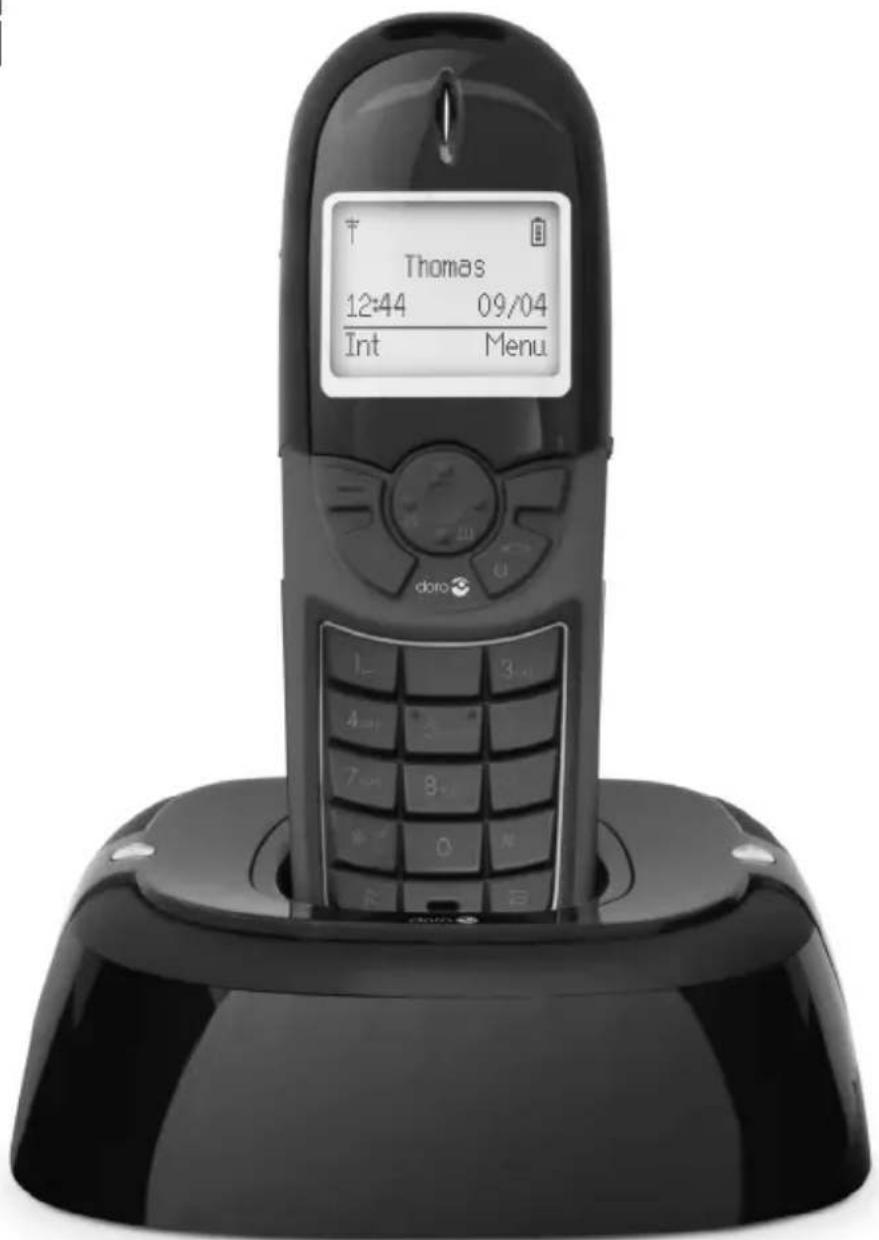
text_image
Thomas 12:44 09/04 Int Menu.doro 750x
text_image
① ② ③ doro ④ ⑤ R 0On
7 A/a 7 PQRS 8 TUV 9 MNO 4 GHI 5 JKL 3 DEF 2 ABC 1 L2 x


| Doro Model: S002CV | V0600030 |
| UK only: S002CB0600030 | |
| AAA | - - + |
| 1.2V 6VDC | |
| 500mAh 300mA | |
| Ni-MH ø 3,5 |
EN Use only original battery and original power adapter.
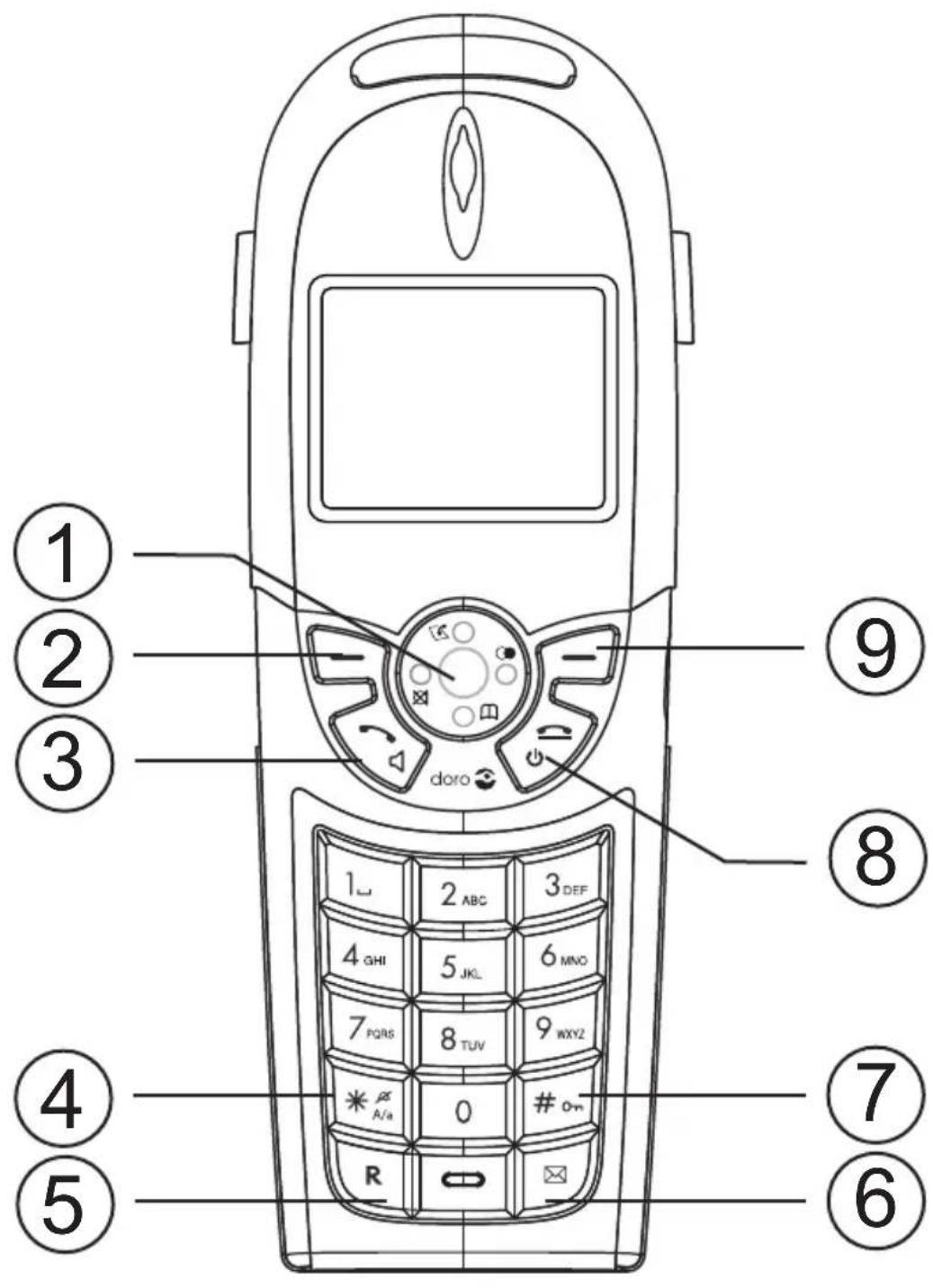
1 Scroll button
2 Left menu button/Back/Internal call
3 Line/Speaker button
4 ✱ and ringer off/on
5 Recall button (PBX features)
6 Message button
7 # and keyguard
8 End call button and on/off
9 Right menu key
Svenska
Base unit indicators ....3
The display ....3
Operation 4
Making a call ....4
Receiving a call 4
Temporary silent mode .....4
Volume control 4
Turning On/Off 4
Redial 4
Mute button ....4
KeyGuard 4
Paging 5
Message button ....5
Phonebook 5
Shared phone book ......6
Incoming numbers/Caller ID 7
Sound 7
Settings 8
Clock/Alarm 8
HS settings 8
Settings - BS settings ......9
Expanded system (+1) .....10
Troubleshooting .....11
Warranty and other information ....12
Specific Absorption Rate (SAR) 12
Doro AB, an ENERGY STAR®
Partner 12
Eco functionality......12
Declaration of conformity ..12
Guarantee 12
Installation
Connection
- Connect mains adapter and phone cable to respective wall sockets.
IMPORTANT: Use the telephone line cord supplied, an existing line cord from a previous phone may not be compatible. The mains socket outlet must be located near the equipment and easily accessible. - To charge and power up your handset please pull the label from the bottom of the handset to connect the batteries.
- Charge the handset with the keypad facing outwards (for 24 hours the first time).
Language
- Press Menu.
- Scroll to Settings with the scroll button (√) . Press OK.
- Scroll to HS settings. Press OK.
- Scroll to Language. Press OK.
- Scroll to desired setting (✗/○). Press OK.
- Press 📞 to return to standby mode.
Date/Time
- Press Menu. Scroll to Settings. Press OK.
- Scroll to Clock/Alarm. Press OK.
- Scroll to Date/Time. Press OK.
- Scroll to Enter Time. Press OK.
- Enter time of day (HH:MM). Press OK.
- Scroll to Enter Date. Press OK.
- Enter date (DD/MM/YYYY). Press OK.
- Press 📞 to return to standby mode.
Note!
The format of date/time can also be adjusted.
Range
The telephone's coverage will vary between 50 and 300 metres, depending on whether the radio waves carrying the conversation are blocked by obstacles in their path.
Coverage can be improved by turning one's head so that the handset is aligned with the base unit. Sound quality declines as the limit is reached until the call is finally interrupted.
Area of use
The handset is intended for indoor and outdoor use. It is shock resistant and is protected against water and dust (IP54), but it must not be immersed in fluid, treated violently or carelessly.
The base unit is intended for indoor use only.
If the handset is damp it should be wiped dry before it is charged!
If the batteries need to be changed, ensure the battery door is properly closed with screws tightened to ensure water and dust resistance.
Battery
When the batteries are new and fully-charged (10 hours) they will last for approx. 100 hours' standby time or approx. 10 hours' call time. These times apply at normal room temperature. Full battery capacity will not be reached until the batteries have been charged 4-5 times. It is not possible to overcharge or damage the batteries by charging them for "too long". If the batteries are completely discharged it can take up to 5 minutes' charging before the display lights up.
Warning!
Use only original type of batteries. The guarantee does not cover any damage caused by using the wrong batteries. Risk of explosion if battery is replaced by an incorrect type. Dispose of used batteries according to the instruction in your country.
Note!
When the battery is low or when there is too great a distance to the base unit the telephone will be unable to connect to a line. Do not place the base unit close to other electrical equipment, in direct sunlight or other strong heat sources! This is to minimize the risk of any interference. It is normal for the device to become warm during charging and this is not dangerous. The equipment will not work during power cuts, so a corded telephone ought to be used as a back up.
Base unit indicators

Steady light while charging.

Flashes during ring and steady during calls.
The display
Icon Function

Shown when in range of base unit

Key lock activated.

Ring signal disconnected.

Alarm activated.

Speaker phone.
Icon Function

During calls.

Battery charge indicator.

Call Muted.

New number received.

Message indication*.
* Only functions in certain countries.
In order to save the batteries, the display is very dark on standby, press 📞 once to illuminate. During calls, use Ⓐ.
English
Operation
Making a call
- Enter the required number.
- Press 🔔, and the number will be dialled. Press 🔔 to end the call.
Receiving a call
- Wait for the handset to ring.
- Press 🔔 to answer. Press 🔔 to end the call.
Please note!
To switch between handset/speaker press 📋. Please remember that in speaker mode, it is only possible for one person at a time to talk.
This product does not usually ring on the first signal to allow correct matching to the phone book.
When the battery is low or when there is too great a distance to the base unit the telephone will be unable to connect to a line.
Temporary silent mode
When someone calls, you can press Silent to turn off the handset ring signal.
Volume control
Adjust the volume during a call with the scroll button.
Turning On/Off
Press and hold the 🔔 button for a few seconds to turn the handset off or on.
Confirm disconnection by pressing Yes.
Redial
Press ⬆ and scroll through the 20 most recently dialled numbers. Press ↙.
Mute button
The microphone can be switched on/off during a call using Ⓧ.
KeyGuard
The KeyGuard is turned off/on by pressing and holding 📋.
Paging
The handset will ring when ≲ (on the base unit) is pressed. The signal will stop automatically after a while or if the 🔔 button on the handset or the ≲ button on the base unit are pressed.
Message button
Can be used when there is a new Caller ID.
If there is no new Caller ID, the shared phonebook will be displayed.
Press the ✉ button to access.
Phonebook
100 telephone numbers (max. 24 digits) with names (max. 15 letters) can be stored in the handset's phonebook.
If you subscribe to a caller ID service, the name allocated to the caller in the phonebook will be shown for incoming calls.
You can also select different ring signals for different groups of numbers that are stored in the phonebook.
Letters
Each number key has been allocated certain letters. The phonebook is arranged according to the order of the buttons, which is not the same for all languages.
1 ....[Space]
* ...... Switch between upper/lower case letters ABC/abc/Abc
0 (press & hold) ...... Pause in telephone number
Save name/number in handset
- Press 📄.
- Scroll to New Entry. Press OK.
- Press equivalent digit key one or more times for desired name.
- Scroll to Number. Enter the telephone number, including the area code.
- Press OK twice to save or scroll to assign the position to a ring signal group.
Managing the phonebook
- Press 📄.
- Scroll among the entries. You can quick search the phonebook by pressing the corresponding number key for the first letter.
- Press 🔔 to make a call or press Option for the following choices:
• Call number see description above.
• Edit entry - revise information.
• View Entry to see stored information.
• Copy Entry/Copy all to duplicate positions on other handsets.
• Delete Entry/Delete All
• Capacity shows the number of free positions.
• Edit call Gp. to select a certain ring signal for certain groups of numbers.
- Speed Dial to assign a position to a certain button in order to make it easier to make a call. To dial a speed dial number press and hold the equivalent 2-9 button. First scroll to the desired button, press OK, then scroll to the desired position in the phonebook. Press OK.
Shared phone book
The phone book in the base unit is shared by all handsets and has 10 entries which only need to be stored once however many handsets there are.
These entries will not match with caller identification.
- Press Menu.
- Scroll to Shared Phonebook. Press OK
- Scroll among the entries.
- Press 🔔 to dial or scroll to the entry that is to be replaced. Press Option.
- Scroll to Edit entry. Press OK.
- Enter name. Scroll to Number.
- Enter the telephone number, including the area code. Press OK.
Incoming numbers/Caller ID
The display shows you who is calling and the 30 most recent incoming numbers. Missed calls are indicated by 📄 in standby mode. If one and the same number calls in more than once it will be saved as only one entry.
Please note!
This function requires a subscription from your service provider.
Retrieving and dialling
- Press Scroll to the required entry.
- Press 🔔 to make a call or press Option for misc. choices.
Symbols in the call list
- Missed / new calls
○ Missed / old calls
Answered calls
Note! In order to remove the 📁 each entry in the log must be read individually by pressing Options at every new entry in the list or delete all calls.
Caller identification messages
Out Of Area No information received, e.g. an international call.
Withheld Number cannot be shown.
Caller ID settings
- Press ☐Press Option.
- Scroll to Settings. Press OK.
- Scroll to required function, e.g. Call List Type. Press OK.
- Scroll to desired setting. Press OK.
Call List Type Select whether the telephone will store missed or all incoming calls.
New call alert
On: Missed calls are indicated by 📁 in standby mode.
Off: No indication.
English
Settings
Sound
- Press Menu. Scroll to Sound. Press OK.
- Scroll to desired function, e.g. Ringer. Press OK.
- Scroll to desired function, e.g. Ringer volume.
- Scroll to desired setting. Press OK.
Ringer The handset's ring signal can be adjusted.
Tones Can be heard when pressing buttons/when charging starts, low battery, confirmation or when out of range.
Clock/Alarm
- Press Menu.
- Scroll to Settings. Press OK.
- Scroll to Clock/Alarm. Press OK.
- Scroll to desired setting. Press OK.
Alarm The activated alarm is indicated with on standby. When the alarm goes off, an audio signal is heard for 30 seconds. Use Stop to switch it off permanently. The volume is determined by the set ringer level.
Date/Time Setting of date/time is described in the Connection chapter.
HS settings
- Press Menu.
- Scroll to Settings. Press OK.
- Scroll to HS Settings. Press OK.
- Scroll to required function e.g. Language. Press OK.
- Scroll to desired setting. Press OK.
Direct call Enter PIN (0000). This function allows you to dial a predetermined number by pressing any button (however not Option which allows you to disconnect this function).
Select base Only used in systems with more than one base unit.
Display Setting the contrast and the text displayed in standby mode.
Language Language settings are explained in the Connection chapter.
Auto answer The handset answers incoming calls when it is lifted from the base unit.
Register HS To register a new handset, see separate description.
De-Register To deregister a handset from a base unit. System PIN is 0000 on delivery.
Handset reset Resetting the handset.
Settings - BS settings
Base PIN is 0000 on delivery.
- Press Menu.
- Scroll to Settings. Press OK.
- Scroll to BS Settings. Press OK.
- Scroll to desired function e.g. Exchange code. Press OK.
- Scroll to desired setting. Press OK.
Ringer The base unit's ring signals can be set at several different levels.
Flash Time Only for adaptation to international company switchboards. For most countries, the setting is 100 ms.
System PIN You can change the PIN code (0000 on delivery).
Exchange code Enter the digit that obtains an external line and the telephone will insert a pause automatically when a number starts with that digit.
Base Reset Reset base unit.
Expanded system (+1)
All handsets included in the package are already registered to the base unit. The handset number used for internal calls is shown in the display on standby mode.
The base unit should be positioned centrally so that the coverage area is roughly equal for all handsets. You can register up to 5 handsets to one base unit.
This model is GAP (Generic Access Profile) compatible, which means that the handset and the base unit can both be used with most other GAP compatible units irrespective of manufacturer. However the GAP protocol cannot guarantee that all functions may be accessed.
Intercom / internal call
- Press Int.
- Scroll to selected handset. Press OK.
A tone will be heard if an external call comes in while an internal call is in progress. End the internal call with 📞 and then answer the external call with 🔒.
Transferring calls/Conference between handsets
- An external call is connected.
- Initiate an internal call as described above.
- Press 📞 to transfer the call or press Conf for conference.
Register a new handset
All new handsets that are to use the base unit must be registered.
- Press Menu. Scroll to Settings. Press OK.
- Scroll to HS Settings. Press OK.
- Scroll to Register HS. Press OK.
- Scroll to the desired base. Press OK.
- Enter the base unit's PIN code (0000 on delivery). Press OK.
- Hold down the base unit's search button until a beep is heard.
- If the registration is successful the handset will return to standby mode within one minute.
English
Troubleshooting
Check that the telephone cord is undamaged and properly plugged in. Disconnect any additional equipment, extension cords and other phones. If the problem is resolved, the fault is with some other equipment.
Test the equipment on a known working line (e.g. at a neighbour's house). If the equipment works there the fault is probably with your telephone line. Please report this to your network operator.
No number shown when ringing
• This function requires a Caller ID subscription from your service provider.
• A switchboard cannot usually pass on incoming numbers.
Warning signal during call/Cannot connect
• The batteries may be running low (recharge the hand unit).
• The hand unit may be nearly out of range. Move closer to a base unit.
Telephone does not work
- Check that the adapter and telephone cord are connected to the base unit and to their respective wall sockets.
- Check the charge status of the handset batteries.
- Try connecting another telephone, known to be in working order, to the line socket. If that phone works then it is likely that this equipment is faulty.
If the telephone still does not work, contact the place of purchase for service. Don't forget the receipt or a copy of the invoice.
English
Warranty and other information
Specific Absorption Rate (SAR)
This device meets approved international safety requirements for exposure to radio waves.
This telephone measures 0,009 W/kg (measured over 10g tissue).
The max. limit according to WHO is 2W/kg (measured over 10g tissue).
Doro AB, an ENERGY STAR® Partner
Products that earn the ENERGY STAR prevent greenhouse gas emissions by meeting strict energy efficiency guidelines set by the US EPA and the EU Commission.
ENERGY STAR and the ENERGY STAR mark are registered US marks.
ENERGY STAR is a registered mark owned by the US government.
Eco functionality
We have introduced the ECO FUNCTIONALITY label to help customers identify products within our assortment having a lower impact on the environment.
Products carrying this label feature:
- Reduced power consumption in both operational and standby modes.
• Adaptive transmission power depending on range on base unit.
• Full Energy Star compliance and approval (www.energystar.gov)
Declaration of conformity
Doro hereby declares that the Doro 750x product conform to the essential requirements and other regulations contained in the directives 1999/5/EC (R&TTE), 2002/95/EC (ROHS). A copy of the manufacturer's declaration is available at www.doro.com/dofc
Guarantee
This product is guaranteed for a period of 12 months from the date of purchase. If you experience any problems please contact the place of purchase. Proof of purchase is required for any service or support needed during the guarantee period.
This guarantee will not apply to a fault caused by an accident or a similar incident or damage, liquid ingress, negligence, abnormal usage, non-maintenance or any other circumstances on the user's part. Furthermore, this guarantee will not apply to any fault caused by a thunderstorm or any other voltage fluctuations.
As a matter of precaution, we recommend disconnecting the device during a thunderstorm.
Batteries are consumables and are not included in any guarantee. This guarantee does not apply if other batteries than DORO original batteries have been used.
Svenska
Specific Absorption Rate (SAR)
Declaration of conformity
Lyser fast under lading.

Lyser fast under samtale, blinker under.
Specific Absorption Rate (SAR)
Installation ....1Genopkald ....4 Fejlfinding....11
Display ....3 Indkomne numre/ partner ....12
Anvendelse ....4 nummervisning ....7Eco functionality
Foretage opkald ....4Indstillinger ....8(∅kofunktion) ....12