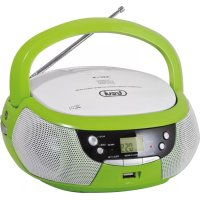
CMP 532 USB - Hi-fi system Trevi - Free user manual and instructions
Find the device manual for free CMP 532 USB Trevi in PDF.

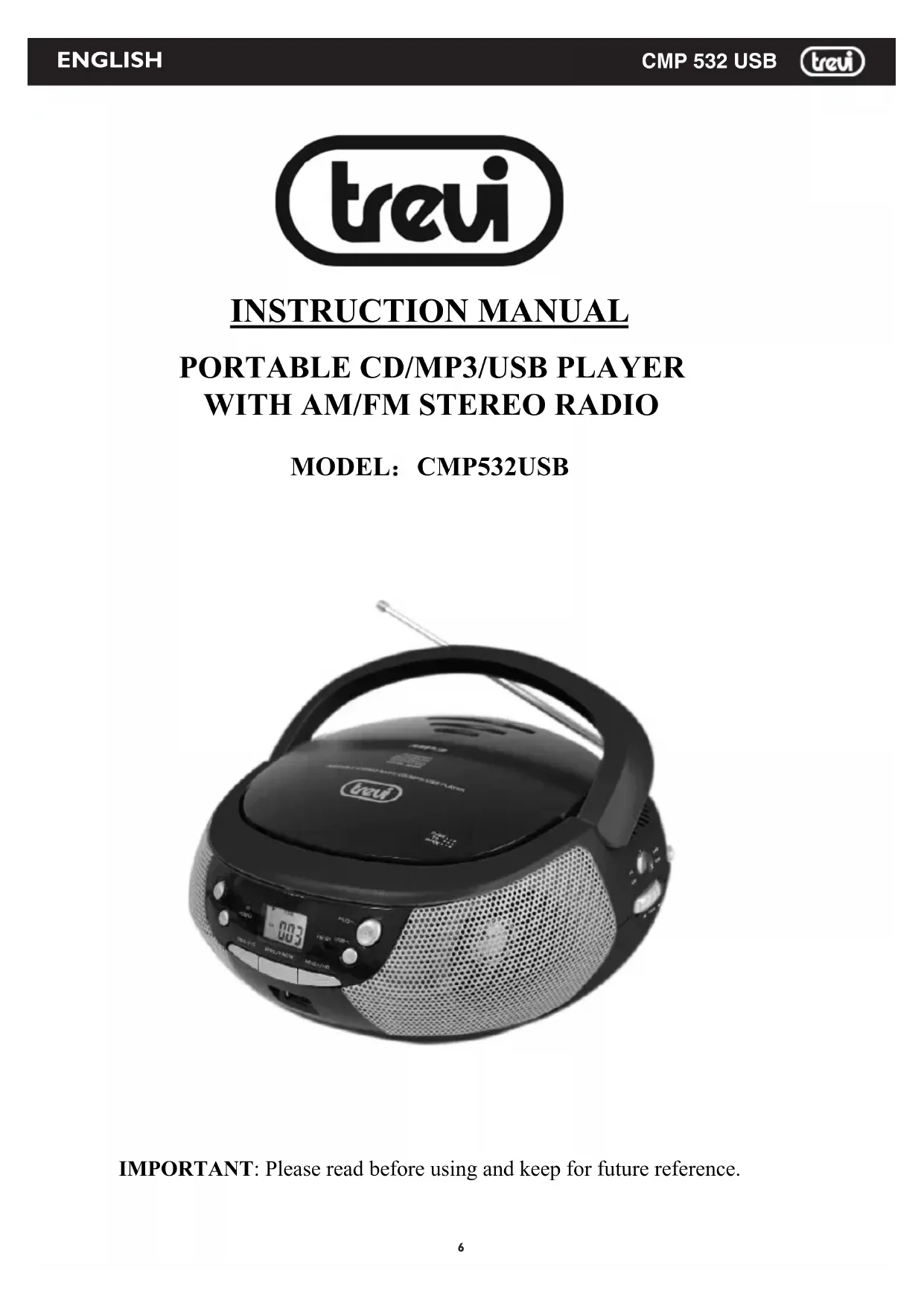


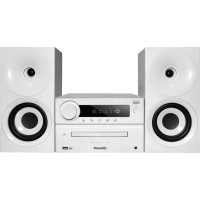
| Product type | Hi-fi system |
| Brand | Trevi |
| Model | CMP 532 USB |
| Power supply | AC 230 V - 50 Hz or 6 C (UM-2) batteries not included |
| Power consumption | 14 W in operation, < 0.5 W in standby |
| Output power | 2 x 0.8 W RMS |
| Dimensions (W x H x D) | 214 x 204 x 110 mm |
| Disc player | CD, CD-R, CD-RW, CD MP3 |
| Supported audio formats | CD audio, MP3 |
| Radio | AM (540-1600 kHz) and FM stereo (87.5-108 MHz) |
| Auxiliary input | AUX IN jack (3.5 mm) for external source |
| USB port | Yes, for playing MP3 files |
| Playback functions | Play, pause, stop, track skip, fast search |
| Programming | Up to 20 tracks for CD audio, 99 for CD MP3 |
| Repeat | Single track, entire folder (MP3), entire disc |
| Random play | Yes (RDM) |
| Play first 10 seconds | Yes (INTRO) for CD audio |
| Safety | Class 1 laser warning, do not open the housing |
| Maintenance | Soft cloth slightly damp, avoid solvents and abrasives |
| Repairability | Contact an authorized Trevi service center |
| Included accessories | None (batteries not included) |
Frequently Asked Questions - CMP 532 USB Trevi
User questions about CMP 532 USB Trevi
0 question about this device. Answer the ones you know or ask your own.
Ask a new question about this device
Download the instructions for your Hi-fi system in PDF format for free! Find your manual CMP 532 USB - Trevi and take your electronic device back in hand. On this page are published all the documents necessary for the use of your device. CMP 532 USB by Trevi.
USER MANUAL CMP 532 USB Trevi
Consumo in OFF Mode: <0,5W
IMPORTANT: Please read before using and keep for future reference.
IMPORTANT NOTES
INTRODUCTION
- Thank you for buying this product.
- Please read through these operating instructions, so you will know how to operate your equipment properly. After you finished reading the instructions manual, put it in a safe place for future reference.
CAUTION
Use of controls or adjustment or performance of procedures other than those specified herein may result in hazardous radiation exposure.
DANGER
CLASS 1 LASER PRODUCT LUOKAN 1 LASERLAITE KCLASS 1 LASERAPPARAT
This Compact disc player is classified as a Class 1 LASER PRODUCT.
THE CLASS 1 LASER PRODUCT label is located on the rear exterior.
NOTE: The manufacturer is not responsible for any radio or TV interference caused by unauthorized modifications.
- Avoid installing the unit in locations described below:
- Places exposed to direct sunlight or close to heat radiating appliances such as electric heaters, or other equipments that radiate too much heat.
- Places subjected to constant vibration.
- Unventilated or dusty places.
- Humid or moist places.
- Operate buttons and switches as instructed in the manual.
- Before turning on the power for the first time, make sure that the power cord is properly installed and the voltage switch is correctly set.
- Store your CD or other devices in a cool area to avoid damage from heat.
CAUTION: TO REDUCE THE RISK OF ELECTRIC SHOCK, DO DOT REMOVE COVER (OR BACK). DO NOT OPEN THE UNIT. ANY SERVICING PLEASE REFER TO QUALIFIED SERVICE PERSONNEL.
WARNING:
- Remove batteries if exhausted or if they will not be used for a long period.
- The incorrect use of batteries can cause electrolyte leakage and will corrode the compartment or cause the batteries to burst. Therefore:
- Do not mix battery types, e.g. alkaline with zinc carbonate.
- When inserting new batteries, replace all batteries at the same time.
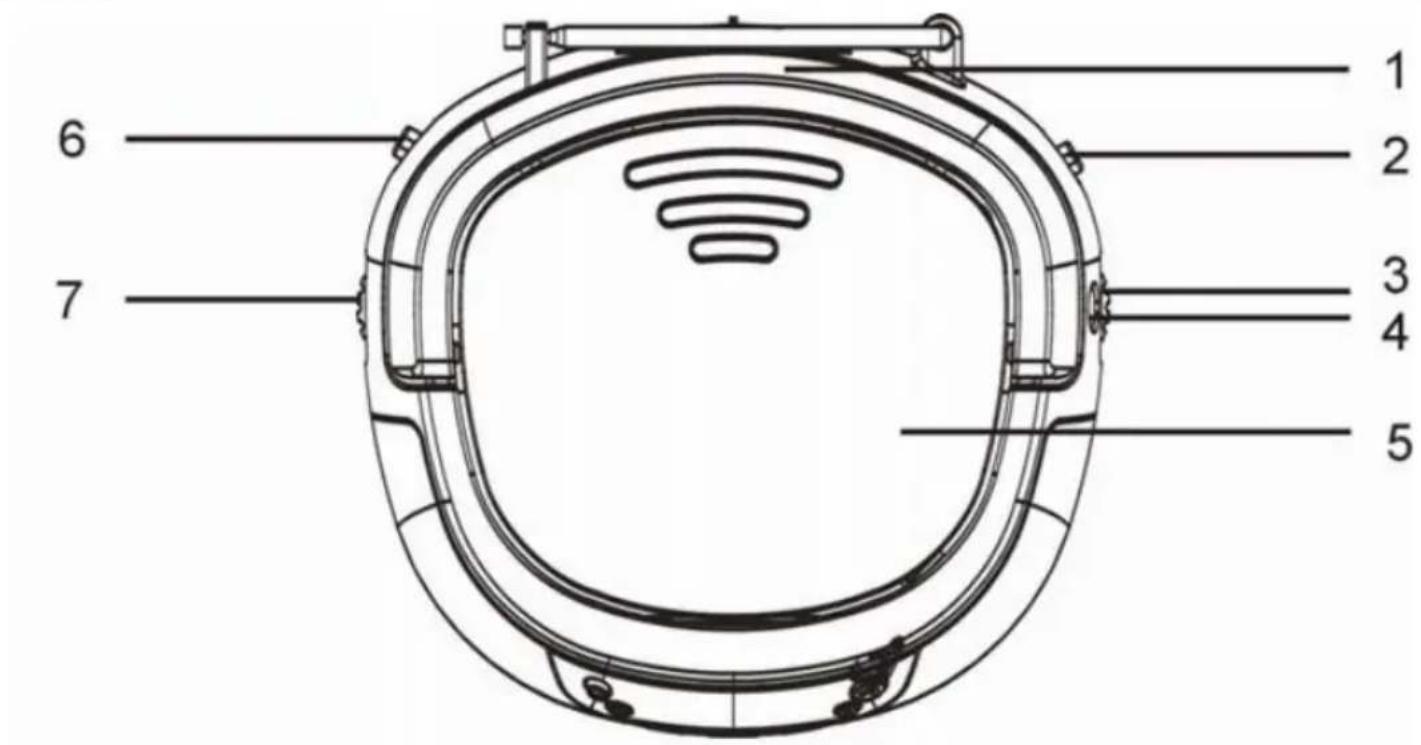
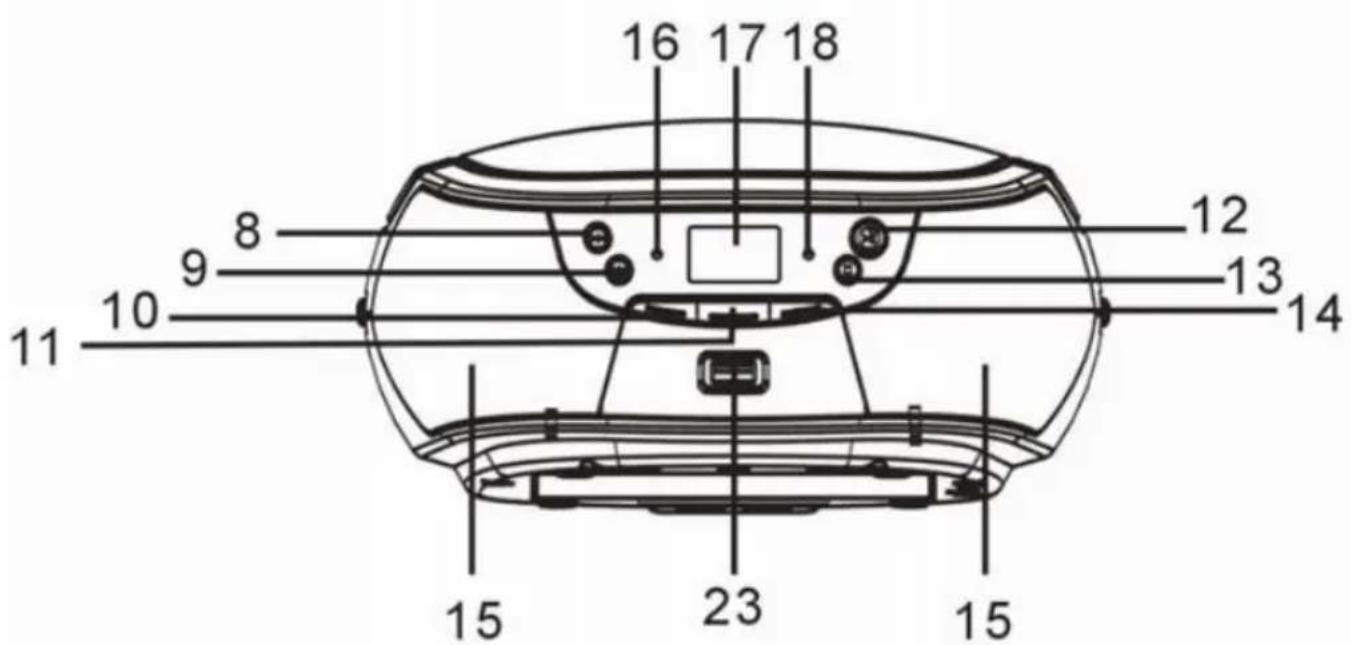
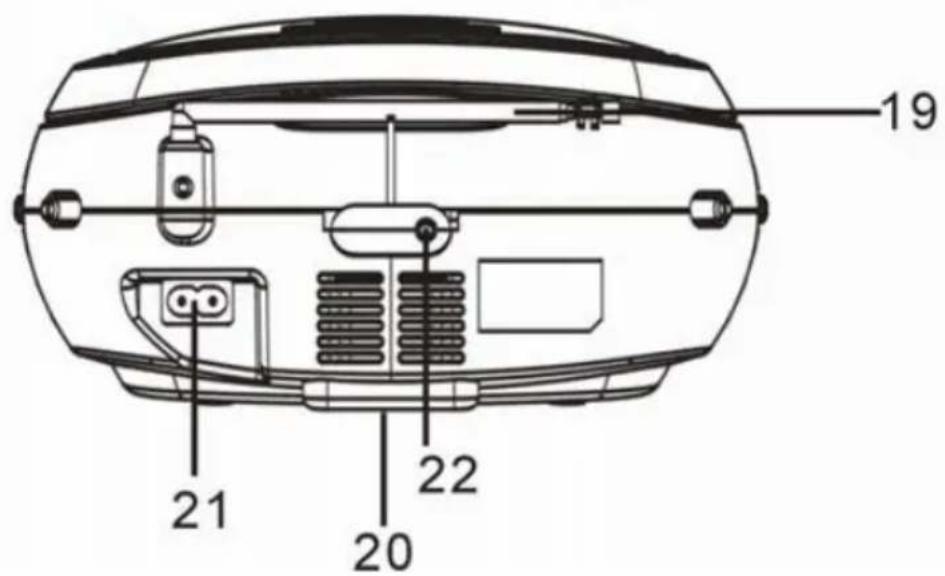
LOCATION OF CONTROLS
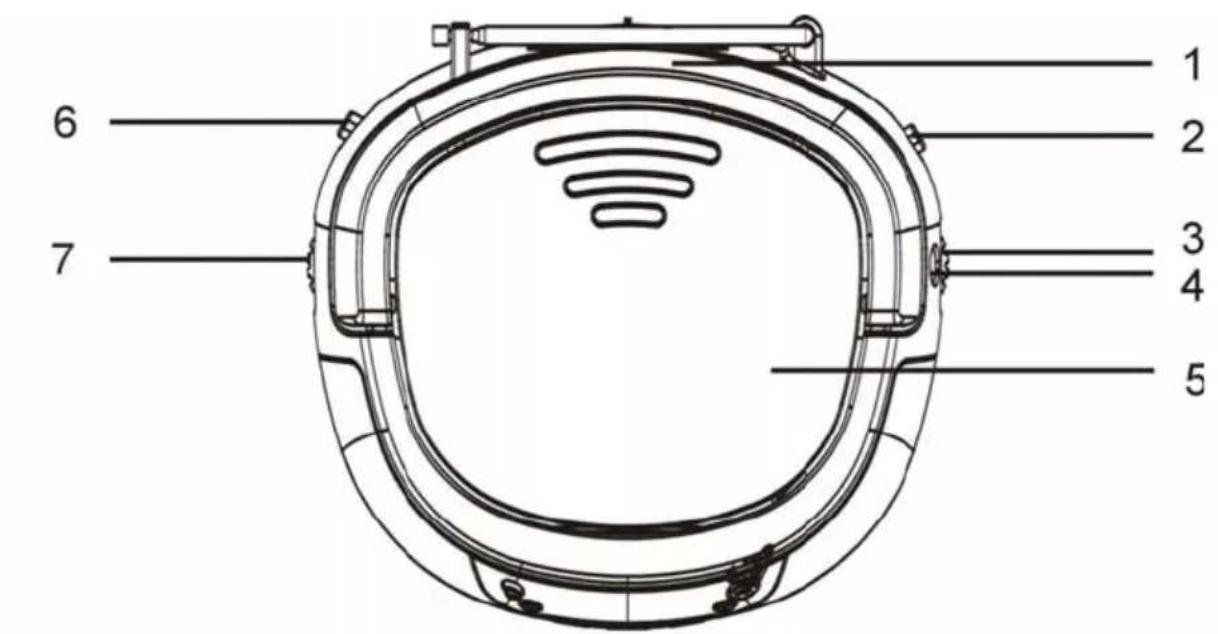

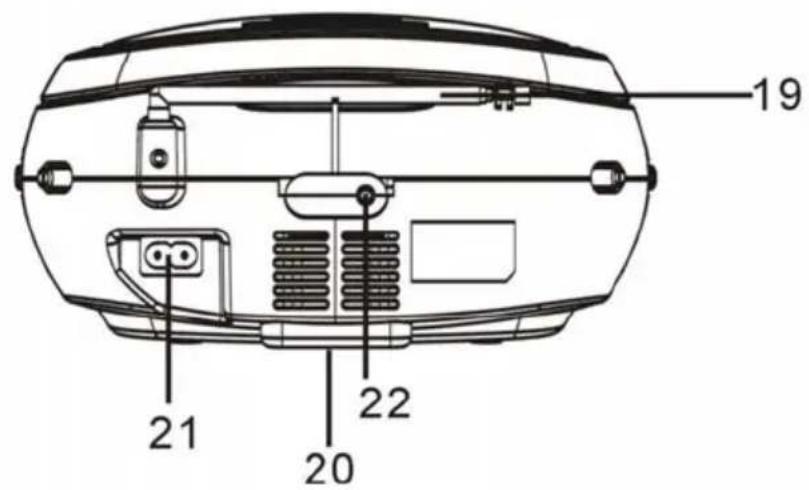
NAMES OF CONTROLS
- HANDLE
- CD STOP/USB BUTTON
- BAND CONTROL
- FOLD. + / + 10 BUTTON
- TUNING CONTROL
- SPEAKERS
- DIAL SCALE
- POWER INDICATOR
- CD COMPARTMENT
- LCD DISPLAY
- FUNCTION SWITCH
- FM STEREO INDICATOR
- VOLUME CONTROL
- FM TELESCOPIC ANTENNA
- CD SKIP/SEARCH FORWARD BUTTON
- BATTERY COMPARTMENT
- CD SKIP/SEARCH BACKWARD BUTTON
- AC SOCKET
- FOLD.-/-10 BUTTON
- AUX IN JACK
- CD PROG./P-MODE BUTTON
- USB PORT
- CD PLAY/PAUSE/STANDBY BUTTON
POWER SOURCE
This unit is designed to be operated on AC/DC.
AC OPERATION
Plug the tail of AC power cord into AC socket on unit and the plug into household AC outlet. The batteries will be automatically disconnected.
DC OPERATION
Open the BATTERY COMPARTMENT DOOR. Install 6 pcs UM-2/C size batteries (not included) into compartment. Please follow correct polarities as indicated.
CAUTION
Remove batteries if they are flat or not being used for a long period of time.
Batteries contain chemical substances, so they should be disposed of properly.
BASIC FUNCTION
SWITCHING ON THE UNIT
Set the FUNCTION switch to CD/MP3/USB/AUX IN or RADIO.
NOTE: In CD/MP3/USB/AUX IN mode, when the unit is not providing the main function for 15 minutes, the unit will automatically switch into standby mode.
ESD hints - The product maybe reset or not reset to operation of control due to electrostatic discharge, just switch off and reconnect again.
ADJUSTING VOLUME
Rotate the VOLUME CONTROL clockwise or counterclockwise to increase or decrease volume.
RADIO OPERATION
- Slide the FUNCTION switch to RADIO position, the POWER indicator will illuminate.
- Slide the BAND switch to select the desired wave band: AM/FM ST.
- Tune to required station by rotating the TUNING KNOB.
- Rotate the VOLUME CONTROL to comfortable volume level.
- Extend the TELESCOPIC ANTENNA to its full length if you are listening to FM broadcasting. Gently move the unit back and forth to get the best reception when you are listening to AM program, or place the unit in an open place.
Note: The FM STEREO indicator will be on if you are receiving FM stereo program.
- Turn off the radio by switching the FUNCTION switch to "OFF" position
CD/MP3 OPERATION
Discs for playback
This system can playback all digital audio CD/MP3/WMA discs, finalized digital audio CD-Recordable (CD-R) discs and finalized digital audio CD-Rewritable (CD-RW) discs.
LOADING A DISC
- Set the FUNCTION switch to CD/MP3/USB/AUX IN position.
- Open the CD door. "OP" will be shown on the display.
- Place an audio CD into the tray with the label side facing up.
- Close the CD door, the total number of tracks will appear in the display.
-
To remove the CD, open the CD compartment lid, grasp the CD by its edges, and carefully take it out. Note:
-
To ensure good system performance; wait until the disc tray completely reads the disc before proceeding.
- If no disc is loaded into the compartment, or the disc is placed upside down, the display will show "no disc".
PLAYING A DISC
- Press the PLAY/PAUSE/STANDBY button on unit or on remote control to start playback. The playback starts from track 1, "▶" will appear on the display.
- To interrupt playback, press the PLAY/PAUSE/STANDBY button, “▶” and the track number will flash on the display.
- To resume playback, press the PLAY/PAUSE/STANDBY button again.
- To stop playback, press the STOP/USB button, the total number of tracks would appear in the display.
SELECTING A DESIRED TRACK/PASSAGE
To select a desired track
- Press the CD SKIP/SEARCH NEXT/BACK button repeatedly in stop mode or during play until the desired track appears on the display.
- Press the PLAY/PAUSE/STANDBY button to start play.
To search for a particular passage during playback (track scanning at high speed)
Press and hold the CD SKIP/SEARCH NEXT/BACK button to scan the current playing track at high speed until desired point passage, and then release the button.
Playback will start again from this point.
To select a song which track number exceeds 10 (for MP3 disc only)
To select a song/track which number exceeds 10, Press the FOLD. + / + 10 button each time to skip forward/backward 10 tracks, then press the CD SKIP SEARCH NEXT/BACK button to select desired track. For example: to select the 17^th track, press FOLD. + / + 10 button, and then the CD SKIP SEARCH NEXT button six times immediately.
To Select A Desired Folder (for MP3 disc only)
(if the MP3 disc contains more than one folder)
To skip to the desired folder during playback, press and hold the FOLD.+/+10 or FOLD.-/-10 button for about 2 seconds to skip to next/previous folder.
PROGRAM TRACKS
Programming tracks of disc are possible when playback is stopped. Up to CD 20 tracks /MP3 99 tracks can be stored in the memory in any order.
- In stop mode, press the PROG./P-MODE button, the PROG will flash and the P01 indicator will be on.
- Press the CD SKIP/SEARCH NEXT button to select the first desired track to be programmed.
- Press the PROG./P-MODE button to enter. The display changes to show P02.
- Repeat steps 2 & 3 to store other desired tracks until all tracks are programmed.
- Press the PLAY/PAUSE/STANDBY button to start playback from the first programmed track.
- Press the STOP/USB button to stop program playback.
To Erase the Memory (Program)
To clear the program, you have two options:
- Press the STOP/USB button when the disc is stopped, or
- Open the CD compartment lid, program will be erased.
REPEAT
You can play one track or all tracks on the disc repeatedly.
To Repeat a Single Track
- Press PROG/P-MODE button once in play mode, "C" will flash on the display. The current track will be played over and over again till you press the STOP/USB button.
- To cancel repeat play, press PROG/P-MODE button control until “ ” disappears from the display.
To repeat all the Tracks
- Press PROG/P-MODE button until the “ ” shows steady on the display, all tracks on the disc will be played over and over again till you press the STOP/USB button.
- To cancel repeat play, press the PROG/P-MODE button control until “ ” disappears from the display.
To repeat the folder (only for MP3 disc which contains more than one folder)
- Press the PROG/P-MODE button until "FOLDER" show steady on the display, the current folder will be repeated over and over again till you press the STOP/USB button.
- Press the PROG./P-MODE button once to cancel.
RANDOM PLAY
Press the PROG./P-MODE button in play mode till the "RDM" shows steady on the display, the random play will start from next track automatically (or press CD skip forward button), until all tracks are played over and then stop. Press the PROG./P-MODE button once to cancel.
INTROSCAN PLAY (for CD disc only)
Press the PROG./P-MODE button in play mode till the "INTRO" shows steady on the display, the unit will start to play the first 10 seconds of music of each track, until all tracks are played over and then stop. Press the PROG./P-MODE button once to cancel.
USB OPERATION
- Set the FUNCTION button to "CD/MP3/USB/AUX IN" position, press and hold the STOP/USB button for about 2 seconds to enter the USB mode.
- Connect the USB to the USB INPUT. The LCD will show the total number of tracks stored in the USB. The unit will start playback from track 1 after reading finished.
- Press PLAY/PAUSE/STANDBY button to pause and resume playback.
- Press the STOP/USB button to stop playing. The display will show total number of USB and STOP.
- Proceed repeat play (repeat 1- repeat folder - repeat all)/program play/skip next and back operation as described in above "CD/MP3 OPERATION".
CAUTION:
Do not use any USB extension cable for connecting the USB device to avoid any conflict.
AUX-IN OPERATION
This unit has provided special AUX-IN jack, through this jack other audio sources can be connected to this unit and be amplified.
- Set the FUNCTION switch to CD/MP3/USB/AUX IN position.
- Connect the audio cable into the AUX-IN jack and the other end connect to the AUDIO OUT jack of the external audio source. The unit will change to AUX mode automatically.
- Adjust the volume of the main unit to your desired level.
Press PLAY of the external audio source (eg.MP3 player) to start playback.
COMPACT DISC MAINTENANCE
- Always use a compact disc bearing the mark as shown.

-
Notes on handling discs
-
Removing the disc from its storage case and loading it.
- Do not touch the reflective recorded surface.
- Do not stick paper or write anything on the surface.
-
Do not bend the disc.
-
Storage
-
Store the disc in its case.
DO not expose discs to direct sunlight or high temperatures, high humidity or dusty places. -
Cleaning a disc
-
Should the disc become soiled, wipe off dust, dirt and fingerprints with a soft cloth.
The disc should be cleaned from the center to the edge.
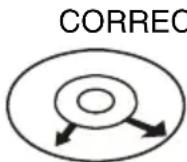
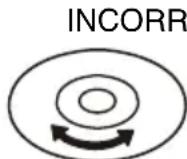
FROM THE CENTRE TO THE EDGE
- Never use benzene, thinners, record cleaner fluid or anti-static spray.
- Be sure to close the CD door, so the lens is not contaminated by dust.
- Do not touch the lens.
SPECIFICATIONS
GENERAL
Power Source: AC 230V ~ 50Hz
DC 9V 1.5V UM-2/C x 6pcs
Power consumption 14 Watts
Standby consumption < 0.5 Watts
Weight.. Approx. 1.2kg
Dimensions.. Approx.214mm (L) x 204mm (W) x 110mm (H)
Operation temperature. 5^ - + 35^
RECEIVER SECTION
Receiving Bands.AM/FM ST.
Tuning Range: AM: 540 - 1600 KHz
FM: 87.5 - 108 MHz
COMPACT DISC SECTION
Optical Pickup. 3-Beam Laser
Frequency Response 100Hz - 16KH z
AUDIO SECTION
Power output. 0.8 Watts x 2 (RMS)
Aux In Jack. 3.5mm
ACCESSIONS
Instruction Booklet 1
AC Cord 1
Specifications are subject to change for continuous improvement, we reserve the rights to modification without prior notice.
COMMANDES
VOLTAGE DANGEREUX
Consumo OFF Mode: <0,5W
Consumo OFF Mode: <0,5W
△iaotaoεic: 214x204x110mm
TMHMA CD
Precautions for correct disposal of the product.
The symbol shown on the equipment indicates that waste must be disposed of in "separate collection" and so the product must not be disposed of together with urban waste.
The user must take the product to special "separate waste collection centres" provided by local government, or deliver it to the retailer against the purchase of a new product.
Separate collection of waste and subsequent treatment, recycling and disposal operations promotes the production of equipment with recycled materials and limits negative effects on the environment and on health caused by improper handling of waste.
Illegal disposal of the product leads to the enforcement of administrative penalties.

WARNING: DO NOT OPEN THE SET. NEITHER CONTROLS OR SPARE PARTS TO BE USED BY THE USER ARE TO BE FOUND INSIDE IT. APPLY TO AUTHISERED TREVI CENTERS FOR SERVICE OPERATIONS.
ATTENTION
RISQUE DE DECHARGES ELECTRIQUES NE PAS EXPOSER A LA PLUIE ET A L'HUMIDITE

ATTENTION: NE PAS OUVRIR L'APPEARIL A L'INTEREUR IL NY A PAS DE COMMANDES A MANIPULE PAR L'UTILISATEUR OU DE PIECES DE RECHANGES. POUR TOUTES LES OPÉRATIONS DE SERVICE IL FAU S'ADRESSER A UN SERVICE D'ASSISTANCE Autorise TREVI.
ACHTUNG
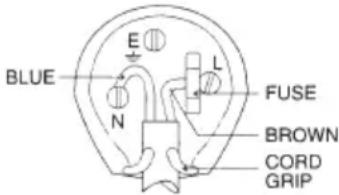
WIRES CONNECTIONS TO A UK THREE-PIN PLUG
The wires in this mains lead are coloured in accordance with the following wiring codes: Blue.. Neutral
Brown: Live
The wires in this mains lead must be connected to the terminals in the plug as follows: Blue wire: N or Black
Brown wire: L or Red
Neither wire is to be connected to the earth (E or W) terminal of three-pin plug. Should the fuse fail in the plug remove the plug form the wall socket and replace the fuse with a 3 Amp. ASTA approved BS 1362 fuse.
- IMPORTANT NOTES
- INTRODUCTION
- CAUTION
- DANGER
- WARNING:
- LOCATION OF CONTROLS
- NAMES OF CONTROLS
- POWER SOURCE
- AC OPERATION
- DC OPERATION
- BASIC FUNCTION
- SWITCHING ON THE UNIT
- ADJUSTING VOLUME
- RADIO OPERATION
- CD/MP3 OPERATION
- Discs for playback
- LOADING A DISC
- PLAYING A DISC
- SELECTING A DESIRED TRACK/PASSAGE
- To select a desired track
- To search for a particular passage during playback (track scanning at high speed)
- To select a song which track number exceeds 10 (for MP3 disc only)
- To Select A Desired Folder (for MP3 disc only)
- PROGRAM TRACKS
- To Erase the Memory (Program)
- REPEAT
- To Repeat a Single Track
- To repeat all the Tracks
- To repeat the folder (only for MP3 disc which contains more than one folder)
- RANDOM PLAY
- INTROSCAN PLAY (for CD disc only)
- USB OPERATION
- CAUTION:
- AUX-IN OPERATION
- COMPACT DISC MAINTENANCE
- SPECIFICATIONS
- GENERAL
- RECEIVER SECTION
- COMPACT DISC SECTION
- AUDIO SECTION
- ACCESSIONS
- VOLTAGE DANGEREUX
- TMHMA CD
- Precautions for correct disposal of the product.
- ATTENTION
- ACHTUNG
- WIRES CONNECTIONS TO A UK THREE-PIN PLUG
Brand : Trevi
Model : CMP 532 USB
Category : Hi-fi system