ManualGo.com
RC 150 - Alarm clock radio HAMA - Free user manual and instructions
Find the device manual for free RC 150 HAMA in PDF.



Download the instructions for your Alarm clock radio in PDF format for free! Find your manual RC 150 - HAMA and take your electronic device back in hand. On this page are published all the documents necessary for the use of your device. RC 150 by HAMA.
USER MANUAL RC 150 HAMA
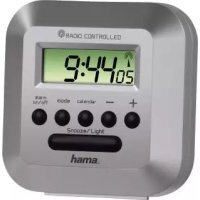
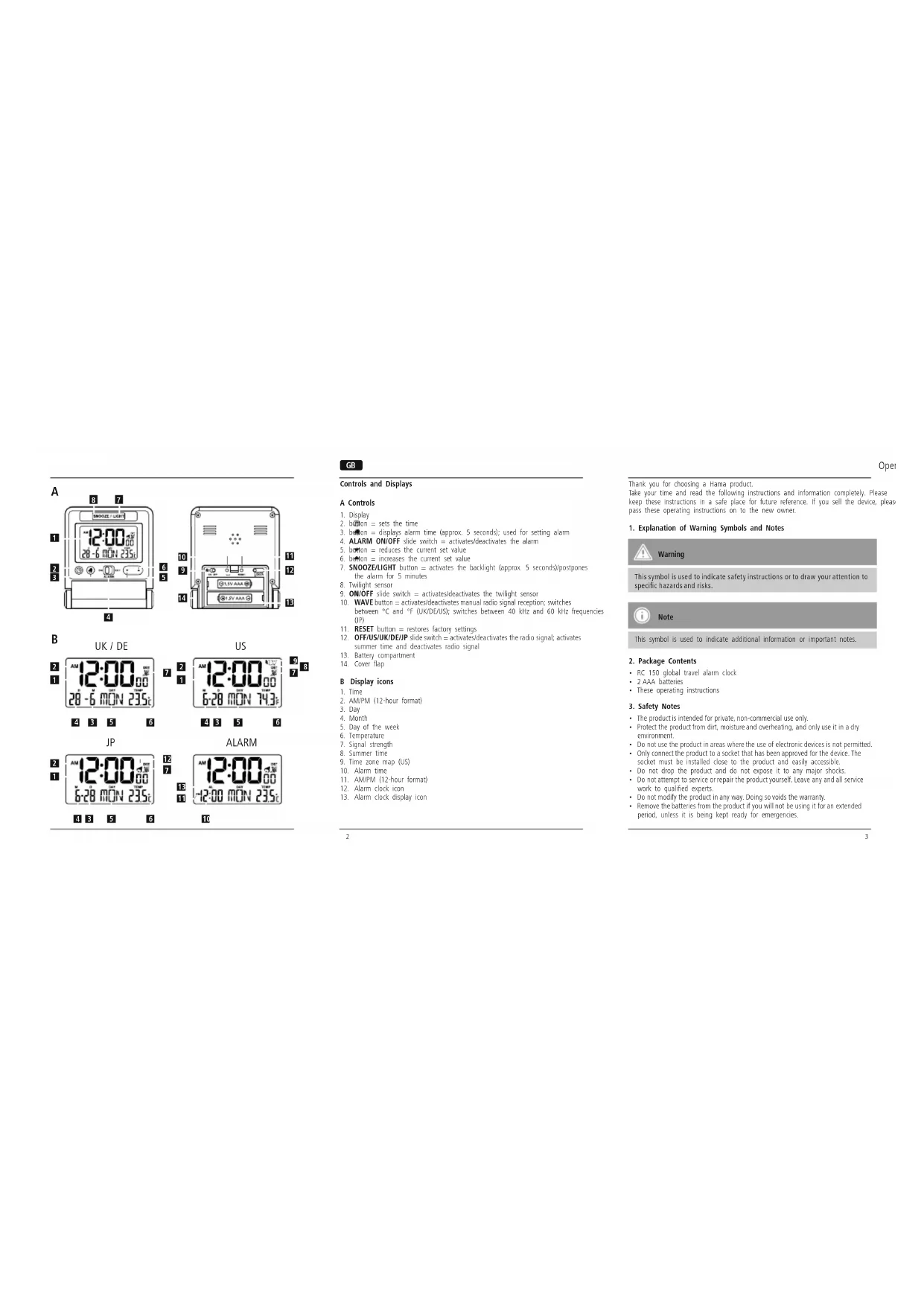
GOperating instruction Controls and Displays A Controls
2. button = sets the time
3. button = displays alarm time (approx. 5 seconds); used for setting alarm
4. ALARM ON/OFF slide switch = activates/deactivates the alarm
5. button = reduces the current set value
6. button = increases the current set value
7. SNOOZE/LIGHT button = activates the backlight (approx. 5 seconds)/postpones
the alarm for 5 minutes
10. WAVE button = activates/deactivates manual radio signal reception; switches
between °C and °F (UK/DE/US); switches between 40 kHz and 60 kHz frequencies (JP)
summer time and deactivates radio signal
13. Battery compartment
Thank you for choosing a Hama product. Take your time and read the following instructions and information completely. Please keep these instructions in a safe place for future reference. If you sell the device, please pass these operating instructions on to the new owner.
1. Explanation of Warning Symbols and Notes
Warning This symbol is used to indicate safety instructions or to draw your attention to specic hazards and risks. Note This symbol is used to indicate additional information or important notes.
- These operating instructions
- The product is intended for private, non-commercial use only.
- Protect the product from dirt, moisture and overheating, and only use it in a dry environment.
- Do not use the product in areas where the use of electronic devices is not permitted.
- Only connect the product to a socket that has been approved for the device. The socket must be installed close to the product and easily accessible.
- Do not drop the product and do not expose it to any major shocks.
- Do not attempt to service or repair the product yourself. Leave any and all service work to qualied experts.
- Do not modify the product in any way. Doing so voids the warranty.
- Remove the batteries from the product if you will not be using it for an extended period, unless it is being kept ready for emergencies. WAVE45
- Keep the packaging material out of the reach of children due to the risk of suffocation.
- Dispose of packaging material immediately according to locally applicable regulations. WARNING – Batteries
- Immediately remove and dispose of dead batteries from the product.
- Only use batteries (or rechargeable batteries) that match the specied type.
- Do not mix old and new batteries or batteries of a different type or make.
- When inserting batteries, note the correct polarity (+ and - markings) and insert the batteries accordingly. Failure to do so could result in the batteries leaking or exploding.
- Do not overcharge batteries.
- Keep batteries out of the reach of children.
- Do not short circuit the batteries/rechargeable batteries and keep them away from uncoated metal objects.
- If necessary, ip the cover ap (14) forwards over the buttons.
- Open the battery compartment (13), insert two AAA batteries with the correct polarity and close the battery compartment (13).
- If nothing is shown on the LCD display after new batteries have been inserted, press the RESET button (11) with a pointed object to restart the device.
- Flip the cover ap (14) back to use it as a base for the alarm clock.
- Once you have inserted the batteries, the display is switched on, an acoustic signal sounds and the alarm clock automatically starts searching for a radio signal. During the search, the radio icon will ash. This process can take 3 to 5 minutes.
- When the radio signal is received, the date and time are automatically set. Radio icon Signal strength No reception Poor Fair Excellent Radio icon appearance radio signal search Flashing Active Displayed continuously Successful – signal is being received No display Inactive Note – Time settings
- If, during initial setup of the device, a radio signal is not received within the rst few minutes, the search is aborted. The radio icon disappears.
- If there are reception problems, we recommend leaving the clock to sit overnight, since interference is generally less at night.
- In the meantime, you can start a manual search for the radio signal at another location or you can manually set the time and date.
- The clock automatically continues to search for the radio signal on a daily basis. If the signal is received successfully, the manually set time and date are overwritten.67 Note – Summer time
- Select DST AUTO as described in 5.3 Manually setting the date/time.
- The clock automatically switches to summer time. (B – 8) appears on the display as long as summer time is activated. 5.3. Manually setting the date/time
- Press and hold the button (2) for approx. 2 seconds until the year display begins to ash.
- Set the following information in the order listed:
- Seconds (only zeros possible)
- Day of the week language (B – 5)
- To select the individual values, press the button (5) or the button (6) and conrm your selection by pressing the button (2).
- Press the button (2) immediately to adopt the set value displayed and skip ahead.
- If you do not make an entry for 30 seconds, the device automatically exits the settings mode and the settings you made are saved. Note – Time zone
- The radio signal can be received over long distances, but it always corresponds to the time zone from which the signal is sent. Please note that you must set the time difference accordingly for countries with a different time zone.
- If you are in Moscow, the time is 3 hours later than in Germany. This means that you should set +3 for the time zone. The clock then automatically sets itself 3 hours ahead after receiving the DCF signal or according to the manually set time.
- Press the WAVE button (10) to start the manual search for the radio signal. Note – Manual search
- The manual search function using the WAVE button (10) is only possible if the radio signal is activated (US/UK/DE/JP) – see 5.2. Activating/deactivating the radio signal.
- The manual search is automatically aborted after 6-16 minutes.
- Using the WAVE button (10) frequently will drain the battery. We recommend only using this function to seek out an optimal location for the device.
- Press the up WAVE button (10) again to end the manual search. 5.2. Activating/deactivating the radio signal You can either completely deactivate radio signal reception or adapt it to one of four different regions.
- Move the OFF/US/UK/DE/JP slide switch (12) to the OFF position to deactivate continuous synchronisation with the radio signal. Use these settings when you are in a region where you cannot or are not permitted to receive a radio signal. You must then manually carry out the settings described in 5.3. Manually setting the date/time.
- Move the OFF/US/UK/DE/JP slide switch (12) to the US, UK, DE or JP position to activate continuous synchronisation with the radio signal for North America (WWVB), Great Britain (MSF), Germany/Europe (DCF-77) or Japan (JJY40/JJY60). If you select the US position, the time zone map (B – 9) appears. Press the button (5) or the button (6) within approx. 5 seconds to select the appropriate time zone for your location. The currently selected time zone ashes. Select P for the Pacic Standard Time Zone (PST), M for the Mountain Standard Time Zone (MST), C for the Central Standard Time Zone (CST) or E for the Eastern Standard Time Zone (EST). To save the selected time zone, do not press anything for approx. 5 seconds.
- If you have selected the JP position, press and hold the WAVE button (10) for approx. 3 seconds to switch between the JJY40 and JJY60 radio signals. Time (B – 1)89
- To stop the alarm early, move the ALARM ON/OFF slide switch (4) to the OFF position to the right until the surface underneath the slide switch is black. The alarm is now deactivated.
- Move the ALARM ON/OFF slide switch (4) back to the ON position on the left again to activate the alarm for the next day. Note – Snooze function
- While the alarm signal is sounding, press the SNOOZE/LIGHT button (7) to activate the snooze function. Zz begins to ash on the display (1). The alarm signal will be stopped for 5 minutes, after which it will sound again.
- The snooze function can be activated four consecutive times. 5.5. Temperature display
- Press and hold the WAVE button (10) for approx. 2 seconds to switch the temperature display (B – 6) between °C and °F.
- This is only possible if the OFF/US/UK/DE/JP slide switch (12) is set to the US, UK or DE position.
- The alarm clock is equipped with a twilight sensor (8) that automatically switches on the backlight of the display (1) to a dimmed setting as soon as it gets dark.
- During the day or if there is enough light, the twilight sensor (8) automatically switches off the dimmed backlight on the display (1).
- Move the ON/OFF slide switch (9) to the ON or OFF position to activate or deactivate the twilight sensor (8). Note – Day of the week
- You can choose from English (GB), French (FR), German (DE), Spanish (ES) and Italian (IT) for the display of the day of the week. 5.4. Alarm Setting the alarm time
- Press and hold the button (3) for approx. 2 seconds until the hours display (B –
- Set the following information in the order listed:
- To select the individual values, press the button (5) or the button (6) and conrm your selection by pressing the button (3).
- If you do not make an entry for 30 seconds, the device automatically exits the settings mode and the settings you made are saved.
- Press the button (3) to display the set alarm time for approx. 5 seconds. Activating/deactivating the alarm
- Move the ALARM ON/OFF slide switch (4) to the left to the ON position. A red surface will be visible underneath the slide switch.
- The alarm is activated and the alarm clock icon (B – 12) is shown on the display (1).
- Move the ALARM ON/OFF slide switch (4) to the OFF position to the right until the surface underneath the slide switch is black.
- The alarm is deactivated and the alarm clock icon (B – 12) disappears from the display (1). Stopping the alarm/snooze function
- If the alarm is activated, it is triggered at the set time and an alarm signal sounds for one minute. The alarm automatically stops after this time and is then triggered again the next day at the set alarm time. Alarm time (B – 10)10 11
10. Recycling Information
Note on environmental protection: After the implementation of the European Directive 2002/96/EU and 2006/66/EU in the national legal system, the following applies: Electric and electronic devices as well as batteries must not be disposed of with household waste. Consumers are obliged by law to return electrical and electronic devices as well as batteries at the end of their service lives to the public collecting points set up for this purpose or point of sale. Details to this are dened by the national law of the respective country. This symbol on the product, the instruction manual or the package indicates that a product is subject to these regulations. By recycling, reusing the materials or other forms of utilising old devices/ Batteries, you are making an important contribution to protecting our environment.
11. Declaration of Conformity
Hama GmbH & Co. KG hereby declares that this device is in compliance with the basic requirements and other relevant regulations of the 1999/5/ EC guideline. You will nd the declaration of conformity with R&TTE directive 99/5/EC on the internet at www.hama.com. Note – Backlight
- We recommend deactivating the twilight sensor while the clock is not in use, while it is packed during travel, etc.
- Continuous use of the twilight sensor will drain the battery. 5.7. Replacing the batteries
- Once the elements on the display (1) begin to dim, replace the batteries as described in 4. Getting Started.
6. Care and Maintenance
Only clean this product with a slightly moist, lint-free cloth, and do not use aggressive cleaning agents. Make sure that water does not get into the product.
7. Warranty Disclaimer
Hama GmbH & Co. KG assumes no liability and provides no warranty for damage resulting from improper installation/mounting, improper use of the product or from failure to observe the operating instructions and/or safety notes.
8. Service and Support
Please contact Hama Product Consulting if you have any questions about this product. Hotline: +49 9091 502-115 (German/English) Further support information can be found here: www.hama.com