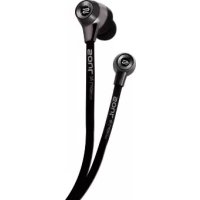
SL99 - Earphones Soul - Free user manual and instructions
Find the device manual for free SL99 Soul in PDF.


| Brand | Soul |
| Model | SL99 |
| Product type | Wired in-ear headphones |
| Connector | Gold-plated 3.5mm jack |
| Cable length | Approximately 1.2 m |
| Weight | Approximately 15 g |
| Included ear tips | 3 pairs (small, medium, large) |
| Remote control function | Volume control, play/pause, next/previous, calls (compatible with iPhone/iPod/iPad) |
| Frequency response | 20 Hz - 20 kHz |
| Impedance | 16 ohms |
| Sensitivity | 105 dB |
| Power | Passive (no battery required) |
| Recommended use | Audio devices, smartphones, tablets |
| Cleaning | Clean ear tips with warm soapy water, dry before reassembly |
| Safety | Do not use at high volume to prevent hearing loss; do not use while driving |
| Box contents | Earphones, carrying case, 2 spare pairs of ear tips |
| Warranty | Registration required at www.soulelectronics.com |
Frequently Asked Questions - SL99 Soul
User questions about SL99 Soul
0 question about this device. Answer the ones you know or ask your own.
Ask a new question about this device
Download the instructions for your Earphones in PDF format for free! Find your manual SL99 - Soul and take your electronic device back in hand. On this page are published all the documents necessary for the use of your device. SL99 by Soul.
USER MANUAL SL99 Soul
Hi-Definition Sound Isolation In-Ear Headphones
Auriculares Internos con Aislamento
Please read this owner's and product guide
Reading this guide will ensure proper and safe use of your Soul® headphones. Follow all operation guidelines and adhere to all safety warnings and cautions.
Warning
Use your headphones responsibly. Exposure to excessively loud noise can cause Noise Induced Hearing Loss (NIHL). "The loudness of sound is measured in units called decibels. For example, the humming of a refrigerator is 40 decibels, normal conversation is approximately 60 decibels, and city traffic noise can be 85 decibels. Sources of noise that can cause NIHL include motorcycles, firecrackers, and small firearms, all emitting sounds from 120 to 150 decibels. Long or repeated exposure to sounds at or above 85 decibels can cause hearing loss. The louder the sound, the shorter the time period before NIHL can occur. Sounds of less than 75 decibels, even after long exposure, are unlikely to cause hearing loss."
Source: http://www.drf.org . Additional information about preventing hearing damage may be found from The Consumer Electronics Association http://www.ce.org. World Health Organization http://www.who.int, Environmental Protection Agency http://epa.gov
Before plugging your Soul® headphones into your phone or multimedia device, make sure that the volume has been set to zero (0) and the power is off. Once you have turned on the device, increase the volume to a safe and comfortable level. Putting on your headphones and turning on at full volume may cause damage to your hearing.
Keep headphones out of reach of small children. These headphones are not a toy and could be harmful to small children.
Below is a chart to help you better understand the causes and effects of different sound levels. The noise levels are rated in dB (decibels)
| Environmental Noise Noise Level dB | Possible Effects of Exposure | |
| Quiet Library 30 dB No Effect - Normal | ||
| Normal Conversation 60 dB Comfortable Hearing | ||
| City Traffic (inside car) 85 dB Maximum | Level before hearing | damage begins. OSHA recommends no more than 8 hours of exposure to sound levels of 90 dB daily. |
| Power Saw at 3' 110 dB | Permanent Hearing Loss likely due to prolonged unprotected exposure. | |
| Jet Engine at 100' 120 to 140 dB | At 125 dB the human ear begins to experience pain that can lead to permanent hearing loss even during short unprotected periods. |
Sources: http://www.drf.org, The Consumer Electronics Association http://www.ce.org. World Health Organization http://www.who.int, Environmental Protection Agency http://epa.gov, and the Occupational Safety & Health Organization http://OSHA.gov
Caution
DO NOT operate any motor vehicle or heavy machinery while listening to or wearing your headphones. Doing so is not only dangerous to you or others but illegal in many states. Listening or wearing headphones reduces your ability to hear sounds around you such as emergency vehicle sirens or the horn from another motorist.
It is not recommended to use headphones when cycling, running or walking in heavy traffic areas, where your full attention is necessary for your safety. Always use your headphones responsibly in every situation.
Safety Instructions
Read all instructions before using your headphones.
Always keep the instructions for future reference.
Adhere to all warnings, cautions and suggestions in this owner's and product guide.
Keep your headphones dry and prevent exposure to moisture or water.
Box Contents
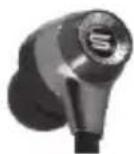
In-Ear Headphones
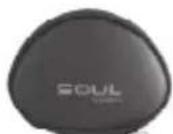
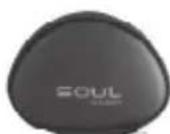
Carrying Case
Large
Small
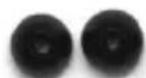
Spare Ear Tips (2 pair)
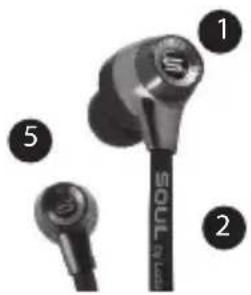
At A Glance
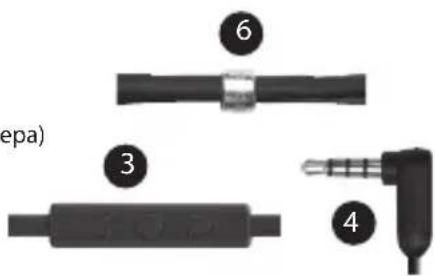
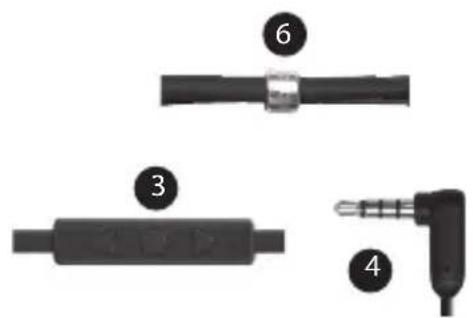
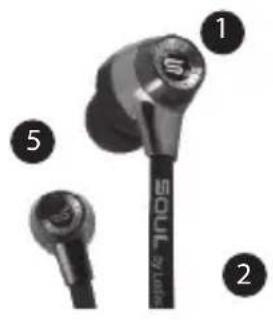
- In-Ear Headphone
- Audio Cable
- iPhone, iPod and iPad control switch
- 1 / 8'' (3.5mm) Gold Plated Plug
- Replaceable Ear Tips (Medium)
- Cord Manager
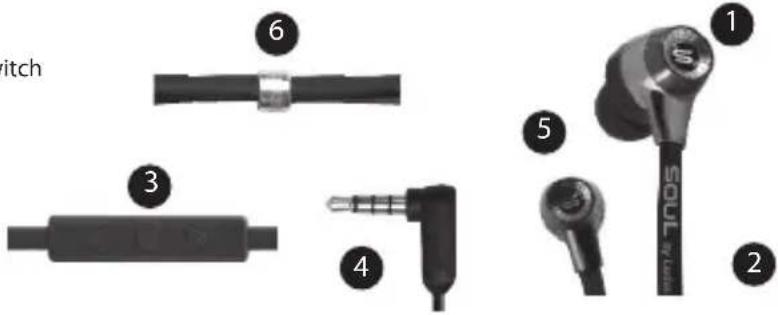
Proper Ear tip Selection
Your Soul® headphones include three pairs of ear tips. One pair of medium sized tips are already installed on your headphones and there are two additional pairs inside the storage case (large and small). Proper fit of the headphones in your ears is essential for the best possible sound performance and comfort. Improper fit will not allow you to take full advantage of the sound quality.
Caution
Never use any harsh cleaning agents.
Never clean ear tips while still on headphones. Water may damage the circuitry inside your Soul® headphones causing permanent damage.
Do not place the headphones in your ear if they are still wet.
Using Your Soul® Headphones
Now that you have selected the proper ear tips, it is time to plug in your in-ear headphones and begin enjoying your music the Soul® way.
- Place headphones in your ears. Note: the headphones have an "L" for Left and "R" for Right indicators on the inside bottom portion of your headphones closest to the audio cable. It is very important to insert the headphones correctly to get full sound benefit and enjoy your listening experience.
- Make sure that the volume is all the way down to zero.
- Turn your device off.
- Plug the 1/8'' (3.5mm) plug into the headphone jack.
- Power Up your device.
- Select the music or movie you wish to hear or view.
- Slowly increase the volume level until you find the safe and appropriate listening level for you.
- Adjust the cord manager up and down until desired fit.
A Caution
Use your headphones responsibly. Exposure to excessively loud noise can cause Noise Induced Hearing Loss (NIHL). Never put headphones on when unit is at full volume as it may cause permanent damage.
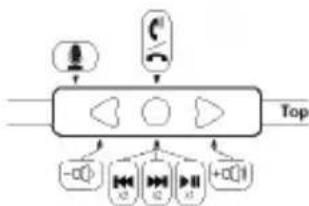
In-Line Remote Control Function and Diagram
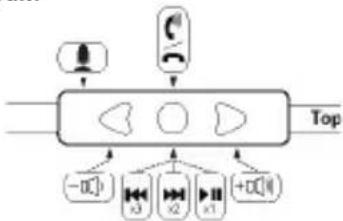
For Controlling Phone Functions
- Answer/Hang Up - During an incoming call press and release the center button (.) once to answer the call. Once you have completed your call press and release the center button once again to hang up the phone.
2.Call Rejection - If you do not want to answer an incoming call, you can hold the center button for approximately two seconds. You will hear two beeps once you release the button that indicates the call was rejected. - Call Waiting - During a call in progress, you may answer another incoming call by pressing the center button. This will place the existing call on hold while you answer the incoming call. If you want to switch to the original call press the center button again. That will placethe second caller on hold while you go back to your original call. You may repeat again to go back to second caller.
- Volume Control - When you want to increase the volume of your phone, press the up arrow (A) on your in-line controller. Note: Make sure to increase volume slowly to prevent damage to your hearing. When you want to decrease the volume on your phone, press the down arrow (V) on your controller.
For Controlling Music or Movie Functions
- Volume Control - When you want to increase the volume of your phone or multimedia device press the up arrow (▲) on your in-line controller. Note: Make sure to increase volume slowly to prevent damage to your hearing. When you want to de create the volume, press the down arrow (▼) on your controller.
-
Play or Pause - To play a song or video, press and release the center button ( ) once. To pause press and release the center button once during song or movie. To resume again, press and release center button once.
-
FFW/REW - To skip forward to the next song or chapter in a movie, quickly press and release the center button twice. To return to the previous song or chapter in a movie, quickly press and release the center button three times.
-
Scan - To scan forward during a song or movie, press and release the center button once, then immediately press and hold the center button again. This will scan forward. Release the button once you have reached the point in the song or movie you seek. To scan backwards during a song or movie, press and release the center button twice, then immediately press and hold the center button again. Release the button once you have returned to the portion of the song or movie you seek.
Note: Not all functions may work on all models. Functionality will be determined by phone or multimedia device.
In-Line Controller Compatibility Guide
The following Apple models should have full functionality of the controller. iPhone® 4S, iPhone® 4, and iPhone® 3Gs, iPad® 2 Wi-Fi, iPad® 2 3G, iPad® Wi-Fi and iPad® 3G, iPod Touch® 4th Generation, iPod Touch® 3rd Generation and iPod Touch® 2nd Generation, iPod Nano® 6th Generation, iPod Nano® 5th Generation and iPod Nano® 4th Generation, iPod Classic®. For Android™ or BlackBerry® models, not all in-line controller functions may fully work.
Disconnecting Your Soul® Headphones
Once you have finished using your Soul® in-ear headphones, disconnect from your device. Firmly hold your music or phone device. Pull the plug from the device by holding the plug. Store your headphones in the protective case to keep safe and clean. Always store the headphones in the case to prevent damage when not in use.
Caution
Do not try to unplug the headphones by pulling on the cables as it may cause damage.
Trouble Shooting Guide
| Problem Solution | |
| No Sound Check plug; make sure it is plugged in all the way. Check volume level, increase volume if necessary. Check power, make sure device is on. Check in-line controller, press center button to ensure it is not on Pause. | |
| Low Volume Level Make sure that the earphones create a proper seal. If necessary replace the ear tips for another size until a proper seal has been created. Increase the volume level on your device. | |
| Only One Side Has Volume Make sure that the plug has been inserted all the way into your device headphone jack. |
Product Registration Website: www.soulelectronics.com
Note: You must register your product for warranty
Customer Support: www.soulelectronics.com
Service clients: www.soulelectronics.com
IpoounTaIe HNCTpyKcIIO DO KOHua npexJe, Yem IcNoJb3ObaTb raphHTpy.
CoxpaHnte HcTpyKunIO IJRA NOcJeUOJcRcONb3OBaHN.
CneyuTe Bcem cOepkaummB daHHOM pyKOBOCTBe yKa3aHnM n peK omHaunr.
XpaHnTe raphHnTypy B cyxom MeCTe H He nOdbepraTte ee DeiCTBnIO BObl N CbipocTN.
Copejxumoe ynaKOBKn
TapHnIpya C HayuHnKamBklaDaBbIaM
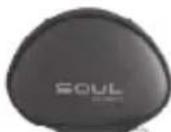
Футлар
Bolbne
MaJIeHbKne
v3anachbteywhbBcTabKn(2napbl)
Kpatkn 0630p kOmnnKeTauu
- TapHnTypa c HayuHnKaMn-BKJaDbIiMaMn
2.Aynokakebn - Пеклочаел iPhone®, iPod® и iPad®
4.ПОЗЮЕнbl pa3bem 1/8"(3,5 MM) - Cmehhble yuHbIe BCTaBKn (cpeHero pa3Mepa)
6.OpraHai3epn
PpaBnIbHbI BbI6Op yUnhbx BCTaBOK
C rapHnIpyo1 Soul noCTabIeTc Tp n npbl yIhBx BCTaBOK. OHa npa BCTaBOK cpeHero pa3Mepa yXe yctAHOBHeHa Hne, n eue Ibe npbl (60JIbIeRo mEhbIeRpa3Mepa) HaxOJaTc BHTprn FyTnpa. PpaBnIbHO npuIerAHne BCTaBOK BYxe Upe3BbUaHBO BaxHO drr HaIyUeRrKaueCTBa 3ByuHn r KOMΦopta. HnpaBnIbHO npuIerAHne He No3BOInr Bam NOnyHTb HndJexkaue KaueCTBO 3Byka.

OctopoxHo
HnkOrda He nCnObn3yIte cunbHbIe MOIOUne CpeDCTBa.
Hikorda He uCTnTe yuHbIe BCTaBKn, ecn OH nY cTaHOBneHbI Ha rapHtpy. BOn MoKet NOBpeNTb 3NeKTPOHHble KOMNoHEHTbl raphHTypb Soul 工 BBBeCTn ee n3 CTpor.
He BCTaBnIe Te BnaJHbIe yUHbIe BCTaBKn ByuN.
Mcnonb3ObaHne TapnTpyb Soul
Tenepb, kOrda Bbl noo6pann npabunbHbe yuHbte BCTaBKn, camoe BpeMa BKIOHTb raphHtpy n HacnaKDaTbCMy3bIKo TAK, kak 30 moxho denatb tonko raphHtpoi Soul.
- BCTaBbTe HauHnKn B ywn. PnpmeuHaHe: HauHnKn-BknaDbIu nn m EIO T O6o3NaueHnra "L" (neBbI) n R" (npabBn) Ha HxKHe BByTppeHHe qactn 6bnke K ayDnOKa6eIIO. Oueh BaXHO BCTaBJIbTb raphNtpy npabunbHO IINrTO, YTO6bl NOnyUHTb NOJHOceHHb 3Byk n yOBOJIbCTBne OT pOcIyUWBnHAHn.
- 6eNTecb, TTO rPOMKoCTb yCTaHOBHeHa 0.
- BbIKIOHTe yCTpOINCTBO.
- BctabBe Tsekep 1/8" (3,5 MM) B pa3bem nra rapHnTypbl.
5.BkInouTe yCTpoNCTBO. - BbIepeHte My3bIKy nnBnDEo, KOtOpoe Bbl 6yTe CnywAtb nn CMOTpeTb.
- MeIeHHO yBENuBaIte rPOMKoCTb Do 6e3OnaCHOrO n KOMΦOpTHOrO yPOBHa.
- Otperynnpyte oprahaun3ep ka6eIdo JxenaemOn dInHbI.

OctopoxHo
Pb3yntcB raphHtpyo OTBeTCTBEHHO. CnHKOM rpoMKne 3ByKu MOrTy Bbl3bBaTb yxUdHeHne Cnyxa B pe3yNbTaTe BO3deIcTBn uyma (NIHL).
Hikorda He HadeBaTe raphNtpy, eCIn yCTpoiCTBO BKIOUeHO Ha NOnHyIO rPOMKoCTb: 3TO MOKeT PnBecTN K HeIOnPiBumomy uep6y dnn 3doopOBb.
BcTpoeHHbI nyblTynpaBneHn
YnpabHeHne yHKnMaMu TenefoHa
- Pnem/3aBepseHne BbI3OBap - Bo Bpem BAxOJaTeo Bbl3OBA HaxMITE NOTyCTNTe CEHTpaJIbHyIO KHOINK ( ) OIN PA3 Jn OTBeTa Ha Bbl3OB. Iocne OKOHuaHn pa3roBopa HaxMITE NOTyCTNTe CEHTpaJIbHyIO KHOINK eIe pa3 dIy 3aBepseHn Bbl3OBA.
-
OTKHOHeHne BbIOBa -EcnB He XOTnTe OTBeaTb Ha BbIOB, Bbl MoKeTe YeepXnBaTb CEHTpaJIbHyO KONKy BTeueHIn np6bn3ntenbHO DByxCceyHd. Korda Bbl OTnyCTnTE KHONKy, Bbl ycblwnte DBA 3BYKOBbIX CnHaJa, KOtOpbe O3HaHaOT, YTO BBIOB OTKJOHeH.
-
OxndaOuun BbIOBBe Bpempa3roBopBa BlMOXeTe OTBEHTb HapyoB BXOaHIN Bbl3OB HaxaTne CEHTpaIbHOH KhoNkN 3TO NOMEcTNT Ekyuun Bbl3OB B pexmO xndAHa Bpemr OxuaHn HA Bpemr OTBeta HA HOBBI b3OB.EcnB bXOTNEpeKKnUHTBCa 6paTHo Ha nepBOHaaybHb Bbl3OB, HaxMnte UeHTpaJIbHyIO KHONKy eue pa3. 3To nepeBedeT BTOPOB B pexmO xndAHHN, NOKA Bbl 3AHrTa IepBBIM Pa3ROBOPM.PnH He06XoDMOCTN Bbl MOXeTe CHOB AEPVbC K0 BTOPOMY Bbl3OBy.
- POMKOCTB -ECIN BBI XOTITE yBEINHHTB rPOMKOCTB TeneoHa, HAXMITE CTpeNk BYBepx (Ha BCTPOEHOM NylbTe. PnimeaHHe: YBeINHBAIte rPOMKOCTB NOCTeNEHHO, UTO6bl 36ExKaTb BO3JeCTBnR, KOtOpOE MoXET PnIBecTN K yxydWeHIO Cnyxa. ECIN BBI XOTITE yMeHbWHTB rPOMKOCTB TeneoHa, HAXMITE CTpeNk BHN3 (Ha BCTPOEHOM NylbTe.
YnpabLeHne yHKnMaM My3bIKN BnDeo
- TpOMKocb - Ecnn Bbl XOTnTE yBENuHTB TpOMKocb TelefoHa NIN MyIbTmEIMHOrO YCTPONCTBa, HAXMNTe CTpeIKy BBepx (A) HA BCTPOEHHom Nylte. PImMeaHHe: YBENuBAIte TpOMKocb NOCTeNEHHO, YTO6bl N36ExKaTB BO3DeiCTBn, KOTOpoe MoKeT nPnBecn K yxyDWeHIO Cnyxa. Ecnn Bbl XOTnTE yMeHbWHTB TpOMKocb, HAXMNTe CTpeIKy BHn3 (YHa BCTPOEHHom Nylte.
- Bocnpoun3BedeHne nnay3a - nra BOCpoun3BedeHn My3bikahbHOKOMIO3nui nn BIDeO HaxMITE n OTnyCTnte ceHTpaIbHyIO KONky (o) OIN pa3. IpynoctaHOBKn BOCpoun3BedeHn HaxMITE n OTnyCTnte CEHTpaIbHyIO KONky OIN pa3 BO BpeMa BOCpoun3BedeHn. Yo6bl npOJXmTB BOCpoun3BedeHne, HaxMITE n OTNYCTnte CEHTpaIbHyIO KONky eue pa3
- Pnma n 6paTHa nepeMOTka -Tobbi neepuN K cndyioe MybKaHbHOKOMno3nui Nn uactn fNbMa, DbaXdbI 6bICTPO HAKMTNE OTNcyCTNE UNTHaPbHyO KHONK. TObbi neepuN K npdeBnyuee MybKaHbHO KOMNo3nui Nn uactn OINbMa, TIOXdbI 6bICTPO HAKMTNE OTNcyCTNE UNTHaPbHyO KHONK.
- Nounck -Дя NOUCKa Bnepe Bo BpeMa Bocnpoun3BedeHnMy3bKaIbHoN KOMNo3uHn UIN ΦNbMa HaxMnte N OTNyCTnte ΚEHpaIbHyO KHONky OIN pa3, 3aTeM HeMeDJIeHNO HaxMNTe ΚEHpaIbHyO KHONky eue pa3 IN ydepXnbAite ee. HaNeTcra NOUC Bnepe, OTyCTnte KONKy, KaK TOnbKO DOCTInHeTe HxKHO MecTa. JIA NOCKaHa3aD BO BpeMa BOCpOun3BedeHn My3bKaIbHoN KOMNo3uHn UIN ΦNbMa HaxMNTe N OTNyCTnte ΚEHpaIbHyO KHONky DbaJdbI, 3aTeM HeMeDJIeHNO HaxMNTe ΚEHpaIbHyO KHONky eue pa3 IN ydepXnbAite ee. OTNyCTnte KHONky KaK TOnbKO IOCTInHete HVKHO MOeTa.
IpnmeuHHe: HeKOTOpbIE yHKcIM MoryT pa6oTaB He Ha Bcex MoDenax. FyHKcNoHaJIbHOCTb ONpeDeneTcTelefoHOM NmMylbTMMeINHbIM YCTPOINCTBOM.
CBeHeHnO COBmecHTMOCTN BCTPOeHHORIO NylbTa
Cnndyioiue MoenApple dOnKbI NMeTb NOnHyIO COBMeCTMOCb Cnyltom. iPhone4S,iPhone4u iPhone3Gs,iPad2Wi-Fi,iPad ^四 23G,iPad ^四 Wi-Fi u iPad ^四 3G,iPod Touch ^四 4th Generation,iPod Touch ^四 3rd Generation u iPod Touch ^四 2nd Generation, iPod Nano 6th Generation, iPod Nano 5th Generation u iPod Nano 4th Generation, iPod Classic.C moedjAmAndroidTM u BlackBerry HeKOToPbE dyHKmN pNbTa MOrVT He paObaTb.
OTcoeMHHeHre raphuTypb Soul
Korda Bbl He Nolb3yeTecb rapHTypoi Soul,OTKnIOaIe ee ot yCTPOBCTBa. HAdexHO yedxNBAITemy3bikalbHOeycPoi TBO INI TepeOH. BbHtte Iepn 13 pAbema. XpaHNTe rAPHTyB cyTnape, UTO6bl 3aunnttB ee ot NOBpeXJHeH N 3aqrHEHm. Bcerla v6uapate rapHTyB aVfTnp. KOrna OHa HE NCNOB3vETcR.

Octopoxho
He nbTaIeTcB OTcoEINHHTb rapHtpy, BblpeprnBaee 3a Ka6JIb, TaK KaK 3TO MOKeT npNBecTI K NOBpeXJDeHIO.
Ponck uycpaHne HenoJaOK
Pondepkka KJnEHTOB: www.soulelectronics.com
Källor: http://www.drf.org, http://www.ce.org. (The Consumer Electronics Association); http://www.who.int, (World Health Organization); http://epa.gov (Environmental Protection Agency) and the Occupational Safety & Health Organization http://OSHA.gov

Forsiktigkeit
World Health Organization http://www.who.int, Environmental Protection Agency http://epa.gov
Kilder: http://www.drf.org, The Consumer Electronics Association http://www.ce.org. World Health Organization http://www.who.int, Environmental Protection Agency http://epa.gov, and the Occupational Safety & Health Organization http://OSHA.gov

Forsiktig
Reserve oreputer (2 par)
Stor Litten
Medettblikk
1.øreplugger
2. Audiokabel
3. iPhone®, iPod® og iPad® kontrollbryter
4.1/8" (3.5mm) gullplugg
5. Utskiftbare oreplugger (Medium)
6. Ledningsholder
Hoppd honjchaKc to he fckafie. 故障的原因可
故障的态思