EasyManual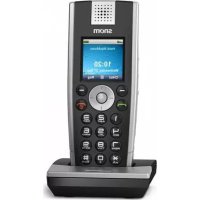
m9 - Phone Snom - Free user manual and instructions
Find the device manual for free m9 Snom in PDF.


User questions about m9 Snom
0 question about this device. Answer the ones you know or ask your own.
Ask a new question about this device
Download the instructions for your Phone in PDF format for free! Find your manual m9 - Snom and take your electronic device back in hand. On this page are published all the documents necessary for the use of your device. m9 by Snom.
USER MANUAL m9 Snom
text_image
snom Handset 1 10:20 Wednesday, 25 Sep. CHist Reg snom Handset 2 10:20 Wednesday, 25 Sep. CHist Reg snom snom ENGLISHENGLISH
DEUTSCH
FRANÇAIS
ITALIANO
ESPAÑOL
snom m9
Quick Start Guide
ENGLISH 5
Safety Information & Warranty Australia 23
Safety Information & Warranty New Zealand .... 27
DEUTSCH 31
FRANÇAIS 51
ITALIANO 71
ESPAÑOL 91
APPENDIX · ANHANG · ANNEXE · APENDICE · ANEXO
GNU General Public Licence 110
snom m9 Quick Start Guide
snom m9 Quick Start Guide
This is the Quick Start Guide to the installation, setup, and operation of the base station and the phone. For further information please refer to the manual at http://wiki.snom.com.
DELIVERY CONTENT
| Combo Kit Handset Kit | ||
| 1. Base station 1 x - | ||
| 2. Base station power adapter (5 V, DC plug inner ∅ 2.1 äämm, outer ∅ 5.5 mm) | 1 x - | |
| 3. Network cable 1 x - | ||
| 4. Handset 2 x 1 x | ||
| 5. 3.7 V Lithium-lon rechargeable battery pack | 2 x 1 x | |
| 6. Handset charger 2 x 1 x | ||
| 7. Handset charger power adapter (5.9 V, DC plug inner ∅ 1.35 mm, outer ∅ 3.5 mm) | 2 x 1 x | |
| 8. Belt clip 2 x 1 x | ||
You will also need:
Data received from your service provider or administrator:
- Account (usually the phone number) (required)
- Registrar (required)
- Password, authentication name, outbound proxy (may be required, mailbox account (if available)
- If DHCP is not available for automatic initialization, you will also need
the IP address, the IP gateway and the DNS server. Press (Settings menu) > Network > enter PIN > select IP Gateway and DNS Server, respectively, with OK.
snom m9 Quick Start Guide
snom m9 Quick Start Guide
COPYRIGHT, TRADEMARKS, GPL, LEGAL DISCLAIMERS
© 2009 snom technology Aktiengesellschaft
All Rights Reserved.
snom, the names of snom products, and snom logos are trademarks owned by snom technology AG. All other product names and names of enterprises are the property of their respective owners.
snom technology AG reserves the right to revise and change this document at any time, without being obliged to announce such revisions or changes beforehand or after the fact.
Texts, images, and illustrations and their arrangement in this document are subject to the protection of copyrights and other legal rights worldwide. Their use, reproduction, and transmittal to third parties without express written permission may result in legal proceedings in the criminal courts as well as civil courts.
When this document is made available on snom's web page, snom technology AG gives its permission to download and print copies of its content for the intended purpose of using it as a manual. No parts of this document may be altered, modified or used for commercial purposes without the express written consent of snom technology AG.
Although due care has been taken in the compilation and presentation of the information in this document, the data upon which it is based may have changed in the meantime. snow therefore disclaims all warranties and liability for the accurateness, completeness, and currentness of the information published, except in the case of intention or gross negligence on the part of snow or where liability arises due to binding legal provisions.
Our firmware includes some source code that may be used and modified by anyone and everyone under the GNU Public License (GPL) (see Appendix on page 110), provided they, in turn, make it available to everyone else with the same licensing agreement. Please go to http://www.snom.com/en/support/download/gpl-quellcode/ for the original GPL license and the source code of components licensed under GPL and used in snom products.
Standards Conformance
CE
This phone is CE-certified and meets European health, safety, and environmental standards.
Unauthorized opening, changing, or modifying the phone will cause the warranty to lapse and may also result in the lapse of the CE certification. In case of malfunction contact authorized service personnel, your seller, or snom.
snom m9 Quick Start Guide
snom m9 Quick Start Guide
SAFETY PRECAUTIONS
Please read these precautions and the instructions on how to set up and use the base and the phone thoroughly before using the devices. Save this Quick Start Guide and do not give the device to third parties without it. See also separate general safety information and country-specific safety and warranty information for the USA, Australia, and New Zealand.
Power supplies/adapters, rechargeable battery
- Use only the power converters (AC/DC adapters) delivered with the base station and the phone or those power supplies expressly recommended by snom. Other power power supplies may damage or even destroy the device(s).
| Elementech Power Adapters, Model No. | |
| Base station Handset charger | |
| Europe without UK | AU1050507e AU1050607e |
| UK | AU1050505b AU1050605b |
| Australia | AU1050505s AU1050605s |
- Use only the rechargeable battery pack delivered with the handset or those rechargeable battery packs expressly recommended by snom.
Placement of base, charger, cables, cords
- Avoid placing the devices' cables and cords where people may trip over them. Avoid placing the cables and cords where they may be exposed to mechanical pressure as this may damage them. If the power supply cord or the plug is damaged, disconnect the device and contact qualified service personnel.
- Base station, chargers, handsets, power adapters, and cables are for indoor installation with a temperature range between +5°C and +45°C. Not for outdoor installation!
- Do not install product in rooms with high humidity (for example, in bathrooms, laundry rooms, damp basements). Do not immerse product in water and do not spill or pour liquids of any kind onto or into any parts of it.
- Do not install product in surroundings at risk for explosions and do not use the handset in such surroundings (paint shops, for example). Do not use the phone if you smell gas or other potentially
explosive fumes!
- Medical devices might be adversely affected. Please consider the technical ramifications when installing the devices in a doctor's office, for example.
If you have an implanted pacemaker
- Do not use if you have an implanted pacemaker unless the pacemaker manufacturer's directions expressly permit the use of devices emitting pulsating radio frequency signals. Always follow the manufacturer's directions!
- Recommended MINIMUM distance to the handset: 20 cm (7.9").
- Do not carry the handset in a breast pocket.
- Hold the handset to the ear opposite the medical device to minimize the potential for interference.
- Turn the handset off immediately if there is any reason to suspect that interference is taking place.
Other health risks
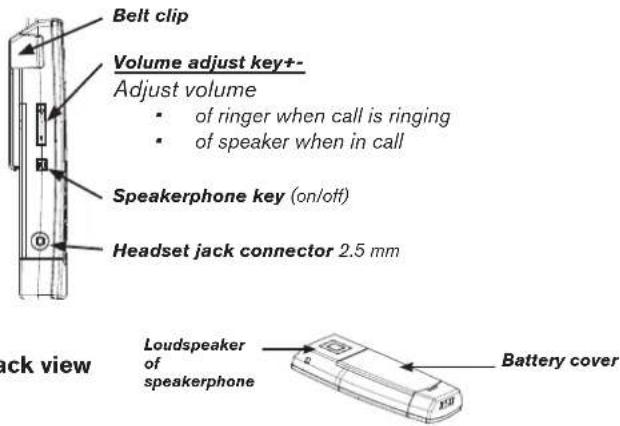
Do not hold the loudspeaker at the back of the handset against your ear when the phone is ringing or when speakerphone is switched on. Danger of serious, irreversible damage to your hearing!
If you are wearing a hearing aid
Please note that the handset may cause an annoying background noise.
ADDITIONAL SAFETY INFORMATION
Small children:
Your device and its enhancements may contain small parts. Keep them out of the reach of small children.
Operating environment:
Remember to follow any special regulations in force in any area, and always switch off your device when its use is prohibited or when it may cause interference or danger. Use the device only in its normal operating positions. Do not place credit cards or other magnetic storage media near the device, because information stored on them may be erased.
snom m9 Quick Start Guide
snom m9 Quick Start Guide
Medical devices
Operation of any equipment emitting radio frequency signals may interfere with the functionality of inadequately shielded medical devices. Consult a physician or the manufacturer of the medical device to determine if they are adequately shielded from external RF energy or if you have any other questions concerning this topic. Switch off your device in health care facilities when signs posted in these areas instruct you to do so. Hospitals or health care facilities may be using equipment that could be sensitive to external RF energy.
Implanted medical devices
Manufacturers of medical devices recommend that a minimum distance of 20 centimeters (7.8 inches) should be maintained between a wireless device and an implanted medical device, such as pacemakers or cardioverter defibrillators, to avoid potential interference with the medical device. Persons who have such devices should:
- Always keep the wireless device more than 20 centimeters (7.8 inches) from the medical device when the wireless device is turned on.
- Not carry the wireless device in a breast pocket.
- Hold the wireless device to the ear opposite the medical device to minimize the potential for inter-ference.
- Turn the wireless device off immediately if there is any reason to suspect that interference is taking place.
- Read and follow the directions of the medical device's manufacturer.
If you have any questions about using your wireless device with an implanted medical device, consult your health care provider.
SELV (Safety Extra Low Voltage) Compliance
Safety status of Input/Output connections comply to SELV requirements.
Warning: To avoid electric shock, do not connect safety extra-low voltage (SELV) circuits to telephone-network voltage (TNV) circuits. LAN ports contain SELV circuits, and PSTN ports contain TNV circuits. Some LAN and PSTN ports both use RJ-45 (8P8C) connectors. Use caution when connecting cables.
Potentially explosive environments
Switch off your device when in any area with a potentially explosive atmosphere and obey all signs and instructions. Sparks in such areas could cause an explosion or fire resulting in bodily injury or even death. Switch off the device at refuelling points such as near gas pumps at service stations. Observe restrictions on the use of radio equipment in fuel depots, storage, and distribution areas; chemical plants; or where blasting operations are in progress. Areas with a potentially explosive atmosphere are often but not always clearly marked. They include below deck on boats, chemical transfer or storage facilities, vehicles using liquefied petroleum gas, and areas where the air contains chemicals or particles such as grain, dust, or metal powders.
Sensitive Electronic Equipment
The current state of research concludes that operational DECT phones normally do not adversely affect electronic equipment. Nevertheless, you should take some precautions if you want to operate DECT phones in the immediate vicinity of such equipment like sensitive laboratory equipment. Always keep a minimum distance of 10 cm (3.94") to the equipment even when the phone is in standby.
Electrical Surges
We recommend the installment of an AC surge arrester in the AC outlet to which this device is connected to avoid damage to the equipment caused by local strikes of lightening or other electrical surges.
IMPORTANT BATTERY INFORMATION
This product uses a rechargeable Lithium-Ion battery 3.7V, 650mAh. Only use batteries with "snom" brand and P/N: 60020438 or 60020438 that came with the handset or replacement batteries approved by snow technology AG. Do not use any other type of battery, since this may lead to leakage, fire, explosion, or other dangerous situations. In order to replace or remove the battery, you must first remove the battery cover of the handset. Never disassemble, alter, or short-circuit batteries or use them for purposes other than the intended one. Charge battery only within the snow m9 handset placed in the snow m9 charger that came with the product.
snom m9 Quick Start Guide
snom m9 Quick Start Guide
Charging and discharging, storage
The handset is powered by a rechargeable battery. The full performance of a new battery is achieved only after two or three complete charge and discharge cycles.
The battery can be charged and discharged hundreds of times, but it will eventually wear out. Use only snow technology AG approved batteries.
If left unused, a fully charged battery will lose its charge over time. If the battery is completely discharged, it may take a few minutes before the charging indicator appears on the display.
Use the battery only for its intended purpose. Do not short-circuit the battery. Short-circuiting the terminals may damage the battery or the connecting object. Do NOT use a damaged charger or battery. Using a damaged battery may cause it to explode.
Do not place or store the battery, inside or outside the handset, in the immediate vicinity of open fire or other heat sources. Leaving the battery in hot or cold places will reduce its capacity and lifetime. Charge batteries within an ambient temperature range of 0^ C to 40^ C ( 32^ F to 104^ F). A device with a hot or cold battery may not work temporarily, even when the battery is fully charged.
Avoid overcharging. Repeated overcharging can lead to deterioration in battery performance. Never attempt charging the battery with reversed polarity as this may cause the gas pressure inside the battery to rise and lead to leakages. For short-term storage store batteries in a dry location with low humidity, no corrosive gases, and at a temperature range of -20^ C to 45^ C ( -4^ F to 113^ F). Long-term storage: Store at a temperature ranges between +10^ C and +30^ C ( 50^ F to 86^ F).
Battery Disposal
Defective or exhausted batteries should never be disposed of as municipal waste. Return old batteries to the battery supplier, a licensed battery dealer or a designated collection facility. Do not incinerate batteries.
CLEANING
Use an anti-static cloth. Please avoid water and liquid or solid cleaning products as they might damage the surface or internal electronics of the base, charger, and handset.
DISPOSAL
Disposal of phone

This product is subject to European Directive 2002/96/EC and may not be disposed of with general household garbage. If you do not know where you may dispose of the device at the end of its lifespan, contact your municipality, your local waste management provider, or your seller.
Battery disposal

This battery is subject to European Directive 2006/66/EC and may not be disposed of with general household garbage. If you do not know where you may dispose of the battery at the end of its lifespan, contact your municipality, your local waste management provider, or your seller.
For countries outside the European Union:
Disposal of electrical and electronic products in countries outside the European Union should be done in line with local regulations. Please contact local authorities for further information.
snom m9 Quick Start Guide
snom m9 Quick Start Guide
INSTALLATION
Before first use, the handset battery should be charged fully. This will take approximately 8 hours.
PREPARATION OF HANDSET
- Lift off the battery cover.
- Insert the battery pack with the electrodes in the top left corner. Replace the cover.
- Connect the 5.9 V power supply of the charger to the wall outlet first, then to the charger, and place the handset in the charger.
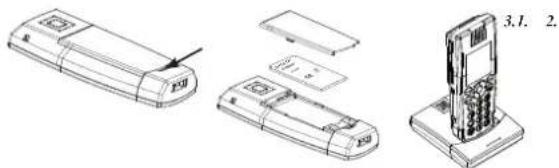
text_image
Technical diagram showing exploded view of a mobile phone with labeled parts and a 3.1. label indicating part number.BASE STATION
text_image
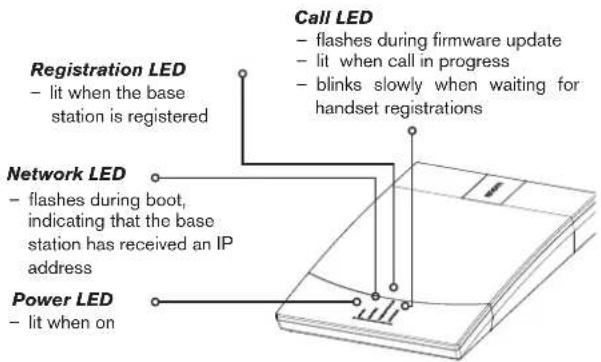
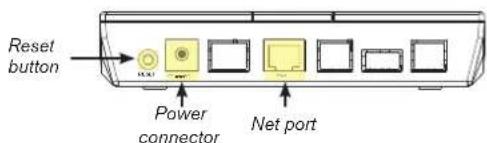
Registration LED - lit when the base station is registered Network LED - flashes during boot, indicating that the base station has received an IP address Power LED - lit when on Call LED - flashes during firmware update - lit when call in progress - blinks slowly when waiting for handset registrations- When the handset is ready for use, connect one end of the network cable with the NET port on the back of the base station and the other end to a LAN port in your network (switch, router, etc.).
- Connect the 5 V power converter to the wall outlet first, THEN to the base station.
text_image
Reset button Power connector Net port- The power indicator comes on and the base station begins to boot.
- When the base station has booted up, the "Call" LED will start to blink, indicating that the base station is waiting for handset registration.
HANDSET OVERVIEW
Side view
text_image
Belt clip Volume adjust key++ Adjust volume • of ringer when call is ringing • of speaker when in call Speakerphone key (on/off) Headset jack connector 2.5 mm Back view Loudspeaker of speakerphone Battery coversnom m9 Quick Start Guide
snom m9 Quick Start Guide
Front view
text_image
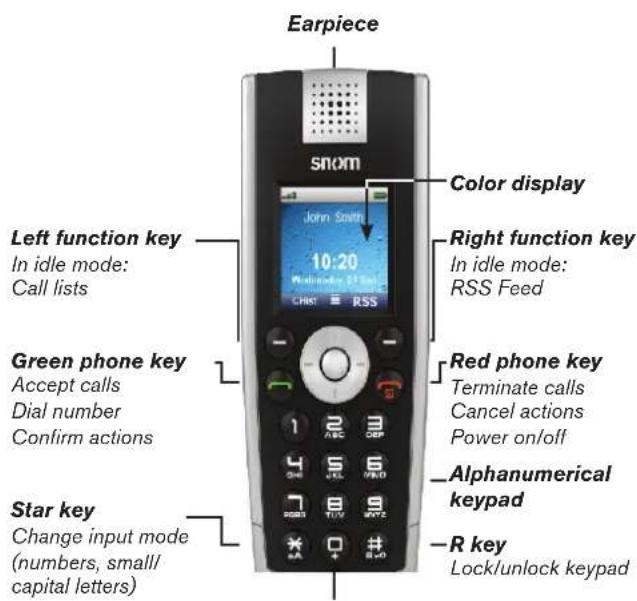
Earpiece snom Color display Left function key In idle mode: Call lists 10:20 Wednesday 27th St. Christ RSS Right function key In idle mode: RSS Feed Green phone key Accept calls Dial number Confirm actions Red phone key Terminate calls Cancel actions Power on/off Star key Change input mode (numbers, small/ capital letters) Alphanumeric keypad Lock/unlock keypadNavigation key
In idle mode, press top/bottom/right/left edge (depicted in this guide by /// , respectively) or the button in the center (O) to open the following menus or functions:
○ Main menu
↓ Directory
← Intercom
→ Settings menu
↑ Preferences menu
In other contexts press or to navigate in menus and lists.
DISPLAY LAYOUT, IDLE SCREEN
text_image
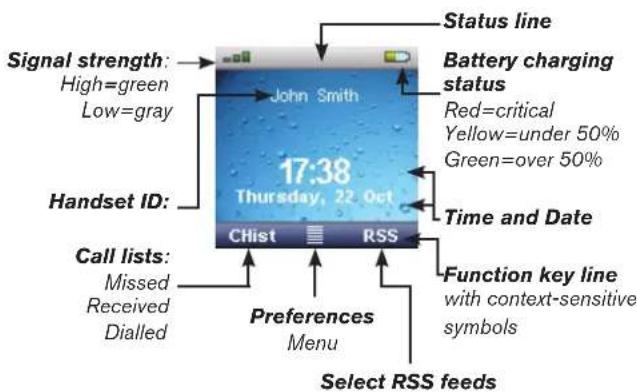
Signal strength: High=green Low=gray Handset ID: Call lists: Missed Received Dialled John Smith 17:38 Thursday, 22 Oct CHist RSS Status line Battery charging status Red=critical Yellow=under 50% Green=over 50% Time and Date Preferences Menu Function key line with context-sensitive symbols Select RSS feedsHandset registration
- Press (red phone key). The display will show: "Searching for Base". Once the handset has found the base station, it will display the PIN prompt.
- Enter the default PIN "0000".
- Press "OK".
Note: If the handset fails to register automatically, a manual registration can also be performed. Press "->" to enter the Settings menu. Enter the Handset menu and press "Register Handset". Select "Base 1". Enter PIN and press "OK" to register the handset.
- Once the handset has registered with the base, the idle screen will be displayed:
Configuration of a VoIP account
- Press → and ↑ on the navigation key and "OK". The IP address of the base station is displayed on the screen. Write it down.
- Press ↑↑ on the navigation key (see page 16) to show --Handset--page. Write down the Handset ID, for example: 00FEA101C0 (without the "h" at the end, if visible).
- Open a browser window, type http://
in the address bar, and press ENTER to open the base station's web interface. Default user name: admin Default password: password - Click on "Identity 1" in the menu on the left.
- Enter the SIP account information you received from your system administrator or VoIP provider. The display name is freely selectable.
-
Click on the "Handsets" tab. Select the handset ID from the "Handset ID (IPUI)" drop-down list. Press "Save".
-
Your snom m9 is now ready for use.
PHONE MENUS
- Press center of navigation key to open top-level menu.
Office Tools
| Name of marked menu item | |
| Directory | Settings |
| Preferences | Intercom |
| Alarm Clock | Current function of function key underneath |
- Press top/bottom/right/left edge of navigation key (indicated in this guide by ) to navigate on display.
- Press function key "OK" to open submenu/function. Press function key "Cancel" to return to idle screen.
DIRECTORY
Use ↑↓ to select existing entry or
New item: Follow the prompts to enter name and number and select ringer. Press OK.
Press (green phone key) to dial number, press to leave directory.
OFFICE TOOLS
Stopwatch, Calculator, Notepad, Calendar, RSS Reader, Voicemail
SETTINGS MENU
| Date/Time | VoIP | Network | Handset | Change PIN |
| Time Server | Display Name | VLAN | Register handset | New PIN: |
| Time Zone | Account | DHCP | Select base | System Info |
| Format | Password | Deregister handset | ||
| Date Format | Registrar | Reset handset | IP address, MAC address, firmware version, IDs of base and handset | |
| Time Format | Outbound Proxy | Reset base | ||
| Mailbox | FW Update | |||
| Version |
snom m9 Quick Start Guide
snom m9 Quick Start Guide
PREFERENCES MENU
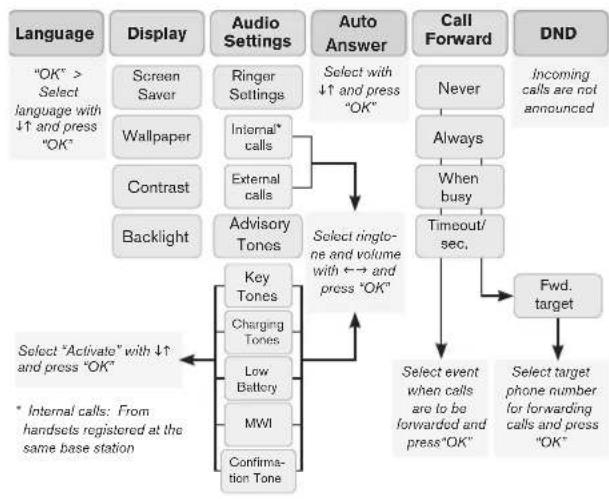
flowchart
graph TD
    A["Language"] --> B["OK" > Select language with ↓↑ and press "OK"]
    C["Display"] --> D["Screen Saver"]
    C --> E["Wallpaper"]
    C --> F["Contrast"]
    C --> G["Backlight"]
    H["Audio Settings"] --> I["Ringer Settings"]
    H --> J["Internal* calls"]
    H --> K["External calls"]
    L["Auto Answer"] --> M["Select with ↓↑ and press "OK""]
    N["Call Forward"] --> O["Never"]
    N --> P["Always"]
    N --> Q["When busy"]
    N --> R["Timeout/sec."]
    S["DND"] --> T["Incoming calls are not announced"]
    U["Advisory Tones"] --> V["Key Tones"]
    U --> W["Charging Tones"]
    U --> X["Low Battery"]
    U --> Y["MWI"]
    U --> Z["Confirmation Tone"]
    AA["Key Tones"] --> AB["Select rington- ne and volume with ↔ → and press "OK""]
    AC["Fwd. target"] --> AD["Select event when calls are to be forwarded and press "OK""]
    AE["Select target phone number for forwarding calls and press "OK""] --> AF["Select target phone number for forwarding calls and press "OK""]
    AG["Select "Activate" with ↓↑ and press "OK""] --> AH["* Internal calls: From handsets registered at the same base station"]
ALARM CLOCK
Activate | Time | Alarm Ringer
INTERCOM
Page All | Handset: Page all handsets or selected handset registered with same base station
PHONE OPERATION
Make and answer calls
Make a call: Enter number > press OK or
Answer a call: Press
Terminate call: Press
Redial
Press → select number > press or "OK"
Call forwarding
Preferences > Call forwarding > enter PIN > OK > select identity > select event (always, busy, timeout) > select SIP address > enter target phone number > press OK > on prompt press Yes to reboot phone Turn off call forwarding: Preferences > Call forwarding > enter PIN > OK > select identity > select event "never"
Hold and resume
Hold call: Press Options > Hold
Unhold call: Press Options > Unhold
Transfer call
With call on line, press Options > Transfer > enter number > press OK
MISCELLANEOUS
Look up MAC address (= serial number) of base station
Press → and ↑ on the navigation key and "OK".
Look up IP address of base station
Press → and ↑ on the navigation key and "OK".
Open web interface of base station
Enter IP address in address bar of your web browser, press ENTER
Reset base station
Menu "Settings" > Handset > Reset base > "OK"
OR
Press "Reset" key on the back of the base station.
Reset handset
Menu "Settings" > Handset > Reset handset > "OK"
snom m9 Quick Start Guide
snom m9 Quick Start Guide
SAFETY INFORMATION & WARRANTY AUSTRALIA
Intended Use
This telephone is designed for telephoning within the Internet. Any other use is considered unintended use. Unauthorised modifications or reconstruction not described in this manual are not permitted.
SAFETY INFORMATION
General
- Only use the power supply included with the product. Using an unauthorised power supply will invalidate the product guarantee and may damage the telephone.
- For the snom m9 use only the Li-ion battery pack specified in the owner's manual (3.7V, 650mAh). Never use other batteries or conventional alkaline batteries.
- Even when the key lock is switched on, it is still possible to make emergency calls (see instructions for details).
- Do not open the handset (other than to change batteries) or base station. This could expose you to high voltages or other risks.
- Radio signals transmitted between the handset and base may cause interference with hearing aids.
- This product should not be used near emergency/intensive care medical equipment and should not be used by people with pacemakers.
- Do not install the base in bathrooms or shower rooms. The handset and base are not watertight.
- Do not use the telephone in environments subject to explosion hazard (e.g. auto paint shops).
Cleaning
- Clean the handset and base station with a damp (not wet) cloth or an anti-static wipe.
- Never use household polish, as this will damage the product.
- Never use a dry cloth as this may cause a static shock.
Environmental
- Do not expose the product to direct sunlight.
- The product may heat up when the batteries are being charged. This is normal. However, we recommend that you do not place the product on antique/veneered wood to avoid damage.
- Do not stand your product on carpets or other surfaces which generate fibres, or place it in locations preventing the free flow of air over its surface.
- Do not submerge any part of your product in water and do not use it in damp or humid conditions, such as bathrooms.
- Do not expose your product to fire, explosive or other hazardous conditions.
- There is a slight chance that your product could be damaged by a thunder storm. We recommend that you unplug the power and telephone line cord and switch off your computer during a thunder storm.
LIMITED WARRANTY
This limited warranty (hereinafter the Warranty) is valid for the products snom m9 base station and cordless snom m9 handset and original accessories thereof (hereinafter the Product). The Warranty is valid only in the country in which the product was originally purchased.
- The Warranty covers only manufacturing defects, and only insofar as the Product has been used and stored in accordance with the instructions set out in the user guide.
- The Warranty is issued by the retailer from whom the Product was originally purchased to the end purchaser of the Product (hereinafter the Customer).
- In accordance with the Warranty, the Customer has a sole claim to demand that the Product be repaired/replaced and may not in accordance with the provisions of the Warranty assert further claims against the manufacturer/retailer for indirect loss, including but not limited to loss of data or loss of profit.
-
The warranty period runs for 12 months from the day on which the Customer originally purchased the Product from a retailer. Subsequent changes of ownership do not extend the warranty period.
-
The Warranty is valid solely on the condition that the Product is taken to a retailer within the warranty period. In the event of a fault or defect in the Product, it must be taken to a retailer in the country in which the Product was purchased. Products are repaired or exchanged at the retailer's own discretion. The warranty period is not extended for a repaired or replaced Product. Exchanged parts are the property of the retailer/manufacturer.
- The Warranty is valid solely on the condition that the original proof of purchase issued to the original purchaser is presented with the Product.
The Warranty is not valid
- if the Product has been opened or repair attempted by a person other than a retailer,
- if the fault with the Product is due to general wear, incorrect use or storage, including use or storage not conforming to the instructions set out in the user guide or faults caused by poor maintenance of the Product,
- if the fault is the result of the Product not being used for its intended purpose,
- if the fault is due to external causes such as but not limited to rough handling or misadventure,
- if the fault is caused by the use of accessories or other peripheral units which are not original accessories intended for use with the Product,
- if the fault is due to a break in the network or power supply,
- if the fault is due to the fact that the battery has short circuited or has been forced open or an attempt made to modify it, or the battery has been used in equipment other than for which it is intended,
- if the software in the Product needs to be upgraded due to changes in the network. In addition to his statutory rights and those set out above, the Customer has no other basis for a claim.
Amendments or additions to the Warranty are only valid with the written consent of the retailer.
snom m9 Quick Start Guide
snom m9 Quick Start Guide
WARNING
- Warning – This telephone will not operate during loss of mains power.
- Warning – Due to possibility of ignition hazard this telephone must be switched off in areas of potentially explosive atmospheres, such as chemical/fuel storage areas or blasting operations.
- Warning – Only use an A-tick approved headset with this device.
SAFETY INFORMATION & WARRANTY NEW ZEALAND
Intended Use
This telephone is designed for telephoning within the Internet. Any other use is considered unintended use. Unauthorised modifications or reconstruction not described in this manual are not permitted.
SAFETY INFORMATION
General
- Only use the power supply included with the product. Using an unauthorised power supply will invalidate the product guarantee and may damage the telephone.
- For the snom m9 use only the Li-ion battery pack specified in the owner's manual (3.7V, 650mAh). Never use other batteries or conventional alkaline batteries.
- Even when the key lock is switched on, it is still possible to make emergency calls (see instructions for details).
- Do not open the handset (other than to change batteries) or base station. This could expose you to high voltages or other risks.
- Radio signals transmitted between the handset and base may cause interference with hearing aids.
- This product should not be used near emergency/intensive care medical equipment and should not be used by people with pacemakers.
- Do not install the base in bathrooms or shower rooms. The handset and base are not watertight.
- Do not use the telephone in environments subject to explosion hazard (e.g. auto paint shops).
Cleaning
- Clean the handset and base station with a damp (not wet) cloth or an anti-static wipe.
- Never use household polish, as this will damage the product.
- Never use a dry cloth as this may cause a static shock.
Environmental
- Do not expose the product to direct sunlight.
- The product may heat up when the batteries are being charged. This is normal. However, we recommend that you do not place the product on antique/veneered wood to avoid damage.
- Do not stand your product on carpets or other surfaces which generate fibres, or place it in locations preventing the free flow of air over its surface.
- Do not submerge any part of your product in water and do not use it in damp or humid conditions, such as bathrooms.
- Do not expose your product to fire, explosive or other hazardous conditions.
- There is a slight chance that your product could be damaged by a thunder storm. We recommend that you unplug the power and telephone line cord and switch off your computer during a thunder storm.
LIMITED WARRANTY
This limited warranty (hereinafter the Warranty) is valid for the products snom m9 base station and cordless snom m9 handset and original accessories thereof (hereinafter the Product). The Warranty is valid only in the country in which the product was originally purchased.
- The Warranty covers only manufacturing defects, and only insofar as the Product has been used and stored in accordance with the instructions set out in the user guide.
- The Warranty is issued by the retailer from whom the Product was originally purchased to the end purchaser of the Product (hereinafter the Customer).
- In accordance with the Warranty, the Customer has a sole claim to demand that the Product be repaired/replaced and may not in accordance with the provisions of the Warranty assert further claims against the manufacturer/retailer for indirect loss, including but not limited to loss of data or loss of profit.
-
The warranty period runs for 24 months from the day on which the Customer originally purchased the Product from a retailer. Subsequent changes of ownership do not extend the warranty period.
-
The Warranty is valid solely on the condition that the Product is taken to a retailer within the warranty period. In the event of a fault or defect in the Product, it must be taken to a retailer in the country in which the Product was purchased. Products are repaired or exchanged at the retailer's own discretion. The warranty period is not extended for a repaired or replaced Product. Exchanged parts are the property of the retailer/manufacturer.
- The Warranty is valid solely on the condition that the original proof of purchase issued to the original purchaser is presented with the Product.
The Warranty is not valid
- if the Product has been opened or repair attempted by a person other than a retailer,
- if the fault with the Product is due to general wear, incorrect use or storage, including use or storage not conforming to the instructions set out in the user guide or faults caused by poor maintenance of the Product,
- if the fault is the result of the Product not being used for its intended purpose,
- if the fault is due to external causes such as but not limited to rough handling or misadventure,
- if the fault is caused by the use of accessories or other peripheral units which are not original accessories intended for use with the Product,
- if the fault is due to a break in the network or power supply,
- if the fault is due to the fact that the battery has short circuited or has been forced open or an attempt made to modify it, or the battery has been used in equipment other than for which it is intended,
- if the software in the Product needs to be upgraded due to changes in the network. In addition to his statutory rights and those set out above, the Customer has no other basis for a claim.
Amendments or additions to the Warranty are only valid with the written consent of the retailer.
CONFORMITÉ AU STANDARDS
CE
text_image
HANDSETS Settings for Identity 1 Please note that intercom calls are only graded to the Handset ID (PUU): 004680851 Handset ID (PUU): 00FEA04A51 Handset ID (PUU): 00FEA04AB1 Handset ID (PUU): 004680851 Handset ID (PUU): 00FEA08668 Handset ID (PUU): 00FEA04761Operating environment:
text_image
Account SIP Audio Handsets Behavior Address Handsets Settings for Identity 1 Please note that intercom calls are only regulated to the Handset ID (PUU): 004680951 Handset ID (PUU): 00FEA04AB1 Handset ID (PUU): 00FEA04AB1 Handset ID (PUU): 004680951 Handset ID (PUU): 00FEA0668 Handset ID (PUU): 00FEA04751text_image
Technical diagram showing three views of a mobile phone with labeled parts and an arrow indicating the left side.ESTACIÓN BASE
text_image
Account SIP Audio Handsets Behavior Address Handsets Settings for Identity 1 ACADE: SE Rate Handsets Behavior ADDRESS Handsets Settings for Identity 1 Please note that intercon calls are only signaled to the Handset ID (PUD): 004800851 Handset ID (PUD): 00FEA04A61 Handset ID (PUD): 00FEA04AB1 Handset ID (PUD): 004800851 Handset ID (PUD): 00FEA0668 Handset ID (PUD): 00FEA04781 OKMake and answer calls
This Product contains Software applicable to GNU General Public License, Version 2 which can be used freely.
II.
This program is distributed in the hope that it will be useful, but WITHOUT ANY WARRANTY; without even the implied warranty of MERCHANTABILITY or FITNESS FOR A PARTICULAR PURPOSE. See the GNU General Public License for more details.
Towards the licensor of this Software the following liability is disclaimed: This program is distributed in the hope that it will be useful, but WITHOUT ANY WARRANTY; without even the implied warranty of MERCHANTABILITY or FITNESS FOR A PARTICULAR PURPOSE See the GNU General Public License for more details.
III.
The GNU General Public License is as follows:
GNU GENERAL PUBLIC LICENSE
Version 2, June 1991
Copyright (C) 1989, 1991
Free Software Foundation, Inc.
59 Temple Place, Suite 330
Boston, MA 02111-1307, USA
Everyone is permitted to copy and distribute verbatim copies of this license document, but changing it is not allowed.
Preamble
The licenses for most software are designed to take away your freedom to share and change it. By contrast, the GNU General Public License is intended to guarantee your freedom to share and change free software--to make sure the software is free for all its users. This General Public License applies to most of the Free Software Foundation's software and to any other program whose authors commit to using it. (Some other Free Software Foundation software is covered by the GNU Library General Public License instead.) You can apply it to your programs, too.
When we speak of free software, we are referring to freedom, not price. Our General Public Licenses are designed to make sure that you have the freedom to distribute copies of free software (and charge for this service if you wish), that you receive source code or can get it if you want it, that you can change the software or use pieces of it in new free programs; and that you know you can do these things.
To protect your rights, we need to make restrictions that forbid anyone to deny you these rights or to ask you to surrender the rights. These restrictions translate to certain responsibilities for you if you distribute copies of the software, or if you modify it. For example, if you distribute copies of such a program, whether gratis or for a fee, you must give the recipients all the rights that you have. You must make sure that they, too, receive or can get the source code. And you must show them these terms so they know their rights.

110
111

We protect your rights with two steps: (1) copyright the software, and (2) offer you this license which gives you legal permission to copy, distribute and/or modify the software.
Also, for each author's protection and ours, we want to make certain that everyone understands that there is no warranty for this free software. If the software is modified by someone else and passed on, we want its recipients to know that what they have is not the original, so that any problems introduced by others will not reflect on the original authors' reputations.
Finally, any free program is threatened constantly by software patents. We wish to avoid the danger that redistributors of a free program will individually obtain patent licenses, in effect making the program proprietary. To prevent this, we have made it clear that any patent must be licensed for everyone's free use or not licensed at all.
The precise terms and conditions for copying, distribution and modification follow.
GNU GENERAL PUBLIC LICENSE
TERMS AND CONDITIONS FOR COPYING, DISTRIBUTION AND MODIFICATION
- This License applies to any program or other work which contains a notice placed by the copyright holder saying it may be distributed under the terms of this General Public License. The "Program", below, refers to any such program or work, and a "work based on the Program" means either the Program or any derivative work under copyright law: that is to say, a work containing the Program or a portion of it, either verbatim or with modifications and/or translated into another language. (Hereinafter, translation is included without limitation in the term "modification".) Each licensee is addressed as "you".
Activities other than copying, distribution and modification are not covered by this License; they are outside its scope. The act of running the Program is not restricted, and the output from the Program is covered only if its contents constitute a work based on the Program (independent of having been made by running the Program). Whether that is true depends on what the Program does.
- You may copy and distribute verbatim copies of the Program's source code as you receive it, in any medium, provided that you conspicuously
and appropriately publish on each copy an appropriate copyright notice and disclaimer of warranty; keep intact all the notices that refer to this License and to the absence of any warranty; and give any other recipients of the Program a copy of this License along with the Program.
You may charge a fee for the physical act of transferring a copy, and you may at your option offer warranty protection in exchange for a fee.
- You may modify your copy or copies of the Program or any portion of it, thus forming a work based on the Program, and copy and distribute such modifications or work under the terms of Section 1 above, provided that you also meet all of these conditions:
a) You must cause the modified files to carry prominent notices stating that you changed the files and the date of any change.
b) You must cause any work that you distribute or publish, that in whole or in part contains or is derived from the Program or any part thereof, to be licensed as a whole at no charge to all third parties under the terms of this License.
c) If the modified program normally reads commands interactively when run, you must cause it, when started running for such interactive use in the most ordinary way, to print or display an announcement including an appropriate copyright notice and a notice that there is no warranty (or else, saying that you provide a warranty) and that users may redistribute the program under these conditions, and telling the user how to view a copy of this License. (Exception: if the Program itself is interactive but does not normally print such an announcement, your work based on the Program is not required to print an announcement.)
These requirements apply to the modified work as a whole. If identifiable sections of that work are not derived from the Program, and can be reasonably considered independent and separate works in themselves, then this License, and its terms, do not apply to those sections when you distribute them as separate works. But when you distribute the same sections as part of a whole which is a work based on the Program, the distribution of the whole must be on the terms of this License, whose permissions for other licensees extend to the entire whole, and thus to each and every part regardless of who wrote it.
Thus, it is not the intent of this section to claim rights or contest your rights to work written entirely by you; rather, the intent is to exercise the
right to control the distribution of derivative or collective works based on the Program.
In addition, mere aggregation of another work not based on the Program with the Program (or with a work based on the Program) on a volume of a storage or distribution medium does not bring the other work under the scope of this License.
- You may copy and distribute the Program (or a work based on it, under Section 2) in object code or executable form under the terms of Sections 1 and 2 above provided that you also do one of the following:
a) Accompany it with the complete corresponding machine-readable source code, which must be distributed under the terms of Sections 1 and 2 above on a medium customarily used for software interchange; or,
b) Accompany it with a written offer, valid for at least three years, to give any third party, for a charge no more than your cost of physically performing source distribution, a complete machine-readable copy of the corresponding source code, to be distributed under the terms of Sections 1 and 2 above on a medium customarily used for software interchange; or,
c) Accompany it with the information you received as to the offer to distribute corresponding source code. (This alternative is allowed only for noncommercial distribution and only if you received the program in object code or executable form with such an offer, in accord with Subsection b above.)
The source code for a work means the preferred form of the work for making modifications to it. For an executable work, complete source code means all the source code for all modules it contains, plus any associated interface definition files, plus the scripts used to control compilation and installation of the executable. However, as a special exception, the source code distributed need not include anything that is normally distributed (in either source or binary form) with the major components (compiler, kernel, and so on) of the operating system on which the executable runs, unless that component itself accompanies the executable.
If distribution of executable or object code is made by offering access to copy from a designated place, then offering equivalent access to copy the source code from the same place counts as distribution of the source code, even though third parties are not compelled to copy the source along with the object code.
- You may not copy, modify, sublicense, or distribute the Program except
as expressly provided under this License. Any attempt otherwise to copy, modify, sublicense or distribute the Program is void, and will automatically terminate your rights under this License. However, parties who have received copies, or rights, from you under this License will not have their licenses terminated so long as such parties remain in full compliance.
- You are not required to accept this License, since you have not signed it. However, nothing else grants you permission to modify or distribute the Program or its derivative works. These actions are prohibited by law if you do not accept this License. Therefore, by modifying or distributing the Program (or any work based on the Program), you indicate your acceptance of this License to do so, and all its terms and conditions for copying, distributing or modifying the Program or works based on it.
- Each time you redistribute the Program (or any work based on the Program), the recipient automatically receives a license from the original licensor to copy, distribute or modify the Program subject to these terms and conditions. You may not impose any further restrictions on the recipients' exercise of the rights granted herein. You are not responsible for enforcing compliance by third parties to this License.
- If, as a consequence of a court judgment or allegation of patent infringement or for any other reason (not limited to patent issues), conditions are imposed on you (whether by court order, agreement or otherwise) that contradict the conditions of this License, they do not excuse you from the conditions of this License. If you cannot distribute so as to satisfy simultaneously your obligations under this License and any other pertinent obligations, then as a consequence you may not distribute the Program at all. For example, if a patent license would not permit royalty-free redistribution of the Program by all those who receive copies directly or indirectly through you, then the only way you could satisfy both it and this License would be to refrain entirely from distribution of the Program.
If any portion of this section is held invalid or unenforceable under any particular circumstance, the balance of the section is intended to apply and the section as a whole is intended to apply in other circumstances.
It is not the purpose of this section to induce you to infringe any patents or other property right claims or to contest validity of any such claims; this section has the sole purpose of protecting the integrity of the free software distribution system, which is implemented by public license practices. Many people have made generous contributions to the wide range of software distributed through that system in reliance on consistent application of that system; it is up to the author/donor to decide if he or she is willing to distribute software through any other system and a

114
115

licensee cannot impose that choice.
This section is intended to make thoroughly clear what is believed to be a consequence of the rest of this License.
-
If the distribution and/or use of the Program is restricted in certain countries either by patents or by copyrighted interfaces, the original copyright holder who places the Program under this License may add an explicit geographical distribution limitation excluding those countries, so that distribution is permitted only in or among countries not thus excluded. In such case, this License incorporates the limitation as if written in the body of this License.
-
The Free Software Foundation may publish revised and/or new versions of the General Public License from time to time. Such new versions will be similar in spirit to the present version, but may differ in detail to address new problems or concerns. Each version is given a distinguishing version number. If the Program specifies a version number of this License which applies to it and "any later version", you have the option of following the terms and conditions either of that version or of any later version published by the Free Software Foundation. If the Program does not specify a version number of this License, you may choose any version ever published by the Free Software Foundation.
-
If you wish to incorporate parts of the Program into other free programs whose distribution conditions are different, write to the author to ask for permission. For software which is copyrighted by the Free Software Foundation, write to the Free Software Foundation; we sometimes make exceptions for this. Our decision will be guided by the two goals of preserving the free status of all derivatives of our free software and of promoting the sharing and reuse of software generally.
NO WARRANTY
-
BECAUSE THE PROGRAM IS LICENSED FREE OF CHARGE, THERE IS NO WARRANTY FOR THE PROGRAM, TO THE EXTENT PERMITTED BY APPLICABLE LAW. EXCEPT WHEN OTHERWISE STATED IN WRITING THE COPYRIGHT HOLDERS AND/OR OTHER PARTIES PROVIDE THE PROGRAM „AS IS“ WITHOUT WARRANTY OF ANY KIND, EITHER EXPRESSED OR IMPLIED, INCLUDING, BUT NOT LIMITED TO, THE IMPLIED WARRANTIES OF MERCHANTABILITY AND FITNESS FOR A PARTICULAR PURPOSE. THE ENTIRE RISK AS TO THE QUALITY AND PERFORMANCE OF THE PROGRAM IS WITH YOU. SHOULD THE PROGRAM PROVE DEFECTIVE, YOU ASSUME THE COST OF ALL NECESSARY SERVICING, REPAIR OR CORRECTION.
-
IN NO EVENT UNLESS REQUIRED BY APPLICABLE LAW OR AGREED TO IN WRITING WILL ANY COPYRIGHT HOLDER, OR ANY OTHER PARTY WHO MAY MODIFY AND/OR REDISTRIBUTE THE PROGRAM AS PERMITTED ABOVE, BE LIABLE TO YOU FOR DAMAGES, INCLUDING ANY GENERAL, SPECIAL, INCIDENTAL OR CONSEQUENTIAL DAMAGES ARISING OUT OF THE USE OR INABILITY TO USE THE PROGRAM (INCLUDING BUT NOT LIMITED TO LOSS OF DATA OR DATA BEING RENDERED INACCURATE OR LOSSES SUSTAINED BY YOU OR THIRD PARTIES OR A FAILURE OF THE PROGRAM TO OPERATE WITH ANY OTHER PROGRAMS), EVEN IF SUCH HOLDER OR OTHER PARTY HAS BEEN ADVISED OF THE POSSIBILITY OF SUCH DAMAGES.
END OF TERMS AND CONDITIONS
How to Apply These Terms to Your New Programs
If you develop a new program, and you want it to be of the greatest possible use to the public, the best way to achieve this is to make it free software which everyone can redistribute and change under these terms.
To do so, attach the following notices to the program. It is safest to attach them to the start of each source file to most effectively convey the exclusion of warranty; and each file should have at least the "copyright" line and a pointer to where the full notice is found.
Copyright (C)
This program is free software; you can redistribute it and/or modify it under the terms of the GNU General Public License as published by the Free Software Foundation; either version 2 of the License, or (at your option) any later version.
This program is distributed in the hope that it will be useful, but WITHOUT ANY WARRANTY; without even the implied warranty of MERCHANTABILITY or FITNESS FOR A PARTICULAR PURPOSE. See the GNU General Public License for more details.
You should have received a copy of the GNU General Public License along with this program; if not, write to the Free Software Foundation, Inc., 59 Temple Place, Suite 330, Boston, MA 02111-1307 USA
APPENDIX · ANHANG · ANNEXE · APENDICE · ANEXO
IV.
If requested by you, the complete corresponding source code of the Software can be sent by snow technology AG on a standard data storage medium against the reimbursement of the manufacturing costs of EUR 5.- per unit.
The complete corresponding source code of the Software can also be downloaded from our web site http://www.snom.com/gpl_.html?&L=0.
v.
For further information see http://www.snom.com.
snom technology AG
Charlottenstr. 68-71
78870 Bailly, France
Tel. +33 1 80 87 62 87
Fax +33 1 80 87 62 88
info@snom.com, sales@snom.com
snom technology, Inc.
100 Cummings Center, Suite 125-G
Beverly, MA 01915, USA
Tel. 978-998-7882
Fax 978-998-7883
infoUSA@snom.com
snom technology SRL
Via A. Lusardi 10