
PA1 - Other phone accessories Snom - Free user manual and instructions
Find the device manual for free PA1 Snom in PDF.

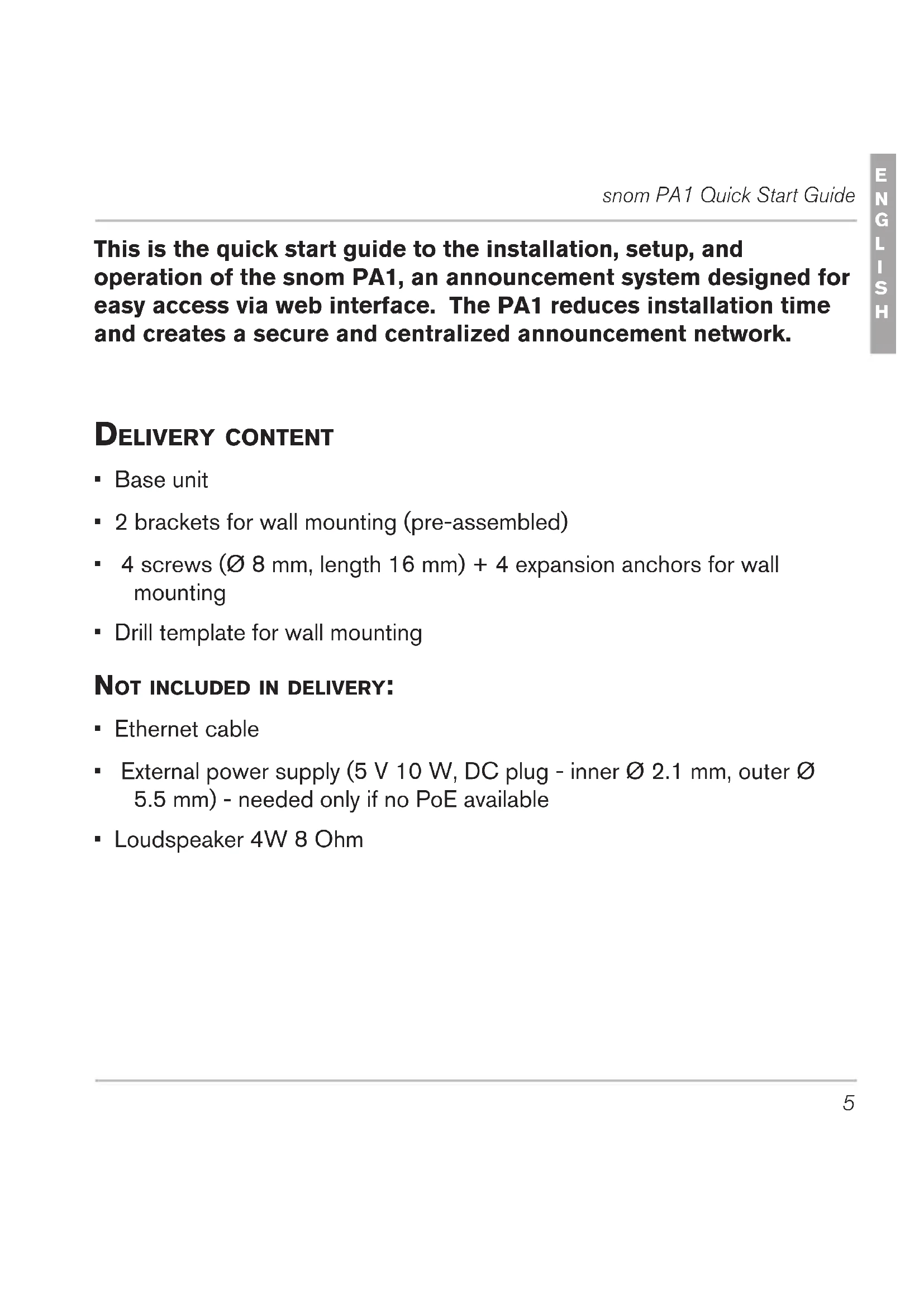


| Product Type | IP Paging System |
| Brand | Snom |
| Model | PA1 |
| Power Supply | PoE IEEE 802.3af (Class 3) or 5 V 10 W power adapter (not included) |
| Network Connectivity | 2 Ethernet 10/100 Mb ports |
| Protocols | SIP and multicast |
| Audio Power | Class D 4 W speaker (not included) |
| Audio Inputs/Outputs | Speaker terminal, 3.5 mm MIC In and Line Out jacks (for headset) |
| Additional Inputs/Outputs | 4 configurable I/O connectors |
| LED Indicators | 2 LEDs: Power (red) and Call (green) |
| Buttons | IP/Reset button (IP announcement and reset) |
| Configuration | Web interface accessible via browser |
| Main Functions | Voice announcements via phone, IP paging, volume and gain adjustment |
| Firmware Update | Automatic or manual via web interface |
| Maintenance | Clean with an antistatic cloth; do not use water or liquid products |
| Safety | Indoor use only; CE and FCC compliant; SELV/TBTS circuits |
| Warranty | Void if unauthorized opening or modification |
| Package Contents | Base unit, 2 mounting brackets, 4 screws and anchors, paper template |
Frequently Asked Questions - PA1 Snom
User questions about PA1 Snom
0 question about this device. Answer the ones you know or ask your own.
Ask a new question about this device
Download the instructions for your Other phone accessories in PDF format for free! Find your manual PA1 - Snom and take your electronic device back in hand. On this page are published all the documents necessary for the use of your device. PA1 by Snom.
USER MANUAL PA1 Snom
natural_image
Black snom® PA1 device with ports and connectors (no visible text or symbols beyond branding)Quick Start Guide
snom® PA1
ENGLISH
DEUTSCH
FRANÇAIS
ITALIANO
ESPAÑOL
© snom technology AG 2009
v.101
snom technology AG
Charlottenstr. 68-71
10117 Berlin
Germany
www.snom.com
ENGLISH 5
DEUTSCH 21
FRANÇAIS 39
ESPAÑOL 57
ITALIANO 75
APPENDIX • ANHANG • ANNEXE • APENDICE • ANEXO
GNU General Public License 92
snom PA1 Quick Start Guide
This is the quick start guide to the installation, setup, and operation of the snom PA1, an announcement system designed for easy access via web interface. The PA1 reduces installation time and creates a secure and centralized announcement network.
DELIVERY CONTENT
- Base unit
- 2 brackets for wall mounting (pre-assembled)
- 4 screws (∅ 8 mm, length 16 mm) + 4 expansion anchors for wall mounting
- Drill template for wall mounting
NOT INCLUDED IN DELIVERY:
- Ethernet cable
- External power supply (5 V 10 W, DC plug - inner ∅ 2.1 mm, outer ∅ 5.5 mm) - needed only if no PoE available
- Loudspeaker 4W 8 Ohm
COPYRIGHT, TRADEMARKS, GPL, LEGAL DISCLAIMERS
© 2009 snom technology Aktiengesellschaft
All Rights Reserved.
snom, the names of snom products, and snom logos are trademarks owned by snom technology AG. All other product names and names of enterprises are the property of their respective owners.
snom technology AG reserves the right to revise and change this document at any time, without being obliged to announce such revisions or changes beforehand or after the fact.
Texts, images, and illustrations and their arrangement in this document are subject to the protection of copyrights and other legal rights worldwide. Their use, reproduction, and transmittal to third parties without express written permission may result in legal proceedings in the criminal courts as well as civil courts.
When this document is made available on snom's web page, snom technology AG gives its permission to download and print copies of its content for the intended purpose of using it as a manual. No parts of this document may be altered, modified or used for commercial purposes without the express written consent of snom technology AG.
Although due care has been taken in the compilation and presentation of the information in this document, the data upon which it is based may have changed in the meantime. snom therefore disclaims all warranties and liability for the accurateness, completeness, and currentness of the information published, except in the case of intention or gross negligence on the part of snom or where liability arises due to binding legal provisions.
Our firmware includes some source code that may be used and modified by anyone and everyone under the GNU Public License (GPL) (see Appendix on page Seite 92), provided they, in turn, make it available to everyone else with the same licensing agreement. Please go to http://www.snom.com/en/support/download/gpl-quellcode/ for the original GPL license and the source code of components licensed under GPL and used in snom products.
IMPORTANT INFORMATION
Please read the instructions on safety and disposal and on how to set up and use the device before using it and also give them to other users to read or inform those users of their contents. Save this manual and do not give the device to third parties without it.
SAFETY INSTRUCTIONS
- Follow the instructions in this manual and other applicable documentation of the device.
- Avoid placing the cables where people may trip over them or where they may be exposed to mechanical pressure as this may damage them.
- This device is for indoor use only! Do not install outdoors - NOT FOR OUTDOOR USE!
- Do not install the device in rooms with high humidity (for example, in bathrooms, laundry rooms, damp basements). Do not immerse the device in water and do not spill or pour liquids of any kind onto or into the device.
- Do not install the device in surroundings at risk for explosions (paint shops, for example). Do not use the device if you smell gas or other potentially explosive fumes.
- Do not use the device during thunderstorms. Lightning striking the power grid may cause electric shocks.
SELV (SAFETY EXTRA LOW VOLTAGE) COMPLIANCE
Safety status of Input/Output connections comply with SELV requirements.
Warning: To avoid electric shock, do not connect safety extra-low voltage (SELV) circuits to telephone-network voltage (TNV)
circuits. LAN ports contain SELV circuits, and PSTN ports contain TNV circuits. Some LAN and PSTN ports both use RJ-45 (8P8C) connectors. Use caution when connecting cables.
STANDARDS CONFORMANCE

This device is CE and FCC-certified and meets European and US health, safety, and environmental standards.
Unauthorized opening, changing, or modifying the device will cause the warranty to lapse and may also result in the lapse of the CE and FCC certifications. In case of malfunction contact authorized service personnel, your seller, or snom.
DISPOSAL OF THE DEVICE

This device is subject to European Directive 2002/96/EC and may not be disposed of with general household garbage.
The separate collection and proper disposal of electrical and electronic devices serve to protect human health and the environment as well as to use and reuse resources prudently and rationally.
If you do not know where you may dispose of the device at the end of its lifespan, contact your municipality, your local waste management provider, or your seller.
CLEANING
To clean the device, use an anti-static cloth. Please avoid cleaning liquids as they might damage the surface or internal electronics of the device.
WALL MOUNTING
Note: The Ethernet cable must not be bent to avoid damage and loss of the network connection. We recommend that you place the PA1 so that the PoE connector is facing toward the LAN port in your network.
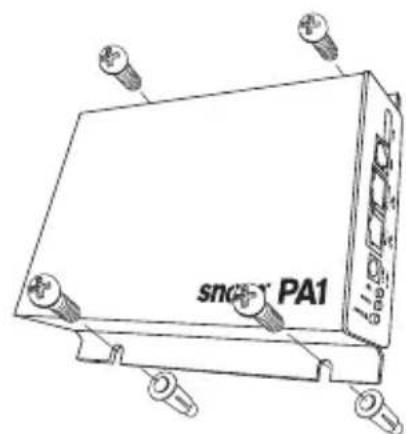
- Use the template to mark the positions of the holes to be drilled in the wall.
- Drill the holes and insert the expansion anchors in the holes.
- Place the PA1 on the wall with the cut-outs above the anchors as shown in Fig. 1.
- Place the screws in the anchors and tighten them evenly.
natural_image
Line drawing of a device labeled 'snc' with pins and 'PA1' on its body (no readable text beyond label)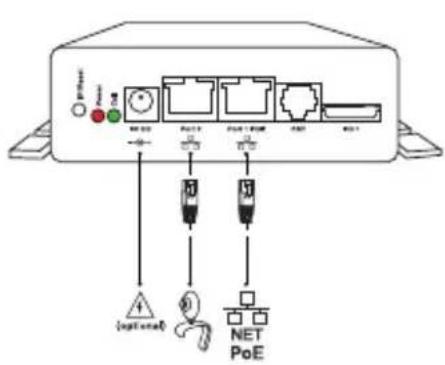
text_image
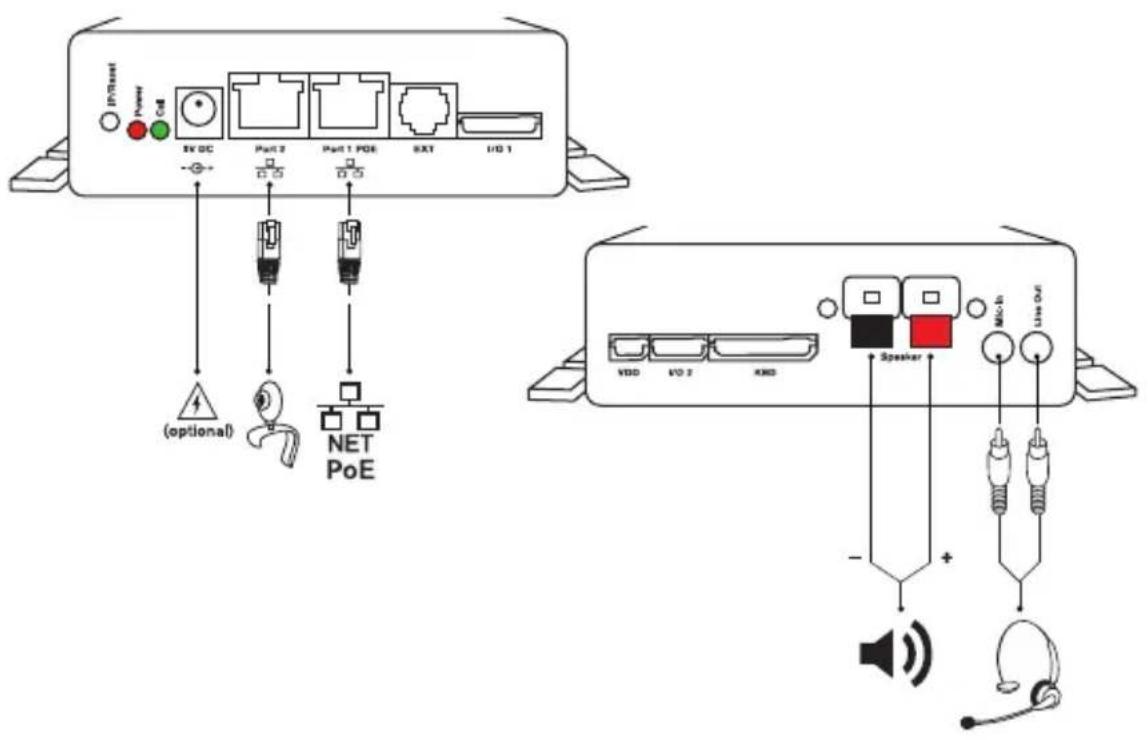
Diagram of an audio device rear panel with labeled ports, audio jack, speaker, and earpieces connected to audio signals- Plug the Ethernet cable into the RJ45 connector labelled "Port 1POE", as shown in Fig. 2. The second RJ45 connector labelled "Port 2" is for daisy-chaining further Ethernet devices without the need for another Ethernet cable.
If no PoE available: Connect a snom-approved 5 V 10 W power adapter to the power connector labelled "5V DC".
- Connect the loudspeaker wires to the speaker terminals labelled "Speaker", as shown in Fig. 3.
a. Connect the "+" wire with the red terminal, connect the "-" wire with the black terminal.
b. If you want to use a headset during the setup:
- Connect the headset's microphone plug to the jack labelled "Mic-In".
- Connect the headset's speaker plug to the jack labelled "Line-Out".
INITIALIZATION AND CONFIGURATION
After the PA1 has been connected to the network via Ethernet cable, the red power LED will light up. The PA1 begins to boot.
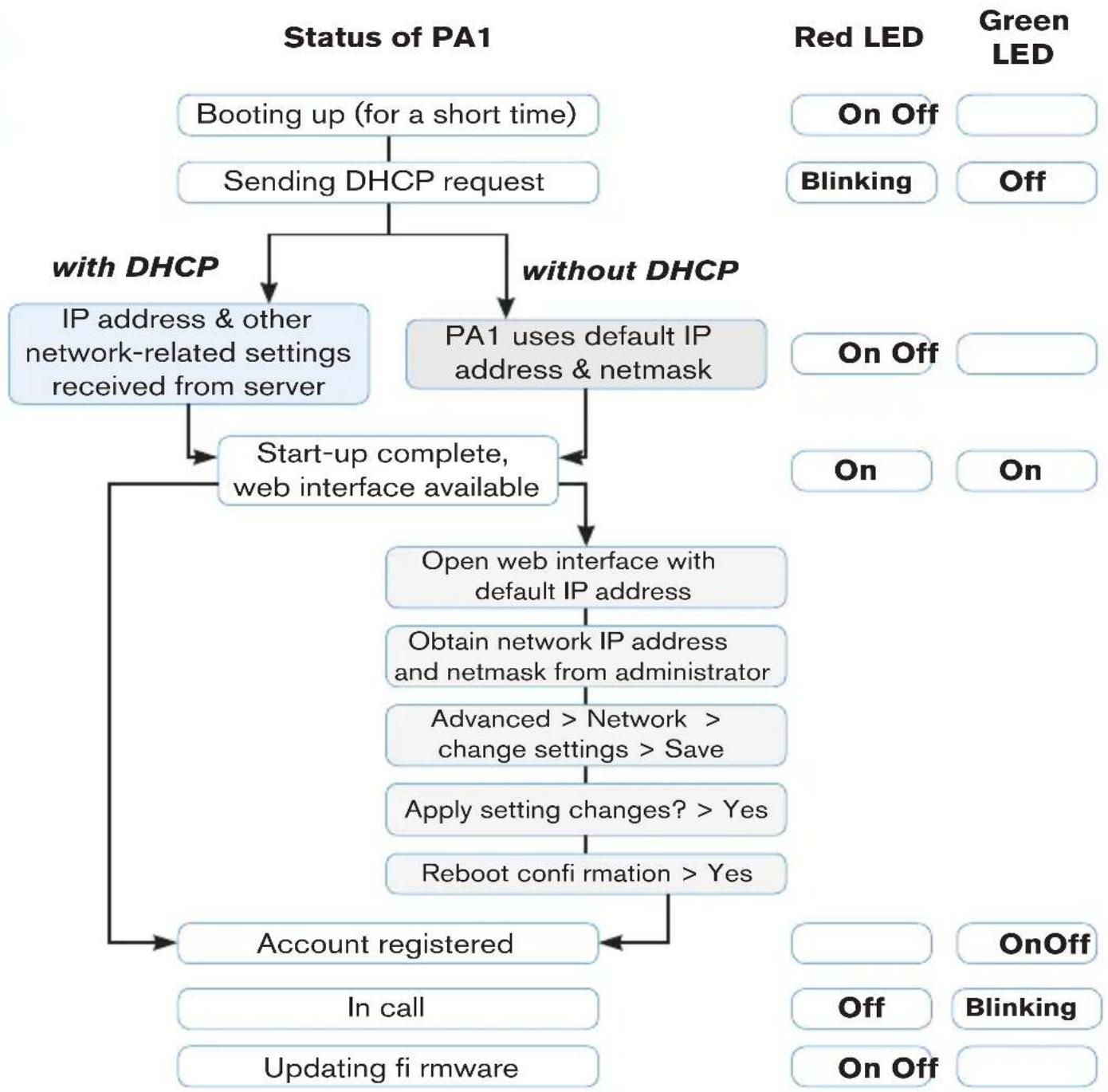
flowchart
graph TD
    A["Booting up (for a short time)"] --> B["Sending DHCP request"]
    B --> C{with DHCP}
    B --> D{without DHCP}
    C --> E["IP address & other network-related settings received from server"]
    D --> F["PA1 uses default IP address & netmask"]
    F --> G["Start-up complete, web interface available"]
    G --> H["Open web interface with default IP address"]
    H --> I["Obtain network IP address and netmask from administrator"]
    I --> J["Advanced > Network > change settings > Save"]
    J --> K["Apply setting changes? > Yes"]
    K --> L["Reboot confirmation > Yes"]
    L --> M["Account registered"]
    M --> N["In call"]
    M --> O["Updating fi rmware"]
CONFIGURATION
With DHCP
The snom PA1 has a built-in DHCP client. When DHCP is available in the network, the PA1 will initialize automatically.
- The red LED begins to blink. The PA1 is sending the DHCP request.
- After the PA1 has received an IP address and other network-related settings (netmask, IP gateway, DNS server, etc.) from the DHCP server, the red LED stops blinking and glows red steadily.
- When the PA1 boot up process is finished and the web interface is available, the green LED lights up.
- Press the "IP/Reset" button for the oral announcement of the IP address (in English) over the loudspeaker or headset.
- Open a web browser on a PC connected to the same network as the PA1.
- Type the IP address into the address bar after http:// and press "Enter" to open the PA1's web interface.
- Continue with "Logging on an account".
Without DHCP
If your network does not support DHCP, the snom PA1 will boot with the default IP address. Please obtain the network IP address and netmask and, if applicable, other network settings from your network administrator.
- The red LED begins to blink. The PA1 is sending the DHCP request.
- If you want to skip the DHCP client setup (it may take several minutes before it is aborted by the PA1), press the "IP/Reset" button while the
red power LED is blinking.
- After the reset (or the aborted DHCP client setup) the PA1 will use the default network settings:
IP address: 192.168.0.2
Netmask: 255.255.0.0
The red LED stops blinking and glows red steadily.
- When the PA1 boot up process is finished and the web interface is available, the green LED lights up.
- Connect your computer to the same network as the PA1, open a browser and type the default IP address in the address bar: http://192.168.0.2. The PA1 web interface will be loaded into the browser.
- Click on "Advanced" in the menu on the left side of the window page.
- At Network > DHCP click on "Off".
- Obtain the network IP address, netmask, and any other network settings that may be necessary from your network administrator.
a. Text field of Network > IP address: Replace default value by network IP address.
b. Text field of Network > Netmask: Replace default value by network netmask.
c. Change other network settings, if necessary.
-
Click on "Save" at the bottom of the page.
-
The question "Apply setting changes?" appears at the top of the page. Click on "Reboot".
-
You will be asked again whether you wish to reboot. Click on "Yes".
-
Device will save new settings and restart. When the start-up with the network settings is complete, the red and the green LED will both be glowing steadily.
- Continue with "Logging on an account".
NOTE: Press the "IP/Reset" button briefly to hear the current IP Address of the snom PA1 (in English) over the connected loudspeaker or in the headset.
LOGGING ON AN ACCOUNT
This is the PA1's phone number you dial from a phone to make an announcement over the PA1's loudspeaker.
AUTOMATICALLY
(recommended) by using the provisioning server. For more details on auto provisioning snom devices see www.snom.com/wiki.
MANUALLY
- In the menu on the left, click on "Identity 1" setup. The page "Configuration Identity 1" opens with the "Login" tab active.
- Enter the data required by your network in the text fields:
a. Account: Name/phone number.
b. Password: Password for your account.
c. Registrar: Registrar address of your PBX software.
- Click on "Save" and "Re-Register".
If the registration has been successful, the green "Call" LED will light up, the red "Power" LED will turn off. Your snom PA1 is ready for operation.
SETTINGS
Normally, it is only necessary to set the timezone and the tone scheme and to adjust the loudspeaker volume and amplifier gain as necessary.
SETTING TIME ZONE
- Web interface > Advanced > Network > Behavior > Time > Timezone.
- Select your country/city from the drop-down list.
- Click on "Save".
SETTING TONE SCHEME
- Web interface > Preferences > General Information > Tone Scheme.
- Select your country from the drop-down list.
- Click on "Save".
ADJUSTING VOLUME AND AMPLIFIER GAIN
- Web interface > Preferences > PA1 controls.
- Text field of "Speaker Volume": Enter a number between 1 (low) and 14 (high). The default setting is 10.
- Text field "Amplifier gain": Enter 0 or 1. The default setting is 1.
- Click on "Save".
USING THE SNOM PA1
Dial the phone number of the PA1 and, when your phone shows that you are connected, speak your announcement into its handset/headset/casing microphone. When you are done, terminate the call.
SOFTWARE UPDATE
AUTOMATICALLY
- Web interface > "Advanced" setup > "Update" tab.
- Select update policy from the list box.
- Enter the settings server's URL in the "Setting URL" text field.
- Change the default settings of "Settings refresh timer", "Subscribe Config", and "PnP Config", if necessary.
- Click on "Reset".
MANUALLY
- Web interface > "Advanced" setup > "Update" tab.
- Select "Never update, do not load settings" from the list box of "Update policy".
- "PnP Config": Select the radio button "off".
- Enter the firmware link in the text field of "Upload Setting file manually"
- Click on "Load".
The PA1 starts to reboot. The red LED will light up, the green LED will go out. The firmware update is done when both LEDs start to blink.
CAUTION: Cutting off the device's power during a firmware update (red LED on, green LED off) will damage the firmware and render the PA1 inoperational.
Do NOT remove the device's power supply (Ethernet cable when using PoE, power supply connection when not using PoE) while a firmware update is ongoing.
STANDARD FEATURE LIST
- IEEE 802.3af PoE compliant, Class 3
- 2 port 10/100Mb Ethernet switch
- SIP or multicast support
- Remote SW update
- Network/web management
- Remotely settable speaker volume adjustment
- Push-on speaker terminals
- Class D 4W power amplifier (loudspeaker not included)
- IP address/reset button
- Call/network activity indicator
- One "MIC in" and one "LINE out" 3.5 mm connector for headset connection (SPK impedance = 150 Ohm, MIC power supply 3.3V, RL = 2 KOhm, S = -42 dB (+-2dB)). Microphone input must be differential and without grounding. This port is for installation and maintenance purposes only, not for the connection of other devices.
- 4 I/O pins remotely settable via web interface (in administrator mode only)
- Robust casing design for wall mounting
NOT INCLUDED:
BSP (board support package) for further software development. If you are interested in this package, please talk to your vendor.
- 12V output power supply
- Keyboard connection
- I2C bus
- Configurable push switch button "IP/Reset"
natural_image
Line drawing of a device labeled 'sncr PA1' with four connectors at the top (no other text or symbols)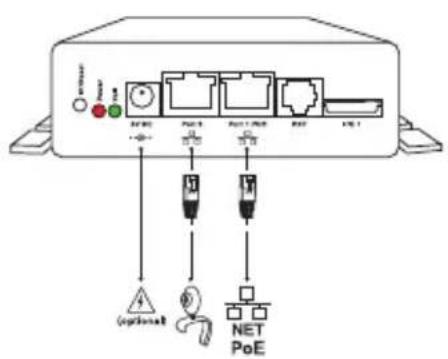
text_image
OFF PART 1 PART 2 PART 3 PART 4 PART 5 (optional) NET PoE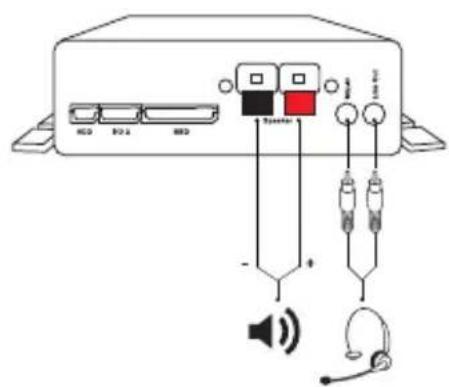
text_image
Diagram of an audio device with labeled ports and audio equipment connections including speaker, headphones, and speaker iconEINEN ACCOUNT ANMELDEN
CONFORMITÉ AU STANDARDS

MISE AU RÉBUT DU PRODUIT

natural_image
Line drawing of a device labeled 'sncr PA1' with four connectors at top (no other text or symbols)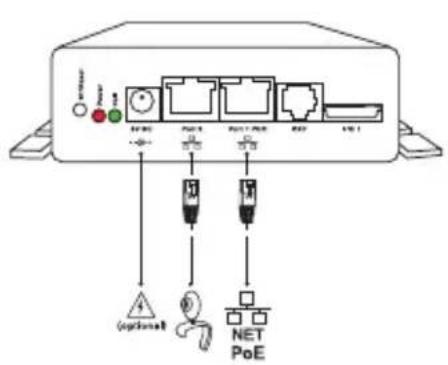
text_image
VCC +/- 1 Port 5 Port 1 Port 8 400 400 (optional) NET PoE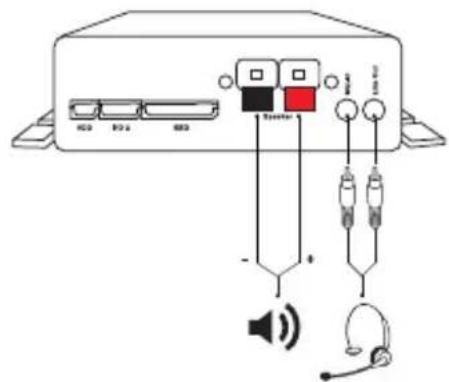
text_image
Diagram of an audio device with labeled ports and audio connections including speaker, headphones, and audio jackDo NOT remove the device's power supply (Ethernet cable when using PoE, power supply connection when not using PoE) while a firmware update is ongoing.
natural_image
Line drawing of a device labeled 'snor PA1' with four connectors at the top (no other text or symbols)text_image
Diagram of an audio device with labeled ports and audio equipment connections including speaker, headphones, and audio jack.CONEXIÓN DEL PA1
- Botón "IP address/Reset"
BSP (board support package) for further software development. If If you are interested in this package, please talk to your vendor.
- 12V output power supply
- Keyboard connection
- I2C bus
- Configurable push switch button
natural_image
Line drawing of a device labeled 'sncr PA1' with four connectors at the top (no other text or symbols)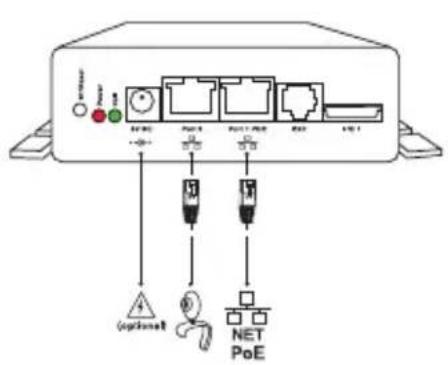
text_image
Switch Power +/-0.1 Port 1 Port 2 Port 3 Port 4 Port 5 Port 6 Port 7 Port 8 Port 9 Port 10 Port 11 Port 12 Port 13 Port 14 Port 15 Port 16 Port 17 Port 18 Port 19 Port 20 Port 21 Port 22 Port 23 Port 24 Port 25 Port 26 Port 27 Port 28 Port 29 Port 30 Port 31 Port 32 Port 33 Port 34 Port 35 Port 36 Port 37 Port 38 Port 39 Port 40 Port 41 Port 42 Port 43 Port 44 Port 45 Port 46 Port 47 Port 48 Port 49 Port 50 Port 51 Port 52 Port 53 Port 54 Port 55 Port 56 Port 57 Port 58 Port 59 Port 60 Port 61 Port 62 Port 63 Port 64 Port 65 Port 66 Port 67 Port 68 Port 69 Port 70 Port 71 Port 72 Port 73 Port 74 Port 75 Port 76 Port 77 Port 78 Port 79 Port 80 Port 81 Port 82 Port 83 Port 84 Port 85 Port 86 Port 87 Port 88 Port 89 Port 90 Port 91 Port 92 Port 93 Port 94 Port 95 Port 96 Port 97 Port 98 Port 99 Port100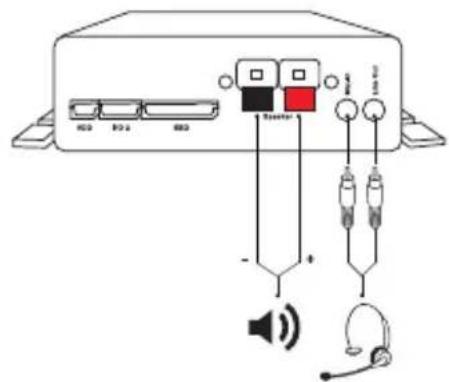
text_image
Diagram of an audio device rear panel with labeled ports, audio jack, speaker, and earphones connected to audio signals.LOGGING ON AN ACCOUNT
This Product contains Software applicable to GNU General Public License, Version 2 which can be used freely.
II.
This program is distributed in the hope that it will be useful, but WITHOUT ANY WARRANTY; without even the implied warranty of MERCHANTABILITY or FITNESS FOR A PARTICULAR PURPOSE. See the GNU General Public License for more details.
Towards the licensor of this Software the following liability is disclaimed:
This program is distributed in the hope that it will be useful, but WITHOUT ANY WARRANTY; without even the implied warranty of MERCHANTABILITY or FITNESS FOR A PARTICULAR PURPOSE. See the GNU General Public License for more details.
III.
The GNU General Public License is as follows:
GNU GENERAL PUBLIC LICENSE
Version 2, June 1991
Copyright (C) 1989, 1991
Free Software Foundation, Inc.
59 Temple Place, Suite 330
Boston, MA 02111-1307, USA
Everyone is permitted to copy and distribute verbatim copies of this license document, but changing it is not allowed.
Preamble
The licenses for most software are designed to take away your freedom to share and change it. By contrast, the GNU General Public License is intended to guarantee your freedom to share and change free software--to make sure the software is free for all its users. This General Public License applies to most of the Free Software Foundation's software and to any other program whose authors commit to using it. (Some other Free Software Foundation software is covered by the GNU Library General Public License instead.) You can apply it to your programs, too.
When we speak of free software, we are referring to freedom, not price. Our General Public Licenses are designed to make sure that you have the freedom to distribute copies of free software (and charge for this service if you wish), that you receive source code or can get it if you want it, that you can change the software or use pieces of it in new free programs; and that you know you can do these things.
To protect your rights, we need to make restrictions that forbid anyone to deny you these rights or to ask you to surrender the rights. These restrictions translate to certain responsibilities for you if you distribute copies of the software, or if you modify it. For example, if you distribute copies of such a program, whether gratis or for a fee, you must give the recipients all the rights that you have. You must make sure that they, too, receive or can get the source code. And you must show them these terms so they know their rights.
We protect your rights with two steps: (1) copyright the software, and (2) offer you this license which gives you legal permission to copy, distribute and/or modify the software.
Also, for each author's protection and ours, we want to make certain that everyone understands that there is no warranty for this free software. If the software is modified by someone else and passed on, we want its recipients to know that what they have is not the original, so that any problems introduced
by others will not reflect on the original authors' reputations.
Finally, any free program is threatened constantly by software patents. We wish to avoid the danger that redistributors of a free program will individually obtain patent licenses, in effect making the program proprietary. To prevent this, we have made it clear that any patent must be licensed for everyone's free use or not licensed at all.
The precise terms and conditions for copying, distribution and modification follow.
GNU GENERAL PUBLIC LICENSE
TERMS AND CONDITIONS FOR COPYING, DISTRIBUTION AND MODIFICATION
- This License applies to any program or other work which contains a notice placed by the copyright holder saying it may be distributed under the terms of this General Public License. The „Program", below, refers to any such program or work, and a „work based on the Program" means either the Program or any derivative work under copyright law: that is to say, a work containing the Program or a portion of it, either verbatim or with modifications and/or translated into another language. (Hereinafter, translation is included without limitation in the term „modification".) Each licensee is addressed as „you".
Activities other than copying, distribution and modification are not covered by this License; they are outside its scope. The act of running the Program is not restricted, and the output from the Program is covered only if its contents constitute a work based on the Program (independent of having been made by running the Program). Whether that is true depends on what the Program does.
- You may copy and distribute verbatim copies of the Program's source code as you receive it, in any medium, provided that you conspicuously and appropriately publish on each copy an appropriate copyright notice and disclaimer of warranty; keep intact all the notices that refer to this License and to the absence of any warranty; and give any other recipients of the Program a copy of this License along with the Program.
You may charge a fee for the physical act of transferring a copy, and you may at your option offer warranty protection in exchange for a fee.
- You may modify your copy or copies of the Program or any portion of it, thus forming a work based on the Program, and copy and distribute such modifications or work under the terms of Section 1 above, provided that you also meet all of these conditions:
a) You must cause the modified files to carry prominent notices stating that you changed the files and the date of any change.
b) You must cause any work that you distribute or publish, that in whole or in part contains or is derived from the Program or any part thereof, to be licensed as a whole at no charge to all third
parties under the terms of this License.
c) If the modified program normally reads commands interactively when run, you must cause if when started running for such interactive use in the most ordinary way, to print or display an announcement including an appropriate copyright notice and a notice that there is no warranty (or else, saying that you provide a warranty) and that users may redistribute the program under these conditions, and telling the user how to view a copy of this License. (Exception: if the Program itself is interactive but does not normally print such an announcement, your work based on the Program is not required to print an announcement.)
These requirements apply to the modified work as a whole. If identifiable sections of that work are not derived from the Program, and can be reasonably considered independent and separate works in themselves, then this License, and its terms, do not apply to those sections when you distribute them as separate works. But when you distribute the same sections as part of a whole which is a work based on the Program, the distribution of the whole must be on the terms of this License, whose permissions for other licensees extend to the entire whole, and thus to each and every part regardless of who wrote it.
Thus, it is not the intent of this section to claim rights or contest your rights to work written entirely by you; rather, the intent is to exercise the right to control the distribution of derivative or collective works based on the Program.
In addition, mere aggregation of another work not based on the Program with the Program (or with a work based on the Program) on a volume of a storage or distribution medium does not bring the other work under the scope of this License.
- You may copy and distribute the Program (or a work based on it, under Section 2) in object code or executable form under the terms of Sections 1 and 2 above provided that you also do one of the following:
a) Accompany it with the complete corresponding machine-readable source code, which must be distributed under the terms of Sections 1 and 2 above on a medium customarily used for software interchange; or,
b) Accompany it with a written offer, valid for at least three years, to give any third party, for a charge no more than your cost of physically performing source distribution, a complete machine-readable copy of the corresponding source code, to be distributed under the terms of Sections 1 and 2 above on a medium customarily used for software interchange; or,
c) Accompany it with the information you received as to the offer to distribute corresponding source code. (This alternative is allowed only for noncommercial distribution and only if you received the program in object code or executable form with such an offer, in accord with Subsection b above.)
The source code for a work means the preferred form of the work for making modifications to it. For an executable work, complete source code means all the source code for all modules it contains, plus any associated interface definition files, plus the scripts used to control compilation and installation of the executable. However, as a special exception, the source code distributed need not include anything that is normally distributed (in either source or binary form) with the major components (compiler, kernel, and so on) of the operating system on which the executable runs, unless that component itself accompanies the executable.
If distribution of executable or object code is made by offering access to copy from a designated place, then offering equivalent access to copy the source code from the same place counts as distribution of the source code, even though third parties are not compelled to copy the source along with the object code.
- You may not copy, modify, sublicense, or distribute the Program except as expressly provided under this License. Any attempt otherwise to copy, modify, sublicense or distribute the Program is void, and will automatically terminate your rights under this License. However, parties who have received copies, or rights, from you under this License will not have their licenses terminated so long as such parties remain in full compliance.
- You are not required to accept this License, since you have not signed it. However, nothing else grants you permission to modify or distribute the Program or its derivative works. These actions are prohibited by law if you do not accept this License. Therefore, by modifying or distributing the Program (or any work based on the Program), you indicate your acceptance of this License to do so, and all its terms and conditions for copying, distributing or modifying the Program or works based on it.
- Each time you redistribute the Program (or any work based on the Program), the recipient automatically receives a license from the original licensor to copy, distribute or modify the Program subject to these terms and conditions. You may not impose any further restrictions on the recipients' exercise of the rights granted herein. You are not responsible for enforcing compliance by third parties to this License.
- If, as a consequence of a court judgment or allegation of patent infringement or for any other reason (not limited to patent issues), conditions are imposed on you (whether by court order, agreement or otherwise) that contradict the conditions of this License, they do not excuse you from the conditions of this License. If you cannot distribute so as to satisfy simultaneously your obligations under this License and any other pertinent obligations, then as a consequence you may not distribute the Program at all. For example, if a patent license would not permit royalty-free redistribution of the Program by all those who receive copies directly or indirectly through you, then the only way you could satisfy both it and this License would be to refrain entirely from distribution of the Program.
If any portion of this section is held invalid or unenforceable under any particular circumstance, the balance of the section is intended to apply and the section as a whole is intended to apply in other circumstances.
It is not the purpose of this section to induce you to infringe any patents or other property right claims or to contest validity of any such claims; this section has the sole purpose of protecting the integrity of the free software distribution system, which is implemented by public license practices. Many people have made generous contributions to the wide range of software distributed through that system in reliance on consistent application of that system; it is up to the author/donor to decide if he or she is willing to distribute software through any other system and a licensee cannot impose that choice.
This section is intended to make thoroughly clear what is believed to be a consequence of the rest of this License.
- If the distribution and/or use of the Program is restricted in certain countries either by patents or by copyrighted interfaces, the original copyright holder who places the Program under this License may add an explicit geographical distribution limitation excluding those countries, so that distribution is permitted only in or among countries not thus excluded. In such case, this License incorporates the limitation as if written in the body of this License.
- The Free Software Foundation may publish revised and/or new versions of the General Public License from time to time. Such new versions will be similar in spirit to the present version, but may differ in detail to address new problems or concerns. Each version is given a distinguishing version number. If the Program specifies a version number of this License which applies to it and „any later version", you have the option of following the terms and conditions either of that version or of any later version published by the Free Software Foundation. If the Program does not specify a version number of this License, you may choose any version ever published by the Free Software Foundation.
- If you wish to incorporate parts of the Program into other free programs whose distribution conditions are different, write to the author to ask for permission. For software which is copyrighted by the Free Software Foundation, write to the Free Software Foundation; we sometimes make exceptions for this. Our decision will be guided by the two goals of preserving the free status of all derivatives of our free software and of promoting the sharing and reuse of software generally.
NO WARRANTY
- BECAUSE THE PROGRAM IS LICENSED FREE OF CHARGE, THERE IS NO WARRANTY FOR THE PROGRAM, TO THE EXTENT PERMITTED BY APPLICABLE LAW. EXCEPT WHEN OTHERWISE STATED IN WRITING THE COPYRIGHT HOLDERS AND/OR OTHER PARTIES PROVIDE THE PROGRAM „AS IS" WITHOUT WARRANTY OF ANY KIND, EITHER
EXPRESSED OR IMPLIED, INCLUDING, BUT NOT LIMITED TO, THE IMPLIED WARRANTIES OF MERCHANTABILITY AND FITNESS FOR A PARTICULAR PURPOSE. THE ENTIRE RISK AS TO THE QUALITY AND PERFORMANCE OF THE PROGRAM IS WITH YOU. SHOULD THE PROGRAM PROVE DEFECTIVE, YOU ASSUME THE COST OF ALL NECESSARY SERVICING, REPAIR OR CORRECTION.
- IN NO EVENT UNLESS REQUIRED BY APPLICABLE LAW OR AGREED TO IN WRITING WILL ANY COPYRIGHT HOLDER, OR ANY OTHER PARTY WHO MAY MODIFY AND/OR REDISTRIBUTE THE PROGRAM AS PERMITTED ABOVE, BE LIABLE TO YOU FOR DAMAGES, INCLUDING ANY GENERAL, SPECIAL, INCIDENTAL OR CONSEQUENTIAL DAMAGES ARISING OUT OF THE USE OR INABILITY TO USE THE PROGRAM (INCLUDING BUT NOT LIMITED TO LOSS OF DATA OR DATA BEING RENDERED INACCURATE OR LOSSES SUSTAINED BY YOU OR THIRD PARTIES OR A FAILURE OF THE PROGRAM TO OPERATE WITH ANY OTHER PROGRAMS), EVEN IF SUCH HOLDER OR OTHER PARTY HAS BEEN ADVISED OF THE POSSIBILITY OF SUCH DAMAGES.
END OF TERMS AND CONDITIONS
How to Apply These Terms to Your New Programs
If you develop a new program, and you want it to be of the greatest possible use to the public, the best way to achieve this is to make it free software which everyone can redistribute and change under these terms.
To do so, attach the following notices to the program. It is safest to attach them to the start of each source file to most effectively convey the exclusion of warranty; and each file should have at least the "copyright" line and a pointer to where the full notice is found.
Copyright (C)
This program is free software; you can redistribute it and/or modify it under the terms of the GNU General Public License as published by the Free Software Foundation; either version 2 of the License, or (at your option) any later version.
This program is distributed in the hope that it will be useful, but WITHOUT ANY WARRANTY; without even the implied warranty of MERCHANTABILITY or FITNESS FOR A PARTICULAR PURPOSE. See the GNU General Public License for more details.
You should have received a copy of the GNU General Public License along with this program; if not, write to the Free Software Foundation, Inc., 59 Temple Place, Suite 330, Boston, MA 02111-1307 USA
IV.
If requested by you, the complete corresponding source code of the Software can be sent by snom technology AG on a standard data storage medium against the reimbursement of the manufacturing costs of EUR 5.- per unit.
The complete corresponding source code of the Software can also be downloaded from our web site http://www.snom.com/gpl_.html?&L=0.
v.
For further information see http://www.snom.com.
snom en FRANCE
snom France SARL
47 R Marcel Dassault
92100 Boulogne Billancourt
Tel. +33 1 80 87 62 87
Fax +33 1 80 87 62 88
info@snom.com; sales@snom.com
snom in ITALIA
snom technology SRL
Via A. Lusardi 10
20122 Milano
Tel +39 02 00611212
Fax +39 02 93661864
info@snom.com; sales@snom.com
snom in the US
snom technology, Inc.
100 Cummings Center, Suite 125-G
Beverly, MA 01915
Tel. 978-998-7882
Fax 978-998-7883
infoUSA@snom.com
Ihr Fachhändler: Your specialist retailer: Votre distributeur: Su distribuidor: Il tuo rivenditore:

natural_image
Plain beige rounded rectangle with no text, symbols, or markingssnom technology AG Charlottenstr. 68-71 10117 Berlin Germany
snom.com
© 2009 snom technology AG
FC CE