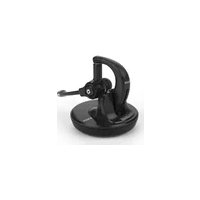
A150 - Headphones Snom - Free user manual and instructions
Find the device manual for free A150 Snom in PDF.


| Product type | DECT wireless headset |
| Brand | Snom |
| Model | A150 |
| Frequency band | 1881.792 - 1897.344 MHz (EMEA) |
| Base station power supply | 6 V DC / 450 mA |
| Battery type | Li-Ion 3.8 V / 185 mAh / 0.7 Wh (integrated, non-removable) |
| Operating temperature | 0 °C to +40 °C |
| Operating humidity | 95% non-condensing |
| Compliance | CE, IEC 60950, SELV/TBTS |
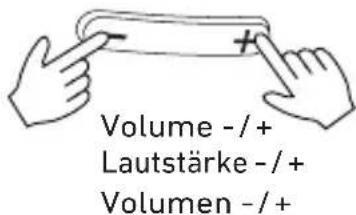
| Main features | Call/button with LED, volume +/-, microphone mute, ear hook, in-ear earpiece |
| Charging | Via magnetic contacts on the base station |
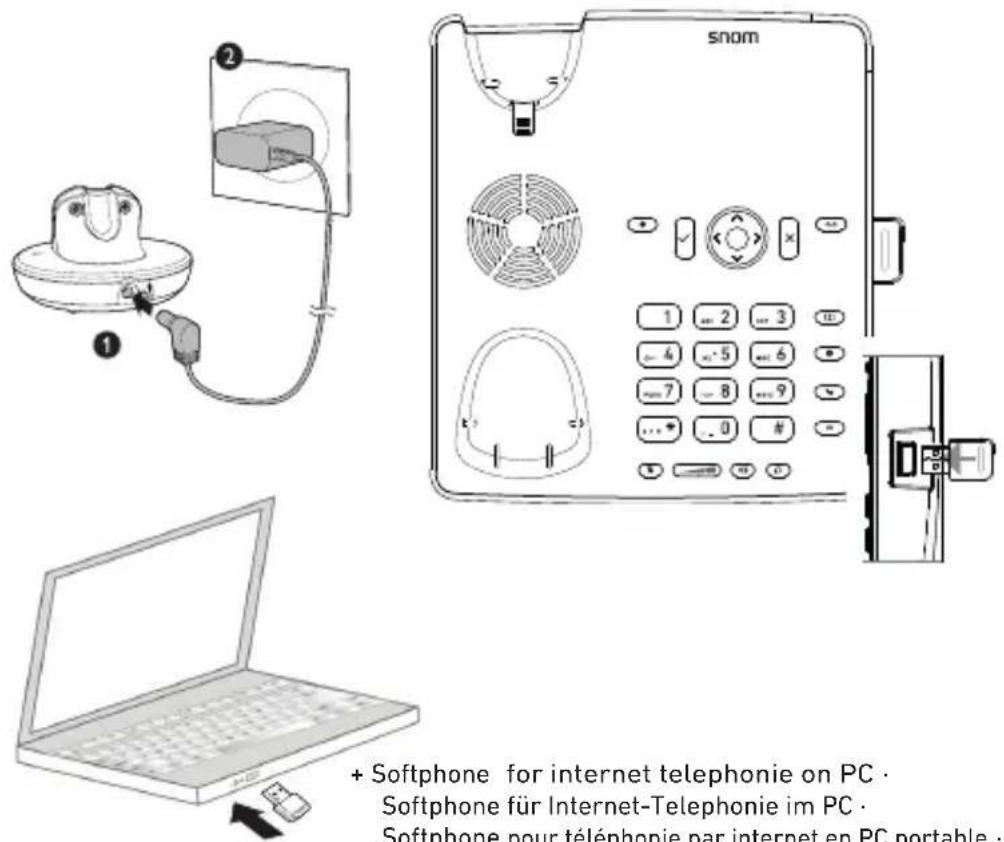
| Software compatibility | Softphone for internet telephony on PC |
| Maintenance / Cleaning | Use an antistatic cloth; do not use water or any liquid or solid products |
| Recycling and disposal | Do not dispose of with household waste; follow directive 2012/19/EU and 2013/56/EC |
Frequently Asked Questions - A150 Snom
User questions about A150 Snom
0 question about this device. Answer the ones you know or ask your own.
Ask a new question about this device
Download the instructions for your Headphones in PDF format for free! Find your manual A150 - Snom and take your electronic device back in hand. On this page are published all the documents necessary for the use of your device. A150 by Snom.
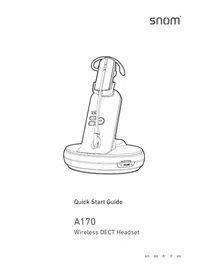
USER MANUAL A150 Snom
natural_image
Line drawing of a mechanical device with a base and a separate USB flash unit (no text or symbols)Quick Start Guide
A150
Wireless DECT Headset
with USB Dongle
Important information ENGLISH .... 7
text_image
Quick Installation Guide A150 XL L M S - snomB Connecting · Anschließen · Connecter · Conectar · Collegare
natural_image
Medical illustration showing a surgical instrument interacting with a patient's knee, with an inset magnified view of the knee joint (no text or labels present)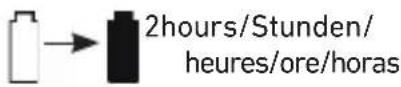
Minimum/minimo/mínimo:
30minutes/Minuten/
minuti/minutos
- Accept, terminate call: Press call button 1x. Make call: Press call button 1x, dial number on phone's keypad, press call button again.
natural_image
Line drawing of a hand operating a mechanical device and a circular button with finger (no text or symbols)- Accepter, terminer un appel: Appuyez sur la touche 1x. Passer un appel: Appuyez 1x, composez le numéro sur le clavier du téléphone, appuyez sur la touche 1x.
- Accettare, terminate una chiamata: Premere il tasto 1x. Effettuare una chiamata: Premere il tasto 1 x, comporre il numero sulla tastiera del telefono, premere il tasto 1x.
- Aceptar, terminar una llamada: Pulse la tecla 1x. Hacer una llamada: Pulse la tecla 1x, marca el número en el teclado del teléfono, pulsa la tecla 1x.
Mute/unmute mic · Mik. stumm-/einschalten · Désactiver/activer le mic · Disattivare/attivare il mic · Desactivar/activar el mic

text_image
Volume -/+ Lautstärke -/+ Volumen -/+Headset LED indications
| Color Pattern Status description | ||
| Red Steady light The headset is charging in the base station's charging cradle. | ||
| Orange Steady light Headset is charging, >50% full | ||
| Green Steady light Headset is on charger, battery is fully charged. | ||
Headset alert tones
| Signal Description | |
| One short beep every 30 sec. The microphone is muted. | |
| Two beeps | Error alertThe speaking volume has reached its highest or lowest setting.Any key is pressed while the headset is out of range. |
| Two low beeps Call waiting | |
| Two rapid beeps every 20 sec. Low battery warning | |
| Three rapid beeps every 20 sec. The headset is out of range. | |
| Three rapid beeps | The headset is powering on or off. |
Headset voice prompts (in English)
| Prompt Voice prompt is heard |
| Mute on when the microphone is muted. |
| Mute off when the microphone is reactivated (unmuted). |
| Not registered when the call button is pressed on a headset not registered on a base station. |
| Out of range • in call: When headset moves out of range.• when a key is pressed while headset is out range. |
| Low battery when the call button is pressed while the battery is low. |
USB Dongle LED status indications
| Description of state Pattern Green Red | |||
| Standby mode, no wire-less device subscribed | Steady - ON |  | |
| In registration mode(duration 10 seconds) | Rapid doubleflashes | - ON |  |
| Standby, wireless devicesubscribed | OFF -- | ||
| Ready to enterderegistration mode | Rapid flashing ON |  | |
| After deregistration mode has been confirmed: | |||
| 1. Duration: 3 seconds Steady | ON | ||
| 2. Duration: 1 second | OFF -- | ||
| 3. Back in standby,no wireless devicesubscribed | Steady - ON |  | |
Pairing
NOTE: The out-of-the-box headset and USB dongle are paired and ready to use when battery is charged – just plug in dongle.
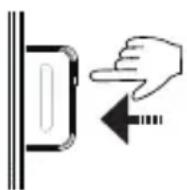
Press the key on the dongle for 4 seconds, then place the headset in its charger. The dongle's red LED double-flashes rapidly and turns off when the registration has been successful, while the headset's LED shows steady light (green if fully charged, red if charging).
Deregistering
- Press the key on the dongle for 10 seconds to enter deregistration mode. After 4 seconds the red LED starts to double-flash; after 10 seconds the LED starts to flash red rapidly, indicating that the dongle has entered deregistration mode.
- Release the key and press it again for 1 second to confirm deregistration. The LED turns green for three seconds, turns off for one second and then shows steady red light.
Important Information
Safety precautions
Please read these precautions and the instructions on setting up and using the product thoroughly before using the device. Save this info sheet and do not give the device to third parties without it.
Privacy. Telephone calls are transmitted between the base station and the headset by radio waves, so there is a possibility that your wireless headset conversations could be intercepted by radio receiving equipment within range of the headset. For this reason, you should not think of wireless headset conversations as being as private as those on corded telephones.
Charger, power adapter, and headset with non-removable battery
CAUTIONS:
Use only the power converter (AC/DC adapter) delivered with the device. Other power power supplies may damage or even destroy it.
• EU: Ten Pao International Ltd., model no. S004LV0600045, or VTech Telecommunications Ltd., model no. VT04EEU06045
- UK: Ten Pao International Ltd., model no. S004LB0600045, or VTech Telecommunications Ltd., model no. VT04EUK06045
- The headset contains a non-removable, rechargeable Li-Ion battery, 3.8V 185mAh 0.7Wh, supplier GP Batteries, Ltd. Do not open the headset and attempt to replace the battery!
Placement of charger and cord, operation of USB stick and headset
- Warning: Install power adapter near the equipment and easily accessible.
- Avoid placing the device's cord where people may trip over them. Avoid placing the cord where it may be exposed to mechanical pressure as this may damage it. If the power supply cord or the plug is damaged, disconnect the device and contact qualified service personnel.
- The device is for indoor installation only. Not for outdoor installation!
- The operational temperature is between 0 °C to +40 °C (32 °F to +104 °F), humidity not exceeding 95% and non-condensing.
- Do not install product in rooms with high humidity (for example, in bathrooms, laundry rooms, damp basements). Do not immerse product in water and do not spill or pour liquids of any kind onto or into any parts of it. If the product comes in contact with any liquids, unplug any line or power cord immediately. Do not plug the product back in until it has dried thoroughly.
- Do not install product in surroundings at risk for explosions and do not use the handset in such surroundings (paint shops, for example). Do not use the headset if you smell gas or other potentially explosive fumes!
- Medical devices might be adversely affected. Please consider the technical ramifications when installing the devices in a doctor's office, for example.
- Warning: The headset contains a magnet and may attract small dangerous objects such as needles or pins. Please ensure before each use that no such objects are present.
- Potential TV interference. Some wireless headsets operate at frequencies that may cause interference to TVs and VCRs. To minimize or prevent such interference, do not place the base station of the wireless headset near or on top of a TV or VCR. If interference is experienced, moving the wireless headset farther away from the TV or VCR will often reduce or eliminate the interference.
If you have an implanted pacemaker
- Do not use if you have an implanted pacemaker unless the pacemaker manufacturer's directions expressly permit the use of devices emitting pulsating radio frequency signals. Always follow the manufacturer's directions!
- Recommended MINIMUM distance to the headset: 20 cm (7").
- Do not carry the headset in a breast pocket.
- Wear the headset on the ear opposite the medical device to minimize the potential for interference.
- Turn the headset off immediately if there is any reason to suspect that interference is taking place.
If you are wearing a hearing aid
Please note that the headset may cause an annoying background noise.
Additional safety information
Earbuds
DO NOT insert the earbuds into your ear canal.
Children, small children
- This headset is not intended for children under the age of 14, and can be dangerous and harmful to babies and younger children.
- Keep this headset, its parts and its package away from babies and children. The small parts of this headset can be lodged in a child's ears or nose or, if swallowed, in the child's windpipe, causing suffocation.
Operating environment
Remember to follow any special regulations in force in any area, and always switch off your device when its use is prohibited or when it may cause interference or danger. Use the device only in its normal operating positions. Do not place credit cards or other magnetic storage media near the device, because information stored on them may be erased.
Medical devices
Operation of any equipment emitting radio frequency signals may interfere with the functionality of inadequately shielded medical devices.
Consult a physician or the manufacturer of the medical device to determine if they are adequately shielded from external radio frequency (RF) energy or if you have any other questions concerning this topic. Switch off your device in health care facilities when signs posted in these areas instruct you to do so. Hospitals or health care facilities may be using equipment that could be sensitive to external RF energy.
Implanted medical devices
Manufacturers of medical devices recommend that a minimum distance should be maintained between a wireless device and an implanted medical device, such as pacemakers or cardioverter defibrillators, to avoid potential interference with the medical device. Persons who have such devices should:
• Always keep the wireless device more than 20 centimeters (7.8 inches) from the medical device when the wireless device is turned on.
- Not carry the wireless device in a breast pocket.
- Hold the wireless device to the ear opposite the medical device to minimize the potential for inter-ference.
- Turn the wireless device off immediately if there is any reason to suspect that interference is taking place.
- Read and follow the directions of the medical device's manufacturer.
If you have any questions about using your wireless device with an implanted medical device, consult your health care provider.
SELV (Safety Extra Low Voltage) Compliance
Safety status of Input/Output connections comply with SELV requirements.
Potentially explosive environments
Switch off your device when in any area with a potentially explosive atmosphere and obey all signs and instructions. Sparks in such areas could cause an explosion or fire resulting in bodily injury or even death. Switch off the device at refuelling points such as near gas pumps at service stations. Observe restrictions on the use of radio equipment in fuel depots, storage, and distribution areas; chemical plants; or where blasting operations are in progress. Areas with a potentially explosive atmosphere are often but not always clearly marked. They include below deck on boats, chemical transfer or storage facilities, vehicles using liquefied petroleum gas, and areas where the air contains chemicals or particles such as grain dust or metal powders.
Sensitive Electronic Equipment
The current state of research concludes that operational DECT devices normally do not adversely affect electronic equipment. Nevertheless, you should take some precautions if you want to operate DECT devices in the immediate vicinity of such equipment like sensitive laboratory equipment. Always keep a minimum distance of 10 cm (3.94") to the equipment even when the phone is in standby.
Electrical Surges
We recommend the installment of an AC surge arrester in the AC outlet to which this device is connected to avoid damage to the equipment caused by local strikes of lightening or other electrical surges.
Important Battery Information
This product uses a non-removable, rechargeable Li-Ion battery. Do not open and/or disassemble the headset. In case of malfunction, contact your vendor.
Charging and Discharging, Storage
- The full performance of a new battery is achieved only after two or three complete charge and discharge cycles.
- The battery can be charged and discharged hundreds of times, but it will eventually wear out. Use only replacement headsets obtained from Snom Technology GmbH.
- If left unused, a fully charged battery will lose its charge over time.
- Charge the battery only by placing the headset on the charger provided with the product.
- Use the battery only for its intended purpose. Do not short-circuit the battery. Short-circuiting the terminals may damage the battery or the connecting object. Do not use a damaged charger or battery. Using a damaged battery may cause it to explode.
- Do not place or store the headset in the immediate vicinity of open fire or other heat sources.
- Leaving the battery in hot or cold places will reduce its capacity and lifetime. Charge batteries within an ambient temperature range of 0 °C to +40 °C (+32 °F to +104 °F). A device with a hot or cold battery may not work temporarily, even when the battery is fully charged.
- Store headset in a cool, dry place without corrosive gases.
Battery Disposal
Defective or exhausted batteries should never be disposed of as municipal waste. Return old batteries to the battery supplier, a licensed battery dealer or a designated collection facility. Do not incinerate batteries.
Cleaning
Use an anti-static cloth. Please avoid water and liquid or solid cleaning products as they might damage the surface or internal electronics of the base, charger, and handset.
Disposal
Charger, headset, power adapter
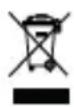
This product is subject to European Directive 2012/19/EU and may not be disposed of with general household garbage. If you do not know where you may dispose of the device at the end of its lifespan, contact your municipality, your local waste management provider, or your seller.
Headset battery

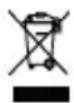
The battery built into this product is subject to European Directive 2013/56/EC and may not be disposed of with general household garbage.
If you do not know where you may dispose of the battery at the end of its lifespan, contact your municipality, your local waste management provider, or your seller.
For countries outside the European Union:
Disposal of electrical and electronic products in countries outside the European Union should be done in line with local regulations. Please contact local authorities for further information.
Standards Conformance

This device complies with the essential health, safety, and environmental requirements of all relevant European directives. Unauthorized opening, changing, or modifying the device will cause the warranty to lapse and may also result in the loss of CE conformity. In case of malfunction contact authorized service personnel, your seller, or Snom.
Technical specifications
Security: IEC 60950
RF frequency band: 1881.792-1897.344 MHz (EMEA)
Operational temperature range: 0 °C - 40 °C (+32 °F to +104 °F)
Hea dset charger voltage (AC adapter output):
6VDC @450mA
Batt ery (built into headset, non-removable):
Li-Ion, 3.8V 185mAh 0.7Wh
Power adapter:
• EU: Ten Pao International Ltd., model no.S004LV0600045, or VTech Telecommunications Ltd., model no. VT04EEU06045
- UK: Ten Pao International Ltd., model no.S004LB0600045, or VTech Telecommunications Ltd., model no. VT04EUK06045
All product specifications are subject to change without notification.
Snom disclaims all warranties and liability for the accurateness, completeness, and currentness of the information published, except in the case of intention or gross negligence on the part of Snom or where liability arises due to binding legal provisions. For more information, see www.snom.com.
Oreillette, station de base, adaptateur
78870 Bailly, France
office.fr@snom.com
Snom, Inc.
2603 Camino Ramon, Suite 420
San Ramon, CA 94583, USA
office.us@snom.com
Snom Technology GmbH
Via Milano 1
20020 Lainate, Italia
office.it@snom.com
Snom Technology GmbH
The Courtyard
High Street
Ascot, Berkshire SL5 7HP, UK
office.uk@snom.com
Snom Technology Ltd.
Rm. 828, 5F, No.285, Sec. 4
Zhongxiao E. Rd., Da'an Dist.
Taipei City 10692, Taiwan
office.tw@snom.com