M430 - Phone Snom - Free user manual and instructions
Find the device manual for free M430 Snom in PDF.



| Brand | Snom |
| Model | M430 (Bundle M400 + M30) |
| Product type | Professional cordless DECT phone |
| Category | Phone |
| Bundle contents | M400 base station, power supply, Ethernet cable, M30 handset, charger with non-detachable power supply, two rechargeable Li-Ion batteries |
| Base power supply | Power over Ethernet (PoE) IEEE 802.3 class 2, or AC adapter (sold separately) |
| Compatible AC adapter | Mass Power NBS12E050200UV or Rongweixin R122-0502000ID (Snom ref. 00004570/00004571) |
| Charger power supply | 5 V DC, 1000 mA, USB type A connector (included) |
| Battery type | Lithium-Ion rechargeable, 1100 mAh, 3.7 V, 4.1 Wh |
| Talk time | Up to 22 hours |
| Standby time | Up to 350 hours |
| Charging time | Up to 6 hours |
| Frequency bands | 1880-1900 MHz (EMEA), 1920-1930 MHz (US) |
| Wireless standard | DECT |
| Output power | < 250 mW (EU), < 140 mW (US) |
| Base connectors | Ethernet RJ45 (8P8C), coaxial power connector |
| Operating temperature | -10 °C to +50 °C (base and handset) |
| Charging temperature | +5 °C to +45 °C |
| Cleaning | Antistatic cloth, no water or liquid products |
| Disposal | WEEE Directive 2012/19/EU, do not dispose of with household waste |
| Compliance | CE, IC, Directive 2014/53/EU, IEC 62368-1 |
| Safety distance (implants) | Minimum 20 cm |
Frequently Asked Questions - M430 Snom
User questions about M430 Snom
0 question about this device. Answer the ones you know or ask your own.
Ask a new question about this device
Download the instructions for your Phone in PDF format for free! Find your manual M430 - Snom and take your electronic device back in hand. On this page are published all the documents necessary for the use of your device. M430 by Snom.
USER MANUAL M430 Snom
text_image
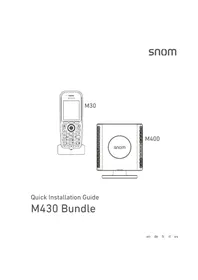
snom M30 1 2 3 5 6 7 8 9 0 M400 snomQuick Installation Guide
M430 Bundle
Table of Contents - Inhaltsverzeichnis - Table des matières - Indice - Índice
ENGLISH 6
Additional Important Information for USA/Canada 9
DEUTSCH 13
FRANÇAIS 17
ITALIANO 21
ESPAÑOL 24
Snom addresses/Anschriften/adresses/indirizzi/direcciones ..... 28
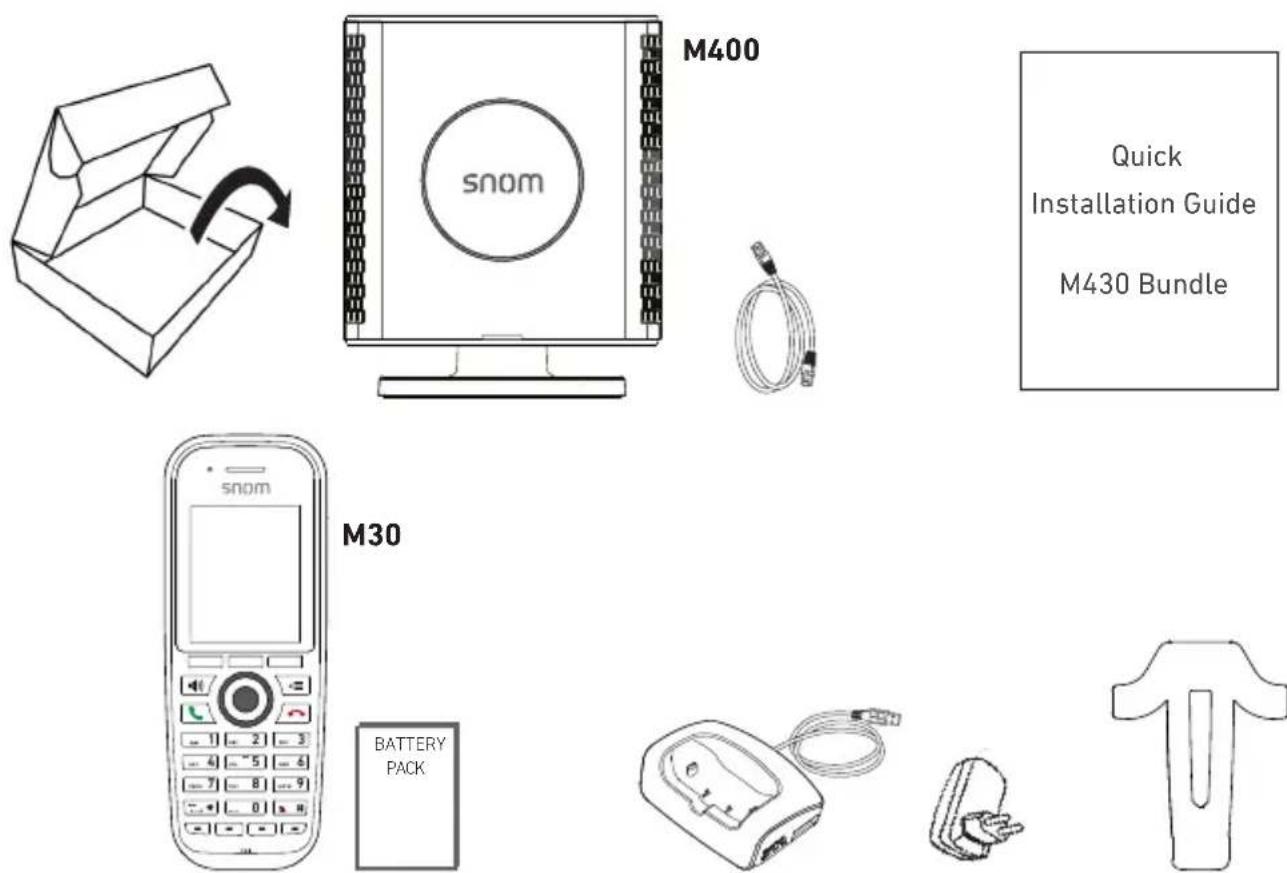
Delivery content • Lieferumfang • Contenu de la boîte • Contenuto della confezione • En la caja
text_image
M400 snom Quick Installation Guide M430 Bundle M30 BATTERY PACKConnecting • Anschließen • Connecter • Collegare • Conectar
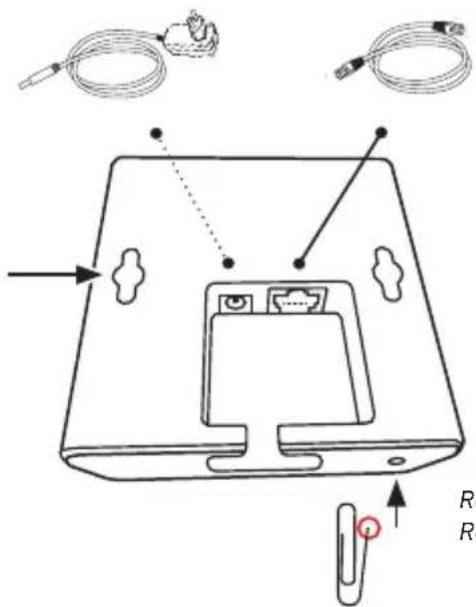
5V DC if PoE not available (power adapter not included)
text_image
Diagram of a device rear panel with labeled components and wiring connectionsEthernet / PoE
• Holes for wall mounting
- Löcher zur Wandaufhängung
- Trous pour montage mural
- Fori per il montaggio a parete
- Agujeros para montaje en pared
Reset key - Neustart Redémarrage - Ripristino - Reiniciar
Charging the battery • Akku laden • Charger la pile • Caricare la batteria • Carga la battería
1
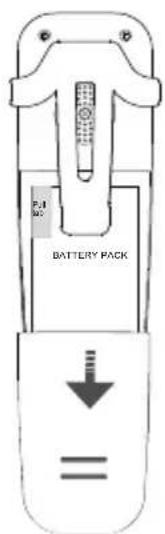
text_image
P.1 NO. BATTERY PACK2
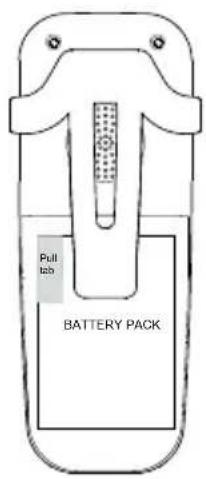
text_image
Pull tab BATTERY PACK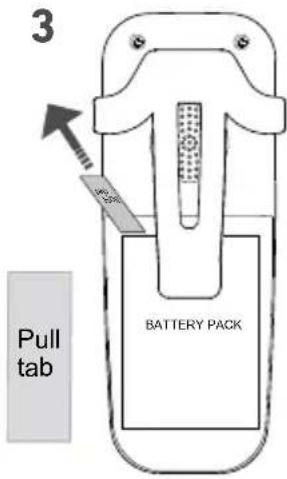
text_image
3 Pull tab BATTERY PACK4
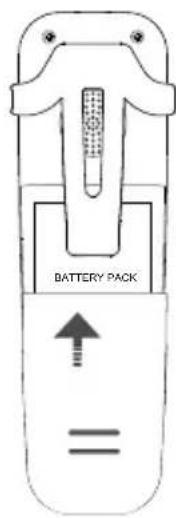
text_image
BATTERY PACK5
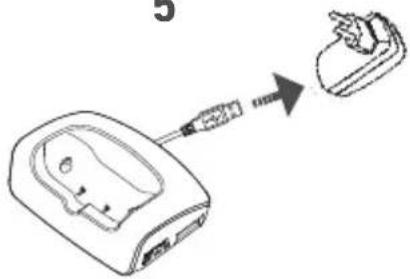
text_image
Diagram showing a device with a screwdriver inserted into a terminal, resulting in a close-up of the terminal's internal structure.6
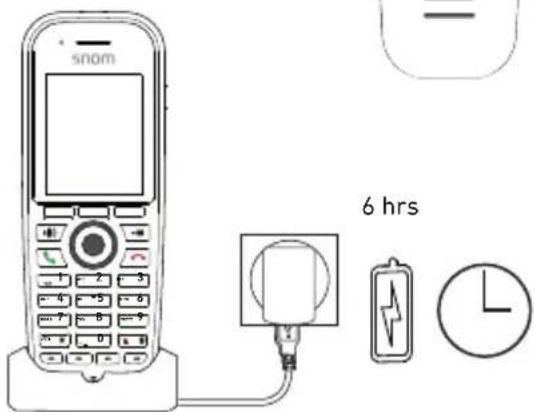
text_image
snom 6 hrs

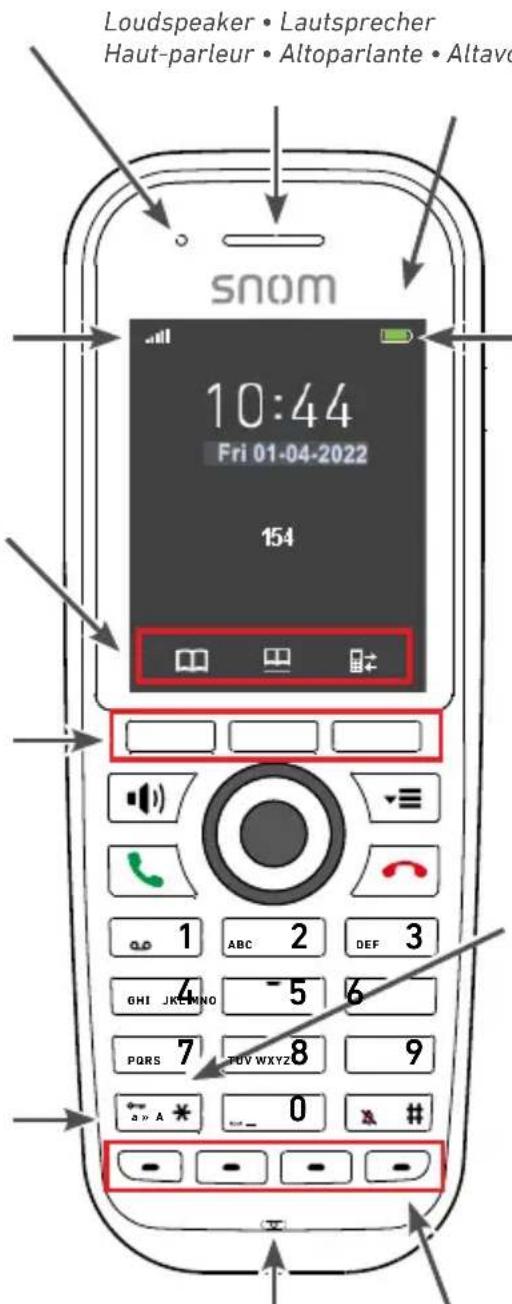
Handset features • Merkmale • Caractéristiques • Caratteristiche • Características
• LED indicator (MWI, missed call, low battery)
• LED-Signal (wartende Nachricht, verpasster Anruf, niedriger Akkustand)
- Diode d'indication (nouvel message, appel manqué, faible niveau de charge des accus)
• LED (nuovi messagi, chiamate perse, basso livello de carico delle batterie)
- LED indicador (mensaje nuovo, llamadas perdidas, bajo estado de carga de las baterías)
- Signal strength • Signalstärke • Force du signal
- Potenza segnale • Potencia de señal
• Function key line, context-sensitive
- Funktionstastenzeile, kontextsensitiv
• Ligne des touches contextuelles
• Riga tasto funzione
- Línea de teclas de función
• 3 context-sensitive function keys
• 3 kontextsensitive Funktionstasten
• 3 touches contextuelles
• 3 tasti funzioni sensibili al contesto
- 3 teclas de funzión dependiendo del contexto

- On idle screen • Am Ruhebildschirm • À l'écran d'attente • Schermo inattiva • Pantalla inactiva:
@ / 🔊/unlock keypad
- When entering • Bei Eingabe von • Lors de la saisie de • Quando si immette • Cuando entras
- numbers / Nummern / chiffres / numeri / números: * - text / Text / texte / testo / texto: abc -> Abc -> ABC -> 123 -> abc
text_image
Loudspeaker • Lautsprecher Haut-parleur • Altoparlante • Altavo snom 10:44 Fri 01-04-2022 154 1 ABC 2 DEF 3 GHI JKEMINO -5 6 PQRS 7 FUVWXYZ 8 9 a» A * 0 x # - - - - - -Microphone Mikrophon Microfono Micrófono
- Battery charging status
• Batterie-Ladezustand - État de charge de la batterie
• Livello della batteria - Estado de carga de bateria
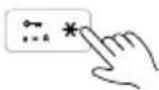
• Keypad unlock: press for 3 seconds
• Tastatur entsperren: 3 Sekunden lang drücken
• Déverrouillage du clavier: appuyez pendant 3 secondes
• Sbloccare la tastiera: premere per 3 secondi
- Desbloquear el teclaso: presione durante 3 segundos
• 4 programmable keys
• 4 programmierbare Tasten
• 4 touches programmables
• 4 tasti programmabili
• 4 teclas programables
- OK key (confirm setting) • Bestätigen-Taste (Einstellungen)
- Confirmer/sauvegarder
- Confermare/salvare
-
Confirmar/guardar
-
Speakerphone (on/off)
• Freisprechen (an/aus) - Mode mains libres
• Vivavoce (on/off) -
Funzión manos libres
-
Accept calls
- Anrufe annehmen
- Acceptor des appels
• Acettare le chiamate - Aceptar los llamadas
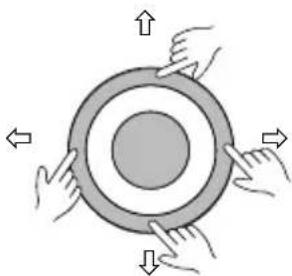
natural_image
Diagram of four hands holding a circular object with arrows indicating rotation or movement (no text or symbols)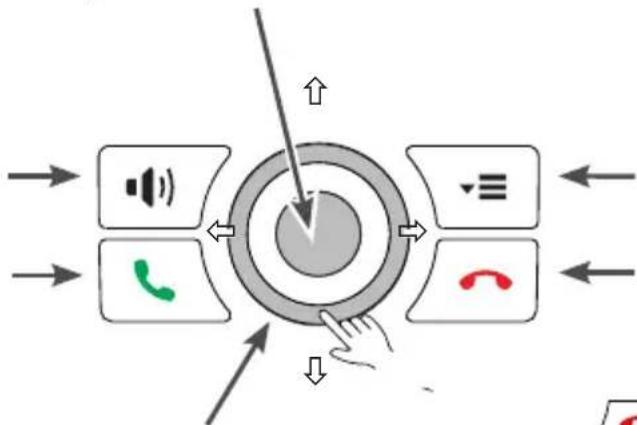
flowchart
graph TD
    A["Central Node"] --> B["Speaker Icon"]
    A --> C["Phone Icon"]
    A --> D["Email Icon"]
    A --> E["Arrow to Center"]
    style A fill:#f9f,stroke:#333
    style B fill:#ccf,stroke:#333
    style C fill:#cfc,stroke:#333
    style D fill:#fcc,stroke:#333
    style E fill:#cff,stroke:#333
- Navigation keys
- Navigationstasten
- Touches de navigation
- Tasti di navigazione
-
Teclas de navigación
-
Settings menu
- Menü Einstellungen
- Menu Paramètres
- Menu Impostazioni
- Menú Ajustes
text_image
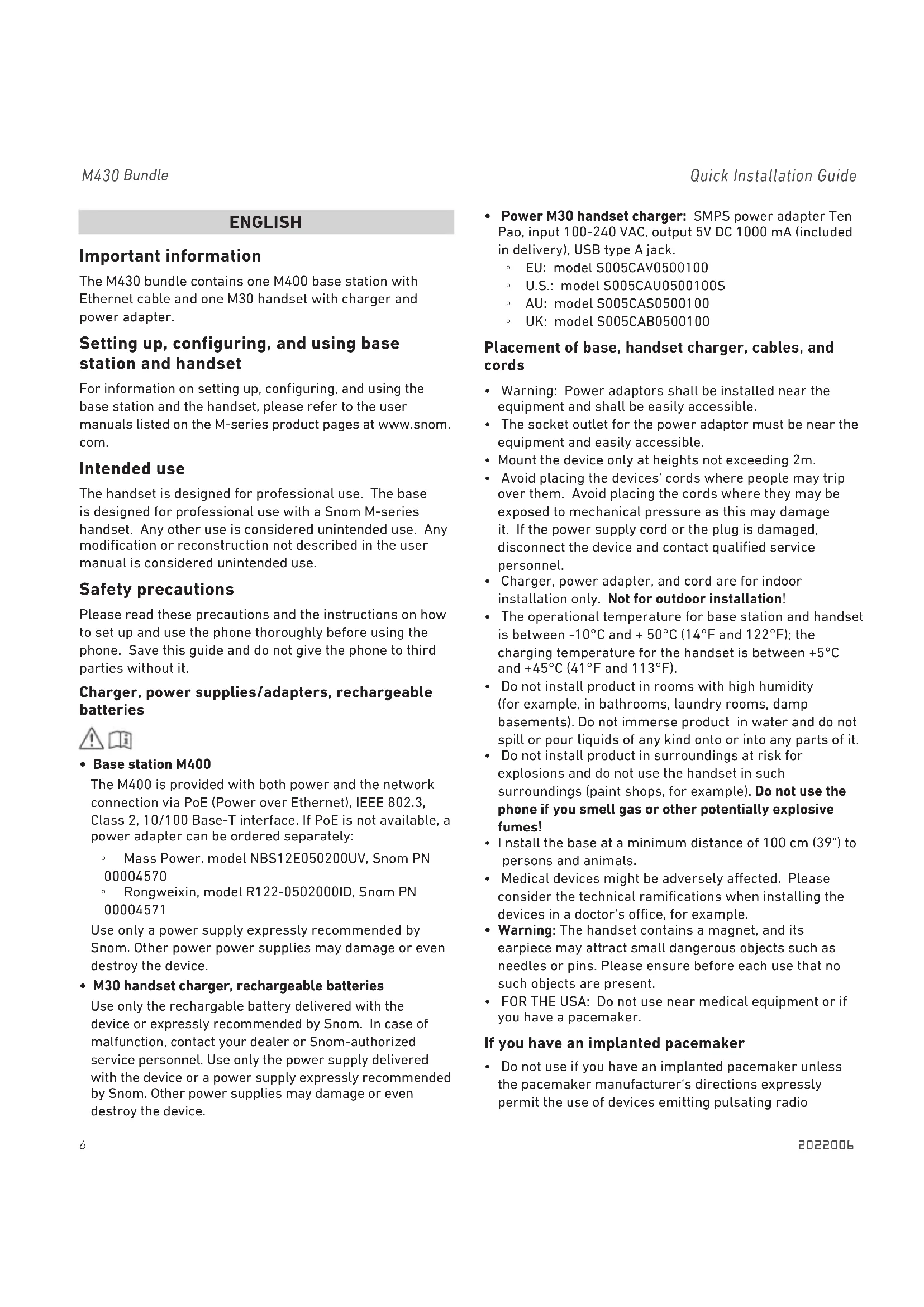
Technical diagram of a dental implant with labeled components and directional arrows indicating flow or movement.The M430 bundle contains one M400 base station with Ethernet cable and one M30 handset with charger and power adapter.
Setting up, configuring, and using base station and handset
For information on setting up, configuring, and using the base station and the handset, please refer to the user manuals listed on the M-series product pages at www.snom.com.
Intended use
The handset is designed for professional use. The base is designed for professional use with a Snom M-series handset. Any other use is considered unintended use. Any modification or reconstruction not described in the user manual is considered unintended use.
Safety precautions
Please read these precautions and the instructions on how to set up and use the phone thoroughly before using the phone. Save this guide and do not give the phone to third parties without it.
Charger, power supplies/adapters, rechargeable batteries

- Base station M400
The M400 is provided with both power and the network connection via PoE (Power over Ethernet), IEEE 802.3, Class 2, 10/100 Base-T interface. If PoE is not available, a power adapter can be ordered separately:
Mass Power, model NBS12E050200UV, Snom PN 00004570
Rongweixin, model R122-0502000ID, Snom PN 00004571
Use only a power supply expressly recommended by Snom. Other power power supplies may damage or even destroy the device.
• M30 handset charger, rechargeable batteries
Use only the rechargeable battery delivered with the device or expressly recommended by Snom. In case of malfunction, contact your dealer or Snom-authorized service personnel. Use only the power supply delivered with the device or a power supply expressly recommended by Snom. Other power supplies may damage or even destroy the device.
- Power M30 handset charger: SMPS power adapter Ten Pao, input 100-240 VAC, output 5V DC 1000 mA (included in delivery), USB type A jack.
EU: model S005CAV0500100
U.S.: model S005CAU0500100S
AU: model S005CAS0500100
UK: model S005CAB0500100
Placement of base, handset charger, cables, and cords
- Warning: Power adaptors shall be installed near the equipment and shall be easily accessible.
- The socket outlet for the power adaptor must be near the equipment and easily accessible.
- Mount the device only at heights not exceeding 2m.
- Avoid placing the devices' cords where people may trip over them. Avoid placing the cords where they may be exposed to mechanical pressure as this may damage it. If the power supply cord or the plug is damaged, disconnect the device and contact qualified service personnel.
- Charger, power adapter, and cord are for indoor installation only. Not for outdoor installation!
- The operational temperature for base station and handset is between -10^ and +50^ (14°F and 122°F); the charging temperature for the handset is between +5^ and +45^ (41°F and 113°F).
- Do not install product in rooms with high humidity (for example, in bathrooms, laundry rooms, damp basements). Do not immerse product in water and do not spill or pour liquids of any kind onto or into any parts of it.
- Do not install product in surroundings at risk for explosions and do not use the handset in such surroundings (paint shops, for example). Do not use the phone if you smell gas or other potentially explosive fumes!
- Install the base at a minimum distance of 100 cm (39") to persons and animals.
- Medical devices might be adversely affected. Please consider the technical ramifications when installing the devices in a doctor's office, for example.
- Warning: The handset contains a magnet, and its earpiece may attract small dangerous objects such as needles or pins. Please ensure before each use that no such objects are present.
- FOR THE USA: Do not use near medical equipment or if you have a pacemaker.
If you have an implanted pacemaker
- Do not use if you have an implanted pacemaker unless the pacemaker manufacturer's directions expressly permit the use of devices emitting pulsating radio
frequency signals. Always follow the manufacturer's directions!
- Recommended MINIMUM distance to the handset: 20 cm (7").
- Recommended MINIMUM distance to the base: 100 cm (39").
- Do not carry the handset in a breast pocket.
- Hold the handset to the ear opposite the medical device to minimize the potential for interference.
- Turn the handset off immediately if there is any reason to suspect that interference is taking place.
• FOR THE USA: Do not use if you have a pacemaker.
Other health risks
Do not hold the loudspeaker at the back of the handset against your ear when the phone is ringing or when speakerphone is switched on. Danger of serious, irreversible damage to your hearing!
If you are wearing a hearing aid
Please note that the handset may cause an annoying background noise.
Additional safety information
Small children
Your device and its enhancements may contain small parts. Keep them out of the reach of small children.
Operating environment
Remember to follow any special regulations in force in any area, and always switch off your device when its use is prohibited or when it may cause interference or danger. Use the device only in its normal operating positions. Do not place credit cards or other magnetic storage media near the device, because information stored on them may be erased.
Medical devices
Operation of any equipment emitting radio frequency signals may interfere with the functionality of inadequately shielded medical devices. Consult a physician or the manufacturer of the medical device to determine if they are adequately shielded from external radio frequency (RF) energy or if you have any other questions concerning this topic. Switch off your phone in health care facilities when signs posted in these areas instruct you to do so. Hospitals or health care facilities may be using equipment that could be sensitive to external RF energy.
Implanted medical devices
Manufacturers of medical devices recommend that a minimum distance should be maintained between a wireless device and an implanted medical device, such as pacemakers or cardioverter defibrillators, to avoid potential interference with the medical device. Persons who have such devices should:
- Always keep the wireless device more than 20 centimeters (7.8 inches) from the medical device when the wireless device is turned on.
- Not carry the wireless device in a breast pocket.
- Hold the wireless device to the ear opposite the medical device to minimize the potential for inter-ference.
- Turn the wireless device off immediately if there is any reason to suspect that interference is taking place.
- Read and follow the directions of the medical device's manufacturer.
If you have any questions about using your wireless device with an implanted medical device, consult your health care provider.
SELV (Safety Extra Low Voltage) Compliance
Safety status of Input/Output connections comply with SELV requirements.
Potentially explosive environments
Switch off your device when in any area with a potentially explosive atmosphere and obey all signs and instructions. Sparks in such areas could cause an explosion or fire resulting in bodily injury or even death. Switch off the device at refuelling points such as near gas pumps at service stations. Observe restrictions on the use of radio equipment in fuel depots, storage, and distribution areas; chemical plants; or where blasting operations are in progress. Areas with a potentially explosive atmosphere are often but not always clearly marked. They include below deck on boats, chemical transfer or storage facilities, vehicles using liquefied petroleum gas, and areas where the air contains chemicals or particles such as grain dust or metal powders.
Sensitive electronic equipment
The current state of research concludes that operational DECT phones normally do not adversely affect electronic equipment. Nevertheless, you should take some precautions if you want to operate DECT phones in the immediate vicinity of such equipment like sensitive laboratory equipment. Always keep a minimum distance of 10 cm (3.94") to the equipment even when the phone is in standby.
Electrical surges
We recommend the installment of an AC surge arrester in the AC outlet to which this device is connected to avoid damage to the equipment caused by local strikes of
lightening or other electrical surges.
Important battery information
The handset uses a rechargeable Lithium-Ion battery. Only use the batterie that came with the handset or suitable replacement batteries recommended by Snom. Do not use any other type of battery since this may lead to leakage, fire, explosion, or other dangerous situations. Never disassemble, alter, or short-circuit batteries or use them for purposes other than the intended one. Charge battery only within the handset placed in the charger that came with the product.
Charging and discharging, storage
- The full performance of a new battery is achieved only after two or three complete charge and discharge cycles.
- The battery can be charged and discharged hundreds of times, but it will eventually wear out. Use only Snom Technology GmbH approved batteries.
- If left unused, a fully charged battery will lose its charge over time. If the batteries are completely discharged, it may take a few minutes before the charging indicator appears on the display.
- Use the batteries only for their intended purpose. Do not short-circuit the batteries. Short-circuiting the terminals may damage the batteries or the connecting object. Do not use a damaged charger or battery. Using a damaged battery may cause it to explode.
- Do not place or store the batteries, inside or outside the handset, in the immediate vicinity of open fire or other heat sources.
- Leaving the batteries in hot or cold places will reduce their capacity and lifetime. Charge batteries within an ambient temperature range of 5^ to 40^ (41°F to 104°F). A device with hot or cold batteries may not work temporarily, even when the batteries are fully charged.
- Avoid overcharging. Repeated overcharging can lead to deterioration in battery performance. Never attempt charging the batteries with reversed polarity as this may cause the gas pressure inside the batteries to rise and lead to leakages.
- Remove batteries if storing phone for more than 1 month.
- Store batteries in a cool, dry place without corrosive gases. Temperature range for storage up to 3 months: -20^ to 35^ (-4° F to 95^ ). Storage up to 6 months: Charge battery to 30% to 70% of its capacity and store at +5^ and +25^ (41° F to 77^ ). Relative humidity approx. 50% .
Battery disposal
Defective or exhausted batteries should never be disposed of as municipal waste. Return old batteries to the battery supplier, a licensed battery dealer or a designated collection facility. Do not incinerate batteries.
Cleaning
Use an anti-static cloth. Please avoid water and liquid or solid cleaning products as they might damage the surface or internal electronics of the base, charger, and handset.
Disposal
Handset, charger, and power supply
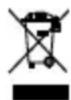
This product is subject to European Directive 2012/19/EU and may not be disposed of with general household garbage. If you do not know where you may dispose of the device at the end of its lifespan,
contact your municipality, your local waste management provider, or your seller.
Batteries

The batteries provided with this product are subject to European Directive 2006/66/EC and may not be disposed of with general household garbage.
If you do not know where you may dispose of the batteries at the end of their lifespan, contact your municipality, your local waste management provider, or your seller.
For countries outside the European Union
Disposal of electrical and electronic products in countries outside the European Union should be done in line with local regulations. Please contact local authorities for further information.
Standards conformance

This device complies with Directive 2014/53/EU and the essential health, safety, and environmental requirements of all relevant European directives. This device complies with the Radio Equipment Regulations 2017 and the essential health, safety, and environmental
requirements of all relevant UK legislation. The declaration of conformity can be downloaded at www.snom.com/conformity.
Unauthorized opening, changing, or modifying the device will cause the warranty to lapse and may also result in the loss of CE conformity. In case of malfunction contact authorized service personnel, your seller, or Snom.
Technical specifications
• Security: IEC 62368-1
- Frequencyband: 1880-1900 MHz (EMEA), 1910-1930 MHz (LATAM), 1920-1930 MHz (US)
- Wireless standard: DECT
• Output power: EU < 250 mW, USA < 140 mW
- Connectors:
- Ethernet/PoE: RJ45 (8P8C)
• Power connector: Coaxial, 5V DC
- Handset
- Battery type:
Rechargeable Lithium-Ion, 1100mAh, 3.7 V, 4.1 Wh
- Talk time: Approx. 22 hours
- Standby time: Approx. 350 hours
- Charging time: From empty to full up to 6 hours
- Charger: Input 5VDC 1000mA, integrated cable and USB type A plug
- Power

- Handset charger: SMPS power adapter Ten Pao, input 100-240 VAC, output 5V DC 1000 mA, 5W (included in delivery), USB type A jack
- EU: model S005CAV0500100
- U.S.: model S005CAU0500100S
- AU: model S005CAS0500100
- UK: model S005CAB0500100
- Base station: Power over Ethernet (PoE): IEEE 802.3, Class 2, 10/100 Base-T interface. If PoE is not available, a power adapter can be ordered separately:
- Mass Power, model NBS12E050200UV, Snom PN 00004570, or
- Rongweixin, model R122-0502000ID, Snom PN 00004571
Additional important information USA
FCC ID M400 base station: T7HX9431
FCC ID M30 handset: T7HCT8436
Intended use
The handset is designed for use with a Snom M-series base. The base is designed for use with a Snom M-series handset. Any other use, modification or reconstruction of the product is considered unintended use.
Important Safety Information
Follow all instructions and warnings in the user manual, and on the equipment to prevent accidents.
WARNING
Fire, electric shock, or other injury may result if you do not observe the following safety precautions:
- Do not use in or near a bathtub, sink, swimming pool, wet basement, or other water.
- Do not use this or any cordless telephone in the vicinity of a gas leak.
- Do not use in environments subject to explosion hazards, such as auto paint shops.
- Do not use near medical equipment or if you have a pacemaker.
- Unplug from wall outlet before cleaning.
- To prevent overheating, do not block slots and openings in the cabinet or the back or bottom of equipment. Do not place equipment on beds, sofas, rugs, or other surfaces that generate fibers.
- To prevent overheating, do not place near or over a radiator or in a cabinet without properventilation.
- To reduce the risk of fire, use only 26 AWG or larger UL-listed or CSA-certified telecommunication line cord.
- Operate using the power source indicated on the marking label. If you are unsure about the type of power supply to your home or business, consult your power company.
- Do not place objects on the power cord. Do not step on the power cord.
- To prevent exposure to dangerous voltage, do not push objects through cabinet slots.
- To reduce the risk of electric shock, do not disassemble equipment or open parts other than specified access doors. Opening or removing parts may expose you to dangerous voltage or other risks. Incorrect reassembly can cause electric shock when equipment is subsequently used.
- Do not overload wall outlets and extension cords.
- Unplug equipment and contact qualified service if any of the following has occurred:
Power supply cord or plug has been damaged or frayed.
- Liquid has been spilled on or in the equipment.
- Equipment has been exposed to rain or water.
- Equipment does not work normally even when the operating instructions are followed. Adjust only those controls referred to in the operating instructions. Improper adjustment of other controls may result in damage and may require extensive work by an authorized service center.
- Equipment has been dropped and damaged.
-
Equipment has exhibited a distinct change in performance.
-
Do not put the handset of the telephone next to your ear when the handset is not in normal talk mode.
- Radio signals transmitted between the handset and base may cause interference with hearing aids.
- WARNING: The handset contains magnets and the earpiece or mouthpiece may attract and hold small dangerous objects such as pins. Please ensure no such objects are present before each use.
- The cords contain lead, a chemical known to the State of California to cause birth defects or other reproductive harm. Wash hands after handling.
Installation Guidelines
Follow all warnings and instructions. Install the base at a minimum distance of 100 cm (39") to persons and animals.
- Do not install equipment near a bath tub, sink, or shower.
- Operate the equipment using only the power source indicated on the marking label. If you are unsure of the power supply to your home or business, consult with your power company.
- To avoid interference to nearby appliances, do not place base of the phone on or near a television, VCR, or microwave oven.
- Do not expose the equipment to direct sunlight.
- Do not place equipment on an unstable cart, stand, or table.
- Adjust only those controls referred to in the operating instructions. Improper adjustment of other controls may result in damage and may require extensive work to restore equipment to normal operation.
- The equipment may get warm when batteries are being charged. To avoid damage, it is recommended that the product not be placed on antique or veneered wood.
- The location of the base unit of the phone should be close to a phone jack, a personal computer, and a continuous power outlet (an AC outlet that does not have a switch to interrupt power).
- Keep base and handset away from sources of electrical noise such as motors or fluorescent lighting.
Cleaning
Do not clean with liquid or aerosol cleaners, household polish, chemicals, or cleaning agents. To avoid static shock, do not clean with a dry cloth. Clean with only a damp (not wet) cloth.
NOTICE
To avoid damage to the equipment, observe the following precautions:
- Do not expose to water, rain, or moisture.
- Place securely on a stable surface.
- To avoid damage during an electrical storm, equipment should be plugged into a surge protector.
Battery safety precautions
The M30 handset contains a rechargeable Lithium-Ion batterie.
WARNING
Fire or injury may result if you do not observe the following
safety precautions:
- Use only the battery specified in the owner's manual.
- Do not use other batteries or conventional alkaline batteries.
- To avoid explosion, do not dispose of battery in a fire.
- Review battery package insert for disposal instructions. Li-ion battery must be disposed of properly and may need to be recycled. Contact your local recycling center for proper disposal methods.
- Do not open or mutilate battery. Released electrolyte is corrosive and may damage eyes and skin and may be toxic if swallowed.
- Battery may overheat and cause burns if placed into contact with conducting materials such as rings, bracelets, or keys.
CAUTION
- Charge batteries only in accordance with the instructions and limitations specified in the user manual.
- Observe proper polarity orientation between battery and battery charger.
- Remove batteries if storing phone for more than 30 days.
- Disconnect and remove batteries before shipment. Any batteries transported with the equipment must be separately secured and cushioned with any exposed terminals covered to prevent breakage, leakage, movement within packaging, or short circuits. Failure to follow recommendations may be against U.S. Department of Transportation (DOT), International Civil Aviation Administration (ICAO), International Air Transport Association (IATA), or International Maritime Organization (IMO) regulations.
- Rechargeable Lithium-Ion batteries must be recycled or disposed of properly. At the end of its useful life, under various state and local laws it may be illegal to dispose of a battery into the municipal waste stream. Check with your local solid waste officials for details in your area for recycling options or proper disposal.
- Please call 1-800-8-BATTERY for information on how to recycle the batteries.
Cordless Telephone Privacy
Communications between the handset and base of your cordless telephone are accomplished by means of radio waves which are broadcast over the open airways. Because of the inherent physical properties of radio waves, your communications can be received by radio receiving devices other than your own cordless telephone unit. Consequently, any communications using your cordless telephone may not be private.
Emergency Calling Service
(i.e., 911, 999, etc.) with VoIP typically functions the same as that of traditional phone service companies. However, you are strongly advised to consult your VoIP provider to ensure that emergency service via VoIP is available in your area. In addition, you will likely be asked to register your physical address with your VoIP service provider to ensure that an emergency response team is able to locate the origin of the emergency call. Also note that it may take several days for the registration of your address to take effect.
In order to better ensure your safety, please be aware of certain circumstances in which emergency calling service may be either unavailable or limited in comparison to traditional emergency calling services.
- During an electrical power outage, an internet service outage, or a service disruption due to non-payment, your emergency calling service may not function properly.
- If at any point in time your broadband phone or adapter fails, emergency calling service may not function properly.
- The relocation of your base station to a physical address other than that provided upon signup, or the use of a number outside your normal area code or exchange may cause incorrect emergency calling information to be provided to your local emergency response center.
- Please contact your VoIP service provider for more information.
Please be advised that emergency calling services generally do not recommend programming emergency numbers into the phone's speed dial as this may lead to accidental dialing. If you dialed an emergency number in error, do not terminate the call. Stay on the phone and explain to the dispatcher that you dialed by accident and that you do not have an emergency.
Regulatory information U.S.A.
Interference information
This device complies with Part 15 of the FCC Rules.
Operation is subject to the following two conditions: (1) this device may not cause harmful interference, and (2) this device must accept any interference received, including interference that may cause undesired operation.
NOTE: This equipment has been tested and found to comply with the limits for a Class B digital device, pursuant to Part 15 of the FCC Rules. These limits are designed to provide reasonable protection against harmful interference in a residential installation. This equipment generates uses and can radiate radio frequency energy and, if not installed and used in accordance with the instructions, may cause harmful interference to radio communications. However, there is no guarantee that interference will not occur in a particular installation. If this equipment does cause harmful interference to radio or television reception, which can be determined by turning the equipment off and on, the user is encouraged to try to correct the interference by one of more of the following measures:
- Reorient or relocate the receiving antenna.
- Increase the separation between the equipment and receiver.
- Connect the equipment into an outlet or on a circuit different from that to which the receiver is connected.
- Consult the dealer or an experienced radio/TV technician for help.
Modifications not expressly approved by Snom Technology GmbH could void the user's authority to operate the equipment. Privacy of communication may not be ensured when using this equipment.
FCC RF Exposure Warning
To insure the safety of users, the FCC has established criteria for the amount of radio frequency energy various products may produce depending on their intended usage. This product has been tested and found to comply with the FCC's exposure criteria. For body worn operation, the FCC RF exposure guidelines were also met when used with the accessories supplied or designed for this product. Use of other accessories may not ensure compliance with FCC RF exposure guidelines and should be avoided.
Caution: To maintain compliance with the FCC's RF exposure guidelines, the internal antennas used for this mobile transmitter (Base unit) must provide a separation distance of at least 20 cm from all persons. Base and handset must not be co-located or operating in conjunction with any other antenna or transmitter.
Caution: Any changes or modifications to this unit not expressly approved by the party responsible for compliance could void the user's authority to operate this device.
Hearing aid compatibility
This equipment is hearing aid compatible as defined by the FCC in 47 CFR Section 68.316.
Health and Safety Information FCC Exposure to Radio Frequency (RF) Signals
Your wireless phone is a radio transmitter and receiver. It is designed and manufactured not to exceed the emission limits for exposure to radio frequency (RF) energy set by the Federal Communications Commission of the U.S.
Government. These limits are part of comprehensive guidelines and establish permitted levels of RF energy for the general population. The guidelines are based on the safety standards previously set by both U.S. and international standards bodies:
This product has been shown to be capable of compliance for localized specific absorption rate (SAR) for uncontrolled environment/general population exposure limits specified in ANSI/IEEE Std. C95.1-1992 and has been tested in accordance with the measurement procedures specified in FCC/OET Bulletin 65 Supplement C (2001) and IEEE Std. 1528-2003 (December 2003).
RF Exposure FCC
Tests for SAR are conducted using standard operating positions specified by the FCC with the phone transmitting at its highest certified power level in all tested frequency bands. The actual SAR level of the phone in operation can be well below the maximum value. This is because the phone is designed to operate at multiple power levels so as to use only the power required to reach the network. In general, the closer you are to a wireless base station antenna, the lower the power output.
Before a phone model is available for sale to the public, it must be tested and certified to the FCC that it does not exceed the limit established by the government-adopted requirement for safe exposure. The tests are performed in positions and locations (e.g., at the ear and worn on the body) as required by the FCC for each model. Body-worn measurements may differ among phone models, depending upon available accessories and FCC requirements. The highest SAR value for this phone when tested for use at the ear is 0.42 W/kg. While there may be differences between the SAR levels of various phones and at various positions, they all meet the government requirement for safe exposure.
For body worn operation, to maintain compliance with FCC RF exposure guidelines, use only accessories that contain no metallic components and provide a separation distance of 15mm (0.6 inches) to the body. Use of other accessories may violate FCC RF exposure guidelines and should be avoided.
Regulatory Information Canada
IC number M400 base station: 4979B-X9431 IC number M30 handset: 4979B-CT8436
This Class B digital apparatus complies with Canadian ICES-003. This product meets the applicable Industry Canada technical specifications.
Interference information
Operation is subject to the following two conditions: (1) this device may not cause interference, and (2) this device must accept any interference, including interference that may cause undesired operation of the device.
Privacy of communications may not be ensured when using this equipment.
Exposure to Radio Frequency (RF) Signals
This product is a radio transmitter and receiver. It is designed and manufactured not to exceed this emission limit for exposure to radio frequency (RF) energy set by the Ministry of Health (Canada), Safety Code 6. These limits are part of comprehensive guidelines and established permitted levels of RF energy for the general population. These guidelines are based on the safety standards previously set by international standard bodies. These standards include a substantial safety margin designed to assure the safety of all persons, regardless of age and health.
This device and its antenna must not be colocated or operating in conjunction with any other antenna or transmitter.
This device has been shown to be capable of compliance for localized specific absorption rate (SAR) for uncontrolled environmental / general public exposure limits specific in ANSI/IEEE C95.1-1992 and had been tested in accordance with the measurement procedures specified in IEEE 1528-2003.
This product meets the applicable Industry Canada technical specifications. / Le présent matériel est conforme aux specifications techniques applicables d'Industrie Canada.
DEUTSCH
VTech Communications Inc.
Snom Americas
9020 Washington Square Rd, Suite 555
Tigard, OR 97223
Phone support: (339) 227 6160
Email support: supportusa@snom.com
Snom Technology GmbH
Via Milano 1
20020 Lainate, Italia
Tel. +39 02 00611212
Fax +39 02 93661864
offi ce.it@snom.com
VTech Technologies Canada Ltd.
Suite 222
13888 Wireless Way
Richmond, B.C. V6V 0A3
Canada
Phone support: (339) 227 6160
Email support: supportusa@snom.com
Snom Technology GmbH
The Courtyard
High Street
Ascot, Berkshire SL5 7HP, UK
Tel. +44 161 348 7500
Fax +44 169 348 7509
offi ce.uk@snom.com