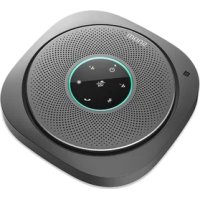
C300 - Bluetooth speaker Snom - Free user manual and instructions
Find the device manual for free C300 Snom in PDF.



| Product Type | Bluetooth Speaker |
| Brand | Snom |
| Model | C300 |
| Wireless Connection | Bluetooth V5.0, NFC |
| Bluetooth Range | Up to 10 meters |
| Connectors | USB 2.0 Type A, USB 2.0 Type C, 3.5 mm audio jack |
| Battery | Built-in Lithium-Ion, 2 x 3.6 V 2600 mAh (model ICR18650-2.6Ah-3.6V-1S1P) |
| Charging Time | Approximately 8 hours |
| Talk Time | 24 hours |
| Standby Time | 5 days (when connected to a Bluetooth device) |
| Charge Input (USB-C) | 5 V, 1.3 A |
| Charge Output (USB-A) | 5 V, 2 A max |
| Speaker Power | 3 W RMS |
| Frequency Response | 100 Hz – 20 kHz |
| Microphones | 6 microphones with beamforming |
| LED Indicators | White/red power LED, 8 circular LEDs (multi-color) for volume, battery, calls, etc. |
| Main Functions | Bluetooth audio playback, hands-free calls, conference, NFC for quick pairing, mute function, volume adjustment |
| Maintenance and Cleaning | Use an antistatic cloth. Do not use water or liquid or solid products. |
| Recycling | Compliant with WEEE (2012/19/EC) and battery (2006/66/EC) directives. Do not dispose of with household waste. |
| Safety | IEC 62368-1. Indoor use only. RF safety distance ≥ 20 cm. |
| Operating Temperature | Avoid extreme temperatures (high or low). |
Frequently Asked Questions - C300 Snom
User questions about C300 Snom
0 question about this device. Answer the ones you know or ask your own.
Ask a new question about this device
Download the instructions for your Bluetooth speaker in PDF format for free! Find your manual C300 - Snom and take your electronic device back in hand. On this page are published all the documents necessary for the use of your device. C300 by Snom.
USER MANUAL C300 Snom
natural_image
Line drawing of a smart speaker with concentric rings and sound waves (no text or symbols)C300
Bluetooth Conference Speakerphone
Quick Start Guide
en de fr it es
Delivery content · Lieferumfang · Contenu de la boîte · En la caja · Contenuto della confezione
text_image
LED 8 LED 1 LED 7 LED 2 LED 6 LED 3 LED 5 LED 4ON x s, OFF x s: blinking, x seconds on, x seconds off
- LED blinkt, x Sek. an, x Sek. aus
- DEL clignote, x secondes allumé, x secondes éteinte
- LED lampeggia, x secundi acceso, x secundi spento
Connecting to a Windows PC via USB
Plug the USB cable into the USB-C port on the C300. Plug the other end of the cable into the USB-A port on the PC.
When the C300 is recognized by the PC, the circle LEDs turn green for two seconds. The speakerphone becomes the external audio device of the PC.
Connecting to Snom deskphone, Windows PC, or mobile device via Bluetooth pairing
- When the C300 is idle, press ✝ for two to five seconds. The circle LEDs flash blue.
- Open the Bluetooth menu on your Snom deskphone with Bluetooth capability, PC, or mobile device and, if necessary, start Bluetooth scanning/detection.
- Select Snom C300 from the list of available devices.
- If you are asked for a PIN code, enter 0000.
If pairing was successful, the C300 plays three ascending tones. The circle LEDs turn blue for two seconds. If pairing failed, the C300 plays three rapid tones. The circle LEDs briefly blink blue every three seconds. Try again or try pairing with a different Bluetooth device.
Note: Only one Bluetooth device can be connected to the C300 at any one time but up to 8 paired Bluetooth devices can be stored in the C300's memory.
Pairing a mobile device using NFC
- On your mobile device, turn NFC on.
- Place the NFC zone of your mobile device against the NFC zone of the speakerphone (indicated
by N). When NFC is detected, the speakerphone plays a tone. LEDs 1–8 turn white for one second.
- If you are asked for a PIN code, enter 0000.
If NFC pairing does not work, try again or try connecting via Bluetooth pairing.
When the C300 is paired to a device, it acts as an external speaker and plays audio from the paired device.
When the C300 is playing media from a paired Bluetooth device, the audio will be interrupted and changed to PC audio immediately when you connect the C300 to a Windows PC with the USB cable.
Receive a call
When your mobile phone receives an incoming call the C300 rings and the circle LEDs 1–8 flash green (if USB call) or blue (if Bluetooth call).
Answer an incoming call
Press ☐. During the call, the respective circle LEDs turning white indicate the direction from where the microphones are receiving sound.
Call waiting
If your paired mobile phone receives an incoming call while a call is in progress, the C300 beeps twice, and the LEDs blink blue ON 0.25 s, OFF 0,25 s, ON 0.25 s, OFF 2 s until call waiting is stopped.
- Press to hold the current call and answer the waiting call.
Swap calls
With an active call and a call on hold, press 📋 for at least two seconds to put the current call on hold and connect to the held call.
Reject an incoming call
Press for at least two seconds.
End all calls
Press

Volume
- Press briefly to increase listening volume by one step.
- Long-press to increase listening volume continuously.
- Press briefly to decrease listening volume by one step.
- Long-press to decrease listening volume continuously.
The respective circle LEDs turn blue for two seconds to indicate the volume level. The more LEDs turn blue, the higher the volume level.
The C300 will synchronize playback volume with a USB-connected Windows PC, or a Bluetooth-connected iPhone or Android phone.
The C300 will synchronize phone call audio volume with a Bluetooth-connected iPhone or Android phone.
Mute
- Press to mute all six microphones. The circle LEDs turn red.
- Press again to unmute the microphones.
- Press while the speakerphone is ringing to temporarily mute the ringing tone.
Connecting a headset
To ensure privacy during a phone call, you can connect a headset to the 3.5mm jack of the C300. The audio will be played through the headset.
Charging
Charging the battery of the C300
- Plug the USB cable into the USB type-C port on the speakerphone.
- Plug the other end of the USB cable into the USB type-A port of a power source (for example, a PC). While the C300 is charging, its power LED indicator flashes white. If the power LED is red, the battery is charging but the battery level is too low for the device to power up.
Note: If the C300 is playing media from a Bluetooth device, it will switch to playing media from the PC once the PC is connected via USB cable.
Using the C300 to charge an external device
- Plug the USB cable into the USB type-A port of the C300.
- Plug the other end of the USB cable into the USB type-C port of the external device.
Note:
- The C300 must be on and the battery must not be low.
- You can charge the batteries of the C300 and a connected external device at the same time (second USB cable not included in delivery).
Checking the battery level of the C300
Press ⏻ briefly. The circle LEDs turn purple one by one to indicate the battery charge level. The more purple LEDs displayed, the higher the battery charge level.
Low battery warning
The eight circle LEDs flash red twice, and, when not in a call, the device beeps rapidly four times. The warning is repeated every three minutes.
App
The Snom Connect app is available in the iTunes store and the Google Play store. This app enables you to perform the following functions on the C300 speakerphone:
- Change speakerphone settings
- Update firmware
For more information, refer to the app's online help — tap ⚙ and then Help.
Factory reset
- In idle mode, press Ⓞ for 5 seconds. Circle LEDs 1, 3, 5, 7 flash red quickly for three seconds, and the C300 plays a tone.
- Press twice within three seconds. The LEDs turn off, and the C300 plays three ascending tones.
ENGLISH
© 2022 Snom Technology GmbH. All Rights Reserved.
Snom, the names of Snom products, and Snom logos are trademarks owned by Snom Technology GmbH. All other product names and names of enterprises are the property of their respective owners.
All product specifications are subject to change without notification.
Texts, images, and illustrations and their arrangement in this document are subject to the protection of copyrights and other legal rights worldwide. Their use, reproduction, and transmittal to third parties without express written permission may result in legal proceedings in the criminal courts as well as civil courts. Snom Technology GmbH reserves the right to revise and change this document at any time, without being obliged to announce such revisions or changes beforehand or after the fact.
Although due care has been taken in the compilation and presentation of the information in this document, the data upon which it is based may have changed in the meantime. Snom therefore disclaims all warranties and liability for the accurateness, completeness, and currentness of the information published, except in the case of intention or gross negligence on the part of Snom or where liability arises due to binding legal provisions.
Important information
Please read the instructions on safety and disposal and on how to set up and use the device before using it and also give them to other users to read or inform those users of their contents. Save this document and do not give the device to third parties without it.
The nameplates are located at the bottom and at the rear of the product.
Safety instructions
Follow the instructions in the manual and other applicable documentation of the device.
• This device is designed for professional use.
- Warning: The product included (ITE) in this manual is to be connected only to PoE networks without routing to the outside plant.
- Mount the device only at heights not exceeding 2m.
- Avoid placing the cables where people may trip over them or where they may be exposed to mechanical pressure as this may damage them.
- This device is for indoor use only! Do not install outdoors - NOT FOR OUTDOOR USE!
- Do not install the device in rooms with high humidity (for example, in bathrooms, laundry rooms, damp basements). Do not immerse the device in water and do not spill or pour liquids of any kind onto or into the device.
- Do not install the device in surroundings at risk for explosions (paint shops, for example). Do not use the device if you smell gas or other potentially explosive fumes.
- Do not use the device during thunderstorms. Lightning striking the power grid may cause electric shocks.
- SELV (Safety Extra Low Voltage) Compliance. Safety status of Input/Output connections comply with SELV requirements. Warning: To avoid electric shock, do not connect safety extra-low voltage (SELV) circuits to telephone-network voltage (TNV) circuits. LAN ports contain SELV circuits, and PSTN ports contain TNV circuits. Some LAN and PSTN ports both use RJ-45 (8P8C) connectors. Use caution when connecting cables.
- Caution: To maintain compliance with radio frequency exposure requirements, the device shall be installed and used so that parts of user's body other than hands keep a distance of 20 cm or more.
Important Battery Information

This product uses a built-in rechargeable Lithium-Ion battery. Do not use any other type of battery since this may lead to leakage, fire, explosion, or other dangerous situations. Never disassemble, alter, or short-circuit batteries or use them for purposes other than the intended one.
Charging and Discharging, Storage
The full performance of a new battery is achieved only after two or three complete charge and discharge cycles.
- The battery can be charged and discharged hundreds of times, but it will eventually wear out.
- If left unused, a fully charged battery will lose its charge over time. If the battery is completely discharged, it may take a few minutes before the charging indicator appears on the display.
- Use the battery only for its intended purpose. Do not short-circuit the battery. Short-circuiting the terminals may damage the battery or the connecting object. Do not use a damaged charger or battery. Using a damaged battery may cause it to explode.
- Do not place or store batteries, inside or outside devices, in full sunlight or in the immediate vicinity of open fire or other heat sources. Risk of explosion!
- Do not dispose of batteries by throwing them into a fire. Risk of explosion!
Battery Cautions Statement
Avoid using the battery in the following conditions:
- High or low extreme temperatures that a battery can be subjected to during use, storage or transportation;
- Low air pressure at high altitude;
Leaving a battery in an extremely high temperature surrounding environment that can result in an explosion or the leakage of flammable liquid or gas; - Extremely low air pressure that may result in an explosion or the leakage of flammable liquid or gas
- Avoid replacement of a battery with an incorrect type that can defeat a safeguard.
- Disposal of a battery into fire or a hot oven or mechanically crushing or cutting of a battery can result in an explosion.
Cleaning
To clean the device, use an anti-static cloth. Please avoid cleaning liquids as they might damage the surface or internal electronics of the device.
Standards conformance

This device complies with Directive 2014/53/EU and the essential health, safety, and environmental requirements of all relevant European directives. This device complies with the Radio Equipment Regulations 2017 and the essential health, safety, and environmental standards of the UK.
You can download the declaration of conformity at https://www.snom.com/conformity.
Unauthorized opening, changing, or modifying the device will cause the warranty to lapse and may also result in the loss of CE and UK conformity. In case of malfunction contact authorized service personnel, your seller, or Snom.
Technical specifications
- Safety: IEC 62368-1
- Wireless connectivity: Bluetooth V5.0
- Frequency range
- Bluetooth / BLE: 2402–2480 MHz
- NFC: 13.56 MHz
- Transmission power
- Bluetooth: Class 2
。 BLE: +4 dBm -
Bluetooth range: Up to 10m
-
NFC: Passive
- Connectors: USB 2.0, 1 x type A, 1 x type C; headset 3.5 mm
- Battery: 2 x 3.6V 2600 mAh Li-Ion (built-in), model ICR18650-2.6Ah-3.6V-1S1P
• Charging input (USB-C): 5V 1.3A - Charging output (USB-A): 5V 2A max.
• Talk time: 24 hours - Standby time: 5 days (when connected to Bluetooth device)
- Charging time: around 8 hours
-
Audio
-
Speaker rated output power: 3W rms
- Speaker frequency response: 100 Hz - 20 kHz
- Microphone: 6 microphones with beamforming
Disposal
Device

This device is subject to European Directive 2012/19/EU and may not be disposed of with general household garbage. If you do not know where you may dispose of the device at the end of its lifespan, contact your municipality, your local waste management provider, or your seller.
Batteries

The battery built into the product is subject to European Directive 2006/66/EC and may not be disposed of with general household garbage. If you do not know where you may dispose of the battery at the end of its lifespan, contact your municipality, your local waste gement provider, or your seller.
In countries outside the EU, disposal of electrical and electronic products and of batteries should be done in line with local regulations. Please contact local authorities for further information.
For more information, see https://service.snom.com -> Conference solution.
FCC Part 15
This equipment has been tested and found to comply with the requirements for a Class B digital device under Part 15 of the Federal Communications Commission (FCC) rules.
These requirements are intended to provide reasonable protection against harmful interference in a residential installation. This equipment generates, uses and can radiate radio frequency energy and, if not installed and used in accordance with the instructions, may cause harmful interference to radio communications. However, there is no guarantee that interference will not occur in a particular installation.
If this equipment does cause harmful interference to radio or television reception, which can be determined by turning the equipment off and on, the user is encouraged to try to correct the interference by one or more of the following measures:
- Reorient or relocate the receiving antenna.
- Increase the separation between the equipment and receiver.
- Connect the equipment into an outlet on a circuit different from that to which the receiver is connected.
- Consult the dealer or an experienced radio/TV technician for help.
Changes or modifications to this equipment not expressly approved by the party responsible for compliance could void the user's authority to operate the equipment.
This device complies with Part 15 of the FCC Rules. Operation is subject to the following two conditions: (1) this device may not cause interference, and
(2) this device must accept any interference, including interference that may cause undesired operation.
Privacy of communications may not be ensured when using this equipment.
To ensure safety of users, the FCC has established criteria for the amount of radio frequency energy that can be safely absorbed by a user or bystander according to the intended usage of the product. This product has been tested and found to comply with the FCC criteria. The speakerphone shall be installed and used such that parts of the user's body other than the hands are maintained at a distance of approximately 20 cm (8 inches) or more.
This Class B digital apparatus complies with Canadian ICES-003. CAN ICES-3 (B)/NMB-3(B)
Industry Canada
This Class B digital apparatus complies with Canadian requirements: CAN ICES-3 (B)/NMB-3(B). Cet appareil numérique de la classe B est conforme à la norme CAN ICES-3 (B)/NMB-3(B) du Canada.
This device contains licence-exempt transmitter(s)/receiver(s) that comply with Innovation, Science and Economic Development Canada's licence-exempt RSS(s).
Operation is subject to the following two conditions: (1) this device may not cause interference, and (2) this device must accept any interference, including interference that may cause undesired operation of the device.
The device is in compliance with RF exposure guidelines, users can obtain Canadian information on RF exposure and compliance. The minimum distance from body to use the device is 20 cm (8 inches).
Privacy of communications may not be ensured when using this telephone.
The term “IC:” before the certification/registration number only signifies that the Industry Canada technical specifications were met.
This product meets the applicable Innovation, Science and Economic Development Canada technical specifications.
For more information, see https://service.snom.com -> Conference solution.
DEUTSCH
VTech Communications Inc.
Snom Americas
9020 Washington Square Rd, Suite 555
Tigard, OR 97223
Phone support: (339) 227 6160
Email support: supportusa@snom.com
VTech Technologies Canada Ltd.
Suite 222
13888 Wireless Way
Richmond, B.C. V6V 0A3
Canada
Phone support: (339) 227 6160
Email support: supportusa@snom.com
Snom Technology GmbH
130, avenue Joseph Kessel
78960 Voisins-le-Bretonneux, France
Tel. +33 1 85 83 00 15
Fax +33 1 80 87 62 88
offi ce.fr@snom.com
Snom Technology GmbH
Via Milano 1
20020 Lainate, Italia
Tel. +39 02 00611212
Fax +39 02 93661864
offi ce.it@snom.com
Snom Technology GmbH
The Courtyard
High Street
Ascot, Berkshire SL5 7HP, UK
Tel. +44 161 348 7500
Fax +44 169 348 7509
offi ce.uk@snom.com
Manufacturer:
VTech Telecommunications Ltd.
23/F., Tai Ping Industrial Centre, Block 1,
57 Ting Kok Road, Tai Po
HONG KONG