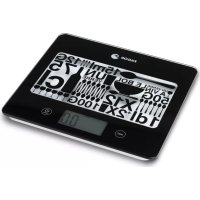
BC275 - Kitchen scales FAGOR - Free user manual and instructions
Find the device manual for free BC275 FAGOR in PDF.



| Brand | Fagor |
| Model | BC275 |
| Product type | Kitchen scale |
| Maximum capacity | 5000 g / 11 lb:04 oz / 5000 ml / 176.4 fl.oz |
| Division | 1 g / 0.1 lb:oz / 1 ml / 0.1 fl.oz |
| Measurement units | grams (g), pounds:ounces (lb:oz), milliliters (ml), fluid ounces (fl.oz) |
| Power supply | 1 button cell CR2032 |
| Tare function | Yes, zero reset with container |
| Automatic shut-off | After 1 minute of inactivity |
| Low battery indicator | Display of specific symbol |
| Overload indicator | Display of error message |
| Negative value display | Yes, when removing ingredients |
| Platform material | Not specified, probably glass or plastic |
| Dimensions (approx.) | 20 x 15 x 3 cm |
| Weight (approx.) | 300 g |
| Care and cleaning | Clean with a soft, dry cloth. Do not immerse in water. Do not use chemical or abrasive products. |
| Safety | Do not overload (do not exceed 5000 g). Avoid shocks. Do not expose to electromagnetic fields (phones). Use on a stable horizontal surface, not on carpet. |
| Intended use | Household only |
| Warranty | Valid if device not opened. Any manipulation voids it. |
Frequently Asked Questions - BC275 FAGOR
User questions about BC275 FAGOR
0 question about this device. Answer the ones you know or ask your own.
Ask a new question about this device
Download the instructions for your Kitchen scales in PDF format for free! Find your manual BC275 - FAGOR and take your electronic device back in hand. On this page are published all the documents necessary for the use of your device. BC275 by FAGOR.
USER MANUAL BC275 FAGOR
Before using the scales for the first time, read this manual carefully in order to use them correctly and keep them in good condition. Keep the instructions for later reference.
2.PRODUCT DEFINITION (FIG.1)
- Platform
- Button UNIT
- Button ① / TARE
- Screen
- Battery compartment
Interference suppression: The
interference of this appliance has been suppressed in accordance with interference suppression standards.
Electromagnetic compatibility: This
apppliance complies with the EMC
standards of electromagnetic compatibility.
3. TECHNICAL CHARACTERISTICS
Maximum capacity: 5000 gr/11 lb:04 oz/5000 ml/176.4 fl.oz
- Division: 1g/0.1 lb:oz/ 1 ml/ 0.1 fl:oz
- Convertible: gr / lb:oz/ ml/ fl:oz
- Power supply: 1xCR2032
4. ICON DISPLAY (FIG. 2)
a) TARE function icon
b) Negative value icon
c) Battery icon
d) Weight displayed in lb:oz
e) Weight displayed in g.
f) Weight displayed in ml
g) Weight displayed in fl.oz
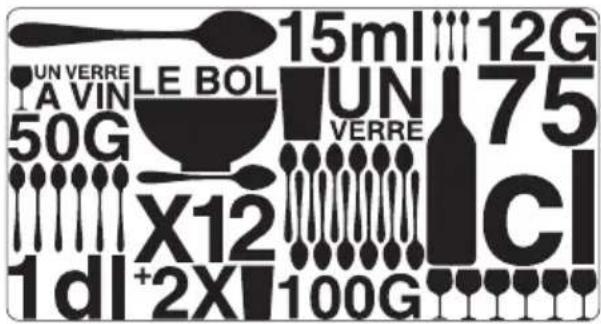
Conversion table:
1 soup spoon = 15ml = 3 coffee spoons = 12g
1 wine glass = 1dl = 6 coffee spoons = 50g
1 bowl = 12 soup spoons = 2 glasses
1 glass = 12 coffee spoons = 100g
1 bottle = 75cl = 6 glasses
5. ADJUSTMENT
- Remove the lid from the battery compartment (5) on the underside of the scales. There is a plastic film between the batteries and the contacts to prevent the scales from being switched on. Remove this plastic film before switching on the appliance.
- Place the scales on a dry, solid surface, making sure they are firmly positioned.
6. FUNCTIONING
- Press on the button to connect the scales.
- The screen will be activated displaying all the icons. (Fig. 2).
- Press the UNIT button to select the desired unit of measurement: lb, fl, ml or grams.
Note: When you switch on the scales, the most recently used unit of measurement will be displayed.
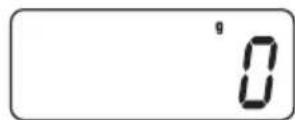
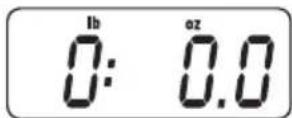
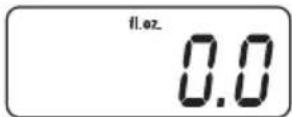
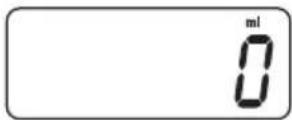
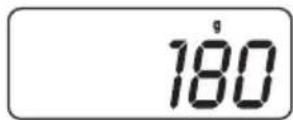
- Depending on whether grams, lb/oz, fl.oz or ml have been selected, the screen will display the following:
a) in grams
b) in lb:oz
c) in fl.oz
d) in ml
- The scales are now ready for use. Place the object to be weighed in the centre of the platform. When the digits on the display remain fixed, you can make the reading. The display reading is as follows:
- Make sure that the scales show "zero" weight before starting to weigh. If not, press the tare button to reset ① / TARE.
- If the scales are not used, they will automatically switch off after 1 minute. You can also switch them off manually by pressing the ① / TARE button for 2 seconds.
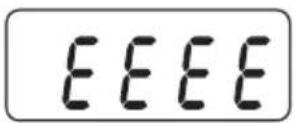
7. WARNING: DO NOT OVERLOAD THE SCALES
If the load capacity is exceed, the scales may be damaged and the following warning will appear on the display:
8. BATTERY LOW INDICATOR
When the battery needs replacing, the following message will appear on the display:

When this happens, follow the adjustment instructions.
Remember that batteries are not household waste. Spent batteries must be disposed of in the special containers provided.
9. USING THE TARE BUTTON (3)
- Adjust the scales as described above.
- Place a container on the weighing platform and gently press and release the ① / TARE button. After a few seconds the display will show zero.

IMPORTANT: If the weight of the container is over 600 g, the word TARE will appear on the display.
- You can now place any additional articles to be weighed in the container, repeating these last two steps if you wish. The net weight of the additional article will appear on the display:
- If you remove an article from the container, a negative value (-) will appear. This represents the weight of the article you have removed.
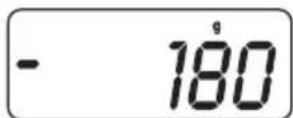
Press the ① /TARE button again each time you remove an article, to set the reading to 0 again:
NOTE: When you activate the scales for the first time, if no reading appears or if the reading does not stabilise at 0, you can also press the ① /TARE button.
10. MAINTENANCE AND CLEANING
- These scales are a precision instrument. Make sure they receive no knocks. Do not store the scales with a weight on them for long periods.
2 Always press the buttons gently. Do not use any sharp objects such as ballpoint pens to press them down. - If nothing appears on the screen when you switch on the scales using the TARE button, check the battery is inserted and correctly connected. If this is the case, the battery may have run down. Replace it with a new one.
- Do not chemical solvents or abrasive substances to clean the scales. The use of a soft, dry cloth is recommended for cleaning the outer surface of the scales. DO NOT SUBMERGE THE SCALES IN WATER.
- Always keep the scales away from heat sources, e.g. ovens, as this could deteriorate the buttons and damage the appliance.
- When the scales are in use, keep them away from any electromagnetic interference (EMI), i.e. mobile phones, as this would affect their accuracy.
- Remove the battery if the scales are likely to be out of use for some time.
- These scales are for domestic use only.
- Always use the scales on a horizontal, firm surface. Do not use them on mats or carpets.
- Do not insert any foreign object into the openings of the scales.
- Do not try to open the scales to repair them. This will invalidate the guarantee
11. INFORMATION FOR THE CORRECT DISPOSAL OF ELECTRICAL AND ELECTRONIC APPLIANCES
At the end of its working life, the product must not be disposed of as urban waste. It must be taken to a special local authority differentiated waste collection centre or to a
dealer providing this service. Disposing of a household appliance separately avoids possible negative consequences for the environment and health deriving from inappropriate disposal and enables the constituent materials to be recovered to obtain significant savings in energy and resources.
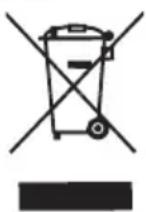
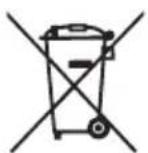
To remind you that you must collaborate with a selective collection scheme, the symbol shown appears on the product warning you not to dispose of it in traditional refuse containers.
For further information, contact your local authority or the shop where you bought the product.
1. INTRODUCTION
2. DEFINITION DU PRODUIT (FIG. 1)
- Plateau
- Touche UNIT
- Touche ① / TARE
- Afficheur
- Compartment pile
BbMOxKeTe CHOBA BOCNoJb3OBaTbcra KHONKoI /TARE IyCTaHOBKn 3HaueHnBeCa Ha DnCnJIeB H0JI KaXdbI pa3, KOrDa Bbl y6npaTe npedMeT:
ПРИМЕЧАHNE:Ппппьом ВКЛЮЧЕНИ ВECOB, ecн Ha ДИСПLEE He БВICBEчINBaETcR 3HAчEHи ИИЗ 3HAчEHne He yCTaHaBЛINBaETcR B HOLь, Bbl MOЖeTe TaKKe HaxKaTb KHOKNy ① / TARE
10.ОБСЛУЖИBAHAЕ ИЧNTKA
1.ДaHHbIe BeCbI YBJIOTcR BbICOKOTOHbIM npn6opom.BepenTe INx OT yapOB n He octaBnIte IOd Harpy3KoB TceHne DInTeBHO BpeMeHn.
2. He haximaiTe Ha KhoNk CnHJKOM cnIbHo HcnoJIb3yIte IJIa HaxKaTna 3aoCTpeHHbIe npEdMeTbI, TaKne KaK OCTpne shapIKOBOpyKN.
3. EcnI NocIe BKNIOUeHnB BecOB NOCpeCTBOM HaxKATN KHOKN 1 /TARE Ha DnCnJIee HnYeO He BbICBeYNBaeTcR, IpOBepbTe HAnuYne I npaBnIbHoCTb yCTaHOBKn 6aTaapeKn.Ecnn 6aTaapeKe Ka YCTaHOBHeHa, IpOBepbTe ee 3apJn, B Cnyae Heo6xOIMoCTn, 3aMeHnte Ha HOByIO.
4.He nCIOJIb3yIte IJRA YNCTKN XIMMueckne COCTaBbl IIN a6pa3nHBHbIE BeUeCTBa. JIy NCTKN HApXHOI NOBepxHOCTN BECOB peKOMeHNdyETcN CIOJIb3OBAbMb MfKyHO CyxyIO TkaHb. HE ONYCKAITE BECbIB BOy.
5. HnKOrJa He pa3MeUaIe BeCbI B6JIn3n NCTOuHnKOB TeJIa, TaKnx KAK Neu, C Tem YTO6bl N36ExKaTb IOBpeXJeHnK HONOK n CamoRo np6opa..
6.ПиИСПОЛБ3OBAHIN BECOH,He pa3MeUaIte Hx B6JIIN3N INCTOCHNKOB 3JIeKTPOMaHHTbIX NOMex (3M),TakNX KAK MO6NJbHbIE TeJIefoHbI,TAK KaK 3TN IOMEXN MOyT BJIaRtB Ha TOUHOCTb N3MEpeHIn..
7.ИЗВЛЕКИТЕ 6aTapeиу n3 BEcOB,ecIN Bbl He co6HpaTeCb INIOJIb3OBAtB INx B TeYeHneДЛNTeJIbHOrO BpemeHn.
8. DaaHHbIe BeCbI npeHa3HaueHbI TOJIbKO dNIAOMaUHrO IcNOJb3OBaHnA.
9. Pn nCIOB30BaHn BEcOB OHn DOJXHbI 6bITb yCTaHOBJIeHbI Ha TBepDoI rOpN3OHTaJIbHOI NOBepxHocTn. He IOnyCKaETcYCTaHOBka BEcOB Ha KOBrKn ININ INHbI MRAKNE NOJKAaIKN.
10. 3aPpeLaaetcBCTaBnTb NocToPOHHne PpeDMeTbI B OTBepCTnBECOB.
11. He nbitaTeCb OTKpbITb BEcbl IJIpeMOHTa. B 3tOM cnyae rapaHTnra CTahOBITcR HeJeCTBNTeJIbHOJ.
11. INHΦOPMAÇNЯ O ΠРABUNbHOJ YTNJIIN3AÇM N 3JEKTPUÇECKNX I 3JEKTPOHHbIX PIPNBOPOB
Iocne OKOHuaHnCpoka cnjxkbI,daHHbI np6Op He dONJKeH yTINu3NpuBaTbcr BMeCTe C 6bITOBbIMN OTXoJaMn. OH MoKet 6bITb NpepaH B CNEUaJIbHbIe CEHTpbI
HaxoJIeNecB BeDMCTBe MyHnIaJIbHbIX BnaCTei, IIN aReHTaM, pa6OtaUOMB DaHHoI Cpepe ycnyr. Pa3JeIbHa yTInn3aun 6bITOBbIX 3NeKTPonpOpOB n03BOJraET n36EkaTb BO3MOXHbIX HeaTINBbIX NocLeDCTBn DnIg OKpyKaIOSeI CpeDbI N 3dOpOBbI JHODeI, KOTOpBle MOyT IMEt b MeCTO BCJeDCTBne HEnpaBnBJHO yTInn3aUN, a TaKxe IO3BOJraET IOBTOPHO NCIOJIb3OBA Tb MaTePnAJIbI, BXOJaUNe B COCTAB 3Tnx pN6OpOB, IN DObntbcra, TAKIM O6pa3OM, cyueCTBeHHoN 3KOHOMN 3Heprnn n pecypcoB.
YTo6bI IOUePKHyTb Heo6xOaMocTb pa3dJIbHOy Tynn3aun,Ha DaHHOM npiope HaHeceH 3NaK, PpeDynpexKaIOuO uO 3aIpeTe NcNoJb3ObaHnra TpaAnuOHbIX MyCOPhIX KOHTeHepOB.
Дяpoуehna 60onee npdo6noHnΦopMaun CBxNTecb C MeCTHBIM OprAHOM Blaactn JIN C MaRa3HHOM, rIe Bbl npno6peJI DaHHBI npOdyKT.
1
e biwally jzll aayb ayj ygill saiis
JooJol all JooJooJooJooJooJooJooJoo
jll 1000
jolll 4 i j 3 y j 5 jlaai
j 1
1 1
jlll jlll 11
= ( x1,y1) , = ( x2,y2)
b ii jj all Jia xu jy all 8
j j 1111111111111111111111111111111111
J10
aaiiaaiy 11
11
λ - Si = g( 1 + j = 1mxjµ j)

1
- 2.PRODUCT DEFINITION (FIG.1)
- INTERFERENCE SUPPRESSION: THE
- ELECTROMAGNETIC COMPATIBILITY: THIS
- TECHNICAL CHARACTERISTICS
- ICON DISPLAY (FIG. 2)
- CONVERSION TABLE
- ADJUSTMENT
- FUNCTIONING
- WARNING: DO NOT OVERLOAD THE SCALES
- BATTERY LOW INDICATOR
- USING THE TARE BUTTON (3)
- MAINTENANCE AND CLEANING
- INFORMATION FOR THE CORRECT DISPOSAL OF ELECTRICAL AND ELECTRONIC APPLIANCES
- INTRODUCTION
- DEFINITION DU PRODUIT (FIG. 1)
- 10.ОБСЛУЖИBAHAЕ ИЧNTKA
- INHΦOPMAÇNЯ O ΠРABUNBHOJ YTNJIIN3AÇM N 3JEKTPUÇECKNX I 3JEKTPOHHBIX PIPNBOPOB
Brand : FAGOR
Model : BC275
Category : Kitchen scales