
BC500 - Kitchen scales FAGOR - Free user manual and instructions
Find the device manual for free BC500 FAGOR in PDF.



| Brand | Fagor |
| Model | BC500 |
| Product Type | Kitchen Scale |
| Maximum Capacity | 3000 g / 6.6 lb:04 oz / 1000 ml / 132 fl.oz |
| Division (precision) | 1 g / 0.1 lb:oz / 1 ml / 0.1 fl.oz |
| Measurement Units | Grams (g), Pounds+Ounces (lb:oz), Milliliters (ml), Fluid Ounces (fl.oz) |
| Power Supply | 1 CR2032 battery (included) |
| Tare Function | Yes, zero reset with T icon display |
| Volume Measurement Modes | Water, Milk, Oil, Butter (CUP mode) |
| Automatic Shut-off | After 1 minute of inactivity |
| Low Battery Indicator | Yes, specific icon on screen |
| Care and Cleaning | Clean with a soft, dry cloth; do not immerse in water |
| Usage Precautions | Do not overload (screen shows error); avoid magnetic fields (phones); stable and horizontal surface |
| Storage | Remove battery if unused for long; do not store with weight on top |
| Repairability | Do not open; any manipulation voids warranty |
| Intended Use | Household use only |
Frequently Asked Questions - BC500 FAGOR
User questions about BC500 FAGOR
0 question about this device. Answer the ones you know or ask your own.
Ask a new question about this device
Download the instructions for your Kitchen scales in PDF format for free! Find your manual BC500 - FAGOR and take your electronic device back in hand. On this page are published all the documents necessary for the use of your device. BC500 by FAGOR.
USER MANUAL BC500 FAGOR
The manufacturer reserves the right to modify the models described in this user's manual.
KITCHEN SCALES
KITCHEN SCALES
MOD.: BC-500
N.I.F. F-20.020.517 - B° San Andrés, n° 18 • Apartado 49 - 20500 MONDRAGON (Gipuzkoa) SPAIN

JUNE 2013
FAGOR


FAGOR

EN
1. INTRODUCTION
Before using the scales for the first time, read this manual carefully in order to use them correctly and keep them in good condition. Keep the instructions for later reference.
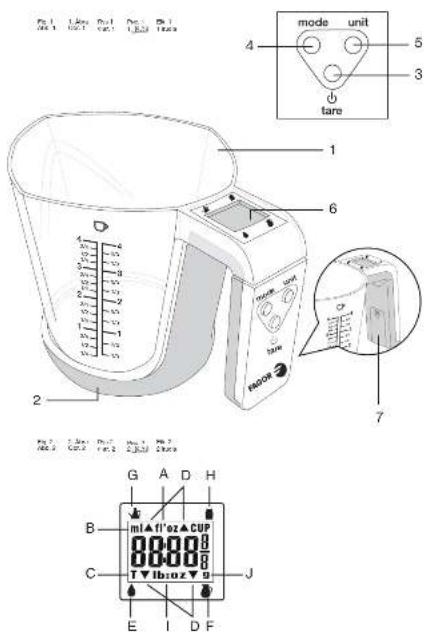
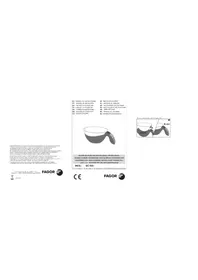
2. PRODUCT DEFINITION (FIG. 1)

- Measuring beaker
- Base
- Button
- Button
- Unit button
- Display
- Battery compartment
Interference suppression: The interference of this appliance has been suppressed in accordance with interference suppression standards.
Electromagnetic compatibility: This appliance complies with the CEM standards of electromagnetic compatibility.
3. TECHNICAL CHARACTERISTICS
- Maximum capacity: 3000 gr/ 6.6 lb: 04 oz/ 1000 ml/ 132 fl.oz
- Division: 1g/0.1 lb:oz/ 1 ml/ 0.1 fl.oz
- Convertible: gr / lb:oz/ ml/ fl.oz
- Power supply: 1xCR2032
4. ICON DISPLAY (FIG. 2)
a) Volume display in fl'oz b) Volume display in ml c) TARA function icon d) Selection arrows e) Water mode f) Milk mode g) Oil mode h) CUP butter mode i) Volume display in lb:oz j) Volume display in g
5. ADJUSTMENT
- Remove the cover from the battery compartment in the scales handle. There is a plastic strip between the batteries and the contact that stops the scales from coming on. Remove the plastic to be able to switch on the appliance.
- Place the scales on a dry, horizontal surface. Make sure it is stable.
6. FUNCTIONING
- Press the ⏻ tare button to connect the scales.
- The display will come on showing all the icons. (Fig. 2).
- Press the unit button to change the unit of measurement.
- Press the mode button to select weight, water, milk or "CUP" margarine mode.
NB: The scale on the measuring beaker is for guidance purposes and does not coincide with the real amount shown on the display.
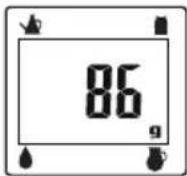
- The scales are now ready for use. Try to keep the object to weigh in the centre of the measuring beaker. Read the screen when the figure stops flashing in this format:
- Make sure the scales are displaying "zero" before you start weighing. If not, press the @ tare button.
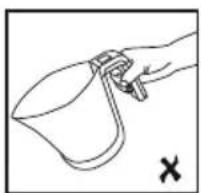
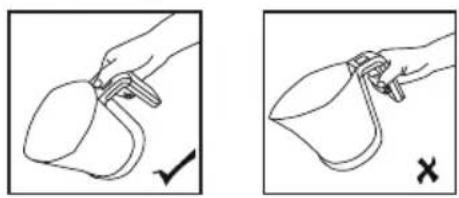
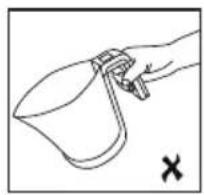
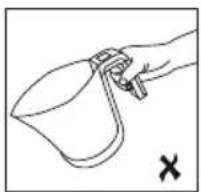
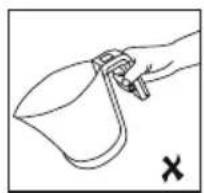
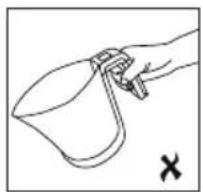
- If you have weighed a liquid, before pouring the liquid from the beaker into another container, remove the measuring
beaker from the scales. If this is not possible, hold the edge of the measuring beaker with your finger to prevent the measuring beaker from tipping over, as shown in Fig.3
- The scales will turn themselves off after one minute if you do not weigh anything. To turn the scales off manually, press ⏻ for 3 seconds. tare
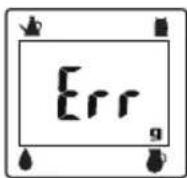
7. WARNING: DO NOT OVERLOAD THE SCALES
If the load capacity is exceeded, the scales may be damaged and the following warning will appear on the display:
8. BATTERY LOW INDICATOR
When the battery needs replacing, the following message will appear on the display:
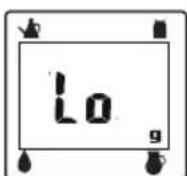
When this happens, follow the adjustment instructions.
Remember that batteries are not household waste. Spent batteries must be disposed of in the special containers provided.
9. USING THE TARE BUTTON (3)
- Set the scales to zero as explained above.
- Position the measuring beaker then press ⏻ lightly and release. The display will revert to zero in a few seconds. NB: The letter "T" will be displayed on the left.
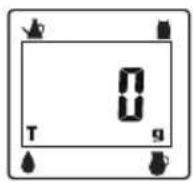
- Now you can add the other items you want to measure in the measuring beaker. Repeat these two steps as often as required. The net weight of the item is shown on the display.
- If you start removing the items from the beaker, you will see a negative number (-) which represents the weight of the item you have removed.
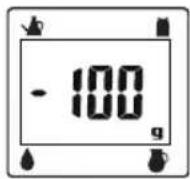
If you wish, you can reset the scales to zero by pressing Ⓞ every time you remove an item.
NB: When you switch on the scales for the first time, if the display does not read zero, you can also press the button.
10. MAINTENANCE AND CLEANING
- These scales are a precision instrument. Make sure they receive no knocks. Do not store the scales with a weight on them for long periods. Always press the buttons gently. Do not
use any sharp objects such as ballpoint pens to press them down.
- If nothing appears on the screen when you switch on the scales using the button, check the battery is inserted and correctly connected. If this is the case, the battery may have run down. Replace it with a new one.
- Do not use chemical solvents or abrasive substances to clean the scales. The use of a soft, dry cloth is recommended for cleaning the outer surface of the scales. DO NOT SUBMERGE THE SCALES IN WATER.
- Always keep the scales away from heat sources, e.g. ovens, as this could deteriorate the buttons and damage the appliance.
- When the scales are in use, keep them away from any electromagnetic interference (EMI), i.e. mobile phones, as this would affect their accuracy.
- Remove the battery if the scales are likely to be out of use for some time.
- These scales are for domestic use only.
- Always use the scales on a horizontal, firm surface. Do not use them on mats or carpets.
- Do not insert any foreign object into the openings of the scales.
- Do not try to open the scales to repair them. This will invalidate the guarantee.
11. INFORMATION FOR THE CORRECT DISPOSAL OF ELECTRICAL AND ELECTRONIC APPLIANCES
At the end of its working life, the product must not be disposed of as urban waste. It must be taken to a special local authority differentiated waste collection centre or to a dealer providing this service. Disposing of a household appliance separately avoids possible negative consequences for the environment and health deriving from inappropriate disposal and enables the constituent materials to be recovered to
obtain significant savings in energy and resources.
To remind you that you must collaborate with a selective collection scheme, the symbol shown appears on the product warning you not to dispose of it in traditional refuse containers.
For further information, contact your local authority or the shop where you bought the product.
1. INTRODUCTION
2. PRODUCT DEFINITION (FIG. 1)
- Graduated bowl
- Base
- Button
- Button
- Button
- Screen
- Battery compartment


- EN
- INTRODUCTION
- PRODUCT DEFINITION (FIG. 1)
- TECHNICAL CHARACTERISTICS
- ICON DISPLAY (FIG. 2)
- ADJUSTMENT
- FUNCTIONING
- WARNING: DO NOT OVERLOAD THE SCALES
- BATTERY LOW INDICATOR
- USING THE TARE BUTTON (3)
- MAINTENANCE AND CLEANING
- INFORMATION FOR THE CORRECT DISPOSAL OF ELECTRICAL AND ELECTRONIC APPLIANCES
Brand : FAGOR
Model : BC500
Category : Kitchen scales