LCS8038TXR7LP - Network card / adapter Longshine - Free user manual and instructions
Find the device manual for free LCS8038TXR7LP Longshine in PDF.



User questions about LCS8038TXR7LP Longshine
0 question about this device. Answer the ones you know or ask your own.
Ask a new question about this device
Download the instructions for your Network card / adapter in PDF format for free! Find your manual LCS8038TXR7LP - Longshine and take your electronic device back in hand. On this page are published all the documents necessary for the use of your device. LCS8038TXR7LP by Longshine.
USER MANUAL LCS8038TXR7LP Longshine
10/100 Fast Ethernet PCI Adapter
English
Deutsch
Italianisch
Französisch
Spanisch
Ver. 4.6
E-1
FCC Statement
This device compiles with Part 15 of the FCC Rules. Operation is subject to the following two conditions: (1) This device may not cause harmful interference, and (2) This device must accept any interference received, including interference that may cause undesired operation.
Warning! This equipment has been tested and found to comply with the limits for a Class B digital device, pursuant to Part 15 of the FCC Rules. These limits are designed to provide reasonable protection against harmful interference when the equipment is operated in a commercial environment. This equipment generates, uses and can radiate radio frequency energy and, if not installed and used in accordance with the instructions, may cause harmful interference to radio communications. Operation of this equipment in a residential area is likely to cause harmful interference in which case the user will be required to correct the interference at his own expense.
CE Declaration of conformity
This equipment complies with the requirements relating to electromagnetic compatibility, EN 55022 class A for ITE, the essential protection requirements of Council Directive 89/336/EEC on the approximation of the laws of the Member States relating to electromagnetic compatibility.
Copyright © 2002, All right Reserved.
Document Version:4.6
All Trademarks and trade names are the properties of their respective owners.
1. Introduction
Congratulations on the purchasing of your new 10/100 NWay Fast Ethernet PCI adapter. This document describes the Installation of network adapter. This adapter supports 10BASE-T/100BASE-TX Fast Ethernet and complies with the electrical and protocol requirements of the PCI Local Bus Specification, revision 2.2. The Wake-On-LAN feature is optional for the adapter.
1.1 Features
The 10/100 Fast Ethernet PCI adapter is a cost effective, high-performance network interface card. It operates in 10BASE-T and 100BASE-TX modes and integrates easily with Fast Ethernet hub and switch.
IEEE 802.3 10BASE-T and 100BASE-TX standards
32-bit bus master for high throughput and low CPU utilization
- Wake-On-LAN feature is optional for different hardware version
Full-duplex operation at both 10Mbps and 100Mbps
Supports 10/100Mbps auto-sensing capability
Rich diagnostic LED mounted on bracket for easily viewing and troubleshooting
- Single shield RJ-45 connector for using at either Speed (Category 3, 4 or 5 UTP cable for 10Mbps Operation, and Category 5 UTP cable for 100Mbps Operation)
Plug and Play Installation.
Test program (include Wake-On-LAN events)
Network drivers on the diskette for Windows 95, 98, ME, NT, 2000, XP, NetWare, SCO Unix and Packet driver.
FCC, CE certification
1.2 System Requirements
To use the adapter, you need the following components:
One PCI master mode expansion slot that is compliant with PCI bus specifications, revisions 2.2
A 3.5-inch,1.44MB diskette drive
The following cables: To operate at 10Mb/s, a Category 3, 4, 5 UTP Cable To operate at 100Mb/s, a Category 5 UTP cable
2. Installation
This section describes how to install the adapter. For connecting to the network, you must have the following:
- Network adapter card installed to your computer.
- Cabling (compatible with network topology)
- Connect the Wake-On-LAN cable to the motherboard (If the WOL function is supported on the adapter)
- Software for the adapter card contains both configuration utilities and drivers
2.1 Unpack and Inspect
Caution:
Under ordinary circumstances, this adapter card will not be affected by static charge as may be received through your body during handling of the unit. In special circumstances where you may carry an extraordinarily high static charge, it had better reduce the charge by touching a ground before handling the adapter card.
Open the shipping gift box and carefully remove all items. In addition to this User's Manual, please check the following items:
One 10/100 Fast Ethernet PCI Adapter Card
One WOL cable (If adapter supports WOL function)
One 3.5" Drivers and Utilities diskette
This user's Manual
Note:
If any of the listed items are missing, please contact your distributor or reseller
2.2 Install the Adapter
- Turn off the computer.
- Remove the computer's cover, in accordance to its manual.
- Insert the contact edge of the adapter card into the connector of any available PCI Bus master expansion slot. Press the card firmly into the connector to PCI slot. Please make sure that the card's contacts are fully seated in the PCI slot.
- Install the bracket screw that secures the card to the Computer chassis.
- Connect the WOL cable to the motherboard. (If adapter supports WOL function)
- Replace the computer's cover.
- Connect the CAT3 or CAT5 UTP cable to the RJ-45 network connector.
- Remove [Drivers and Utilities] diskette from the PC diskette drive.
- Turn on the computer
- If the BIOS section of your computer's boot program is Plug and Play compliant, then at power up the BIOS will configure any newly installed adapter automatically.
Note:
Due to some Plug-n-Play BIOS programs' problem, it happens occasionally that a newly installed adapter is assigned an Interrupt Number which is already used by another device adapter. In such a case, the conflict of Interrupt Number will cause faults in the behavior of both devices. Then it is necessary to run the CMOS Setup utility, and manually assign a non-conflict Interrupt Number.
2.3 Connect Fast Ethernet
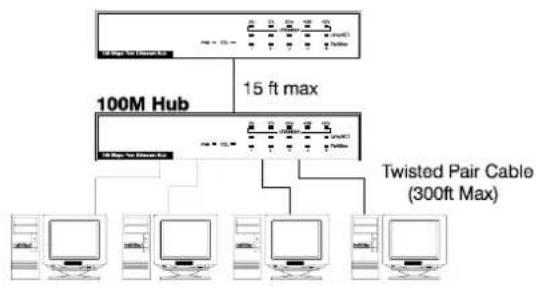
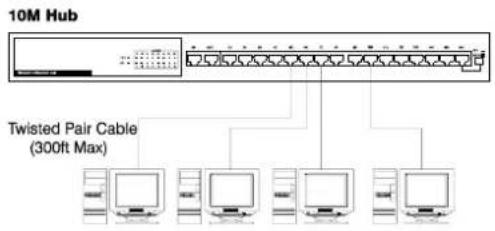
Category 5 UTP cable is required for Fast Ethernet operation. The maximum cable run between the adapter and the supporting hub is 300ft (100m). Make the network connection by plugging one end of the cable into the RJ-45 receptacle of the adapter, and the other end into one port in the hub.
2.4 Connect 10Mbps Ethernet
Category 3, Category 4, and Category 5 UTP cable, as well as EIA/TIA 568 100 ohm STP cable, all qualification under Ethernet cabling rules. The maximum cable length run between this adapter and the supporting hub is 300 ft. Make the network connection by plugging one end of the cable into the RJ-45 receptacle of this adapter, and the other end into the hub.
2.5 Drivers and Utilities Diskette
The [Divers and Utilities] diskette contains all the popular operating system drivers.
Novell NetWare(client/server)
Windows NT 3.5, NT4.0/2000/XP
Windows 95/98/ME
Microsoft Client (NDIS 2.0 DOS/OS2)
Windows For Workgroup 3.11
Linux Red Hat 6.0, 6.1
...and so on
2.6 Software Installation
Please refer to "Quick Installation Guide"
2.7 Test Program
This test program verifies configuration of the adapter and assists the isolation of any faults in operation. Test procedure are optional, and will only be useful in the unusual event that there is a fault, such as an interrupt number conflict among your computer's add on cards, if your installation provides normal operation, you do not need these test procedures.
At your DOS prompt, type the following command:
a:\rset8139.exe
The opening screen is displayed as following:
View Current Configuration
Set Up New Configuration
Run Diagnostics
Exit RSET8139
Choose
Mode, Full or Half Duplex, and so on. Choose <Run
Diagnostics> item to run the adapter test program.
Adapter test program includes:
The Power Management Test is available for WOL adapter only.
After choosing the
NodeID.00e07d c00001
Network Speed.: 100Mbps
I/O Base ....:E000H
Interrupt.....11
Full-Duplex ..Disabled
Pass Count Fail Count
A. I/O Register
B. 100Mbps Loopback
C. 10Mbps Loopback
D. Cable Connection
For the
For the
Ethernet Address
00E07DC00002
Target Machine
Ethernet Address
00E07DC00001
Master Machine
Network
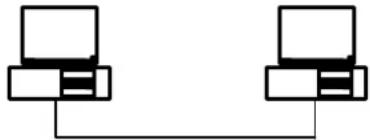
Master Machine: Master machine sends magic packet or wake up frame through the network.
Target Machine: Target machine is notified whenever a qualified wakeup packet is received.
To wake up Target Machine with Magic Packet
Step1: Target Machine:
Target Machine is necessary to use the WOL cable link the Wake On LAN connector on adapter with your motherboard. Check BIOS <POWER
MANGEMENT SETUP> ACPI, Wake On LAN function must be enable.
Step2: Target Machine:
Select
Step3: Master Machine:
Select
Step4: Target Machine:
ACPI Testing events will be show
Device State 1: PASS
Device State 2: PASS
Device State 3: PASS
Step5: Target Machine:
Put the Target Machine to power down mode.
Step6: Master Machine:
Send a magic packet to wake up Target Machine.
Test the Wakeup Frame
Step1: Target Machine:
Select
Step2: Master Machine:
Select
Step3: Target Machine
ACPI Testing events will be show
Device State 1: PASS
Device State 2: PASS
Device State 3: PASS
Note:
Adapter testing program can not be used in Windows 95/98 DOS mode. Do not load any device drivers, memory manager, and anti-virus software. The testing program only can work in clean DOS prompt.
Quick Installation Guide
Please take the following steps for driver installation.
Microsoft Windows 95/Windows 98/Windows ME
- Turn off the computer.
- Insert the adapter into the available PCI slot.
- Restart the computer.
- After Microsoft Windows reboot, the PCI Ethernet Controller will be found.
- The system will prompt for driver installation.
- Insert the "Driver and Utilities" diskette into diskette driver and press
. - For Windows 95, Key in a:\path to install driver for the adapter.
- For Windows 98, Key in a:\w98_2000 path to install driver for the adapter.
- For Windows ME, Key in a:\winme path to install driver for the adapter.
- The Windows system will install the driver automatically.
- Reboot the Windows system.
Windows NT
- Turn off the computer.
- Insert the adapter into the available PCI slot.
- Restart the computer.
- Click "Start" menu bar and select "Setting" item then "Control Panel" setting
- Select "Network" icon
- If this is the first time to install network on the machine then the system will ask "YES" or "NO" to install network adapter. Please select "YES"
- If the computer already install network before then you need to select "Interface" -> "Add"
- The system will prompt for driver installation.
- Insert the "Driver and Utilities" diskette into diskette driver and press
. - Key in a:\winnt path to install driver for the adapter
- The Windows system will install the driver automatically.
- Reboot the Windows system.
Microsoft Windows 2000
- Turn off the computer.
- Insert the adapter into the available PCI slot.
- Restart the computer.
- After Microsoft Windows reboot, the 10/100Mbps Fast Ethernet Adapter will be found and the system will assign the default network driver to the adapter.
- Select "Control Panel" from "Start" menu bar
- Select "Network and Dial-Up Connection" folder and click "Local Area Connection".
- Click "Configure" item and select "Driver"
- From the "Driver" item then choose "Update Driver".
- The system will prompt two optional for driver search, one is auto search and the other is "Display a list of known drivers ...". Please select second one "Display ..."
- The system will prompt for driver installation and please select "Have Disk" button.
- Key in a:\w98_2000 path to install driver for the adapter
Microsoft Windows XP
- Turn off the computer.
- Insert the adapter into the available PCI slot.
- Restart the computer.
- After Microsoft Windows reboot, the 10/100Mbps Fast Ethernet Adapter will be found and the system will assign the default network driver to the adapter.
- Select "Control Panel" from "Start" menu bar
- Select "Network Connection" folder then click "Local Area Connection" and "Properties".
- Click "Configure" item and select "Driver".
- From the "Driver" item then choose "Update Driver"
- Choose "Install from a list or specific location(Advanced)" and click "Next".
- Select "Don't search, I will choose the driver to install" then click "Next".
- The system will prompt for driver installation and please select "Have Disk" button.
- Key in a:WinXP path to install driver for the adapter.
Please execute the following commands:
For Netware Client
LSL
RTSODI
IPXODI
NETX or VLM
F
LOGIN
For Netware Server
LOAD RTSSRV
BIND IPX TO RTSSRV
The help file in the diskette will describe the detail driver installation information for all popular operating systems.
10/100 Fast Ethernet PCI Adapter
English
Deutsch
Italianisch
Französisch
Spanisch
Ver. 4.6
D-1
FCC Statement
This device compiles with Part 15 of the FCC Rules. Operation is subject to the following two conditions: (1) This device may not cause harmful interference, and (2) This device must accept any interference received, including interference that may cause undesired operation.
Warning! This equipment has been tested and found to comply with the limits for a Class B digital device, pursuant to Part 15 of the FCC Rules. These limits are designed to provide reasonable protection against harmful interference when the equipment is operated in a commercial environment. This equipment generates, uses and can radiate radio frequency energy and, if not installed and used in accordance with the instructions, may cause harmful interference to radio communications. Operation of this equipment in a residential area is likely to cause harmful interference in which case the user will be required to correct the interference at his own expense.
CE Declaration of conformity
This equipment complies with the requirements relating to electromagnetic compatibility, EN 55022 class A for ITE, the essential protection requirements of Council Directive 89/336/EEC on the approximation of the laws of the Member States relating to electromagnetic compatibility.
Copyright © 2002, All right Reserved.
Document Version:4.6
All Trademarks and trade names are the properties of their respective owners.
1. Einführung
View Current Configuration
Set Up New Configuration
Run Diagnostics
Exit RSET8139
NodeID.00e07d c00001
Network Speed.: 100Mbps
I/O Base ....: E000H
Interrupt ....: 11
Full-Duplex ....Disabled
Pass Count Fail Count
A.I/O Register
B.100Mbps Loopback
C.10Mbps Loopback
D.Cable Connection
Device State 1: PASS
Device State 2: PASS
Device State 3: PASS
Step5: Ziel PC:
Device State 1: PASS
Device State 2: PASS
Device State 3: PASS
Notiz:
This device compiles with Part 15 of the FCC Rules. Operation is subject to the following two conditions: (1) This device may not cause harmful interference, and (2) This device must accept any interference received, including interference that may cause undesired operation.
Warning! This equipment has been tested and found to comply with the limits for a Class B digital device, pursuant to Part 15 of the FCC Rules. These limits are designed to provide reasonable protection against harmful interference when the equipment is operated in a commercial environment. This equipment generates, uses and can radiate radio frequency energy and, if not installed and used in accordance with the instructions, may cause harmful interference to radio communications. Operation of this equipment in a residential area is likely to cause harmful interference in which case the user will be required to correct the interference at his own expense.
CE Declaration of conformity
This equipment complies with the requirements relating to electromagnetic compatibility, EN 55022 class A for ITE, the essential protection requirements of Council Directive 89/336/EEC on the approximation of the laws of the Member States relating to electromagnetic compatibility.
Copyright © 2002, All right Reserved.
Document Version:4.6
All Trademarks and trade names are the properties of their respective owners.
1. Introduzione
View Current Configuration
Set Up New Configuration
Run Diagnostics
Exit RSET8139
Node ID: 00 e0 7d c0 00 01
Network Speed: 100Mbps
I/O Base: E000H
Interrupt: 11
Full-Duplex: Disabled
Pass Count Fail
Count
A.I/O Register
B.100Mbps Loopback
C.10Mbps Loopback
D.Cable Connection
Device State 1: PASS
Device State 2: PASS
Device State 3: PASS
Fase 5: Macchina target:
Device State 1: PASS
Device State 2: PASS
Device State 3: PASS
Nota:
This device compiles with Part 15 of the FCC Rules. Operation is subject to the following two conditions: (1) This device may not cause harmful interference, and (2) This device must accept any interference received, including interference that may cause undesired operation.
Warning! This equipment has been tested and found to comply with the limits for a Class B digital device, pursuant to Part 15 of the FCC Rules. These limits are designed to provide reasonable protection against harmful interference when the equipment is operated in a commercial environment. This equipment generates, uses and can radiate radio frequency energy and, if not installed and used in accordance with the instructions, may cause harmful interference to radio communications. Operation of this equipment in a residential area is likely to cause harmful interference in which case the user will be required to correct the interference at his own expense.
CE Declaration of conformity
This equipment complies with the requirements relating to electromagnetic compatibility, EN 55022 class A for ITE, the essential protection requirements of Council Directive 89/336/EEC on the approximation of the laws of the Member States relating to electromagnetic compatibility.
Copyright © 2002, All right Reserved.
Document Version:4.6
All Trademarks and trade names are the properties of their respective owners.
1. Introduction
View Current Configuration
Set Up New Configuration
Run Diagnostic:
Exit RSET8139
| Node ID: 00 e0 7d c0 00 01 Network Speed: 100Mbps I/O Base: E000H Interrupt: 11 Full-Duplex: Disabled Pass Count Fail Count A.I/O Register B.100Mbps Loopback C.10Mbps Loopback D.Cable Connection |
Device State 1: PASS
Device State 2: PASS
Device State 3: PASS
Device State 1: PASS
Device State 2: PASS
Device State 3: PASS
Note :
This device compiles with Part 15 of the FCC Rules. Operation is subject to the following two conditions: (1) This device may not cause harmful interference, and (2) This device must accept any interference received, including interference that may cause undesired operation.
Warning! This equipment has been tested and found to comply with the limits for a Class B digital device, pursuant to Part 15 of the FCC Rules. These limits are designed to provide reasonable protection against harmful interference when the equipment is operated in a commercial environment. This equipment generates, uses and can radiate radio frequency energy and, if not installed and used in accordance with the instructions, may cause harmful interference to radio communications. Operation of this equipment in a residential area is likely to cause harmful interference in which case the user will be required to correct the interference at his own expense.
CE Declaration of conformity
This equipment complies with the requirements relating to electromagnetic compatibility, EN 55022 class A for ITE, the essential protection requirements of Council Directive 89/336/EEC on the approximation of the laws of the Member States relating to electromagnetic compatibility.
Copyright © 2002, All right Reserved.
Document Version:4.6
All Trademarks and trade names are the properties of their respective owners.
1. Introduccion
View Current Configuration
Set Up New Configuration
Run Diagnostics
Exit RSET8139
NodeID.....00e07dc0001
Network Speed.: 100Mbps
I/O Base ....: E000H
Interrupt.....11
Full-Duplex ....: Disabled
Pass Count Fail Count
A.I/O Register
B. 100Mbps Loopback
C. 10Mbps Loopback
D.Cable Connection
Device State 1: PASS
Device State 2: PASS
Device State 3: PASS
Paso5: Maquina Objetiva: Apagar la maquina objetiva.
Device State 1: PASS
Device State 2: PASS
Device State 3: PASS
Nota:
El programa de comprobacion del adaptor no possible