
LCS-8539TXR1 - Network card / adapter Longshine - Free user manual and instructions
Find the device manual for free LCS-8539TXR1 Longshine in PDF.


| Product Type | Network Adapter (CardBus) |
| Brand | Longshine |
| Model | LCS-8539TXR1 |
| Interface | PCMCIA Type II, 32-bit CardBus |
| Connector | 1x RJ-45 |
| Data Transfer Rate | 10/100 Mbps (Fast Ethernet) |
| Supported Standards | IEEE 802.3 10BASE-T, IEEE 802.3u 100BASE-TX, IEEE 802.3x Flow Control |
| Bus Type | CardBus (32-bit, 3.3V) |
| Operating Voltage | 3.3V |
| Auto-Negotiation | Yes (10BASE-T/100BASE-TX) |
| Full Duplex Support | Yes (both 10 and 100 Mbps) |
| Flow Control | IEEE 802.3x (Full-duplex) |
| Buffer Memory | 2x 2KB FIFO (transmit/receive) |
| LED Indicators | Red (100Mbps), Green (Link/Activity) |
| Power Management | ACPI, CardBus compliant, Wake on LAN |
| Compatible Operating Systems | Windows 98/ME/2000/XP, NT, Novell, Linux (Redhat, TurboLinux, FreeBSD), etc. |
| Package Contents | Adapter, User Manual, Driver CD |
| Dimensions (approx.) | 85.6 x 54 x 3.3 mm (PCMCIA Type II) |
| Weight (approx.) | 20 g |
Frequently Asked Questions - LCS-8539TXR1 Longshine
User questions about LCS-8539TXR1 Longshine
0 question about this device. Answer the ones you know or ask your own.
Ask a new question about this device
Download the instructions for your Network card / adapter in PDF format for free! Find your manual LCS-8539TXR1 - Longshine and take your electronic device back in hand. On this page are published all the documents necessary for the use of your device. LCS-8539TXR1 by Longshine.
USER MANUAL LCS-8539TXR1 Longshine
10/100Mbit/s CardBus Card
www.longshine.de
10/100 FAST ETHERNET CARDBUS ADAPTER
User Manual
Ver. 1.00
All brand names and trademarks are properties of their respective owners.
Overview
- The 10/100 Fast Ethernet CardBus Adaptor is a high performance Fast Ethernet Network Interface CardBus with integrated physical layer interface for 10BASE-T and 100BASE-TX application.
- The 10/100 Fast Ethernet CardBus Adaptor is designed with advanced CMOS technology to provide glueless 32-it bus master interface for CARDBUS, boot ROM interface, CSMA/CD protocol for Fast Ethernet, as well as the physical media interface for 100BASE-TX of IEEE802.3u and 10BASE-T of IEEE802.3. The auto-negotiation function is also supported for speed and duplex detection.
- The 10/100 Fast Ethernet CardBus Adaptor provides both half-duplex and full-duplex operation, as well as support for full-duplex flow control.
- It provides long FIFO buffers for transmission and receiving, and early interrupt mechanism to enhance performance.
- The 10/100 Fast Ethernet CardBus Adaptor also supports ACPI and CARDBUS compliant power management function and Magic Packet wake-up event.
Features
- Bus: PCMCIA Type II slot, 32-bit, 3.3V.
- Connector: 1x RJ-45
- IEEE802.3u 100BASE-TX and IEEE802.3 10BASE-T compliant.
• Support for IEEE802.3x flow control. - IEEE802.3u Auto-Negotiation support for 10BASE-T and 100BASE-TX.
- ACPI and CARDBUS power management standard compliant.
• Support PC98 wake on LAN. - Provides two independent long FIFOs with 2k bytes each for transmission and receiving.
- Provides Full-duplex operation on both 100Mbps and 10Mbps modes
- Supports Drivers
ODI drivers Novell NetWare 3.x, 4.x, 5
Packet drivers FTP PC/TCP, NCSA TCP/IP
NDIS 2.0 drivers Microsoft LAN manager
Windows for Workgroups
NDIS 3.0 drivers WFW3.11, Windows95
Windows
NT3.51
NDIS 4.0 drivers Windows NT4.0
NDIS 5.0 drivers Windows 98/98SE, Windows ME, Windows 2000, Windows XP
LINUX Drivers Redhat, TurboLinux, FreeBSD
Package contents
• One 10/100 Fast Ethernet CardBus Adaptor
• One User Manual
- One Driver CD
•
LED Status
| LED | Color | State | Indication |
| F | Red | On Off | Connection at 100Mbps Connection at 10Mbps |
| L | Green | Off Flash | Valid Network Connection No Network Connection Sending/Receiving Data |
Driver Installation
Windows ME
Insert the 10/100 Fast Ethernet CardBus Adaptor into any available PCMCIA Type II slot. Windows will detect the board and attempt to install driver for it.
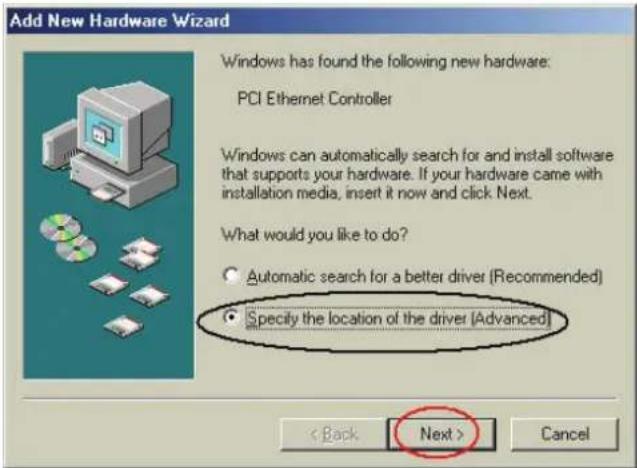
- Windows has found the new hardware
"PCI Ethernet Controller".
Select "Specify the location of the driver (Advanced)". Click Next to continue.
-
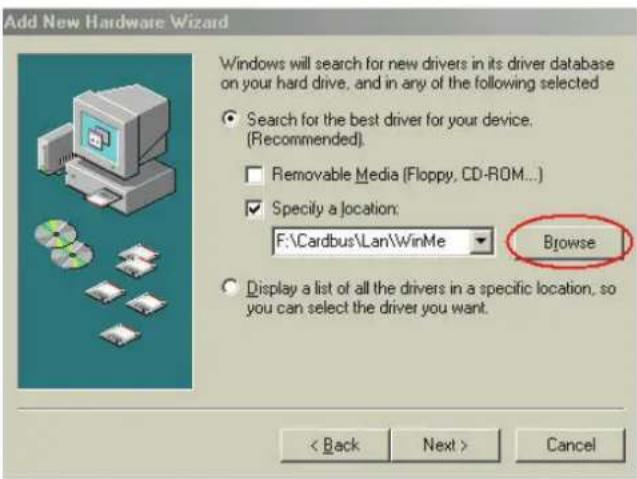
Select "Specify a location" and click "Browse" to select F:\Cardbus\LAN\WinME where F is CD-ROM drive Click "Next" to continue.
-
Windows start to install the best driver for this device and click "Next" to continue.

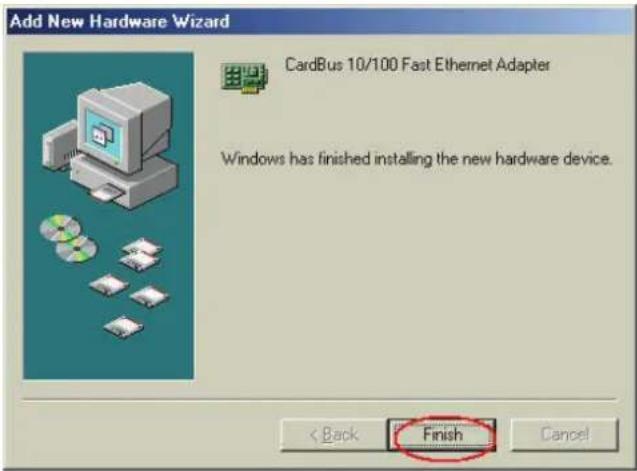
- Select "Finish" completed the installation.
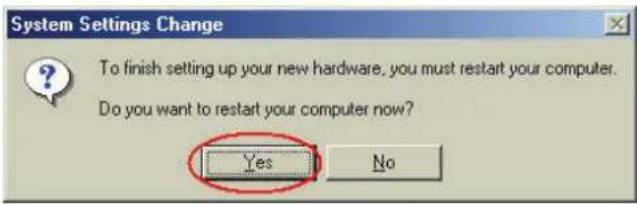
- ClickYes to restart your computer.
- If the drivers are installed successfully, you will see the following new devices in Device Manager.

Windows98/98SE
The path of the driver is F:\CARDBUS\Win9.x where F is CD-ROM drive
Windows 2000
The path of the driver is F:\CARDBUS\Win2K where F is CD-ROM drive
Windows XP
The path of the driver is F:\CARDBUS\WinXP where F is CD-ROM drive


Brand : Longshine
Model : LCS-8539TXR1
Category : Network card / adapter