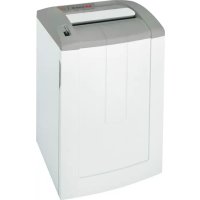
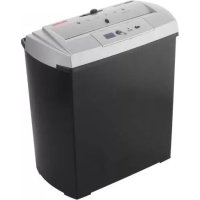
Top Secret 390 S4 - Shredder GEHA - Free user manual and instructions
Find the device manual for free Top Secret 390 S4 GEHA in PDF.



| Product type | Document shredder |
| Brand | Geha |
| Model | Top Secret 390 S4 |
| Cut type | Strip cut (5.8 mm or 3.9 mm) or cross-cut (3.9×40 mm, 1.9×15 mm, 0.78×11 mm, 1×5 mm) |
| Security level (DIN 32757-1) | Levels 2 to 6 depending on cut size |
| Cutting capacity (70 g/m²) | Up to 42 sheets (strip cut 5.8 mm); up to 7 sheets (cross-cut 1×5 mm) |
| Cutting speed | 126 mm/s (strip cut) / 135 mm/s (cross-cut) |
| Working width | 400 mm |
| Power supply | 230 V, 50 Hz (100 V and 115 V versions available) |
| Rated power | 1400 W |
| Operating mode | Continuous operation |
| Dimensions (W × D × H) | 595 × 510 × 915 mm |
| Weight | 48 kg (strip cut) / 56–58 kg (cross-cut) |
| Bin volume | 148 liters |
| Noise level | 60 dB(A) idle; up to 80 dB(A) under load |
| Operating conditions | -10 °C to +40 °C, max. humidity 90% non-condensing |
| Warranty | 2 years (10 years on cutting shafts, except security level 5 and HS Level 6) |
| Included accessories | 5 waste bags, 1 special oil bottle 50 ml, instruction manual |
| Available spare parts | Waste bags (ref. 1.442.995.000), special oil 250 ml (ref. 1.235.997.403) |
| Special functions | Auto stop, anti-jam reverse, photoelectric detection, open door safety, special slot for CDs/floppy disks |
| Maintenance | Oil the cutting unit regularly; clean with a soft cloth and non-corrosive soapy water |
Frequently Asked Questions - Top Secret 390 S4 GEHA
If the red light stays on after emptying or closing the door, wait 15-20 minutes for the motor to cool down.
User questions about Top Secret 390 S4 GEHA
0 question about this device. Answer the ones you know or ask your own.
Ask a new question about this device
Download the instructions for your Shredder in PDF format for free! Find your manual Top Secret 390 S4 - GEHA and take your electronic device back in hand. On this page are published all the documents necessary for the use of your device. Top Secret 390 S4 by GEHA.
USER MANUAL Top Secret 390 S4 GEHA
1 Proper use, warranty
The shredder is designed exclusively for destroying paper. Depending on the cutting type, it can also handle small quantities of the following materials:
| Shred width (mm) 3.9 5.8 3.9x40 | 1.9 | x15 | ||
| Credit cards • • • | • | |||
| Floppy discs, CDs • • | • |
Its sturdy drive mechanism is not damaged by paper clips and staples. Only on machines with safety level HS Level 6 (1 x 5 mm) can the paper not contain staples or paper clips.
The warranty period for the document shredder is 2 years. In addition, there is a 10 year guarantee on the solid steel blade rollers (except for security level 5, HS Level 6). This warranty and guarantee exclude wear and damage caused by improper handling or actions taken by third parties.
2 Safety instructions
- Read the operating instructions before switching on the document shredder. Save these instructions for later use.
- Observe all safety instructions on to the machine.



Risk of injury!
Do not reach into the paper feed slot.
Risk of injury from being pulled in!
Keep long hair, loose articles of clothing, ties, scarves, jewellery, etc. away from feed opening.
Material with the tendency to form loops, e.g. tapes, strapping material, etc. must not be shredded.

Keep paper shredder out of the reach of children. Do not let the shredder run if the person using it is not present.

Switch the shredder off and disconnect it from the mains if it is damaged, not working correctly or before relocating or cleaning it.
Service work may only be carried out by Pelikan Customer Service or by the service technicians of our contractual partners.
- Make sure that the mains plug is well accessible.
- Before you insert the mains plug, make sure that the voltage and frequency of your power supply comply with the information on the name plate.
Make sure that no liquid gets into the shredder. - The shredder may not be placed near a heater or other heat source.
- The ventilation slots must not be blocked or covered and there must be at least 5 cm space between the shredder and any wall or furniture.
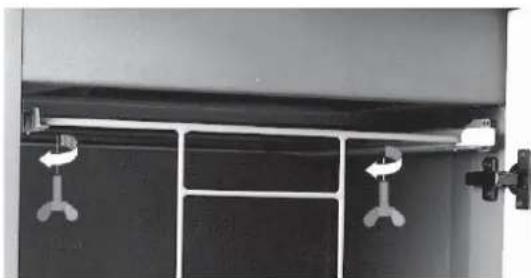
Before start-up:
Undo the wing screws securing the unit during transportation.
3 Machine components

1 Door
2 Paper feeding opening
3 Feed opening for disks and CDs
4 Safety instructions
5 LEDs
Paper shredder is ready for operation.
Paper jam or motor overloaded
Cut material container full or door open
6 Rocker switch
Switching the paper shredder on


less rocker switch ▲.
Rocker switch locks in place.

GreenLED lights.
Paper shredder is ready for operation (standby).
Feed paper

- Insert the paper to be destroyed. See "Technical data" for sheet capacity.
The shredding process is started by a pho to -cell in the paper feeding opening.
Paper is pulled into cutting system and shredded.
When the paper fee ding opening is free again, the cutting sy stem au to ma tical ly switches off at ter app rox. 3 sec. and returns to standby.
Shredding CDs and disks (see "Proper Use")
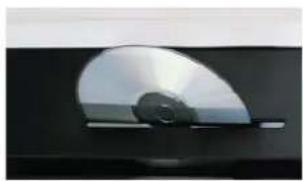
Feed CDs and disks through the slot in the safety element. This protects you from splinters.
4 Scope of delivery
- Paper shredder, ready for connection, in carton packing
- 5 Bags for shredded material
- Special cutting block oil 50ml (cross cut)
- Operating instructions
Acces sories:
- Bag for shredded material order No.: 1.442.995.000
- Special cutting block oil 250 ml order No.: 1.235.997.403
Swt ching paper shredder off

- Tap rocker switch .
Switch returns to zero or si ti on.
6 Troubleshooting
Paper jam
You have fed in too much paper.

Red LED lights.
The cutting device runs in reverse for approx. 2 seconds automatically.
Pa per is pus hed out.
NOTICE! Do not press rocker switch alternately forwards/backwards ( -) . Cutting unit could be damaged.
- Pull out the paper from the paper feed opening.
If the paper is too low and cannot be taken out: Activate the rocker switch several times briefly. Light barrier must be free of obstacles. - Acknowledge the fault by switching the machine off and on again.
- Se pa ra te pa per stack.
Press rocker switch - Feed pa per successively.
Shredded material container full

Red LED lights.
Paper shredder switches off
NOTICE! Empty the cut material container immediately, because if it is too full, malfunctions can occur in the cutting system.
- Switch equipment off. To do this tap rocker switch .
- Remove full shredded material bag and insert new bag.
Door open

Red LED lights.
Paper shredder switches off.
- Check whether front door is closed properly.
For all other malfunctions, check whether the motor was overloaded before contacting our customer service. Let the shredder cool down for approx. 15 - 20 mins. before using it again.
7 Cleaning and maintenance
Switch off the shredder and pull out the mains plug. When cleaning only use a soft cloth and a mild soap-water solution. However, no water must enter the equipment.
Check that the door switch is working properly:

Warning!
If the following procedure cannot be performed, switch off the document shredder, disconnect the mains plug and contact customer service.
- Insert the mains plug and switch on the shredder.
- Feed in a sheet of paper and open the front door while the paper is being drawn in.
The cutting unit must turn off immediately and the "door open" indicator must light up.
- Close the door.
The cutting unit must not yet restart.
- Pull the paper out of the feed opening. The light barrier must be clear.
- Switch off the machine and then switch back on.
The cutting unit starts when paper is fed in.

Oil the cutting unit when cutting performance decreases or the device becomes noisy, or every time you empty the waste container (Cross cut only):
- Spray special cutting apparatus oil through the paper feed opening along the entire width on to the cutting rollers.
- Run cutting system backwards ( ) without feeding paper.
Paper dust and particles are shaken off.
8 Technical data
| Cutting type Strip cut Cross cut | ||||||
| Shred size (mm) 5.8 3.9 3.9 x 40 1.9 x 15 0.78 x 11 1 x 5 | x 11 1 x 5 | |||||
| Safety rating German DIN 32757 - 1 | 2 | 2 | 3 | 4 | 5 | Level 6* |
| Cutting ca pa ci ty (Sheet), DIN A4 70 g/m² 80 g/m² | 40 - 42 33 - 35 | 31 - 33 25 - 27 | 25 - 27 20 - 22 | 17 - 19 13 - 15 | 10 - 11 7 - 9 | 7 - 8 6 - 7 |
| Cutting speed | 126 mm/s | 135 mm/s | ||||
| Weight | 48 kg | 56 - 58 kg | ||||
| Noise level (Idle running/ load) | 60 dB(A)/60-70 dB(A) | 60 dB(A) / 70 - 80 dB(A) | ||||
| Lo ading width | 400 mm | |||||
| Voltage | 230 V, 50 Hz 100 V, 50/60 Hz - 115 V, 60 Hz | |||||
| Power for the maximum number of sheets | 1400 W | |||||
| Operating mode | Continuous operation | |||||
| Dimensions W x D x H (mm) | 595 x 510 x 915 | |||||
| Ambient conditions in operation: Temperature Relative humidity Height above sea-level (MSL) | -10 °C to +40 °C max. 90 %, without condensation max. 2,000 m | |||||
| Volume of shredded material bag | 148 l | |||||
- Geha-specification
EC Declaration of Conformity
The manufacturer HSM GmbH + Co. KG, Austrasse 1 - 9, D-88699 Frickingen hereby declares that the machine, referred to here as
document shredder Geha top secret 390
corresponds to the health and safety requirements of the following EC directives listed below due to its conception and design of the version in which it was put into circulation by us:
Machinery directive 2006/42/EC
EMC directive 2004 / 108 / EC
Applied standards and technical specifications:
EN 55014-1:2006
EN 61000-4-2:1995 + A1:1998 + A2:2001
EN 61000-3-2:2006
EN 61000-4-4:1995 + A1:2001 + A2:2001
EN 61000-3-3:1995 + A1:2001 + A2:2005
EN 61000-4-5:1995 +A1:2001
EN 55014-2:1997 +A1:2001
EN 61000-4-6:1996 +A1:2001
EN 13849-1
EN 61000-4-11:1994 + A1:2001
EN 60950-1:2006
Authorised representative for the compilation of technical documentation:
Rolf Gasteier - Technical Director
The machine type was tested for compliance with the requirements of the EU Machinery Directive by: the test and certification board of the Technical Administration Committee, c/o Verwaltungs-Berufsgenossenschaft, Deelbogenkamp 4, D-22297 Hamburg, Germany.
This test centre is responsible in accordance with Appendix XI of the EC Machinery Directive.
Directive machines 2006/42/CE
Directive CEM 2004 / 108 / CE
6 IpeeknDHOB BbIKIOuateJIb
A:BkJIbOuHTb
V: BbIKNIOHTb, BO3BpaT
4 O6bem nocTaBkn
TOTOBBI K NOIDKJIIOHEnIO Wpeep, ynaKOBaHHbIB KAPTOHHbI RAUNK
5c6opHbIX MeIkoB
16ytbIka (50Mn) cneuaHbHoro macna dnpexkyo 6Joka (Tolbko npn Hape3Ke Ha yactubl)
- INHCTpykunno 3Kcnnyatau
PnHaIeXHOCTb:
Mewok, apt. 1.442.995.000
- Bytblnka cneuaJIbHoro macna (250 mI) apt. No 1.235.997.403
5 YnpaBJIeHne
BkIoueHne wpeepa


HaxaTb nepeKNDHOB BvIKNHOaTeNb
BbIKHouateJIb KcnpyeTc.

INdNkaTOp ropnt.
Upeep roTOB K pa6oTe.
YHnHToxeHne 6ymarn

-БумагуВCTaBnTbВприemHyU 电ь(MaKcImaJIbHoДOnyctN-MOEKOJINueCTBOJINCTOBCMOTPn «TexHnueckneDaHHbIe)
ПроцсиЗмельецни зanyckaetcФOTOлЕМENTOM.
Бумara 3aTЯгнBaETCB pexy- mMEXAHN3M N ydaJAreTcR.
ПибпиЗnteьно уер3с nocJIe nocJIeДнeroВТЯнВаня 6умагpeжуиmMexaHn3M aBTOMATNueCKN BbIKIQUaETcR IN epexOДNTВpexIM rOTOBHOCTN.
N3MeJIbYeHne KOMNaKT-ДИСКOB NДИСКET (cM. «ИспОЛьЗОВаHne NO Ha3Ha-ЧeHиO»)
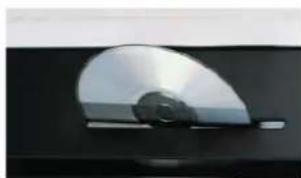
OTKINbTe 3aunTHbI
JIeMeHT Ha ce6n
BBeInTe MaepnAŋpe3 3arpy3OHyIO npope3b 3aunTHoro 3JIeMeHtA. 3To 3aunuaeT OT OCKoJIKOB.
BbikloueHne wpeedepa


- HaxaTb nepeKnIDHOB BbIKIOuATeNB. >BbIKIOUATeNB nepexOoNT B HyneBOE NOIOXeHHe.
6 YcTpaHHe NcnpaBHOCTe
3aTop 6ymarn
BbI BBeJIcNIshKOM MHoro 6yMarN OndHO-BpeMeHNo.

Fopnt KpaacHbI CBeToIDNoD.
PeKyuMEXaHn3MaBToMaTn-ueckn BpaAaeTcnaHa3aOkoNo 2 CEkyHd.
Бумara BBItaJIKNBaetcra.
BHIMAHHE! He haxumamb nepekuudou 6blnoyameIb nonepemehHO bpe- ha3ad (A - V). 3mo moxem npueecmu K noepexdehuo pexy- ueo mexahu3Ma.
- BbItaunTe 6yMaury n3 npHemHo
UeJn.
Ecnn 6yMarra HaxoNTcra CnNko
Hn3KO n He MoXeT 6bITb BbIHyTa,
HeckoIbKO pa3 Ha KOpOTKoe
BpeMra NaXMITE nepeKeiDHO
BbIKIOuHaTeJb.
OTo3JIeMeHT He DoJxeh 6bITb
nepeKpbT.
KbntnpyTe HncnpaBHOCTb nyTem BbIKIOUeHnI NOBTOpHOro BKIOUeHnMaunHbl. - UMeHbIHTb BDbOE CTONky 6ymar.
- HaxaTb nepeKnDHOB BvIKNHOaTeJb ▲.
Bymary BBecTN B HeCKOJIbKO 3TaNOB.
Pe3epByap nepenonHeN

Topnt KpaChbI CBeToND.
UpeepoKnouaetc.
BHIMAHHE! O6ra3amelbHo onopoxHumb HanoJIHeHHbI pe3ep8yap, mak KaMHO2OKpamHoe cXamue moXem npueecmu K noepeXdHuMa pexy- uzeo MexaHu3Ma.
- HaxaTb nepeKnHoi BblKnHouaTeJb
CHaTb c6OpHbIM MeWOk N 3aKpeIITb HOBbI.
HET KOHTaKaTaNpeDHeN DBePcbl

FopntKpaChbIcBeToIONoI.
WpeepoKnIouaetc.
- PpOBepntb, npaBnIbHO JN 3aKpbIta nepeHnraDbepca.
B cnyae dpynHex HeucnpabHocte, nepe TeK kak o6paTntbca B haSy cnyk6y Texnueckoro o6ecneueHnaPobepbTe, He 6blJ nn neperpyKeH DBuratel. NepeD NOBTOpHbIM BKNIOUeHEm DaIte Wpepepy oxlaadntbcra TceHHe 15 - 20 MInHyT.
7 OuNTka N TexHnueckoe 06cnyxnbHne
BbIKIOHTe Wpeepn BbITaUNTe WTeNCenb n3po3ETKn.OuNCTky pa3peWaeTcR BblONHrTb TOnbKO MmKoTKaHbU,CMOeHHoB BVODHom pactBope HeItpaJIbHOro MOIOUeO cpeDCTBa. Pn3tOM B np6Op He DoJXHa nonaDaTb BOda.
Rolf Gasteier - Director technic


- 1 PROPER USE, WARRANTY
- 2 SAFETY INSTRUCTIONS
- RISK OF INJURY
- RISK OF INJURY FROM BEING PULLED IN
- BEFORE START-UP
- 3 MACHINE COMPONENTS
- SWITCHING THE PAPER SHREDDER ON
- FEED PAPER
- SHREDDING CDS AND DISKS (SEE "PROPER USE")
- 4 SCOPE OF DELIVERY
- ACCES SORIES
- SWT CHING PAPER SHREDDER OFF
- 6 TROUBLESHOOTING
- PAPER JAM
- YOU HAVE FED IN TOO MUCH PAPER
- SHREDDED MATERIAL CONTAINER FULL
- DOOR OPEN
- 7 CLEANING AND MAINTENANCE
- CHECK THAT THE DOOR SWITCH IS WORKING PROPERLY
- WARNING
- EC DECLARATION OF CONFORMITY
- 4 O6BEM NOCTABKN
- PNHAIEXHOCTB
- 5 YNPABJIEHNE
- BKIOUEHNE WPEEPA
- YHNHTOXEHNE 6YMARN
- N3MEJIBYEHNE KOMNAKT-ДИСКOB NДИСКET (CM. «ИСПОЛЬЗОВАHNE NO HA3HA-ЧEHИO»)
- BBIKLOUEHNE WPEEDEPA
- 6 YCTPAHHE NCNPABHOCTE
- 3ATOP 6YMARN
- PE3EPBYAP NEPENONHEN
- HET KOHTAKATANPEDHEN DBEPCBL
- 7 OUNTKA N TEXHNUECKOE 06CNYXNBHNE
Brand : GEHA
Model : Top Secret 390 S4
Category : Shredder