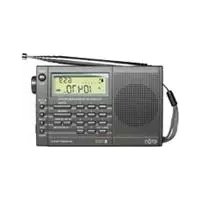
E100 - Radio ETON - Free user manual and instructions
Find the device manual for free E100 ETON in PDF.



| Product Type | AM/FM/Shortwave Radio Receiver |
| Brand | Eton |
| Model | E100 |
| Power Supply | 3 AA batteries (alkaline or rechargeable) or AC adapter (not included) |
| Reception Bands | FM (87-108 MHz), MW/AM (520-1710 kHz), Shortwave (1711-29995 kHz) |
| Tuning Methods | Manual, automatic scan, direct frequency entry, fine tuning |
| Memory | 200 stations organized into customizable pages (4, 5, 8, or 20 pages) |
| Display | LCD screen with frequency, clock, signal strength, battery level |
| Clock | Digital, 12/24-hour format with alarm and sleep timer |
| Alarm Functions | Radio alarm, snooze (3 times 10 minutes), auto-off (1-120 min) |
| Antennas | Built-in for AM (ferrite) and FM/shortwave (telescopic) |
| Controls | Volume, tone (bass/treble), antenna gain (H/M/L), lock |
| Connections | 3.5 mm headphone jack, AC adapter jack |
| Included Accessories | In-ear earphones, carrying case |
| Country Setting | Configurable for North America (default) and other regions (no FM, no AM) |
| Maintenance | Use quality batteries, avoid leaks, clean with dry cloth |
Frequently Asked Questions - E100 ETON
User questions about E100 ETON
0 question about this device. Answer the ones you know or ask your own.
Ask a new question about this device
Download the instructions for your Radio in PDF format for free! Find your manual E100 - ETON and take your electronic device back in hand. On this page are published all the documents necessary for the use of your device. E100 by ETON.
USER MANUAL E100 ETON
We want you to thoroughly enjoy the use of your E100 radio. If you need help while learning its operation, please contact us, using the methods below.
Monday-Friday, 8:30 a.m. - 4:00 p.m., North American Pacific Time.
1-800-872-2228 from the U.S.
1-800-637-1648 from Canada
1-650-903-3866, worldwide
FAX: 650-903-3867
customersvc@etoncorp.com
www.etoncorp.com
Mailing Address:
etón Corporation
1015 Corporation Way
Palo Alto, CA 94303
USA
TABLE OF CONTENTS
1 INTRODUCTION. 4
2 FEATURES 5
3 DIAGRAMS 6
4 GETTING STARTED 8
WHAT THE E100 INCLUDES 8
- INSTALLING BATTERIES 8
- SELECTING AND USING AN AC ADAPTOR 8
- SIGNAL STRENGTH AND BATTERY STRENGTH INDICATOR 8
- IMPORTANT INITIAL SET-UP 9
- TURNING THE E100 ON AND OFF
VOLUME AND TONE CONTROLS 10
SELECTING THE FM, AM OR SHORTWAVE 10 - SETTING UP AM AND FM OUTSIDE OF NORTH AMERICA 11
TUNING IN STATIONS 11
6 CLOCK AND ALARM FEATURES 13
7 WORKING WITH MEMORY 15
8 SYSTEM SET CODES AND THE SYSTEM SET CODE TABLE 21
9 OTHER E100 INFORMATION 24
10 TROUBLESHOOTING 26
11 LISTENING TO SHORTWAVE STATIONS 28
12 SHORTWAVE LISTENING GUIDE 32
13 WARRANTY REGISTRATION 38
14 LIMITED WARRANTY TO THE ORIGINAL CUSTOMER 39
15 SERVICE INFORMATION. 41
1 INTRODUCTION
Thank you for purchasing the E100 AM/FM/Shortwave Radio. This radio has been designed and manufactured to high quality standards, and will provide reliable operation for many years. Please carefully read the Owner's Manual in order to take advantage of the many interesting features of the E100.
2 FEATURES
MAJOR FEATURES OF THE E100
SHORTWAVE:1711-29.995 KHz
FM87.0-108.0MHz;MW520-1710
- Manual and Auto-Scan Tuning
- Direct Keypad Frequency Entry
- Manual/Auto Scan to scan the preset stations
- Fine-Tuning Control Knob
200 Random Programmable Memories
Memory Page Customizing
- 9/10KHz step size selector for correct worldwide Medium Wave (AM) reception
FM-Stereo/Signal Strength/Power Level Indicators
Digital Clock
- Selectable 12/24 hour clock display format
- Simultaneous display of frequency and clock
- Favorite Station Wake-Up
- Programmable Alarm
- Programmable Sleep Timer (10 - 90min.) functions
LCD display light
Built in antennas for AM, FM and SW reception
- Earphone socket (earbud style earphones included)
- AC adaptor socket (adaptor not included)
- Includes carrying pouch
3DIAGRAMS
Refers only to the display's upper right corner.
Refers only to the display's upper right corner.
MEMORY DISPLAY
Refers only to the display's upper right corner.
4 GETTING STARTED
WHAT THE E100 INCLUDES
- Earbud style earphones
- Batteries
- Carrying pouch
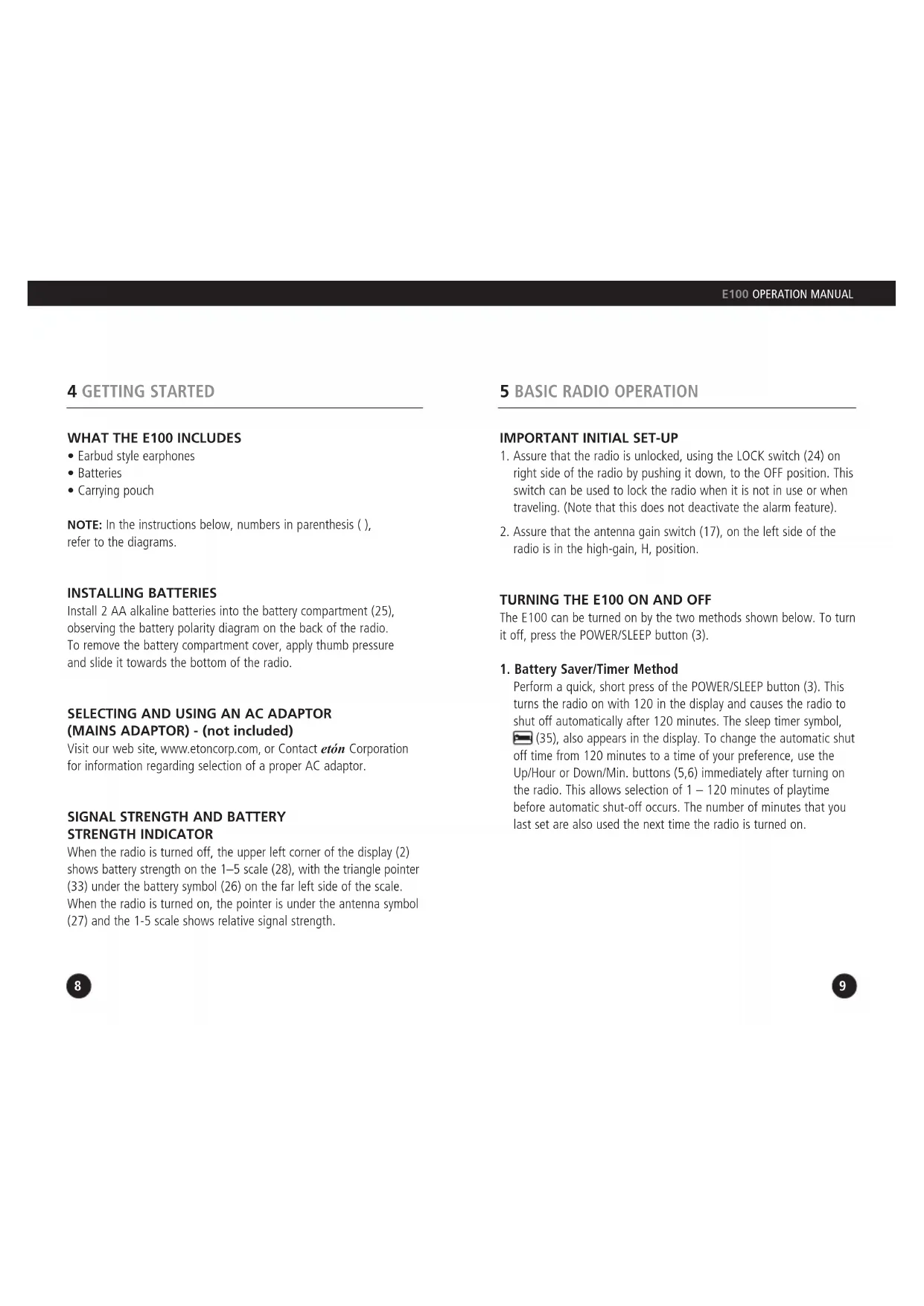
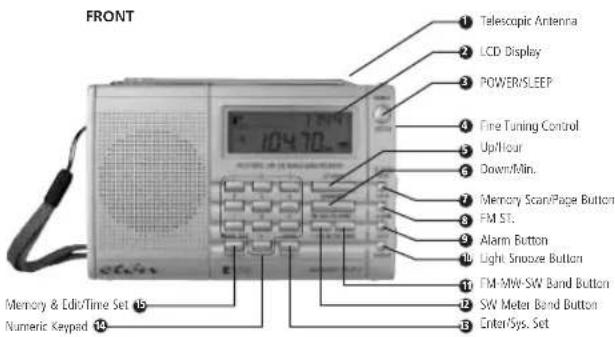
NOTE: In the instructions below, numbers in parenthesis ( ), refer to the diagrams.
INSTALLING BATTERIES
Install 2 AA alkaline batteries into the battery compartment (25), observing the battery polarity diagram on the back of the radio. To remove the battery compartment cover, apply thumb pressure and slide it towards the bottom of the radio.
SELECTING AND USING AN AC ADAPTOR (MAINS ADAPTOR) - (not included)
Visit our web site, www.etoncorp.com, or Contact eton Corporation for information regarding selection of a proper AC adaptor.
SIGNAL STRENGTH AND BATTERY STRENGTH INDICATOR
When the radio is turned off, the upper left corner of the display (2) shows battery strength on the 1-5 scale (28), with the triangle pointer (33) under the battery symbol (26) on the far left side of the scale. When the radio is turned on, the pointer is under the antenna symbol (27) and the 1-5 scale shows relative signal strength.
- Assure that the radio is unlocked, using the LOCK switch (24) on right side of the radio by pushing it down, to the OFF position. This switch can be used to lock the radio when it is not in use or when traveling. (Note that this does not deactivate the alarm feature).
- Assure that the antenna gain switch (17), on the left side of the radio is in the high-gain, H, position.
TURNING THE E100 ON AND OFF
The E100 can be turned on by the two methods shown below. To turn it off, press the POWER/SLEEP button (3).
1. Battery Saver/Timer Method
Perform a quick, short press of the POWER/SLEEP button (3). This turns the radio on with 120 in the display and causes the radio to shut off automatically after 120 minutes. The sleep timer symbol, (35), also appears in the display. To change the automatic shut off time from 120 minutes to a time of your preference, use the Up/Hour or Down/Min. buttons (5,6) immediately after turning on the radio. This allows selection of 1 - 120 minutes of playtime before automatic shut-off occurs. The number of minutes that you last set are also used the next time the radio is turned on.
BASIC RADIO OPERATION continued
2. Timer-D defeat Method
This method defeats the automatic 120 minute timer and causes the radio to stay on until deliberately turned off, until the batteries drain or indefinitely if used with an AC adaptor. Hold down the POWER button for about 3 seconds, then release. Note that '120' and the sleep timer symbol do not appear when this method is used.
VOLUME AND TONE CONTROLS
- The volume control (23), labeled VOLUME, is located on the right side of the radio. To change the volume, rotate the volume control knob.
The tone control (22), on the right side of the radio is labeled LOW/HIGH. Use the position that you like best.
SELECTING FM, AM OR SHORTWAVE
After turning on the E100, pressing the button labeled FM/MW/SW Band' (11), allows selection of FM, AM and SW. Note that when the AM band is selected, the display shows MW, not AM. The frequency digits (36) appear in the lower portion of the display.. The local stations of the area that you are currently in will be heard on AM and FM. Shortwave stations from around the world will be heard on SW.
BASIC RADIO OPERATION continued
SETTING UP AM AND FM OUTSIDE OF NORTH AMERICA You can skip this section if you are in North America and just purchased the E100. It is already set-up in the factory for use in North America. If you travel to other world regions, make the changes below as necessary.
Outside of North America, AM stations (MW in the E100's display) are spaced in 9 KHz tuning steps. The FM frequency range may be different from that used in North America, e.g. like that used in Japan, 76-108MHz. To make these changes please see the instructions titled SYSTEM SET CODE TABLE, on pages 21-22.
TUNING IN STATIONS
Four Ways to Tune in Stations
Below, four ways to tune stations are described. They are Regular Tuning, Auto-scan Tuning, Direct Frequency Entry and Fine Tuning.
1. REGULAR TUNING (also called manual tuning)
Quick, short presses of the Up/Hour-Down/Min. buttons (5,6) enables tuning up or down frequency.
2.AUTO-SCAN TUNING
Pressing the Up/Hour or Down/Min. buttons (5,6) for just over 1 second enables automatic scan-tuning. The radio will then automatically stop on the next station encountered. Use the Up/Hour button to auto-scan upward in frequency and the Down/Min. button to auto-scan downward in frequency.
BASIC RADIO OPERATION continued
3. DIRECT FREQUENCY ENTRY
When the desired frequency is known, it can be entered via the numeric keypad (14) and the 'Enter' button (13). First, make sure that the correct band is selected - AM, FM or SW.
Most AM and Shortwave frequencies are designated in kilohertz (KHz), e.g. 810 KHz or 9475 KHz. All FM frequencies are designated in megahertz (MHz), e.g. 102.9 MHz. To enter such frequencies:
- Press/release the 'Enter' (13) button.
- Enter the frequency using the numeric keypad.
Sometimes Shortwave frequencies are designated in megahertz (MHz). If you encounter such a shortwave frequency and it has less than three digits after the decimal point (e.g. 15.10 MHz or 6.92 MHz), then use the following method to enter it. However, if there are three digits after the decimal point (e.g. 15110 MHz or 5.975 MHz), use the method described previously.
- Press/release the 'Enter' (13) button.
- Enter the frequency using the numeric keypad.
- Press/release the 'Enter' button again.
4. FINE TUNING
The FINE TUNING control (4) is located on the right side of the radio. It tunes in 1 Kilohertz steps in AM and Shortwave and .05 Megahertz steps in FM. Use it to fine-tune' stations to your liking, or use it as you would a tuning knob.
6 CLOCK AND ALARM FEATURES
SETTING THE CLOCK
The factory has set the clock to function as a 24-hour format clock. If you prefer a 12 hour, AM/PM clock format, see the section titled CHANGING THE CLOCK FROM 24 TO 12 HOUR FORMAT, on page 22.
To set the clock:
- Turn the radio off. The clock digits appear in the lower part of the display (43).
- Press/release the button labeled 'Time Set' (15). The clock's digits flash in the display.
- Within 5 seconds, set the hour using the Up/Hour button and the minutes using the Down/Min. button. Make sure that AM or PM (32) appear in the display, to the left of the time, if your clock is set up in the 12 hr. AM/PM format.
- Within 5 seconds of finishing, press/release the 'Time Set' button twice or just wait until the clock digits stop flashing.
SETTING THE ALARM
Set the alarm with the instructions below. Note that the alarm must be activated to function. After setting the alarm time, be sure to read the next section titled ACTIVATING AND DEACTIVATING THE ALARM. The alarm will wake you to the last radio station tuned, unless set for Favorite Station Wake-Up (Use system set code 01. See page 21).
When the alarm activates, it turns the radio on and the alarm activation symbol (31) appears flashing in the display. The radio will play for 30 minutes, until you turn it off or until you press the SNOOZE/LIGHT button (see USING THE SNOOZE FEATURE, below).
CLOCK AND ALARM FEATURES continued
To set the alarm:
- Turn the radio off. The alarm clock digits (30) appear in the upper right corner of the display.
- Press/release the button labeled 'Time Set' twice. The alarm clock's digits flash in the display.
- Within 5 seconds, set the hour using the Up/Hour button and the minutes using the - button. Make sure that AM or PM (29) appear in the display if your clock is set up in the 12 hr. AM/PM format.
- Within 5 seconds of finishing, press the 'Time Set' button once or just wait until the alarm digits stop flashing.
USING THE SNOOZE FEATURE
When the alarm activates and turns the radio on, the alarm activation symbol (31) appears flashing in the display. While it is flashing, press/release the SNOOZE/LIGHT button (10). The radio will turn off and then turn on again in 10 minutes. This process can be repeated 3 times.
ACTIVATING AND DEACTIVATING THE ALARM
The alarm is activated and deactivated by pressing the button labeled 'Alarm' (9). When it is activated, the alarm activation symbol (31) appears in the display. When this symbol is not in the display, it is deactivated. Note that once the alarm turns the radio on, with the alarm symbol flashing, except for the SNOOZE/LIGHT button, the radio's controls will not function until the ON/OFF-TIMER button is pressed.
7 WORKING WITH MEMORY
At the factory, the E100 is set up with 8 pages of memory, each page holding 25 frequencies. This enables storing of 200 frequencies into memory. This factory setting can be changed and tailored to your personal needs or can be left as-is. When first learning to store stations into memory, we suggest using the factory setting. To change the factory setting, see the section CUSTOMIZING MEMORY PAGES on page 20. Otherwise, follow the instructions below to store your favorite frequencies into memory using this original factory memory set-up.
STORING STATIONS INTO MEMORY
The instructions below show you how to store stations (frequencies) into the currently selected memory page.
- Turn on the radio.
- Tune to the desired station.
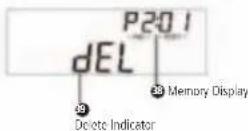
- Press/release the Mem.&Edit button (15). Note that the memory number digits (38) flash in the upper right corner of the display. The memory page number, P#, also appears, but does not flash.
- Within 5 seconds use the numeric keypad to enter the memory number that you wish to store the station into (In the factory's original memory setting, there are 25 memories per page. You would therefore enter a number between 01 and 25).
- Within 5 seconds press the Mem.&Edit button, or wait 5 seconds.
After a few seconds, the upper right corner's display returns to the clock.
WORKING WITH MEMORY continued
SELECTING/CHANGING MEMORY PAGES
If you are not interested in changing memory pages and wish to keep the original factory memory page setting, skip this section. At the factory, the E100 is set up to access memory page 1 when storing a frequency. You can leave this as-is or change to a different memory page. We suggest learning first to store stations into memory page 1 before changing to other pages. To do this, go to the previous section, STORING STATIONS INTO MEMORY. To change to the memory page, follow the directions below.
- Press/hold the M.Scan/Page button (7) for about 3 seconds. Then release it. Note that the memory page (38) is flashing in the upper right corner of the display.
- Within 5 seconds select the desired page with the Up/Hour and Down/Min. buttons (5,6). You will see the memory page change with each press. When the page of your choice is reached, stop pressing.
- When finished, either press/release the M.Scan/Page button, or wait about 3 seconds, causing the memory page to be entered. The clock (34) will reappear in the display's upper right corner.
WORKING WITH MEMORY continued
ACCESSING WHAT IS STORED INTO MEMORY
There are three ways to access what has been stored into memory: Direct Memory Access, Memory Search and Memory Auto-scan. These three methods are described below. When the memory page and memory preset numbers appear in the upper right corner of the display, as it will in the descriptions below, the radio is in MEMORY ACCESS MODE. This mode can be exited any time with a press/release of the M.Scan/Page button (7).
Direct Memory Access
If you are already on the desired memory page, simply key- in the memory number with the numeric keypad. For example, if the desired radio station is in memory number 01, just press '0', then '1', and it will go to memory 01.
If you first need to change memory pages, see the previous section, SELECTING/CHANGING MEMORY PAGES.
Memory Search
Memory Search enables manual searching through the memories within a memory page, as shown below:
- Press/release the MSCAN/Page button.
- Use quick, short presses on the Up/Hour or Down/Min. buttons to search through the memories.
WORKING WITH MEMORY continued
Memory Auto-Scan
Memory Auto-scan enables scanning through the memories within the selected memory page. Each filled memory is accessed for about 5 seconds, after which the scan move on to the next used memory automatically, staying on it for about 5 seconds. This continues indefinitely on the selected page until deliberately stopped. Unused memories are not accessed.
- Press/release the M.Scan/Page button.
- Press/hold either the Up/Hour or Down/Min. button for about 3 seconds. Then release it. Note that the memory number in the upper right corner of the display flashes and the preset being scanned remains for about 5 seconds. It then moves on to the next memory preset for another 5 seconds.
To stop memory preset auto-scan, press/release either the Up/Hour or Down/Min. button.
WORKING WITH MEMORY continued
MOVING A STORED FREQUENCY
If desired, a frequency that has been stored into a memory can be moved to a different memory on the same page, or a different page.
- Turn on the radio.
- Press/hold the M.Scan/Page button (7) for about 3 seconds and release it.
- Use the Up/Hour or Down/Min. button (5,6) to select the required memory page.
- Press/release the MSCAN/Page button twice.
- Press/release the Mem.&Edit button (15).
- Within 5 seconds use the numeric keypad to enter the memory number that you wish to store the station into.
- Within 5 seconds press/release the Mem.&Edit button.
DELETING A FREQUENCY STORED IN MEMORY
- Press/release the M.Scan/Page button (7).
- Use the Up/Hour or Down/Min. button (5,6) to select the memory preset location of the frequency that you wish to delete.
- Press/hold the Mem.&Edit button (15) for about 2 seconds and then release it. 'dEL' appears flashing in the display.
- Within 2 seconds, press/release the Mem.&Edit button.
WORKING WITH MEMORY continued
DELETING ALL MEMORY CONTENTS OF A PAGE
- Press/release the M.Scan/Page button (7).
- Press/hold the Mem.&Edit button (15) for 4 seconds and then release it. 'Del' (39) appears flashing in the display.
- Within 2 seconds, press/release the Mem.&Edit button.
CUSTOMIZING MEMORY PAGES
The E100 is configured at the factory with 8 memory pages, each page having 25 memories, for a total of 200 memories. You can change this set-up. The number of memory pages can be set to your choice of 4, 5, 8 or 20. This changes the number of frequencies stored per page, but in all cases, 200 total frequencies can be stored. To see the details of these changes and to make these changes please see the instructions titled SYSTEM SET CODE TABLE, on Pages 21-23.
8 SYSTEM SET CODES AND THE SYSTEM SET CODE TABLE
Please review the System Set Code Table, below. System Set Codes allow the radio to be tailored to your needs by changing certain programmable functions. These functions and their descriptions are noted in the table.
| CODE DESCRIPTION SHOWN IN NO. DISPLAY | ||
| 01* Alarm uses radio station on page 1, Mem 1 AL. 1 | ||
| 02* Alarm uses last radio station tuned AL. 2 | ||
| 04 Divide the memories into 4 pages with P4: 50 50 locations | ||
| 05 Divide the memories into 5 pages with 40 locations P5: 40 | ||
| 08 Divide the memories into 8 pages with 25 locations P8: 25 | ||
| 20 Divide the memories into 20 pages with 10 locations P20: 10 | ||
| 09* Set the tuning steps for MW (AM) to 9KHz 9KHz | ||
| 10* Set the tuning steps for MW (AM) to 10KHz | 10KHz | |
| 12* Set the clock system to 12Hr | 12H | |
| 24* Set the clock system to 24H | 24H | |
| 22 Check all the segments on LCD display and model no. All LCD segments show | ||
| 28* Rechargeable battery to be used | 1.2 | |
| 29* Normal AAA battery to be used | 1.5 | |
| 76* Set the FM frequency range to 76-108MHz (Japan) | 76 108 | |
| 88* Set the FM frequency range to 87-108MHz (N. America; Western Europe) | 87 108 | |
SYSTEM SET CODES AND THE SYSTEM SET CODE TABLE continued
CHANGING SYSTEM SET CODES
To enter a system code of your choice, use the procedure below.
- Turn off the radio.
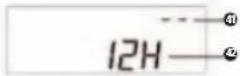
- Press/release the 'Sys. Set' button (13). Note that '--' (41) appears in the upper right corner of the display and the clock digits disappear.
- Within 5 seconds, enter the desired numeric code with the numeric key pad, then immediately press/release the button labeled ENTER. The code ICON (42) will briefly appear in the lower right corner of the display.
CHANGING THE CLOCK FROM 24 TO 12 HOUR FORMAT - AN EXAMPLE OF CHANGING A SYSTEM SET CODE
The instructions below serve as an excellent example of how to change a system set code, in this case changing the clock system to a 12 hour format:
- Turn off the radio.
- Press/release the 'Sys. Set' button. Note that '--' appears in the upper right corner of the display and the clock digits disappear.
- Within 5 seconds, enter 12 with the numeric keypad, then immediately press/release the button labeled ENTER. '12H' briefly appears in the display.
SYSTEM SET CODES AND THE SYSTEM SET CODE TABLE continued
DEFAULT FACTORY SYSTEM SET CODES
When shipped from the factory, the radio's System Set Code Table is set up as follows. Changes can be made via the procedure shown in the section titled CHANGING SYSTEM SET CODES.
- Radio alarm uses last station tuned. Code 02.
Eight pages with 25 memories (200 memories total).Code 08. - 10 KHz AM (MW) tuning rate. Code 10.
24 hour clock system. Code 24.
1.5 Volt AA batteries. Code 29.
87-108 MHz FM frequency coverage. Code 88.
MONITORING CURRENT SET CODE STATUS
In the System Set Code Table, the current status of the set codes identified with an asterisk (*) can be monitored by performing a 3 second press of the 'Sys. Set' button. The applicable icon shows briefly in the display window for each code.
9 OTHER E100 INFORMATION
USING THE LIGHT
A quick, short press/release of the SNOOZE/LIGHT button (10), located at the top of the radio, will turn on the display light, shining from the right side of the display, for about 10 seconds. A longer, 5 second press/release of the button will cause it to stay on indefinitely (note that this will greatly decrease battery life). Turn off the light with a quick short press of the button.
USING EARPHONES
Plug stereo earphones/headphones with a 1/8 inch stereo plug into the earphone socket (19) on the left side of the radio.
USING THE ANTENNA GAIN SWITCH
The Antenna Gain switch (17) has three positions, H, M and L representing High, Medium and Low antenna gain. This switch should normally be in the H position. If the AM or Shortwave station that you are listening to is overwhelmingly powerful and causes distortion, try the M or L position. This switch is not used for FM stations.
USING THE LOCK SWITCH
Placing the LOCK switch (24) into the ON position will render all buttons and the FINE TUNING control inoperative. If the radio is turned on while LOCK is on, the volume control is still operative. This is an excellent feature to use when traveling. Before placing the radio into a suitcase, purse or briefcase, turn it off and then lock it. This will prevent accidental turn-on and battery drainage.
OTHER E100 INFORMATION continued
PREVENTING BATTERY ACID LEAKAGE
To avoid battery acid leakage, only use high quality alkaline or rechargeable nickel-metal-hydride batteries. Never intermix old with new, or different brands or types of batteries. If the batteries leak, don't throw them away and immediately contact the manufacturer of the batteries. Battery acid leakage is not covered by warranty and voids the warranty.
10 TROUBLESHOOTING
RESET PROCEDURE
When performing a 'reset', assure that the batteries in use are good. If the radio does not function and the solutions below do not resolve the problem, perform a 'reset'. To do this, slide the RESET switch, on the bottom of the E100, in the direction of the arrow.
WILL NOT TURN ON
- Assure that the LOCK switch is in the OFF position (pushed down).
- Assure that the radio has power (batteries installed or AC adaptor plugged in.
- If using an AC adaptor, assure that it is plugged into the household outlet (mains socket) and into the radio's DC socket. Take care not to plug it into the earphone socket.
- Assure that batteries are inserted with correct polarity
- Assure that the batteries are not depleted
CLOCK SHOWS IN DISPLAY, BUT RADIO WILL NOT TURN ON
There are two possibilities: dead batteries or the LOCK switch is ON.
SHUTS OFF ABRUPTLY WHILE PLAYING DURING BATTERY USE
This is caused by depleted batteries. Replace them.
SHUTS OFF ABRUPTLY WHILE BEING MOVED DURING AC ADAPTOR USE
This is caused by a broken wire or loose connection in the AC adaptor cord.
TROUBLESHOOTING continued
OPERATES ERRATICALLY
Perform a RESET, as described in the section titled RESET PROCEDURE.
STATIONS ARE RECEIVED太O WEAK
Assure that the ANTENNA GAIN switch is set to the H position.
Assure that the telescopic antenna is pulled up all the way for FM and Shortwave reception.
- When listening to AM stations, swivel the radio. The AM internal ferrite bar antenna is highly directional.
THERE IS NO SOUND FROM THE SPEAKER
Assure that earphones/headphones are not plugged in and that the volume control is turned up.
A STATION CAUSES SEVERE AUDIO DISTORTION, BUT SEEMS TO BE VERY STRONG IN SIGNAL STRENGTH
This is probably a strong, local station, very close to your location. Because of its close proximity to you, its signal is too strong. To reduce signal strengths, place the ANTENNA GAIN switch into the M or L position. Also, try retuning the station with the FINE TUNING control.
THE BATTERY COMPARTMENT HAS A STICKY LIQUID OR DRIED WHITE POWDER IN IT
This is the result of battery acid leakage. Battery acid leakage is not covered by warranty. Do not throw away the leaked batteries and immediately contact their manufacturer.
11 LISTENING TO SHORTWAVE STATIONS
Shortwave enables listening to stations from around the world. To get you started, some basics are noted below. Also see the SHORTWAVE LISTENING GUIDE in this manual.
Night shortwave reception is almost always better than daytime shortwave.
- During daytime the most active shortwave bands are 13, 15, 16, 19, and 22 meters. 16 and 19 usually being the best. At night, the most active bands are 25, 31, 41 and 49 meters, with 31 and 49 usually best.
- Around sunset and sunrise, both the day and night bands may be good, sometimes exceptionally good. Listening at these times can often be quite rewarding.
- Signal strengths are often stronger when holding the radio in your hands and being very close to a window.
SELECTING A SHORTWAVE METER BAND
What is a band? It's a frequency range. In this case, a frequency range in which international radio stations will be found.
All 14 of the international broadcast bands can be accessed. The bands are numbered 120, 90, 75, 60, 49, 31, 25, 22, 19, 16, 15, 13 and 11 meters and are commonly called 'Meter Bands'. See the section below titled SHORTWAVE BAND CHART OF AUTO-SCANNING RANGES, which shows the full frequency range of each band used by the radio's auto-scan system.
LISTENING TO SHORTWAVE STATIONS continued
There are two ways to access a band. Each method places the tune at the beginning of the accessed band's frequency range.
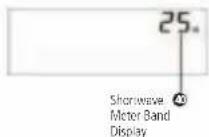
- Each successive quick, short press of the button labeled SW METER BAND (12) places the radio at the beginning of a band. While pressing the button, the band number shows in the upper right corner of the display (40) and disappears a few seconds after it is released, causing the clock to reappear in the corner. Start tuning only after the clock reappears. If you don't wait, then method 2, below will automatically be used.
- Perform one quick, short press of the button labeled SW METER BAND, immediately followed by quick, short presses of either the Up/Hour or Down/Min. tuning buttons. The band number appears in the upper right corner of the display. Once the band of choice is selected, start tuning after the clock reappears in the upper right corner.
AUTO-SCAN TUNING WHILE IN SHORTWAVE
In shortwave, auto-scan tuning only auto-scans in the shortwave frequency ranges noted in the Band Chart below. To tune shortwave frequencies that are in-between these ranges, or outside of these ranges, use one of the other tuning methods, e.g. Regular Tuning (manual tuning), described previously.
LISTENING TO SHORTWAVE STATIONS continued
SHORTWAVE BAND CHART OF AUTO-SCANING RANGES
| BAND FREQUENCY METER RANGE (kilohertz) | |
| 120 225 | - 2550 |
| 90 3150 | - 3450 |
| 75 3850 | - 4050 |
| 60 4700 | - 5100 |
| 49 5800 | - 6300 |
| 41 7100 | - 7500 |
| 31 9400 | - 1000 |
| 25 1150 | - 12150 |
| 22 1350 | - 13900 |
| 19 1500 | - 15900 |
| 16 1745 | - 18000 |
| 15 1885 | - 19100 |
| 13 2145 | - 21950 |
| 11 2560 | - 26100 |
LISTENING TO SHORTWAVE STATIONS continued
PUBLICATIONS THAT PROVIDE MORE DETAILED SHORTWAVE INFORMATION
There are two excellent publication that provide very detailed shortwave information, including a listing of all world-wide shortwave stations, their specific frequencies, broadcast times and target areas. These publications are listed below and are available from major bookstores and at online booksellers.
Published by International Broadcasting Services.
IBS North America, Box 300, Penn's Park, PA 18943
Phone: 215-598-3794
www.passband.com
WORLD RADIO TV HANDBOOK
Published in North America by Watson Guptil Publications. 770 Broadway - 7th Floor, New York, NY 10003-9595 www.watsonguptill.com
12 SHORTWAVE LISTENING GUIDE
Now that you have a shortwave radio, no doubt you'll want to hear worldwide stations right away. If you're new to shortwave, please take some time to learn the basics outlined below. To successfully listen to shortwave stations you must know how to find them. They are found in the shortwave bands. If you're an experienced shortwave listener, you'll know what bands are and how to use them, but if you're new, you'll need to learn about bands first. After that, you will have excellent success. Please read on.
WHAT ARE BANDS? To fully enjoy shortwave listening, this is the most important concept to learn right away.
If you have ever listened to AM or FM radio, then you already know what a band is. The AM band is a frequency range stretching form 530 to 1600 kilohertz, the FM band is 66-108 megahertz. A band is simply a frequency range where stations are located. When you look for stations in these "bands", you simply tune around with your tuning buttons (or the tuning knob on an analog radio) until you find a station you like. Shortwave is similar and the shortwave bands have names like 25 meters, 31 meters, 49 meters, etc.These are abbreviated 25m , 31m and 49m . Just like in AM and FM radio, one simply gets into the shortwave band and tunes around, looking for stations.
SHORTWAVE LISTENING GUIDE continued
For example, the 19 meter shortwave band encompasses the frequency range of 15100 to 15600 kilohertz. In the chart below is a list of the shortwave bands used for international shortwave broadcasts and their corresponding frequency ranges. Since some radios show frequency in megahertz and some in kilohertz, both are shown here. Look at your radio's tuning scale or digital display (or owner's manual) to determine which frequency designation it uses in shortwave. Most radios use the abbreviations KHz and MHz. On some shortwave radios these frequencies will look like 15100 KHz, 15105 KHz or 15110 KHz, but on other radios they might look like this: 15.1 MHz, 15.105 MHz or 15.11 MHz. That's because some radios show frequencies as kilohertz and others show the frequencies as megahertz, as in the accompanying table. The exact frequency ranges for these bands may vary somewhat from one radio model to another. This is perfectly OK. On some radios the bands are clearly marked, on others they are not marked at all. If it is not apparent how to get into a band on your radio, consult the owner's manual, the eton Corporation web site (www.etoncorp.com) or contact eton Corporation and we'll show you how this is done for your model.
A HELPFUL ANALOGY: a shortwave band is like a street with many individual addresses on it.
Think of a shortwave band as you would a street with a full range of individual addresses on it, each address is a specific frequency. The 19 meter band could be called 19 Meter Street. As on any street, we have a range of addresses encompassing individual house numbers such as 15100, 15105, 15110, etc., each of these house numbers representing an individual house that you could visit on the street. In the 19 meter shortwave band, these 'addresses' or 'house numbers' are called frequencies and on each frequency you might visit a different shortwave radio station.
SHORTWAVE LISTENING GUIDE continued
| BAND MEGAHERTZ (MHz) KILOHERTZ (KHz) | |
| 120 m 2 | 300-2.500 MHz 2300-2500 KHz |
| 90 m 3.20-3.40 MHz 3200-3400 KHz | |
| 75 m 3.90-4.00 MHz 3900-4000 KHz | |
| 60 m 4.750-5.060 MHz 4750-5060 KHz | |
| 49 m 5.950-6.20 MHz 5950-6200 KHz | |
| 41 m 7.10-7.60 MHz 7100-7600 KHz | |
| 31 m 9.20-9.90 MHz 9500-9900 KHz | |
| 25 m 11.600-12.200 MHz 11600-12100 KHz | |
| 22 m 13.570-13.870 MHz 13570-13870 KHz | |
| 19 m 15.10-15.80 MHz 15100-15800 KHz | |
| 16 m 17.480-17.90 MHz 17480-17900 KHz | |
| 13 m 21.450-21.850 MHz 21450-21850 KHz | |
| 11 m 25.60-26.10 MHz 25600-26100 KHz | |
SHORTWAVE LISTENING GUIDE continued
DAY BANDS AND NIGHT BANDS - THE DIFFERENCE IS IMPORTANT
Because shortwave signals depend on such factors as the sun, the ionosphere and interaction with the earth itself, signals cannot be heard on all bands throughout the day. Some bands are best during the daylight hours, and some are best at night. In general, the bands with frequencies below 13 MHz (13000 KHz) are better at night and the bands with frequencies above 13 MHz (13000 KHz) are best during the day. Listed below are the characteristics of the major shortwave bands. Follow these guidelines for best listening results. How to get into a specific band will vary from one radio to another. Consult your owner's manual for instruction on how to access the bands on your radio or call eton Corporation if it's not clear to you.
SUNSET AND SUNRISE - OFTEN THE VERY BEST TIME TO LISTEN
We are often asked whether there is a truly best time for listening to shortwave, when signals are strongest and clearest. Often, this is a window of hours right around sunset and sunrise. Sometimes it's a two-hour window, other times three or four hours. Experiment to determine when it's best in your area.
SHORTWAVE LISTENING GUIDE continued
DAYTIME LISTENING
Shortwave listening is generally at its poorest during the daylight hours of about 10 a.m. to 3 p.m. The major reason for this is that the broadcasters are not transmitting to North America at this time, assuming that we are all either at work or at school and are not able to listen during the day. If you want to try daytime listening, use the guidelines below. Typically, daytime shortwave tends to be better in Eastern North America than in Western North America. The best daytime bands are shown in BOLD print in the table below.
DAY BANDS CHARACTERISTICS
| 13m Results vary. Worth trying. Sometimes extremely good around sunrise and sunset. |
| 16m Similar to 19m. |
| 19m The best overall daytime band. May also be good at night in the summer months. Sometimes extremely good around sunrise and sunset. Sometimes good at night in the summer. |
| 22m Similar to 19m. |
| 25m Best around sunrise and sunset. May be good mid-day in Eastern North America. |
| 31m Similar to 25m. |
SHORTWAVE LISTENING GUIDE continued
This is the best time to listen, because the broadcasters are deliberately transmitting to North America. These bands may be extremely good around sunset and sunrise too. Best night bands are shown in BOLD print in the table below.
NIGHT BANDS CHARACTERISTICS
| 25m Similar to 31m. |
| 31m Good all night everywhere. Often extremely good at sunrise and sunset. Good results often start about an hour before sunset. |
| 41m Similar to 49m. Good all night in Eastern North America; varies in Western North America. |
| 49m The best overall night band. |
IMPORTANT NOTE: Getting close to a window may substantially improve your reception. The construction materials of some buildings simply do not let signals in very well. Signals penetrate wood frame buildings easiest, while concrete and brick buildings usually block signals. If you are in a building with one or more stories above you, signals can also be impaired in strength. In such a situation, position yourself, and especially the radio's antenna, as close to a window as possible while listening.
13 WARRANTY REGISTRATION
To ensure full warranty coverage or product updates, registration of your eton or Grundig product should be complete as soon as possible after purchase or receipt. To register your radio, please select one of the following methods:
1) Register by visiting our website at http://www.etoncorp.com
2) Call our toll-free registration number anywhere in the United States or Canada at (888) 889-4391 or world-wide by dialing (204) 336-6547. French and English speaking operators available.
3) Mail your registration information to the following address:
etón Corporation
1015 Corporation Way
Palo Alto, CA 94303
PRODUCT REGISTRATION
Include your name, full mailing address, phone number, model purchased, date purchased, retail vendor name and product serial number (typically located in or near the battery compartment).
14 LIMITED WARRANTY TO THE ORIGINAL CUSTOMER
This eton or Grundig brand product, as supplied and distributed by eton Corporation (eton) is warranted by eton against manufacturing defects in material and workmanship for the following limited warranty period:
ONE (1) YEAR PARTS AND LABOR
This limited warranty begins on the original date of purchase, and is valid only on products purchased through an authorized eton retailer and does not include transportation, installation, removal or reinstallation. Warranty repairs must be performed by eton or eton's authorized service center. To receive warranty service, the original dated bill of sale must be presented upon request as proof of purchase to eton or eton's authorized service center. Transportation to eton or eton's authorized service center is the responsibility of the purchaser.
etón will repair or replace this product, at our option and at no charge with new or reconditioned parts, if found to be defective during the limited warranty period specified above. The product must be returned no later than 15 days beyond the expiration of the warranty period with transportation charges prepaid to etón or etón's designated service center for warranty coverage. Prior to returning any product for warranty service, the purchaser must contact etón for problem determination and service procedure. All replaced parts and products become the property of etón. Replacement parts and products assume the remaining original warranty, or ninety (90) days, whichever is longer.
LIMITED WARRANTY TO THE ORIGINAL
CUSTOMER continued
This limited warranty covers manufacturing defects in material and workmanship encountered in normal, noncommercial use of this product and shall not apply to the following, including, but not limited to: damage which occurs due to applications and uses for which the product was not intended; failures or problems which are caused by products or equipment not supplied by eton; accidents, misuse, abuse, neglect, misapplication, fire, water, lightning, or other acts of nature; incorrect line voltage, fluctuations or surges; damage caused by improper or faulty installation (including batteries, which may create an acid leak with irreversible circuit damage); damage caused by acid leakage; product alteration or modification; or use of unauthorized parts, supplies, accessories, or equipment which damage this product or result in service problems.
15 SERVICE INFORMATION
SERVICE YOUR eton OR GRUNDIG PRODUCT
To obtain service for your eton or Grundig product we recommend first contacting an eton service representative at 800-872-2228 US, 800-637-1648 Canada or (650) 903-3866 for problem determination and trouble-shooting. Many of the common questions can be resolved quickly over the phone.
There are two service types should your eton or Grundig product need repair.
1) WARRANTY -
If your product is still in warranty and the eton service representative determines that warranty service is needed, a return authorization will be issued and instructions for shipment to an authorized warranty repair facility. Do Not ship your radio back without obtaining the return authorization number.
2) NON-WARRANTY -
If your product is no longer under warranty and requires service our technical staff will refer you to the nearest repair facility that will be able to best handle the repair.
etón
AVEZ-VOUS BESOIN D'AIDE?
CE QUI EST INCLUS AVEC LE E100
LE SIGNAL DES STATIONS REÇUES EST TROP FAIBLE
14 GARANTIE LIMITÉE AU CLIENT INITIAL
IBS North America, Box 300, Penn's Park, PA 18943
U.S.A. Telefono: +215 598-3794
www.passband.com
WORLD RADIO TV HANDBOOK
Pubblicato in Nord America alla Watson Guptil Publications, 770 Broadway - 7th Floor, New York, NY 10003-9595, U.S.A.
www.watsonguptill.com
12GUIDA ALL'ASCOLTO DELLE ONDE CORTE
CAPE RE LE BANDE: LA CHIAVE DI LETTURA DELLE ONDE CORTE
Introduzione
1-800-637-1648 from Canada
1-650-903-3866, worldwide
FAX:650-903-3867
customersvc@etoncorp.com
www.etoncorp.com
etón Corporation
1015 Corporation Way
Palo Alto, California 94303
USA

v.12-07-04


- TABLE OF CONTENTS
- INTRODUCTION
- FEATURES
- MAJOR FEATURES OF THE E100
- 3DIAGRAMS
- GETTING STARTED
- WHAT THE E100 INCLUDES
- INSTALLING BATTERIES
- SELECTING AND USING AN AC ADAPTOR (MAINS ADAPTOR) - (not included)
- SIGNAL STRENGTH AND BATTERY STRENGTH INDICATOR
- TURNING THE E100 ON AND OFF
- Battery Saver/Timer Method
- BASIC RADIO OPERATION continued
- Timer-D defeat Method
- VOLUME AND TONE CONTROLS
- SELECTING FM, AM OR SHORTWAVE
- TUNING IN STATIONS
- REGULAR TUNING (also called manual tuning)
- 2.AUTO-SCAN TUNING
- DIRECT FREQUENCY ENTRY
- FINE TUNING
- CLOCK AND ALARM FEATURES
- SETTING THE CLOCK
- To set the clock:
- SETTING THE ALARM
- CLOCK AND ALARM FEATURES continued
- To set the alarm:
- USING THE SNOOZE FEATURE
- ACTIVATING AND DEACTIVATING THE ALARM
- WORKING WITH MEMORY
- STORING STATIONS INTO MEMORY
- WORKING WITH MEMORY continued
- SELECTING/CHANGING MEMORY PAGES
- ACCESSING WHAT IS STORED INTO MEMORY
- Direct Memory Access
- Memory Search
- Memory Auto-Scan
- MOVING A STORED FREQUENCY
- DELETING A FREQUENCY STORED IN MEMORY
- DELETING ALL MEMORY CONTENTS OF A PAGE
- CUSTOMIZING MEMORY PAGES
- SYSTEM SET CODES AND THE SYSTEM SET CODE TABLE
- SYSTEM SET CODES AND THE SYSTEM SET CODE TABLE continued
- CHANGING SYSTEM SET CODES
- CHANGING THE CLOCK FROM 24 TO 12 HOUR FORMAT - AN EXAMPLE OF CHANGING A SYSTEM SET CODE
- DEFAULT FACTORY SYSTEM SET CODES
- MONITORING CURRENT SET CODE STATUS
- OTHER E100 INFORMATION
- USING THE LIGHT
- USING EARPHONES
- USING THE ANTENNA GAIN SWITCH
- USING THE LOCK SWITCH
- OTHER E100 INFORMATION continued
- PREVENTING BATTERY ACID LEAKAGE
- TROUBLESHOOTING
- RESET PROCEDURE
- WILL NOT TURN ON
- CLOCK SHOWS IN DISPLAY, BUT RADIO WILL NOT TURN ON
- SHUTS OFF ABRUPTLY WHILE PLAYING DURING BATTERY USE
- SHUTS OFF ABRUPTLY WHILE BEING MOVED DURING AC ADAPTOR USE
- TROUBLESHOOTING continued
- OPERATES ERRATICALLY
- STATIONS ARE RECEIVED太O WEAK
- THERE IS NO SOUND FROM THE SPEAKER
- A STATION CAUSES SEVERE AUDIO DISTORTION, BUT SEEMS TO BE VERY STRONG IN SIGNAL STRENGTH
- THE BATTERY COMPARTMENT HAS A STICKY LIQUID OR DRIED WHITE POWDER IN IT
- LISTENING TO SHORTWAVE STATIONS
- SELECTING A SHORTWAVE METER BAND
- LISTENING TO SHORTWAVE STATIONS continued
- AUTO-SCAN TUNING WHILE IN SHORTWAVE
- SHORTWAVE BAND CHART OF AUTO-SCANING RANGES
- PUBLICATIONS THAT PROVIDE MORE DETAILED SHORTWAVE INFORMATION
- WORLD RADIO TV HANDBOOK
- SHORTWAVE LISTENING GUIDE
- WHAT ARE BANDS? To fully enjoy shortwave listening, this is the most important concept to learn right away.
- SHORTWAVE LISTENING GUIDE continued
- A HELPFUL ANALOGY: a shortwave band is like a street with many individual addresses on it.
- DAY BANDS AND NIGHT BANDS - THE DIFFERENCE IS IMPORTANT
- SUNSET AND SUNRISE - OFTEN THE VERY BEST TIME TO LISTEN
- DAYTIME LISTENING
- WARRANTY REGISTRATION
- PRODUCT REGISTRATION
- LIMITED WARRANTY TO THE ORIGINAL CUSTOMER
- ONE (1) YEAR PARTS AND LABOR
- LIMITED WARRANTY TO THE ORIGINAL
- CUSTOMER continued
- SERVICE INFORMATION
- SERVICE YOUR eton OR GRUNDIG PRODUCT
- 1) WARRANTY -
- 2) NON-WARRANTY -
- etón
- AVEZ-VOUS BESOIN D'AIDE?
- CE QUI EST INCLUS AVEC LE E100
- LE SIGNAL DES STATIONS REÇUES EST TROP FAIBLE
- GARANTIE LIMITÉE AU CLIENT INITIAL
- 12GUIDA ALL'ASCOLTO DELLE ONDE CORTE
- CAPE RE LE BANDE: LA CHIAVE DI LETTURA DELLE ONDE CORTE
- Introduzione
Brand : ETON
Model : E100
Category : Radio