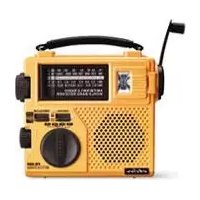
G2 - Radio ETON - Free user manual and instructions
Find the device manual for free G2 ETON in PDF.


Pick your language and provide your email: we'll send you a specifically translated version.
| Product Type | Portable AM/FM Radio |
| Brand | Eton |
| Model | G2 |
| Dimensions (W x H x D) | 5.7 x 3.5 x 1.4 inches |
| Weight | 8.8 ounces (250 g) |
| Power Source | 3 x AA batteries or AC adapter (not included) |
| Frequency Bands | AM, FM, Weather Band |
| Speaker | 2.5 inch dynamic |
| Headphone Jack | 3.5 mm stereo |
| Main Functions | AM/FM/Weather radio, flashlight, alarm clock |
| Care and Cleaning | Wipe with dry cloth; do not use liquids |
| Safety Warnings | Keep away from water; do not disassemble |
| Spare Parts and Repairability | Contact Eton support; authorized repair centers |
| General Information | Digital tuner with LCD display; telescopic antenna |
Frequently Asked Questions - G2 ETON
How do I turn on the Eton G2 radio?
Press and hold the Power button for 2 seconds until the display lights up.
What type of batteries does the G2 use?
It uses 3 AA batteries (not included). Alkaline or rechargeable batteries can be used.
How can I improve AM reception?
Rotate the radio horizontally; the internal ferrite antenna is directional. Avoid metal objects.
Does the G2 have a weather band?
Yes, it includes NOAA Weather Band with public alerts for severe weather.
How do I set the alarm?
Press Alarm button, use Tuning knob to set hour, press again, set minutes, press Alarm to confirm.
Can I use headphones with the G2?
Yes, there is a 3.5mm headphone jack on the side. Inserting headphones disables the internal speaker.
How do I turn on the flashlight?
Press the Flashlight button on the top of the radio. Press again to turn off.
What is the warranty period?
Eton offers a 1-year limited warranty against manufacturing defects.
How do I clean my G2 radio?
Wipe the exterior with a dry, soft cloth. Do not use water or cleaning solvents.
Why is my G2 not receiving FM stations?
Extend the telescopic antenna fully and rotate it for best reception. Move away from electronic devices.
User questions about G2 ETON
0 question about this device. Answer the ones you know or ask your own.
Ask a new question about this device
No questions yet. Be the first to ask one.
Download the instructions for your Radio in PDF format for free! Find your manual G2 - ETON and take your electronic device back in hand. On this page are published all the documents necessary for the use of your device. G2 by ETON.
USER MANUAL G2 ETON


Manual assistant
Powered by Anthropic
Waiting for your message
Product information
Brand : ETON
Model : G2
Category : Radio