Journey - Radio ETON - Free user manual and instructions
Find the device manual for free Journey ETON in PDF.


Pick your language and provide your email: we'll send you a specifically translated version.
| Type of product | Portable radio |
| Brand | Eton |
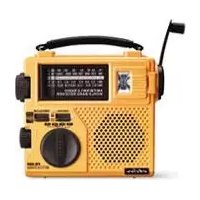
| Model | Journey |
| Dimensions | Approximately 5.0 x 3.0 x 1.2 inches |
| Weight | Approximately 0.5 lbs (without batteries) |
| Power supply | 3 x AA batteries (not included) or USB DC 5V |
| Radio bands | AM / FM |
| Antenna | Built-in ferrite for AM, telescopic whip for FM |
| Speaker | Built-in dynamic speaker |
| Headphone jack | 3.5 mm stereo |
| Main functions | AM/FM reception, volume control, tuning knob, power on/off |
| Cleaning | Wipe with a soft, dry cloth. Do not use liquids or abrasives. |
| Safety | Do not expose to rain or moisture. Keep away from heat sources. |
| Spare parts | Contact Eton customer service for replacement antennas or knobs. |
| Repairability | User-replaceable batteries; other repairs should be done by a professional. |
| General information | Designed for portable use. Store in a cool, dry place. |
Frequently Asked Questions - Journey ETON
How do I turn on the Eton Journey radio?
Turn the volume knob clockwise until you hear a click. The power indicator will light up.
What type of batteries does the radio use?
It uses 3 AA batteries (not included). You can also power it via a USB cable (5V).
How do I switch between AM and FM?
Use the band selector switch located on the top or side of the radio. Slide it to the desired band.
Why is the reception poor?
Try extending the telescopic antenna for FM. For AM, rotate the radio to align the internal ferrite antenna. Avoid interference from electronic devices.
Can I use headphones with this radio?
Yes, plug your headphones into the 3.5 mm headphone jack. The speaker will be muted automatically.
How do I clean the radio?
Wipe the exterior with a soft, dry cloth. Do not use cleaning agents or immerse in water.
What should I do if the radio doesn't turn on?
Check that batteries are installed correctly and have sufficient charge. If using USB, ensure the cable and power source are functional.
Is the radio weather-resistant?
No, it is not waterproof. Keep it away from rain and moisture to avoid damage.
Can I replace the antenna if broken?
Contact Eton customer support for replacement parts. The telescopic antenna can be replaced by a qualified technician.
Where can I find the user manual?
Download the PDF manual from notice-facile.com or the Eton website for detailed instructions.
User questions about Journey ETON
0 question about this device. Answer the ones you know or ask your own.
Ask a new question about this device
No questions yet. Be the first to ask one.
Download the instructions for your Radio in PDF format for free! Find your manual Journey - ETON and take your electronic device back in hand. On this page are published all the documents necessary for the use of your device. Journey by ETON.
USER MANUAL Journey ETON


Manual assistant
Powered by Anthropic
Waiting for your message
Product information
Brand : ETON
Model : Journey
Category : Radio