
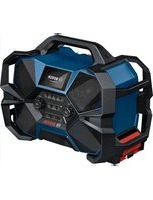
GML 10 8 VLI Professional - Radio BOSCH - Free user manual and instructions
Find the device manual for free GML 10 8 VLI Professional BOSCH in PDF.
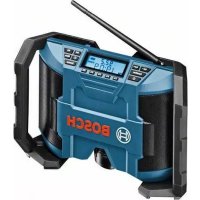


| Brand | Bosch |
| Model | GML 10 8 VLI Professional |
| Product type | Job site radio |
| Mains power supply | Power supply unit 12 V (100–240 V~, 50/60 Hz, output 12 V/1.5 A) |
| Battery power | Li-ion battery 10.8 V (Bosch Professional) |
| Backup batteries | 2 LR03/AAA batteries (1.5 V) |
| Weight | 1.4 kg (according to EPTA 01/2003) |
| FM frequency range (VHF) | 87.5 – 108 MHz |
| AM frequency range (MW) | 531 – 1602 kHz |
| Amplifier output power | 2 x 5 W (at 12 V) |
| Operating temperature | -10 °C to +40 °C |
| Storage temperature | -20 °C to +70 °C |
| Sound settings | Integrated equalizer (bass/treble adjustable from -5 to +5) |
| Main functions | FM/AM radio, AUX input, clock, mute, memory 5 FM + 5 AM |
| Antenna | Adjustable rod antenna |
| Display | Screen with frequency, battery charge status, stereo reception, audio source |
| Included accessories | Power supply unit, AUX cable, battery (depending on version) |
| Maintenance | Clean with a soft, damp cloth; no solvents |
| Safety | Read the warnings; only use original Bosch batteries and power supply units |
| Repairability | Bosch after-sales service; original spare parts |
Frequently Asked Questions - GML 10 8 VLI Professional BOSCH
User questions about GML 10 8 VLI Professional BOSCH
0 question about this device. Answer the ones you know or ask your own.
Ask a new question about this device
Download the instructions for your Radio in PDF format for free! Find your manual GML 10 8 VLI Professional - BOSCH and take your electronic device back in hand. On this page are published all the documents necessary for the use of your device. GML 10 8 VLI Professional by BOSCH.
USER MANUAL GML 10 8 VLI Professional BOSCH
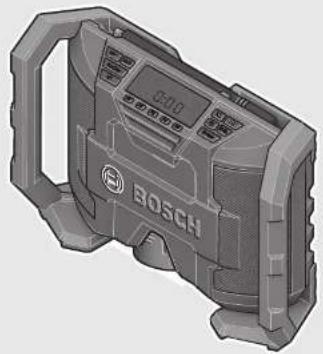
Robert Bosch GmbH
Power Tools Division
70745 Leinfelden-Echterdingen
Germany
www.bosch-pt.com
1 609 92A 00B (2012.12) T/156 UNI

GML 10,8 V-LI Professional

BOSCH
GML 10,8 V-LI







5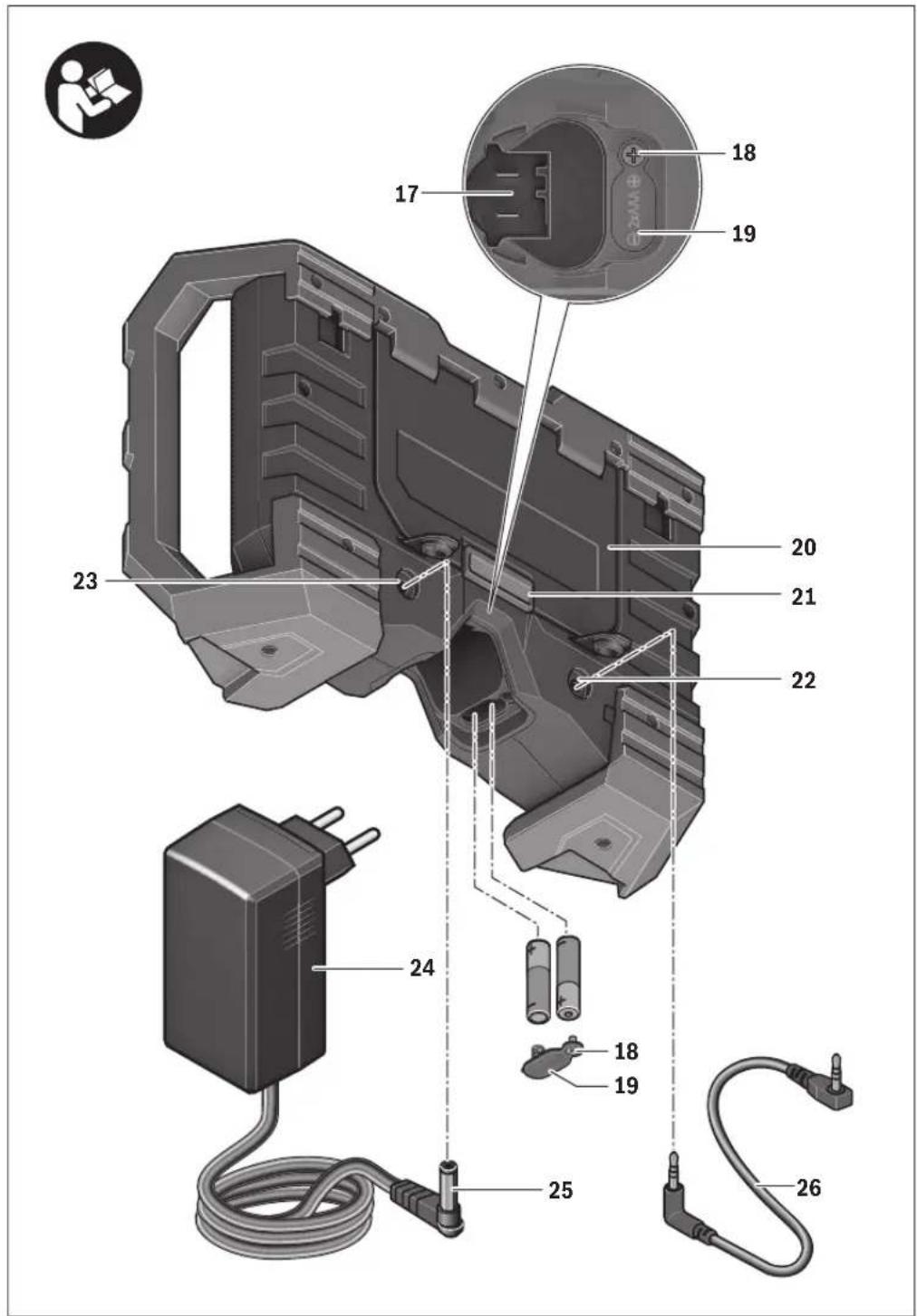








6 | Deutsch
Deutsch
Safety instructions
WARNING
Read all safety warnings and all instructions, including the information
on the rear of the construction site radio. Failure to follow the warnings and instructions may result in electric shock, fire and/or serious injury.
Save all safety warnings and instructions for future reference.
The term “construction site radio” used in the safety notes refers to mains-powered construction site radios (with power-supply plug) and to battery-operated construction site radios (without power-supply plug).
- Keep work area clean and well lit. Cluttered or dark areas invite accidents. The mains plug of the power-supply plug must match the socket outlet. Never modify the plug in any way. Do not use adapter plugs together with construction site radios. Unmodified plugs and matching outlets will reduce the risk of electric shock.
- Keep work area clean and well lit. Cluttered or dark areas invite accidents.
▶ Do not misuse the cord of the power-supply plug to carry the construction site radio charger, hang it up, or for pulling the plug out of the outlet. Keep the cord away from heat, oil, sharp edges or moving parts. Damaged or entangled cords increase the risk of electric shock. ▶ Completely unwind the connection cable of the power-supply plug when operating the construction site radio via mains supply. Otherwise the connection cable can heat up. ▶ Take care that the mains plug can be pulled at any time. The mains plug is the only possibility to disconnect the construction site radio from the mains supply.

Protect the construction site radio from rain and moisture. The penetration of water into the construction site radio increases the risk of electric shock.
- Keep the construction site radio and the power-supply plug clean. Contamination may result in danger of electric shock. ▶ Check the construction site radio, power-supply plug, cable and plug each time before using. If damage is detected, do not use the construction site radio. Never open the construction site radio or the power-supply plug yourself, and have repairs carried out only by a qualified repair person using only identical replacement parts. Damaged construction site radios, power-supply plugs, cables and plugs increase the risk of electric shock. This construction site radio can be used by children aged from 8 years and above and persons with reduced physical, sensory or mental capabilities or lack of experience and knowledge if they have been given supervision or instruction concerning use of the construction site radio in a safe way and understand the hazards involved. Otherwise, there is danger of operating errors and injuries. ▶ Supervise children. This will ensure that children do not play with the construction site radio.
- Cleaning and user maintenance of the construction site radio shall not be made by children without supervision. ▶ Do not open the battery. Danger of short-circuiting.

Protect the battery against heat, e.g., against continuous intense sunlight, fire, water, and moisture. Danger of explosion.
▶ When battery pack is not in use, keep it away from other metal objects like paper clips, coins, keys, nails, screws, or other small metal objects that can make a connection from one terminal to another. Shorting the battery terminals together may cause burns or a fire. ▶ Under abusive conditions, liquid may be ejected from the battery; avoid contact. If contact accidentally occurs, flush with water. If liquid contacts eyes, additionally seek medical help. Liquid ejected from the battery may cause irritations or burns. ▶ In case of damage and improper use of the battery, vapours may be emitted. Ventilate the area and seek









medical help in case of complaints. The vapours can irritate the respiratory system.
▶ Recharge only with the charger specified by the manufacturer. A charger that is suitable for one type of battery pack may create a risk of fire when used with another battery pack. ▶ Only use the battery in conjunction with your construction site radio and/or a Bosch power tool. This is the only way to protect the battery against dangerous overload. ▶ Use only original Bosch Professional 10.8 V lithium ion batteries. When using other batteries, e.g. imitations, reconditioned batteries or other brands, there is danger of injury as well as property damage through exploding batteries. Read and strictly observe the safety warnings and working instructions in the operating instructions of the tools that you connect to the construction site radio.
Product Description and Specifications

Read all safety warnings and all instructions. Failure to follow the warnings and instructions may result in electric shock, fire and/or serious injury.
While reading the operating instructions, unfold the fold-out page with the illustration of the construction site radio and leave it open.
Product Features
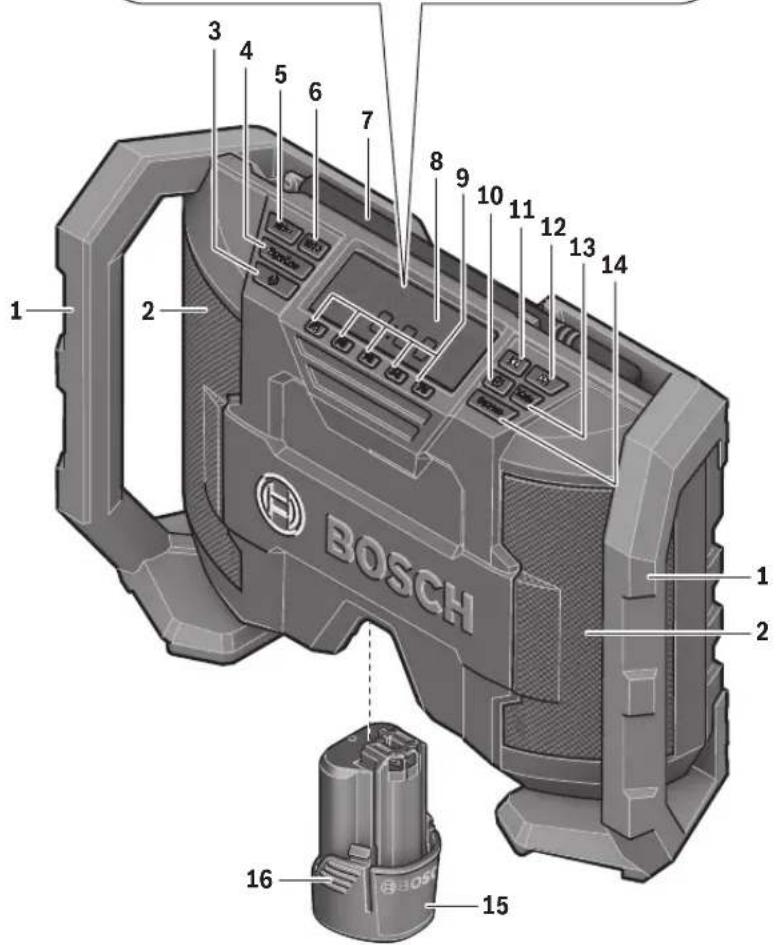
The numbering of the product features refers to the illustration of the construction site radio on the graphics page.
1 Carrying handle 2 Speaker 3 On/Off button 4 "Equalizer" button (for manual sound adjustment) 5 "Vol - " button for reducing the volume/treble/bass setting 6 "Vol +" button for increasing the volume/treble/bass setting 7 Rod antenna 8 Display 9 Preset buttons 10 ⏻ button (for setting the time) 11 spelt button 12 seek button 13 "Mute" button 14 "Source" button (for selecting an audio source) 15 Battery pack* 16 Battery unlocking button 17 Battery port 18 Screw for battery lid 19 Battery lid
20 Lid of the storage compartment 21 Locking latch of the storage compartment 22 "AUX IN" socket 23 12 V connection socket 24 Power- supply plug 25 Plug-in connector 26 AUX cable
*Accessories shown or described are not part of the standard delivery scope of the product. A complete overview of accessories can be found in our accessories program.
Display Elements
a Radio frequency indicator b Battery charge-control indicator c Stereo indicator d Mute indicator e Multi-function indicator f Audio-source indicator
Technical Data
| Construction Site Radio GML 10,8 V-LI | ||
| Article number | 3 601 D29 2.. | |
| Back-up batteries | 2x 1.5 V (LR03/AAA) | |
| Battery | V 10.8 | |
| Operating temperature | °C -10...+40 | |
| Storage temperature | °C -20...+70 | |
| Weight according to EPTA-Procedure 01/2003 | kg | 1.4 |
| Audio Operation/Radio | ||
| Operating voltage | ||
| - for operation with power-supply plug | V | 12 |
| - for battery-pack operation | V | 10.8 |
| Rated output of amplifier (for operation with power-supply plug) | 2x 5 W | |
| Reception range | ||
| - FM | MHz | 87.5 -108 |
| - AM | kHz | 531 -1602 |
Power-supply plug
| Article number | 1 600 A00 0.. | |
| Input voltage | V~ | 100 -240 |
| Frequency | Hz | 50/60 |
| Input current | mA | 500 |
| Output voltage | V= | 12 |
| Output current | mA | 1500 |
| Weight according to EPTA-Procedure 01/2003 | kg | 0.2 |
| Protection class | / |







English | 13
Assembly
Power Supply of the Construction Site Radio
The power supply of the construction site radio can take place via the power-supply plug 24 or via a lithium ion battery 15.
Operation with Battery Pack
▶ Use only original Bosch Professional 10.8 V lithium ion batteries. Using other batteries can lead to injuries and pose a fire hazard.
Note: Use of batteries not suitable for the construction site radio can lead to malfunctions of or cause damage to the construction site radio.
Note: The battery pack is supplied partially charged. To ensure full capacity of the battery pack, completely charge the battery pack in the battery charger before using for the first time.
▶ Use only the battery chargers listed on the accessories page. Only these battery chargers are matched to the lithium ion batteries used in your construction site radio.
The Lithium-Ion battery can be charged at any time without reducing its service life. Interrupting the charging procedure does not damage the battery.
The battery is equipped with a NTC temperature control which allows charging only within a temperature range of between 0 °C and 45 °C. A long battery service life is achieved in this manner.
Insert a battery into the battery port 17 in such a manner that the connections of the battery face against the connections in the charging compartment 17, and allow the battery to engage in the battery port.
The battery charge-control indicator b appears on the display as soon as a battery pack with sufficient voltage is inserted and the construction site radio is not connected to the mains supply via the power-supply plug 24.
The battery charge-control indicator b indicates the current battery pack status. When the battery charge-control indicator flashes, the battery pack must be charged.
Indication Capacity
| ≥ 2/3 | |
| ≥ 1/3 | |
| <1/3 | |
| Reserve | |
| Battery pack empty |
To remove the battery pack 15, press the unlocking buttons 16 and pull the battery pack out of the battery port 17.
Operation with Power-supply Plug
▶ Observe the mains voltage! The voltage of the power source for the power-supply plug must correspond with the data on the type plate of the power-supply plug.
Open the protective cap of the 12 V connection socket 23. Insert the plug-in connector 25 of the 12 V power-supply plug into the 12 V connection socket 23. Connect the power-supply plug to the mains supply.
▶ Use only the original Bosch power-supply plug intended for your construction site radio. This measure will ensure proper operation of the construction site radio.
After removing the plug-in connector, reattach the protective cap of the 12 V connection socket 23 to protect against dirt/debris.
When not using the power-supply plug 24, it can be stored in the storage compartment of the construction site radio. For this, disengage the locking latch 21 and open the lid 20 of the storage compartment.
Inserting/Replacing the Back-up Battery
In order to store the time in the construction site radio, backup batteries have to be inserted. Using alkali-manganese batteries is recommended for this purpose.
To open the battery compartment, loosen screw 18 and remove battery lid 19. Insert the back-up batteries. When inserting, pay attention to the correct polarity according to the representation on the outside of the battery lid.
Mount the battery lid 19 again and tighten it with screw 18.
Replace the back-up batteries when the time indication e becomes weaker and the construction site radio no longer stores the time.
Always replace all batteries at the same time. Only use batteries from one brand and with the identical capacity.
Remove the back-up batteries from the construction site radio when not using it for longer periods. When storing for longer periods, the back-up batteries can corrode and discharge themselves.
Operation
Protect the construction site radio against moisture and direct sunlight. The construction site radio is suitable only for indoor use.
Audio Operation
Switching On and Off
To switch on the construction site radio, press the On/Off button 3. The display 8 goes on and the last set audio source after switching off the construction site radio is activated.
Note: When operating the first time via battery pack or when not having used the construction site radio for a longer period, it may be necessary to press the On/Off button 3 several times or longer, to switch the radio on.
Each time after pressing a button, the display 8 is illuminated for several seconds.
To switch off the construction site radio, press the On/Off button 3 again. The current audio source setting is stored. To save energy, only switch the construction site radio on when using it.
Adjusting the Volume
After switching on the construction site radio, a mean volume level (value 10) is always set.
To increase the volume, press the "Vol +" button 6; to reduce the volume, press the "Vol -" button 5. The volume setting "VL" is indicated with a value between 0 and 20 for a few seconds in indicator e on the display.






Before adjusting or changing a radio station, set the volume to a lower setting; before starting an external audio source, set the volume to medium.
The sound can be switched off by pressing the "Mute" button 13. To switch the sound on again, either press the "Mute" button 13 once more or either of the "Vol +" 6 or "Vol -" buttons 5.
Adjusting the Sound
An equalizer is integrated in the construction site radio for optimal sound reproduction.
To manually change the bass level, press the "Equalizer" button 4 once. "BA" is indicated on the display along with the stored bass level value in the multi-function indicator e. To manually change the treble, press the "Equalizer" button 4 again; "TR" as well as the stored treble value are indicated in the multi-function indicator e.
The bass and treble levels can be adjusted between -5 and +5. To increase the indicated value, press the "Vol +" button
6; to lower the value, press the "Vol -" button 5. The changed values are automatically stored when indicator e changes back to the time indication a few seconds after last pressing either of the buttons.
Selecting an Audio Source
To select an audio source, press the "Source" button 14 until the indicator f for the desired internal audio source (see "Setting/Storing Radio Stations", page 14) or for the desired external audio source (see "Connecting External Audio Sources", page 14) is indicated on the display:
- "FM": FM radio,
- "AM": AM radio,
- "AUX": external audio source (e.g. CD player) via the 3.5 mm socket 22.
Setting the Rod Antenna
The construction site radio is provided with a mounted rod antenna 7. For radio operation, point the rod antenna toward the direction that enables the best reception.
When the reception is insufficient, position the construction site radio at a different location that enables better reception.
Note: When operating the construction site radio in the direct vicinity of radio-communication equipment or radio transceivers, or other electronic equipment, the radio reception can be subject to interference.
Setting/Storing Radio Stations
Press the "Source" button 14 until "FM" is indicated for the ultra-short wave reception range or "AM" for the medium wave reception range in display element f.
To set a certain radio frequency, press the ▶▶| seek button 12 to increase the frequency or the ◀◀ seek button 11 to decrease it. The current frequency is shown in indicator a on the display.
To scan for radio stations with a high signal strength, press and briefly hold the ▶▶| seek button 12 or the ◀◀ seek button 11. The frequency of the found radio station is shown in indicator a on the display.
When the reception of a suitable signal is sufficiently strong, the construction site radio automatically switches to stereo reception. The indicator for stereo reception c appears on the display.
To store a set station, press one of the preset buttons 9 for 3 seconds. As soon as "PR" and the number of the selected preset button appears in display element e, the station is stored.
A total of 5 FM and 5 AM stations can be preset. Please note that an already occupied preset is overwritten when a new radio station is assigned to it.
To start the playback of a stored station, briefly press the respective preset button 9. "PR" as well as the preset number of the station are indicated in display element e for a few seconds.
Connecting External Audio Sources
Apart from the integrated radio, various external audio sources can be played.
Remove the protective cap of the "AUX IN" socket 22. Insert the angled 3.5 mm plug of the AUX cable 26 into the socket (see illustration on the graphics page). Connect the second plug of the AUX cable to an appropriate audio source.
For playback of the connected audio source, press the
"Source" button 14 until "AUX" appears in indicator f on the display.
After removing the plug of the AUX cable, reattach the protective cap of the "AUX IN" socket 22 again to protect against dirt/debris.
Time Indication
The construction site radio is equipped with a time indication with separate power supply. When back-up batteries with sufficient capacity are inserted in the back-up battery compartment (see "Inserting/Replacing the Back-up Battery", page 13), the time can be stored even when the construction site radio is disconnected from the A/C power supply or the battery.
Setting the Time
- To set the time, press the ⏻ button 10 until the hours indication flashes in display element e.
- Press the ▶▶| seek button 12 or the |◀◀ seek button 11 until the correct hour setting is indicated.
- Press the ⏻ button 10 again, so that the minutes indication flashes in display element e.
- Press the ▶▶| seek button 12 or the |◀◀ seek button 11 until the correct minute setting is indicated.
- Press the Ⓐ button 10 a third time to store the time setting.
Working Advice
Recommendations for Optimal Handling of the Battery
Protect the battery against moisture and water.
Store the battery only within a temperature range between 0 °C and 50 °C. As an example, do not leave the battery in the car in summer.




A battery that is new or has not been used for a longer period does not develop its full capacity until after approx. 5 charging/discharging cycles.
A significantly reduced working period after charging indicates that the battery is used and must be replaced.
Observe the notes for disposal.
Troubleshooting – Causes and Corrective Measures
| Cause Corrective Measure | |
| Construction site radio inoperative | |
| No power supply | Completely insert the power-supply plug and plug-in connector or the charged battery pack |
| Construction site radio too warm or too cold | Wait until the construction site radio has reached operating temperature |
| Construction site radio inoperative on A/C power supply | |
| Power-supply plug or connection cable defective | Check the power-supply plug and the connection cable, and have them replaced as required |
| Wrong power-supply plug inserted | Use the original Bosch power-supply plug (also available as spare part) |
| Construction site radio inoperative on DC power supply | |
| Battery contacts contaminated | Clean the battery contacts (e.g. by inserting and removing the battery several times) or replace the battery |
| Battery pack defective Replace the battery | |
| Battery pack too warm or too cold | Wait until of the battery has reached operating temperature |
| Construction site radio suddenly inoperative | |
| Power-supply plug or battery pack not properly or completely inserted | Plug in power-supply plug or battery properly and completely |
| Bad radio reception | |
| Interference from other devices or insufficient set-up location | Position the construction site radio at another location with better reception or with greater clearance to other electronic devices |
| Time indication faulty | |
| Back-up batteries of clock empty | Replace back-up batteries |
| Back-up batteries incorrectly inserted (wrong polarity) | Insert back-up batteries correctly |
| When the corrective measures do not eliminate an error, please contact an authorised service agent for Bosch power tools. | |
Maintenance and Service
Maintenance and Cleaning
For safe and proper operation, always keep the construction site radio clean.
Wipe off debris with a moist, soft cloth. Do not use any cleaning agents or solvents.
If the construction site radio should fail despite the care taken in manufacturing and testing, repair should be carried out by an authorized customer service agent for Bosch power tools.
In all correspondence and spare parts orders, please always include the 10-digit article number given on the type plate of the construction site radio.
After-sales Service and Application Service
Our after-sales service responds to your questions concerning maintenance and repair of your product as well as spare parts. Exploded views and information on spare parts can also be found under:
www.bosch-pt.com
Bosch's application service team will gladly answer questions concerning our products and their accessories.
Great Britain
Robert Bosch Ltd. (B.S.C.)
P.O. Box 98
Broadwater Park
North Orbital Road
Denham
Uxbridge
UB 9 5HJ
Tel. Service: (0844) 7360109
Fax: (0844) 7360146
E-Mail: boschservicecentre@bosch.com
Ireland
Origo Ltd.
Unit 23 Magna Drive
Magna Business Park
City West
Dublin 24
Tel. Service: (01) 4666700
Fax: (01) 4666888
Australia, New Zealand and Pacific Islands
Robert Bosch Australia Pty. Ltd.
Power Tools
Locked Bag 66
Clayton South VIC 3169
Customer Contact Center
Inside Australia:
Phone: (01300) 307044
Fax: (01300) 307045
Inside New Zealand:
Phone: (0800) 543353
Fax: (0800) 428570
Outside AU and NZ:
Phone: +61 3 95415555
www.bosch.com.au






Republic of South Africa
Customer service
Hotline: (011) 6519600
Gauteng - BSC Service Centre
35 Roper Street, New Centre
Johannesburg
Tel.: (011) 4939375
Fax: (011) 4930126
E-Mail: bsctools@icon.co.za
KZN - BSC Service Centre
Unit E, Almar Centre
143 Crompton Street
Pinetown
Tel.: (031) 7012120
Fax: (031) 7012446
E-Mail: bsc.dur@za.bosch.com
Western Cape - BSC Service Centre
Democracy Way, Prosperity Park
Milnerton
Tel.: (021) 5512577
Fax: (021) 5513223
E-Mail: bsc@zsd.co.za
Bosch Headquarters
Midrand, Gauteng
Tel.: (011) 6519600
Fax: (011) 6519880
E-Mail: rbsa-hq.pts@za.bosch.com
People's Republic of China
China Mainland
Bosch Power Tools (China) Co., Ltd.
567, Bin Kang Road
Bin Jiang District 310052
Hangzhou, P.R.China
Service Hotline: 4008268484
Fax: (0571) 87774502
E-Mail: contact.ptcn@cn.bosch.com
www.bosch-pt.com.cn
HK and Macau Special Administrative Regions
Robert Bosch Hong Kong Co. Ltd.
21st Floor, 625 King's Road
North Point, Hong Kong
Customer Service Hotline: +852 2101 0235
Fax: +852 2590 9762
E-Mail: info@hk.bosch.com
www.bosch-pt.com.hk
Indonesia
PT. Multi Mayaka
Kawasan Industri Pulogadung
Jalan Rawa Gelam III No. 2
Jakarta 13930
Indonesia
Tel.: (021) 46832522
Fax: (021) 46828645/6823
E-Mail: sales@multimayaka.co.id
www.bosch-pt.co.id
Philippines
Robert Bosch, Inc.
28th Floor Fort Legend Towers,
3rd Avenue corner 31st Street,
Fort Bonifacio Global City,
1634 Taguig City, Philippines
Tel.: (02) 8703871
Fax: (02) 8703870
matheus.contiero@ph.bosch.com
www.bosch-pt.com.ph
Bosch Service Center:
9725-27 Kamagong Street
San Antonio Village
Makati City, Philippines
Tel.: (02) 8999091
Fax: (02) 8976432
rosalie.dagdagan@ph.bosch.com
Malaysia
Robert Bosch (S.E.A.) Sdn. Bhd.
No. 8A, Jalan 13/6
G.P.O. Box 10818
46200 Petaling Jaya
Selangor, Malaysia
Tel.: (03) 79663194
Fax: (03) 79583838
cheehoe.on@my.bosch.com
Toll-Free: 1800 880188
www.bosch-pt.com.my
Thailand
Robert Bosch Ltd.
Liberty Square Building
No. 287, 11 Floor
Silom Road, Bangrak
Bangkok 10500
Tel.: 02 6311879 - 1888 (10 lines)
Fax: 02 2384783
Robert Bosch Ltd., P. O. Box 2054
Bangkok 10501, Thailand
Bosch Service – Training Centre
2869-2869/1 Soi Ban Kluay
Rama IV Road (near old Paknam Railway)
Prakanong District
10110 Bangkok
Thailand
Tel.: 02 6717800 - 4
Fax: 02 2494296
Fax: 02 2495299
Singapore
Robert Bosch (SEA) Pte. Ltd.
11 Bishan Street 21
Singapore 573943
Tel.: 6571 2772
Fax: 6350 5315
leongheng.leow@sg.bosch.com
Toll-Free: 1800 3338333
www.bosch-pt.com.sg







Français | 17
Vietnam
Robert Bosch Vietnam Co. Ltd
10/F, 194 Golden Building
473 Dien Bien Phu Street
Ward 25, Binh Thanh District
84 Ho Chi Minh City
Vietnam
Tel.: (08) 6258 3690 ext. 413
Fax: (08) 6258 3692
hieu.lagia@vn.bosch.com
www.bosch-pt.com
Transport
The contained lithium-ion batteries are subject to the Dangerous Goods Legislation requirements. The user can transport the batteries by road without further requirements.
When being transported by third parties (e.g.: air transport or forwarding agency), special requirements on packaging and labelling must be observed. For preparation of the item being shipped, consulting an expert for hazardous material is required.
Dispatch batteries only when the housing is undamaged. Tape or mask off open contacts and pack up the battery in such a manner that it cannot move around in the packaging. Please also observe possibly more detailed national regulations.
Disposal

Construction site radios, power-supply plugs, battery packs, accessories and packaging should be sorted for environmental-friendly recycling.
Do not dispose of construction site radios, power-supply plugs and battery pack/batteries into household waste!
Only for EC countries:

According to the European Guideline 2002/96/EC, electrical devices/tools that are no longer usable, and according to the European Guideline 2006/66/EC, defective or used battery packs/batteries, must be collected separately and disposed of in an environmentally correct manner.
Batteries no longer suitable for use can be directly returned at:
Great Britain
Robert Bosch Ltd. (B.S.C.)
P.O. Box 98
Broadwater Park
North Orbital Road
Denham
Uxbridge
UB 9 5HJ
Tel. Service: (0844) 7360109
Fax: (0844) 7360146
E-Mail: boschservicecentre@bosch.com
Battery packs/batteries:
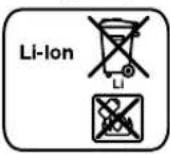
Li-ion:
Please observe the instructions in section "Transport", page 17.
Subject to change without notice.
Français
Robert Bosch (France) S.A.S.
Bosch Service Center
Telegrafvej 3
2750 Ballerup
Tel. Service Center: 44898855
Fax: 44898755
E-Mail: vaerktoej@dk.bosch.com
Transport
Bosch Service Center
Telegrafvej 3
2750 Ballerup
Denmark
Tel.: (020) 414455 (within Sweden)
Fax: (011) 187691
Transport
Bosch San. ve Tic. A.S.
Ahi Evran Cad. No:1 Kat:22
Polaris Plaza
80670 Maslak/Istanbul
Bosch Expert Team +90 (0212) 367 18 88
Işıklar LTD.ŞTİ.
Kızılay Cad. No: 16/C Seyhan
Adana
Tel.: 0322 3599710
Tel.: 0322 3591379
Robert Bosch Sp. z o.o.
Bosch Service Center PT
K Vápence 1621/16
692 01 Mikulov
Tel.: 519 305700
Fax: 519 305705
E-Mail: servis.naradi@cz.bosch.com
www.bosch.cz
Transport
Tel. service scule electrice: (021) 4057540
Fax: (021) 4057566
E-Mail: infoBSC@ro.bosch.com


- GML 10,8 V-LI PROFESSIONAL
- BOSCH
- DEUTSCH
- SAFETY INSTRUCTIONS
- WARNING
- SAVE ALL SAFETY WARNINGS AND INSTRUCTIONS FOR FUTURE REFERENCE
- PRODUCT DESCRIPTION AND SPECIFICATIONS
- PRODUCT FEATURES
- DISPLAY ELEMENTS
- ENGLISH
- ASSEMBLY
- POWER SUPPLY OF THE CONSTRUCTION SITE RADIO
- OPERATION WITH BATTERY PACK
- OPERATION WITH POWER-SUPPLY PLUG
- INSERTING/REPLACING THE BACK-UP BATTERY
- OPERATION
- AUDIO OPERATION
- SWITCHING ON AND OFF
- ADJUSTING THE VOLUME
- ADJUSTING THE SOUND
- SELECTING AN AUDIO SOURCE
- SETTING THE ROD ANTENNA
- SETTING/STORING RADIO STATIONS
- CONNECTING EXTERNAL AUDIO SOURCES
- TIME INDICATION
- SETTING THE TIME
- WORKING ADVICE
- RECOMMENDATIONS FOR OPTIMAL HANDLING OF THE BATTERY
- MAINTENANCE AND SERVICE
- MAINTENANCE AND CLEANING
- AFTER-SALES SERVICE AND APPLICATION SERVICE
- WWW.BOSCH-PT.COM
- GREAT BRITAIN
- IRELAND
- AUSTRALIA, NEW ZEALAND AND PACIFIC ISLANDS
- REPUBLIC OF SOUTH AFRICA
- CUSTOMER SERVICE
- GAUTENG - BSC SERVICE CENTRE
- KZN - BSC SERVICE CENTRE
- WESTERN CAPE - BSC SERVICE CENTRE
- BOSCH HEADQUARTERS
- PEOPLE'S REPUBLIC OF CHINA
- CHINA MAINLAND
- HK AND MACAU SPECIAL ADMINISTRATIVE REGIONS
- INDONESIA
- PHILIPPINES
- MALAYSIA
- THAILAND
- SINGAPORE
- VIETNAM
- TRANSPORT
- DISPOSAL
- ONLY FOR EC COUNTRIES
- BATTERY PACKS/BATTERIES
- LI-ION
- FRANÇAIS
Brand : BOSCH
Model : GML 10 8 VLI Professional
Category : Radio