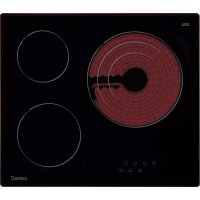
TT 603 - Cooker CATA - Free user manual and instructions
Find the device manual for free TT 603 CATA in PDF.



| Brand | CATA |
| Model | TT 603 |
| Product type | Ceramic hob |
| Category | Cooker |
| Dimensions (W x D x H) | 60 x 52 x 5 cm (estimation) |
| Weight | Approximately 10 kg |
| Power supply | 220-240 V ~ 50/60 Hz |
| Maximum power | 7200 W (estimation) |
| Number of cooking zones | 4 |
| Controls | Touch Control keys |
| Power levels | 9 (1 to 9) |
| Special functions | Double/triple circuit, automatic switch-off, child safety lock, residual heat indicator |
| Residual heat indicator | Display 'H' for hot zone |
| Automatic switch-off | After 20 seconds of inactivity or duration depending on power level |
| Key lock | Child safety lock can be activated/deactivated |
| Surface material | Ceramic glass |
| Cleaning | Scraper, non-abrasive products, avoid metal scouring pads |
| Installation | Built into a worktop |
| Electrical connection | By a qualified installer, grounding mandatory |
| Protection against unintentional start-up | Shutdown after 10 seconds of continuous pressure on a key |
| Acoustic signal | Key confirmation, error alarm |
| Certifications | Directives 2014/35/EU and 2014/30/EU |
Frequently Asked Questions - TT 603 CATA
User questions about TT 603 CATA
0 question about this device. Answer the ones you know or ask your own.
Ask a new question about this device
Download the instructions for your Cooker in PDF format for free! Find your manual TT 603 - CATA and take your electronic device back in hand. On this page are published all the documents necessary for the use of your device. TT 603 by CATA.
USER MANUAL TT 603 CATA
EN Installation, use and maintenance instructions
THIS APPLIANCE IS DESIGNED FOR DOMESTIC USE ONLY. THE MANUFACTURER SHALL NOT IN ANY WAY BE HELD RESPONSIBLE FOR WHATEVER INJURIES OR DAMAGES ARE CAUSED BY INCORRECT INSTALLATION OR BY UNSUITABLE, WRONG OR ABSURD USE.
The manufacturer declares that this product meets all basic requirements regarding low-voltage electrical equipment established in the 2014/35/EU Directive and electro-magnetic compatibility established in the 2014/30/EU Directive.
PRECAUTIONS
- When one makes use of heating elements, we advise receptacles with flat bottom having same diameter or lightly higher than that of the hot area.
- Avoid overflows of liquid, therefore when boiling has happened, or in any case when liquid is heated, reduce the heat supply.
- Don't leave the heating elements on without receptacles on the top or with void pots and pans.
- Do not use any aluminium foil or place any foodstuffs wrapped in aluminium foil directly on the hob - do not place any metal objects such as knives, forks, spoons and lids on the hob surface as they will heat up.
- When cooking in a non-stick pan without seasoning, do not exceed 1-2 minutes' preheating time.
- When cooking food that may easily stick, start at a low power output level and then
slowly increase while regularly stirring.
- If the surface of the hob is damaged, immediately disconnect the appliance from the mains to prevent the possibility of electric shock.
- Never use a steam cleaner to clean the hob.
- The appliance and accessible parts may be hot during operation.
- Take care to avoid touching the heating elements.
- Children less than 8 years of age should be kept at a safe distance unless continuously supervised.
- This appliance may be used by children aged 8 or over and by persons with reduced physical, sensory or mental capabilities or lack of experience and knowledge, if they are supervised and have received suitable instructions on safe use of the appliance and understand the dangers involved. Children must not play with the appliance. User maintenance and cleaning should not be carried out by children except under constant supervision.
- Cooking with grease or oil may be dangerous and cause a fire if left unattended. NEVER try to extinguish a fire with water. Rather, disconnect the appliance and then cover the flames with a cover or fire blanket, for example.
- The cooking process has to be supervised. A short term cooking process has to be supervised continuously.
-
Unattended cooking on a hob with fat or oil can be dangerous and may result in a fire.
-
Fire hazard: do not store elements on cooking surfaces.
-
Only counter top protectors designed for use with the cooking appliance and listed in the manufacturer's instructions should be used as suitable protection for the counter top incorporated in the appliance. Use of unsuitable protectors may cause accidents.
-
WARNING: Accessible parts will become hot when in use. To avoid burns and scalds children should be kept away. Insert in the fixed wiring a mean for disconnection from the supply mains having a contact separation in all poles that provide full disconnection under overvoltage category III conditions, in accordance with the wiring rules. The plug or omnipolar switch must be easily reached on the installed equipment.
This appliance is not intended to be used via an external timer or a remote control system.
The manufacturers decline any responsibility in the event of non-compliance with what is described above and the accident prevention norms not being respected and followed.
To avoid all risk, if the power cable becomes damaged, it must only be replaced by the manufacturer, by an authorised service centre, or by a qualified electrician.
User's Instructions Installation
All operations relative to installation (electric connection) should be carried out by skilled personnel in conformity with the rules in force.
As for the specific instructions see part pertaining to installer.
Use TOUCH CONTROL HEATING ELEMENTS
Touch sensitive keys
All operations can be performed using touch sensitive keys (capacitive sensors) located on the front of the control board; each key has a corresponding display. All actions are confirmed by an audible signal.
TOUCH CONTROL (Fig. 2)
1ON/OFF
2 Minus -
3 Plus +
4 Double / Triple Circuit
5 Cooking zone
6 Setting level display
7 Dual circuit pilot light
8 Illuminated Segment Multiple Circuits
Switching the Touch Control on/off
After mains voltage is applied, the touch control initialises for approximately one second before it is ready for use.
All displays and LEDs flash for approximately one second after resetting. Once this period is complete, all displays and LEDs switch off and the touch control is in standby mode.
Press the ON/OFF (1) button to switch the touch control on.
The cooking zone displays indicate "0". If a cooking zone is in "hot" (high temperature) mode, the display will alternately indicate "H" and "0".
After switching the touch control on, it will remain active for 20 seconds. If no cooking zone is selected, the touch control automatically switches back to standby mode.
The touch control can only be switched on by pressing the ON/OFF (1) button.
Pressing the ON/OFF (1) button at the same time as other buttons will have no effect and the touch control will remain on standby.
The touch control can be switched off at any time using the ON/OFF (1) button. This is even the case when the control has been locked by the child safety feature.
The ON/OFF (1) button always takes priority in the switching off function.
Automatic off
Once switched on, the touch control automatically switches off after 20 seconds of inactivity. After selecting a cooking zone, the automatic off time is divided into 10 seconds, after which the zone is deselected and, after another 10 seconds, the touch control switches off.
Switching a cooking zone on/off
If the touch control is switched on, the cooking zone can be selected by pressing the button (5) of the corresponding zone.
The display (6) of the zone selected lights up, while the remaining displays are dimmed. If the cooking zone is "hot", "H" and "0" are alternately displayed.
Press the PLUS (3) or MINUS (2) button to select a setting and the
zone will begin to heat up.
Once the cooking zone has been selected, the setting can be selected by keeping the PLUS (3) button pressed down. The setting begins at level 1 and increases by 1 level every 0.4 seconds. When setting "9" is reached, the setting will not be changed further. If the setting level has been selected using the MINUS (2) button, the start level is "9" (maximum level). Keep the button pressed down to lower the active level by 1 every 0.4 seconds. When setting "0" is reached, there will be no further setting changed. The setting can only be changed by pressing the MINUS (2) or PLUS (3) button again.
Switching a cooking zone off
Select the zone to be switched off using the corresponding button (5). The display (6) of the zone selected lights up, while the remaining displays are dimmed. Press the PLUS (3) and MINUS (2) buttons at the same time and the setting level of the zone is changed to 0. Alternatively, the MINUS button (2) can be used to reduce the setting level to 0.
If a cooking zone is "hot", "H" and "0" will be alternately displayed.
Switching all cooking zones off
Press the ON/OFF (1) button to immediately switch off all zones at any time. In standby mode, an "H" is displayed in all cooking zones that are "hot". The remaining displays will be switched off.
Setting level
The cooking zone can be set to 9 levels that are indicated by the numbers "1" to "9" on the seven-segment LED displays (6).
Residual heat indicator
This informs the user that the glass is at a dangerous temperature in the event of touching the area located around the cooking zone. The temperature is determined by a mathematical model and any residual heat is indicated by a "H" on the corresponding 7-segment display.
Heating and cooling are calculated based on:
The selected setting level (between "0" and "9")
The ON/OFF time.
After switching off the cooking zone, the corresponding display will indicate "H" until the temperature in the zone has dropped below the critical level (≤ 60^)
Automatic off function (operating time limitation)
In terms of the setting level, if no operation occurs each cooking zone switches off after an established maximum time.
Each operation in the cooking zone condition (using the PLUS (3) and MINUS (2) or dual zone) restarts the maximum operating time of the zone by resetting it to its initial value.
Protection against unintended switching on
- If the electronic control detects a button being held down for approx. 10 sec, it will switch off automatically. The control sends out an audible error signal to warn the user that the sensors have detected the presence of an object. The displays indicate error code "E R 0 3". If the cooking zone is in "hot" mode, "H" will be
indicated alternately on the display with the error signal.
- If no cooking zone is activated within 20 seconds after switching on the touch control, it will return to standby mode.
- When the control is switched on, the ON/OFF button has priority over all other button and, therefore, the control can be switched off at any time, even when several buttons are pressed at the same time or a button is kept held down.
- In standby mode, no effect will be caused by buttons being kept held down. However, before the electronic control can be switched back on, it has to detect that no button is pressed down.
Button lock (child safety feature)
- Child safety feature:
Button lock:
To activate the child safety feature after having switched on the Touch control, press de rear left cooking zone selection button at the same time as the MINUS button (2) for 3 seconds, followed by just the rear left cooking zone selection button. An "L" standing for LOCKED (child safety feature preventing unintended switch on) will be indicated on all displays. If a cooking zone is in "hot" mode, "L" and "H" will be alternately displayed.
This operation must take place within a 10 successive seconds and no button other than those described must be pressed. Otherwise, the sequence will be interrupted and the hob will not be locked.
The electronic control remains locked until it unlocked by the user, even if it has been switched off and back on meanwhile. Not even touch control resetting (after a voltage drop) will interrupt the button lock.
Cancelling the button lock:
After switching the touch control on, the child safety feature can be disabled. Press the rear left cooking zone selection button and the MINUS button (2) for 3 seconds, followed by just the MINUS button (2). If all operations are carried out in the right order within 10 seconds, the button lock will be cancelled and the touch control switched off. Otherwise, the sequence will be considered incomplete and the touch control will remain locked and will switch off after 20 seconds.
Switch the touch control back on using the ON/OFF button and all displays will be indicate "0", the decimal points will flash and the touch control will be ready for cooking. If a cooking zone is in "hot" mode, "0" and "H" will be alternately displayed.
Control of multiple circuits
Hobs without double or triple circuit, see Fig. 2A
Hob with double zone. (Fig. 2B)
When a dual cooking zone is activated, the two circuits are switched on at the same time. Activation of the external circuit is indicated by a pilot light (7) in the bottom right corner of the display. If only the internal circuit is to be switched on, the external circuit can be switched off using the dual circuit button (4). Press the dual circuit button (4) again to re-activate the external circuit and the corresponding pilot light (7) will switch on.
Hob with triple zone. (Fig. 2C) / Hob with double and triple zone.
(Fig. 2D)
When a dual / triple cooking zone is activated, the 3 circuits are switched on at the same time. The activation / deactivation of each circuit is done with button 4 and it is indicated with an illuminated segment (8).
Sound signal (buzzer)
The following activities are indicated by a buzzer during use:
- Normal button pressing by a short sound.
- Buttons kept pressed down for more than 10 sec. by a long, intermittent sound.
Maintenance (Fig. 4)
By means of a scraper immediately remove any aluminium foil bits, food spills, grease splashes, sugar marks and other high sugarcontent food from the surface in order to avoid damaging the hob.
Subsequently clean the surface with some towel and appropriate product, rinse with water and dry by means of a clean cloth. Under no circumstance should sponges or abrasive cloths be used; also avoid using aggressive chemical detergents such as oven sprays and spot removers.
Installer's Instructions
Installation
These Instructions are for the qualified technician, as a guide to installation, adjustment and maintenance, according to the laws and standards in force. These operations must always be carried out when the appliance has been disconnected from the electric system.
Positioning (Fig. 5)
1 Front view
2 Front side
The appliance can be fitted into a working area as illustrated on the figure. Apply the seal supplied over the whole perimeter of the working area.
Electrical connection
Prior to carrying out the electrical connection, please ensure that: the plant characteristics are such as to follow what is indicated on the matrix plate placed at the bottom of the working area;
-
that the plant is fitted with an efficient earth connection, following the standards and law provisions in force.
-
The earth connection is compulsory in terms of the law.
Should there be no cable and/or plug on the equipment, use suitable absorption material for the working temperature as well, as indicated on the matrix plate. Under no circumstance must the cable reach a temperature above 50^ of the ambient temperature.
QUESTO PRODOTTO è STATO CONCEPITO PER UN IMPIEGO DI TIPO DOMESTICO. IL COSTRUTTORE DECLINA OGNI RESPONSABILITA NEL CASO DI EVENTUALI DANNI A COSE O PERSONE DERIVANTI DA UNA NON CORRETTA INSTALLAZIONE O DA USO IMPROPRIO, ERRONEO O ASSURDO.
VOORZORGSGMAATREGELEN
Knappsparr (sakerhetsmekanism for barn)
- Sakerhetsmekanism for barn:
Knappsparr:
HctpyKunn IJIa IIOJb3OBateJIa MoHTaK
Bce OIepaunn no MOHTaKy (JIeKtpnueckne IOIKIOUeHNA) DOJXHBI IPOHN3BOIDNTBCr TOJIbKO KBAJINHIIHNPoBAHHbIM IepCOHaJIOM H CootBTCTBHN C cyIeCTBYIOHMn HOpMaTHBaMH.
B Pa3IeJIe “ДлЯ MOHTaЖнka” npHBeJdeHb BCE IOIPO6HOCTN MOHTaJa.
IIpHMeHeHHe 3JIEMEHTbI HAFPEBAHHA TOUCH CON TROL(yIpaBJIeHHe IIprHKoCHOBeHHcM)
KlaBnHa JercKOHaKaTHa
KJIaBnHJIerKOrO HaKaTHN (HIN ceHCopbI THNa eMKoCTHBIX DaTNUKOB) IIpeHa3HaueHbI JII BblIOJIHeHH IIO60IonepaHH paCIOLOKeHbI Ha
fpoHTaJIbHOJ qactn KAPTOCHN, IIpHcEM IJIaKaKIOJ KAPTOCHN IIpeIycMOTpeH COOTBcTCTByIOIIH INHCIIIE. BbIOJIHeHne JIO6OTo DEIcTBnI IOITBepXJaetc 3BYKOBbIM CNrHaJOM.
CEHCOPHOE YIIPABJEHNE (Puc. 2)
1 BkJIOueHne/BBKJIIOueHne - «BKJI/BbIKJI»
2 KhoIIka «MHHYC» -
3 KhoIIKa IOC +
4ДBoiHoi/TpoHoiKoHTyp
5 Bb6op BapOuHoi 3OnBi
6Дисплій уровь мошноctн
7 INHINKAtop BKIOUeHHRABOHOHO3OHbI HaPeBa
8ПОДСBE ueHHbI CEmHT HeCkoKoHToPOb
BkiOueHne H BbIKIOueHne cehcOpHOr yipabJIeHH
IocJIeIOKIIIOUeHHKJIeKrPoCeTHceHCOpHoe ynpaBJIeHHe HHnHaJIN3HypeTcI pIMepHO B TeueHHe 1 c.
Pn BkIOUcHNN BCE INCIJIEN H HINKATOpbl MmraOT B TceHHe IIpH6JIIN3HTeJIbHO OINHO CEkyHbI. IocJIe TORO KaBCE INCIIJEN H HINKATOpbl IORachyT, fYHKINN cEHcOPHOrO yIpaJIeHHaCTaHyT IOCTyIHbIMN DJIa HCIOJIb3OBaHHa.
JIBKJIIOUcHnCeHCOPHOYIpaBJIeHHHaKMHTC KHOIIkyBKJIIOUcHn(1).
HaIINCIIICX BApOHyBIX 3OH IIOABHTc3 3HaueHHe 0 EeJIN KAKaJI-NH6O H3 BApOHyBIX 3OH TOpRJa, HaIINCIJIe6yIyT IIIOIEPCMeHHO OTO6paKaTaBc H N 0
CehcopHoe yipabJIeHne octactcA kTHBbIM B TeCHHe 20 ckyHII IocJIe BKJIOueHn. EcJIN B TeCHHe 3TOI BpemHH He IIPOHCXoINT Bb6Opa 3OHb HArpeBaHH, ceHCOPHoe yipabJIeHne aBTOMaTHueckn IIepexoINT B peKHM OKnHaHH.
Cehcophoe yipabJIeHne BKIOHoyaTeTc np HaKaTHN TOJIbKO HA OINHy KHOIIKY BKJIOHueHHN (1).
EcIN OJHOBpeMeHHO c KHOIKO BKJIIOueHn (1) IPOIN3BOJNTcHaKaTHe Ha KaKyIO-JIN6O dpyrYIO KHOIIky, ceHCOPHoe yipabJIeHne ocTaETcB peXHMe OXHNaHH.
BbIKIOueHHe ceHCOPHO yIpaBJIeHNr IPOH3BOJNTcR c IOMOIIbIO ToJ Ke KHOIIKN. 3TO MOxHO cJeIaTb JaKe B Tex ClyuAx, KOrJa yIpaBJIeHNr 3a6IOKnPoBaHO OT JeTei.
KHOIIKa BkJIIOueHn (1) HMeet IpnOpHTe T npN BBIKJIOueHH.
ABTOMaTHueCKoBbIKJIOUeHHe
IocJIe BKJIOUeHn ycTpoIcTBA ceHCopHOe yipabJIeHne ABtOMaTHueCKn BbIKJIOuAeTcra Ype3 20 cekyHb CJIyuae OTCyTCTBn KaKoJ-JIN6O aKTNBHOCTN IIOJB3OBaTeJIa. Ype3 10 cekyHd NocJIe TORO KaK bIBpaHa BapOuHa 30Ha, BBIOp 3OHbI OTMeHaeTcra, a eIe Ype3 10 cekyHd BbIKJIOuAeTcra CeHCOPHOe yipabJIeHne.
BkJIOueHHe/ByIKJIOueHHe BapOCHo30HbI
PbB KIOCHHOM CECOPHOM yIpaJIeHHM MOKHO BBipbT JIO6yIO BapOHyIO 3OHy HaKaTHem KHOIKN BBiOpa COOTBeCTByIOIIe 3OHbI (5).
ДиСПЛeBb6paHNo 30HbI (6) 3aRopaetc cHJIbHee, a OCTaJIbHbIe HcIIeH rachyT. EcHn 3OHa HaRpeBaETc, TO IIOUpeHNO OTO6paKaIOTc cHMBOJIbI H n 0 . HaKHMa KHOIN JIOC (3) n MNIHC (2), MOxHo Bb6paTB Heo6xoHMBI yPOBeH b MoIHOCTH, n 3OHa HaHHT HarpeBaTbcr.
Bb6paB BapOHyIO 30Hy, MoJHO HAcTpONr b yPoBeHb MOIHCTH, HaKHMaR KHOINy «IJIIOC» (3);
HaHHa c ypoBn 1 yBeJIHueHHe Ha OINH IIar 6yIeT IPOHCxoJNTb KaKDbie 0,4 c. YpOBeHb 9 ABJAEtCn MaKcHMajHBHm yPOBHEM MOIIHOCTH.
Ipn HacTpOKe ypoBHa MOHOCTH npn NOMOHN KHOIIKN «MHHYC》(2) IepBOHaaybHbIypoBeHb
6yTePaBeH9(MaKcHMaJIbHbI yPOBeH).EcJIN yIepKHBaTb3Ty KHOIIKy HaKaToI, yPOBeH MOIHOCTH 6yTe CHNkaTbcaHaOHH KaKDbic0,4 cckyHdbI.
YPOBCHb0 ABJCTCMMHHMAJIbHBIMyPOBHCMOIOHOCTN.JIpeRyJINPObaHHy yPOBHR MOIOHOCTH HcO6XoIIMO cHOBaHaKaTb KHOIIKy OC (2) HJIN
BbIKJIIOUeHHe BApOuHoi 30HbI
Bb6epHTc 30Hy, KOtOpyH HCo6xOJIMMO OTKJIOOHITb, IIpH IOMOIIIN COOTBCTCTBYIOIe KHOIIKN (5). IHCIIJIeB b6paHHoH 30HbI (6) 3aRopHTcra CHJBHcc, a OCTaJIbHBic IHCIIIEH IORachYr. IIpH OIHOBpeMeHHOM HaKaTHN KHOIOK «IJIIOC» (3) I «MHYC» (2) ypoBcHb MOIHCHTN Bb6paHHoH 30HbI yCTaHaBJIINBaCTcRA Ha «0». B KaHeCTbc aJIbTePHaTHBBi MOKHO HcIOJIb3OBaTb KHOIKY «MHYC» (2), YTO6bl cHn3HTb ypoBcHb MOIHCHTN IO «0».
EcJHKaKaJINHbO H3BapOuHbIX 3OH TOpRJa,Ha JnCIIJIe6ydyT IIOIepemEHNO OTo6paKaTaBcK«H»N «0».
BbKIOueHne Bcex BapOuHbIX 30n
HaKaB KHOIIky BKJIOHcHn (1) MoKHO cpa3y BbIKIOHTb BCE BapOuHBie 3OHbl. BpeKHMc OKeJaHHa HINCIJIe CBeX TOpRHyx BapOuHBix 3OH oTo6paKaaeTc CHMBOJ «H». BCE ocTaJIbHbe INcIJIeH 6ydyT OTKJIIOUeHbl.
YpOBeHb MoIIOHOCTH
HacTpoKMOHOCHTBapOHbIX 3OH
IpeYcMOTpeHb9yPOBHei, KOToPbIE 6o03HaHaIOCTc
HnΦpaMHOT1do9Ha7-CErMeHTbIX CBeTOHOdHBIX
HncIIeix (6).
HnkaTop octaToHoro tenJa
3TOT HnHnKaTOp PpeynpexKaet NOJb3OBaTeJI 06 ONaCHOCTH IprHKoCHOBeHHK K KepaMHueckOIOBepxHOCTN BapOuHOH 3OHbI, HMeIOeIN BBICOKYIO TeMIIepaTpy. 3HaueHHe TEmIIepaTpybI OIIpeJeTcR HCXODI N3 MaTeMaTHueCKO MoJEHN, H B CJIyuae HAJIHyN OcTaTOUHO TEPJa Ha COOTBeTCTBYIOeM 7-CErMeHTHom INcIIee OTo6paKaeTc CHMBOI
CteIeHb HaPeBa H OXJaXeHnPaCCHTbIbAeTcHa OCHOBcJIeIyIOIInx NapaMeTpOB:
BbI6paHHbI yPOBeHb MOIIHOCTN (OT 0 Do 9);
BPCMpaObbl.
IocJIe BbIKJIOUcHnB BApOuHOJ 3OHbI Ha IINCIIE 6yIeT OTO6paKaTbCnMBOJI «H》,IOKa pacYeTHaTeMIIepaTypa 3OHbI He ONyCTHTcI Do 6e30NaChORo yPOBn(≤60°C)BCOTBeTCTBHH C MaTeMaTHueckOIMoJeJIbIO.
ФункиаabTomaTHueckoro OTKJIIOyHn (orpaHHeHHe BpeMeHH pa6OtbI)
B 3aBHCIMOCTH OYcTaHOBJIeHHORO yPOBnMoIIOHOCTH KaJDA BApOuHa 3oHa OTKJIIOHaETcI IO HCTeUeHHN OIIpeJeJIeHHoro BpMeHN, ecJIN B TeUeHHe 3aJaHHORO IIpOMeKytKa BpMeHN 3oHa He peRyJIInpoBAJIocb.
KaKIOe H3MeHeHHe COCTOHHN 30HbI IIpH IOMOII KHOIOK «JIIOC» (3), «MHHYC» (2) IN KHOIIKN BKJIOueHNN IBOHHO 30HbI HaPpeBa IIpHBOINT K TOMy, YTO IIpeJeJIbHoe Bpem Pa6OTbI HaUNHaET OTCHTBtBaTbCra 3aHOBO.
3aHTa oT cIyauHOr BkJIOueHH
-ПиДЛNTeJIbHOM HaKaTHN Ha KHOIIKy (JOJIbIe 10 c)HarpeB 6yIeT aBTOMaTHueCKn OTKJIIOUeH. EcJIN Ha ceHCOPHOH KHOIIKe HaxOHTcKaKOH-JIN6o IIpeIMet, ycTpoIcTBO H3dAcT 3ByKOBoi CnIHaJI OIN6KN. IIpH 3OM Ha INCIIIEE OTO6pa3HTc KaO IN6Kn «ER03». EcJIN 3OHa TOpYaH, Ha INCIIIEe 6byT INONEpeMeHHO OTO6paKaTbc KaO INH6KN H CMBOJI «H».
BcIyueeecJINB TeueHne 20cekyHIOscJIe BKIOUeHHa ceHCOPHO yipabJIeHHn He 6yIeT aKTHBnPOBaHa Hn OJHa H3 BapOuHbIX 3OH, IIHTa aBTOMaTHueCKN IpeKJIIOHTcB PcKHM OJHaHH.
- Pn BKIOHCHHOM cHcOpHOM yIpaJIeHHN KHOIIKA BKIOUcHHN HmecT IIpHOpHTc HA Bd BCCMH OCTaJIbHbIMN KHOIIKAMN. 1TO IO3BOJIACT BbIKJIOHTb IINTy B JIO60MOMCHT,JaKe B Clyuac OIOHBpCMCHHOrO HIN IINTcJIbHOHaKaTHN HeCKOJIbKHX KHOIIOK.
BpcKHMcOKNHdAHNIIpHJINTEJBHOMHaKaTHN KHOIOKHeIPOHCXODHTHHKaKHXH3MeHCHN.BJIHO6OM cIyHaeTTOIYTObCICHOBABKIOOHtBJIEKTPoHHOC yipabJIeHNC,y6eINTccb,YTObHN OHaKHONiKa Hc 6bJIaHakata.
BIOKHPOBKa KHOHOK (3aHTa oT JeTei)
-ФункиязaintbIOTnei:
Блорва Кногк
Дя BKJIOueHЯ ΦyHKIJIa 6e3OIIacHocTH YeTei, IocJIe BkJIIOueHЯ ceHCOPHO yIpaBJIeHЯ,HaKMHTe KHOIIky Bb6opa JIeBOI 3aIHeI 3OHbI IIpHIOTOBJIeHЯ OJHOBPMeHHc KHOIIKOJ MINUS (MHNyc) (2)В TeueHHe 3 cekYHcpa3y Jke IocJIe KHOIIKN Bb6opa JIeBOI 3aIHeI 3OHbI IIpHIOTOBJIeHHa Ha BCex IINcIIIEx OTO6pa3HTc CHMBOI «L»,O6O3HaiaIOIH N6JOKHPoBky (6JIOKHPoBkaOT CJyauHOrO BKJIIOueHHa. EcIn KaKaJa-ⅡIbO 30Ha ropJuaI,6yUyt IOnepMeHHO OTO6paKaTbc CHMBOLI «L» H«H
BpeM OINHOpeMeHHORo HaxaTHRe He JIOJHKHO
IpeBBHATb 10 cekyH. Pn EToM HeJIb3a HaKHMATb
HNkHX KHOIOK, KpOme OINcAHHBIX BBIIe. B
IpoTHBHom Cnyae IocJIeIOBaTeJBHoCTb DeIcTBNI
6yET IpeBaHa H IIHTa He 3a6IOKHyetc.
3JIeKtpoHHoe yIpaBJIeHHe 6yIeT 3a6IOKpOBAHO daKe IIpn BBIKJIOUeHHN IIOcJIeDyIOIIeM BKJIIOUeHHN
IO MOMcHTa CHrTHN 6JIOKHPOBKN IIOJIb3OBaTeJIcM. IOBTOpHOC BKJIHOChHn IIINTbI (IOcJIe OTKJIHOChHn IINTaHH) He cHmaeT 6JIOKHPOBKN yIpabJIeHHN.
CHTHE 6JOKUPOBKNKHOIOK ynpabJeHH
IocJIe BKIOUOeHnCeHCOPHO yIpabJIeHnIyHKUNa3aHTbOTDeTe MoKet 6bIT DeaKTINBHpOBaHa.ⅡrTOrO Heo6xOJHMO OJHOBpeMeHHo HauKaTbHydePKBaTb B TeueHHe 3 cekyHKnpaHHIOJeByIO KHOIIky BB6opa BapOHHo 30hBi N KOIIky «MHYC》(2), a 3aTeM eIe pa3 HaKaTb KHOIIky «MHYC》 (2).EcIIN BCE 3TN OIepaunn BblIOJIHeHb B yka3AHOM IopAKe B TeueHHe 10 cekyH, 6IOKpOBKa KHOIOK6yET Chra, n CeHCOPHoe yipabJIeHne 6yET BbIKIOUeHO. B IpOTNBHom CIIyae IpoUeCC CHaTHN6IOKpOBKn 6yEt IpeBaH Ka He3aBepIeHHbI,6IOKpOBKa OCTaHETcA kTINBHO, N CeHCOPHoe yipabJIeHne OTKIIIOHTcA Hepe3 20 cekyH. IIpn IOcJIeDyIOUeM BKIOUeHHn CeHCOPHOyIPABJIeHn IIpn ILOMOUHN KHOIIKN BkIOUeHHn Ha BceX IIncIIeX OTO6pa3HTc3 HAueHHe «0», DecrTHNbIE TOKn HaHyT MHRatb, a IIInTa 6yEt rOTOBa IIINCIOJB3OBaHHN. EcJIN KAKaJ-JIN6O 30Ha rOpua, Ha IIncIIiEe 6yIyt IIOIpcMeHHO OTO6paKaTbc3 HAueHHN «0» n «H».
YIIpaBJIeHHe HeCKOJIbKHMN KOHTypaMH
KoHΦopKN 6e3 IBOHOrO HJIN TpoHOrO KOHTypa, CM. pnc.2A
KoHΦopKa c IBOHoi 3OHOi. (Pnc.2B)
AKTHBaIIHaIBOHOBAPouHOI 3OHbI
03Haayet, YTO IBA HArpeBaTeJIbHbIX CeIMHTa
6yUyt BkJIIOueHbI OJIOHBpeMeHHo. BKJIIOueHne
BHeIIHeRo HArpeBaTeJIbHbO CcEMeHTa
OTOpkaAcTc CBcTOBBIM HINIKaTOPOM
(7) B HnKHeM IIpaOB yIpy IINCIJIeE. Ecln
HcO6XoIHMO BkJIIOuHTb TOJIbKO BHyTPcHHN
HArpeBaTeJIbHbI CcIMcHT, BHeIIHH N CcIMeHT
MOJKHO BbIKJIIOHTb, HaxKaB KHOIIKY IBOHoi
3OHi HaIPCBA (4). IIOBtOPHOC HaKaTHC KHOIIKN
1BOHoi 3OHi HaIPCBA (4) cHOBA aKTHBHPcyET
BHCIIHN HaPCBaTeJIbHbI CcIMcHT, IIpn 3TOM
KoHΦopKa c TPOHoi 3OHOi. (Pnc.2C)/KoHΦopKa c
1BOHoi N TPOHoi 3OHOi. (Pnc.2D)
IIpn aKTHBaIIHH IBOHoi/ TPOHoi 3OHi
IIpHIOTOBJIeHHa 3 KOHTypa BKJIIOuaIOTcR
ODHOBpeMeHHo. BKJIIOueHne/OTKJIIOueHne
KaKJOrO KoHTypa OcyIeCTBJIaeTcR KHOIIKO 4 N
IIOITBePKJaTeC TIOcBceHHbIM ceImHTOM (8).
3BykoBoi cHrHaJ (3yMMep)
HCIOJIb3OBaHHI IJNTbI 3BYKObIe CnHajbI pa3JaIOTCB B CJIeIyIOUHX CJIyuaX: KpaTKOBpeMeHHoe HaKaTHe KHOIIOK -KOPOTKN CHHaJI;
JInHTeJIbHoE HaKaTHe KHOIIKN (6oJIee 10 ceKyH) - JInHHbI IIpepbIBNCTbI CNHajI.
YxoD(Pnc.4)
Ipn IIOIaHaHH Ha KOHΦopKn ocTaTKa aIIOMHHeBOH fOJIbH, oCTaTKOB IIIN, KInpHbIX IITeH HJN 6pb3r Knpa, caxapa HJN OueHb caxapHcTBIX
IPOJyKTOB, CJIcIyEcT HX HeMcIICHHO yJaJIHTb C BapOuHOH IOBcpxHocTHI
IOcpeIcTBOM cIeIHaJIbHOrO CKpe6Ka BO H36eKaHHe
IapaIIaHnBaPoyHOH IOBepxHocTH. IocJIe 3ToT O
IpOMbITb IOBepxHocTB cIeIHaJIbHbIM IPOjyKTOM C HCIOJIb3OBAHNEM
6ymaxHOrO IIOJIoTeHua, 3aTeM cIOJIOChHyTB BOIoH N BbCyIHtB YHCToH TpIIOUkOH. KaterOpHueCKN
3aIpeIIaETcR hCIOJIb3OBAbT abpa3HBhIE rY6KN HIN IIeTKH, a TaKKe
3aIpeIIaETcR IIOJIb3OBAtbcra arpeccHBHbIMN XHMNUeCKHMn YHCTraIIMn CpEICTBaMH HIN IITHOBBIOBDHTeJIaMH.
HctpyKHHI MoHTaKHHka
Mohrak
HactoIHe HhctpyKuHH PpeHa3HaYeHbI IJIa HCIOJIb3OBAHn
B IepHOJ MOHTaKa H IJIa MOHTaKHnKa, 3TO
pYKOBOCTBO IJIa
MOHTaKa, peryINHpOBKn H yXoJa 3a IJIHTOIB COOTBeTCTBHe C
cyIeCTByIOUHMn HopMaTHBaMn. He 3a6bIbAaTe O TOM, YTO
HC06xOIMO OTKJIIOHTb IIHTy IJIa BBIIIOJIHCHNk KaKHX-JIbO
OIIcpaun.
YcTaHOBka (Pnc.5)
1BnCnpeHn
2IpcdHyaactb
JaHHbI aIIIapAT IIpeHa3HaueH IJIaYCTaHOBKn B COOTBcTCTByIOUeN 3OHe TaK, KaK 3TO yKa3aHO Ha PnCyHKc. OChb BaJHo IIOITROBHTb IJIa YCTaHOBKn BECb IIcpHMctp IOBepxHOCTN C HIOJIb3OBAHHem BOIOHCIIPOHHuaCMO IIIEHKN, BXOJIHcB KOMIIICKT IOCTaBKn.
3Jektpnueckne noKIOeHHN
IpeEIIIOIKJIIOHcHHeM K cETn IHTaHHy, y6eINTEcb B TOM, YTO:
-XapaKTepHCTKN yCTaHOBKn COBIIaIaOT c
XapaKTepHCTNKAMN, IIpHBeDEHHbIMN Ha yCTaHOBOUHOI
IIaCTINHe, HaxOJIaIeICsHa IHe IIaHEJIN IJIa BApKN;
- YcTaHOBKn IIpeDyCMOTpeHo IOCTaTOHOMOIIHoe 3a3EmJIeHHe, B COOTBeTCTBHN C HopMaTHBaMNI Tpe6OBAHnM NdeCTByIOIeRo 3aKOHOJaTeJIbCTBa.3a3EMJIeHHe IIpeDyCMOTpeHO B yCTaHOBJeHHbIX HopMaTHBaX.
B TOM cIyuae, ecII nIaI IaIapata He IIpeDyCMOTpeH IIIHyp H - IIIN pO3eTKa BKJIIOueHHN, Heo6XoIMHOHCIOb3OBaTb MaTePnaI, IIpHIoIbHbI IJIa 3HaueHHN 3JIeKtpnueCKORTOka, IIpHBeDEHHbIX Ha ycTaHOBOUHOI IIJaCTnHe C xapaKTEpHcTHKaAMH, H IIaIg DaHHoJ pa6Oyei TEMIIepaTypbl.
3aIIpeIaTcHcIOJIb3OBaTb IIHyp B cIyuae erO IpeIepBaHHn IIpyBbIIeHHN 50^ TeMIIepaTypbI OKpyKaIOIIeIcpeIbI.
PRODUKT TEN ZAPROJEKTOWANY ZOSTAL DO UZYTKU W GOSPODARSTWIE DOMOWYM. PRODUCENT NIE PONOSI ZADNEJ ODPOWIEDZIALNOSCIA ZAWENTUALNE SZKODY RZECZOWE I OSOBOWE POWSTALE WSKUTEK JEGO NIEPRAWIDLOWEJ INSTALACJI ORAZ NIEWLA SCIWEGO, BLEDNEGOLUB NIEUZASADNIONEGO UZYTKOWANIA.
a a a a a a a a a a a a a a a a a
gJUJGJU
.
J:
iill 1
aalaaalll aalaeill albcX
yllg g 1111111
X| Looell oBpLol jgJx Jcrol
1 1
5)
- sololz1 rskoall
2J)gJgJgJgJgJgJgJgJgJgJgJgJgJgJgJgJgJgJgJgJgJgJgJgJgJgJgJgJgJgJgJgJgJgJgJgJgJgJgJgJgJgJgJgJgJgJgJgJgJgJg
aJgU 1JxI:
aJgU gJgU JxJxJxJx
- 2d1 ole slc kshbfoa jy
000000000000000000000000000000000000000000
- d alc rnnn Jkbsb 11r jy
a yj 10 12 yj 11r jy
a bao g a.
1
- p
- k
-0rJlLjB
- gblgbi D
- 1000000000000000000000000000000000000000000000000000000000000000000000000000000
JLOCKED. (JbL) Lw y w g .(L) LLg Jy Dg Jy Hg W y G H"H". 10 Jx y g aal o s y s y bgs y jz jz jz jz jz jz jz jz jz jz jz jz jz jz jz jz jz jz jz jz jz jz jz jz jz jz jz jz jz jz jz jz jz jz jz jz jz jz jz jz jz jz jz jz jz jz jz jz jz jz jZ Jg Jg Jg Jg Jg Jg Jg Jg Jg Jg Jg Jg Jg Jg Jg Jg Jg Jg Jg Jg Jg Jg Jg Jg Jg Jg Jg Jg Jg Jg Jg Jg Jg Jg Jg Jg Jg Jg Jg Jg Jg Jg Jg Jg Jg Jg Jg Jg Jg Jg J
g G g
10 1
J
J
ER03"
.0.5 0.5 0.5 0.5 0.5 0.5 0.5 0.5 0.5 0.5 0.5 0.5 0.5 0.5 0.5 0.5 0.5 0.5 0.5 0.5 0.5 0.5 0.5 0.5 0.5 0.5
J
J
J
J
J
J
J
J
J
J
J
J
J
J
J
J
J
J
J
J
J
J
J
J
J
J
J
J
J
J
J
J
J
J
J
J
J
J
J
J
J
J
J
J
J
J
J
J
J
J
J
J
J
J
J
J
J
J
J
J
J
J
J
J
J
J
J
J
J
J
J
J
J
J
J
J
J
J
J
- 20000000000000000000000000000000000000000000000000000000000000000000000000000000000000000000000
S0J.0) 0LgIbll S0s0s0s0s0s0s0s0s0s0s0s0s0s0s0s0s0s0s0s0s0s0s0s0s0s0s0s0s0s0s0s0s0s0s0s0s0s0s0s0s0s0s0s0s0s0s0s0s0s0s0
JlllcIgSbIaIbIaIbIaIbIaIbIaIbIaIbIaIbIaIbIaIbIaIbIaIbIaIbIaIbIaIbIaIbIaIbIaIbIaIbIaIbIaIbIaIbIaIbIaIbIaIbIaIbIa Ie Ie Ie Ie Ie Ie Ie Ie Ie Ie Ie Ie Ie Ie Ie Ie Ie Ie Ie Ie Ie Ie Ie Ie Ie Ie Ie Ie Ie Ie Ie Ie Ie Ie Ie Ie Ie Ie Ie Ie Ie Ie Ie Ie Ie Ie Ie Ie Ie Ie Iae Iae Iae Iae Iae Iae Iae Iae Iae Iae Iae Iae Iae Iae Iae Iae Iae Iae Iae Iae Iae Iae Iae Iae Iae Iae Iae Iae
00 Jx gds jgab gljur
Jg jg g 1 1
b#dJXs no sSsw Sdill a>gl Sso
a 1000

- THIS APPLIANCE IS DESIGNED FOR DOMESTIC USE ONLY. THE MANUFACTURER SHALL NOT IN ANY WAY BE HELD RESPONSIBLE FOR WHATEVER INJURIES OR DAMAGES ARE CAUSED BY INCORRECT INSTALLATION OR BY UNSUITABLE, WRONG OR ABSURD USE.
- PRECAUTIONS
- User's Instructions Installation
- Use TOUCH CONTROL HEATING ELEMENTS
- TOUCH CONTROL (Fig. 2)
- Switching the Touch Control on/off
- Automatic off
- Switching a cooking zone on/off
- Switching a cooking zone off
- Switching all cooking zones off
- Setting level
- Residual heat indicator
- Automatic off function (operating time limitation)
- Protection against unintended switching on
- Button lock (child safety feature)
- - Child safety feature:
- Button lock:
- Cancelling the button lock:
- Control of multiple circuits
- Hob with double zone. (Fig. 2B)
- Sound signal (buzzer)
- Maintenance (Fig. 4)
- Installer's Instructions
- Installation
- Positioning (Fig. 5)
- Electrical connection
- QUESTO PRODOTTO è STATO CONCEPITO PER UN IMPIEGO DI TIPO DOMESTICO. IL COSTRUTTORE DECLINA OGNI RESPONSABILITA NEL CASO DI EVENTUALI DANNI A COSE O PERSONE DERIVANTI DA UNA NON CORRETTA INSTALLAZIONE O DA USO IMPROPRIO, ERRONEO O ASSURDO.
- VOORZORGSGMAATREGELEN
- Knappsparr (sakerhetsmekanism for barn)
- - Sakerhetsmekanism for barn:
- Knappsparr:
- HctpyKunn IJIa IIOJb3OBateJIa MoHTaK
- IIpHMeHeHHe 3JIEMEHTbI HAFPEBAHHA TOUCH CON TROL(yIpaBJIeHHe IIprHKoCHOBeHHcM)
- KlaBnHa JercKOHaKaTHa
- CEHCOPHOE YIIPABJEHNE (Puc. 2)
- BkiOueHne H BbIKIOueHne cehcOpHOr yipabJIeHH
- ABTOMaTHueCKoBbIKJIOUeHHe
- BkJIOueHHe/ByIKJIOueHHe BapOCHo30HbI
- BbIKJIIOUeHHe BApOuHoi 30HbI
- BbKIOueHne Bcex BapOuHbIX 30n
- YpOBeHb MoIIOHOCTH
- HnkaTop octaToHoro tenJa
- ФункиаabTomaTHueckoro OTKJIIOyHn (orpaHHeHHe BpeMeHH pa6OtbI)
- 3aHTa oT cIyauHOr BkJIOueHH
- BIOKHPOBKa KHOHOK (3aHTa oT JeTei)
- -ФункиязaintbIOTnei:
- Блорва Кногк
- CHTHE 6JOKUPOBKNKHOIOK ynpabJeHH
- YIIpaBJIeHHe HeCKOJIbKHMN KOHTypaMH
- 3BykoBoi cHrHaJ (3yMMep)
- YxoD(Pnc.4)
- HctpyKHHI MoHTaKHHka
- Mohrak
- YcTaHOBka (Pnc.5)
- 3Jektpnueckne noKIOeHHN
Brand : CATA
Model : TT 603
Category : Cooker