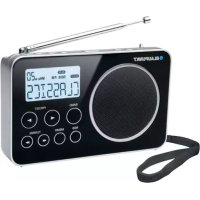
BDR500 - Radio BLAUPUNKT - Free user manual and instructions
Find the device manual for free BDR500 BLAUPUNKT in PDF.

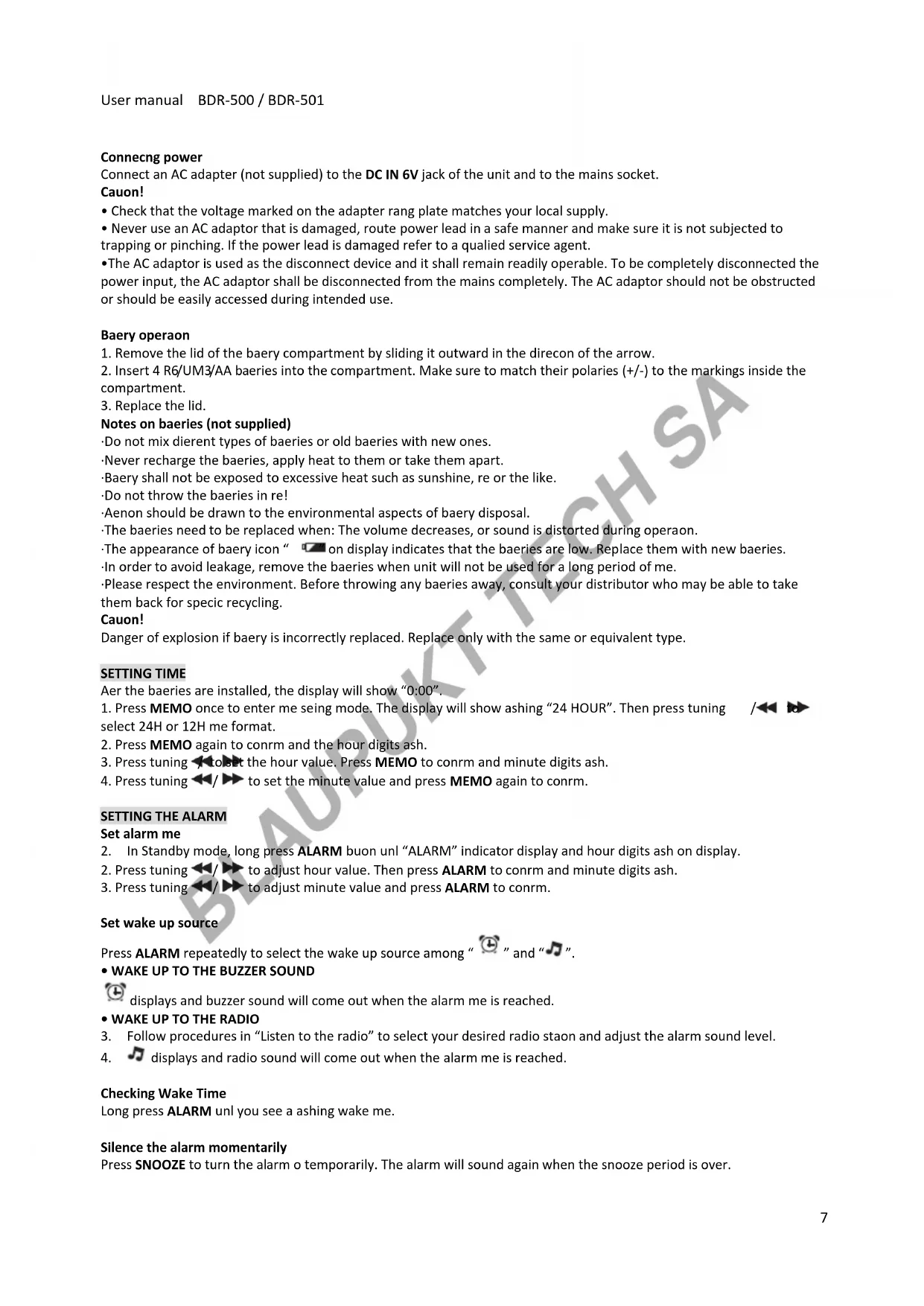


| Product type | Portable alarm clock radio |
| Brand | Blaupunkt |
| Model | BDR500 |
| Main power supply | 6 V DC mains adapter (not supplied) or 4 x 1.5 V R6/UM3/AA batteries (not supplied) |
| Frequency bands | FM and MW |
| Number of presets | 20 (10 FM + 10 MW) |
| Alarm functions | Buzzer or radio, snooze (9 min) |
| Sleep timer | Yes (120, 90, 60, 45, 30, 15 or 0 min) |
| RDS | Station name display, program type, radio text |
| Auxiliary input | LINE IN jack (3.5 mm) |
| Headphone output | 3.5 mm headphone jack |
| Sound ambiences | Voice, Music, Normal |
| Display | LCD screen |
| Dimensions (approx.) | Approx. 200 x 120 x 70 mm |
| Weight (approx.) | Approx. 0.5 kg (with batteries) |
| Antenna | FM telescopic, MW internal ferrite antenna |
| Care and cleaning | Clean with a soft, dry cloth. Remove batteries if not used for a long time. |
| Safety | Do not expose to water, naked flames, do not block ventilation openings. Minimum distance 5 cm around the device. |
| Spare parts and repairability | No spare parts supplied. In case of malfunction, contact after-sales service. |
| General information | Use in temperate climate. Respect the environment: do not dispose of with household waste. |
Frequently Asked Questions - BDR500 BLAUPUNKT
User questions about BDR500 BLAUPUNKT
0 question about this device. Answer the ones you know or ask your own.
Ask a new question about this device
Download the instructions for your Radio in PDF format for free! Find your manual BDR500 - BLAUPUNKT and take your electronic device back in hand. On this page are published all the documents necessary for the use of your device. BDR500 by BLAUPUNKT.
USER MANUAL BDR500 BLAUPUNKT
| Page 2 | German |
| Page 6 | English |
| Page 10 | French |
| Page 13 | Italian |
| Page 17 | Spanish |
| Page 22 | Portuguese |
| Page 26 | Dutch |
| Page 30 | Swedish |
| Page 34 | Danish |
| Page 38 | Finnish |
| Page 42 | Norwegian |
| Page 46 | Russian |
| Page 51 | Greek |
| Page 55 | Turkish |
| Page 59 | Polish |
| Page 63 | Bulgarian |
| Page 67 | Romanian |
| Page 71 | Czech |
| Page 75 | Hungarian |
| Page 79 | Japanese |
| Page 83 | Chinese |
| Page 87 | Arabic |
Please read the instrucon carefully before operaon the unit.
GENERAL CONTROLS
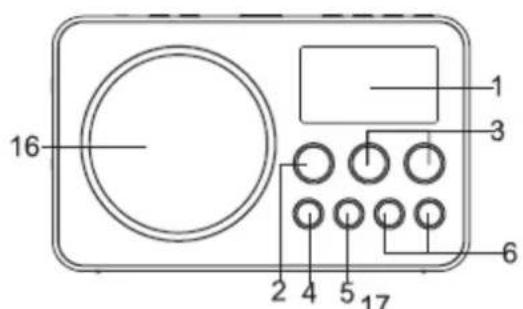
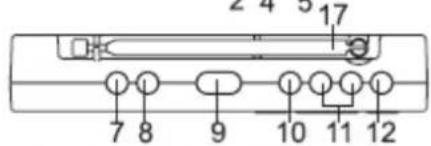
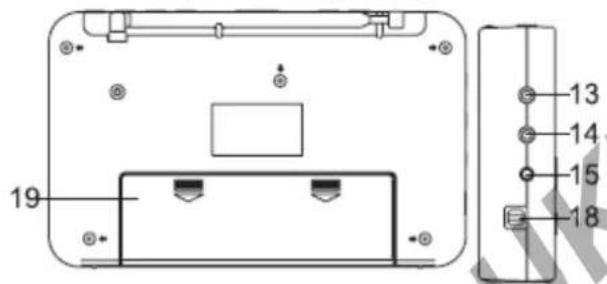
- LCD display
- BAND buon
- PRESET
4.RDSbuon - MEMO buon
6.TUNING - SLEEP buon
- ALARM buon
- SNOOZE buon
- AUDIO buon
- VOLUME+/- buons
- ON/OFF buon
- Earphone jack
- LINE IN jack
- DC IN 6V jack
- Speaker
- FM telescopic antenna
- Strap pin
- Baery compartment
POWER SUPPLY
Choose one of the power sources as below.
- AC adapter (not supplied): Output DC 6V
- 4x1.5V R6/UM3/AA baeries (not supplied)
Connecng power
Connect an AC adapter (not supplied) to the DC IN 6V jack of the unit and to the mains socket.
Cauon!
- Check that the voltage marked on the adapter rang plate matches your local supply.
- Never use an AC adaptor that is damaged, route power lead in a safe manner and make sure it is not subjected to trapping or pinching. If the power lead is damaged refer to a qualified service agent.
- The AC adaptor is used as the disconnect device and it shall remain readily operable. To be completely disconnected the power input, the AC adaptor shall be disconnected from the mains completely. The AC adaptor should not be obstructed or should be easily accessed during intended use.
Baery operaoi
- Remove the lid of the baery compartment by sliding it outward in the direcon of the arrow.
- Insert 4 R6/UM3/AA baeries into the compartment. Make sure to match their polaries (+/-) to the markings inside the compartment.
- Replace the lid.
Notes on baeries (not supplied)
-
Do not mix dierent types of baeries or old baeries with new ones.
-
Never recharge the baeries, apply heat to them or take them apart.
Baery shall not be exposed to excessive heat such as sunshine, re or the like.
- Do not throw the baeries in re!
Aenon should be drawn to the environmental aspects of baery disposal.
The baeries need to be replaced when: The volume decreases, or sound is distorted during operaoon.
The appearance of baery icon " on display indicates that the baeries are low. Replace them with new baeries.
In order to avoid leakage, remove the baeries when unit will not be used for a long period of me.
- Please respect the environment. Before throwing any baeries away, consult your distributor who may be able to take them back for specific recycling.
Cauon!
Danger of explosion if baery is incorrectly replaced. Replace only with the same or equivalent type.
SETTING TIME
Aer the baeries are installed, the display will show "0:00".
- Press MEMO once to enter me seeing mode. The display will show ashing "24 HOUR". Then press tuning select 24H or 12H me format.
- Press MEMO again to conrm and the hour digits ash.
- Press tuning to the hour value. Press MEMO to conrm and minute digits ash.
- Press tuning / to set the minute value and press MEMO again to conrm.

SETTING THE ALARM
Set alarm me
- In Standby mode, long press ALARM buon unl "ALARM" indicator display and hour digits ash on display.
- Press tuning to adjust hour value. Then press ALARM to conrm and minute digits ash.
- Press tuning to adjust minute value and press ALARM to conrm.
Set wake up source
Press ALARM repeatedly to select the wake up source among "L" and "J".
displays and buzzer sound will come out when the alarm me is reached.
- Follow procedures in "Listen to the radio" to select your desired radio staon and adjust the alarm sound level.
- displays and radio sound will come out when the alarm me is reached.
Checking Wake Time
Long press ALARM unl you see a ashing wake me.
Silence the alarm momentarily
Press SNOOZE to turn the alarm o temporarily. The alarm will sound again when the snooze period is over.
User manual BDR-500/BDR-501
Note: snooze me is 9 minutes.
Stop the alarm
Press ON/OFF: The alarm will stop, and will sound again 24 hours later.
Cancel Wake Seng
Press ALARM repeatedly unI all alarm indicators disappear from the display.
SLEEP TO THE RADIO
In sleep mode, the radio will turn o automatically aer a specied me.
In radio ON mode, press SLEEP to select the desired me before turn o among 120-90-60-45-30-15-00.
- Select "00" then the sleep funcon is OFF, SLEEP indicator disappear from display.
When in SLEEP mode, press SLEEP buoy to read the remaining sleep me.
SOUND PRESETS
When listening to the radio, press AUDIO buon repeatedly to select desired sound preset: VOICE, MUSIC or NORMAL.
USING THE RADIO
Listen to the radio
-
Press ON/OFF.
-
Select the frequency FM/MW by pressing BAND.
- Select the required radio staon with the buons and
- Adjust the volume with the buons VOLUME +/-
To enhance radio recepon ability:
FM: Extend the telescopic antenna.
MW: Rotate the unit horizontally for opumum recepon.
Saving Preset Staons
- Tune to a staon to be saved as a preset staon (see "Listen to the radio").
- Press MEMO once and you will see "M" and a ashing "01" on the display.
- Press PRESET to select a preset number.
- Press MEMO to save staon as selected preset number.
- Repeat above steps to preset a maximum of 10 staons for MW and FM respectively.
Selecng Preset Staons
Press PRESET to select a preset number.
RDS FUNCTION
When FM staon with RDS is received, the staon name (PS) is displayed. Press RDS buon repeatedly to display the program type (PTY), the radio text (RT), the frequency and the staon name (PS).
AUXILIARY FUNCTION
- Connect an audio device to the LINE IN jack, using an audio cable (not supplied).
- Switch the appliance on.
- Use the device's controls directly.
LISTENING WITH EARPHONES
Connect earphones (not included) to the microphone jack on unit.

Connuous use of earphones at high volume can damage the user's hearing.
SAFETY INSTRUCTION
IMPORTANT!
- The venlaon should not be impeded by covering the venlaon openings with items such as newspapers, tablecloths, curtains, etc.
- No naked ame sources, such as lighted candles, should be placed on the apparatus.
- The use of apparatus in moderate climates.
- The apparatus should not be exposed to dripping or splashing.
- Ensure a minimum distance of 5cm around the apparatus for sucient venlaon.
- Do not place objects lled with liquids, such as vases, on the apparatus.
- The rang plate is located at back of unit.
- Excessive sound pressure from earphones and headphones can cause hearing loss.
Under the inuence of electrical fast transient or/and electrostac phenomenon, the product may malfuncon and require user to power reset.

If at any me in the future you should need to dispose of this product please note that Waste electrical products should not be disposed of with household waste. Please recycle where facilities exist. Check with your Local Authority or retailer for recycling advice. (Waste Electrical and Electronic Equipment Direcve)
Note: Design and specicaon are subject to change without noce.
© 2011 All rights reserved by Blaupunkt. This material may be reproduced, copied or distributed for personal use only.
C
Opmerking: de snooze-jd is 9 minutes.
-He CmeunBaIte pa3InuHbIe TINbI 6aTapeek, He yCTaHaBnBaIte cTapble 6aTapeKIM BMeTe C HOBIMn 6aTapeKamn.
-нкогда He nepezaаite 6ataeКи, He harpeBaTe nIи He pa3bupaTe nx.
-DepKHe 6aTapeKn BdaIIN OT NCTOCHNKOB HArpeBaHIn, TaKnx KaK CoHNcE, OOrHb IIn IpOuHX.
-He 6pocaiTe 6aTapeiKn B oroHb!
-Посси IncnoIb3OBAHn6 BaTapeeK, Bbl6paCbBaIte nX, He 3aqr3Hry OkpykaioyUcpey.
-БатAPEикслдуETЗамeHntb,КOrДa:CHnJaeTcHypoBeHb rPOMKocTиLNo6,eCIn BO BpeM NOlb3OBaHnI NCKaHaTeC3ByK.
IoBHeHne 3NaUka 6aTapeKn " Ha Iucnlee yKa3bIbaeT Ha To, YTO 6aTapeKn pa3pndnncb. 3aMeHInTe IN HA HOBble.
- Ecnn annapaT He 6ydt HcnoIb3ObaTbC B TeueHne IInTeIbHoro nepNoJa BpeMeHn, BO n36eKaHne yTeuKn, BaTapeKn Heo6xOdmo BblHyTb,
-5epeHnTe OkpykaioyUcpey. IpeKdyeem BbIbpcntb 6aTapeN, npOKOHcyJbTnpuYteCb co CBOIM nncTpnoBIOtopom 6aTapeek, BO3MOxHo, OH npImet ux
Ha3aD IJRA NcIIOb3OBAHnB KaueCTBe BTOpUHOro cbIpBa.
BHHMaHHe:
B clyuae HnnpaBnIbHOY yCTaHOBKn, 6aTapeNk MOrYT B3OpBaTbcra. 3aMeHnTe 6aTapeNk TOnbKO TeM Jne IIN60 paBHOUeHHbIM TINOM
HACTPOIKA BPEMEHN
IocTe TOrO, KaK 6aTapeeKn yCTaHOBJIeHbI, Ha IINcJIee NOBUTcR "0:00".
- Haxmte KhoNky MEMO dIy TORo, yTo6bl BOITn BpeKIM HacTPOkN BpeMeHn. Ha DCnJIe e NORBNTc MMRaIOUaJ HAIDINCB "24 HOUR". 3aTeM Haxmte TUNING 一 _ 一 Iy TORo, yTo6bl Bb6paTb fOpMaT BpeMeHn 24 u nn 12 u.
- HaxMMTe KhoNky MEMO cHOba IJn noTBePckDeHn, npn 3om 3amnraIOT uΦpbl, o6o3HaiaUioNe KOINueCTBO YacOB.
- Hαχmnte KhONky TUNING ⇌ ➔ ДяТОгуTO,чTOбы yCTaHOBnTB 3HaueHne YacOB. Hαχmnte KhONky MEOДЯ NOДТВержден,在пгэлтOMЗAMURAOTцФрbl,обOЗнauHошиКOLИЧECTBOMHHT.
- Haxmte KhoNky TUNING <DJIa TORO, YTO6bl yCTaHOBnTB 3HaueHne MmHyT n Haxmte CHOBA KhoNky MEMO nnnoTBeHHJ.
HACTPOIKA 6yDnJIbHNIKA
YcTaHOBnTe BpEm6yDnIbHnKa
B peKHe OxHdAnHn, HaxMnte N yDepKbBaTe KhoNky ALARM, noka Ha dncnlee He 3amirgaet INndkaTOp "ALARM" n cnphi, o6o3HaauOuNe KoJInueCTBO Yaocob.
- Haxmte KhoNky TUNING <T DnI TORO, yTo6bI hAcptOntB 3HaueHne YacOB. NocIe 3TORo HaxmTe KhoNky ALARM, yTo6bI NOdTBePdntB, uΦpbl, o603HaauHOuNE MHyTbI npN 3OM 3aMnraHot.
- HαχMnte KhONky TUNING <▶ DЯ TORO, YTO6bI HacTpOHTb 3HaueHne MmHYT N HαχMnte KhONky ALARM DЯ TORO, YTO6bI NOdTBePdNTb.
HactpoKa nctouHnka npo6yKdEHHa
1.HeckoIbko pa3 haKMIte KHOINky ALARM IJIa TORO, YTO6bl BbIbpaTb NcToCHNK IpO6yJKeHnra n3 PNIKTOrpamM 7
-БУДИЛьНИК CO 3ВУКОМ ГДКOB
Ha nncnnee noaBnaeTc3NaOHK, npn HacTyIneHn BpeMeHn 6yIbHnKa NaHnHaOT 3ByuTaB rKn.
-БУДИЛьНИКCO3BYKOMPAДИО
- BbIOnHnTe yka3aHnpa3deJa "CnywaTb paDnO" IJIy BbIbopa JKeJaeMoI paDIOCTaHcNn HAcTpOte ypoBHe 3Byka 6yDnJIbHnKa.
- NIOBlaeTc3HaouK n, npHn HAcTyIeHHn BpeMeHN 6yDInbHnKa, NaHHaTe 3ByuTaB paAno
PpOBeRka BpeMeHn 6yDnIbHnKa
HaMMTe u ydepKnBaIe KhoNkY ALARM, noka He yBnDte Mrraiooee BpeM 6ydnbHnka.
OTKIIIOUeHHe 6yDnIbHnKa Ha HeKOToOpoe BpEmr
HaKMMTe KONky SNOOZE dIy BpeMeHHoro OTKJIIOUeHnI 6yDINbHnKa. ByINbHnK 3a3ByuT cHOBa nocIe OKOHuaHHBpeMeHHoro nepnoDa snooze.
PpMmeaHHe: BpeMa NOBTopeHnCnHnAa DnTc9 MNHyT.
BbIKIOueHne 6yduNbHnka
HaKMnTe KHOHky ON/OFF: 3BoHok 6yDnIbHnka OcTaHOBnTcN nPpO3ByuT TOnbKo 24 Cnyctra.
OTMeHHTb yCTaHOBky 6yDnIbHnKa
HeckoIbko pa3 HaxmTe KHOIpKy ALARM, noka BCE uHnKkAToPb6yuNbHnKa He uCye3HyT c dncnIe.
PEXKIM SLEEP
B pexnme otKIOueHn, paNO aTOMaTHueCKN OTKIOUaETcN oocne 3aDaHHoro BpeMeHn.
B pejkmpe pao ON hajmnte KhoNky SLEEP dIra TOrO, YTO6bI Bbl6paTb JKeJaemoe BpeMa OTKIOueHnra 13 120-90-60-45-30-15-00.
*PnBbIbope "00" φ yHKzur OTKIOUeHnne nepExoDHT B cOcToHne OFF, HndKAtop SLEEP nCye3aet C dncnJeA.
BpeKMe SLEEP, HaxMnte KhoNkY SLEEP dIy cHTbBaHnO octaBweroC BpeMeHH Do BbIKIOueHn.
HACTPOIKN 3BYKA
HeckoIbko pa3 HaKmTe KhoNky AUDIO dIra TorO, yTo6bl BbIpaTb Jeaemble HAcTpOuKn 3ByKa: ToHaIbHocTb VOICE, npocnyuBaHHaMy3bIKn MUSIC nn HopMaIbHbI pexM NORMAL
NcnoJIb3OBAHNE PAIIO
PpocnyuBaHne paHno
- Haxmte KhoNky ON/OFF.
- BblbepnTe noIocu yactot n3 FM/MW, haxab KhoNky BAND.
Bb6epnte Tpe6yemyo paHnoctaHnIO C nOmoIbKHOHONK - HactpoiTe 3ByK c nOMOuH KHOHOK VOLUME +/-.
-ДяТоуTO6bI bIKHOUHTb paДи,HaKMnTe KHOITKY ON/OFF.
ДяТOrO yTo6bI yLyu7HtB npnem:
FM: BbIbINHbTe TeJeckOnnueeCKyO aHTehHy.
MW: NobopaunBaIte annapat rOpnOHTaIbHo dIy ONTImaJIbHOro npneMa.
CoXpaHHeNHe NaCTpoE paAnocTaHcN
- HauDnte paAnocTaHnIO, HacTpoKn KOTopoN Heo6xOmo CoXpaHnTB (cm. pa3dEn "PpocnyuBaHne paNo").
- HaxMMTE KhoNky MEMO, nocle yero Ha dncnlee noBntc Mraioi 3HaK "M01".
- Haxmte Preset / TIOI TORO, yTO6bI Bb6paTb HOMep COxpaHeHHoI CTAHUN.
- Haxmte KhoIky MEmO dIa coxpaHnHaCtpoek paIIOCTaHcII IOd ONpeJeHHbIM HomepOM.
- NOBTOPiTe BbIeYka3aHHbIe WArn IJIra TORO, YTO6bl COxpaHHTb HAcTpOoi MaKcMym 10 cTaHciN dJIra KaJdoTOr Dnana3oHa FM nII Mw COOTBeTCTBeHNo.
Bb6op Homepa Hactpoek coxpaehHno paadnoctAHn
- Y6eIntecb, yTO peXHM COxpaHeHHbIX HAcTpoE BKJIIOueH.
- Haxmte KhONky Preset / Tnra TORo, YTO6bI Bb16paTb COxpaHeHHbH Homep.
ФунклгRDS
Pn npneMe cTahm FM c yHKuEe RDS Ha 3KpaHe IOBaIeTc H3BaHne cTahm (PS). HeckoJIbKO pa3 HaKMNTe KHOKNy RDS dToro, TTo6bl NOBILcKoD nDeHTnФUkaun pOrpamMbI (PTY), paINO TeKCT (RT), hAcTota n Ha3BaHne cTahm (PS).
ФУHKЦЯ BCПOMOTATEЛьНО ГИСТОЧИКА
- PoiCoeHNHTe ayHNOyCTPOINCTBO KTHHe3y LINE-IN cncNoB3OBAHNEM ayHNO Ka6EJIa (He BXoJNT B KOMnJIeKT).
BkHIOHTe yCTpoINCTBO.
-ИспοльзугенаряMuHастpoиуctpoiuctBa.
NcNoJIb3OBAHNE HAYUHNIKOB
IopoceHnHTe HauHHNK (He BXoT B KOMnKeT) KrHe3y HaayHHKOB Ha annapaTe.

IocToHHoe nCIOJIb3OBAHHe HayUHnKOB C BbICOKIM yPOBHEm rPOMKOCTM MoKeT NOBpeNTb CInx.
HHTPYKLIINBE3ONACHOCTN
BAXHO!
- BeHTnlaIyBHyTpN Kopnyca He dOJnxHa 3aTpynHbTbcr NyTeM HApbITn BHTnlaIzHOHHbIX OTBepCTn TaKIMnpedMeTaMn KaK raeTbI, cKaTePtn, 3aHaBeckn T.D.
He pa3pewaaTcTaBnTb Ha aannapat OTkpBITne NCTOCHNKn PJIaMeHN, TaKne KaK 3aKKeHHbIe CBeH. - Annapat npedHa3HaueH nla HcnoJb3ObaHn B yMepeHHOM KImMaTe.
-Избeraite nonadHnB Odbi B annapaT. - 06ecnebyte cbo6oHoe npoctpaHCTBO Ha paccToHHN 5 cm BOKpyr annapaTa IJy doCTaTOHoi BEHTnlaIIN.
He cTaBbTe Ha annapaT npEIMeTbI HAnOJIHeHHbIe KINKocTAM, TaKne KaK Ba3bl.
- NaonopTnHa Ta6JnuKa annapaTa HaxoDntcH a 3aDHeK pblke Kopnyca.
- Ype3MepHbI ypoBeH 3Byka n3 HayuHnKOB MOKeT npNBecT K nOtepe cLyxa.
KpaTkoBpeMeHHa HeYcToHbOCTb B3eKtpOnHtAHn n/nn 3JeKtpocTaHueckne RbHeHm MOyr BbI3BaTb nepe6oB B pa6ote n Notpe6oBaTb BBk./BKn NiTaHne 3aHOBO.
B cnyae, ecn BAM noHaobntc Bb6pocntb annapat, mme Te BnDy, yTo 3eKtpueckne n3denn He MoryT yTHIN3HPOBaTcB MecTe C ocTaIbHbIM Mycopom. Ioxayncta, y3HaTe, y MeCThblx opraHOB BLaCTN, IIn6o B Maar3HHe, rKe HaxOJATcC COOTBeTCTByIOUne ueHTpbI nepepa60TK (DInpeKTnBa no NobTOpHoi nepepa60Tke 3eKTPoHORO n 3eKTPpucecko O6OpuOboHH)
PnmeuHHe: H3aH N xapaKTepeNCTkN npOyKta Moryt n3MeHrTbC8 6e npDeynpeXdeHn.
© 2011 Bce npaba 3aunuiehbl ot Blaupunkt. 3ToT Maepnai MoKeT 6bItb Bocnpo3BeDeH, KOnIpobAH nn paacnpoctpaeh ToIbko B cIeJX IuHOro NlOb3OBaHH
C
DODATKOWE WEJSCIE LINE
ALVAS FUNKCIO (SLEEP)
| LCD | .1 |
| BAND | .2 |
| PRESENT | .3 |
| RDS | .4 |
| MEMO | .5 |
| TUNING | .6 |
| SLEEP | .7 |
| ALARM | .8 |
| SNOOZE | .9 |
| AUDIO | .10 |
| +/- VOLUME | .11 |
| ON/OFF | .12 |
| LINE IN | .14 |
| (5) DC IN 6V | .15 |
| .16 | |
| FM | .17 |
| .18 | |
| .19 |
aal 4a
0jia 1iie iie jai 1o aiiil iis gaaag, 1a 4iill sNooze ie bica
98 13 20
4.1.11
Ae 24 8 j 8 g aagaaagg aagaaagaaagaaagaaagaaagaaagaaagaaagaaagaaagaaagaaagaaagaaagaaagaaagaaagaaagaaagaaagaaagaaagaaagaaagaaagaaagaaagaaagaaagaa
biuui buaie
ALARM
1
sleep
.120-90-60-45-30-15-00 1
SLEEP OFF
a aal gill ool sL eep jie bai sL eep
Cglll 1
. NORMAL MUSIC VOICE : CIOI LIOI AUDIO JIOI JIOI JIOI JIOI JIOI JIOI JIOI JIOI JIOI JIOI JIOI JIOI JIOI JIOI JIOI JIOI JIOI JIOI JIOI JIOI JIOI JIOI JIOI JIOI JIOI JIOI JIOI JIOI JIOI JIOI JIOI JIOI JIOI JIOI
1
.ON/OFF
BAND le biuall y FM/MW 2
+/-VOLUME Jj j j j j j j j j j j j j
:
∴ 与 FM
J 10000000000000000000000000000000000000000000000000000
a
(1) (2)
Ae "01" 568,743 M" 568,743 568,743 MEMO 2.
PRESSET
a a a a a a a a a a a a a a a a a a a a a a a a a a a a a a a a a a a a a a a a a a a a a a a a a
f FM MW 10 55.
Laaabgacallcballa
Preset
RDS
Pw w g (y) RT, (PTY) 1000000000000000000000000000000000000000000000000000000
.PS)
a
.(j)gall s pahyLINEIN gall
jia jia
jbjil aelauu Dus co elauuN
jL 1

山
1
1 1

aaii iiaiiie 1
aee aee eae ae aee aee aee aee aee aee aee aee aee
( a + b) ( b - 1) ( c + d) = 0
gaaa jn y aie g aiae gaiy aaii
2011 ⑥
C


- GENERAL CONTROLS
- POWER SUPPLY
- CONNECNG POWER
- CAUON
- BAERY OPERAOI
- NOTES ON BAERIES (NOT SUPPLIED)
- SETTING TIME
- SETTING THE ALARM
- SET ALARM ME
- SET WAKE UP SOURCE
- CHECKING WAKE TIME
- SILENCE THE ALARM MOMENTARILY
- STOP THE ALARM
- CANCEL WAKE SENG
- SLEEP TO THE RADIO
- SOUND PRESETS
- USING THE RADIO
- LISTEN TO THE RADIO
- SAVING PRESET STAONS
- SELECNG PRESET STAONS
- RDS FUNCTION
- AUXILIARY FUNCTION
- LISTENING WITH EARPHONES
- SAFETY INSTRUCTION
- IMPORTANT
- BHHMAHHE
- HACTPOIKA BPEMEHN
- HACTPOIKA 6YDNJIBHNIKA
- YCTAHOBNTE BPEM6YDNIBHNKA
- HACTPOKA NCTOUHNKA NPO6YKDEHHA
- PPOBERKA BPEMEHN 6YDNIBHNKA
- OTKIIIOUEHHE 6YDNIBHNKA HA HEKOTOOPOE BPEMR
- BBIKIOUEHNE 6YDUNBHNKA
- OTMEHHTB YCTAHOBKY 6YDNIBHNKA
- PEXKIM SLEEP
- B PEXNME OTKIOUEHN, PANO ATOMATHUECKN OTKIOUAETCN OOCNE 3ADAHHORO BPEMEHN
- HACTPOIKN 3BYKA
- NCNOJIB3OBAHNE PAIIO
- PPOCNYUBAHNE PAHNO
- COXPAHHENHE NACTPOE PAANOCTAHCN
- BB6OP HOMEPA HACTPOEK COXPAEHHNO PAADNOCTAHN
- ФУНКЛГRDS
- ФУHKЦЯ BCПOMOTATEЛЬНО ГИСТОЧИКА
- NCNOJIB3OBAHNE HAYUHNIKOB
- HHTPYKLIINBE3ONACHOCTN
- BAXHO
- DODATKOWE WEJSCIE LINE
- ALVAS FUNKCIO (SLEEP)
Brand : BLAUPUNKT
Model : BDR500
Category : Radio