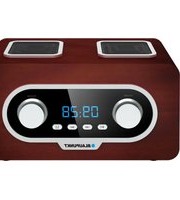
BR-50DAB - Radio BLAUPUNKT - Free user manual and instructions
Find the device manual for free BR-50DAB BLAUPUNKT in PDF.


Pick your language and provide your email: we'll send you a specifically translated version.
| Product Type | DAB/DAB+ Digital Radio |
| Brand | Blaupunkt |
| Model | BR-50DAB |
| Tuner Bands | DAB/DAB+ and FM |
| DAB Frequency Range | Band III (174-240 MHz) |
| FM Frequency Range | 87.5-108 MHz |
| Display | LCD with backlight |
| Speaker Output | 2W RMS |
| Audio Output | 3.5mm headphone socket |
| Antenna | Telescopic aerial |
| Preset Stations | 20 DAB and 20 FM presets |
| Alarm Function | Dual alarm with snooze |
| Sleep Timer | Yes, selectable 10-90 minutes |
| Power Supply | AC adapter 230V, 50Hz or 4 x AA batteries |
| Battery Life | Up to 20 hours (alkaline, est.) |
| Dimensions (W x H x D) | Approx. 200 x 120 x 60 mm |
| Weight | Approx. 500 g (without batteries) |
| Additional Features | Auto scan, manual tune, volume control |
| Cleaning Instructions | Wipe with a soft dry cloth |
| Safety Warnings | Do not expose to moisture or extreme heat |
Frequently Asked Questions - BR-50DAB BLAUPUNKT
How do I scan for DAB stations?
Press the SCAN button to automatically search for all available DAB/DAB+ stations. The radio will store them in the preset list. You can also perform a manual tune by holding the TUNE button.
Can I listen to FM radio on this device?
Yes, the BR-50DAB supports FM radio in the 87.5 to 108 MHz range. Switch to FM mode using the BAND button, then use the tuning controls to find stations.
How do I set the alarm?
Press the ALARM button and use the TUNE dial to set the hours, minutes, and the alarm source (DAB, FM, or buzzer). Confirm each setting by pressing the SELECT button. The dual alarm feature allows two independent alarms.
How do I set the sleep timer?
Repeatedly press the SLEEP button to cycle through the sleep timer options (10, 20, 30, 60, 90 minutes). The radio will automatically switch off after the selected time.
Why is my DAB reception poor?
DAB reception requires a clear signal. Extend the telescopic antenna fully and adjust its position. If you are in a basement or far from a transmitter, move closer to a window or outdoor area. Avoid placing the radio near metal objects or electronic interference.
Can I use headphones with this radio?
Yes, there is a 3.5mm headphone jack on the side of the device. Insert your headphones and the internal speaker will be muted automatically for private listening.
How do I reset the radio to factory settings?
Press and hold the MENU button for about 5 seconds until the display shows 'Factory Reset'. Confirm by pressing SELECT. This will delete all presets and restore default settings.
What batteries should I use?
The radio operates on 4 x AA alkaline batteries. For longer battery life, use lithium or rechargeable NiMH batteries. Make sure to observe the correct polarity as indicated in the battery compartment.
How do I clean the radio?
Always disconnect the power and remove batteries before cleaning. Use a soft, dry cloth to wipe the exterior. Do not use any liquid cleaners, alcohol, or abrasive materials, as they may damage the surface.
Is there a built-in antenna?
Yes, the BR-50DAB comes with a telescopic antenna that can be extended for DAB and FM reception. For optimal signal strength, extend it fully and try different orientations.
User questions about BR-50DAB BLAUPUNKT
0 question about this device. Answer the ones you know or ask your own.
Ask a new question about this device
No questions yet. Be the first to ask one.
Download the instructions for your Radio in PDF format for free! Find your manual BR-50DAB - BLAUPUNKT and take your electronic device back in hand. On this page are published all the documents necessary for the use of your device. BR-50DAB by BLAUPUNKT.
USER MANUAL BR-50DAB BLAUPUNKT


Manual assistant
Powered by Anthropic
Waiting for your message
Product information
Brand : BLAUPUNKT
Model : BR-50DAB
Category : Radio