Benvenuto Venezia TCA5608 - Coffee maker BOSCH - Free user manual and instructions
Find the device manual for free Benvenuto Venezia TCA5608 BOSCH in PDF.



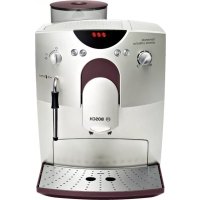
| Product type | Fully automatic espresso machine |
| Brand | Bosch |
| Model | Benvenuto Venezia TCA5608 |
| Power supply | 230 V ~ 50 Hz (according to rating plate) |
| Preparation modes | Coffee beans, ground coffee, hot water, steam |
| Water tank | Removable with max level mark |
| Bean hopper | Capacity approx. 250 g, airtight lid preserves aroma |
| Aroma setting | 3 levels: mild, normal, strong |
| Grind fineness adjustment | Progressive slider (finer grind = smaller dot) |
| Water quantity adjustment | Continuous selector between small and large cup |
| Double spout | Height adjustable, for 1 or 2 cups |
| Steam/hot water nozzle | For milk froth and hot water, removable for cleaning |
| Display screen | With symbols for settings and messages |
| Eco mode | Reduces power consumption, programmable automatic switchover |
| Maintenance | Combined descaling/cleaning program with dedicated tablets (ref. 310451 and 310575) |
| Service access | Bosch after-sales service, spare parts available |
Frequently Asked Questions - Benvenuto Venezia TCA5608 BOSCH
User questions about Benvenuto Venezia TCA5608 BOSCH
0 question about this device. Answer the ones you know or ask your own.
Ask a new question about this device
Download the instructions for your Coffee maker in PDF format for free! Find your manual Benvenuto Venezia TCA5608 - BOSCH and take your electronic device back in hand. On this page are published all the documents necessary for the use of your device. Benvenuto Venezia TCA5608 by BOSCH.
USER MANUAL Benvenuto Venezia TCA5608 BOSCH
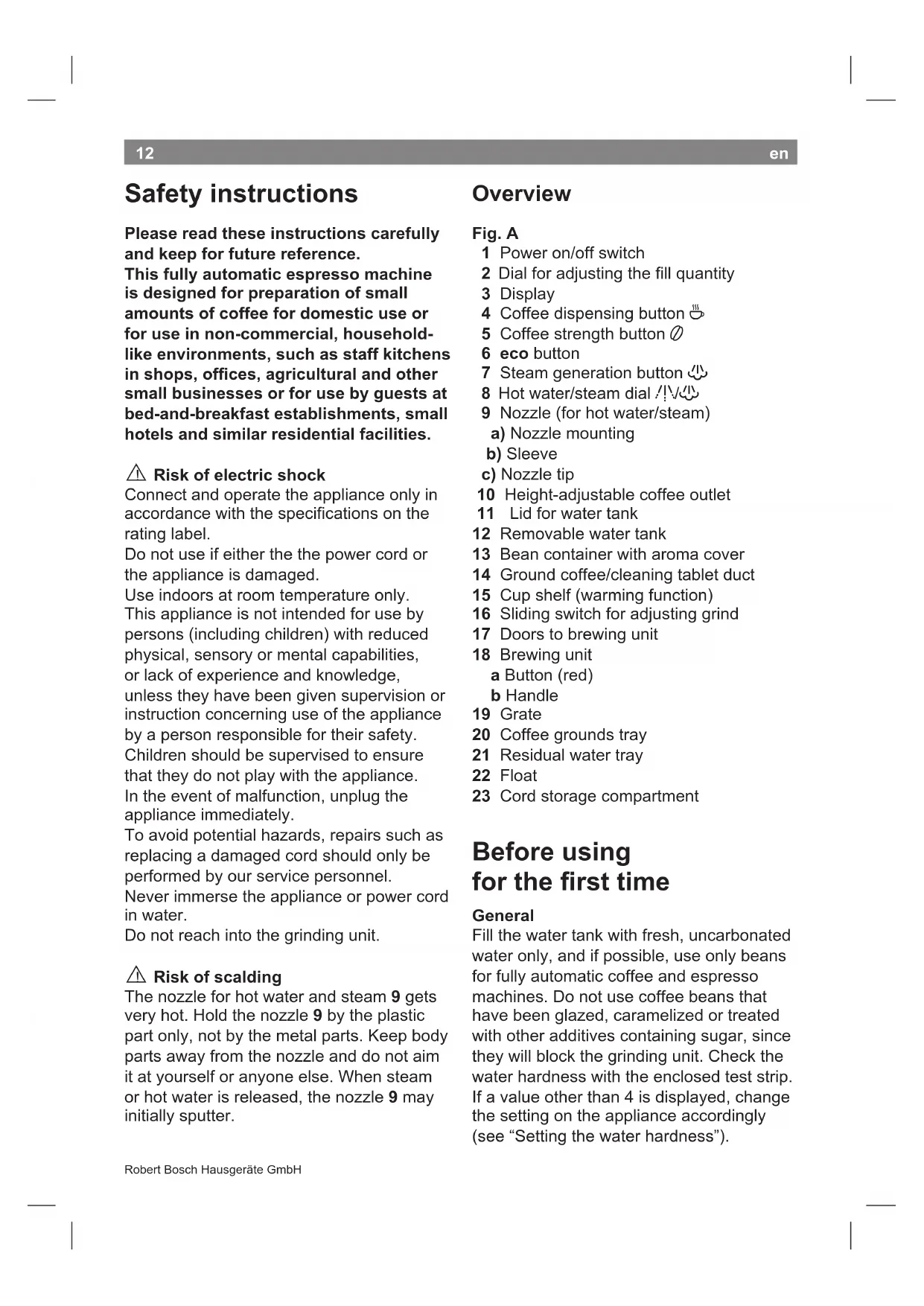
Please read these instructions carefully and keep for future reference.
This fully automatic espresso machine is designed for preparation of small amounts of coffee for domestic use or for use in non-commercial, household-like environments, such as staff kitchens in shops, offices, agricultural and other small businesses or for use by guests at bed-and-breakfast establishments, small hotels and similar residential facilities.

Risk of electric shock
Connect and operate the appliance only in accordance with the specifications on the rating label.
Do not use if either the power cord or the appliance is damaged.
Use indoors at room temperature only. This appliance is not intended for use by persons (including children) with reduced physical, sensory or mental capabilities, or lack of experience and knowledge, unless they have been given supervision or instruction concerning use of the appliance by a person responsible for their safety.
Children should be supervised to ensure that they do not play with the appliance. In the event of malfunction, unplug the appliance immediately.
To avoid potential hazards, repairs such as replacing a damaged cord should only be performed by our service personnel. Never immerse the appliance or power cord in water.
Do not reach into the grinding unit.

Risk of scalding
The nozzle for hot water and steam 9 gets very hot. Hold the nozzle 9 by the plastic part only, not by the metal parts. Keep body parts away from the nozzle and do not aim it at yourself or anyone else. When steam or hot water is released, the nozzle 9 may initially sputter.
Overview
Fig. A
1 Power on/off switch
2 Dial for adjusting the fill quantity
3 Display
4 Coffee dispensing button
5 Coffee strength button
6 eco button
7 Steam generation button
8 Hot water/steam dial
9 Nozzle (for hot water/steam)
a) Nozzle mounting
b) Sleeve
c) Nozzle tip
10 Height-adjustable coffee outlet
11 Lid for water tank
12 Removable water tank
13 Bean container with aroma cover
14 Ground coffee/cleaning tablet duct
15 Cup shelf (warming function)
16 Sliding switch for adjusting grind
17 Doors to brewing unit
18 Brewing unit
a Button (red)
b Handle
19 Grade
20 Coffee grounds tray
21 Residual water tray
22 Float
23 Cord storage compartment
Before using for the first time
General
Fill the water tank with fresh, uncarbonated water only, and if possible, use only beans for fully automatic coffee and espresso machines. Do not use coffee beans that have been glazed, caramelized or treated with other additives containing sugar, since they will block the grinding unit. Check the water hardness with the enclosed test strip. If a value other than 4 is displayed, change the setting on the appliance accordingly (see "Setting the water hardness").
en
13
Switching on the appliance
- Place the appliance on a flat, water-resistant surface.
- Pull enough of the power cord out of the storage compartment and plug it into the electrical socket.
- Remove and rinse the water tank 12 and fill it with fresh cold water. Do not fill above the "max" mark.
- Replace the water tank 12 and push it firmly downward into place.
- Fill the bean container with coffee beans.
- Make sure that the hot water/steam dial 8 is at "O".
- Set the power on/off switch 1 to I.
When switched on for the first time, the water pipes in the appliance must be filled.
- Place a cup under the nozzle 9.
- Turn the dial 8 to /ɪv/. Water runs into the cup. Turn the dial 8 back to "O".
- The eco button will now flash.
The appliance rinses and heats up. The appliance is ready for use when all four buttons 串 0,eco,and the coffee strength indicator (coffee beans) light up on the display.
This appliance also offers an "eco" mode which uses less power.
Coffee or steam can be dispensed in the usual way when the appliance is in "eco" mode. When the required button is pressed, the appliance first heats up, so it will take a little longer until the coffee is brewed or the machine is ready to provide steam.
To dispense hot water, first press the eco button. The appliance heats up briefly. Now the hot water can be dispensed as usual.
1 The appliance's factory settings are programmed for optimal performance.
Note: If the appliance is being used for the first time or has not been operated for a prolonged period, the first cup of coffee will not have the full aroma and should not be consumed.
Controls
1 Power on/off switch
The power switch 1 on the rear of the appliance switches the power supply on or off.
When the power on/off switch has been turned on, the appliance heats up, rinses and is then ready for use.
The appliance does not rinse if it is still warm when switched on.
Warning
Do not turn off the power switch while the appliance is operating. Before switching off, press the eco button to start the automatic rinse cycle. Then switch off at the power on/off switch.
2 Dial for adjusting the amount of coffee per cup
This dial 2 allows variable adjustment of the quantity of coffee from a small cup to a large cup .
3 Display
The display uses symbols to indicate appliance settings and messages.

Coffee dispensing, 2 cups

flashing Lid for ground coffeecuct 14 is open

Ground coffee/Cleaning
on Mild coffee
on Medium-strength coffee
on Strong coffee
000 flashing Bean container empty
S on Service:
Descale/clean appliance
S flashing Service programme
in operation
on Fill water tank 12, hold cup
- flashing under nozzle 9 and turn dial 8 to /ɪvʌ
flashing Turn dial 8 to
on Turn dial 8 to "O"
on Empty trays
flashing Trays missing
4 Coffee dispensing button
Coffee can be brewed by pressing this button.
Press once for one cup. The coffee is ground, brewed and dispensed into the cup.
Button 念 flashes during this process.
Press twice within 3 seconds for two cups. The coffee is ground, brewed and dispensed into the cups (the grinding and brewing process takes place twice). Button flashes and (2 cups) appears on the display during this process.
If the coffee dispensing button is pressed again, the coffee brewing process is terminated.
5 Coffee strength button
This button is used to select the coffee strength:
mild
medium
strong
The selected setting is shown on the display.
6 eco button
The appliance can be put into "eco" mode or returned to normal mode with the eco button.
In "eco" mode the appliance consumes less energy.
All displays and buttons are dimmed, only messages such as "Empty trays" are displayed in the usual brightness.
The temperature of the cup shelf (warming function) is lower.
Switching to "eco" mode starts an automatic rinse cycle.
The appliance does not rinse if:
- no coffee was dispensed before it was switched to "eco" mode.
- steam was dispensed shortly before it was switched off.
Note: The appliance is programmed so that it switches to "eco" mode automatically after about 10 minutes. The default time can be changed (see "Settings and displays").
7 Steam generation button
Button generates steam for foaming or warming.
8 Steam dispensing dial
Hot water or steam can be dispensed by turning the dial to hot water /I\ or steam. To dispense steam, the steam generation button 山 must be pressed first (see "Steam for foaming milk").
Settings and displays
Setting the water hardness
It is important that the water hardness be set correctly, so that the appliance indicates accurately when the descaling programme should be run. The factory setting is a water hardness of 4. You can check the water hardness using the enclosed test strip or by asking your local water supplier.
Degree Water hardness
| German (°dH) | French (°fH) | |
| 1 | 1-7 | 1-13 |
| 2 | 8-15 | 14-27 |
| 3 | 16-23 | 28-42 |
| 4 | 24-30 | 43-54 |
- Determine the water hardness with the enclosed test strip.

e.g. Hardness = 2
en
- Switch the appliance to "eco" mode.
- Hold down the steam button for at least 5 seconds. The number of service buttons, , eco, that light up indicate the selected water hardness.
- Press the steam button 必 repeatedly until the correct number of buttons is lit.
- Press eco button once. The selected number of service buttons should light up briefly; this indicates that the desired water hardness setting has been saved successfully.
If a water filter (special accessory) is used, the water hardness should be set to 1.
Note: If no button is pressed within 90 seconds, the appliance switches to stand-by mode without saving the new settings. In this case, the previous water hardness setting is retained.
The first time a filter is used or after changing the filter, the appliance needs to be cleaned.
- Fill the water tank up to the 0.5l mark.
- Place a suitable container (approx. 0.5 litres) under the nozzle 9.
- Turn the dial 8 to /ɪv/
- If no water comes out of nozzle 9, turn the dial back to "O".
- Fill the water tank and water pipes (see section "Switching on the appliance").
Setting the time for switchover to "eco" mode
The appliance can be programmed so that it automatically switches to "eco" mode after a certain time (from 10 minutes to 4 hours).
- Switch the appliance to "eco" mode.
- Hold down the button for at least 5 seconds.
If lights up,
switchover after 10 minutes
If , lights up,
switchover after 30 minutes
If ,, eco lights up,
switchover after 2 hours
If , ,eco,小 lights up,
switchover after 4 hours
- Press the button to set the required time.
- Press the eco button to save the setting.
Note: The factory setting is 10 minutes.
Adjusting the grinding unit
Sliding switch 16 adjusts the degree of grinding, from coarse to fine.
Warning
Adjust the grinding unit only while it is running! Otherwise the appliance may be damaged.
- Press the coffee dispensing button.
- While the grinding unit is running, move the sliding switch 16 to the desired position: the smaller the dots, the finer the grind.
1 The new setting will not become apparent until the second or third cup is brewed.
Tip: For dark roast coffee beans, choose a coarser grind; for light roast beans, select a finer grind.
Float
The float 22 in the water tray 21 shows when the tray needs emptying.
- If the float 22 is clearly visible, empty the water tray 21.
Preparation
This fully automatic espresso/coffee machine grinds beans freshly for each brew. If possible, use only beans for fully automatic coffee and espresso machines.
Deep-freeze or store in a cool place in sealed, airtight containers. Coffee beans can be ground while frozen.
Important: Fill the water tank with fresh water every day. The tank must always contain sufficient water for operating the appliance. Do not allow it to become empty.
Tip: Pre-warm cups, especially small, thick.
espresso cups, by placing on the cup shelf
15 or rinsing with hot water.
Using coffee beans
The appliance must be ready for use.
- Set the desired per-cup quantity using dial 2.
- Select the desired coffee strength using button
- Place the prewarmed cup(s) under the coffee outlet 10.
- Press the coffee dispensing button once for 1 cup or twice within three seconds for 2 cups. The coffee is brewed and dispensed into the cup(s).
Warning
If you select two cups, the grinding and brewing process is performed twice.
- Coffee dispensing stops automatically when the selected quantity has been dispensed.
1 The brewing process can be terminated by pressing the coffee dispensing button again. When coffee is brewed for 2 cups, it is dispensed via two outlet nozzles (place the cups side by side).
Using ground espresso/ coffee powder
The appliance must be ready for use.
- Set the desired per-cup quantity using the dial 2.
- Place the prewarmed cup(s) under the coffee outlet 10.
- Open the cover of the ground coffee duct 14.
- Add one to two level scoops of ground coffee (grind: medium-fine) to the ground coffee duct 14.
Warning
Do not add whole beans or instant coffee! Use a maximum of two level scoops of coffee.
- Close the cover of the ground coffee duct 14.
- Press the coffee dispensing button.
Repeat the process if a second cup is desired.
Note: If coffee is not brewed within 90 seconds, the brewing chamber is emptied automatically in order to prevent overfilling. The appliance is rinsed.
Preparing hot water
The appliance must be ready for use. This function allows water to be heated for a cup of tea, for example.
Risk of burns
The nozzle gets very hot. Do not touch the metal parts!
- Place an appropriate cup under the nozzle 9.
- Push the sleeve on the nozzle 9 all the way down.
- Turn the dial 8 to /ɪʌ/
Risk of scalding
When the dial 8 is set to /1V, the nozzle may sputter a little. Do not touch the nozzle 9 or aim it at anyone.
- End the process by turning the dial 8 back to "O".
Important: It is not possible to dispense hot water when the appliance is in "eco" mode. First press the eco button and then dispense hot water.
Steam for foaming milk
The appliance must be ready for use. You can foam the milk first and add the coffee on top, or foam the milk separately and pour it into the coffee.
Risk of burns
The nozzle gets very hot. Do not touch the metal parts!
- Push the sleeve on the nozzle 9 all the way down.
en
- Fill the cup approximately 1/3 full of milk.
- Press the button. It will start to flash.
The appliance will heat up for approx. 20 seconds.
- Immerse the nozzle 9 deep into the milk, but do not let it touch the bottom of the cup.
- When the button lights up and appears on the display, turn the dial 8 to
Risk of scalding
When the dial 8 is set to /1V, the nozzle 9 may sputter. Escaping steam is very hot and may cause liquids to sputter. Do not touch the nozzle 9 or aim it at anyone.
- Rotate the cup slowly until the milk is fully foamed.
- End the process by turning the dial 8 back to "O".
Note: When the nozzle 9 has cooled down, clean it immediately. Dried residue is difficult to remove.
Tip: If possible, use cold low-fat (1.5% fat) milk.
Steam for warming milk
Risk of burns
The nozzle gets very hot. Do not touch the metal parts!
The appliance must be ready for use.
- Push the sleeve on the nozzle 9 all the way up.
- Press the button. It will start to flash.
1 The appliance will now heat up for approx. 20 seconds.
- Immerse the nozzle 9 deep into the liquid you want to heat.
- When the button lights up and appears on the display, turn dial 8 to /ɪv
Risk of scaldingRisk of scalding
When the dial 8 is set to /ɪvʌ, the nozzle 9 may sputter a little. Escaping steam is very hot and may cause liquid to sputter. Do not touch the nozzle 9 or aim it at anyone.
- End the process by turning the dial 8 back to "O".
Note: When the nozzle 9 has cooled down, clean immediately. Dried residue is difficult to remove.
Maintenance and daily cleaning
Risk of electric shock
Unplug the appliance before cleaning it. Never immerse the appliance in water. Do not use a steam cleaner.
- Wipe the outside of the appliance with a damp cloth. Do not use scouring agents.
- Always remove any limescale, coffee, milk or descending fluid residue immediately. Such residue can cause corrosion.
- Wash all removable parts by hand only.
- Rinse out the water tank 12 with water only.
- Remove, empty and clean the trays for coffee grounds 20 and residual water 21.
- Wipe out the inside of the appliance (tray holders).
Note: If the appliance is cold when switched on, or if it is switched to "eco" mode after dispensing coffee, it rinses automatically; in other words the system cleans itself.
Nozzle 9 for hot water/steam
- Unscrew the nozzle 9 from the steam pipe.
- Dismantle all parts (Fig. E).
- Clean with a caustic cleaning solution and a soft brush. Clean the tip of the nozzle 9c with a blunt needle.
- Thoroughly rinse and dry all parts.
Brewing unit
The brewing unit can be removed for cleaning (Fig. D).
- Press the eco button to start the automatic rinse cycle.
- Turn the power on/off switch 1 to 0.
- Open the door 17 to the brewing unit 18.
- Hold the red button 18a down and push the handle 18b up until you hear it engage.
- Grasp the brewing unit 18 by the handle, remove carefully, and rinse under running water. Do not use cleaning agents. Do not place in the dishwasher.
Vacuum the inside of the appliance, or clean it with a damp cloth. - Reinsert the brewing unit 18 all the way into the appliance.
- Hold the red button 18a down and push the handle 18b down as far as it goes, until you hear it engage. The brewing unit is now secure.
- Close the doors of the brewing unit.
Service programme:
Combined cleaning and. descaling process
If an "S" is shown on the display while the appliance is on, the service programme must be run immediately to clean and descale the appliance. If the service programme is not run as instructed, the appliance may be damaged.
Specially-developed descending (order no. 310451) and cleaning agents (order no. 310575) are included with the appliance and can also be obtained from customer service.
Warning
Each time you run the service programme, you should follow the instructions for using the cleaning and descaling agents carefully.
Never interrupt the descending programme.
Do not drink the liquids.
Never use vinegar or vinegar-based products.
Never put descending tablets or other descending materials into the duct for cleaning tablets.
The "S" symbol flashes while the service programme is running (approx. 40 minutes).
Important: If there is a filter in the water tank, it needs to be removed before the service programme is run.
Starting the service programme
Important: There should be approx. 0.5 liters of water in water tank 12.
- Switch the appliance to "eco" mode.
- Hold down the coffee dispensing button for at least 5 seconds. The appliance rinses 2 × through the coffee outlet 10.
lights up on the display.
- Empty and reinsert the trays 20 and 21.lights up on the display.
- Open the cover of the duct 14 for ground coffee/cleaning tablets.
- Place one cleaning tablet in the duct 14 and close the cover.
lights up on the display and the button flashes.
- Empty the water tank before filling it with lukewarm water, add descaling agent and dissolve completely (total liquid: 0.5 litres). or
- Pour prepared descaling mixture into the water tank (total liquid: 0.5 litres).
- Press the button. The descending process begins. Duration approx. 10 minutes. The descending solution flows into the water tray 21.
en
19
flashes on the display.
- Place a suitable container (approx. 0.5 litres) under the nozzle 9.
- Set the dial 8 to /1. The descending process begins. Duration approx. 5 minutes. The descending solution flows into the container.
lights up on the display.
- Empty and reinsert the water tray 21.
lights up on the display and the button flashes.
- Empty and clean the water tank 12, fill with fresh water up to the "max" mark and reinsert.
- Place a suitable container (approx. 0.5 litres) under the nozzle 9.
- Press the button. The cleaning process begins. Water flows into the container.
lights up on the display.
- Turn the dial 8 to "O". The cleaning process begins. Duration approx. 10 minutes. Liquid flows into tray 21 inside the appliance, then from the coffee outlet.
lights up on the display.
- Empty, clean and re-insert the trays 20 and 21.
The appliance heats up and is ready for use again when all four buttons 串 0,eco and light up and remain lit.
Important: If the service programme is interrupted, e.g. owing to a loss in power, it is vital that the water tank be emptied, rinsed and filled with fresh water before the appliance is used again. Then turn the appliance on.
- The appliance rinses, liquid flows into tray 21.
flashes on the display.
- Hold a cup under the nozzle 9 and turn the knob 8 to 小心. Water runs into the cup.
lights up on the display.
- Turn the knob 8 back to "O".
The appliance rinses and is ready for use again.
Anti-freeze
In order to avoid damage through cold during transportation and storage, the appliance must be emptied completely first.
The appliance must be ready for use.
- Remove, empty, and replace water tank.
- Place a large, narrow container under nozzle 9.
- Press button.
- As soon as lights up on display, turn dial 8 to /ɪv/
The appliance will release steam for a while.
- When nozzle 9 stops releasing steam, turn dial back to "O".
- Turn off the appliance.
Disposal

This appliance is labelled in accordance with the European Directive 2002/96/EG relating to waste electrical and electronic equipment - WEEE. The directive provides the framework for the EU-wide take-back and disposal of end-of-life appliances. Please ask your specialist retailer about current disposal facilities.
Guarantee
The guarantee conditions for this appliance are as defined by our representative in the country in which it is sold. Details regarding these conditions can be obtained from the dealer from whom the appliance was purchased. The bill of sale or receipt must be produced when making any claim under the terms of this guarantee.
Right of modification reserved.
Troubleshooting
| Problem Possible cause Solution | ||
| ∅∅∅ flashing when bean container is full. | The grinding unit is not yet full enough. | Press coffee dispensing button again. |
| No hot water or steam discharge. | Nozzle 9 is blocked. Clean nozzle 9. | |
| Foam insufficient or too runny. | Sleeve b on nozzle 9 not in correct position. | Push down sleeve b on nozzle 9. |
| Milk not suitable for foaming. | Use cold low-fat (1.5% fat) milk. | |
| Coffee dispensing slows to a trickle. | Coffee is ground too fine. Pre-ground coffee is too fine. | Adjust the grinding unit to a coarser setting. Use a more coarsely-ground coffee. |
| Coffee not dispensed. | Water tank not filled or not correctly positioned. | Fill water tank and make sure it is in the right position. If necessary, fill water pipes (see section “Switching on the appliance”). |
| Coffee has no “crema”“crema” chasuitable type of coffee. (creamy foam). | Beans no longer fresh. | Change type of coffee used. Use fresh beans. |
| Degree of grinding inappropriate for beans. | Optimize degree of grinding. | |
| Grinding unit does not grind the beans. | Beans are not falling into the grinding unit (beans too oily). | Gently tap the bean container. |
| Grinding unit makes a loud noise. | Foreign objects in the grinding unit (e.g. grit, which can be found even in superior types of coffee). | Call the hotline. Note: The appliance can still be used to make pre-ground coffee. |
| eco button and steam button flash alternately. | The brewing unit 18 is missing, or is not properly inserted or secured. | Insert and secure the brewing unit 18. |
| If problems cannot be eliminated, always call the hotline. | ||
cepBnCHoCnyK6oHnAWeiΦnpMb.I.HnB KOem Cnyuae He norgykaTe B Body Hn cam np6Op, Hn erO ceTeBOHnHyp.
He BCTaBnIe HnKaKnx IpeMToB B KOFemOnKy.
Onachoctb ownapnbHnra!
Hacakn a nna noaun ropaye BObl/napa 9 cnIbHO HarpBaetc. PpKacatbcr MOxHo TOIbKO K nactMaCCOBbIM 3JIeMeHTam Ha- cakn 9, a He K DeTajm Kopnyca. B camom hauane OT6opa npa nn ropaye BObl BO3MOXHO NOBHeHne 6pb13r n3 Hacaikn 9.
KpaTkno63op
PncyHOK A
1 CeTeBOB BbIKJIIOuHaTeJIb
2 NobopoTHbI peryJrTop ypoBn3aONHeHn
3 Ducnnei
4 Knabnwa (npiroTOBneHne Kofoe)
5 KnaBnua (Kpenoctb Kope)
6 KnaBnuaeco
7 Knabnwa 心 (noDau napa)
8 NobopOTbI peryJrTop /1V/ 心 (ropa/BoDa/nap)
9 Hacadka (dЯ noaun ropueB BObl/ napa)
a DepeKaTeB HacaIKN
bBtynka
C NaKoHeuHnK HacaKn
10 Perynpyemoe NO BbICote yctpoCTBO noaun Kope
11 Kpbuika eMKoCTn IJIa BOdbI
12 CbeMaHa eMKoCTb Ira BOdbI
13 EMKoCTb IJRA KoFeHbIX 3epeH c KpbIuKO, COxpaHraUSei apomat
14 甲xTa nla 3arpy3kn MOJOTORO Kope/ qnctraux Ta6neTOK
15 POnctabka Jnla YaWeK (pynkunnoDorpeBa)
16 POn3yHKOBbI peryJrTOp cTeNeHn NOMoJa KoPe
17 DBepu6Joka3aBapnBaHn
18 Bnok 3aBapuBaHna a KlaBnua (Kpachra)
b pykoTka
19 PeWetka
20 POnDOn DnKoPeHNoIy
21 POnDoH dJa c6opa OCTaTkoB BoDbl
22 NonJaBok
23 OtceK JIy XpaHeHH Ka6eJIa
4 KnaBnua npiroTOBneHna Kofoe
JaHnA KnabuA cnIyKNT dI npIroTOBNeHnKaOe.
Pn Haxatnn KnaBn1 1 pa3 dny 3anonHeHn OndHouaShKn npOn3BOoNTcpa3MOJ KoFe,ero 3aBapuBaHne nNoDaVbAaKy. B npouecce npiroTOBHeHnKoPe KnaBnua Miraet.
Pn 2-KpaTHOM HaxaTNI KnaBnB IN B TeueHne 3 cek.ДЯ 3anONHeHnA DByX YaWeK npOn3BOuNTcra p3MOJ KoΦe, ero 3aBapNBaHne n noDaYaWKn, npUeM npOceC pa3MoJa N 3aBapNBaHn IOBTopraETc. B npOceCse npiroTOBJIeHn Kocpe KnaBnSha MmRaet, a Ha DNICNee BbICBeuNBaEtc CmBOJ (DBe yaWK).
I NOBTOPHoe HaxaTne KnaBnHn NOaHn KoOe CnyKNT IJIg PpeXdEbpemEHOro 3aBepseHn npiroTOBHeHn KoOe.
5 KnaBnwa HactpoynKpEnocTu KoPe 0
Pn NOMOuN KnaBUN MOKHO yCTaHOBNTb KpeNoCTb KoPe:

cna6bmykope,

HopMaJIbHbI KoΦe,

KpeNkn Kofoe.
HactpoJa oTo6paxKaTcHa ducnnee.
6 KnaBnua eco
Pn HaxaTn KHONKn Eco npOxCoDnT
pepeKnIoueHne np6opa B pexkM «eco» N
ero BO3BpaT B HopMaJIbHbI pexkM.
Pnp6op B pexkme «eco» nOtpe6Iyaret
MeNbSe 3Heprn.
Bce HndkaTopbI N KHOKN CBETTcay TycNo,ToIbKO COO6ueHn,HaNPmep, «Empty trays》(OnopoxHNt b noDoHbl),KaBCerda,OTo6paXaOTcraRko.
ChnkaetcTemepaTypa noctabkn Ira Yauke (yHKpI npedBapntbHoro HarpeBa).
PnpeeknoeHnBpeKIM «eco OndOBpeMeHHo 3anyckaetc npoccc ABTomatueckO npombIKN.
Pn6op He npo3BOoNT npombBky,ecn:
- npeeI nepeKJIIOueHHeM B peXIM ««eco» npnroTOBJIeHne KoPe He npOn3BOJINIOcb,
-He3aOJIO DO BbIKNoUeHnnpoIN3BOIDNCpOuceC NoIyueHn npa.
HhOpMaun: np6op 3anporpamMnpoBaH TaKIM o6pa3OM, yTO npimeRHO uepe3 10 MNHyT OH ABTomatNueCKN nepeKIOUHTcB peXIM «eco». BpemI nepeKIOUeHn moXHo n3MeHnTB, cm. rIaBy «HaCTpoKn I BN3yAalbHa NIDnKaunr.
7 KnaBnua noa npapa
Ipn Haxatnn KnaBnun B npnbope opa3yeTc np, Heo6xOdmbi DJI BCneHbAHnN nn HaRpeBaHn.
8 NobopOtHbI peyJrTOp noaH npa
Pn yctaHOBe NOBOPoTHOro peryIaTopa B nOLOXeHne noDaun ropuee BoDbI /1. nn npapa 1npOn3BOuNTcR, COOTBeTCTBEHNO, nOdaua BOdbI nn npapa.Kpome TOrO, dIra nOdaun npapa Tpe6yeTcR npedBapntbHo HaxaTb KnaBnUy noDaun npapa (cm. pa3dJIe Nap dJa BCneHbAHHaMoIoka').
Hactpoyni Bn3yaJIbHaNHHdkaCnI
YCTAHOBKa JECTKOCTN BOBbl
IpaBnBna yCTaHOBka JecTKoCTN BObI BaxHa Ira ObecneueHna CBOeBpeMeHHo CNrHaIN3aunn O Heo6XODMocTn YdaJeHna Haknn. PpeBapntelbHo yCTaHOBHeHa CTeneHb JecTKoCTN BObl 4. Ira ONpeDeHnE HJcTkoCTN BObl Bbl MOKeTe NcNoB3OBaTb npnlaraeMyIO KOHTpObnHyIO NOLOCKy IIN ObpatNTbcra 3a INOpOpMaune B MeCTHOe PpeDnprTne BODOCh6xHnRA.
| Стенисыtenены Граданы щекточы воры щекточы Hem. (°dH) (°dH) | Фразни. (°fH) (°fH) | |
| 1 | 1-7 | 1-13 |
| 2 | 8-15 | 14-27 |
| 3 | 16-23 | 28-42 |
| 4 | 24-30 | 43-54 |
- OnpeJeIte JecTKocTb BOdbIC NOMOuIO npuaaemo KOnTpOJbHOI NOLOCKN.

Hanpumep: kecKoctb = 2
- Переклочтейпибор в ржим «ecо».
- YdepxnBaTe KnaBnUy nOaun npa B HaxaTOM NIOJKeHnB TeueHne KaK MInHMym 5 cek. KOnuYeCTBO CBETaIUXcR KnaBnU ynpabNeHnR 日 , eco, COOTBeTCTByeYcTaHOBJeHHoJ XECTKOCTN BObl.
- Haxmaite KnaBnuy noa npa 1 Do Tex nop, noka He 3aropraKnaBnUynpaBneHnB KoJIueCTBe, COOTBeTCTByUcEM HyXHOJ XeCTKOCTN BODbI.
- Odn pa3 HaKMTe KnaBnuy eco. Ha KOpOTKoe Bpem 3aRopaTcra KnaBnuy npabHnra, COoTBETCTByOuNe yCTaHOBJIeHHo JXecTKOCTn; yCTaHOBJIeHHa JXecTKOCTb BObl coxpaHreTcB NaMrtn np6opa.
ru
87
B cnyuae npimHeHnA pInbTp aIra OunCTKn BObl (CneuHaNbHa npHaAdnEeXHoCTb) Tpe6yeTcra yCTaHOBnTb CTeneHb XecTKoCTN BObl 1.
Yka3aHne: EcIn B TeueHne 90 cekynd He npOn3BOdntc Haxatne Hn OdHoi n3 KnaBnI, np6op nepeKIOUaETcR B pexIM OxuaHn8 Be3 COxpaHeHnHOBoi HacTpoKn. YctAHOBIIeHHa pahee CTepeHb JXECTKOCTN BObl OCTaETc8e3 N3MeHeHn.
Pn nepBOM npImeHEnn fNbTpa nn nocne 3aMeHbI fNbTpa Heo6xOdmo npOn3BecTN npombIKy np6opa.
- HanoHHTb eMKoCTb IJI BODbl BOIOI DO OTMeTkn "0,5 n".
- IOnCTaBnTb NOI HacaKy 9 DoCTaTOUHO60JIbUHy eMKoCTb (npImepHo 0,5 n).
- YcTaHOBnTb NOBOpTHbI peRyIaTOp 8 B noJoxHe /V.
- После Того Кам ИЗ Насадки 9 посятатовыTeKaTb BODa, yCTaHOBuTb NOBOPOThbl peулг�торобразноВполжень «O».
- HanoJIHHTb eMKoCTb JIa BOJbI IN Tpy6oNpOBoNDHyO CnCTeMy (cM. "PepBoe BkJIIOUeHne npi6opa").
YctaHOBtBe Bpem nepeKIOUeHnB peKIM «ECO»
Прибор можно 3анPORpaMMNPOBaTb TAKIMобразOM,чTO uepe3 onpeDEJIeHHOe Bpemr (OT 10 MmHyTdo4 YacOB) Oha ABTOMaTNueckn6ydt NepeKNIouaTbcB PexkM «eco».
-Пepeклioчитepn6opВржIM««ecO»...
- YdepknBaTe HaKaToH KhoNky He MeHee 5 ceKyHd.
EcnI ropnt KhONka
= nepeknueHne npou3oJTeT uee3 10 MNHyT
Ecnroprt KhoNKn,0
= nepeknueHne npou3oIeT uepe3 30 mHyT
Ecnn rojrt KhoNk W, 0,eco
= nepekeHIOueHne npoIN3OienTe chee3 2 yaca
EcnI ropT KhoNKn 0,eco,
= nepekeIIOueHne npoI3OienTeYepe3 4 yaca
- Haxmaj KONky, MOxHO yCTaHOBHTb HxHoe Bpemr.
-Дя coхpaHЯ yCTaHOBKn HaKMnte KHOKNy ««ecO»..
HnΦopMaun: npeBapntbHo yCTaHOBJIeHHoe Ha 3aBOJe Bpemr nepeKlIOueHncoCTabIaTeT 10 MInHyT.
Hactpoika cTeeneH nOmoJa
Tpe6yemaa cTeenb nomola Kooe HactpaunBaetcna3yHKOBbIM peryIaTOpOM 16.
BHHMaHHe
Cmeenb nomona doJxHa peayunpoBambcn mnbko npu paobamauee koemonke! B npomubHom cnyaae 603MOXHO noepexdeHue npubopa.
HaKmTe KnaBnU W
- Ppi pa6oTaHoueien KoΦemOnKe yCTaHOBnTE NOJ3yHKOBbI peYJIaTOp 16 B Tpe6yEmoe NIOXKeHHe: Yem MeHbWe TOUka, TEM MeJIbYe MOJOTbIKoΦe.
HOBa HactpoKa 3aMeTHa TOJIbKO npn nprirotobJeHH BTOPO NIN TpeTbeN aWK KoΦe.
CoBET: Pn nCNoJb3OBAHn 3epeH TeMHOJ 06XapKn CneJeT yCTaHaBnBaTb 6OJee rpy6bI NOMOI, a npn nCNoJIb3OBAHn 3epeH CBTeTNO J6XapKn - 6OJee MeJIKN IOMON KoΦe.
NonJaBok
PonpaBok 22 B noDohe 21 cnHaHn3npyET O Heo6xOIMocTn ONOpoxHeHnA NOdoHa.
- Ecnn nonnaBok 22 xopoWIO BnDeH, onopoxhnte noDOn H 21.
PnroToBJIeHne Kofoe
ДаHHЯ NOЛHOCtьO aBTOMaTnueCKa
KoФeMaUHa 3cPpecco Ipon3BOdnt
NOMON CBexKeRo KoΦe dIg KaJDoRo HOBOrO
3aBapuBaHry.
IpeiNoTteNbHO nCNoJb3ObaHne CMecei KoFeiHbIX 3epeH, IpeHa3NaueHHbIX dIa KoFeMaunH 3cnpecco IIN aBTOMaTHueCcknx KoFeBapOK. XpaHnte KoFe B 3ephax B npoxlaHOM MecTe, B 3aunuEHHoI OT DoCTyNA BO3dyXa repMeTuHOn ynaKOBKe IIn60 B 6bICTpo3amOpOXeHHom COCTOHN. Bo3MOxHen TaKke pa3MOn 6bICTpO3amOpoxeHHbIX KoFeiHbIX 3epeH.
BaxnHa HOpMaun: Heo6xOIMO
eKeHHeBHOe 3aONHeHne EMKocTN
DnB BObl CBexe BDOi. B daHNOI
EMKocTN NOCToAHHO DOJXHO HaXoITbcra
KOJIueCTBO BObl, DOCTaTOHoe DnI
paobtbpnp6opa - pa6ota np6opa 6e3
BObl He Donyckaetc.
Cobet: npoun3BOUnte noDorpeB yaUKn (yauek), npexde Bcero MaIeHbKnx TOIcTOCTeHHbIX Yauek dJa KoPe 3cnpecco, Ha NOdCTaBke 15 nio npombIbaTte YAUKn ropaye BOIOJ.
PnroToBJIeHne KoΦe n3 KoΦeINbIX 3epeH
Pn6op dOJxhen 6bIb roTOB K pa6oTe.
- YctaHOBnTe HxHbI ypoBeHb 3anONHeHnC NOMOuBIO NOBOPOTHOrO peryTota2.
- BbI6epnte KnaBnWei 0 KeNaTeJbHyIO KpenocTb KoPe.
- Повставы чашику (чашки) поюстороство поадун кODE 10.
B 3aBnCmOCTN OT KOJIynchecTb aawek haxMITE KnaBnUy OOnH pa3 (1 yaWka) IIN6o DBAKDbI B TeueHne Tpex CeKyHd (2 yaWK). KoFe 3aBapnBaETcra n HAnNBaETcB YaWKy (yaWK).
BHHMaHHe
B cnyuae ebibopa deuyx qawek pa3mon 3epen u 3aebapuehue npou3eodmca dba pa3a nopd.
- Iopdaa KoFe aBTOMaTnueckn npekpaaaetcnaocne BbITEkaHHy yCTaHOBHeHHoro obema.
I IOBTOHoe HaxaTne KnaBnH NoDAuN KoΦe CnyKNT DnA npExKeBpeMeHHoro 3aBepueHn npiroTOBHeHn KoΦe. DnA 3aONHeHn 2 yAweK yCTpoiCTBO NOaHn KoΦe OCHaUeHO DByM HaCaDKAMN (yaShKn DoJXHbI yCTaHaBnBaTbcr OdHa BO3Ne dpyro).
PnroToBJIeHne KoOe n3 MoIOTOro KoOe 3cnpcecco/ MoIOTOro KoOe
Pp6bOpdoJKeH 6bITb roTOB pa6oTe.
- YctaHOBInTe HuxHbI yPoBeHb 3aONHeHc NOMOuHIO NobOPOTHO peryTota2.
- IoDCTaBbTe npedBapnteJbHo nOOrpeTuO uAuKy (uaKn) noJ yctpoiCTBO noDaun KoFe 10.
- OtkpoTe KpbIkwky WaxTbI Dn8 3arpy3kn MOnOToro KoPe 14.
3acbInbTe B waxTy dIa 3arpy3kn MOJOTOro KoPe 14 OdHy-DbE NOnHbIe Do KpaEB MepHbIe IOKKn KoPe cpeHero NOMOJa.
BHHMaHHe
Hu 6 Koem cnyae He 3a2pykaume ueIbHbIe 3epHa unu pacmeOpmbiKope! 3a2pykaume He 6onee deyx nonhbx do Kpaee Mephbx IoxKeK.
3akpoTe KpbIkwky WaxTbI Dnra 3arpy3KMOJOTORKOe14.
HaXMMTe KJIaBnUy
IДЯ npriroTOBneHnO oupeHNo YaWKIMONOTOro KoPe Tpe6yeTcN NOBtOpNTbDaHHbI nPoueCC.
Yka3aHne:EcnnB TeueHne 90
cekynd KoFe He npiroTaNBAeTc,
Kamepa 3aBapNBAHNA BTOMaTNUeCKN
ONOPOXHReTc BO N36ExaHne
pepeoJIHHeH.NpIbOp npOn3BOoNT
PpOMblBky.
B eMKoCTb 21, a 3aTeM BblTeKaet N3 yCTpoiCTBa nOaH KoΦe.
Ha nucnnee noBnEeTcCnMBoJ
- Onopoxhnte u yctaHObHTe Ha npexHHe MeCTO NOIOHbI 20 n 21.
Pnp6op npOn3BOJNT HaReBaHne n BHObB roTOB K pa6Ote B cIyue, ecn BCE yeTbipe KnaBnCBeTcra NOCToRHHO , 0,eco,
Baxhna nHopmaun: B cnyae npepbIBaHHa cepBnCHo nporpaMMbl, HanpImep, BCneDCTBne nepe603IeKTPocHa6KeHHa, nepeB BKIOUeHNEm np6bopa 683aTeNbHO Tpe6yeTcOnOpOxHHTb EMKOCTb DJIa BOdbl, Ipomblte ee I 3aONHHTb CBexKe BOdo. Nocle 3TOROBKIOuHTe np6op.
- Pnp6op npo3BOiNT npombIKy CO CnVBOM XnIDKOCTN B NOIDOH 21.
Ha nucnnee Muraet cmboJ - IoDCTaBbTe yawky noHacaKy 9 uYCTaHOBHTe NOBOPOTbI peyJrTOp 8 B nIOJoxHe /V.
Boda cInBaetcB yauKy.
Ha nCnnee IOBnEeTcNMBOJ
- YctaHOBInTe NOBOpOTHbI peRyJrTOp 8 o6paTHo B NIOJOKeHne «O».
Pnp6op npoN3BOJNT npOMbIKy n CHOba roTOB K pa6Ote.
3auntataOT3amep3aHnA
Bo n36eXaHne Bbl3BaHHbIX 3aMep3aHnEm NOBpeKdEHN npi6opa npi erO TpaHCnpTnpOBke IN xpaHeHN Heo6xOdmo npedBapnteJIbHO pONHOCTbIO ONOPOXHTb npi6Op.
Pn6op dONxhen 6bItb roTOB K pa6oTe.
- CHaTb eMKoCTb dIa BODbl, ONOpOxHnTb ee n yCTaHOBnTB Ha npexKHee MeCTO.
-Подставиь по Насаду 9 6ольшю y3kyo EMKOCtB. - HαkaTb KnaBnUy 小.
KordaHaDnCnIeNOBITcCnMBOJ
yCTAHOBITb NOBOPOTbpeYJrTOp8B
noJoxKeHne/
B TeueHHe HnpooJOnXHTeJIbHO
BpeMeHn np6op npOn3BOdnt
obpa3OBaHne napa.
-ПослTe TOrO KaK n3 HacaIkn 9 празанet NOBnTbCn nap, yCTaHOBnTb нOBOPThbI pyJITop O6paTHo B пОJOKeHne «O». - Bыключпь пибор.
Mbl octabJem 3a c6oB npaBO Ha BHeceHne n3MeHeHn.
YTNIN3aun

Данны пибор Имeel Маркировky corlachoEbpoeneckoДиpektube 2002/96/EC no ytunn3aun cTapbIX anektpuyecknxИлaktpoHHbIX npi6opob (waste electrical and electronic equipmentWEEE).ToiДиpektboO onpeJeHbI DeicTByUoune Ha Bcei TeppntOpn EC npabnna npneMa n ytunn3aun cTapbIX npi6opob.ИнфopmaunO6akTuNbHbIX BO3MOxHocTAX ytunn3aun Bbl MoKeTe NOJyHTB Mara3nHe, B KOTOpom Bbl npno6peNi npi6op.
UcnoBraRapaHTnHoro 06cnyxNbHna
IOnyuHTb NcYeepNbBaIOUOHy INHOpMaUHO 06 ycNoBnAx rapaTnHOro O6CnyKbAHnBA Bb MoKeTe B Baem 6nJaAWeM aBTopn3OBaHHOM cepBnCHOM ueHTpe nN B CepBnCHOM ueHTpe OT npON3BOJNTeJI OOO «5CX BblTOBaay Texnka», a TaKxHe NaTHN BΦnpMeHHOM rapaTnHOM TaJNOHe, BBdAbaEMOM npn npOdaXe.
CamocToTeIbHoe yCTpaHeHne MeJKNX HenCnpaBHOCTeI
| HéncπpaBnOCTb ΠprUHnHa YcTpaHne | ||
| СиMbBoЛы 000MнraIOT,хOTЯ emKоCTbДЯ кофeйны зерпЗаолнeha. | Кофeмолka 3aopoIhHeNeHa eSUe He nOJIHocTbI. | ПовТорно нажмITEКлавишу поадч Кофe II. |
| HéвозмоЖна пОдачarрячe BODы ИПппа. | Hacadka 9 3acopnilacb. Прочитite Hacadku 9. | |
| СлишКOM мало пЕны ИПппЕна слишКOM жИдкая. | HeprabInьhoe рIoJoxeHne BtUkN b Ha Hacadke 9. | СdВинБTe BtUkN b Ha Hacadke 9 BHN3. |
| HenodxOJaIe moIOKo. IcPOnb3yIte xOJIoIhOeMOIOKo 1,5% xIupHocTn. | ||
| Кофe BblTeKaet TOLbKOkanлЯМ. | СлишКOM мелКиnomOЛСлишКOM мELКИ mOЛТьйkoфe. | HactrpoIte Na 6OJIeepуБьnomOЛ.NcPOnb3yIte MOLOTbIkoфe 6OJIeep rpy6oro nomOla. |
| Кофe He BblTeKaet n3прбopa. | EmKoCTb ДЯ ВОblHe NaOJIHNeHa nIIu ySTahOBJIeHa HEPrabInьHo. | HanOJIHNTe EMKoCTbДЯ BODы nI prOBepbTe nprabInьHoCTb eeNoIooJeHry,ПрiHeobXoDImOCTnIproIN3VeДITE NaOJIHNeHnETrpy6OpOBQIDHOm CnCTeMbIs(Cm."ПерBoe BKNIOUeHne np6ObaP"). |
| Кофe 6e3 «Крema» (сpoonsпЕнки). | HenodxOJaIe copr KoФe.IcPOnb3yIOTcReHcBExeObXapEnHbIe 3eRNa. | ИсрльЗуITE koФe dpyrOrocopTa.IcPOnb3yIte 6OJIeep CBexe KeФeIbIe 3eRNa. |
| СтЕпЕньnomOLA HecoOTbETCTByET copTyKoФeIbIx 3eRPh. | ОпТIMИЗИРУТе StЕпЕньnomOLA. | |
| КофeМOLka He npOIN3ВODIITpazMоЛ кофeйны зeрп. | Зерна He сKaTbIBAIOTcReB KoФeMOLky (слишКOMmacIЯнICTbIe 3eRHa). | Сlerгka noCTuYIte nopEMKoCTnДЯ кофeIbIX3eRPh. |
| Есln Bы He smOrлу устразны НссрpaBnOCTb CamOCTOЯТьНо, CBЯЖITeCbС«ROPaYe LInHne». | ||
CamocToTeIbHoe yCTpaHeHne MeJKNX HenCnpaBHOCTeI
AE United Arab Emirates,
BSH Home Appliances FZE
Round About 13,
Plot Nr MO-0532A
17312 Jebel Ali Free Zone - Du
Tel: 04 881 4401
Fax: 04 881 4805 www.bosch-household.ae
HEATHERTON, Victoria 3202
Tel.: 1300 368 339
Fax: 1300 306 818 valid only in AUS
mailto:bshau-as@bshg.com
BA Bosnia-Herzegovina Bosna i Hercegovina,
"HIGH" d.o.o.
Odobasina 57
71000 Sarajewo
Info-Line: 061 100 905
Fax: 033 213 513
mailto:delicnanda@hotmail.com
BE Belgique, Belgie, Belgium
BSH Home Appliances S.A.
Avenue du Laerbeek 74
Laarbeeklaan 74
1090 Bruxelles - Brussels
Tel.: 070 222 141
Fax: 024 757 291
mailto:bru-repairs@bshg.com www.electro.bosch.be
BG Bulgaria
EXPO2000-service
Ks. Ljulin, bl.549/B - patrer
1359 Sofia
Tel.: 02 826 0148
Fax: 02 925 0991
mailto:service@expo2000.bg
BH Bahrain, Khalaifat Est.
P.O.BOX 5111
Manama
Tel.: 17592233
Fax: 17593340
mailto:info@khalaifat.com
BR Brasil, Brazil
BSH Continental
Bosch Hvidevareservice
BSH Hvidevarer A/S
Telegrafvej 4
2750 Ballerup
Tel.: 44898985
Fax:44898986
mailto:BSH-Service.dk@
BSHG.com
www.bosch-hvidevarer.com
EE Eesti, Estonia
SIMSON OÜ
RAUA 55
10152 Tallinn
Tel.: 0627 8730
Fax: 0627 8733
mailto:teenindus@simson.ee
ES Espana, Spain
www.bshappliancecare.co.uk/ bosch
Service Requests (nationwide)
Tel.: 0844 8928979
mailto:mks-servicerequest@
bshg.com
Spares and Accessories
Tel.: 0844 8928921
mailto:mks-spares@bshg.com
Product Advice
Tel.: 0844 8928925
mailto:mks-productadvice@
bshg.com
Head office
Tel.: 0844 8928922
Fax: 01908 328670
GR Greece, Eλλας
BSH Ikiakes Siskeves A. B. E.
Kentriko Ipokastima Service
17 km E. O. Athinon-Lamias &
Potamou 20
145 64 Kifisia
North Block, Skyway House
3 Sham Mong Road
Tai Kok Tsui, Kowloon
Hongkong
Tel.: 2565 6151
Fax: 2565 6252
mailto:bshhkg.service@bshg.com
HR Hrvatska, Croatia
Andabaka d.o.o.
Gunduliceva 10
21000 Split
Info-Line: 021481403
Info-Fax: 021 481 402
mailto:servis@andabaka.hr
IE Republic of Ireland
BSH Home Appliances Ltd.
BSH Appliance Care,
Service Division
Unit F4, Ballymount Drive
Ballymount Industrial Estate
Walkinstown
Dublin 12
www.bshappliancecare.ie/Bosch
Service Requests, Spares and
Accessories
Tel.: 01450 2655
Fax: 01450 2520
IL Israel,
C/S/B Home Appliance Ltd.
Uiel Building
2, Hamelacha St.
Industrial Park North
71293 Lod
Tel.: 089777222
Fax: 089777245
mailto:csb-serv@zahav.net.il
IS Iceland
Smith & Norland hf.
Noatuni 4
105 Reykjavik
Tel.: 0520 3000
Fax: 0520 3011
www.sminor.is
IT Italia, Italy
LT Lietuva, Lithuania
Senuku Prekybos Centras UAB.
Jonavos g. 62
44192 Kaunas
Tel.: 0372 12146
Fax: 0372 12165
www.senukai.lt
UAB "AG Service"
R.Kalantos g. 32
52494 Kaunas
Tel.: 037 301032
Free call line 8800 77577
Fax: 037 331363
mailto:servisas@agservice.lt
www.agservice.lt
LU Luxembourg
Unit F 2.4 Orbit Drive
Mairangi Bay, Auckland 1310
Tel.: 094770492
Fax: 094772647
www.bosch.co.nz
PL Polska, Poland
Chung Hsiao E. Road, Sec. 1
Taipei
Tel.: 02 5556 2556
Fax:0255561235
www.boschappliance.com.tw
UA Ukraine, YkpauHa
KnIB
TOB "DoiueeKeTpocePbic"
TeN.: 044 248 71 54, 55
CNI"Amari-Cepbic
Tei.: 044 568 51 50
TOB «TexHoodbic»
TeN.: 044 274 96 72, 74, 76
TOB "IobyTExcepBic"
ten.: 044 462 50 05
www.bosch-pt.com.ua
XK Kosovo
NTP GAMA
Rruga Mag Prishtine-Ferizaj
70000 Ferizaj
Tel.: 038 502 448
Fax: 029 021 434
mailto:gama_mm@yahoo.com
XS Srbija, Serbia
15th Rd., Randjespark
Private Bag X36, Randjespark
1685 Midrand-Johannesburg
Tel.: 086 002 6724
Fax: 011 265 7852
mailto:service@bsh.co.za
www.boschappliances.co.za

bosch-infoteam@bshg.com