TECTRO SRE 1328C - SRE 1528 C-2 - Kerosene heater

SRE 1328C - SRE 1528 C-2 - Kerosene heater TECTRO - Free user manual and instructions

Find the device manual for free SRE 1328C - SRE 1528 C-2 TECTRO in PDF.

📄 164 pages English EN Download 💬 AI Question 18 questions
Notice TECTRO SRE 1328C - SRE 1528 C-2 - page 66
Pick your language and provide your email: we'll send you a specifically translated version.

User questions about SRE 1328C - SRE 1528 C-2 TECTRO

18 questions about this device. Answer the ones you know or ask your own.

Ask a new question about this device

The email remains private: it is only used to notify you if someone responds to your question.

What does the error code E00 mean on a TECTRO SRE 1328C or SRE 1528 C-2 oil stove and how can it be resolved?
Frequently Asked Questions - 07/03/2026
Response Notice-Facile

The error code E00 on a TECTRO SRE 1328C or SRE 1528 C-2 oil stove indicates a fuel problem: the oil used is of poor quality, contaminated, or contains water. This display signals that the safety system of your stove has detected an anomaly in the combustion circuit due to the fuel supply.

Main causes of the E00 code: Poor quality or contaminated fuel, water or moisture in the fixed tank, a heavily clogged fuel filter that limits the flow of oil, or deposits inside the combustion circuit.

Steps to resolve the E00 code: Start by turning off the stove and waiting for it to cool completely. Completely drain the tank using a siphon or by carefully tilting the stove (place a catch basin underneath to avoid spills). Clean the inside of the fixed tank with a clean cloth to remove any residues, water, or dust that may have accumulated.

Locate the fuel filter (usually located between the tank and the burner) and remove it according to the instructions in chapter L of your manual. Clean the filter by immersing it in a suitable solvent, then gently brush all parts to remove deposits. Allow it to dry completely before reinstalling. You can also clean the inner walls of the combustion circuit with a damp cloth if they are accessible.

Refill the tank with high-quality fuel specifically designed for oil stoves (pure oil without water, such as Qlima Premium Quality Fuels, for example). Use a funnel to avoid splashes and ensure that the fuel is clean and free of particles. Wait a few minutes before restarting the stove to allow the new fuel to circulate well in the circuit.

Restart the stove by pressing the ON/OFF button. If the E00 code persists after these interventions, the problem may stem from a damaged internal component (injector, fuel quality sensor) or a blockage in the circuit that only a qualified technician can diagnose and repair.

To avoid this problem in the future, always use high-quality fuel, regularly check for the absence of water in the tank, and clean the filter at least once per heating season. Storing oil in a dry, closed place prolongs its lifespan and prevents contamination.

Respond (be the first)
What does error code E3 mean on a TECTRO SRE 1328C / SRE 1528 C-2 oil stove and how can it be resolved?
Frequently Asked Questions - 08/02/2026
Response Notice-Facile

The error code E3 on a TECTRO oil stove, models SRE 1328C or SRE 1528 C-2, generally indicates a problem related to combustion or smoke evacuation. This code signals that the device detects a malfunction that may compromise the safety or efficiency of the heating.

Possible causes of error code E3:

  • Lack of air or poor ventilation: The stove requires sufficient air supply to ensure proper combustion.
  • Clogged filter: A dirty filter can hinder the passage of air or fuel.
  • Obstruction in the exhaust duct: A blocked duct prevents proper smoke evacuation.
  • Combustion problem: A malfunction in the combustion chamber or burner.

Steps to resolve error code E3:

  1. Check ventilation: Ensure that the stove is installed in a well-ventilated space and that nothing obstructs the air intakes around the device.
  2. Clean the filter: If your model has an air or fuel filter, clean it thoroughly to remove any dirt or dust.
  3. Inspect the exhaust duct: Check that the smoke duct is not blocked or obstructed by debris.
  4. Restart the device: Turn off the stove, wait a few minutes to let it cool down, then turn it back on to see if the error code disappears.

If error code E3 persists after these checks, it is advisable to consult a qualified professional for a thorough diagnosis and safe repair.

Respond (be the first)
What does the error code H20 mean on a TECTRO SRE 1328C / SRE 1528 C-2 oil stove and how can it be resolved?
Frequently Asked Questions - 04/02/2026
Response Notice-Facile

The error code H20 on a TECTRO oil stove, models SRE 1328C or SRE 1528 C-2, generally indicates a problem related to combustion or fuel supply. Here are the steps to identify and resolve this issue:

1. Check the oil level

Make sure that the oil tank is sufficiently filled. A low level can cause poor combustion and trigger this error code.

2. Check and clean the air filter

A dirty air filter prevents proper air circulation necessary for combustion. Clean the filter or replace it if necessary.

3. Inspect the wick

The wick can wear out or become dirty over time, disrupting combustion. Check its condition and replace it if it is damaged or dirty.

4. Check the ventilation openings

Ensure that the stove's ventilation openings are not blocked, which could limit air supply and cause combustion errors.

5. Restart the device

Turn off the stove, wait a few minutes for it to cool down, then turn it back on. Sometimes, a simple restart can resolve the error.

If the error code H20 persists after these checks, it is advisable to consult a qualified professional for a thorough diagnosis and safe repair.

Respond (be the first)
What does error code F00 mean on a TECTRO SRE 1328C or SRE 1528 C-2 oil stove and how can it be resolved?
Frequently Asked Questions - 01/02/2026
Response Notice-Facile

The error code F00 on the TECTRO oil stove models SRE 1328C or SRE 1528 C-2 indicates a malfunction requiring maintenance. This code is part of the F00-F30 range, which signals a general system anomaly detected by the digital display. Unlike specific error codes (E01, E02, E03, etc.), F00 does not point to a specific problem but rather to a global malfunction.

Possible causes of code F00:

  • Clogging of the fuel filter or burner due to poor quality oil or prolonged accumulation of residues
  • Water or dust in the fixed tank affecting the overall operation of the system
  • Wear of internal components requiring maintenance or replacement (burner, electrodes, etc.)
  • Malfunction of the control electronics or sensors

Procedure to follow:

  • Note any messages or codes displayed on the digital screen at the time of the appearance of F00
  • Check the quality of the oil used (adhere to class C1 for the UK or the recommended equivalent) and the cleanliness of the tank
  • Clean or replace the fuel filter if it appears clogged
  • Completely turn off the device for a few minutes, then turn it back on by pressing the ON/OFF button to check if the error persists

If the code F00 continues to display after these checks, the device requires professional intervention. According to the official manual, you should contact your distributor or a certified TECTRO technician, having previously noted the exact messages displayed on the screen. Do not attempt to repair it yourself: this code indicates a failure that exceeds basic maintenance and could compromise the safe operation of the device.

Respond (be the first)
Why does my TECTRO oil heater display a colder temperature than the actual temperature and how can I fix it?
Frequently Asked Questions - 30/01/2026
Response Notice-Facile

If your TECTRO SRE 1328C or SRE 1528 C-2 oil heater displays a temperature lower than what you measure with a thermometer, this is completely normal and can be explained by the design of the device. The temperature shown on the digital screen is that captured by the temperature probe located at the back of the heater, and not the actual temperature of your room measured at the same spot as a standard thermometer.

Check the location of your heater: Make sure the heater is not placed too close to a source of cold (open window, frequently used door, draft). Exposure to cold drafts will locally cool the probe and distort the reading. Place the heater in a well-ventilated area, away from obstacles that could block air circulation.

Understand how the thermostat works: The temperature setting (between 5°C minimum and 26°C maximum) allows you to set the desired temperature. Note that when heating is used in a small, well-insulated room or during mild weather, the actual temperature can quickly exceed the programmed one. In this case, the device automatically stops to maintain the desired temperature level. If this happens, you can simply lower the programmed temperature or turn off the heater.

Cleaning and maintenance: Ensure that nothing obstructs the fan filter and that the rear area of the device, where the probe is located, remains clean and clear. A buildup of dust can slightly affect the measurements.

This difference between the heater's display and a standard thermometer is normal due to the position of the probe at the back of the device. If despite these checks you observe a display error or if the device shows an error code (E07, etc.), contact TECTRO customer service.

Respond (be the first)
Why doesn't the time set on my TECTRO SRE 1328C or SRE 1528 C-2 oil heater stay recorded?
Frequently Asked Questions - 06/01/2026
Response Notice-Facile

If the time you set on your TECTRO SRE 1328C or SRE 1528 C-2 oil heater does not stay recorded, several causes may be responsible:

1. Power supply issue

The heater must remain powered at all times to keep the programmed time. If the device is unplugged or if there is a power outage, the clock may reset.

2. Defective or missing internal battery

Some models have a small battery or capacitor that allows saving settings in case of a power cut. If this battery is drained or defective, the time will not be retained.

3. Incorrect setting procedure

Make sure to follow the steps to set and confirm the time on your heater correctly. Sometimes, failing to confirm the setting prevents saving.

4. Technical defect

An electronic malfunction may prevent the parameters from being memorized. In this case, a technical check or intervention from customer service may be necessary.

Tip: First, check that the heater remains powered and that the setting procedure is correctly followed. If the problem persists, it is possible that the internal battery needs to be replaced or that the device requires repair.

Respond (be the first)
What does error code E17 mean on a TECTRO SRE 1328C or SRE 1528 C-2 oil heater and how can it be resolved?
Frequently Asked Questions - 29/12/2025
Response Notice-Facile

The error code E17 on TECTRO SRE 1328C and SRE 1528 C-2 oil heaters indicates that the room is not sufficiently ventilated. This is a safety system that automatically triggers to prevent the accumulation of carbon monoxide (CO).

When E17 activates: The E17 indicator lights up on the digital display, an audible signal sounds, and the device automatically turns off for safety reasons. You should never use this heater in a poorly ventilated room.

How to resolve error code E17: As soon as you hear the alert signal, immediately ventilate the room. Open a door or window to allow sufficient air circulation. Once the room is properly ventilated and the air quality is improved, you can turn the device back on by pressing the ON / OFF button.

Prevention: Use this liquid fuel mobile heater only in well-ventilated rooms. This device should never be used in poorly ventilated, airtight spaces, in caravans, on boats, or in vehicle cabins. The minimum heating room volume must be respected (refer to the specifications table for your model). Ensure that fresh air can circulate freely by leaving an adequate air passage.

Important: This device is an intermittent auxiliary heater. It cannot operate continuously for more than 36 hours and should never be used as the primary heating source. If error E17 reappears regularly, your room is likely not suitable for this type of heating.

Respond (be the first)
Why does my TECTRO SRE 1328C or SRE 1528 C-2 oil heater turn on but not heat?
Frequently Asked Questions - 27/12/2025
Response Notice-Facile

If your TECTRO SRE 1328C or SRE 1528 C-2 oil heater turns on but does not heat, first check these essential points. The device takes about 45 seconds to start up properly, and several malfunctions can prevent effective heating despite the burner igniting.

First, check the quality and level of the fuel. Only use high-quality fuel that meets standards (Qlima Premium Quality Fuels or PTX recommended). Fuel ages: use fresh fuel at the beginning of each heating season. Poor quality fuel, contaminated with water or impurities, causes incomplete combustion and reduces heating capacity. Ensure that the removable tank is sufficiently filled (a low level prevents optimal combustion).

Clean the fuel filter which may be clogged. This is the most common cause of the E02 error code (ignition failure). Remove the removable tank and the fuel filter. Empty the filter by gently tapping it against a solid surface. Clean it with clean fuel or a dry cloth, NEVER with water. Replace the filter and restart the device.

Make sure the room is adequately ventilated. This device has an air quality control system that automatically shuts it off if the room is not sufficiently ventilated or is too small. Open a door or window to maintain good air circulation. The fan filter should not be obstructed by curtains or objects: clean it if necessary.

Check the thermostat setting and automatic shut-offs. The thermostat is adjustable between 5°C and 26°C. If the room temperature reaches or exceeds the requested temperature, the device automatically shuts off: increase the desired temperature by 1°C. Note that the device automatically shuts off after 36 hours of continuous operation, even if the tank remains full. In this case, turn the device off and on again.

Check for the absence of water in the fixed tank. Humidity is the main enemy of combustion. If water has entered the fixed tank or filter, the device cannot heat properly. Completely empty the fixed tank with a fuel pump, remove the fuel filter before inserting the pump, and clean the filter with fuel. If the device remains exposed to humidity, always close the fuel cans with their original caps.

If after these interventions your heater turns on but still heats little or not at all, consult the user manual for the error codes displayed on the screen. A more complex technical malfunction may require the intervention of a qualified professional.

Respond (be the first)
What are the common error codes and their meanings for TECTRO SRE 1328C and SRE 1528 C-2 oil stoves?
Frequently Asked Questions - 23/12/2025
Response Notice-Facile

The TECTRO SRE 1328C and SRE 1528 C-2 oil stoves have a digital display system that signals malfunctions with specific error codes. Here is the complete list of common error codes and their meanings.

Code E01 - Earthquake or violent shocks
This code appears following an earthquake (magnitude 5 or higher), very strong vibrations, or a shock that caused the automatic shutdown of the device. Check that there are no flammable products around the stove, ensure it has not suffered any damage, and that there are no fuel leaks. Press the ON / OFF button again to restart.

Code E02 - Startup problem
The device has automatically shut down due to a failure during startup, usually caused by a buildup of water or dust. Clean the fuel filter (see chapter L of the manual) and press the ON / OFF button again.

Code E03 - Presence of water or dust in the filter
This code indicates the detection of water or dust on the fuel filter or in the fixed tank. Empty the water and dust present in the fixed tank, then clean the fuel filter according to the instructions in chapter L. Then press the ON / OFF button.

Code E07 - Room overheating
The increase in ambient temperature has triggered the automatic shutdown of the device (the temperature monitoring system has activated). Ventilate the room by opening a door or window, allow the device to cool for a few minutes, then press the ON / OFF button again.

Code E09 - Blocked filter or fan
The device has stopped because the fan or its filter has been blocked or obstructed by talc, dust, or another substance (the overheating prevention system has activated). Remove any obstacles from the fan outlet, clean the fan filter, and press the ON / OFF button. If the problem persists, contact a repair technician.

Code E13 - Insufficient ventilation and risk of incomplete combustion
This code appears when the stove is used in a closed room and the CO2 concentration rises dangerously (the incomplete combustion prevention system has been activated). Immediately ventilate the room by opening a window or door, then press the ON / OFF button. A minimum ventilation of 50 cm² per opening is required.

Code E17 - Insufficient air quality
The device has automatically shut down due to a too high concentration of CO2 or poor air quality in the room (the atmosphere control system has activated). Ventilate the room by opening a window or door, set the desired temperature, and press the ON / OFF button again.

Codes F00 to F30 - Major malfunction
These codes indicate a malfunction requiring intervention. The device has automatically shut down due to constant pressure or a blockage of the ON / OFF button. Remove any obstacles around the controls, reconnect the device, and press the ON / OFF button. If the problem persists, note the exact error code and contact your TECTRO dealer for professional maintenance.

Respond (be the first)
Where can I buy a replacement fuel filter for a TECTRO SRE 1328C or SRE 1528 C-2 oil stove?
Frequently Asked Questions - 10/12/2025
Response Notice-Facile

The fuel filter of your TECTRO SRE 1328C or SRE 1528 C-2 oil stove is a wear part that needs to be replaced regularly to ensure optimal operation. This filter, also known as the tank needle, has the reference 8713508770314 and is located inside the removable tank of the device.

Several supply channels allow you to obtain this filter:

  • Liquid fuel heating specialists: French websites specializing in spare parts such as le-sav.com, sav-pem.eu, meches-discount.fr, adepem.com, and piecesdetacheeselec.com offer this filter specifically compatible with your model.
  • Large DIY stores: Leroy Merlin also offers filters for TECTRO and QLIMA tanks online and in-store.
  • Official TECTRO service: You can directly contact the manufacturer via www.pvg.eu or at contact@pvg.eu to locate an authorized dealer near you. Dealers generally have these parts in stock or can order them quickly.

Before ordering, make sure that the filter reference matches your SRE 1328C or SRE 1528 C-2 model, as the offer may vary depending on the variants. When replacing the filter, the manual also advises having a manual fuel pump and a transport cap for complete and safe use of the device.

If you have difficulty finding the exact filter, do not hesitate to directly contact a TECTRO dealer who can offer you the suitable spare part and advise you on its installation.

Respond (be the first)
How to program the ignition of a TECTRO oil stove model SRE 1328C or SRE 1528 C-2?
Frequently Asked Questions - 29/11/2025
Response Notice-Facile

To program the ignition of your TECTRO oil stove SRE 1328C or SRE 1528 C-2, follow the steps below:

Steps to program the ignition:

  1. Check the fuel level: Ensure that the tank is sufficiently filled to allow for uninterrupted ignition.
  2. Place the stove correctly: Install it on a stable surface and away from any flammable materials.
  3. Activate the stove: Turn the power button to the "ON" position to prepare the device.
  4. Access the programming function: If your model is equipped with a timer, press the programming or timer button to enter the setting mode.
  5. Set the ignition time: Use the "+" and "-" buttons to set the time you want the stove to automatically ignite.
  6. Confirm the programming: Press the "OK" or "SET" button to validate the programmed time. A symbol or indication on the display will confirm that the programming is active.
  7. Check the settings: Ensure that all parameters are correct and that the stove is ready to ignite at the desired time.

Safety tips:

  • Never leave the stove unattended while it is operating.
  • Ensure that the room is well-ventilated to avoid any gas buildup.
  • Avoid programming the ignition if you are not present to monitor the startup.

By following these steps, you will be able to use the ignition programming function of your TECTRO stove safely and comfortably.

Respond (be the first)
How to clean and maintain a TECTRO SRE 1328C or SRE 1528 C-2 oil heater?
Frequently Asked Questions - 27/11/2025
Response Notice-Facile

To ensure optimal operation and a long lifespan of your TECTRO SRE 1328C or SRE 1528 C-2 electronic oil heater, regular maintenance is essential. Before any intervention, make sure the device is turned off and completely cooled down. Never perform maintenance on a hot or operating heater to avoid burns and fire hazards.

Exterior cleaning: Regularly clean dust and stains from the body of the device with a dry or slightly damp cloth. This operation should be performed every 1 to 2 weeks depending on your environment. Never use abrasive products that could damage the surface of the device.

Fan filter: Access the fan filter according to your model and clean it regularly to maintain good air circulation. A clogged filter reduces heating efficiency and can trigger safety systems. Clean it with a dry cloth or gently blow it with compressed air.

Fuel filter: Remove the removable tank and access the fuel filter. Clean it exclusively with fuel (oil) or using a blower (compressed air). Never clean the filter with water, as this could damage the injection system and create risks of malfunction or fire.

Products to absolutely avoid: Never use solvents, alcohol, or aggressive chemicals. For heavily soiled parts, use only a mild synthetic detergent diluted in water. These restrictions are essential to avoid internal damage and safety risks.

End of season maintenance: At the end of each heating period, completely empty both tanks (main tank and fuel tank) after burning all remaining fuel. Store the device in a dry place away from dust, preferably in its original packaging. Before restarting, use fresh fuel.

Repairs and advanced maintenance: Any replacement of major components, repair of the electronic injection system, or intervention on fuel circuits should be entrusted to a certified professional technician. Never attempt to disassemble or modify the safety systems of the heater.

Respond (be the first)
How to set the temperature on a TECTRO SRE 1328C or SRE 1528 C-2 oil heater?
Frequently Asked Questions - 26/11/2025
Response Notice-Facile

To set the temperature on your TECTRO SRE 1328C or SRE 1528 C-2 oil heater, follow these simple steps:

1. Turn on the heater

Make sure the heater is turned on and operating. Temperature adjustment will only be effective when the device is running.

2. Locate the thermostat

Find the temperature adjustment knob or dial on the control panel of your heater. On these models, it is usually clearly visible and easy to operate.

3. Set the temperature

  • Turn the knob or adjust the dial to increase or decrease the desired temperature.
  • Some models may display the set temperature via a light indicator or a digital display.

4. Check and adjust

After a few minutes, check if the ambient temperature meets your expectations. You can adjust the setting if necessary to achieve optimal comfort.

5. Safety and monitoring

Be sure to monitor the heater while it is in operation to ensure safe and efficient heating.

Respond (be the first)
Where is the burner located on a TECTRO SRE 1328C or SRE 1528 C-2 oil stove?
Frequently Asked Questions - 22/11/2025
Response Notice-Facile

The burner of your TECTRO SRE 1328C or SRE 1528 C-2 oil stove is located inside the combustion chamber, at the bottom of the unit, above the fixed tank. This component is not directly accessible to the user, and its maintenance should be entrusted to specialists authorized by the manufacturer.

To observe the condition of the burner and the combustion conditions, use the flame viewing window (inspection window) provided for this purpose on the stove. Regularly check that the combustion is normal: the flames should be blue, and the burner grid may turn red. If you observe an abnormal yellow and blue flame, turn off the device and contact your dealer.

Accessing the burner for cleaning or repair should never be done by the user. Repairs, replacement of important parts, and work on safety elements must be carried out by authorized specialists. Before any intervention, allow the device to cool completely.

To maintain optimal operation of your burner, ensure you use a high-quality fuel such as Qlima Premium Quality Fuels or PTX, and regularly clean the fuel filter by gently tapping it on a hard surface to remove deposits. Poor quality fuel or a clogged filter can hinder the flow of fuel to the burner and lead to abnormal combustion.

Respond (be the first)
Where is the air filter located on the TECTRO SRE 1328C and SRE 1528 C-2 oil stove?
Frequently Asked Questions - 22/11/2025
Response Notice-Facile

The air filter of your TECTRO SRE 1328C or SRE 1528 C-2 oil stove is generally located at the back or on the side of the device. To locate and maintain it, follow these steps:

Locating the air filter

  • Turn off and unplug the device to ensure your safety before any handling.
  • Locate the access panel: look for a grille or removable cover at the back or on one of the sides of the stove.
  • Remove the panel by unscrewing or unclipping it depending on the model.
  • Identify the air filter: it often appears as a grille or a filtering foam.

Maintaining the air filter

  • Gently remove the filter.
  • Clean it with warm soapy water if necessary, then let it dry completely.
  • If the filter is damaged or too dirty, replace it with a compatible filter.
  • Reinstall the filter, then close and secure the access panel properly.

A clean air filter ensures better combustion and optimal operation of your oil stove.

Respond (be the first)
Why does my TECTRO SRE 1328C or SRE 1528 C-2 oil stove turn off automatically after 5 minutes?
Frequently Asked Questions - 22/11/2025
Response Notice-Facile

The automatic shutdown after 5 minutes on your TECTRO SRE 1328C or SRE 1528 C-2 is usually caused by poor room ventilation. These oil stoves are equipped with an automatic air quality control system that shuts off the device if ventilation is insufficient or if the room is too small, in order to prevent incomplete combustion and dangerous CO2 buildup.

First, check the ventilation: The room where the stove operates must have a minimum air inlet and outlet of 50 cm² each. Always slightly open a door or window when the stove is in use. Ensure that curtains or objects do not obstruct the air inlets/outlets, especially around the fan at the back or on the sides of the device.

Here are other possible causes according to the error codes displayed: An empty or insufficient fuel tank will cause a shutdown after a few minutes of operation at the minimum setting. Check the oil level and refill if necessary. Also, make sure to use a high-quality fuel that meets standards (Qlima Premium Quality or PTX); poor quality or old oil leads to unexpected shutdowns and faulty combustion.

If the digital display shows an E09 error code, it means that the fan is blocked or the fan filter is dirty. Clean the fan inlet and check the fan filter. An E02 or E03 code indicates the presence of water, dust, or debris in the fuel filter or fixed tank; clean the fuel filter and the tank. An E07 code means that the room temperature is too high; let it cool down and ventilate more.

If the problem persists despite good ventilation and the absence of error codes, or if the stove displays codes F00 to F30 (operational fault requiring maintenance), contact your distributor or TECTRO customer service for a thorough diagnosis, as the device may require maintenance or technical repair.

Respond (be the first)
Where is the thermo plug 5 located on a TECTRO SRE 1328C or SRE 1528 C-2 oil stove?
Frequently Asked Questions - 22/11/2025
Response Notice-Facile

The thermo plug 5 on a TECTRO oil stove models SRE 1328C or SRE 1528 C-2 is a connector related to the thermal safety system or temperature sensor. To locate it, follow these steps:

  • Turn off and unplug the device: Ensure that the stove is completely cooled down and unplugged before any handling.
  • Access the access panel: Depending on the model, open the rear or side panel of the stove using a screwdriver if necessary.
  • Look for the thermo plug 5: Look for a connector or electrical plug labeled "thermo" or "thermostat", often connected to a temperature sensor or the thermal safety system.
  • Check the condition of the plug: Ensure that the plug is properly connected, clean, and free of any signs of damage or corrosion.

This plug is usually located near the burner or thermal sensor inside the stove. Handle with care to avoid damaging the components.

Respond (be the first)
How to reset a TECTRO SRE 1328C or SRE 1528 C-2 oil heater?
Frequently Asked Questions - 21/11/2025
Response Notice-Facile

To reset your TECTRO SRE 1328C or SRE 1528 C-2 oil heater, the first step is to completely turn off the device by pressing the ON/OFF button. The red indicator light will blink for about 8 seconds, then the device will stop. Always check that the flame goes out properly and wait about 3 minutes to allow the fan to cool the inside of the device.

If your heater displays an error code on the digital screen, this indicates a specific problem that must be resolved before restarting. The most common codes are:

  • Code E01: triggered by an earthquake, strong vibrations, or a shock. Check that there are no flammable products around the device, that it has not been damaged, and that there are no fuel leaks. Then press the ON/OFF button again to restart.
  • Code E02 or E03: indicate the presence of water or dust in the fixed tank or on the fuel filter. You need to remove the water and dust from the fixed tank, then clean the fuel filter (see chapter L of your manual). After cleaning, press ON/OFF again.
  • Code E07: indicates overheating of the safety system. Allow the device to cool completely, then press the ON/OFF button to restart.

Before restarting the device after a reset, ensure that the tank contains good quality fuel (heating oil that meets current standards). Also check that the tank is properly closed and that there are no leaks. If the tank has been recently refilled, keep the cap tightly closed and the pump removed.

Once the problem is resolved and the device has cooled down, press the ON/OFF button to turn the device on. The digital display should show the time and temperature. If an error code appears again or if the device does not start, check that safety conditions are met (sufficient ventilation, absence of obstacles, minimal space around the device) and repeat the procedure.

Special case: in case of a power outage, you will need to reset the clock and timer of your device. The device also automatically stops after 36 hours of continuous operation, even if the tank is not empty. In this case, wait a few minutes, then restart by pressing ON/OFF.

Respond (be the first)

Download the instructions for your Kerosene heater in PDF format for free! Find your manual SRE 1328C - SRE 1528 C-2 - TECTRO and take your electronic device back in hand. On this page are published all the documents necessary for the use of your device. SRE 1328C - SRE 1528 C-2 by TECTRO.

USER MANUAL SRE 1328C - SRE 1528 C-2 TECTRO

LE COMBUSTIBLE APPROPRIÉ

K CONTROLE D'ATMOSPHERE

P CONDITIONS DE GARANTIE

M OPBEVARING (SLUT PÅ FYRINGSSAESONEN)

Congratulations with your purchase of a portable domestic heater. You have purchased a quality product, which will serve you for many years to come. This, of course, provided you use the heater correctly. Please read these Directions for Use first, to ensure maximum lifetime for your heater.

Your heater comes with a 24-month manufacturer's warranty on all defects in materials or workmanship.

We wish you a warm and comfortable time with your heater.

Yours sincerely,

PVG Holding b.v.

Customer Service Department

GENERAL DIRECTIONS FOR USE

Below you will find the main steps to be taken for using your heater. For more details, please refer to the MANUAL (pages 67 ff.).

1 Remove all packaging materials (refer to Section A, Fig. A).
2 Fill the removable tank (refer to Section B, Fig. C-F).
3 Insert the plug into the wall-socket.
4 Ignite the heater using the ON-OFF key (refer to Section D).
5 If required, change the temperature using the adjustment keys (refer to Section E).
6 Switch off the heater by pressing the ON-OFF key 20.

As a fire precaution, the tank must be filled either when the heater has been switched off or in another room than the room where the heater is installed.

  • The first time the heater is ignited it will smell like "new" for a short time.
  • Store all fuel containers with their original caps and seals in a cool and dark place.
  • Fuel ages. Use new fuel at the start of every heating season.
  • The use of Qlima Premium Quality Fuels as a heating fuel assures you that you have a good quality fuel.
  • Before changing brands and/or types of fuel make sure that the mobile heater first completely empties all of the remaining fuel inside the heater.

MAIN COMPONENTS

Information display
Operating keys
Tank compartment lid
4 Removable tank
Metal cap
6 Fuel filter
7 Fixed tank
8 Flame inspection window
Hot air grille
10 Air supply
Safety bracket
12 Filter ventilator
13 Plug
14 Connecting lead
Child safety catch key
16 Green timer indicator
17 Timer key
18 Mode key
19 Key to set temperature/time
20 On/off key (red indicator on)

WHAT YOU NEED TO KNOW IN ADVANCE

VENTILATE SUFFICIENTLY

This heater is equipped with an air quality control system. When there is insufficient ventilation in the room or when the heater is being used in a room which is too small, the heater will shut off automatically. For comfortable and safe heating ensure that there is sufficient ventilation.

Note: To avoid unexpected shut off, we recommend to put a door or window ajar when the heater is operating.

Read this user manual carefully before using the appliance and keep it for future reference. Install this device only when it complies with local/national legislation, ordinances and standards. This product is intended to be used as a heater in residential houses and is only suitable for use in dry locations, in normal household conditions, indoors in living room, kitchen and garage.

Regardless of the model, you must always make sure that the heater is used in a room large enough to enable the heater to be used safely without extra ventilation. If the room is smaller than required, you must always open a door or window slightly (ensuring an opening of approx. 2.5cm ). It is important that every room where the heater is used has sufficient air intake and efficient air outflow (both openings must have a minimum cross section of 50~cm^2 ). No modifications to the safety system are allowed, as that will invalidate the guarantee that the air probe will work properly. Consult your dealer in case of doubt.

Especially for France: Your heater was designed to operate exclusively on fuel for liquid fuel-operated mobile heaters in accordance with the Decrees of 18-07-2002 and 25-06-2010. The use of other fuels is forbidden.

Ask your dealer or check our website for the addresses of our retailers.

The liquid fuel-operated mobile heater is intended as an extra heater, and not as a continuous source of heat.

Especially for United Kingdom: Only use Class C1 paraffin fuel in accordance with BS2869; Part 2, or equivalent.

The user must comply with the following instructions for proper use:

DO NOT

  • use the liquid fuel-operated mobile heater in caravans, boats, and vehicle cabins;

  • use the liquid fuel-operated mobile heater in insufficiently ventilated rooms (consult the table of properties for the minimum dimensions of the room to be heated), underground rooms and / or at a height of over 1000 metres;

  • modify the heater safety features.

The use of this type of heating in public rooms is subject to prior regulatory permission. Obtain proper information on this in advance.

THE RIGHT FUEL

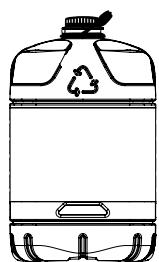
Your heater has been designed for use with high-quality water-free pure paraffin oil, such as Qlima Premium Quality Fuels. Only fuels of this kind will ensure clean and proper burning. Lower quality fuel may result in:

increased possibility of malfunctioning
incomplete combustion
reduced heater lifetime
smoke and/or fumes
deposits on the grid or mantle

Using the right fuel is therefore essential for safe, efficient, and comfortable use of your heater.

Damage and/or malfunctions of the heater due to the use of other than high-quality water-free pure parafine oil is not covered by the warranty.

Always refer to your local dealer for the right fuel for your heater.
TECTRO SRE 1328C - SRE 1528 C-2 - THE RIGHT FUEL - 1
Only the use of the correct fuel will ensure safe, efficient, and comfortable use of your heater.
TECTRO SRE 1328C - SRE 1528 C-2 - THE RIGHT FUEL - 2
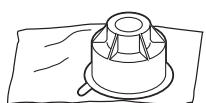
This transportation cap is packed separately in the box. Only this cap ensures trouble-free transportation of the heater after use. Store it well!

TECTRO SRE 1328C - SRE 1528 C-2 - THE RIGHT FUEL - 3

TECTRO SRE 1328C - SRE 1528 C-2 - THE RIGHT FUEL - 4

TECTRO SRE 1328C - SRE 1528 C-2 - THE RIGHT FUEL - 5

TECTRO SRE 1328C - SRE 1528 C-2 - THE RIGHT FUEL - 6

TECTRO SRE 1328C - SRE 1528 C-2 - THE RIGHT FUEL - 7

TECTRO SRE 1328C - SRE 1528 C-2 - THE RIGHT FUEL - 8

MANUAL

A INSTALLING THE HEATER

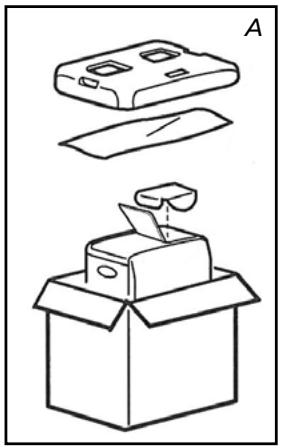
1 Carefully remove your heater from the box and check the contents. In addition to the heater you also need to have:

a transportation cap
these directions for use

Keep the box and the packaging materials (Fig. A) for storage and/or transportation.

2 Open the lid of the removable tank 3 and remove the piece of cardboard.
3 Fill the removable tank as indicated in Section B.
4 The floor should be firm and completely level. Reposition the heater, when it is not level. Do not try to correct the situation by placing books or other goods under the heater.
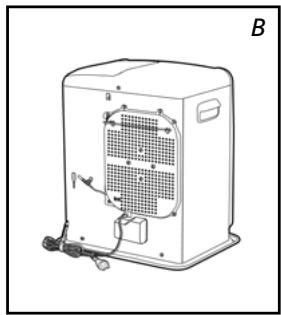
Use the horizontal safety bracket to prevent the curtains from covering the ventilator (Fig. B.).
6 Insert the plug ⑧ into the wall-socket (230 Volts - AC / 50 Hz) and set the correct time using the adjustment keys ⑨ (refer to Section C).
7 Your heater is now ready for use.

B FILLING FUEL

Fill the removable tank in a suitable place since there can always be some spillage. Follow the procedure below:

1 Make sure that the heater is switched off.
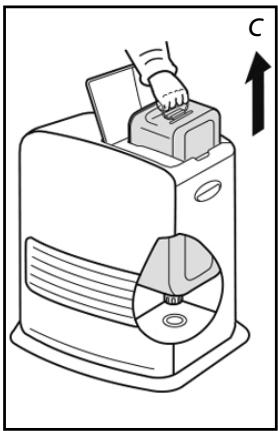
2 Open the upper lid and lift the removable tank out of the heater (Fig. C). Note: Some drops may leak from the tank. Put down the removable tank (cap pointing upwards, handle on floor and screw off the fuel cap.
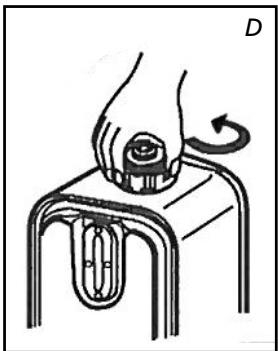
3 Remove the metal cap (unscrew). Easy to open by holding the outside (fig. D.).
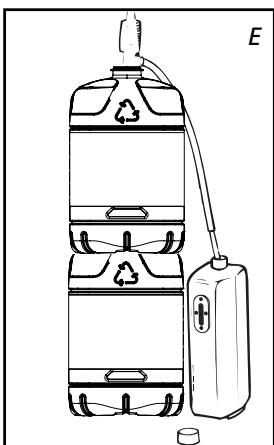
4 Fill the removable tank using a fuel pump (refer to fuel pump operation instructions.) Make sure that it is in a higher position than the removable tank (Fig. E). Insert the ribbed hose into the opening of the removable tank.
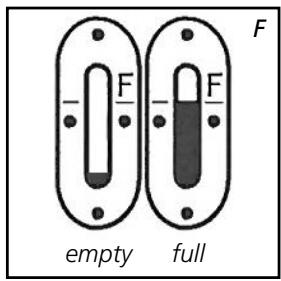
5 Check the removable tank fuel gauge while filling the tank (Fig. F). Stop filling once the gauge indicates that the tank is full. Never overfill the tank, especially not when the fuel is very cold (fuel expands when it heats up).
6 Let the remaining fuel in the pump flow back into the jerrycan and carefully
TECTRO SRE 1328C - SRE 1528 C-2 - B FILLING FUEL - 1

remove the pump. Carefully screw the fuel cap back on the tank. Clean off any spilled fuel.

7 Check whether the fuel cap is straight and tightened properly. Reinstall the removable tank in the heater (cap down). Close the lid.

TECTRO SRE 1328C - SRE 1528 C-2 - B FILLING FUEL - 2

  • Do not move the heater after reinstalling the tank.
  • Take care not to damage the cap while filling the tank. Deformation of the cap can lead to fuel leakage.

8 Turn the heater on again.

C SETTING THE TIME

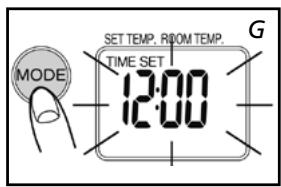
Set the time to use the heater as a clock or if using the timer. You can even set the time when the heater is on.
TECTRO SRE 1328C - SRE 1528 C-2 - C SETTING THE TIME - 1

TECTRO SRE 1328C - SRE 1528 C-2 - C SETTING THE TIME - 2

Press the mode key to set the time (fig. G). Time set and the time flash on the display.
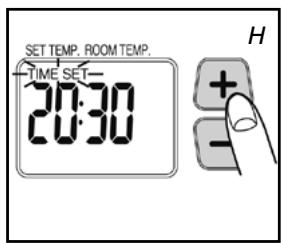
Press the buttons (-) or (+) to set the time. The time displays the numbers 00:00 to 23:59. Press the (+) button to go forwards and the (-) button to go backwards. The time will change in one minute steps each time you press one of these 2 buttons. The time on the display will change in ten minute steps if you keep the button pressed (fig. H.).
Press the mode key again to activate the timer function. See chapter F.
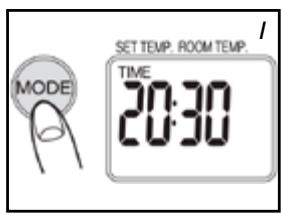
4 Press the mode key to display the time (fig. 1.). If the time is not set, the display indicates ---.
TECTRO SRE 1328C - SRE 1528 C-2 - C SETTING THE TIME - 3

The time must be set again after a power cut or if the plug has been removed from the socket.

D IGNITING THE HEATER

When used for the first time, a new heater may give out a smell for a short while. You should therefore provide extra ventilation.
TECTRO SRE 1328C - SRE 1528 C-2 - D IGNITING THE HEATER - 1

Always ignite the heater with the ON / OFF button 20. Never use matches or a cigarette lighter.

1 Press the ON/OFF button 20.

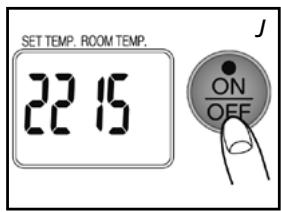
The ignition indicator will light up: the required temperature and the ambient temperature are displayed (fig. J.). The ambient temperature is displayed from 1^ . If the temperature is below 0^ , Lo is displayed. Ignition takes about 45 seconds.

2 Normal combustion:

  • The flames are blue
  • The burner grille can become red

TECTRO SRE 1328C - SRE 1528 C-2 - D IGNITING THE HEATER - 2

Abnormal combustion:

The flame is yellow and blue In this case take appropriate measures.

This heater cannot be switched on continuously for more than 36 hours. After 36 hours it stops automatically, even if the tank has been refilled within this period.

E

SETTING THE REQUIRED TEMPERATURE

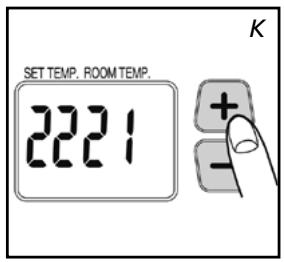
If the heater is on, the required temperature can be changed using the adjustment buttons (fig. K). To increase the temperature, press the + button. To decrease the temperature, press the - button. Each time you press the adjustment button the temperature changes by 1^ . The temperature can be set to a minimum of 5^ and a maximum of 26^ .
TECTRO SRE 1328C - SRE 1528 C-2 - SETTING THE REQUIRED TEMPERATURE - 1

TECTRO SRE 1328C - SRE 1528 C-2 - SETTING THE REQUIRED TEMPERATURE - 2

  • If the heater is used in a small space, in a well-insulated space or if the outside temperature is relatively high, the ambient temperature can become higher than the required temperature. In this case, turn the heater off.
  • The displayed temperature is the mean ambient temperature. This temperature may not correspond with that indicated by a thermometer.
TECTRO SRE 1328C - SRE 1528 C-2 - SETTING THE REQUIRED TEMPERATURE - 3

F

USING THE TIMER

The timer allows you to switch on the heater automatically at a preset time. In order to switch on the timer, the correct time must have been set (refer to Section C) and the heater should be off. Follow the procedure below:

1 Check that the time is set properly (see chapter C).
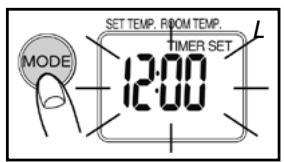
Press the mode button (fig. L) until Timer and Set appear in the display.
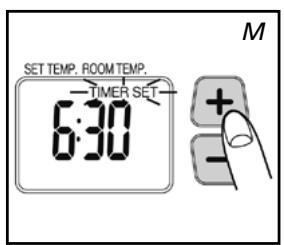
Press the (-) or (+) buttons to set the required activation time for the heater. Press the (+) button to go forwards and the (-) button to go backwards. The time will change in one minute steps each time you press one of these 2 buttons. The time on the display will change in ten minute steps if you keep the button pressed (fig. M).
4 Press the ON/OFF buttons to turn the heater on (the indicator will light up). It is not necessary to press this button if the heater is on.
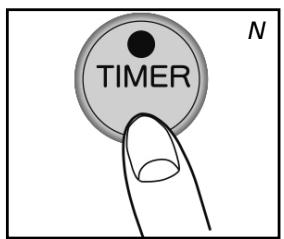
Press the timer button. The indicator goes out. The time indicator will light up and the timer is set.
TECTRO SRE 1328C - SRE 1528 C-2 - USING THE TIMER - 1

TECTRO SRE 1328C - SRE 1528 C-2 - USING THE TIMER - 2

Take care not to press the ON / OFF button again after setting the timer, this will reset the timer.

The heater turns on at the time chosen.

TECTRO SRE 1328C - SRE 1528 C-2 - USING THE TIMER - 3

  • To cancel the timer, press the ON / OFF button (the timer indicator goes out).
  • Set the timer and the clock again after a power cut.
  • In case of an earthquake, or shocks, code E01 will appear in the display. Reset the error and repeat from point 4 to set the timer again.

G

Press the ON/OFF button. The red lamp flashes for about 8 seconds and the heater is turned off. Always check that the flame goes out.

TECTRO SRE 1328C - SRE 1528 C-2 - G - 1

The ventilator continues operating for about 3 minutes after turning off in order to cool the inside of the heater. If you turn off the power earlier, uncontrolled symptoms can occur (release of smoke, smell etc.).

H

IN CASE OF PROBLEMS

The symptoms mentioned above are not faults and not abnormal. Check the list.

SymptomsCauses
While ignitingIgniting is tediousIgniting takes about 45 seconds. After filling the tank, wait till the fuel has reached the fixed tank. Repeat ignition 2 or 3 times.
Crackling soundThis sound is made by the elec-tric ignition.
White smokeThis can happen if the fuel does not circulate past the burner properly
During ignition or turning offSmoke and an unpleasant smell during first useThat is the protective lacquer getting warm. This soon stops. Give the space more ventilation.
The ambient temperature does not increase and the requested temperature is higher.The space is too large.
The flame glows red.The ambient air is damp or salty or it contains too many impu-rities.
The ambient temperature does not decrease and the requested temperature is lower.The heater is being used in a small insulated space or the outside temperature is relati-vely high. Turn the heater off.
The displayed ambient tempera-rature is not the same as indica-ted by a thermometer.This is because the displayed ambient temperature is an indi-cation of the average tempera-ture of the space.
Small knocking noises when the heater is in operation or imme-diately after turning off.This is the sound of the metal expanding.
Noise 8 seconds after turning off.A ticking sound: can occur when the heater cools off.

THE INFORMATION DISPLAY

The information display ① not only serves as an indicator of the (set) time and temperature (sections C, E, and F), it also indicates any malfunctioning of the heater. The code on the information display tells you what is the matter:

CodeInformationAction
Time ----The heater has been automa- tically turned off by a power cut or bad connection.Restore power or restore the connection. Press the ON / OFF key ⑩ again.
E01An earthquake (magnitude 5 or more), strong vibrations or a shock will ensure that the heater automatically turns off. (The safety system against shocks has worked).Make sure there are no com- bustible materials around the heater, or fuel leakages. Press the ON / OFF key ⑩ again.
E02 E03The heater has been automa- tically turned off after a fault or during ignition or due to the presence of water or dust in the fuel filter or in the fixed tank.Remove the water and the dust in the fixed tank. Clean the fuel filter (see chapter L). Press the ON / OFF button ⑩ again.
E07An increase in ambient temperature has turned the heater off. (The tempera- ture monitoring system has worked).Ventilate the space. Let the heater cool off. Press the ON / OFF button ⑩ again.
Filter E09 FilterThe heater has been automa- tically turned off because the hot air stream, the ventila- tor or the ventilator filter is blocked or hindered by something. (The safety system against overheating has worked).Remove obstacles from the ventilator opening. Clean the ventilator filter (see chapter L) Press the ON/OFF button ⑩ again. If the problem oc-curs again after taking the above measures, contact your dealer.
E13The heater has been turned off in a closed space. (The safety system against incom- plete combustion has wor- ked).Ventilate the space and press the ON / OFF button ⑩ again. Ensure the space is sufficien- tly ventilated.
E17The heater has been turned off due to an increased CO2 concentration. (The system for air quality monitoring has worked).Ventilate the space and set the ON / OFF button ⑩ again. Ensure the space is sufficien- tly ventilated.
The ON induca- tor flashes. Err lights upThe heater has automatically stopped because the ON / OFF button was kept pressed in or was blocked.Remove obstacles from the ventilator opening. Clean the ventilator filter (see chapter L) Press the ON/OFF button ⑩ again. If the problem oc-curs again after taking the above measures, contact your dealer.
F00 – F30Poor functioning. Heater needs maintenanceNote the messages displayed and turn the heater off. Con- tact your dealer.
SymptomsCausesMeasures to be taken
Heater doesn’t igniteThe child safety catch lights upTurn the child safety catch off
The fuel in- indicator lamp doesn’t workThe tank is emptyFill the tank
The tank is deformedReplace the tank
Dirt particles dust or water on the filter and / or in the fixed tankClean the fixed tank and the fuel filter.
Power lossThe fuel indicator flashes
The fuel indicator flashesFill the tank
A poor quality fuel has been used.Remove the fuel from the two tanks, then rinse with the correct fuel.
Abnormal combustionA poor quality fuel has been used.
Poor ventilationVentilate regularly
Dust on the ventilator filterClean the ventilator filter
Unpleasant smellsA poor quality fuel has been usedRemove the fuel from the two tanks, then rinse with the correct fuel.
No fuel in the tankFill the tank
Fuel leakage or spilled fuelDo not use any more and contact your dealer
Fuel leakageMove the heater, the tank is not empty
A poor quality fuel has been used.

AUTOMATIC DEACTIVATION

This heater is fitted with a safety system that ensures that it switches off automatically after 36 hours continuous operation. If desired, you can switch the heater on again by pressing the ON/OFF button (see section D).

CHILDPROOF LOCK

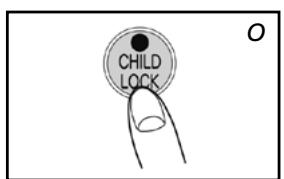
The childproof lock can be used to prevent children accidentally changing the heater settings. When the heater is burning and the childproof lock is on, the heater can only be switched off. Other functions are blocked then. If the heater has already been switched off, the childproof lock also prevents accidental ignition of the heater. Activate the childproof lock by pressing the CHILDLOCK key 15 and holding it down for more than 3 seconds. The childlock indicator will appear on the information display (Fig. O), indicating that the childproof lock has been activated. Switch off the childproof lock by pressing the CHILDLOCK key 15 and holding it down for more than 3 seconds once again.

J THE 'OIL' INDICATOR

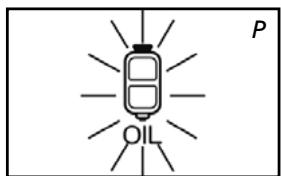
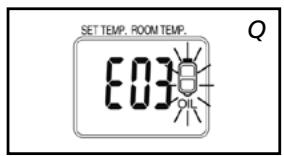
If the low fuel level indicator lights up in combination with a short tone, then the fuel tank is empty. The heater will automatically burn at its lowest setting for a period of about 80 minutes. The fuel tank must be replenished.
TECTRO SRE 1328C - SRE 1528 C-2 - J THE 'OIL' INDICATOR - 1

TECTRO SRE 1328C - SRE 1528 C-2 - J THE 'OIL' INDICATOR - 2

remove the removable tank from the heater and fill it with new fuel (outside the living space in a safe place) (see chapter B)

If you take no action, the fuel tank will be emptied and the display will indicate "E 03" (fig. Q). The heater is automatically turned off.

To ignite the heater once more, fill the tank and wait a few minutes.

Then press the ON/OFF button 20.
TECTRO SRE 1328C - SRE 1528 C-2 - J THE 'OIL' INDICATOR - 3

K CHECKING THE AIR QUALITY

If the space is insufficiently ventilated, the indicator E17 will light up and the heater is automatically turned off. As soon as you hear this signal, ventilate the space (e.g. by opening a door or a window). As soon as the space has been ventilated sufficiently, (e.g. by opening a door or a window) the heater can be ignited by pressing the ON/OFF button 20.
TECTRO SRE 1328C - SRE 1528 C-2 - K CHECKING THE AIR QUALITY - 1

L MAINTENANCE

Switch off the heater and let it cool down, before you start any maintenance work. Also disconnect the plug from the mains. Your heater needs hardly any maintenance.

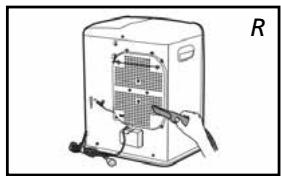
1 Clean the ventilator filter (fig. R).

Clean the fuel filter:

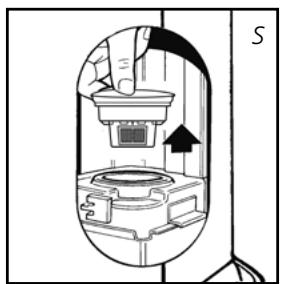
1 Remove the removable tank 4 from the heater and remove the fuel filter (Fig. S). Some drops may leak from the filter; keep a cloth at hand.
2 Remove the dirt by tapping the fuel filter upside-down against a hard surface. (Never clean it with water!)
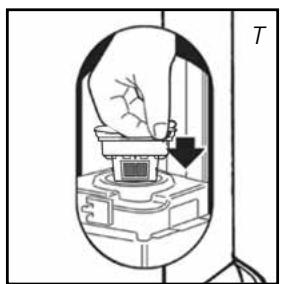
3 Reinstall the fuel filter into the heater.

We recommend that you remove dust and stains from time to time with a damp cloth, because otherwise these may cause stains that are hard to remove.
TECTRO SRE 1328C - SRE 1528 C-2 - Clean the fuel filter: - 1
Fuel filter

TECTRO SRE 1328C - SRE 1528 C-2 - Clean the fuel filter: - 2

Do not use solvents or alcohol to clean the heater: fire hazard. Clean very dirty components with a light synthetic cleaning agent.
TECTRO SRE 1328C - SRE 1528 C-2 - Clean the fuel filter: - 3

TECTRO SRE 1328C - SRE 1528 C-2 - Clean the fuel filter: - 4

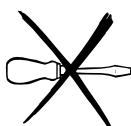
Do not remove any heater components yourself. Always contact your dealer for repairs.

TECTRO SRE 1328C - SRE 1528 C-2 - Clean the fuel filter: - 5

When the power cord is damaged, it may only be replaced by an authorised fitter. Use a new cord of the type H05 VV-F.
TECTRO SRE 1328C - SRE 1528 C-2 - Clean the fuel filter: - 6

TECTRO SRE 1328C - SRE 1528 C-2 - Clean the fuel filter: - 7

Transport cap

TECTRO SRE 1328C - SRE 1528 C-2 - Clean the fuel filter: - 8

TECTRO SRE 1328C - SRE 1528 C-2 - Clean the fuel filter: - 9

M STORAGE (END OF THE HEATING SEASON)

At the end of the heating season, you must store the heater in a dust-free place, if possible in its original packaging. Unused fuel cannot be used in the next heating season. We therefore recommend that you burn up all fuel. If there is still some fuel left, do not throw it away, but dispose of it in accordance with the local regulations for the disposal of domestic chemical waste.

Always start the new heating season with fresh fuel. When you start re-using the heater follow the instructions again (starting from section A and as specified).

N TRANSPORTATION

Take the following measures to avoid fuel leakage during the transportation of the heater:

1 Let the heater cool down.
2 Remove the removable tank 4 from the heater and remove the fuel filter. Some drops may leak from the filter; keep a cloth at hand. Store the fuel filter and the removable tank outside the heater.
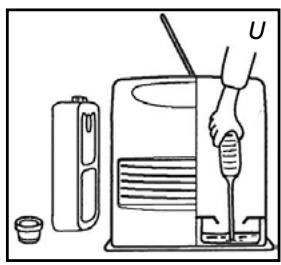
3 Empty the fixed fuel tank (fig. U).
4 Place the transport cap.
Always move the heater in an upright position.

Make the fixed tank empty with a fuel pump before transportation or in case of wrong or dirty fuel. First remove the fuel filter and then insert the fuel pump into the empty fixed tank. Follow the same procedure if the fuel tank contains water.

WARRANTY PROVISIONS

SRE 1528 C-2
Ignitionelectrical
Fuelparaffin
Capacity (kW)*2.85
Suitable space (m3)**46-115
Fuel consumption (l/hr)*0.298
Fuel consumption (g/hr)*238
Burning time per tank (hr)*17
Capacity removable tank (litres)5
Weight (kg)7.7
Dimensions (mm) (including base plate)width 371
depth 299
height 429
Accessoriestransportation cap, manual fuel pump
Mains230V - AC 50 Hz
Electrical consumption:
Igniter335W
Continuous78-119W
Monitoring of the quality of ventilation (air renewal): Direct measurement of the CO2 level (NDIR CO2-sensor).
  • At maximum setting ** Specified values are indicative

The CE marking corresponds with the compliance with the standards EN 60-335 part 1 (1995) and EN 50-165 (08/97)

P WARRANTY PROVISIONS

Your heater comes with a 24-month warranty starting on the date of purchase. Within this period all defects in material or workmanship will be repaired without any charge. The following provisions shall apply regarding this warranty:

1 We expressly dismiss all other claims for damages, including consequential damages.
2 Any repairs or replacements of components within the term of warranty will not result in an extension of the term of warranty.
3 The warranty shall no longer apply, when the heater has been modified, non-original parts have been used, or when it is repaired by third parties.
4 The warranty shall not apply to parts that are subject to normal wear, such as the manual fuel pump.
5 The warranty shall only apply, when you present the original, dated proof of purchase, provided no changes have been made to it.
6 The warranty shall not apply to damages caused by actions not in compliance with the Directions for Use, neglect, and the use of an incorrect type of fuel, or fuel past its use-by date. The use of incorrect fuel can even be dangerous*.
7 Transportation costs and the risks involved during the transportation of the heater or heater components shall always be at the expense of the purchaser.

In order to avoid unnecessary costs, we recommend that you always read the 'Directions for Use' carefully first. In case they offer no solution, please take the heater to your dealer for repair.

  • Highly inflammable substances may induce uncontrollable burning, causing flames to break out. Should this happen, never try to move the heater, but always switch off the heater immediately. In case of emergency you may use a fire extinguisher, but only a type B extinguisher: a carbon dioxide or powder extinguisher.

Egregio Signore, Gentile Signora,

ACCENSIONE DELLA STUFA

WAT U VOORAF MOET WETEN

WYSIWIELACZ INFORMACYJNY

SE ALLTID TILL ATT DET FINNS TILLRACKLIG VENTILATION

K NADZOR KAKOVOSTI ZRAKA
Manual assistant
Powered by Anthropic
Waiting for your message
Product information

Brand : TECTRO

Model : SRE 1328C - SRE 1528 C-2

Category : Kerosene heater