VALBERG FLOORWASHER FL3 - Vacuum cleaner with mop

FLOORWASHER FL3 - Vacuum cleaner with mop VALBERG - Free user manual and instructions

Find the device manual for free FLOORWASHER FL3 VALBERG in PDF.

📄 66 pages English EN Download 💬 AI Question 19 questions
Notice VALBERG FLOORWASHER FL3 - page 4
View the manual : Français FR English EN Español ES Nederlands NL
Pick your language and provide your email: we'll send you a specifically translated version.

User questions about FLOORWASHER FL3 VALBERG

20 questions about this device. Answer the ones you know or ask your own.

Ask a new question about this device

The email remains private: it is only used to notify you if someone responds to your question.

What does the roller symbol that lights up on the VALBERG FLOORWASHER FL3 vacuum cleaner mean and how can I resolve this issue?
Frequently Asked Questions - 7 j
Response Notice-Facile

The roller symbol that lights up means that the cleaning roller is blocked. This is usually caused by hair or debris wrapped around the roller. Fortunately, this issue can be easily resolved with regular maintenance.

To resolve this issue:

  • Completely stop the device and ensure it is turned off.
  • Press the cleaning roller release button located on the left side.
  • Pull the left end of the roller upwards, then remove it completely.
  • Use the hook provided at the end of the cleaning brush to gently remove any tangled hair and debris wrapped around the roller.
  • Rinse the roller under running water to remove any residue.
  • Wipe the suction nozzle with a slightly damp cloth (do not rinse directly).
  • Reinstall the roller by first inserting the right end into the pin at the right end, then place the left end aligning it with the slot, and push until you hear a click.

Once the roller is cleaned, dried, and properly reinstalled, the blocked roller indicator will turn off automatically. We highly recommend cleaning and drying the roller after each use to maintain optimal performance and prevent this issue in the future. This regular maintenance also extends the lifespan of your device.

Respond (be the first)
Why does my VALBERG FLOORWASHER FL3 vacuum stop after using foaming water?
Frequently Asked Questions - 11 j
Response Notice-Facile

Foaming water is incompatible with your FL3 cleaner. The manual specifies: "Do not use the floor cleaner to clean surfaces with foaming liquid." When the foam enters the dirty water tank (600 ml), it blocks the drainage system and triggers an automatic safety shutdown after a few seconds of operation, as the device detects an anomaly.

What happens concretely: the foam prevents the float from functioning properly and blocks the internal passages. The dirty water tank icon flashes on the display panel, and then the device automatically turns off. This is a protective mechanism to avoid damaging the motor.

To resolve the issue immediately, you need to:

  • Completely empty the dirty water tank and rinse it several times with plenty of water
  • Remove and rinse the HEPA filter outdoors (let it dry completely before reinstalling)
  • Clean the suction nozzle and clear any obstruction with the provided hook
  • Check that the float inside the tank is not blocked
  • Let all components dry before reassembling

For the future, use only tap water with a neutral floor cleaning product: pour 10 to 15 ml into the 700 ml clean water tank. The water temperature should not exceed 60 °C. Never use foaming soaps, regular detergents, or acidic products that damage internal components and reduce the lifespan of the device.

Respond (be the first)
A light is flashing and my VALBERG FLOORWASHER FL3 won't start - what should I do?
Frequently Asked Questions - 11 j
Response Notice-Facile

If your VALBERG FLOORWASHER FL3 refuses to start with a flashing light, several causes may explain this problem. Here are the solutions to try in order:

1. Discharged or weak battery
If the battery icon is flashing or slowly animating, your 2500 mAh Li-ion battery is empty or insufficiently charged. Place the cleaner on the charging base and let it charge completely: 4.5 to 5 hours are needed for a completely empty battery. Only unplug the cable when the charge is complete.

2. Full dirty water tank (600 ml)
When the dirty water tank reaches its maximum capacity of 600 ml, the cleaner automatically stops and refuses to start. The corresponding icon appears on the status panel. Completely empty this tank by pressing the release button, removing the HEPA filter and the lid, then rinsing the tank with clear water. This step is essential: a full tank completely blocks operation.

3. Blocked cleaning roller
If the “roller blocked” icon appears, the roller is hindered by hair, fibers, or debris. Press the roller release button (left side), pull it up and then out to remove it. Use the hook of the provided cleaning brush to remove any tangled hair, then rinse the roller with tap water. Reinstall it properly until you hear a click.

4. Device position at startup
Critical point: The FLOORWASHER FL3 only starts if it is slightly tilted backward. If you hold the device in a vertical position and press the on/off button, it will remain inactive. Always tilt the device backward before pressing the button (maintain a maximum angle of 140 degrees to avoid water leaks). This is often the most common reason for apparent non-starting.

5. Other possible obstructions
Also check that the aluminum tube is not blocked. If debris or dirt is blocking the tube, it may trigger a motor anomaly and prevent starting. Remove any visible obstruction and test again.

Apply these solutions in this order. If after completely emptying the dirty water tank, cleaning the roller, fully charging the battery, and respecting the correct position at startup, your VALBERG FLOORWASHER FL3 still refuses to operate, consult customer service or an authorized repair center.

Respond (be the first)
Voyant deau sale, allumé alors qu'il est vide résolu
A Aurélie - 16 j - 1 réponse communauté

Bonjour, depuis deux jours, mon aspirateur ne veut pas fonctionner car il indique que le bac à eau sale est pleins alors qu'il est vide, que puis-je faire

Report this question
N Notice-Facile - 16 j

Ce symptôme est généralement lié à un problème de capteur de niveau d'eau sale ou à un mauvais positionnement du réservoir. Même si le bac vous semble vide, il est possible que l'eau résiduelle ou l'humidité active le capteur, ou que le réservoir ne soit pas correctement emboîté.

Voici les étapes à suivre :

  • Retirez complètement le réservoir d'eau sale en appuyant sur le bouton de déverrouillage.
  • Retirez le filtre HEPA et le séparateur du réservoir, puis videz-le complètement.
  • Rincez le réservoir sous l'eau courante et vérifiez qu'il est parfaitement sec à l'intérieur (pas d'eau résiduelle ni d'humidité) avant de le remettre. Le capteur peut être sensible à la moindre trace d'eau.
  • Nettoyez aussi le filtre HEPA et le séparateur sous l'eau courante et laissez-les sécher à l'air.
  • Réinsérez le réservoir jusqu'au clic de verrouillage pour confirmer qu'il est bien en place.

Si le voyant reste allumé après ces étapes, le capteur de niveau peut être défectueux. Dans ce cas, nous vous conseillons de contacter le service client ou de consulter la notice complète pour une prise en charge éventuellement sous garantie.

Report this response
Add a response
What do the 6 indicators of the VALBERG FLOORWASHER FL3 mean?
Frequently Asked Questions - 03/05/2026
Response Notice-Facile

Your VALBERG FLOORWASHER FL3 vacuum cleaner has a control panel with 6 LED indicators that inform you about the device's status. Here is the meaning of each:

  • Standard Mode - Indicates that the default mode is active for daily maintenance
  • Roller Blocked - Lights up when the roller is obstructed by hair or debris and requires cleaning
  • Dirty Water Tank Full - Activates beyond 600 ml of accumulated water, causing the device to automatically stop to protect you
  • Battery Level - The icon lights up during charging to display the current charge status
  • Power Mode - Indicates the activation of the enhanced mode for stubborn dirt
  • Self-Cleaning - Displays during the automatic cleaning process of the roller

How to interpret the indicators?

Simultaneously flashing indicators: This situation generally signals an automatic safety shutdown. Check the level of the dirty water tank and clean the roller if it is obstructed.

One indicator lit: This indicates a specific problem. For example, a low battery indicator means your device needs to be charged, a "roller blocked" indicator means you need to clean the roller.

Respond (be the first)
How to reset the VALBERG FLOORWASHER FL3 vacuum cleaner?
Frequently Asked Questions - 30/04/2026
Response Notice-Facile

To reset your VALBERG FLOORWASHER FL3 vacuum cleaner, follow this simple procedure to reset the sensors and clear any error messages:

  1. Completely turn off the device using the power button.
  2. Unplug it from the electrical outlet and leave it disconnected for at least one minute. This allows the electronics to reset.
  3. Plug the device back into the electrical outlet.
  4. Turn it back on by pressing the power button again.

This method is the standard procedure recommended to reset the electronic functions of your floor cleaner.

In case of a minor issue, it is sometimes sufficient to turn the device off and then back on without unplugging it to perform a quick reset.

If you encounter a specific error message or a flashing light, this reset may help resolve the issue. Otherwise, more in-depth troubleshooting may be necessary.

Respond (be the first)
Why is the self-cleaning function of my VALBERG FLOORWASHER FL3 not working even though the battery is charged and two indicators are on?
Frequently Asked Questions - 28/04/2026
Response Notice-Facile

The self-cleaning function of the VALBERG FLOORWASHER FL3 automatically cleans the cleaning roller on the charging base. If this function does not start despite a charged battery, first check that you are following the exact procedure: the device must be placed upright on the charging base, and you must press the Self-cleaning button located on the handle to start the process. If you are not positioned correctly or if the contact between the device and the base is not established, the self-cleaning cannot be triggered.

The two indicators you mentioned could be the charged battery indicator and the Standard mode indicator (default mode). However, if the blocked roller indicator is on, the device detects an obstruction, and the self-cleaning will not work until the issue is resolved. Clean the roller by removing it and using the provided cleaning brush to eliminate hair, fibers, or debris wrapped around the roller.

Also, check that the dirty water tank is not full. If the tank has reached its maximum capacity of 600 ml, the device will automatically turn off, and no function can be activated. Empty the tank by pressing the release button, removing the HEPA filter and the lid, and then completely emptying the dirty water. Clean the tank before putting it back in place.

Another important point: make sure that the charging base is in good condition and that the contact is established correctly. Place the device upright on the base, ensure it is resting flat, and then press the Self-cleaning button. If there are dirt residues on the base or on the contacts, clean them immediately with a damp cloth to ensure good electrical contact.

Before and after using the self-cleaning, always clean the dirty water tank as described above. If after these checks the self-cleaning still does not trigger, there may be a malfunction of the sensor or the Self-cleaning button, which would require technical intervention.

Respond (be the first)
Where are the sensors located on the VALBERG FLOORWASHER FL3 vacuum cleaner?
Frequently Asked Questions - 24/04/2026
Response Notice-Facile

The VALBERG FLOORWASHER FL3 vacuum cleaner (model 984070) is equipped with several essential sensors and detectors that ensure the proper functioning of the device and signal their status via the LED display panel.

Float in the dirty water tank: Located inside the dirty water tank (capacity 600 ml), the float is a movable part that automatically detects when the tank has reached its maximum capacity. When full, the device automatically stops and the "Dirty water tank full" icon lights up on the display panel. This float can be cleaned when emptying the tank.

Blocked roller detector: A sensor detects when the cleaning roller is obstructed by hair, fibers, or debris. When this obstruction is detected, the "Roller blocked" icon lights up on the LED display, signaling that the roller needs to be cleaned to maintain suction performance.

Battery system sensors: The display panel shows the battery level with an animated icon during charging. This feature allows you to check the charge level (runtime: approximately 30 minutes) before starting cleaning.

Mode detection system: The device detects the selected mode (default Standard Mode or Power Mode) and displays it on the LED panel, allowing for appropriate use according to the type of dirt to be cleaned.

These sensors are integrated into the device's electronic system and communicate with the status icon display panel. To maintain their proper functioning, keep the dirty water tank and float clean after each use, and regularly clean the roller to avoid blockages detected by the sensor.

Respond (be the first)
What does the flashing battery logo on the VALBERG FLOORWASHER FL3 vacuum cleaner mean and how can I fix it?
Frequently Asked Questions - 19/04/2026
Response Notice-Facile

The flashing battery logo on your VALBERG FLOORWASHER FL3 vacuum cleaner generally indicates a problem related to the battery status or the device's charge. Here are the most common causes and their associated solutions:

Possible causes of the battery logo flashing

  • Low battery: The charge level is insufficient and the device needs to be recharged.
  • Charging issue: The charger or cable may be defective, or the battery may not be charging properly.
  • Overheating: The device may be overheating, which prevents normal charging.

Solutions to try

  • Check the connection: Ensure that the charger is properly plugged into the electrical outlet and the vacuum cleaner.
  • Inspect the cable and charger: Check the cable for any visible damage and test the charger on another outlet if possible.
  • Let the device cool down: If you suspect overheating, turn off the device and let it cool down before recharging.
  • Extended charging: Leave the device charging for several hours even if the logo is flashing, to allow for a full charge.

If after these checks the logo continues to flash, it may indicate a more serious problem with the battery or internal electronics. In this case, it is recommended to contact customer service or a qualified professional for further assistance.

Respond (be the first)
What does the blinking of the 5th indicator light on the VALBERG FLOORWASHER FL3 vacuum cleaner mean and why does the device stop by itself?
Frequently Asked Questions - 12/04/2026
Response Notice-Facile

The blinking of the 5th indicator light on your VALBERG FLOORWASHER FL3 vacuum cleaner generally indicates a technical problem that causes the device to stop automatically. Here are the most common causes and checks to perform:

1. Check the water tank

  • Make sure the water tank is properly installed and securely locked in place.
  • Check that the tank is not empty, as a lack of water can lead to automatic shutdown to protect the device.

2. Check the filter

  • A clogged or dirty filter can cause overheating or malfunction.
  • Clean the filter according to the manufacturer's recommendations or replace it if necessary.

3. Device overheating

  • If the vacuum cleaner overheats, it automatically shuts down for safety reasons.
  • Allow the device to cool down for at least 30 minutes before turning it back on.

4. Battery (for cordless models)

  • Check that the battery is sufficiently charged.
  • If the battery is low, recharge it fully before reusing the device.

If the problem persists after these checks, it is advisable to contact VALBERG customer service for further technical assistance.

Respond (be the first)
What is the recommended charging time for the first use of the VALBERG FLOORWASHER FL3 vacuum cleaner?
Frequently Asked Questions - 11/04/2026
Response Notice-Facile

For the first use of your VALBERG FLOORWASHER FL3 vacuum cleaner, it is important to fully charge the battery to ensure optimal performance and good longevity of the device.

Recommended charging time:

  • The first charge should last about 4 to 6 hours.
  • Make sure the device is properly plugged into a functional electrical outlet.
  • The charging indicator on the device usually lights up to indicate that the battery is charging.

Once the battery is fully charged, the charging indicator may change color or turn off, depending on the model. It is advisable not to interrupt the charging before it is complete to ensure maximum autonomy during the first use.

By following these recommendations, you will optimize the battery life and performance of your VALBERG FLOORWASHER FL3 vacuum cleaner.

Respond (be the first)
Why is water no longer coming out during cleaning with the VALBERG FLOORWASHER FL3 vacuum cleaner?
Frequently Asked Questions - 01/04/2026
Response Notice-Facile

To keep your Samsung CLX-3300 laser multifunction printer in excellent working condition, regular cleaning is essential. Here’s how to do it correctly:

Before you begin: Turn off the device and unplug the power cord. Wait for the printer to cool down before any intervention. This step is crucial for your safety and that of the equipment.

Cleaning the exterior casing: Use a dry, lint-free cloth to remove dust. If the device is soiled with toner, use a cloth slightly dampened with water. Do not use a vacuum cleaner, as it would blow toner particles away. Avoid cleaning products containing a high concentration of alcohol or solvents, as they could discolor the casing.

Cleaning the interior: Open the access cover and regularly clean the interior with a dry, lint-free cloth to remove toner residue, dust, and paper debris that accumulate. These deposits can cause stains or streaks on your documents. Be careful not to damage the transfer roller or other internal parts.

Maintaining the imaging unit: Do not expose it to light for more than a few minutes. If necessary, cover it with a sheet of paper. Always use the handle to handle it and never touch the green part, which is sensitive.

Cleaning the scanner: The scanning module requires special maintenance. Clean it regularly every morning and during the day if necessary, with a dry, lint-free cloth. This ensures optimal copy quality.

Essential precautions: Never use benzene, paint thinner, alcohol, or solvents to clean the interior. Never spray water directly into the device. Keep cleaning products out of reach of children. For repairs or interventions other than this routine maintenance cleaning, contact only an authorized Samsung maintenance technician.

Respond (be the first)
How do I remove the brush from the VALBERG FLOORWASHER FL3 vacuum cleaner?
Frequently Asked Questions - 01/03/2026
Response Notice-Facile

To remove the cleaning roller from your VALBERG FLOORWASHER FL3 vacuum cleaner, here is the exact procedure:

  • Step 1: Unplug the device from the power outlet for safety reasons.
  • Step 2: Locate the cleaning roller release button located on the left side of the device, near the base.
  • Step 3: Press firmly on this release button to free the locking mechanism.
  • Step 4: While holding the button down, pull the roller up at the left end.
  • Step 5: Once freed from its left housing, pull the roller out completely to remove it.

After disassembly, you can clean the roller under running tap water. To remove embedded hair and debris, use the hook of the cleaning brush provided with the device. Allow the roller to dry before reinstalling it. To reinstall the roller, first insert the right end into the pin located on the right, then place the left end in its position by aligning it well with the slot, before pushing down until you hear a click.

Respond (be the first)
What should I do if the brush of my VALBERG FLOORWASHER FL3 vacuum cleaner does not rotate?
Frequently Asked Questions - 12/02/2026
Response Notice-Facile

If the brush of your VALBERG FLOORWASHER FL3 vacuum cleaner does not rotate, here are several steps to check to identify and resolve the issue:

1. Check the power supply

  • Make sure the device is properly plugged into a functional outlet.
  • Check the condition of the power cord for any damage.

2. Check the water tank

  • Ensure that the water tank is properly installed and sufficiently filled, as some models block the rotation of the brush if the tank is improperly positioned or empty.

3. Inspect the brush

  • Examine the brush for debris, hair, or other obstructions that may prevent it from rotating.
  • Carefully clean the brush and surrounding areas if necessary.

4. Check the operating mode

  • Make sure the device is in wash or cleaning mode and that all necessary functions are activated.

5. Restart the device

  • Turn off the vacuum cleaner, wait a few seconds, then turn it back on to reset the functions.

If after these checks the brush still does not rotate, there may be a technical issue requiring professional assistance or repair.

Respond (be the first)
What should I do if my VALBERG FLOORWASHER FL3 is not charging?
Frequently Asked Questions - 11/02/2026
Response Notice-Facile

If your VALBERG FLOORWASHER FL3 is not charging, start by checking the positioning of the device on its charging base. Place it correctly on the provided charging base and ensure it is in contact with the charging points. During normal charging, the battery level icon on the display panel should animate. If this icon does not animate, unplug the unit and try again after a few seconds.

Next, inspect the charging cable and plug for any visible damage (bends, exposed wires, damaged insulation). Also, check that the electrical outlet is functioning properly by plugging in another device. Gently clean the charging contacts on the charging base and on the device with a soft, dry cloth to remove any dust or dirt preventing electrical contact.

Place the charging base in a dry location and allow the FL3 to charge for at least 4.5 to 5 hours, which is the specified full charging time for the 2500 mAh Li-ion battery. Do not move the device during this time. If after this period the battery icon still has not lit up or animated, it is likely that the Li Shen LR1865LD battery is defective.

Important: Once the FL3 is fully charged, immediately unplug the charging cable. Do not leave the device on the base indefinitely, as prolonged overcharging can damage the battery or the power plug. Also, avoid using the device near heat sources, fireplaces, or radiators, as this can deform the battery and internal components.

If the FL3 still does not charge after these checks, contact VALBERG customer service or an authorized repair center, as the issue is most likely due to a defective battery or faulty power supply that requires professional diagnosis.

Respond (be the first)
What does the water indicator light mean on the VALBERG FLOORWASHER FL3 vacuum cleaner and how can I resolve this issue?
Frequently Asked Questions - 29/01/2026
Response Notice-Facile

The water indicator light on your VALBERG FLOORWASHER FL3 vacuum cleaner generally indicates a problem related to the water tank. Here are the possible causes and solutions to apply:

Possible Causes

  • The water tank is empty.
  • The tank is improperly positioned or installed.
  • A clogged filter or a water circulation issue.

Solutions to Try

  1. Check the water level: Ensure that the tank is filled with clean water. An empty tank triggers this indicator.
  2. Reinstall the tank: Remove the tank and then carefully reposition it, ensuring it is securely locked in place.
  3. Clean the filter: If your device has a filter, check that it is not clogged with dirt. Clean it if necessary.
  4. Restart the device: Turn off the vacuum cleaner, wait a few seconds, then turn it back on to reset the indicators.

If the water indicator remains on despite these checks, it may indicate a more complex malfunction. In this case, it is advisable to contact customer service or a professional for appropriate technical assistance.

Respond (be the first)
What should I do if my VALBERG FLOORWASHER FL3 vacuum cleaner does not start?
Frequently Asked Questions - 18/01/2026
Response Notice-Facile

If your VALBERG FLOORWASHER FL3 vacuum cleaner does not start, several causes may explain this problem. According to the troubleshooting guide in the manual, the first step is to check the status of your battery. Your device has a Li-ion 2500 mAh battery (model Li Shen LR1865LD) that requires a full charge of 4.5 to 5 hours before first use. If the battery icon on the display panel is flashing or not displayed, fully recharge the device by placing it on the charging base for 4.5 to 5 hours until the battery icon stops flashing.

Next, check the operating position of your cleaner. The VALBERG FLOORWASHER FL3 can only operate when it is tilted backward for cleaning. If you press the power button while the device is in a vertical position (standing), it will remain off even if you hold the button down. Pull the device back at least 45 degrees (but no more than 140 degrees to avoid leaks) before pressing the power button.

Also, check the condition of the cleaning roller and the supply tube. If the roller is blocked by hair or debris, the device will not start or the “roller blocked” icon will appear on the panel. Remove the cleaning roller by pressing the release button on the left side, then clean it by passing a hook (provided) through the roller to remove tangled hair. Also, check that the aluminum tube is not clogged and clear any obstruction found in the tube before restarting.

Make sure that the dirty water tank is not full. The FL3 model automatically turns off when the 600 ml tank reaches its maximum capacity, and the “dirty water tank full” icon appears on the panel. Empty the dirty water tank by pressing its release button, removing the HEPA filter, the lid, and the separator, then completely empty the tank before putting it back in place until it clicks.

Finally, check that all components are correctly installed. The cleaning roller must be inserted into both anchoring points (right and left) and clicked into place. The clean and dirty water tanks must also be locked in place until they click. The HEPA filter must be dry and correctly reinserted into the dirty water tank before use. If after all these checks your device still does not start, there may be a motor anomaly requiring professional intervention at an authorized repair center.

Respond (be the first)
What should I do if the VALBERG FLOORWASHER FL3 vacuum cleaner shows "dirty water tank full" even after being emptied and cleaned?
Frequently Asked Questions - 09/01/2026
Response Notice-Facile

If your VALBERG FLOORWASHER FL3 vacuum cleaner continues to display the message "dirty water tank full" even after being emptied and cleaned, the problem usually lies with the float, the component that detects the water level. The dirty water tank has a maximum capacity of 600 ml, and when the float does not return to its initial position correctly, the sensor remains stuck at "full". Here’s how to resolve this issue:

Start by completely cleaning the dirty water tank. After each use, it is important to properly maintain this tank, especially after emptying it. Press the dirty water tank release button and remove it from the device. Then, remove the HEPA filter, the lid, and the separator. The float is usually located in the tank and may be covered with residues or stagnant dirty water, preventing it from moving freely.

Once the parts are separated, completely empty the tank and clean it with the provided cleaning brush, paying special attention to the internal walls. If you notice any blockage or significant residues, rinse particularly the float, the lid, and the separator under tap water until they are completely clean. This is very important, as the float must move freely to correctly detect the water level.

After cleaning, ensure that all components are completely dry before reassembling: the HEPA filter should air dry, and the float should not remain damp. Reinsert the separator, the lid, and the HEPA filter, then insert the tank into the device, pushing until you hear a click. Check that the float has properly repositioned at the bottom of the tank.

If the "full tank" icon persists after a complete cleaning, perform a manual reset of the device: turn off the cleaner, unplug it from the power outlet for at least one minute, then plug it back in and turn it on. This operation may restart the sensor system.

If the problem persists, check that the float is not damaged or cracked after cleaning, which could prevent its normal movement. If after all these steps the error message reappears, the level sensor or detection system may require specialized intervention at an authorized repair center.

Respond (be the first)
Why does my VALBERG FLOORWASHER FL3 turn off automatically a few seconds after starting?
Frequently Asked Questions - 20/12/2025
Response Notice-Facile

If your VALBERG FLOORWASHER FL3 turns off automatically shortly after starting, several specific causes may explain this. The device has a display panel with status icons that will help you diagnose the problem.

Full dirty water tank: This is the most common cause. When the dirty water tank (600 ml) reaches its maximum capacity, the device automatically turns off and the "Full dirty water tank" icon lights up on the control panel. Empty the tank and clean the HEPA filter after each use to avoid this blockage. Also, check that the suction nozzle is not blocked, as this can cause the motor to overheat and shut down automatically.

Device position: If the FLOORWASHER is in a standing (vertical) position, it will turn off automatically even if you press the power button. The device must be tilted backward to operate. Do not tilt the device more than 140 degrees to avoid water leaks.

Low or depleted battery: An insufficiently charged battery can cause a shutdown after a few seconds. Ensure that the cleaner is fully charged before use (about 4.5 to 5 hours). During charging, the battery icon animates on the display panel. The runtime of the Li-ion 2500 mAh battery is approximately 30 minutes.

Blocked cleaning roller: If the roller is tangled with hair or debris, the "Roller blocked" icon lights up and the device stops. Clean the cleaning roller after each use using the provided hook to remove any tangles.

Checks to perform: Before concluding a defect, check that the clean water tank is filled (maximum 700 ml), that the HEPA filter is correctly reinserted and completely dry, and that all tanks are properly clicked in until you hear a click. Also, clean the tube and any potential obstructions. If the battery icon is flashing rapidly, unclog the tube and restart the device. If the problem persists after these checks, contact an authorized repair center.

Respond (be the first)
Why does my VALBERG FLOORWASHER FL3 vacuum cleaner stop with all the flashing lights on?
Frequently Asked Questions - 14/12/2025
Response Notice-Facile

When your VALBERG FLOORWASHER FL3 vacuum cleaner stops with all the flashing lights, it indicates an automatic safety shutdown. The display panel has several LED indicators (mode, battery, roller blocked, full tank, self-cleaning), and this simultaneous flashing generally signals a critical issue that requires your intervention before further use.

The most common cause is a full dirty water tank. The VALBERG FLOORWASHER FL3 has a capacity of 600 ml, and the device automatically stops as soon as this threshold is reached. The 'Full dirty water tank' icon will then appear on the LED panel. To resolve this issue, press and hold the dirty water tank release button and remove the tank. Completely empty the dirty water, then reinsert the tank until you hear a click. This is often the only action needed to restart the device.

Next, check your Li-ion 2500 mAh battery. If the device has been used for a long time or intensely, the battery may be completely discharged. The nominal runtime is about 30 minutes, so prolonged use quickly drains the battery. The 'Battery level' light flashes when the battery is low. Plug the provided charging cable into the charging base and a power outlet, then place the FL3 on it. The battery charges in about 4.5 to 5 hours.

Also check the cleaning roller. A blockage of the roller (by hair, debris, or accumulated dirt) triggers the 'Roller blocked' alert. Press the roller release button on the left side, pull it up and out to remove it. Use the hook of the provided cleaning brush to remove hair or debris wrapped around the roller, then rinse it under warm water. Reinsert it by aligning it correctly until you hear a click.

The HEPA filter and the dirty water tank can also cause this shutdown. After emptying the tank, remove the HEPA filter, the cover, and the separator. Inspect the HEPA filter grid located above the float: if it is dirty or clogged, clean it under running water and let it dry completely in the air before reinserting it. Also check that the float (small indicator) is present in the tank. Rinse the cover and the separator, then reassemble everything correctly by pushing until it clicks.

Finally, check the suction nozzle and the hose. A blockage in the hose or nozzle can create a motor anomaly and trigger the shutdown with flashing. Remove the hose by unscrewing the handle (insert a small flat screwdriver into the hole at the back of the main body and press), then inspect the passage to eliminate any blockage. Also check the suction nozzle located under the cleaning head.

Once these checks are done and the device is restarted, the clean water must be checked: the clean water tank (700 ml) should be filled to the MAX line with tap water (maximum 60 °C) and properly clicked into the main body. If all the lights continue to flash after these actions, do not force the use and contact an authorized repair center.

Respond (be the first)

Download the instructions for your Vacuum cleaner with mop in PDF format for free! Find your manual FLOORWASHER FL3 - VALBERG and take your electronic device back in hand. On this page are published all the documents necessary for the use of your device. FLOORWASHER FL3 by VALBERG.

USER MANUAL FLOORWASHER FL3 VALBERG

EN This product is guaranteed against faults caused by defects in manufacturing or the materials used for a period of two years, starting from the date of purchase.* This warranty does not cover defects or damage caused by failure to install the device correctly, incorrect use of the product, or excessive wear and tear.

*proof of purchase required

CONDITION DE GARANTIE

Thank you for choosing this VALBERG product. VALBERG products are chosen, tested, and recommended by ELECTRO DEPOT, so you can be sure you are getting a top-quality, easy-to-use product that won't let you down. We're confident your new device will be a pleasure to use every day!

Welcome to ELECTRO DEPOT.

Table of Contents

VALBERG FLOORWASHER FL3 - Table of Contents - 1

Parts

Product overview

Intended use

Specifications

VALBERG FLOORWASHER FL3 - Table of Contents - 2

Before using the product

Operations

VALBERG FLOORWASHER FL3 - Table of Contents - 3

Cleaning and maintenance

Troubleshooting

Storage

Parts

A On/Off button
B Mode switching button
Self-clean button
D Status icon display panel
Standard mode icon - default mode.
Brush stuck icon - On when the Rolling brush is stuck.
3 Dirty water cup full icon - On when the Dirty water cup is full.
Battery level icon - the icon animates while charging.
5 Power mode icon - for cleaning tougher dirt and stains
Self-clean icon - On when Self-clean function is in progress.
E Clean water cup release button
F Clean water cup
6 Dirty water cup release button
H Dirty water cup
HEPA filter
Lid

3 Float
4 Separator
Rolling brush release button
J Handle
Aluminum tube
L Main body handle
M Rolling brush
Charging base
0 Cleaning brush
Charging cable with power plug

Product overview

  • Unpack and remove all labels from the unit except the nameplate. Please check that all the product's parts are included and intact. If the unit is damaged or faulty, do not use it and take it to your retailer or after-sales service centre.
  • Keep all packaging out of the reach of children. There is a risk of accidents if children play with packaging materials.

Intended use

This product is for domestic use only. It has not been designed for industrial or professional use by cleaning companies. Any other use may damage the product or cause injury. Only use the product indoors, in a dry place.

Specifications

Model:984070 - FL3
Power:160 W
Operating voltage:21.6 V
Clean water cup capacity:700ml
Dirty water cup capacity600ml
Battery:2500mAh Model: Li Shen LR1865LD
Battery charging time:4.5 ± 0.5h
Operating time:≈30min

AC adapter

Published informationValue and precisionUnit
Company name or registered trademark, business registration number and manufacturer's address:ELECTRO DEPOT/R.C.S. 433 744 539 1 route de Vendeville, 59155 Faches Thumesnil, FRANCE-
Model reference:CZH013260050EUWQ-
Input voltage:100-240V
Input current frequency:50/60Hz
Output voltage:26V
Output current:0.5A
Output power:13W
Average efficiency in active mode:≥83.39%%
Low load efficiency (10%):≥78%%
No-load power consumption:≤0.1W
Protection class:Class II

Before using the product

VALBERG FLOORWASHER FL3 - Before using the product - 1

WARNING!

  • Never use the product without the filter, clean water cup or dirty water cup.
  • Make sure the product is powered off and unplugged from the mains socket before attaching or changing any tools.

Attach the handle

1 Attach the handle with the aluminum tube to the slot of the main body vertically.
When you hear a click sound, it indicates the handle and the tube are stable and are properly assembled.

Detach the handle

2 1 Unplug the Floorwasher from the power supply.
Use a slender tool, for example, a small screwdriver, to insert into the hole at the back of the main body and press it.
Hold the tube and pull out the tube and the handle.

Detach the clean water cup

3 While pressing the clean water cup release button downward, pull out the clean water cup.

Attach the clean water cup

Put the clean water cup into the slot of the main body.

Push the cup in until it clicks into place.

Detach the dirty water cup

5 While pressing the dirty water cup release button downward, pull out the dirty water cup.

Attach the dirty water cup

Put the dirty water cup into the slot of the main body.
Push the cup in until it clicks into place.

B Product usage

Detach the rolling brush

7 ① Press the rolling brush release button on the left side.

Pull the rolling brush upward at the left end, and then pull outward to detach the rolling brush.

Attach the rolling brush

8 ① Insert the right side of the rolling brush into the spindle at the right end.
Put the left side of the rolling brush into the left end and align with the slot.
Push the rolling bush in until it clicks into place.

Operations

VALBERG FLOORWASHER FL3 - Operations - 1

WARNING!

  • Never use the product to clean the following substances: explosive or flammable gases, liquids and dust (reactive dust), in addition to magnetic, toxic, flammable or combustible reactive metal dust (e.g. aluminium). Do not use the product to clean sharp, hot or incandescent objects at temperatures above 40^ , such as cigarettes or hot ashes.
  • Do not use this product near working fireplaces or heaters. Doing so may result in deformation of the product casing.
  • Unplug the charging cable after the Floorwasher is fully charged. Do not overcharge the battery. Doing so may cause overheating or deformation of the battery.

VALBERG FLOORWASHER FL3 - WARNING! - 1

CAUTION!

  • Never use the product without the filter or water cups.
    This product is suitable for hard floor of indoor environment, including waxed floor, stone floor, rubber floor, marble floor, granite floor, terrazzo floor, solid wood floor, composite floor, bamboo floor, and all kinds of mirror tiles, porcelain tiles, etc.
    If the product is used on uneven surface, the best cleaning effect may not be achieved.
  • When the Floorwasher is not in use, place it upright against a wall corner to prevent from tripping over and causing any injuries.

Charge the Floorwasher

VALBERG FLOORWASHER FL3 - Charge the Floorwasher - 1

  1. Place the Floorwasher on the charging base.
  2. Connect the charging cable to the charging base and the power socket.

VALBERG FLOORWASHER FL3 - Charge the Floorwasher - 2

NOTE:

When charging, the battery level icon on the display panel animates
Make sure the Floorwasher is fully charged before use.
- Place the charging base in a dry place.

Use the Floorwasher

Fill the clean water cup

Before using the Floorwasher, fill the clean water cup with tap water to the MAX line marked on the cup. Do not allow water to exceed the MAX line.

VALBERG FLOORWASHER FL3 - Use the Floorwasher - 1

NOTE: You can fill the cup with warm water; however, do not use water with temperature over 60 degrees.

VALBERG FLOORWASHER FL3 - Use the Floorwasher - 2

1 While pressing the clean water cup release button downward, pull to remove the cup.

VALBERG FLOORWASHER FL3 - Use the Floorwasher - 3

Open the lid and fill the cup with tap water. Do not allow water to exceed the MAX line.

VALBERG FLOORWASHER FL3 - Use the Floorwasher - 4

NOTE: You can fill the cup with warm water; however, do not use water with temperature over 60 degrees.

VALBERG FLOORWASHER FL3 - Use the Floorwasher - 5

Close the lid and make sure the cup is closed tight and no leakage.

VALBERG FLOORWASHER FL3 - Use the Floorwasher - 6

Place the clean water cup back to the main body, and then push the cup in until it clicks into place.

Power on the Floorwasher

  1. Press the On/Off button on the handle to power on the Floorwasher.
  2. Tilt the Floorwasher backward to start cleaning.

VALBERG FLOORWASHER FL3 - Power on the Floorwasher - 1

NOTE:

  • When standing upright, the Floorwasher will be powered off even if you press the On/Off button.
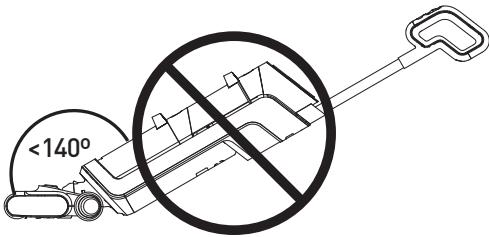
  • Do not tilt the Floorwasher over 140 degrees. Doing so might result in water leakage from the water cups.

B Product usage
VALBERG FLOORWASHER FL3 - B Product usage - 1

Power off the Floorwasher

  • Press the On/Off button on the handle.

Switch modes

  1. While the Floorwasher is powering on and cleaning the floor, you can press on the handle to switch to Power mode .

VALBERG FLOORWASHER FL3 - Switch modes - 1

NOTE: Standard mode is the default mode.

  1. Press on the handle to switch the cleaning mode between Standard mode and Power mode .

VALBERG FLOORWASHER FL3 - Switch modes - 2

CAUTION: Do not use the Floorwasher to clean surface with foam liquid. It is recommended using Power mode for tougher dirt and stains.

VALBERG FLOORWASHER FL3 - Switch modes - 3

  • Currently selected mode will be shown on the display panel.

Clean the dirty water cup

VALBERG FLOORWASHER FL3 - Clean the dirty water cup - 1

NOTE:

After using the Floorwasher, check the suction nozzle regularly and clean the dirty water cup timely to keep the air tunnel unblocked so as to prevent from any blockages that might cause suction dropping and motor overheating, thus affecting the performance and service life of the product.

B Product usage

11 1 While pressing the dirty water cup release button downward, pull to remove the cup.

Hold the cup and remove the HEPA filter and the lid, and then pull out the separator in the cup.

Empty the cup, and then place the cup back to the main body. Push the cup in until it clicks into place.

Self-clean

VALBERG FLOORWASHER FL3 - Self-clean - 1

NOTE:

We recommend that you:

Clean the dirty water cup before and after performing the Self-clean function.
- Clean the charging base right away if any dirty residues remain on the charging base after using the Self-clean function.

  1. To perform rolling brush self-cleaning, place the Floorwasher back to the charging base after use.
  2. While the Floorwasher is in the charging base, standing upright, press the Self-clean button on the handle to start .
  3. After performing the self-cleaning, the Floorwasher enters charging mode.

Cleaning and maintenance

VALBERG FLOORWASHER FL3 - Cleaning and maintenance - 1

WARNING!

  • To prevent the risk of electrocution, always turn off and unplug the product from the mains supply before cleaning.
  • Never immerse the main body or power cord in water or any other liquid. Never rinse them under the tap.
  • Use a neutral floor liquid detergent (to be purchased separately) according to the instructions. Acid, aqueous alkali or other environmental harmful substance must not be used. (For example: fill the clean water cup with tap water and add 10ml to 15ml of neutral floor liquid detergent).
  • Liquid detergent should be kept out of the reach of children. If the liquid detergent gets into the eyes accidentally, rinse them thoroughly with clean water; seek medical attention immediately in case of accidental ingestion.
  • Follow the local environmental protection regulations when disposing of sewage and liquid detergent.

VALBERG FLOORWASHER FL3 - WARNING! - 1

NOTE:

  • Never use solvents, chemical or abrasive cleaning products, wire brushes, sharp objects or scouring pads to clean the product.

In order to achieve its best performance, we recommend that you maintain the product regularly.

Clean the main body

12 1 Make sure the Floorwasher is powered off before cleaning.

2 Clean the main body with a soft cloth. It can be slightly damp with clean water or neutral detergent. Be caution not to get the internal components wet.

Clean and empty the dirty water cup

When the dirty water cup is full, the Floorwasher will turn off automatically. The Dirty water cup full status icon will appear on the display panel.

1 While pressing the dirty water cup release button, pull the cup out.

2 Remove the HEPA filter, the lid and the separator from the cup.

3 Empty the cup and clean the residues on the inner wall of the cup with the cleaning brush provided. Then, rinse the cup clean.

If you find blockage in the dirty water cup, rinse the lid, the float and the separator with tap water.

Clean the HEPA filter

We recommend that you clean the HEPA filter after each use.

1 Remove the HEPA filter from the dirty water cup.

2 Clean the filter under running tap water.

3 After cleaning, allow the filter to air dry.

Re-attach the dirty water cup

15 After cleaning, allow the cup, the HEPA filter, the lid and the separator to dry.

1 Place the separator, the lid and the HEPA filter back to the dirty water cup.
2 Insert the dirty water cup back to the main body. Push the cup in until it clicks into place.

Clean the rolling brush

VALBERG FLOORWASHER FL3 - Clean the rolling brush - 1

Tips:

  • If there are residual stains on the suction nozzle, please wipe it clean with a damp cloth,. Do not rinse with water.
  • We recommend that you clean and dry the rolling brush after each use.

16 ① Press the rolling brush release button on the left side.

Pull the rolling brush upward at the left end, and then pull outward to detach the rolling brush.
Use the hook end of the supplied cleaning brush to remove any tangled hair or debris from the rolling brush.
Then rinse the rolling brush with tap water.
Wipe clean any stains on the entrance to the suction nozzle with a damp cloth.
6 Attach the rolling brush back to the Floorwasher.

Troubleshooting

Use this troubleshooting guide to resolve any common problems that you may encounter with the product. If the problem persists, do not use the product and contact an authorised repair centre to have it inspected and if necessary, repaired.

ProblemPossible CauseSolution
Battery level icon flashing• Motor abnormal• Clean the clog in the tube and restart the appliance.
Appliance does not work• Out of power or low battery • The rolling brush is entangled with objects like hair• Fully recharge the appliance before use. • Clean the rolling brush.
Weak suction power· Dirty water has reached its designated capacity · The rolling brush or the dirty water cup may have been attached incorrectly · The rolling brush is entangled with objects like hair · The suction nozzle is blocked · The HEPA filter mesh above the float is dirty · Low battery· Detach the dirty water cup and empty the water. · Re-attach the rolling brush or the dirty water cup correctly. · Clean the rolling brush. · Clean the suction nozzle. · Clean the HEPA filter · Fully recharge the appliance before use.
There is abnormal sound in motor operation· The suction nozzle is blocked · Dirty water has reached its designated capacity · The HEPA filter mesh above the float is dirty· Clean the suction nozzle. · Detach the dirty water cup and empty the water. · Clean the HEPA filter
Cannot be charged· The appliance and the charging slot are not properly contacted· Check and properly attach the appliance to the charging base.
No water is sprayed from the rolling brush· Clean water cup is empty · Clean water cup is not properly attached· Fill up the clean water cup. · Re-attach the clean water cup correctly.
There is water leakage from the air outlet· Missing HEPA filter · Missing float indicator · HEPA filter is not dry enough after washing · Dirty water has reached its designated capacity· Re-attach the HEPA filter to the dirty water cup. · Re-attach the float indicator. · Allow the HEPA filter to completely bair dry before re-attaching it to the dirty water cup. · Detach the dirty water cup and empty the water.

Storage

  • Always unplug the product before storing it.
  • Store the product in a fresh, dry and dust-free place, out of thereach of children and pets.
  • Please retain the packaging and use it to store the product when it is not in use for an extended period of time.

VALBERG FLOORWASHER FL3 - Storage - 1

Merci!

Manual assistant
Powered by Anthropic
Waiting for your message
Product information

Brand : VALBERG

Model : FLOORWASHER FL3

Category : Vacuum cleaner with mop