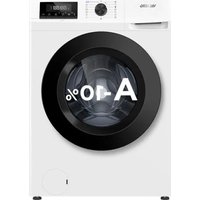
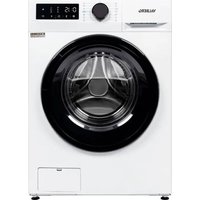
USER MANUAL WF 914 A-10 SD W180C VALBERG
Thank you for choosing this VALBERG product. VALBERG products are chosen, tested, and recommended by ELECTRO DEPOT, so you can be sure you are getting a top-quality, easy-to-use product that won't let you down.
We're confident your new device will be a pleasure to use every day!
Welcome to ELECTRO DEPOT.
Table of Contents

Product overview
Parts
Parts supplied
Specifications

Product usage
Installation
Before the first wash cycle
Preparation of the washing
Detergents and additives
Operation

Cleaning and
Care and maintenance
Troubleshooting guide
Transport/handling
A
Product overview
Parts

Worktop

Control panel

Detergent dispenser

Door

Plinth covering pump access

Adjustable feet

NOTE:
Control panel layout and appearance will depend on the model.
Parts supplied
Package with small items
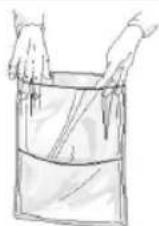
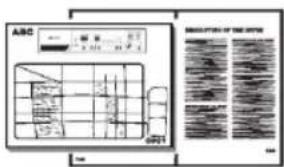
Instruction for use, installation guide, warranty card (depends on model)
A
Product overview
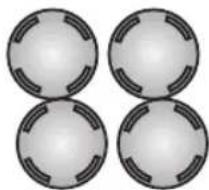
4 plastic caps
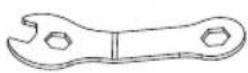
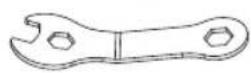
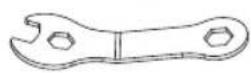
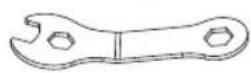
Wrench
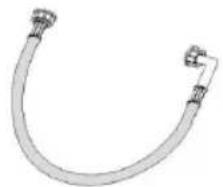
Inlet hose (inside the machine or already installed)
- Cold inlet hose
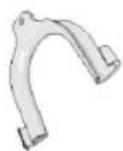
“U”-bend (inside the machine or already installed)
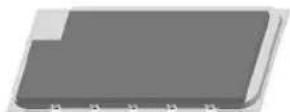
Bottom cover
Specifications
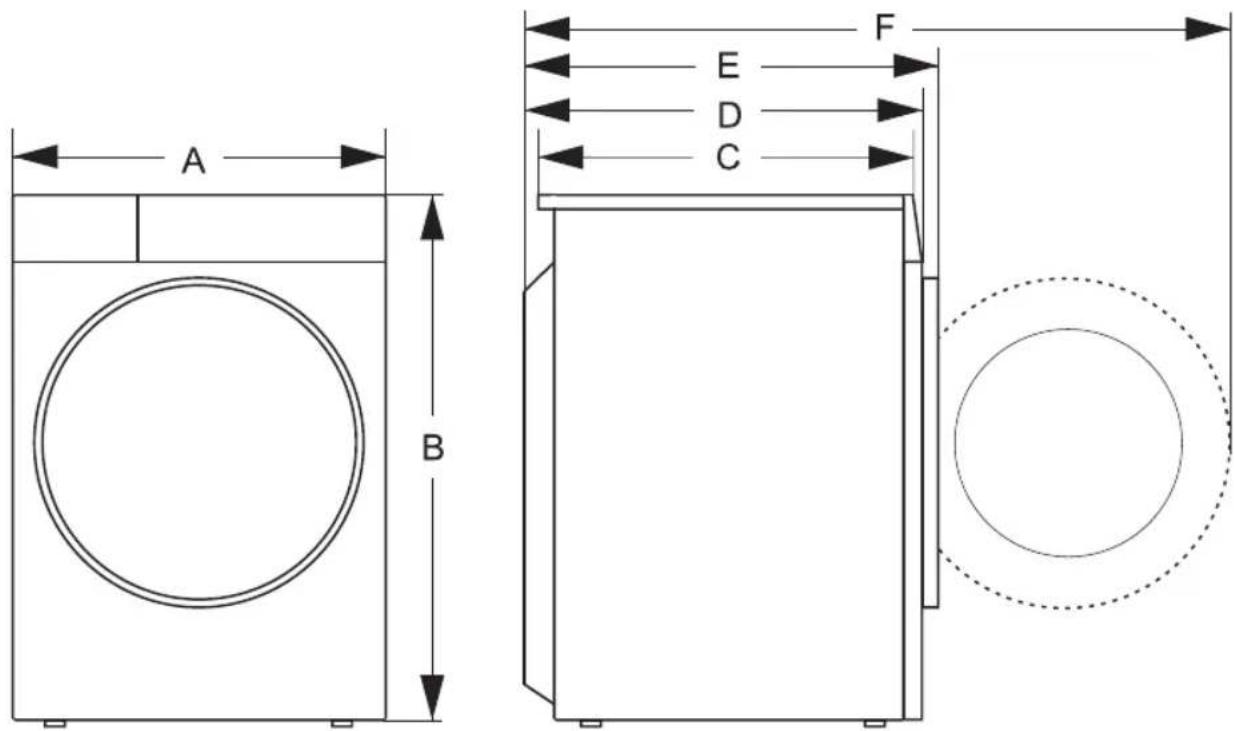
Model: 10009856 - WF 914 A-10 SD W180C
Washing Capacity: 9kg
Max.spin speed: 1400rpm
Net Weight: 63kg
Rated Voltage: 220 - 240V~
Heating Power: 1500W
Washing Power: 150W
Dimension
A: 600mm
B: 850mm
C: 480mm
D: 550mm
E: 590mm
F: 1040mm
B
Product usage
Installation
BEFORE USING THE WASHING MACHINE
Removing the packaging and inspection
- After unpacking, ensure that the washing machine is undamaged. If in doubt, do not use the washing machine. Contact After-Sales Service or your local retailer.
- Check that the accessories and supplied parts are all present.
- Keep the packaging materials (plastic bags, polystyrene parts, etc.) out of reach of children, as they are potentially dangerous.
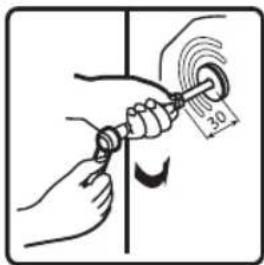
Remove the transport bolts

Important:
- Transport bolts which are not removed can cause damage to the appliance.
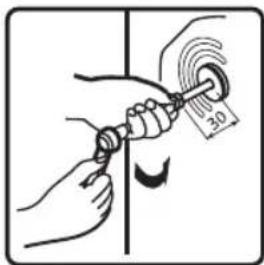
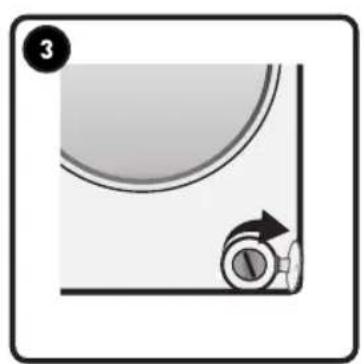
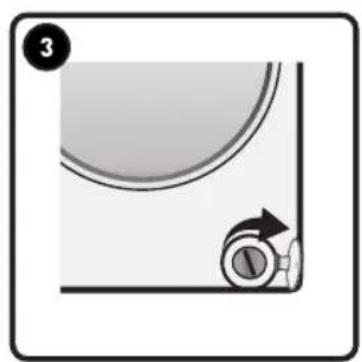
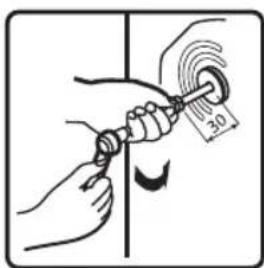
- Screw off all transportation bolts for approx. 30mm with wrench following the direction of arrow shown (not fully screw it off).
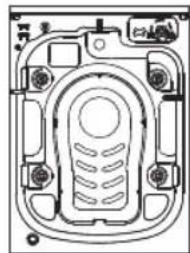
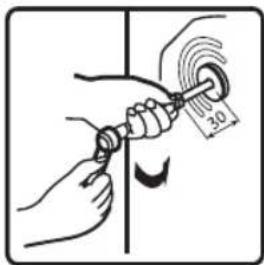
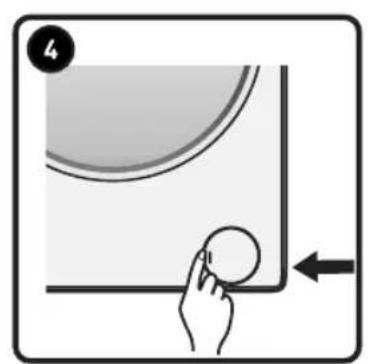
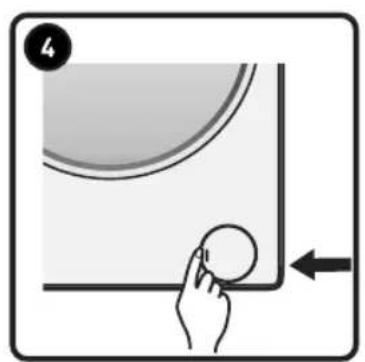
- Push four transportation bolts on horizontal direction inward and loose transportation bolt.
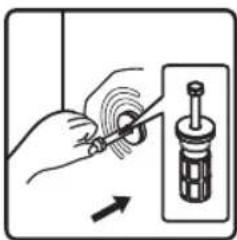
- Pull out transportation bolt together with rubber part and plastic part.
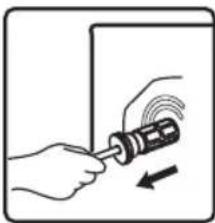
B
Product usage
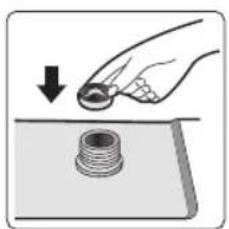
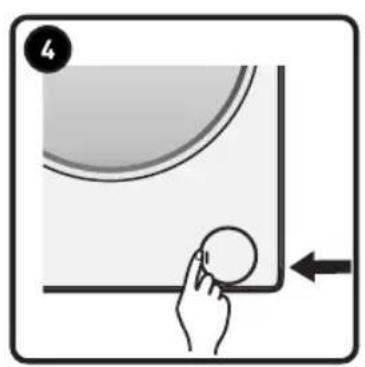
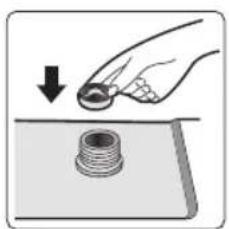
- To ensure safety and reduce noise, you should install the transportation bolt cover supplied with the unit (see the annex accompanying the unit). Lean and place the transportation bolt into hole and press it following the shown direction until it clicks.
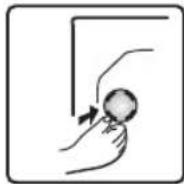

Important: Keep the transport bolts and the wrench for future transporting of the appliance and in this case refit the transport bolts in reverse order.
Adjustment of the feet
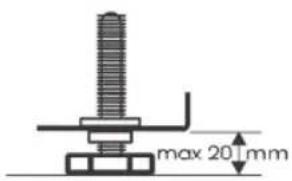
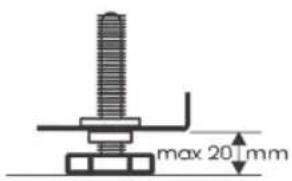
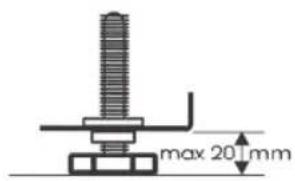
The appliance must be installed on a solid and level floor surface (if necessary use a spirit level). If the appliance is to be installed on a wooden floor, distribute the weight by placing it on a 60x60cm sheet of plywood at least 3cm in thickness and secure it to the floor. If the floor is uneven, adjust the 4 leveling feet as required; do not insert pieces of wood etc. under the feet.
- Slacken the locknut clockwise (see arrow) using the wrench.
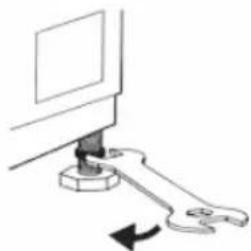
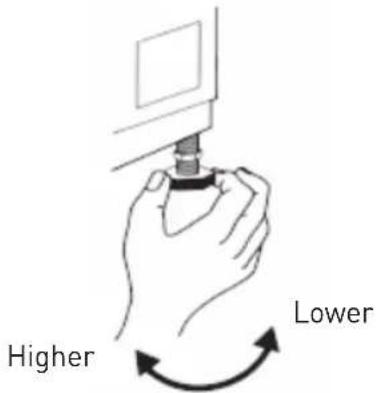
- Lift the machine slightly and adjust the height of the foot by revolving it.
B
Product usage

Important: tighten the locknut by turning it anti-clockwise towards the appliance casing.
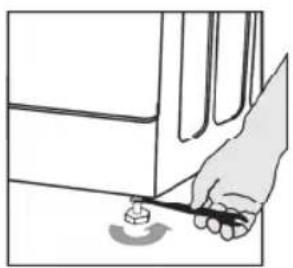
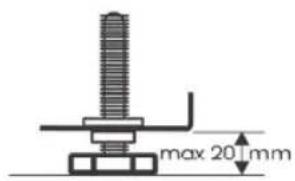
Install bottom cover
To realize quieter operation, a bottom cover is supplied with the unit (only applies to some of the washers). After installing the cover at the bottom of the washer, the noise level will be greatly reduced. Please ask for advice from specialists before installing the cover, nevertheless, the machine can be used without the bottom cover.
Connect the water supply inlet hose
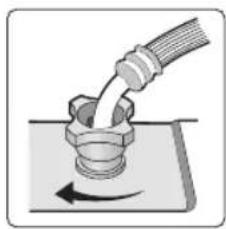
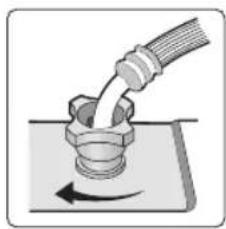
- If the water inlet hose is not already installed, it must be screwed to the appliance. The blue marked hose is only for cold water.
- Screw by hand the inlet hose onto the tap, tightening the nut.

Attention:
• No kinks in the hose! - The appliance must not be connected to the mixing tap of an un-pressurized water heater. - Check water-tightness of connections by turning the tap completely on. - If the hose is too short, replace it with a suitable length of pressure resistant hose (1000 kPa min). - Check the inlet hose regularly for brittleness and cracks and replace if necessary. - The washing machine can be connected without a non-return valve.
B
Product usage
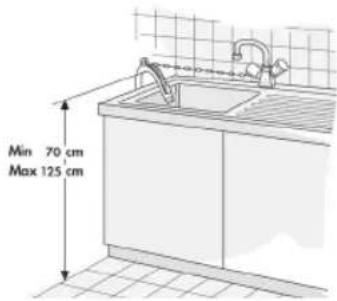
Connect the drain hose
If the drain hose is installed as shown below:
- Unhook it only from the right clip (see arrow)
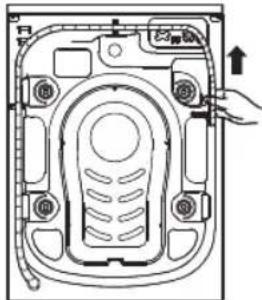
- Connect the drain hose to the drain or hook it over the edge of a sink using the "U" bend.
Fit the "U" bend E, if not already installed, at the end of the drain hose.
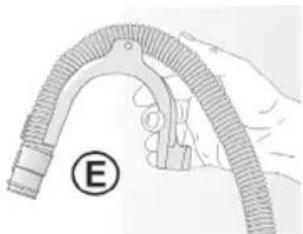

Notes:
- Ensure that there are no kinks in the drain hose.
- Secure the hose so that it cannot fall down. After the wash phase, the machine will drain out hot water.
- Small hand basins are not suitable.
- To make an extension, use a hose of the same type and secure the connections with clips. • Max. overall drain hose length: 2.50 m.
Before the first wash cycle
To remove any residual water used during testing by the manufacturer, we recommend that you carry out a short wash cycle without laundry.
- Open the tap.
- Close the door.
- Pour a little detergent (about 30 ml) into the main wash chamber of the detergent dispenser.
- Select and start a short programme.
Preparation of the washing
- Sort the laundry according to...
- Type of fabric / care label symbol
Cottons, mixed fibres, easy care/synthetics, wool, handwash items.
- Colour
Separate coloured and white items. Wash new coloured articles separately.
- Loading
Wash items of different sizes in the same load to improve washing efficiency and distribution in the drum.
- Delicates
Wash small items (e.g. nylon stockings, belts etc.) and items with hooks (e.g. bras) in a cloth bag or pillow case with zip. Always remove curtain rings or wash curtains with the rings inside a cotton bag.
- Empty all pockets
Coins, safety pins etc. can damage your laundry as well as the appliance drum and tub.
- Fasteners
Close zips and fasten buttons or hooks; loose belts or ribbons should be tied together. Stain removal
Blood, milk, eggs etc. are generally removed by the automatic enzyme phase of the programme.
- To remove red wine, coffee, tea, grass and fruit stains etc. add a stain remover to the main wash chamber of the detergent dispenser.
- Pre-treat heavily-soiled areas with stain remover if necessary.
B
Product usage
Dyeing
- Only use dyes that are suitable for washing machines.
- Follow the Manufacturer's instructions.
- Plastic and rubber parts of the washing machine can be stained by dyes.
Loading the laundry
- Open the door.
- Load the articles one at a time loosely into the drum, without overfilling. Observe the load sizes given in the quick reference guide.

Note: Overloading the machine will result in unsatisfactory washing results and creased laundry.
- Close the door.
Detergents and additives
Always use high efficiency, low foam detergent for a front load machine. The choice of detergent depends on:
- type of fabric (cottons, easy care/synthetics, delicate items, wool).

Note: Use only specific detergents for washing wool.
- colour
- the wash temperature • degree and type of soiling

Any whitish residues on dark fabrics are caused by insoluble compounds used in modern phosphate-free powder detergents. If this occurs, shake or brush out the fabric or use liquid detergents. Use only detergents and additives specifically produced for domestic washing machines. When using descaling agents, dyes or bleaches for the pre-wash, make sure that they are suitable for use in domestic washing machines. Descalers could contain products which could damage your washing machine. Do not use any solvents (e.g. turpentine, benzine). Do not wash fabrics that have been treated with solvents or flammable liquids.
B
Product usage
Dosage
Follow the dosage recommendations on the detergent pack. They depend on:
• degree and type of soiling - size of wash
follow the detergent manufacturer's instructions for a full load;
half load: 3/4 the amount used for a full load;
minimum load (about 1 kg): 1/2 the amount used for a full load;
- water hardness in your area (ask for information from your water company). Soft water requires less detergent than hard water.

Notes:
Too much detergent can result in excess foam formation, which reduces washing efficiency. If the washing machine detects too much foam, it may prevent spinning. Insufficient detergent may result in grey laundry in time and also calcifies the heating system, drum and hoses.
Where to put detergent and additives
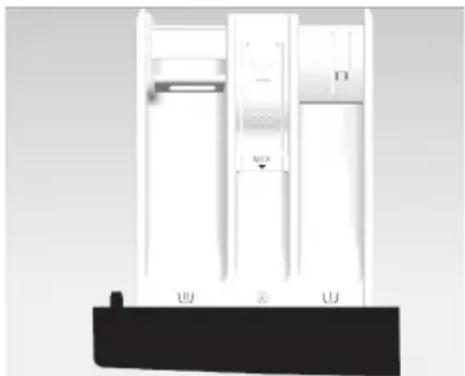
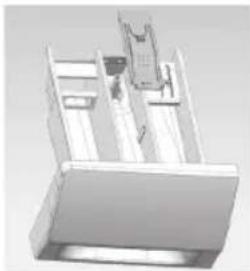
The detergent drawer has three chambers (fig. "A")
Prewash chamber
• Detergent for the prewash
Mainwash chamber
• Detergent for the main wash - Stain remover • Water softener (water hardness class 4)
Softener chamber

- Fabric softener
- Liquid starch
Pour additives only up to the "Max" mark.
A
Product usage

Notes:
- Keep detergents and additives in a safe, dry place out of the reach of children.
- Liquid detergents can be used for programmes with prewash. However, in this case a powder detergent must be used for the main wash.
- Do not use liquid detergents when activating the "Start Delay" function (if available on your washing machine).
- To prevent dispensing problems when using highly concentrated powder and liquid detergents, use the special detergent ball or bag supplied with the detergent and place it directly inside the drum.
- When using descaling agents, bleaches or dyes, make sure that they are suitable for washing machines. Descalers could contain compounds that can damage parts of your washing machine.
- Do not use any solvents in the washing machine (e.g. turpentine, benzine).
Product usage
Operation
This washing machine is equipped with automatic safety functions which detect and diagnose at an early stage and react appropriately.
Control Panel![graph TD A["Raw Material"] --> B["Product"] C["Coated Products"] --> B D["Tyrene"] --> B E["Titanine"] --> B F["Flour"] --> B G["Glue & Skin"] --> B H["Recycled Materials"] --> B I["Recycled Products"] --> B J["Recycled Products"] --> B K["Recycled Products"] --> B L["Recycled Products"] --> B M["Re…](/content/2026/05/753055/images/066a207f5df91476e7eaf58fe207c36989dc4ac6975414e70a9410184ba41a49.jpg)
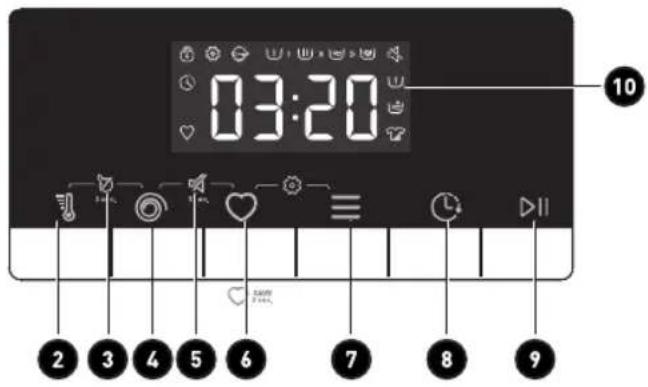
1 Program selector "Favourite" button 2 "Temp." button "Option" button 3 Child Lock Function "Delay End" button 4 "Spin" button "Start/Pause" button 5 Mute Function
6 7 8 9 10 Program and function status display window
Programmes
| Program Care Label | Material / Level of Soiling | Maximum Wash Load (kg) |
| Washing temperature selected as per the Care Label instruction. |
| Cotton (1) --, 20°C, 30°C, 40°C,60°C, 90°C | | Heavily and moderately soiled cotton, or linen.For very heavily soiled items select the "Prewash" function. | 9 |
| Synthetics--, 20°C, 30°C, 40°C,60°C | | Moderately soiled synthetics, cotton blended fabrics. 4.5 | |
| Allergy Steam (2) 60°C | | It is suitable for high temperature resistant and less fading fabrics, which removes allergens such as pollens,mites and parasites through high temperature steam. | 2 |
| Eco 40-60ECO | | — Normally soiled cotton laundry. 9 | |
| Wool--, 20°C, 30°C, 40°C | | Machine washable wool. (Refer to the washing label attached to the clothing) 2 | |
| Baby Steam Care (2) 40°C, 60°C, 90°C | | It is suitable for baby clothes and underwear, etc., which sterilizes and disinfects through high temperature steam. | 2 |
| Dark Wash--, 20°C, 30°C, 40°C,60°C | — Dark textiles made of cotton and dark easy-care textiles | 4 |
| Quick 15--, 20°C: 15mins,30°C: 20mins, 40°C:30mins(preferred deepwash in a shortertime) | | Cotton, mixed fabrics. Items worn for a short time or newly bought. | 1 |
| Mix--, 20°C, 30°C, 40°C | | Mixed loads of moderately soiled cotton and synthetic fabrics. | 4.5 |
| Sportswear--, 20°C, 30°C, 40°C | | Sportswear and leisure wear made from microfibre fabrics. | 3.5 |
| Down--, 20°C, 30°C, 40°C | | Machine-washable items stuffed with synthetic fibres, such as pillows, quilts and bedspreads; also suitable foritems stuffed with down. | 2 |
| 20°C | — This program is suitable for cotton clothes with light stains, energy saving. 9 | |
| Drum Clean90°C | — | Program to remove dirt and bacterial residue that can breed in the machine after it has been used for a period,especially when low temperature washes are used regularly. | — |
| Rinse & Spin | | — This program is defaulted to two rinses and spin. | 9 |
| Spin | — Select the length, and speed, of the spin manually. | 9 |
*: Optional Functions Yes : Detergent Required —: Cannot be selected -- : Temperature of unheated water [1] Wash performance test programs are: Eco 40-60. (2) Allergy Steam and Baby Steam Care both washing are suitable to sterilize the colorfast clothes. When you see the door glass with water mist, please don't put your hand on the door glass or open the dispenser to prevent burns.
| Detergent Compartment Wash Program Functions | Maximum spin speed (rpm) |
| Prewash | Main wash | Softener | Delay End | Prewash | Extra rinse | Intensive | Spin Temp. | |
| * | Yes 1400 | * | * | * | * | * | * | * | |
| * | Yes 1400 | * | * | * | * | * | * | * | |
| * | Yes - 1400 | * | * | * | * | * | * | | |
| - Yes - | -- - 1400 | * | * | | | | * | | |
| - Yes - | - 600 | * | * | | * | | * | * | |
| * | Yes 1400 | * | * | * | * | * | * | * | |
| * | Yes 1400 | * | * | * | * | * | * | * | |
| - Yes - | - 800 | * | * | | * | | * | * | |
| * | Yes 1400 | * | * | * | * | * | * | * | |
| * | Yes | * | * | * | * | * | * | * | 800 |
| - Yes - | - 600 | * | * | | * | | * | * | |
| * | Yes - 1400 | * | * | * | * | * | * | | |
| -- -- -- -- | -- -- -- -- | 800 | * | | | | | | |
| -- | | * | * -- -- 1400 | * | | * | | |
| -- -- -- -- - 1400 | | * | | | | * | | |
Add detergent, close the door and set the program
Load the clothes to be washed in the drum and close the door.
Add the detergent into the relevant compartments for the type of program you are going to select. Add detergent as described in the Detergent and Additives section.
- Turn on the power.
- Spin the program selection knob to the required program. The pointer must pass through the initial position if it is not already there.
- Select washing temperature and spin speed by pressing the "J" buttons.
- Press the "button to select additional functions.
- After starting the program, the display window shows the program length (hours: minutes) and additional function options in sequence.
| Programme | Washing temperature select | Laundry and textile | Recommended detergent |
| Wool --, 20, 30, 40°C Wool fabric Mild detergent |
| 20°C 20°C | | Synthetic materials, coloured laundry made from easy care fibres | Colour or mild detergent without optical brighteners |
| Cotton,Eco 40-60, Dark Wash, Sportswear, Down, Synthetics,Mix, Quick 15' | --, 20, 30, 40, 60°C | Synthetic materials, coloured laundry made from cotton or linen | Colour detergent free of bleach and optical brighteners |
| Eco 40-60, Cotton, Dark Wash, Baby Steam Care, Allergy Steam | 40, 60, 90°C | White laundry made from boil-proof cotton or linen | Strong detergent containing bleach and optical brighteners |
Additional function selection
At standby state, press the "Option" button to select an additional function for the current program. Select only one function for each press, and then the corresponding icon flashes. After starting up, the program cannot be changed.
Pre-wash
- Select this function to conduct a pre-wash to enhance washing effects and better remove stains. This function is suitable for heavily soiled clothes.
- Before inflowing, laundry detergent/washing powder can be added to pre-wash box, and washing powder must be added to main wash box.
After setting the function of rinsing adding, the program runs the rinsing process once again before running the softening, and the total running time of the program increases accordingly.
B
Product usage
Intensive
This function can be selected to prolong washing time, strengthen washing effects, and better remove stains.
Inlet water warning
If the tap is not opened, or water pressure is too low, the display screen will prompt "F01" to give an alarm.
Drainage warning
If the pipe is squeezed, drainage will not be smooth. In case of failing to completely drain for a long time, the display screen will prompt "F03" to give an alarm.
Door lock icon 🔒
After the program starts, the Door Lock icon will light up and the door will be locked.
- After completing the program, the door lock unlocks automatically. When the washing machine is paused, if the door lock opening conditions are met, the door lock will open.
- When the door lock indicator light flashes, the door shall not be opened forcibly to avoid personal injury.
Delay end function ⓧ
Delay end function allows the machine to run at the consumer's convenience, for example, at night when electricity is cheaper.
- This button is only valid for selecting the reservation time in standby mode.
- After the reservation function is selected, each press of the reservation button increases the time by 1 hour. Before reservation, if the program time is not an integral multiple of 1 hour, the first press of the reservation key will round it up to the next hour, and then each subsequent press increases the time by 1 hour. If a reservation is selected, it can be canceled before the program starts by turning the button to select another program.
- The delay time must be longer than the wash program length, as the delay time is the time the program will finish. For example, if the selected program time is 02:28, the delay time selected must be between 03:00 and 24:00.
- When the reservation process is operated, the 'reservation time' icon will be on. When the reservation process is finished, the 'reservation time' icon will be off.
Favourite
After selecting the program and setting each parameter and starting, long press the Favorite key for 3 seconds to memorize the selected program, temperature, rotational speed, and other related settings. Then the Favorite symbol lamp will be on. Under the circumstance that the Favorite lamp is not on, short press the Favorite key, and the program will switch to the program memorized last time; at the same time, the temperature, rotational speed, and other parameters will automatically change to the parameters memorized last time.
At this moment, if switching the program or pressing other keys, the panel will display a new program and parameters, and the Favorite symbol lamp will be off.
When the user uses it for the first time, if he/she has never long pressed the Favorite key to collect programs, he/she can short press the Favorite key, and then the cotton linen program and its default settings will be collected by default.
B
Product usage
Mute function

When the machine is in the state of holding, pause, or operation, press the "☐" buttons for 3 seconds. The display will show the mute function fault icon. All the buzzing will be turned off except the alarms.
When the machine is in the mute state, press the "○" buttons for 3 seconds until the mute function fault icon light turns off. All the buzzing will be activated.
Automatic weighting
Washing machine displays “----” after startup, indicating that it is weighing automatically. It will adjust program length (hours: minutes) automatically according to weight of clothes.
Child lock

To strengthen the safety of children, this machine is equipped with Child Lock function.
When the programme starts, press “☐ + ☐” button for 3 seconds. Child Lock icon will light up, and then Child Lock is set up. Repeat the same operation, the Child Lock will be released.
- When the Child Lock is set, all function buttons will be shielded.
- When you turn the machine off by rotating the program selection button "Off", child lock is released. • After completing program, child lock will automatically unlock.
Cleaning Reminders
- This function is enabled by default. Every 60 cycles of the program runs, the screen displays the cleaning reminder "U01" (flashes for 5 seconds), and the cleaning icon "is always on. At this point, user can clean the drain pump filter, door seal, inlet valve screen, detergent box, and run the "Drum Clean" program to complete the machine cleaning and descaling.
- If user don't want to clean this time, press the "♥" button at the same time for 1 second to cancel this cleaning reminder.
- After running the "Drum Clean" program or canceling this reminder, the running cycle is cleared to zero and the program starts to count again.
- Permanently turning off/on the cleaning reminder function of the machine: when the machine is connected to the power cord and knob is turned to any program, press the "Button" at the same time for 7 seconds, the screen will display "UoF", which means this function is turned off; with the same operation, screen will show "Uon", which means this function is turned on.
To start the program
After you have selected your options and placed detergent within the detergent dispenser, turn on the water tap and press the "D" button. The screen will display the current program progression with icons from left to right. It also displays the remaining program time.
To cancel the program or reselect the options
- Rotate the program selector to "Off" for 3 seconds to turn off the machine.
- Select the new program and options.
- Press the "Start/Pause" button to turn on the machine without adding any extra detergent.
End of the Program
The washing machine shows "END" at the end of the program, when the door is unlocked. If the knob is turned to "Off", the power will be cut off. If there is no button or knob operation within 2 minutes, the program will automatically power off.
Programme Instructions
- The eco 40-60 programme is able to clean normally soiled cotton laundry declared to be washable at about 40°C to 60°C, together in the same cycle, and this programme is used to assess compliance with the EU ecodesign legislation.
- The power consumption of the off-mode is 0.49W.
- The most efficient programmes in terms of energy consumption are generally those that perform at lower temperatures and longer duration.
- Loading the household washing machine up to the capacity indicated by the manufacturer for the respective programmes will contribute to energy and water savings.
- Correct use of detergent, softeners and other additives. Do not apply excessive detergent. This may affect the washing results adversely.
- Periodic cleaning, including optimal frequency, and limescale prevention and procedure.
- Noise and remaining moisture content are influenced by the spinning speed: the higher the spinning speed in the spinning phase, the higher the noise and the lower the remaining moisture content.
- The product information and QR code are reflected in the energy consumption label, the product registration information can be obtained by scanning the QR code.
- The information of standard programmes:
| Program | Selected Temperature (°C) | Rated Capacity (kg) | Maximum temperature in drum | Program duration (h:min) | Energy consumption (kWh/cycle) | Water consumption (litres/ cycle) | Remaining moisture content (%) | Maximum speed reached rpm |
| Eco 40-60 full load - 9.0 35 3:48 0.720 49.0 53.90 1400 |
| Eco 40-60 half load - 4.5 26 2:54 0.420 38.0 53.90 1400 |
| Eco 40-60 1/4 load - 2.5 24 2:40 0.220 30.0 53.90 1400 |
| 20°C 20 9.0 20 2:09 0.280 118.0 55.00 1400 |
| Cotton 60 9.0 56 3:29 1.900 118.0 55.00 1400 |
| Synthetics 40 4.5 40 2:35 0.910 85.0 35.00 1400 |
| Quick 15' | 20 | 1.0 | 20 | 0:15 | 0.037 | 20.0 | 75.00 | 800 |
The values given for programmes other than the eco 40-60 programme are indicative only.
Care and maintenance
Appliance exterior and control panel
- Can be washed down with a soft, damp cloth.
- A little neutral detergent (non abrasive) can also be used.
- Dry with a soft cloth.
Door seal
- Clean with a damp cloth when necessary.
- Check the condition of the door seal periodically.
Detergent dispenser
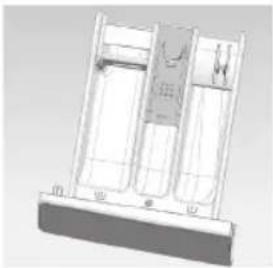
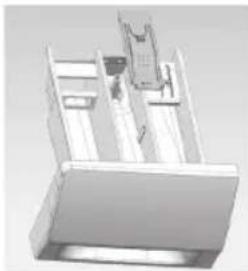
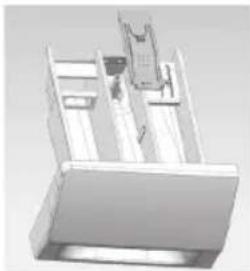
- Press the release lever in the main wash compartment downward and remove the drawer (fig. "B").
- Remove siphon cap from the fabric softener compartment (fig. "C").
- Wash all the parts under running water.
- Refit the siphon in the detergent drawer and fit the drawer back inside its housing.
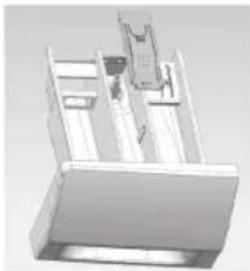
C
Filter
We recommend that you check and clean the filter regularly, at least two or three times a year.
Especially:
- If the appliance is not draining properly or if it fails to perform spin cycles.
- If the pump is blocked by a foreign body (e.g. buttons, coins or safety pins).
C
Cleaning and maintenance

IMPORTANT: Ensure that the water has cooled before draining the appliance.
- Stop the appliance and unplug it.
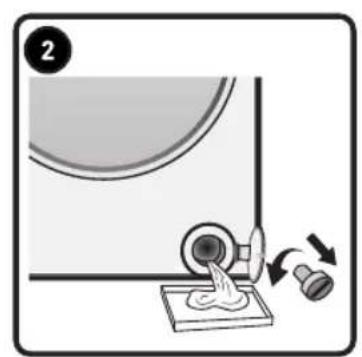
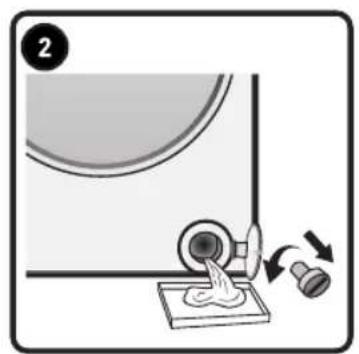
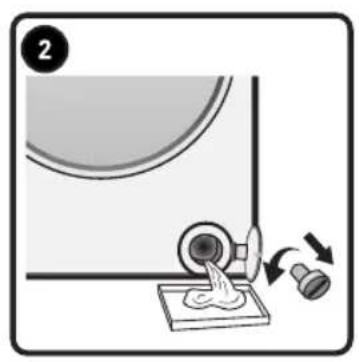
- Insert a removal tool like a slotted screwdriver into the small opening of the bottom baffle, press the bottom baffle downward with much strength and open it.
- Put a flat container under the filter door and then drain with the emergency drain pipe (see [draining residual water] for specific operation methods). Then, loosen the filter anticlockwise and completely unscrew and remove the filter.
- Clean the filter and the filter chamber.
- Check that the pump rotor moves freely.
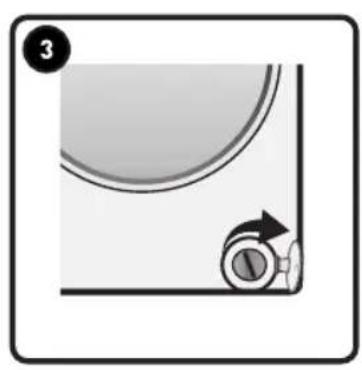
- Re-insert the filter and screw it in clockwise as far as it will go.
- Reinstall the plinth.
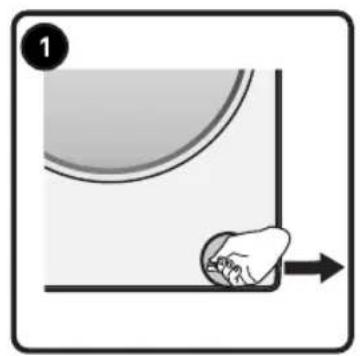
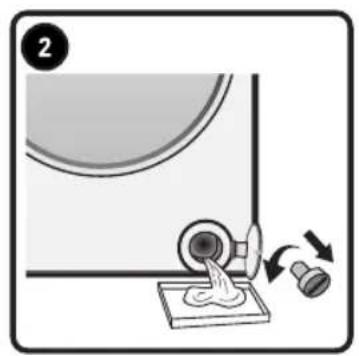
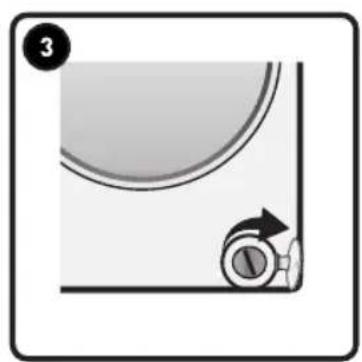
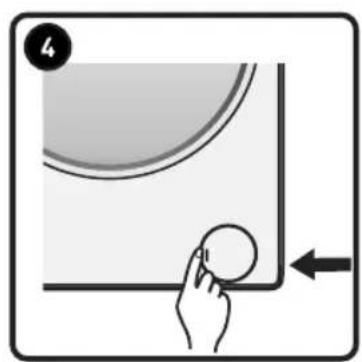
C
Cleaning and maintenance
Water supply hose
Check the supply hose regularly for brittleness and cracks and replace it if necessary using a new hose of the same type (available from After-Sales Service or specialist dealer).
Mesh filter for water connection
Check and clean regularly.
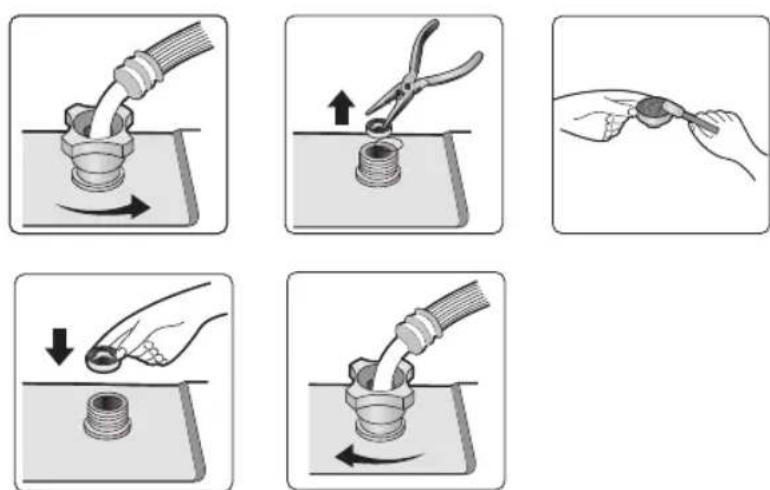
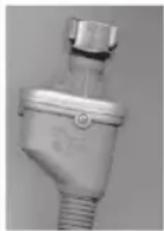
For washing machines with an inlet hose as shown in pictures "D",
- Close the tap and loosen the inlet hose on the tap.
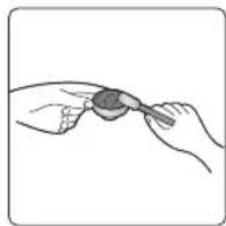
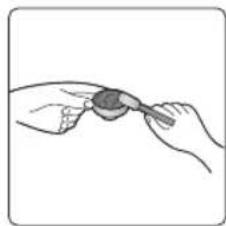
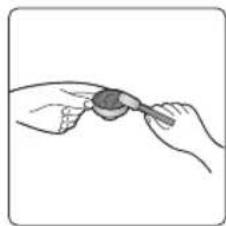
- Clean the internal mesh filter and screw the water inlet hose back onto the tap.
- Now unscrew the inlet hose on the rear of the washing machine.
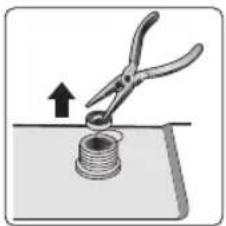
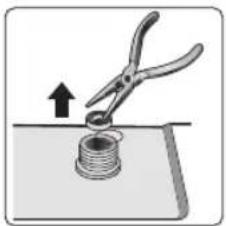
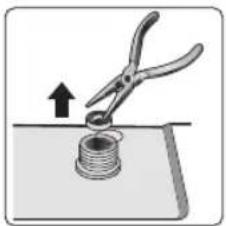
- Pull off the mesh filter from the washing machine connection with universal pliers and clean it.
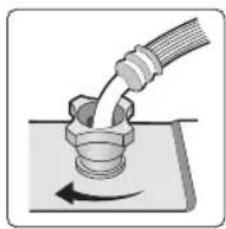
- Refit the mesh filter and screw the inlet hose on again.
- Turn on the tap and ensure that the connections are completely water-tight.
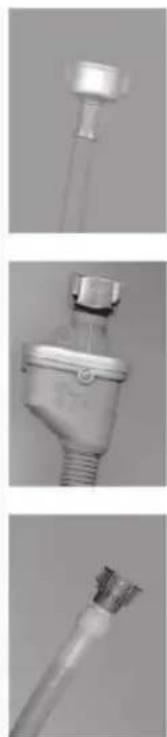
D
Troubleshooting guide
Depending on the model, your washing machine is equipped with various automatic safety functions. This enables faults to be detected in good time and the safety system can then react appropriately. These faults are frequently so minor that they can be resolved within a few minutes.
Problem Check whether / Possible cause
| The washing machine will not start, no indicator lamps are on. | the mains plug is inserted into the socketthe wall socket is functioning correctly (use a table lamp or similar appliance to test it). |
| The washing machine will not start... and the “Start/Pause” indicator lamp flashes. | the door is properly closed (child safety);the “Dilbutton has been pressed;the “Water tap closed” indication lights up. Open the water tap and press the “Dilbutton. |
| The appliance stops during the programme (varies depending on model). | the door has been opened and the “Dilindicator lamp is flashing. Close the door and press the “Dilbutton again.Check if there is too much foam inside, machine enters kill-foam routine. The machine will run again automatically after a period.the washing machine’s safety system has been activated (see “Fault description table”). |
| Residue from detergent and additives left in the detergent drawer at end of wash. | the cover grid of the softener chamber and the separator of the main wash chamber are correctly installed in the detergent dispenser and all parts are clean (see “Care and maintenance”);sufficient water is entering. The mesh filters of the water supply could be blocked (see “Care and maintenance”);the position of the separator in the main wash chamber is adapted to the use of powder or liquid detergent (see “Detergent and additives”). |
| Machine vibrates during spin cycle. | the washing machine is level and standing firmly on all four feet;the transport bolts have been removed. Before using the machine, it is imperative that the transport bolts are removed. |
Problem Check whether / Possible cause
| Final spin results are poor. The washing machine has an imbalance detection and correction system. If individual heavy items are loaded (e.g. bathrobes), this system may reduce the spin speed automatically or even interrupt the spin completely if it detects too great an imbalance even after several spin starts, in order to protect the washing machine.If the laundry is still too wet at the end of the cycle, remove some articles of laundry and repeat the spin cycle.Excessive foam formation may prevent spinning. Use the correct amount of detergent.Check that the spin speed selector has not been set to “0”. |
| If your washing machine has a time display: the programme time initially displayed is lengthened / shortened by a period of time: | This is a normal capacity of the washing machine to adapt to factors that can have an effect on the wash programme time, e.g.:excess foam formation;load imbalance due to heavy items of laundry;prolonged heating time due to reduced inlet water temperature;Because of influences like these, the time remaining in the programme run is recalculated, and updated if necessary. In addition, during the filling phase, the washing machine determines the load and if necessary adjusts the initial programme time displayed accordingly. During such update periods, an animation appears on the time display. |
Enter the after-sales query mode
- In the OFF mode, press the “+” “+” to enter the after-sales inquiry mode.
- It displays the number of operation cycles.
- Press "to switch cycles or fault codes
- When querying fault codes, press the “ 📋 to page up and the “ ” page down.
- Turn the knob to “ 📋 wait for 3 seconds, you will exit query mode.
Fault Code List
Displayed on Display Window Fault Description
| “F01” Water inflow fault |
| “F03” Drainage fault |
| “F13” Door lock fault |
| “F14” Door unlock fault |
"F24" Overflow or too much foam.
Else fault code, "F04-F98" Electronic module fault.
"Unb" Unbalance alarm
"U01" Cleaning Reminders
"F01" displayed on screen
The machine is not fed with water or insufficient water. Check:
- Faucet is fully open and has enough water pressure. • Water inlet pipe is knotted or not.
- Filtering net of water inlet pipe is blocked or not (refer to maintenance and repair). • Water pipe is frozen or not.
Press "Start/Pause" key after fault is removed.
If fault occurs again, please contact with after-sale service (refer to after-sale service.).
"F03" displayed on screen
The washer is not emptied. The washer stops the program being executed. Shut down the machine and disconnect power supply. Check:
- Drain pipe is knotted or not.
- Filter in drain pump is blocked or not (refer to the cleaning of filter in drain pump)

IMPORTANT: Ensure that the water has cooled before draining the appliance.
• the drain hose is frozen up.
Plug in the appliance again.
Select and start the "Spin" programme or push the "Start/Pause" button for at least 3 seconds and restart the desired programme.
If the fault occurs again, please contact After-Sales Service (see "After-Sales Service").
Fault code
The washer stops when the program is running. The display window shows fault code "F13", "F14", "F24", or other fault codes from "F04" to "F98" or "Unb".
If fault code "F13" is shown
Door lock is abnormal.
Start the program for 20 seconds and unlock the washer door (PTC) to check whether the door is closed. Open or close it again.
After the fault is removed, press the "Start/Pause" key. If the fault occurs again, disconnect the power supply and contact after-sales service.
If fault code "F14" is shown
Door open fault.
Action: Press the "Start/Pause" button. The washing machine will try to open the door.
The alarm will not be removed until the door is unlocked. Or turn the knob to off for 3 seconds to turn off the machine. Choose the desired program to start the machine. The alarm will be removed.
C
Cleaning and maintenance
If fault code "F24" is shown
Water level reaches overflow level.
Remove it by pressing "Start/Pause" key and feed water.
Select and start required program. If fault occurs again, disconnect power supply and contact after-sales service.
If else fault code "F04" to "F98" is shown
Electronic module fails.
Turn the knob to Off for 3 seconds to turn off the machine.
After fault is removed, press "Start/Pause" key. If fault occurs again, disconnect power supply and contact after-sales service.
If fault code "Unb" is shown
Unbalance alarm shall be solved by the following methods.
- Laundry winding
Turn the knob to "off" for 3 seconds for shutdown, open the door, shake the clothes and put them back into the washing machine, then select the single dewatering program to dry again.
- Too light-weighted laundry
Turn the knob to "off" for 3 seconds for shutdown, open the door, put in one or two towels, and then select the single dewatering program to dry again.
If code "U01" is shown
Every 60 cycles of the program runs, the screen displays the cleaning reminder "U01" (flashes for 5 seconds), and the cleaning icon "is always on. At this point, user can clean the drain pump filter, door seal, inlet valve screen, detergent box, and run the "Drum Clean" program to complete the machine cleaning. After running the "Drum Clean" program, the running cycle is cleared to zero and the program starts to count again.
- Try to remedy the problem yourself (see "Troubleshooting Guide").
- Restart the programme to check whether the problem has solved itself.
- If the washing machine continues to function incorrectly, call After-Sales Service.
Transport/handling
Never lift the appliance by the worktop when transporting.
- Pull out the mains plug.
- Turn off the tap.
- Disconnect the inlet and drain hoses.
- Eliminate all water from the hoses and from the appliance (see "Removing the Filter", "Draining Residual Water").
- Fit the transport bolts (obligatory).
- The machine is over 55 kg in weight, two persons are needed to move it.

Thank you!
Transport/Handling
Key

Remarks:
A
B
Program instructions
B
C
Filter
C
D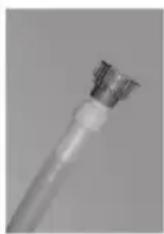
C

Troubleshooting
Transport/Handling
Thank you!
A
Wrench
B

Notes:
A
B
B
C
Filter
C
Key
B
Install the bottom cover

Notes:
A
B
B
C
Filter
C
D
C
This product is guaranteed against faults caused by defects in manufacturing or the materials used for a period of two years, starting from the date of purchase.* This warranty does not cover defects or damage caused by failure to install the device correctly, incorrect use of the product, or excessive wear and tear.
*proof of purchase required.
WARRANTY CONDITIONS