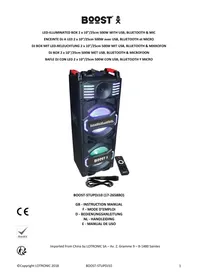
POWERSOUND 280 - Powered speaker BOOST - Free user manual and instructions
Find the device manual for free POWERSOUND 280 BOOST in PDF.



User questions about POWERSOUND 280 BOOST
0 question about this device. Answer the ones you know or ask your own.
Ask a new question about this device
Download the instructions for your Powered speaker in PDF format for free! Find your manual POWERSOUND 280 - BOOST and take your electronic device back in hand. On this page are published all the documents necessary for the use of your device. POWERSOUND 280 by BOOST.
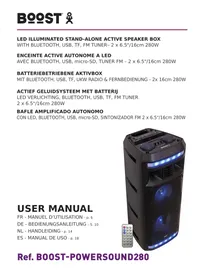
USER MANUAL POWERSOUND 280 BOOST
Ref. BOOST-POWERSOUND280
STAND-ALONE ACTIVE PA BOX WITH BT, FM, USB, TF & BATTERY
Operating Instructions
Congratulations to the purchase of your new speaker.
Warnings

CAUTION DO NOT OPEN THE HOUSING SHOCK HAZARD

Explanation of signs
The triangle containing a lightning symbol is used to indicate whenever your health is at risk (due to electrocution, for example).
An exclamation mark in a triangle indicates particular risks in handling or operating the appliance.
Important Safety instructions and danger warnings
-
Please read the manual carefully and keep it for future reference.
-
The unit shall be connected to a power supply only of the type described.
-
To reduce the risk of fire or electrical shock, do not expose this unit to rain or moisture.
-
Adequate care shall be taken so that foreign objects do not fall, or liquids are not spilled into the enclosure through openings.
-
Do not remove the cover or back, as there are no user-serviceable parts inside.
-
For indoor use only
-
Do not place on the apparatus a naked flame source, such as lighted candles.
-
The unit should only be used in moderate climates
-
A minimum distance of 0.5m around the unit must be kept to ensure sufficient ventilation and avoid overheating.
-
All safety instructions and warnings must be adhered to. They are part of the manual and must be kept with the manual.
-
Any guarantee claims are rendered invalid if damage occurs due to non-observance of these operating instructions. We assume no liability for any consequent damage.
-
We assume no liability for personal injury or damage to property caused by incorrect handling or disrespect of the safety instructions. Any guarantee claims expires in such cases.
-
Unauthorized conversions and/or modifications of the appliance are not permitted for safety and licensing reasons (CE).
-
The appliance may not be exposed to extreme temperatures (< +5^ C / > +35^ C) in operation.
-
The appliance may not be subject to strong vibrations or heavy mechanical strain.
IMPORTANT NOTE on LITHIUM-ION Batteries
- PRIOR to using the unit for the first time, please charge fully the battery
- Charge the battery regularly after each use. Don't wait until it is discharged!
- DON'T allow the battery to discharge completely, otherwise it will lose 20% of its capacity or even be totally damaged! If the voltage becomes too low, the internal circuits are not powered anymore and it will become impossible to recharge the battery!
- If you don't use the unit for a longer period of time, it is recommended to charge it at 40% of its capacity and check/charge it once per month.
** BATTERIES ARE NOT COVERED BY THE WARRANTY **
We cannot be held responsible for damaged batteries further to the non-observance of these basic rules.
Accessories
Unit
- User Manual
Remote Control
USB charger lead
Charging the battery
Prior to using the unit for the first time, fully charge the built-in battery. Plug de DC connector of the supplied lead into the input socket (1) on top of the unit and the other end into the USB socket of a PC, USB mains adaptor or any other USB device delivering a voltage of 5V .
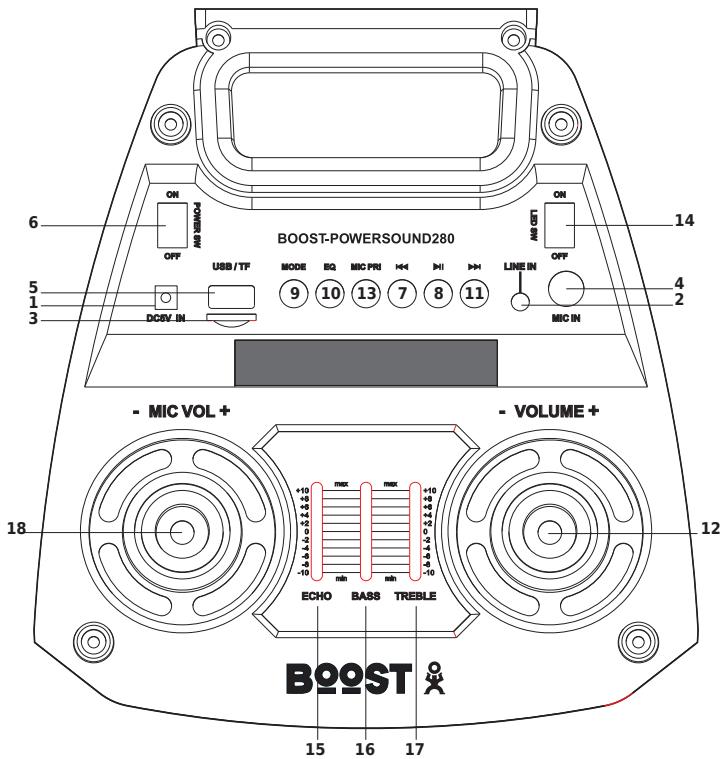
Description of Top Panel
- 5Vdc input to charge the speaker
- LINE input
- TF card input
- MIC input
- USB input
- ON/OFF switch when speaker in standby mode, press power key shortly to wake up the speaker
- In BT/USB/TF mode: press shortly = Previous song In AUX mode, this button has no function In FM mode: Back to previous radio station
- II Play/pause: In USB/TF/BT mode this button has the Play/Pause function In AUX mode, this button has no function In FM mode: The speaker will start scanning and store automatically found radio stations
- MODE switch to select among FM tuner/LINE/ BT/USB/TF mode. Keep the button pressed for a few seconds to switch off the speaker illumination.
- EQ: Choose between Jazz, Rock, Bass, Normal and Classic mode
- : In BT/USB/TF mode: press shortly = Next song; In LINE mode: no function In FM mode: Skip to next radio station
- Volume control
- MIC priority: press to reduce the music level when you talk into the microphone
- Switches the LED illumination on and off
- Echo control of the microphone
- Reduces/increases the low frequencies
- Reduces/increases the high frequencies
- Mic volume control
Description of Remote Control
POWER key: This button is used to power on/off the speaker.
In FM mode: Keep pressed to browse upwards through the radio band
MODE key: Use this button to toggle between radio mode/AUX mode/BT/USB/TF mode.
In FM mode: Keep pressed to skip to the next stored radio station
MUTE key: mutes the sound. Press again to restore the sound
In FM mode: Keep pressed to skip to the previous stored radio station
II Play/pause
In FM mode: Keep pressed to browse downwards through the radio band
: In Mp3 mode, short press to play the previous track and long press for fast backwards.
In Mp3 mode short press to play the next track; long press to fast forward. In radio mode, short press to save the channel, long press to search FM channels.
VOL- key: This button is to reduce the volume.
VOL+ key: this button is to increase the volume.
In MP3 mode: Press to browse through the folders
EQ key: Helps you to choose between Jazz, Rock, Bass, Normal and Classic mode.
SCN key: This button is to choose between USB or TF card.
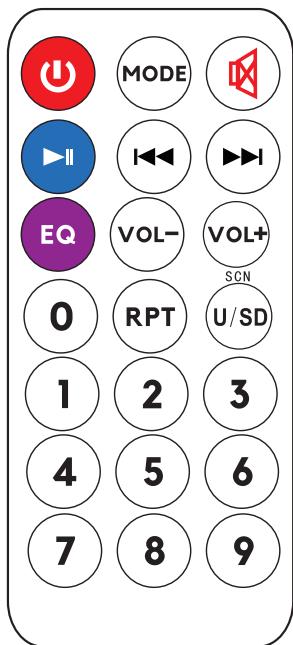
Repeat key: Press "repeat" once to repeat the song and twice to repeat the entered playlist.
"0-9" numbers: In radio mode, it refers to FM channel number. In Mp3 mode, it refers to the track number.
RECOMMENDATIONS FOR BATTERIES

This symbol indicates that used batteries should not be disposed of with household waste but deposited in separate collection points for recycling.
WARNING
Danger of explosion if battery is incorrectly placed. Only replace by the same or equivalent type.
Do not swallow the battery. Danger of chemical burns.
The supplied remote control contains a button cell. In case of ingestion, it might cause serious internal burns within only 2 hours that might lead to death.
Keep new and old batteries out of the reach of children.
If the battery compartment doesn't close properly, stop using the product and keep it out of the reach of children.
If you are in doubt whether the batteries have been swallowed or introduced into any other part of the body, contact immediately a doctor.
INSTRUCTION OF USE
Press the POWER button to switch the unit on.
Press MODE button to select FM/AUX/BT/USB/TF.
In FM mode: press PLAY button. The speaker will start scanning and store automatically the found radio stations. Once all stations have been searched, the radio will play the first preset channel. For optimum reception it is advisable to pull out the external antenna. Press NEXT button to listen to the next channel.
Press MODE button and it will enter AUX mode. Use the audio cable (included) to connect the "AUX input" of the speaker to reproduce music from other devices.
Press MODE button to enter BT mode. Previously pair the chosen device to the speaker. Once they have been paired successfully you can sit back and enjoy the music. Regulate the volume with the help of the volume knob.
BT Pairing Mode:
- Press MODE button on the unit or the remote control until BT is selected.
- Put the cell phone within 3 meters;
- Activate the BT features on your cell phone so that the cell phone starts to search for the BT device. Please refer to the users' manual for details
- Select "BOOST-POWERSOUND280" from the device list found by the cell phone;
- For some cell phones, the users have to key in the identification code "0000" and press ENTER key to pair the unit and cell phone.
- Press RETURN key on the cell phone to exit from the cell phone menu and play music with the unit when there is no barrier between two cell phones within 10 meters. At this time, you can play music with the unit.
- Shortly press PLAY/PAUSE button to play or pause music. Short press “ 艹 ” or “ 艹 ” key to select the previous or next track.
LINE IN MODE:
Press MODE button on the unit or the remote control until LINE is selected. Play the music of the device connected to the LINE input.
USB Mode:
- After startup, press MODE to select "USB" and insert the USB device. The unit will automatically read and play the music in the USB device.
- Press "▶ II" key shortly to pause or play the track.
- Shortly press "▶" key to skip to the previous track.
- Shortly press ">>" key to skip to the next track.
TF Mode:
- After startup, press MODE to select "TF" and insert the TF card. The unit will automatically read and play the music in the TF card.
- Press "▶ II" key shortly to pause or play the music.
- Shortly press " 心 " key to skip to the previous track.
- Shortly press ">>" key to skip to the next track.
Troubleshooting
| Problem | Possible cause | Solution |
| No sound output when power on | 1: No input sound source | 1:Connect a Line signal |
| 2: Volume in the lowest position | 2:Adjust volume | |
| 3: USB/TF not connected | 3:Insert a USB/TF Card | |
| Distortion of sound | 1:Volume too loud | 1:Turn volume lower |
| 2: Audio file error | 2:Check and change the audio file | |
| 3:Adjust Bass/Treble by “MENU” and “Main volume” | ||
| No sound from the Microphone | 1:Microphone socket not fully plugged in | 1:Completely plug in the microphone socket |
| 2: Microphone switch is not on | 2:Power on microphone | |
| 3: Microphone volume too low | 3:Adjust microphone volume | |
| No sound from the USB/TF card | 1:incompatible song format | 1:songs format should be MP3/WMA |
| 2: Illegal operation causes failures | 2:Power off, then power on | |
| 3:USB/TF Card not inserted properly | 3:Insert USB/TF card properly | |
| Speaker makes much noise | 1: Wired Microphone too close to the speaker | 1: Do not let the wired microphones head point at the speaker |
| 2: Wired Microphone is switched on but not in use | 2: Turn off wired microphone if not in use | |
| 3: Microphone volume too loud | 3: Reduce the microphone volume | |
| 4: Mobile phone too close to the speaker | 4: Keep mobile away from the speaker during calls | |
| 5: Too close to the equipment which interferes with the speaker | 5: Keep the speaker away from other sources of interference | |
| Blue-connect Failure | 1: Blue-connect Disconnected | 1: Find the right device Name or press “MENU” Button to restore factory settings. |
| 2: Blue-connect Connected but no voice | 2: Confirm if you are connected to the right device Name | |
| 3: Blue-connect effective distance too short | 3: Try to keep away from barriers, such as walls, glasses...etc |
Specifications
Max. power 280W
Woofer . 2x6.5"/16cm
Freq. range 100Hz-18kHz
FM band. 87.5MHZ - 108MHz
S/N ratio. 75dB
BT frequency 2402-2480MHz
BT Max RF Power -0,91dBm
Power supply. .5V=2A via supplied USB lead
Built-in battery. Lithium 3.7V= 3.6Ah
Dimensions 290 x 280 x 660mm
Weight 3.9kg
This marking indicates that this product should not be disposed with other household wastes throughout the EU. To prevent possible harm to the environment or human health from uncontrolled waste disposal, recycle it responsibly to promote the sustainable reuse of material resources. To return your used device, please use the return and collection systems or contact the retailer where the product was purchased. They can take this product for environmental safe recycling.
ENCEINTE ACTIVE AUTONOME AVEC BLUETOOTH, USB, MICRO-SD,TUNER FM & BATTERIE
Introduction
FM Freqenzband. 87.5MHZ - 108MHz
Bluetooth Freqenz 2402-24080MHz
BT Max RF Leistung -0.91dBm
Storabstand. 75dB
Congratulations to the purchase of your new speaker.
Advertencias

ATencion NO ABRIR LA CARCASA PELIGRO DE ELECTROCUTION

EU Declaration of Conformity
Hereby we,
LOTRONIC SA
Avenue Zénobe Gramme, 9
1480 SAINTES
Belgique
+32.2.390.91.91
Certify and declare under our sole responsibility that the following product:
BQOST
Trade name:
Product name:
Type or model:
Portable speaker
BOOST-POWERSOUND280
Conforms to the essential requirements of the:
RED directive 2014/53/EU and 2011/65/EU RoHS directive
EN60065:2014
EN62479:2010
EN55032 : 2015
EN55035 : 2017
EN 300 328 V2.1.1 (2016-11)
Draft ETSI EN301 489-1 V2.2.0 (2017-03)
Draft ETSI EN301 489-17 V3.2.0 (2017-03)
ETSI EN 300 328 V2.1.1 (2016-11)
Final draft ETSI EN303 345 V1.1.7 (2017-03)
IEC 62321-3-1 : 2013
IEC 62321-4 : 2013
IEC 62321-5 : 2013
IEC 62321-6 : 2015
IEC 62321-7-1 : 2015
IEC 62321-7-2 : 2017
Place and date of issue:
Saintes (Belgium), on 08/04/2019
Manuel De Sousa
Quality Manager
CE
Imported from China by LOTRONIC S.A.
Avenue Zénobe Gramme 9
B-1480 Saintes