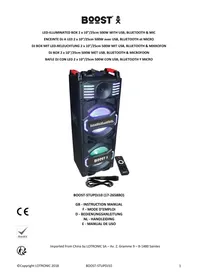
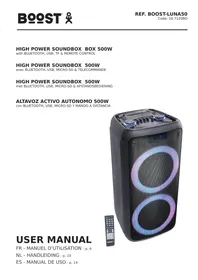
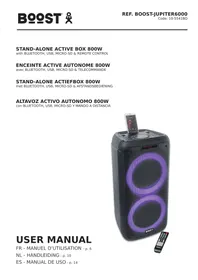
USER MANUAL STUPDJ10 BOOST
Imported from China by LOTRONIC SA – Av. Z. Gramme 9 – B-1480 Saintes
Please read the manual carefully and keep it for future reference.

The lightning flash with arrowhead symbol, within an equilateral Triangle, is intended to alert the user to the presence of not insulated dangerous voltages within the product's enclosure that may be of sufficient magnitude to constitute a risk of electric shock to persons.

The exclamation point within an equilateral triangle is intended to alert the user to the presence of important operating and maintenance (servicing) instructions in the literature accompanying the appliance.
CAUTION:
- Do not place any recipients filled with liquids, such as glasses or vases, on top of or directly next to the appliance. They could fall over, causing water to enter the appliance. Never pour out liquids over the appliance. Do not place small objects, such as coins or paper clips, on the appliance since they could fall inside the appliance and cause fire or a shock hazard! If any liquid or objects enter the appliance, pull immediately the mains plug out of the socket and contact a specialist.
- Only pull the mains plug out of the socket by the intended gripping surface. Do not pull it by the cable.
- Never plug the mains plug in or out with damp or wet hands
- Electrical appliances must be kept out of the reach of children. Be particularly careful if children are present. Children are not aware of the hazards involved in handing electrical appliances improperly. Children could attempt to poke objects into the appliance. There is a life-threatening danger of electrocution.
- Never place the appliance on an unstable or mobile surface. Persons could be injured or the appliance damaged by it falling down.
- All persons involved in operating, installing and servicing the appliance and putting it into service must be trained and qualified accordingly and observe these operating instructions.
- Defective mains cables may only be replaced by specialists. Danger of shock hazard!
- If you are not sure about the correct connection or if questions arise which are not answered by the operating instructions, please do not hesitate to contact support or a specialist of your choice. Consult a specialist if you are in doubt about the operating principle or the safety of the product.
- Please unplug the adaptor and switch the unit off if you don't use it for a long time, to avoid damage due to voltage surges.
- No naked flame sources such as lighted candles should be placed on the apparatus.
- A warning that batteries (battery pack or batteries installed) shall not be exposed to excessive heat such as sunshine, fire or the like.
- Where the MAINS plug or an appliance coupler is used as the disconnect device, the disconnect device shall remain readily operable.
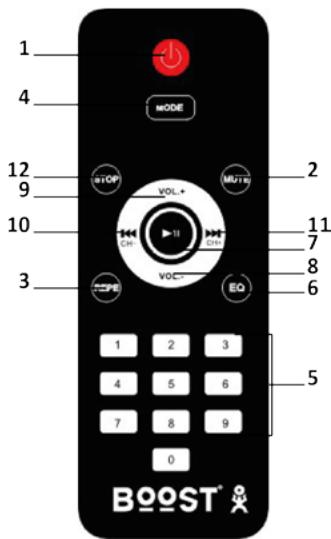
Remote Control
- Standby
- Mute
- Repeat key (single repeat, repeat all) in USB/TF/BT mode
- Mode key (Choose from AUX/USB/TF/BLUETOOTH/FM)
- 0-9 keys
- Sound mode key (Choose from rock, pop, jazz)
- Play/pause (the sound will be muted when paused): In USB/TF/BT mode: Press to pause and resume play In FM mode: Press to mute sound Keep pressed for auto scan
- Volume-
- Volume+
- Previous track
- Next track
- Stop
Use of the Remote Control
Please operate the remote control within a distance of 6m and 30^ between the remote and the appliance. Aim the remote at the sensor. Remove all obstacles between the remote and the sensor.
The remote control might not work properly if the sensor is exposed to strong sunshine. If the remote control doesn't work properly, please check the batteries.
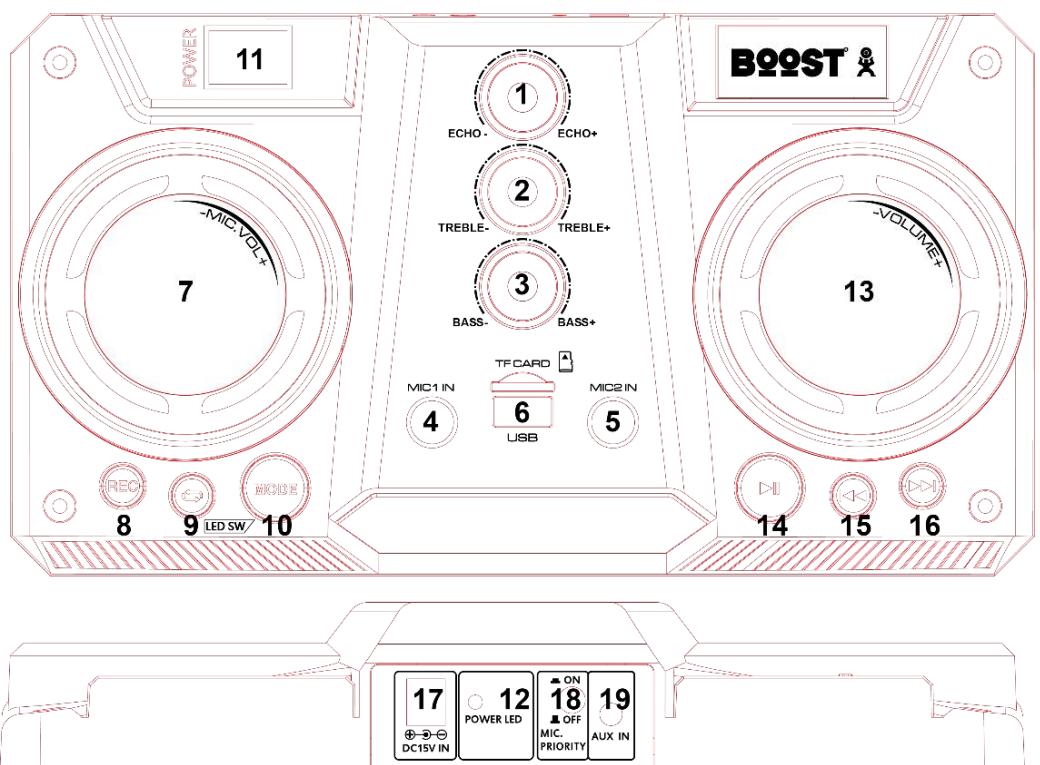
Top Panel Description
- ECHO
- TREBLE
- BASS
- MIC INPUT 1
- MIC INPUT 2
- USB /TF CARD INPUT
- MIC.VOL: adjusts the level of the connected microphones
-
REC (RECORD TO USB/SD CARD)
-
REPEAT: Press this button to repeat USB/TF track
- MODE (SWITCH TO USB/TF/BLUETOOTH/FM/AUX-IN)
- POWER SWITCH (POWER ON/OFF)
- Power LED lights up when the unit is switched on
- Main Volume control
- PLAY (PLAY/PAUSE MUSIC): When in USB/TF mode, press this button to pause or play. When in FM mode, press this button to mute, hold it down for auto scan
- PREV (PREVIOUS SONG): When on USB/TF/Bluetooth mode, press this button to move to the previous track. Hold it down to reduce the volume for USB/TF/Bluetooth.
- NEXT (NEXT SONG): When on USB/TF/Bluetooth mode, press this button to move to the next track. Hold it down to increase the volume for USB/TF/Bluetooth.
- DC 15V IN: Adaptor input for power supply.
- MIC priority switch: reduces the sound of the music when the microphone is used
- AUX INPUT: The Input is designed to connect directly to a music Player or any other stereo level audio device.
Built-in recording function of microphone sound
- In Aux mode: Plug in a USB/TF card and press the record key to go to record function. The screen shows 00:01 to indicate that recording has started. If you connect the USB/TF card for the first time to the speaker, the system will create a folder and the speaker will save and play the recorded file automatically in this folder.
- In USB/TF play mode: Press the record key to go into recording mode. The current sound output will stop and go to mute status. The recording will start when the screen displays 00:01. You can use a microphone to record. If you connect the USB/TF card for the first time to the speaker, the system will create a folder.
USB/TF Operation
Keep the speaker away from high temperatures, strong magnetic fields and any equipment that could generate interference. If the speaker stops working, switch it off and on again, or unplug USB/TF card and re-plug it. The speaker should be back to normal status.
Supported music formats: MP3, WMA
- USB port: plug and play
- TF slot: plug and play
- Mode key: press to cycle through external AUX sound source/USB/TF card/FM/BLUETOOTH
- Play/pause: Press to play, press to pause, press again to resume play.
- Previous/Next: During play press once to go back to the beginning of the track or to the next track.
- Repeat: During play press once to repeat the current song, press twice to repeat all songs.
BLUETOOTH OPERATION
- Turn on the unit and press the MODE button on unit or on the remote control to select the Bluetooth function. "blue" will start flashing on the display, the system automatically enters search mode.
- Activate the Bluetooth feature on the external device to be paired.
- Initiate a search for devices. The device shows up as " STUPDJ10".
- Select it and enter the password "0000" if required.
- Press the PLAY button on the unit or the II key on remote control, to start playing and the buttons NEXT and PREV, or the keys I and for the selection of songs.
FM (radio) Mode:
Press MODE button to select "FM".
Auto radio station search and storage: Press the PLAY/PAUSE button and the unit will automatically search for radio stations in the radio frequency range between 87.5 and 108.0 MHz. After finished the searching, auto searching will stop and the found stations will be saved automatically.
AUX IN MODE:
Press MODE button on the unit or the remote control until AUX is selected. Play the music of the device connected to the AUX input.
Trouble shooting
If a problem occurs, follow the steps in the table below. If problem still can't be solved, please contact your retailer.
| Problem | Possible cause | Solution |
| No sound when power is turned on | 1. The power cord is not connected2. Faulty mains outlet3. No input source4. Volume set to minimum | 1. Connect the power cord2. Use an outlet that receives power3. Connect an input source4. Set the volume to an appropriate level |
| Distorted sound | 1. Master volume is set too high2. Damaged speaker | 1. Reduce the volume2. Check if the speaker is damaged |
| No sound from Karaoke | 1. Microphone plug is not firmly inserted2. The microphone is not switched on3. Microphone volume set to the minimum | 1. Insert the mic firmly into the socket2. Switch the microphone on3. Increase the microphone volume |
| No sound from MP3 source | 1. Un supported file format2. Illegal copy3. USB/TF source not properly inserted | 1. Change into MP3 format2. Insert the USB/TF source properly |

Electric products must not be put into household waste. Please bring them to a recycling centre. Ask your local authorities or your dealer about the way to proceed.

Accordance with the requirements of the CE seriously

As to meet the requirements of environmental protection certification

Recycled products can be recycled

The product is suitable for indoor use
Specification
Speaker 2 x 10"/25cm
Tweeters 2x3"
Max. power 500W
Power supply 220-240Vac 50/60Hz
Frequency response 35Hz - 20kHz (+/-5%)
S/N ratio. 85dB
Bluetooth frequency range 2402-2480MHz
Input sensitivity 750mV
Input signal 1kHz
Dimensions 350 x 310 x 1000mm
Weight 18kg
guardarán automatistically.
AUX IN MODE:
We, LOTRONIC SA
Avenue Zénobe Gramme, 9
1480 SAINTES
Belgique
+32.2.390.91.91
certify and declare under our sole responsibility that the following product:
Trade name: BOOST
Product name: 2x10" ACTIVE BOX WITH LED EFFECTS REC/USB/SD/BT/FM
Type or model: BOOST-STUPDJ10
conforms with the essential requirements of:
RED directive 2014/53/EU – LVD directive 2014/35/EU – EMC directive 2014/30/EU – ERP directive 2009/125/EC – ROHS directive 2011/65/EU
based on the following standards applied:
EN60065:2014
EN62479 :2010
EN 301 489-1 V2.2.0
EN 301 489-17 V3.2.0
EN 300 328 V2.1.1
EN 303 345 V1.1.7
EN 50564 : 2011
IEC62321:2008
Place and date of issue: Saintes (Belgium), on 11/01/2018
Guive Akbar
Technical manager
LOTRONIC SA
Av. Zenope Grand, Sainte-Claintes - Belgium
1480 Sanites 322,390.91.91
Tel. +32 2.390.93.19
Fax+32.2-01-84679500@ctronic.net
info@lotronics.com
www.18618.com

CE
Responsible technique
LOTRONIC SA
Av. Zenobe Gramme 9
1480 Saintes - Belgium
Tel. +32.2.390.91.91
Fax +32.2.390.93.19
info@lotronic.net
www.lotronic.com