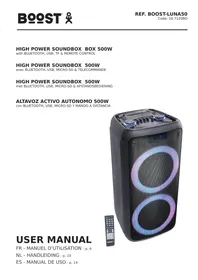
USER MANUAL Luna 50 BOOST
with BLUETOOTH, USB, TF & REMOTE CONTROL
Congratulations to the purchase of your new speaker.
WARNING

CAUTION DO NOT OPEN THE HOUSING SHOCK HAZARD
EXPLANATION OF SIGNS

The triangle containing a lightning symbol is used to indicate whenever your health is at risk (due to electrocution, for example).

An exclamation mark in a triangle indicates particular risks in handling or operating the appliance.

Accordance with the requirements of CE standard

Class II protection without earth connection

The product is for indoor use only

This marking indicates that this product should not be disposed with other household wastes throughout the EU. To prevent possible harm to the environment or human health from uncontrolled waste disposal, recycle it responsibly to promote the sustainable reuse of material resources. To return your used device, please use return and collection systems or contact the retailer where the product was purchased. They can take this product for environmental safe recycling.
IMPORTANT SAFETY INSTRUCTIONS AND DANGER WARNINGS
- Please read the manual carefully and keep it for future reference.
- The unit shall be connected to a power supply only of the type described.
- To reduce the risk of fire or electrical shock, do not expose this unit to rain or moisture.
- Unplug the unit from the wall socket when it is not to be used for a long period of time.
- Adequate care shall be taken so that foreign objects do not fall, or liquids are not spilled into the enclosure through openings.
- Do not remove the cover or back, as there are no user-serviceable parts inside.
- The apparatus shall not be exposed to dripping or splashing and that no objects filled with liquids, such as vases, shall be placed on the apparatus.
- Do not place on the apparatus as naked flame source, such as lighted candles.
- Do not use the unit in a tropical climate. Only for use in temperate climates.
- Please place the equipment on a level and stable platform. Never place the appliance on an unstable or movable surface. Persons could be injured or the appliance damaged by it falling down.
- A minimum distance of 0.5m around the unit must be kept to ensure sufficient ventilation and avoid overheating.
- All safety instructions and warnings must be adhered to. They are part of the manual and must be kept with the manual.
- We assume no liability for personal injury or damage to property caused by incorrect handling or disrespect of the safety instructions. Any guarantee claims expires in such cases.
- Unauthorized conversions and/or modifications of the appliance are not permitted for safety and licensing reasons (CE).
- The appliance is approved for operation in dry, closed rooms only. Do not operate the device nearby water, such as in bathrooms or nearby swimming pools.
- The appliance may not be exposed to extreme temperatures (< +5^ / > +35^) in operation.
- The appliance may not be subject to strong vibrations or heavy mechanical strain.
- CONNECT DEVICE: Where the MAINS plug or an appliance coupler is used as the disconnect device, the
disconnect device shall remain readily operable.
CHARGING THE BATTERY
- Connect the mains power plug to an AC outlet and the built-in battery will start charging, no matter if the speaker is on or off. On the display, the battery charging symbol will run from 1 to 3 cells.
- Once the battery is fully charged, it will display steadily 3 cells.
PLEASE NOTE: If the speaker has been switched into standby mode via the remote control, the built-in battery will NOT charge.
After 30 minutes of inactivity, the unit will switch automatically into standby mode.
IMPORTANT NOTE ON LITHIUM-ION BATTERIES
- PRIOR to using the unit for the first time, please charge fully the battery.
- Charge the battery regularly after each use. Don't wait until it is discharged!
- DON'T allow the battery to discharge completely! Once the battery is fully discharged, the 3. DON'T allow the battery to discharge completely, otherwise it will lose 20% of its capacity or even be totally damaged! If the voltage becomes too low, the internal circuits are not powered anymore and it will become impossible to recharge the battery!
- If you don't use the unit for a longer period of time, it is recommended to charge it at 40% of its capacity and check/charge it once per month. THE LIFE TIME OF THE BATTERY DEPENDS ON THE OBSERVANCE OF THESE RECOMMENDATIONS.
** BATTERIES ARE NOT COVERED BY THE WARRANTY **
WE CANNOT BE HELD RESPONSIBLE FOR DAMAGED BATTERIES FURTHER TO THE NON-OBSERVANCE OF THESE BASIC RULES.
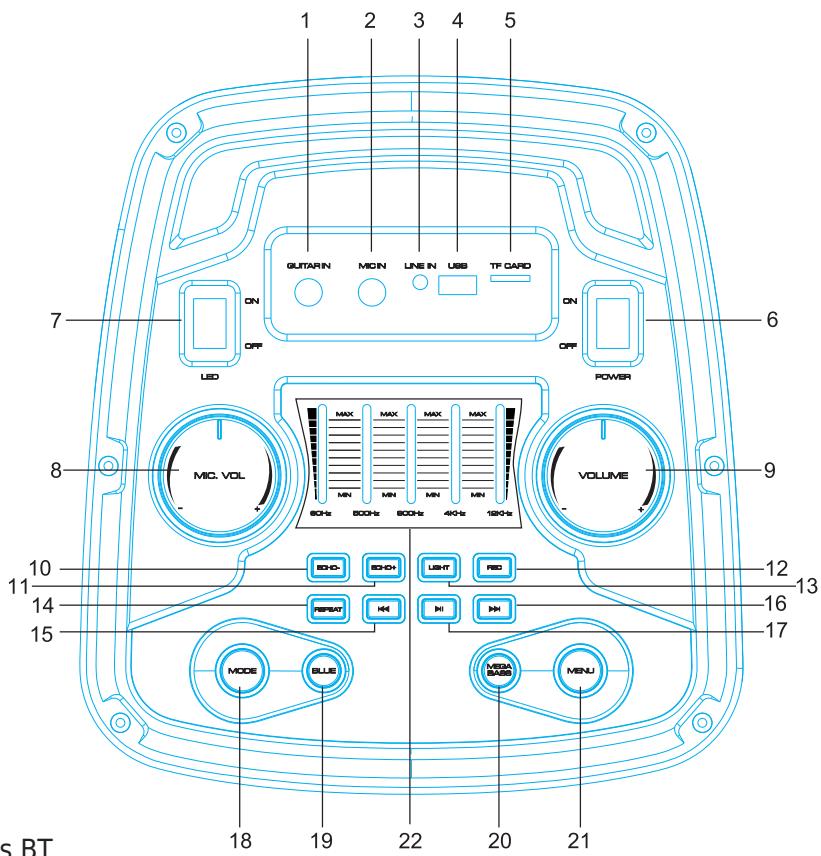
DESCRIPTION OF THE TOP PANEL CONTROLS & CONNECTORS
- Guitar input
- Microphone input
- Line in
- USB input
- TF card input
- Power ON/OFF
- LED Light Switch
- MIC Volume
- Main Volume
- Echo-
- Echo+
- Record function
- Change Light mode
- Repeat function
- Previous song
- Next song
- Pause/Play
- Mode: Line in, USB mode, TF Card, Wireless BT
- Wireless BT function
- Mega Bass
- Menu
- 5-band EQ
INSTALLING THE BATTERIES IN THE REMOTE CONTROL
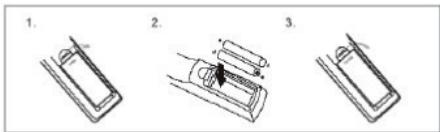
Remove the battery cover from the back of the remote control as shown and insert 2x AAA size batteries ensuring correct polarity
RECOMMENDATIONS FOR BATTERIES

This symbol indicates that used batteries should not be disposed of with household waste but deposed correctly in accordance with your local regulations..
Batteries shall not be exposed to excessive heat such as sunshine, fire or the like.
When the internal batteries are not to be used, remove them to avoid damage caused by battery leakage or corrosion.
ATTENTION: Danger of explosion if battery is incorrectly placed.Only replace by the same or equivalent type.
WARNING :Do not swallow the battery. Danger of chemical burns.Keep new and old batteries out of the reach of children.
If the battery compartment doesn't close properly, stop using the product and keep it out of the reach of children.
If you are in doubt whether the batteries have been swallowed or introduced into any other part of the body, contact immediately a doctor.
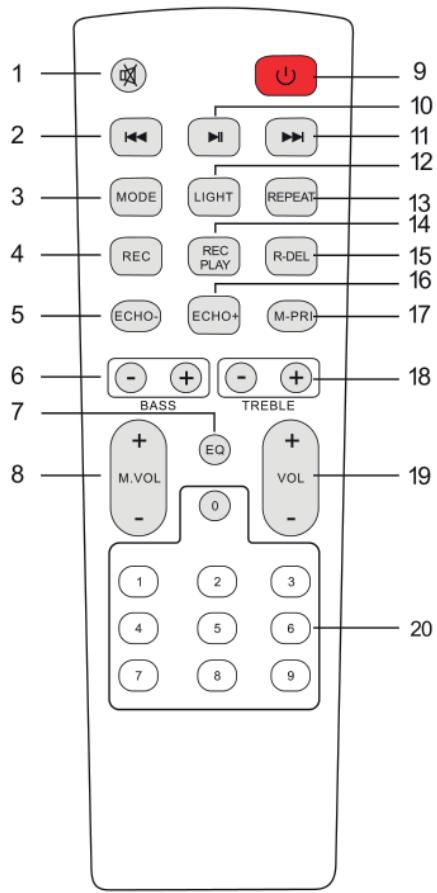
REMOTE CONTROL
- Mute: Mutes the sound in any mode
- Previous Song
- Mode: Press shortly to skip to Wireless BT/LINE IN/USB/TF mode.
- Record function: In USB/TF mode, press "REC" button to record
- Echo-
- BASS+/-
- EQ function
- Microphone Volume+/-
- Stand by
- Pause / Play
- Next song
- Changes the light mode: press to cycle through the various modes
- Repeat function
- Play the recorded file
- Delete the recorded file
- Echo+
- Microphone priority
- Treble+/-
- Main Volume
- Number buttons: In USB/TF mode enter directly the number of the desired songs
BLUETOOTH PAIRING PROCEDURE
Press MODE or Blue button on the unit or the remote control until BT is displayed.
- Put the cell phone within 10 meters
- Activate the BT search function on your cell phone to search for the BT device. Please refer to the user manual for details
- Select BOOST-LUNA50 in the list of found devices.
- Shortly press the PLAY/PAUSE button to play or pause the music. Shortly press the "▶" or "▶" button to select the previous or next track.
LINE IN MODE:
Press the MODE button on the unit or the remote control until LINE is selected. Play the music of the device connected to the LINE input.
USB MODE:
- Press MODE to select "USB" and insert the USB device. The unit will automatically read and play the music in the USB device.
- Press "▶ II" button shortly to pause or play.
- Shortly press "▶" button to go to the previous song.
- Shortly press "▶" button to go to the next song.
SPECIFICATIONS
Power supply. 100-240V~50/60Hz
Consumption 33W
Woofer 2x8"20cm
Tweeter 2
Max. power 500W
Battery. Lithium 7.4V= 3.6Ah
BT frequency band 2402-2480MHz
Max. Bluetooth RF emission power . 2.882dBm
Dimensions 320 x 300 x 630mm
Weight. 8.4kg
The above specifications are for reference only.
Design and specifications are subject to change for improvement without prior notice.
ENCEINTE ACTIVE AUTONOME 500W AVEC BLUETOOTH, USB, MICRO-SD & TELEMANDE
INTRODUCTION
RECOMMANDATIONS POUR LES PILES

Hereby we,
LOTRONIC SA
Avenue Zénobe Gramme, 9
1480 SAINTES
Belgium
+32.2.390.91.91
Certify and declare under our sole responsibility that the following product:
Trade name:
BOOST
Product name:
SPEAKER WITH BLUETOOTH, USB and SD
Type or model:
BOOST-LUNA50
Conforms with the essential requirements of
RED directive 2014/53/EU, ErP directive 2009/125/EC, Commission Regulation (EC) No 1275/2008 & 801/2013, 2011/65/EU RoHS directive and the Commission Delegated Directive (EU) 2015/863
Based on the following specifications applied:
EN 62368-1:2014+A11:2017
EN 62479 : 2010
EN 55032 : 2015
EN 55035 : 2017
ETSI EN 301 489-1 V2.2.3 (2019-11)
ETSI EN 301 489-17 V3.1.1 (2017-02)
Place and date of issue: Saintes (Belgium), on 23/11/2020
Manuel De Sousa
Quality manager
CE
Check the product on our website
Imported from China by LOTRONIC S.A.
Avenue Zénobe Gramme 9
B-1480 Saintes