14km/h - MEDLINE - MED-730 - Treadmills CARE FITNESS - Free user manual and instructions
Find the device manual for free 14km/h - MEDLINE - MED-730 CARE FITNESS in PDF.



User questions about 14km/h - MEDLINE - MED-730 CARE FITNESS
0 question about this device. Answer the ones you know or ask your own.
Ask a new question about this device
Download the instructions for your Treadmills in PDF format for free! Find your manual 14km/h - MEDLINE - MED-730 - CARE FITNESS and take your electronic device back in hand. On this page are published all the documents necessary for the use of your device. 14km/h - MEDLINE - MED-730 by CARE FITNESS.
USER MANUAL 14km/h - MEDLINE - MED-730 CARE FITNESS
B. Lecture prize MP3 :
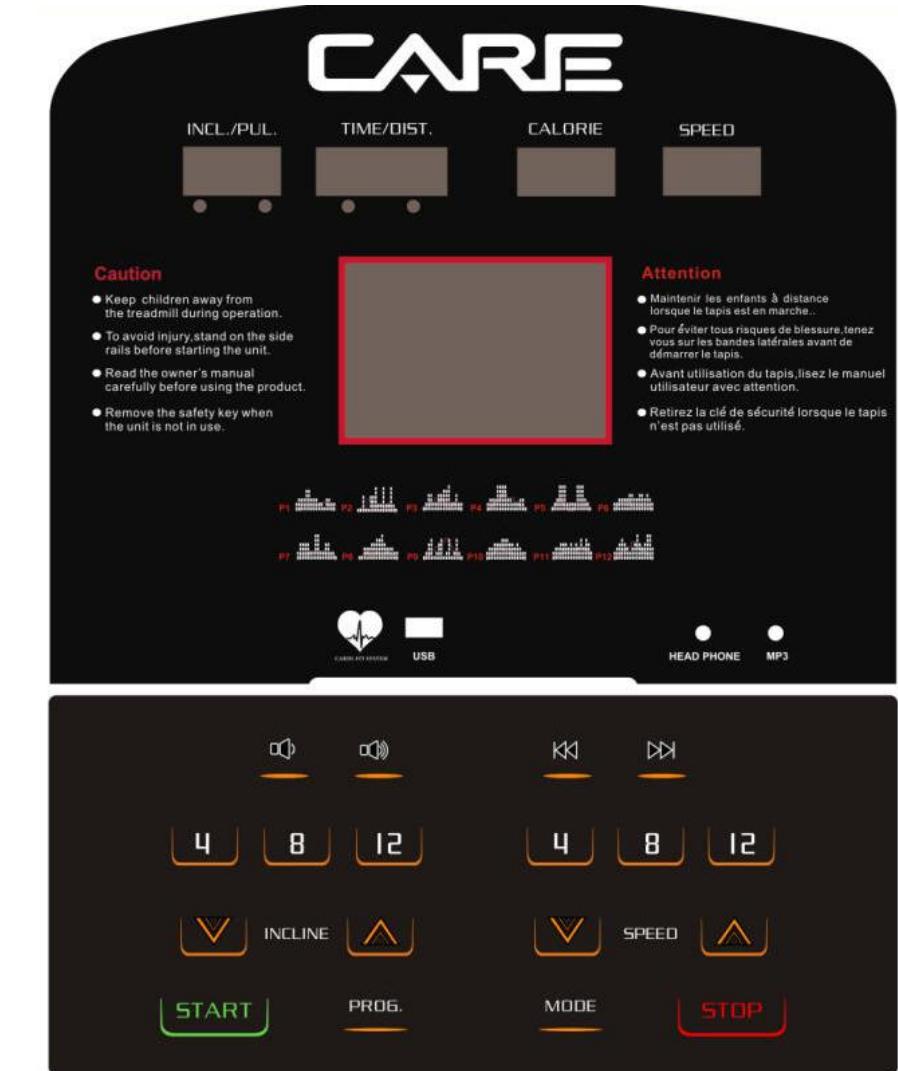
Computer instruction
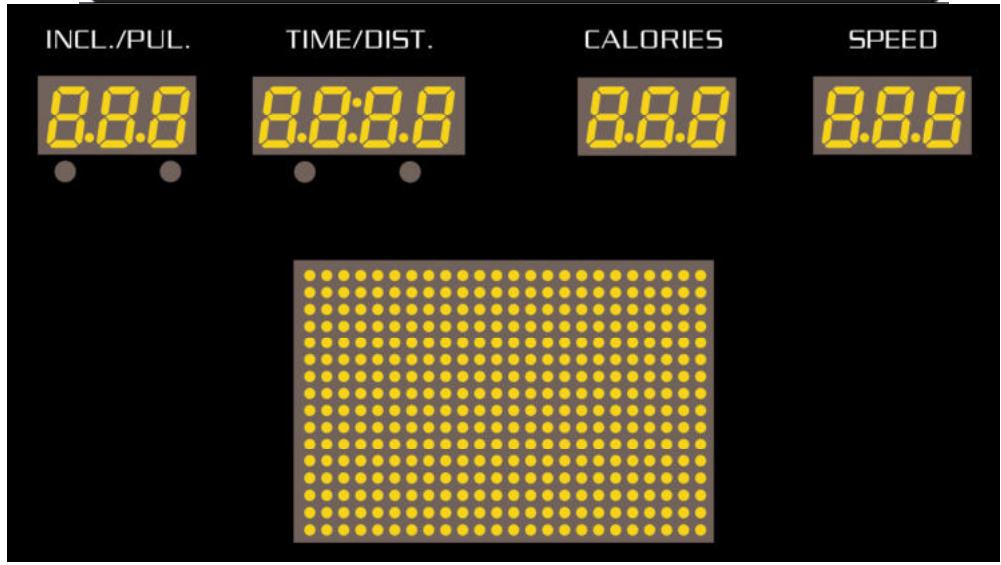
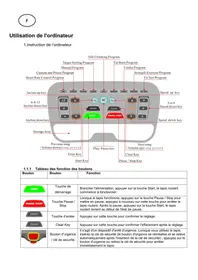
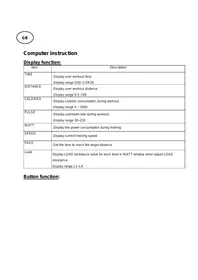
LCD WINDOW FUNCTION
1. "INCL / PUL" WINDOW:
1.1 When red light on the "INCL", it shows INCLINE.
1.2 When the light on the "PUL", it show PULSE.
2."TIME / DIST" WINDOW:
2.1 When red light on the "TIME", it shows running time, including count-down Time.
2.2 When red light on the "DIST", it shows DISTANCE, including count-down Distance.
2.3 When in FAT MODE, it shows parameter code:-1-, -2-, -3-, -4-, -5-.
3. "CALORIES" WINDOW:
3.1 It shows CALORIES, including count-down calories.
3.2 It shows PROGRAMS P01-P20, U1-U3, FAT.
4. "SPEED" WINDOW:
1.1 Display the current SPEED, the range is 0.2-14.0 KM/H.
1.2 Display parameter under FAT MODE, "SEX" "AGE" "HEIGHT" "WEIGHT".
5. "THE BIG LED" WINDOW
5.1 It shows running track, programmes diagram, count-down start, informations.
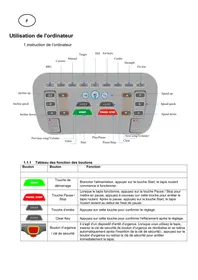
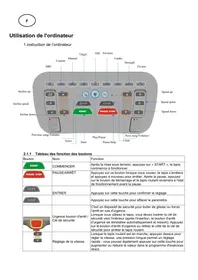
6. BUTTON FUNCTION
| START | START: Normal start after 3 seconds countdown. | ||
| STOP | STOP:Press this button to stop. | ||
| PROG. | PROG.: For program choosing, the programs are as the following: P01-P18, FAT, | ||
| MODE | MODE:Select modes: manual modes--time count-down--distance count-dwon--calories count-down. | ||
| SPEED | SPEED+/-: Adjust speed. You can adjust parameter when it stops. | ||
| INCLINE | INCLINE+/-: Adjust incline. You can adjust parameter when it stops. | ||
| 4 | 8 | 12 | 4,8,12 can adjust the speed when treadmill is running. |
| 4% | 8% | 12% | 4,8,12 can adjust the incline when the treadmill is running. |
| It can adjust the volume when music is playing | |||
| It can switch to the songs you are interested in when SD or USB equipment is working. | |||
MAIN FUNCTION
Power on, all windows will be light up, the big window shows: WELCOME, then you come
Into manual mode after 3 seconds.
Take off SAFETY KEY, the big window shows: SAFETY KEY PROTECTION.
Put on SAFETY KEY, the big window shows: SELECT PROGRAM OR PRESS START TO BEGIN.
7. MODE PARAMETER SETTINGS
Press MODE button, you can chosse: time count-down,distance count-down, calories count-down. The big window will show as below:
ADJUST TIME THEN PRESS START
ADJUST DISTANCE THEN PRESS START
ADJUST CALORIES THEN PRESS START
Press the "MODE" button, choose: time countdown, distance countdown, carolies countdown. Windows display a default value and shine. Click "SPEED + -" button to adjust to the necessary values. Press START button. After 3 seconds, the treadmill will start with the lowest speed. Click "SPEED + -, "4 / 8 / 12" or rotate the right handrail around to adjust speed. Press "INCLINE (+-)", "4 / 8 / 12" or rotate the left handrail around to adjust incline. When countdown to 0, the treadmill will stop slowly. Also you could press the "STOP" button or take away the safety lock to stop.
8. BUILD-IN PROGRAM
When the treadmill is not running, press PROG button, the speed window will display "P1-P20". Choose any one in P1--P20 and the time window shows default value 30:00 and flickers.
Press "SPEED + -" or "INLINE+-" button to adjust the time you need. Press "START" button to start build-in program. Built-in program totally has 16 sections and running time of every section is set time/16. When enter the next section, it will make a sound of "Bi" to prompt. The system's speed is changed as the program. And you can adjust the speed with "SPEED +,-" when running. But when enter the next section, it will recover this section's speed. After all sections finish, the system will make a sound of "bi-bi-......" ten prompt sound and display "End". At this time, press "STOP" button can make the treadmill restoration, and it will enter standby mode.
Manual mode is the default program, the default speed in kilometer is 0.2km / h ."and the fastest speed is 14.0 km/h.
PROGRAM EXERCISE CHAT
| TIME PROG | SETTING TIME / 16 GRADES = EVERY GRADE TIME | ||||||||||||||||
| 1 | 2 | 3 | 4 | 5 | 6 | 7 | 8 | 9 | 10 | 11 | 12 | 13 | 14 | 15 | 16 | ||
| P1 | INCLINE | 0 | 0 | 2 | 2 | 2 | 2 | 2 | 2 | 2 | 2 | 4 | 4 | 4 | 2 | 2 | 0 |
| SPEED | 4 | 6 | 6 | 6 | 10 | 10 | 6 | 6 | 6 | 4 | 4 | 2 | 6 | 6 | 4 | 4 | |
| P2 | INCLINE | 0 | 2 | 2 | 2 | 6 | 6 | 2 | 2 | 4 | 4 | 2 | 2 | 4 | 2 | 2 | 0 |
| SPEED | 2 | 2 | 8 | 2 | 2 | 8 | 8 | 12 | 4 | 4 | 12 | 4 | 4 | 12 | 4 | 2 | |
| P3 | INCLINE | 0 | 2 | 2 | 4 | 4 | 6 | 4 | 6 | 4 | 2 | 2 | 2 | 4 | 2 | 2 | 0 |
| SPEED | 2 | 4 | 8 | 8 | 4 | 4 | 8 | 8 | 10 | 10 | 12 | 4 | 4 | 8 | 4 | 4 | |
| P4 | INCLINE | 0 | 2 | 2 | 4 | 4 | 6 | 8 | 8 | 6 | 6 | 6 | 4 | 4 | 2 | 2 | 0 |
| SPEED | 4 | 6 | 6 | 6 | 12 | 12 | 12 | 12 | 6 | 6 | 4 | 4 | 4 | 6 | 6 | 2 | |
| P5 | INCLINE | 0 | 2 | 4 | 6 | 4 | 2 | 2 | 0 | 0 | 2 | 2 | 2 | 2 | 2 | 4 | 0 |
| SPEED | 2 | 4 | 6 | 12 | 12 | 12 | 4 | 4 | 4 | 4 | 12 | 12 | 12 | 6 | 4 | 2 | |
| P6 | INCLINE | 0 | 2 | 4 | 4 | 4 | 4 | 4 | 2 | 2 | 2 | 2 | 2 | 2 | 2 | 2 | 0 |
| SPEED | 4 | 4 | 6 | 6 | 6 | 6 | 8 | 8 | 6 | 6 | 8 | 8 | 6 | 8 | 6 | 4 | |
| P7 | INCLINE | 0 | 2 | 2 | 2 | 2 | 4 | 4 | 4 | 4 | 4 | 4 | 2 | 2 | 2 | 2 | 0 |
| SPEED | 4 | 8 | 8 | 8 | 8 | 4 | 4 | 12 | 12 | 4 | 4 | 8 | 8 | 4 | 4 | 2 | |
| P8 | INCLINE | 0 | 2 | 2 | 4 | 2 | 2 | 2 | 4 | 2 | 2 | 2 | 4 | 2 | 2 | 2 | 0 |
| SPEED | 2 | 2 | 6 | 6 | 6 | 8 | 8 | 10 | 10 | 12 | 8 | 6 | 6 | 6 | 4 | 4 | |
| P9 | INCLINE | 0 | 2 | 2 | 4 | 4 | 6 | 6 | 8 | 8 | 10 | 8 | 6 | 4 | 2 | 2 | 0 |
| SPEED | 2 | 4 | 8 | 10 | 2 | 4 | 8 | 10 | 2 | 4 | 10 | 2 | 4 | 10 | 4 | 2 | |
| P10 | INCLINE | 0 | 2 | 2 | 4 | 6 | 6 | 6 | 4 | 4 | 4 | 2 | 2 | 2 | 2 | 2 | 0 |
| SPEED | 4 | 6 | 6 | 8 | 8 | 8 | 10 | 10 | 10 | 8 | 8 | 6 | 8 | 6 | 4 | 4 | |
| P11 | INCLINE | 0 | 2 | 2 | 2 | 4 | 4 | 4 | 4 | 4 | 4 | 6 | 6 | 6 | 4 | 4 | 0 |
| SPEED | 4 | 6 | 6 | 8 | 8 | 8 | 6 | 8 | 6 | 8 | 6 | 10 | 6 | 10 | 8 | 4 | |
| P12 | INCLINE | 0 | 2 | 2 | 4 | 4 | 6 | 6 | 8 | 8 | 6 | 6 | 4 | 4 | 2 | 2 | 0 |
| SPEED | 4 | 6 | 8 | 10 | 8 | 6 | 4 | 6 | 8 | 12 | 8 | 6 | 8 | 12 | 12 | 6 | |
| P13 | INCLINE | 0 | 0 | 2 | 2 | 2 | 2 | 2 | 2 | 2 | 2 | 4 | 4 | 4 | 2 | 2 | 0 |
| SPEED | 2 | 4 | 6 | 10 | 8 | 4 | 10 | 6 | 4 | 6 | 10 | 4 | 6 | 8 | 6 | 4 | |
| P14 | INCLINE | 0 | 2 | 2 | 2 | 6 | 6 | 2 | 2 | 4 | 4 | 2 | 2 | 4 | 2 | 2 | 0 |
| SPEED | 2 | 2 | 4 | 6 | 6 | 8 | 10 | 10 | 10 | 4 | 6 | 4 | 6 | 6 | 4 | 6 | |
| P15 | INCLINE | 0 | 2 | 2 | 4 | 4 | 6 | 4 | 6 | 4 | 2 | 2 | 2 | 4 | 2 | 2 | 0 |
| SPEED | 2 | 2 | 4 | 4 | 12 | 12 | 4 | 4 | 12 | 12 | 4 | 4 | 12 | 12 | 2 | 2 | |
| P16 | INCLINE | 0 | 2 | 2 | 4 | 4 | 6 | 8 | 8 | 6 | 6 | 6 | 4 | 4 | 2 | 2 | 0 |
| SPEED | 2 | 3 | 4 | 7 | 7 | 8 | 5 | 5 | 6 | 10 | 12 | 10 | 8 | 5 | 6 | 4 | |
| P17 | INCLINE | 0 | 2 | 4 | 6 | 4 | 2 | 2 | 0 | 0 | 2 | 2 | 2 | 2 | 2 | 4 | 0 |
| SPEED | 2 | 2 | 4 | 8 | 10 | 2 | 4 | 8 | 8 | 10 | 5 | 4 | 7 | 8 | 6 | 4 | |
| P18 | INCLINE | 0 | 2 | 4 | 4 | 4 | 4 | 4 | 2 | 2 | 2 | 2 | 2 | 2 | 2 | 2 | 0 |
| SPEED | 2 | 3 | 5 | 8 | 11 | 12 | 10 | 8 | 7 | 6 | 10 | 10 | 10 | 8 | 4 | 2 | |
9. USER
For user defined programs setting:
Press PROG until it shows the user program (U1, U2, U3)
Choose one and enter it.
Press MODE enter time set, the range is 5:00 -- 99:00.
Press MODE again and use "SPEED +/-" or " INLINE +/-" to select your desired speed
Or incline, press MODE once more and your choice will be set, then the next workout
Segment will flash.
Please go through the same set up as you completed with segment one to complete all 20 segments.
When all the data is entered, the computer will flash OK and your personal user program Is now saved and ready to use.
When using your user program, the screen will switch from incline to speed, and your set
Programmed levels will be displayed.
10. BODY FAT TEST
At the beginning state, press PROGRAM continue entering FAT body fat tester, window displays FAT. Press MODE and enter (F-1 SEX, F-2 AGE, F-3 HEIGHT, F-4 WEIGHT, F-5 FAT TESTER). Press SPEED+, SPEED-to set. Press MODE to set F-5, grasp the hand pulse, the window will display your body quality index. The body quality index is to test the relation between height and weight.
The body FAT suits for any male and female to adjust the weight according it together with other body quality index. The ideal FAT should be 20-25, if under 19, it means too thin. If between 25 and 29, it means overweight, if over 30, it means obesity. (The data is just for reference, can not be as medicinal data)
Input parameter display and setting limits
| PARAMETERS | ARRANGE | NOTE |
| SEX | 01--02 | 01=MALE 02=FEMALE |
| AGE | 10-99 YEARS | |
| HEIGHT | 100-200 CM | |
| WEIGHT | 20-150 KGS |
| FA(BMI) | RESULT |
| ≤19 | UNDER WEIGHT |
| 20--25 | NORMAL WEIGHT |
| 25--29 | OVER WEIGHT |
| ≥30 | OBESITY |
11. PULSE FUNCTION
When the treadmill is running, hold the handle pulse about 5 seconds, it will display pulse data. It has heart-shaped graphics when testing pulse. To get the exact heartbeat rate, please test when the treadmill stops, and hold the hand pulse not less than 30 seconds. This data is only for reference and can not be as medical data.
- MP3 FUNCTION
This treadmill can accept various media medium : USB / MP3 wire / headset socket. When you are playing music,please make sure the treadmill is in louder state, not "MUTE" state.
A. USB disk display:
Insert USB disk with music, the system will play them automatically.
Press buttons to choose the music or adjust the volume as you like.
B. MP3 wire display:
Insert the MP3 wire into your audio device (MP3 / PHONE) to display the music.
Press buttons to choose the music or adjust the volume as you like.
C. Headset socket.
Insert headset socket into the hole on the computer to listen to the voice.
ATTENTION
When you play USB / MP3 all together, the priority level is as below:
1, MP3 wire
2, USB disk.
13. POWER SAVING MODE
This system includes power saving mode, When the treadmill is not running, If there is no button instruction for 10 minutes. The system will enter power saving mode and close the display. Press any button can awaken system.
14. SAFETY LOCK FUNCTION
The window shows"SAFETY KEY PROTECTION" when take away the safety lock and the treadmill will stop quickly with "BiBi" alarm noise. And put the safety lock on, set program default.
Maintenance and Malfunction Treatment
1) The surface of the treadmill should be kept clean, pull out the power line before cleaning. You can clean the running belt and the surface of the treadmill with a soft and wet cloth.
2) The running belt is adjusted at factory; it may runs defectively after transportation and use. Turn off the treadmill before adjusting, pull the belt in the center, and then adjust the left and right bolts in rear roller with hex spanner (See figure) it is better to adjust 1/2 circle once. Then turn on the switch, check if the belt 10 runs defectively when the running speed is 4 5km / h .
3) After using over 100 hours or the lubricant between the running board and the running belt is used up, please lubricate the running board and adjust the running belt well.
4) After a long time of running, the belt may be longer and stuck. You should turn the left and right adjustor bolt in rear roller clockwise at same position till the runs smoothly and freely.
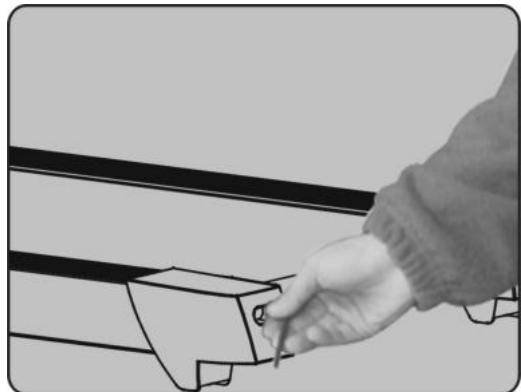
Warning:
1) The safety level of the equipment can be maintained only if it is examined regularly for damage and wear, e.g. pins, connection points.
2) Please replace defective components immediately and/or keep the equipment out of use until repair.
| FAULT CODE | FAULT DESCRIPTION | FAULT PROCESSING |
| E1 | Communication abnormal:The control and computer has abnormal communication after start | Stop and go into fault. The machine can't running, the computer shows fault code “E01”, and the buzz will ringing three tone.Possible reasons: Communication obstructed between controller and computer, please check the wire and make sure the wire connect well and the wire without and danger. |
| E2 | Explosion-Proof Protection | Stop and go into fault. The machine shows fault code “E06”. Other areas show blank, and can not restart.Possible Reason: Check the motor wire if connect well, and then connect it again. |
| E3 | No Speed Wireless Sensor Network | Possible Reasons: Can't receive the motor speed sensor feedback above 3 seconds, please check sensor plug and motor connect wire and the controller. |
| E4 | Incline self-learning fault | Check incline motor sense wire and AC wire are inserted well; AC wire is right inserted according to the indentify in the incline motor; make sure the incline motor wire without damager; after check those, press the button on controller, then start self-learning again. |
| E5 | Over-Current Protection | Stop and go into fault status, computer shows fault code “E03”.Other areas show blank. After 10 seconds will go into ready mode, and can restart.Possible Reasons: Over the rated load cause too much electricity that make system Self-preservation or some parts blocked and make DC motor can't process. Adjust the machine and restart. Another please check the DC motor or controller have any burned smell or not. If yes, please change the motor or controller. Another make sure the power and voltage is comply with standard. |
| E6 | Controller self-checking error | Change the controller. |
| E7 | EEPROM is broken | Change the controller. |
To order spare parts
To guarantee an efficient service, make sure you have the following items before you contact our After Sales Service:
The name or reference of the product.
The manufacturing number shown on the main chassis and on the packing box.
The number of the missing or faulty part shown on the exploded view of the product described in this manual.
After Sales Service
Email: service-uk@carefitness.com
E mail: service-de@carefitness.com
8.PROGRAMA INCORPORADO
COMO LUBRICAR EL MARCO (DECK)?
4. SNELHEIDSVENSTER:
1.1 Toont de huidige SNELHEID, het bereik is 0,2-14,0 KM/H.
1.2 Toont parameter onder VETMODUS, "GESLACHT" "LEEFTIJD" "LENGTH" "GEWICHT".
5. "HET GROTE LED"-SCHERM
E-mail: service-nl@carefitness.com