22km/h - CARE - ENDURANCE - Treadmills CARE FITNESS - Free user manual and instructions
Find the device manual for free 22km/h - CARE - ENDURANCE CARE FITNESS in PDF.


User questions about 22km/h - CARE - ENDURANCE CARE FITNESS
0 question about this device. Answer the ones you know or ask your own.
Ask a new question about this device
Download the instructions for your Treadmills in PDF format for free! Find your manual 22km/h - CARE - ENDURANCE - CARE FITNESS and take your electronic device back in hand. On this page are published all the documents necessary for the use of your device. 22km/h - CARE - ENDURANCE by CARE FITNESS.
USER MANUAL 22km/h - CARE - ENDURANCE CARE FITNESS
| Age Gender\Body shape | slim | healthy | fleshy | over wt | obese |
| body 1 | body 2 | body 3 | body 4 | body 5 | |
| Male≤30 years old | <14% | 14%-20% | 20.1%-25% | 25.1%-35% | >35% |
| Male>30 years old | <17% | 17%-23% | 23.1%-28% | 28.1%-38% | >38% |
| Female≤30 years old | <17% | 17%-24% | 24.1%-30% | 30.1%-40% | >40% |
| Female>30 years old | <20% | 20%-27% | 27.1%-33% | 33.1%-43% | >43% |
| Body condition | Thin | Realistic weight | Overeight | Mild obesity | Moderate obesity | Severely obesity |
| Body mass index(BMI) | <18.5 | 18.5-23 | 23-25 | 25-30 | 30-35 | >35 |
5.Test de pouls manuel
https://cloud-carefitness.com/index.php/s/E2WD22KMNBQzERL
https://www.carefitness.com/sav
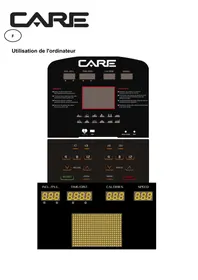
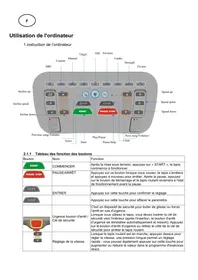
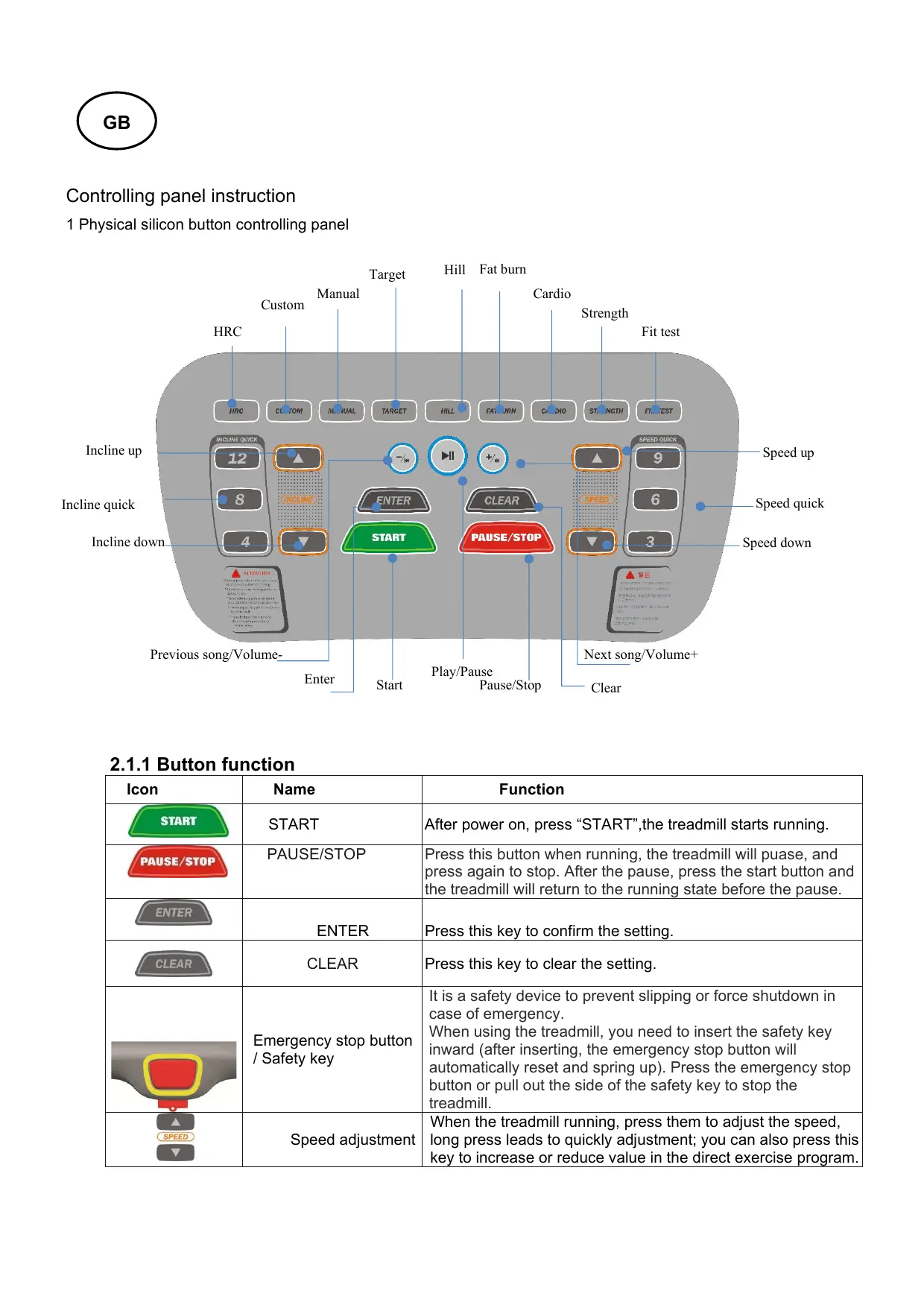
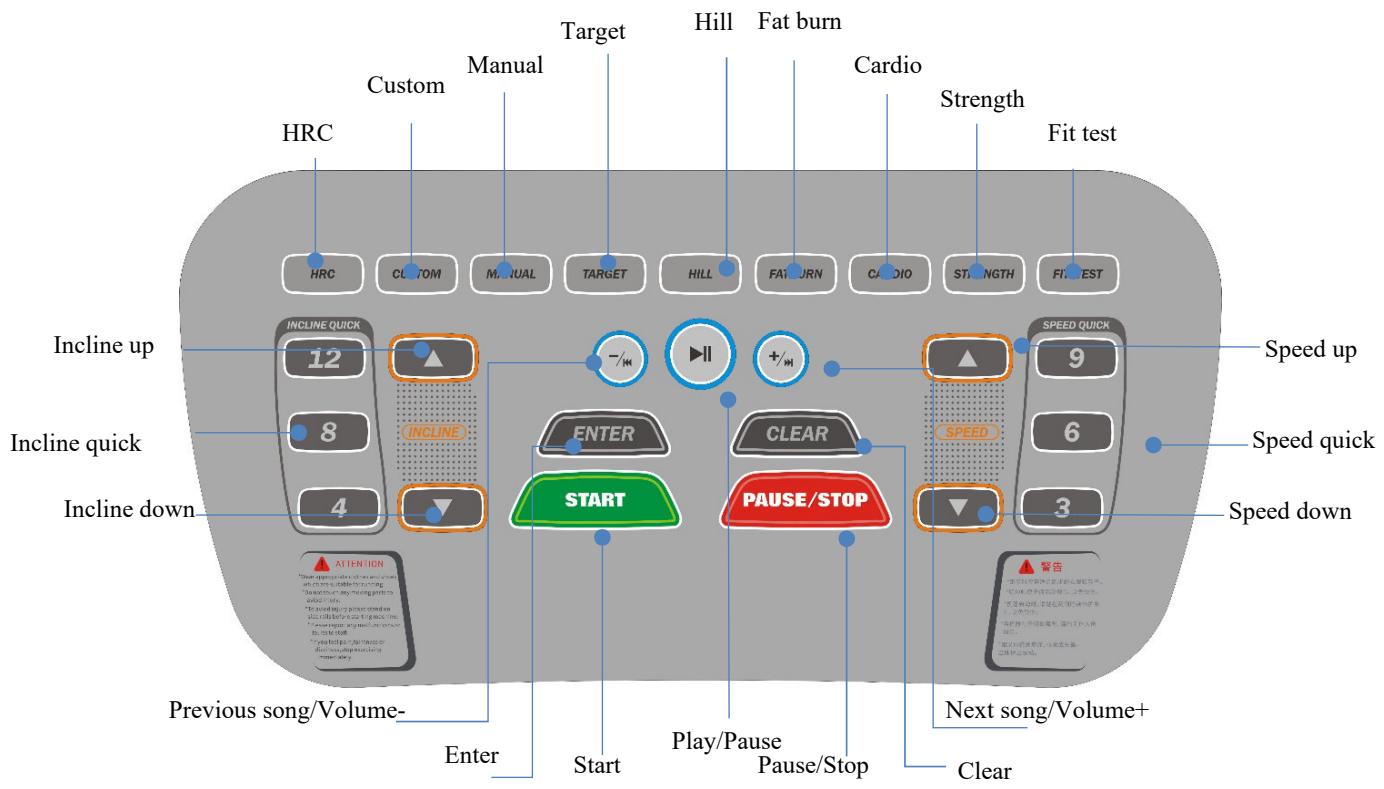
Controlling panel instruction
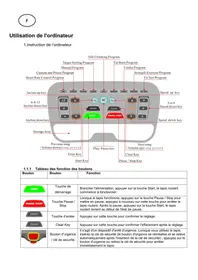
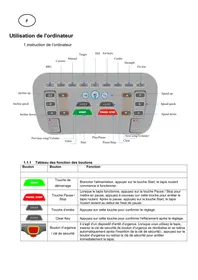
1 Physical silicon button controlling panel
2.1.1 Button function
| Icon | Name | Function |
| START | START | After power on, press “START”, the treadmill starts running. |
| PAUSE/STOP | PAUSE/STOP | Press this button when running, the treadmill will puase, and press again to stop. After the pause, press the start button and the treadmill will return to the running state before the pause. |
| ENTER | ENTER | Press this key to confirm the setting. |
| CLEAR | CLEAR | Press this key to clear the setting. |
| Emergency stop button / Safety key | It is a safety device to prevent slipping or force shutdown in case of emergency. When using the treadmill, you need to insert the safety key inward (after inserting, the emergency stop button will automatically reset and spring up). Press the emergency stop button or pull out the side of the safety key to stop the treadmill. | |
| Speed adjustment | When the treadmill running, press them to adjust the speed, long press leads to quickly adjustment; you can also press this key to increase or reduce value in the direct exercise program. | |
| 3 | 6 | 9 | Quick speed | Build-in 3-6-9 three speed shortcut keys. (It is effective when the treadmill running) |
| INLINE | Incline adjustment | When the treadmill running, press them to adjust the incline, long press leads to quickly adjustment; you can also press this key to increase or reduce value in the direct exercise program. | ||
| 4 | 8 | 12 | Quick incline | Build-in 4-8-12 three incline shortcut keys. (It is effective when the treadmill running) |
| Audio play | ||||
| - /+ | Previous song/Volume- | Short press will back to previous song, long press to volume down. | ||
| II | Play/Pause | Press once to play, press again to pause. | ||
| +/+ | Next song/Volume+ | Short press will go to next song, long press to volume up. | ||
| P1-P9:9 kinds of intelligent exercise program direct selection | ||||
| HRC | P1: Heart rate control program | HRC1-HRC3 | ||
| CUSTOM | P2: Custom program | Users can customize each section of speed in the program inside each section of speed, and choose according to your own conditions, the setting can be saved even power off. | ||
| MANUAL | P3: Manual program | This program can be set for time/distance/calorie, only one mode can be set at a time. | ||
| TARGET | P4: Target program | There are six levels P4-1---P4-6 | ||
| HILL | P5: Hill program | Six kinds of different incline hill program. It can be strengthen upper and lower limb joint and muscle training. P5-1---P5-6 | ||
| FATBURN | P6: Fat burn program | There are six levels, P6-1---P6-6 | ||
| CARDIO | P7: Cardio program | There are six levels, P7-1---P7-6 | ||
| STRENGTH | P8: Strength program | There are six levels, P8-1---P8-6 | ||
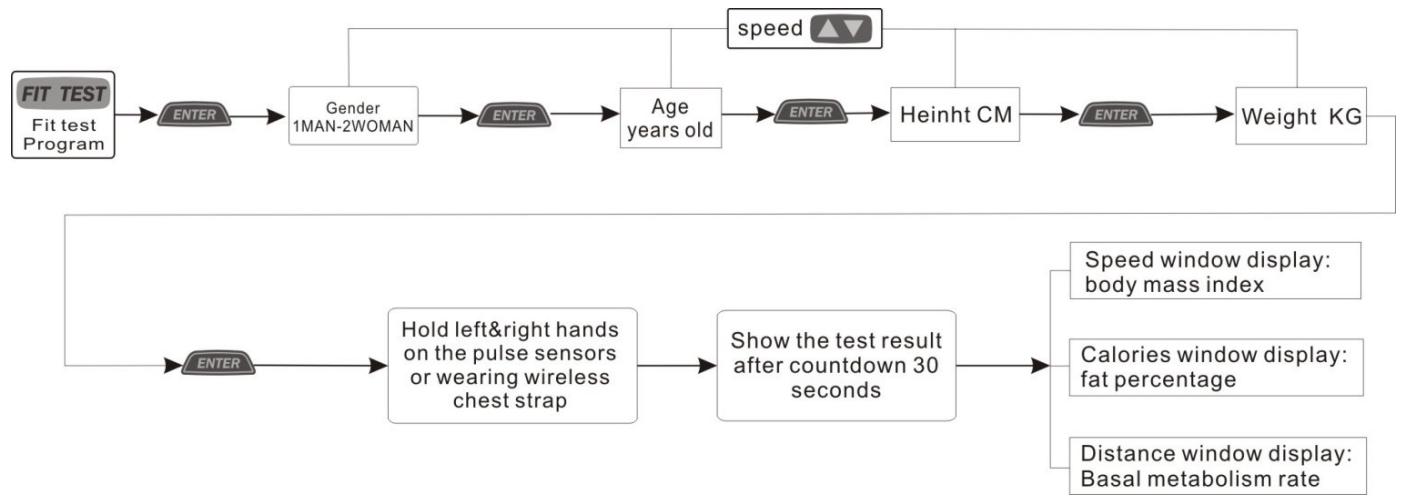
| FIT TEST | P9: Fit test | In standby mode, it will countdown 30 seconds for Body Mess Index Test: fat percentage (Calorie window display); Basal metabolism rate (Distance window display); BMI (Speed window display). | ||
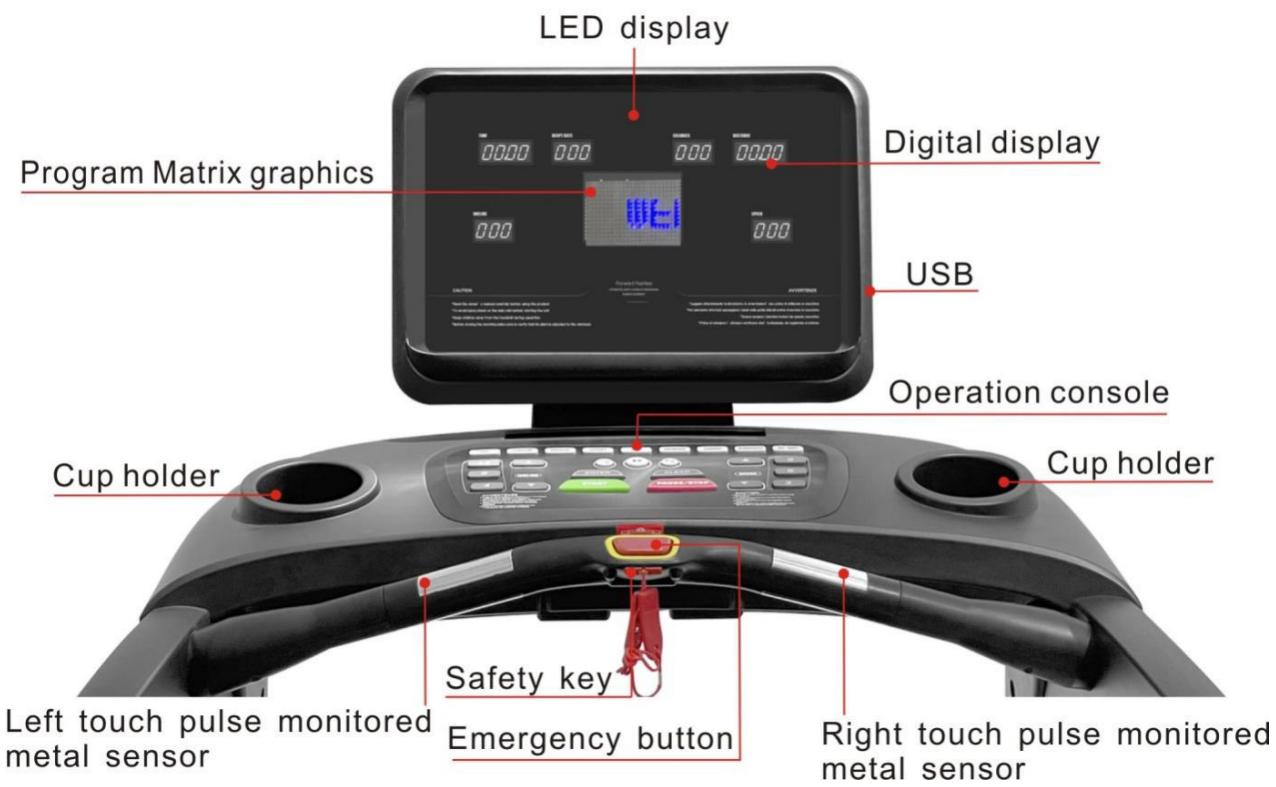
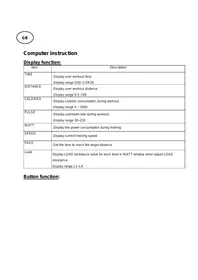
3.2 Display function
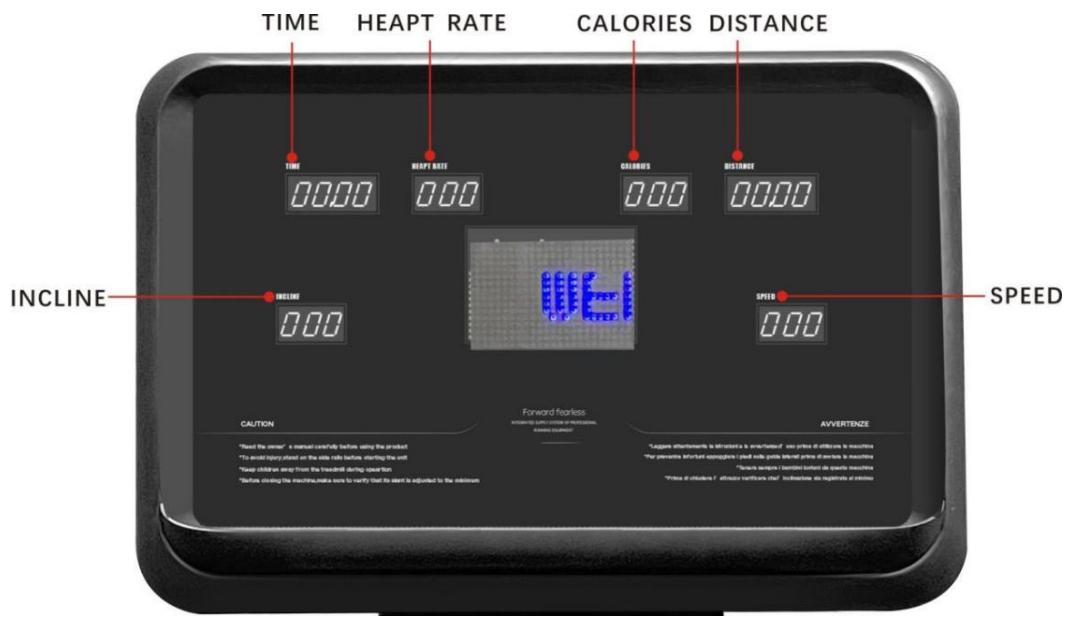
4. Operating instruction
4.1Treadmill operating instruction
4.1.1 Standby mode operation
Put the special power wire insert to treadmill socket, another end of power wire is connected to the environment working voltage (the environment working voltage must be in conformity with requirements of the treadmill).
Connect the power, the treadmill enters to standby mode, Distance window shows preset program, other windows show initial value "0".
4.1.2 Start treadmill operation
In standby mode, press START key, treadmill start to running, each window shows current exercise data accordingly. Matrix window displays dynamic runway and number of lap, each lap is 400 meters. At the same time, you can select speed or incline key to adjust speed or incline as you like, press stop key to pause or stop running.

4.1.3 Exercise program operating instruction
The treadmill is equipped with 9 kinds of intelligent exercise program wht different level of intensity. Exerciser can choose a appropriate exercise program according to his age, gender, weight and other parameters as well as exercise purpose.
When use intelligent program, you need to use setting key to proceed relevant setting, press Enter key ENTER to confirm; press Clear key CLEAR to modify the setting; Press P1-P9 direct key HRC -FITTEST to select intelligent program as you like, press Stop/Pause key PAUSE/STOP to exit when selected, then you can select another program.
4.1.4 Operating schematic diagram of exercise program
P1 Heart rate control program

HRC
Press enter into P1 program; press ENTER, the program HRC1-HRC3 will be displayed in the distance window. HRC1-HRC3 can be selected by speed adjustment keys, press ENTER to confirm then select "gender-age-height-weight" (can be adjusted by speed adjustment keys), press START to start the program. At this time, hold heartrate sensor with both hands, and the treadmill will automatically adjust incline and speed according to the detected rate. See the detailed description of the program as below:
HRC1:
This program is with a certain incline, where speed can be selected according to the grade of weight loss. Press ENTER to confirm and press SPEED UP/DOWN to adjust the corresponding parameters. In the heartrate window, 60% of the maximum heart rate is calculated according to the maximum heart rate formula (maximum =220- age) according to the input age. This value can be changed by pressing the SPEED UP/DOWN button. Press START/PAUSE to start or pause the program. The incline can be customized by the user. There is no automatic change in incline or speed during the initial 4.0 minutes warm-up. After warm-up exercise, the treadmill will automatically adjust its speed by increasing 1.0 ~km / h every 40 seconds until the user's heart rate reaches its maximum ( ± 5 beats/min.). When the user's heart rate is greater than the maximum, the program will automatically adjust by reducing 1.0 ~km / h every 40 seconds until it reaches the maximum. If there is no heart rate signal input within 10 seconds, the heartrate window will display "--"; If there is no heart rate signal input within 30 seconds, the treadmill will stop.
HRC2:
This is an aerobic exercise program with a certain speed, where incline can be automatically adjusted Press ENTER to confirm the selection and press SPEED UP/DOWN to adjust the corresponding parameters. In the
heartrate window, 60% of the maximum heart rate is calculated according to the maximum heart rate formula (maximum =220- age) according to the input age. This value can be changed by pressing the SPEED UP/DOWN button. Press START/PAUSE to start or and pause the program. The speed can be customized by the user. There is no automatic change in incline or speed during the initial 4.0 minutes warm-up. After warming up exercise, the treadmill's incline will automatically adjust by increasing with one unit every 30 seconds until the user's heart rate reaches that its maximum ( ± 5 beats/min.). When the user's heart rate is greater than the maximum, the program will automatically adjust by reducing one unit of incline every 30 seconds until it reaches the maximum ( ± 5 beats/min.). If there is no heartrate signal input within 10 seconds, the heartrate window will display "--"; If there is no heart rate signal input within 40 seconds, the treadmill will stop.
HRC3:
This program is an interval exercise of weight loss program, where speed and incline can be automatically adjusted. Press ENTER to confirm the selection and press SPEED UP/DOWN to enter your age, and then press ENTER to confirm the age. In the heartrate window, 60% of the maximum heart rate is calculated according to the maximum heart rate formula (maximum =220- age) according to the input age . This value can be changed by the SPEED UP/DOWN button. Press START/PAUSE to start or pause the program. There is no automatic change in incline or speed during the initial 4.0 minutes warm-up. After the warm-up exercise, the incline will automatically adjust by increasing 1.0 km/h every 30 seconds until the user's heart rate reaches its maximum ( ± 5 beats/min.). When the user's heart rate is greater than the maximum, the incline will be automatically adjusted by reducing one unit every 30 seconds, and the speed will be automatically adjusted by decreasing 1.0 km/h every 30 seconds until the user's heart rate reaches the maximum ( ± 5 beats/min.). If there is no heart rate signal input within 10 seconds, the heartrate window will display "--"; If there is no heart rate signal input within 40 seconds, the treadmill will stop.
P2 Custom program

CUSTOM
- When the treadmill stop, press to the program, to set the speed first, then the time.
- The speed setting is divided into 24 sections with range: 1.0 - 22.0km for each one, press SPEED UP/DOWN to change the setting; After adjustment, press ENTER to confirm and enter the next setting;
- The time setting range from 5-99 min., press ENTER to confirm.
- After completing all setting, press START, the treadmill will run accordingly.
- The treadmill will keep the setting in memory, when no new setting is made, the treadmill will run under the last user's setting.
- When the countdown reaches zero, the treadmill stops running.
P3 Manual program
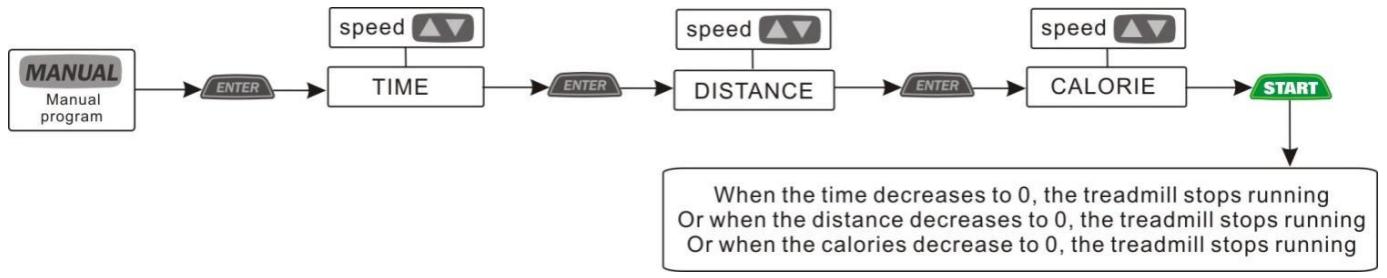
There are three setting functions in the backward counting mode: time, distance and calorie.
- Under standby state, press ENTER to the time counting mode. Time window displays the time and flashes. The
initial time is 30:00, you can press SPEED UP/DOWN to adjust, time setting range: 5:00-9:00.
2. Under time countdown state, press ENTER to enter distance countdown mode. The initial distance is 5.00km , you can press SPEED UP/DOWN to adjust, distance setting range: 1.0-99.9.
3. Under distance countdown state, press ENTER to enter calorie countdown mode. The initial calorie is 20.0, press SPEED UP/DOWN to adjust by 10 at a time, calorie setting range: 20.0-999,
4. Under countdown mode, when the set time or distance or calorie decreases to zero, the speed slowly decreases until it stops and returns to standby state.
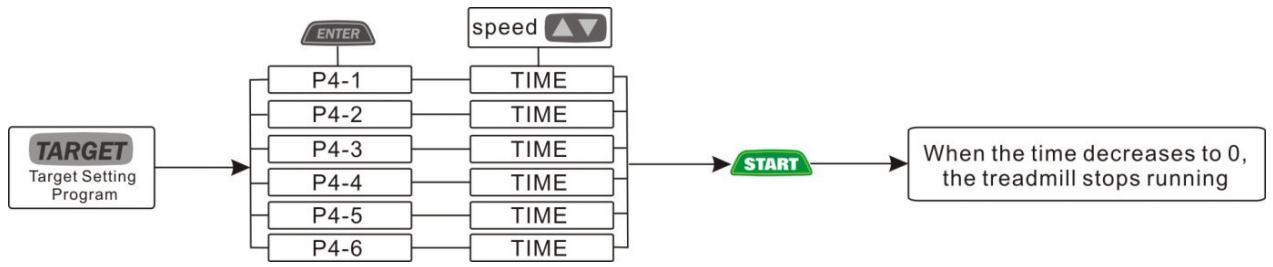
P4 Target program
TARGET
- Press , enter into the program selection; press ENTER, then you can select different level of P4- 1----P4-6, the initial time setting is 30min ., only time can be set, the time range is: 5:00-99:00, press SPEED UP/DONW to adjust the initial value, then press START, the treadmill starts running, and the speed slowly increases to the value that indicated in the first section of automatic program.
- Press SPEED UP/DOWN to adjust the speed.
- Press INCLINE UP/DOWN to adjust the incline.
- Press the speed shortcut key to quickly set the speed indicated by the key.
- Press the incline shortcut key to quickly set the incline indicated by the key.
- Each program is divided into 24 segments.
- It chirps when switches between segments.
- When the set time run to zero, the treadmill slows down until stop, then return to standby.
- This program shows changes in the speed graph.
| LEVEL | 1 | 2 | 3 | 4 | 5 | 6 | 7 | 8 | 9 | 10 | 11 | 12 | 13 | 14 | 15 | 16 | 17 | 18 | 19 | 20 | 21 | 22 | 23 | 24 | |
| P4-1 | SPEED | 2 | 4 | 6 | 8 | 10 | 2 | 4 | 6 | 8 | 10 | 2 | 4 | 6 | 8 | 10 | 2 | 4 | 6 | 8 | 10 | 2 | 4 | 6 | 8 |
| INCLINE | 0 | 1 | 1 | 3 | 3 | 4 | 4 | 5 | 4 | 1 | 4 | 4 | 3 | 2 | 1 | 0 | 1 | 1 | 2 | 2 | 3 | 3 | 5 | 4 | |
| P4-2 | SPEED | 3 | 5 | 7 | 9 | 11 | 3 | 5 | 7 | 9 | 11 | 3 | 5 | 7 | 9 | 11 | 3 | 5 | 7 | 9 | 11 | 3 | 5 | 7 | 9 |
| INCLINE | 0 | 1 | 1 | 1 | 3 | 3 | 3 | 2 | 5 | 1 | 4 | 4 | 3 | 2 | 1 | 0 | 1 | 1 | 3 | 3 | 4 | 4 | 5 | 4 | |
| P4-3 | SPEED | 4 | 6 | 8 | 10 | 12 | 4 | 6 | 8 | 10 | 13 | 4 | 6 | 8 | 10 | 12 | 4 | 6 | 8 | 10 | 12 | 4 | 6 | 8 | 10 |
| INCLINE | 2 | 2 | 1 | 2 | 3 | 5 | 5 | 4 | 4 | 2 | 4 | 4 | 3 | 2 | 1 | 0 | 1 | 1 | 3 | 3 | 4 | 4 | 5 | 4 | |
| P4-4 | SPEED | 5 | 7 | 9 | 11 | 13 | 5 | 7 | 9 | 11 | 14 | 5 | 7 | 9 | 11 | 13 | 5 | 7 | 9 | 11 | 13 | 5 | 7 | 9 | 11 |
| INCLINE | 2 | 2 | 1 | 4 | 4 | 5 | 5 | 4 | 4 | 3 | 4 | 4 | 3 | 2 | 1 | 0 | 1 | 1 | 3 | 3 | 4 | 4 | 5 | 4 | |
| P4-5 | SPEED | 6 | 8 | 10 | 12 | 14 | 6 | 8 | 10 | 12 | 15 | 6 | 8 | 10 | 12 | 14 | 6 | 8 | 10 | 12 | 14 | 6 | 8 | 10 | 12 |
| INCLINE | 2 | 1 | 2 | 2 | 3 | 4 | 5 | 4 | 4 | 3 | 4 | 4 | 3 | 2 | 1 | 0 | 1 | 1 | 3 | 3 | 4 | 4 | 5 | 4 | |
| P4-6 | SPEED | 7 | 9 | 11 | 13 | 15 | 7 | 9 | 11 | 13 | 16 | 7 | 9 | 11 | 13 | 15 | 7 | 9 | 11 | 13 | 15 | 7 | 9 | 11 | 13 |
| INCLINE | 2 | 3 | 3 | 4 | 5 | 5 | 6 | 6 | 5 | 1 | 4 | 4 | 3 | 2 | 1 | 0 | 1 | 1 | 3 | 3 | 4 | 4 | 5 | 4 | |
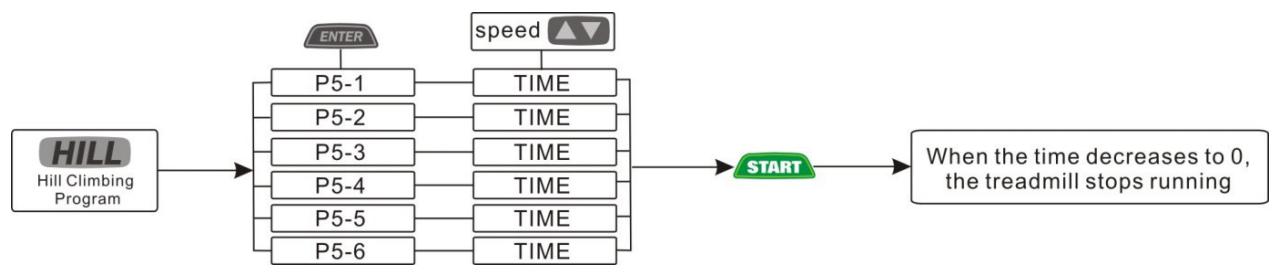
HILL
-
Press , enter into the program selection, press ENTER, then you can select different level of P5- 1----P5-6, the initial time setting is 30min ., only time can be set, the time range is 5:00-99:00, press SPEED+/- to adjust the initial value, then press START, the treadmill starts running, and the speed slowly increases to the value that indicated in the first section of automatic program.
-
Press SPEED UP/DOWN to adjust the speed.
- Press INCLINE UP/DOWN to adjust the incline.
- Press the speed shortcut key to quickly set the speed indicated by the key.
- Press the incline shortcut key to quickly set the incline indicated by the key.
- Each program is divided into 24 segments.
- It chirps when switches between segments.
- When the set time run to zero, the treadmill slows down until stop, then return to standby.
- This program shows changes in the incline graph.
| LEVEL | 1 | 2 | 3 | 4 | 5 | 6 | 7 | 8 | 9 | 10 | 11 | 12 | 13 | 14 | 15 | 16 | 17 | 18 | 19 | 20 | 21 | 22 | 23 | 24 | |
| P5-1 | SPEED | 2 | 4 | 5 | 8 | 6 | 6 | 8 | 5 | 5 | 4 | 6 | 6 | 8 | 5 | 5 | 8 | 2 | 4 | 5 | 8 | 6 | 6 | 8 | 5 |
| INCLINE | 1 | 2 | 3 | 4 | 5 | 6 | 1 | 2 | 3 | 4 | 5 | 6 | 5 | 4 | 3 | 2 | 1 | 6 | 5 | 4 | 3 | 2 | 1 | 0 | |
| P5-2 | SPEED | 2 | 4 | 9 | 6 | 7 | 9 | 8 | 8 | 8 | 4 | 6 | 6 | 8 | 5 | 3 | 8 | 2 | 4 | 5 | 8 | 6 | 6 | 8 | 5 |
| INCLINE | 2 | 3 | 4 | 5 | 6 | 7 | 2 | 3 | 4 | 5 | 6 | 7 | 6 | 5 | 4 | 3 | 2 | 7 | 6 | 5 | 4 | 3 | 2 | 1 | |
| P5-3 | SPEED | 2 | 5 | 6 | 10 | 8 | 9 | 9 | 10 | 9 | 4 | 6 | 6 | 7 | 5 | 3 | 8 | 2 | 4 | 5 | 8 | 6 | 9 | 8 | 5 |
| INCLINE | 0 | 1 | 2 | 3 | 4 | 5 | 6 | 7 | 8 | 9 | 10 | 11 | 10 | 9 | 8 | 7 | 6 | 5 | 4 | 3 | 2 | 1 | 1 | 0 | |
| P5-4 | SPEED | 2 | 6 | 8 | 10 | 11 | 10 | 8 | 8 | 10 | 4 | 6 | 6 | 8 | 5 | 3 | 8 | 2 | 4 | 5 | 8 | 9 | 6 | 8 | 5 |
| INCLINE | 1 | 2 | 3 | 4 | 5 | 6 | 7 | 8 | 9 | 10 | 11 | 12 | 11 | 10 | 9 | 8 | 7 | 6 | 5 | 4 | 3 | 2 | 2 | 1 | |
| P5-5 | SPEED | 2 | 6 | 8 | 10 | 11 | 12 | 6 | 6 | 0 | 4 | 6 | 6 | 8 | 5 | 3 | 8 | 2 | 4 | 5 | 8 | 9 | 6 | 8 | 5 |
| INCLINE | 2 | 4 | 6 | 8 | 10 | 12 | 14 | 12 | 10 | 8 | 6 | 4 | 2 | 0 | 12 | 10 | 8 | 6 | 4 | 2 | 1 | 0 | 0 | 0 | |
| P5-6 | SPEED | 2 | 7 | 8 | 9 | 10 | 11 | 12 | 12 | 12 | 4 | 6 | 6 | 8 | 5 | 3 | 8 | 2 | 4 | 5 | 8 | 9 | 6 | 8 | 5 |
| INCLINE | 3 | 5 | 7 | 9 | 11 | 13 | 15 | 13 | 11 | 9 | 7 | 5 | 3 | 1 | 13 | 11 | 9 | 7 | 5 | 3 | 2 | 1 | 1 | 1 | |
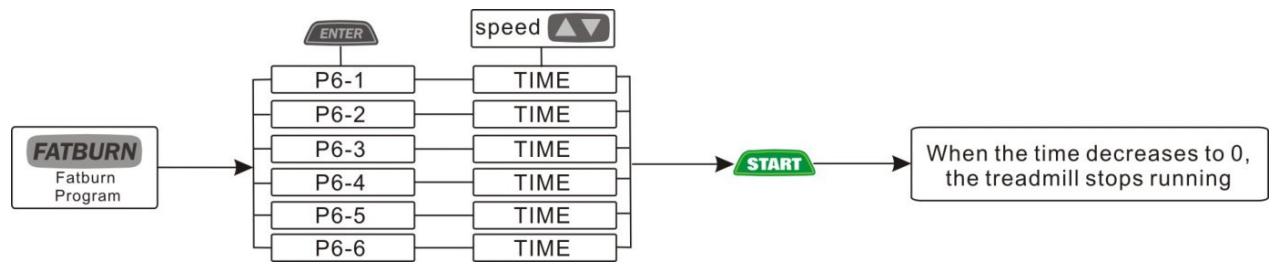
P6 Fatburn program
FATBURN
- Press , enter into the program selection, press ENTER, then you can select different level of P6- 1----P6-6, the initial time setting is 30min ., only time can be set, the time range is 5:00-99:00, press SPEED+/- to adjust the initial value, then press START, the treadmill starts running, and the speed slowly increases to the
value that indicated in the first section of automatic program.
2. Press SPEED UP/DOWN to adjust the speed.
3. Press INCLINE UP/DOWN to adjust the incline.
4. Press the speed shortcut key to quickly set the speed indicated by the key.
5. Press the incline shortcut key to quickly set the incline indicated by the key.
6. Each program is divided into 24 segments.
7. It chirps when switches between segments.
8. When the set time run to zero, the treadmill slows down until stop, then return to standby.
9. This program shows changes in the speed graph.
| LEVEL | 1 | 2 | 3 | 4 | 5 | 6 | 7 | 8 | 9 | 10 | 11 | 12 | 13 | 14 | 15 | 16 | 17 | 18 | 19 | 20 | 21 | 22 | 23 | 24 | |
| P6-1 | SPEED | 2 | 3 | 4 | 5 | 6 | 7 | 8 | 9 | 8 | 7 | 6 | 5 | 4 | 3 | 2 | 3 | 4 | 5 | 6 | 7 | 8 | 9 | 8 | 7 |
| INCLINE | 0 | 1 | 1 | 3 | 3 | 4 | 4 | 5 | 4 | 1 | 4 | 4 | 3 | 2 | 1 | 0 | 1 | 1 | 3 | 3 | 4 | 4 | 5 | 4 | |
| P6-2 | SPEED | 3 | 4 | 5 | 6 | 7 | 8 | 9 | 10 | 9 | 8 | 7 | 6 | 5 | 4 | 3 | 2 | 5 | 6 | 7 | 8 | 9 | 10 | 9 | 8 |
| INCLINE | 0 | 1 | 1 | 1 | 3 | 3 | 3 | 2 | 5 | 1 | 4 | 4 | 3 | 2 | 1 | 0 | 1 | 1 | 3 | 3 | 4 | 4 | 5 | 4 | |
| P6-3 | SPEED | 4 | 5 | 6 | 7 | 8 | 9 | 10 | 11 | 10 | 9 | 8 | 7 | 6 | 5 | 4 | 3 | 6 | 7 | 8 | 9 | 10 | 11 | 10 | 9 |
| INCLINE | 2 | 2 | 1 | 2 | 3 | 5 | 5 | 4 | 4 | 2 | 4 | 4 | 3 | 2 | 1 | 0 | 1 | 1 | 3 | 3 | 4 | 4 | 5 | 4 | |
| P6-4 | SPEED | 5 | 6 | 7 | 8 | 9 | 10 | 11 | 12 | 11 | 10 | 9 | 8 | 7 | 6 | 5 | 4 | 7 | 8 | 9 | 10 | 11 | 12 | 11 | 10 |
| INCLINE | 2 | 2 | 1 | 4 | 4 | 5 | 5 | 4 | 4 | 3 | 4 | 4 | 3 | 2 | 1 | 0 | 1 | 1 | 3 | 3 | 4 | 4 | 5 | 4 | |
| P6-5 | SPEED | 6 | 7 | 8 | 9 | 10 | 11 | 12 | 13 | 12 | 11 | 10 | 9 | 8 | 7 | 6 | 5 | 8 | 9 | 10 | 11 | 12 | 13 | 12 | 11 |
| INCLINE | 2 | 1 | 2 | 2 | 3 | 4 | 5 | 4 | 4 | 3 | 4 | 4 | 3 | 2 | 1 | 0 | 1 | 1 | 3 | 3 | 4 | 4 | 5 | 4 | |
| P6-6 | SPEED | 7 | 8 | 9 | 10 | 11 | 12 | 13 | 14 | 13 | 12 | 11 | 10 | 9 | 8 | 7 | 6 | 9 | 10 | 11 | 12 | 13 | 14 | 15 | 12 |
| INCLINE | 2 | 3 | 3 | 4 | 5 | 5 | 6 | 6 | 5 | 1 | 4 | 4 | 3 | 2 | 1 | 0 | 1 | 1 | 3 | 3 | 4 | 4 | 5 | 4 | |
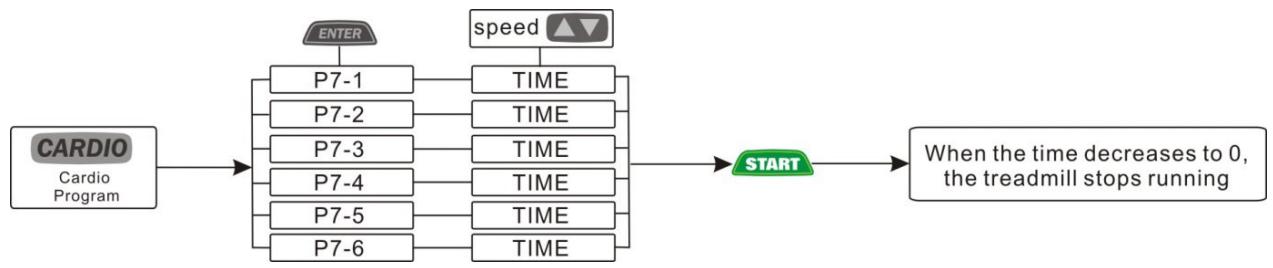
P7 Cardio program
CARDIO
-
Press , enter into the program selection, press ENTER, then you can select different level of P7-1----P7-6, the initial time setting is 30 min., only time can be set, the time range is 5:00-99:00, press SPEED UP/DOWN to adjust the initial value, then press START, the treadmill starts running, and the speed slowly increases to the value that indicated in the first section of automatic program.
-
Press SPEED UP/DOWN to adjust the speed.
- Press INCLINE UP/DOWN to adjust the incline.
- Press the speed shortcut key to quickly set the speed indicated by the key.
- Press the incline shortcut key to quickly set the incline indicated by the key.
- Each program is divided into 24 segments.
- It chirps when switches between segments.
- When the set time run to zero, the treadmill slows down until stop, then return to standby.
- This program shows changes in the speed graph.
| LEVEL | 1 | 2 | 3 | 4 | 5 | 6 | 7 | 8 | 9 | 10 | 11 | 12 | 13 | 14 | 15 | 16 | 17 | 18 | 19 | 20 | 21 | 22 | 23 | 24 | |
| P7-1 | SPEED | 2 | 4 | 6 | 2 | 4 | 6 | 2 | 4 | 6 | 2 | 4 | 6 | 2 | 4 | 6 | 2 | 4 | 6 | 2 | 4 | 6 | 2 | 4 | 6 |
| INCLINE | 0 | 1 | 1 | 3 | 3 | 4 | 4 | 5 | 4 | 1 | 4 | 4 | 3 | 2 | 1 | 0 | 1 | 1 | 3 | 3 | 4 | 4 | 5 | 4 | |
| P7-2 | SPEED | 3 | 5 | 7 | 3 | 5 | 7 | 3 | 5 | 7 | 3 | 5 | 7 | 3 | 5 | 7 | 3 | 5 | 7 | 3 | 5 | 7 | 3 | 5 | 7 |
| INCLINE | 0 | 1 | 1 | 1 | 3 | 3 | 3 | 2 | 5 | 1 | 4 | 4 | 3 | 2 | 1 | 0 | 1 | 1 | 3 | 3 | 4 | 4 | 5 | 4 | |
| P7-3 | SPEED | 4 | 6 | 8 | 4 | 6 | 8 | 4 | 6 | 8 | 4 | 6 | 8 | 4 | 6 | 8 | 4 | 6 | 8 | 4 | 6 | 8 | 4 | 6 | 8 |
| INCLINE | 2 | 2 | 1 | 2 | 3 | 5 | 5 | 4 | 4 | 2 | 4 | 4 | 3 | 2 | 1 | 0 | 1 | 1 | 3 | 3 | 4 | 4 | 5 | 4 | |
| P7-4 | SPEED | 5 | 7 | 9 | 5 | 7 | 9 | 5 | 7 | 9 | 5 | 7 | 9 | 5 | 7 | 9 | 5 | 7 | 9 | 5 | 7 | 9 | 5 | 7 | 9 |
| INCLINE | 2 | 2 | 1 | 4 | 4 | 5 | 5 | 4 | 4 | 3 | 4 | 4 | 3 | 2 | 1 | 0 | 1 | 1 | 3 | 3 | 4 | 4 | 5 | 4 | |
| P7-5 | SPEED | 6 | 8 | 10 | 6 | 8 | 10 | 6 | 8 | 10 | 6 | 8 | 10 | 6 | 8 | 10 | 6 | 8 | 10 | 6 | 8 | 10 | 6 | 8 | 10 |
| INCLINE | 2 | 1 | 2 | 2 | 3 | 4 | 5 | 4 | 4 | 3 | 4 | 4 | 3 | 2 | 1 | 0 | 1 | 1 | 3 | 3 | 4 | 4 | 5 | 4 | |
| P7-6 | SPEED | 7 | 9 | 11 | 7 | 9 | 11 | 7 | 9 | 11 | 7 | 9 | 11 | 7 | 9 | 11 | 7 | 9 | 11 | 7 | 9 | 11 | 7 | 9 | 11 |
| INCLINE | 2 | 3 | 3 | 4 | 5 | 5 | 6 | 6 | 5 | 1 | 4 | 4 | 3 | 2 | 1 | 0 | 1 | 1 | 3 | 3 | 4 | 4 | 5 | 4 | |
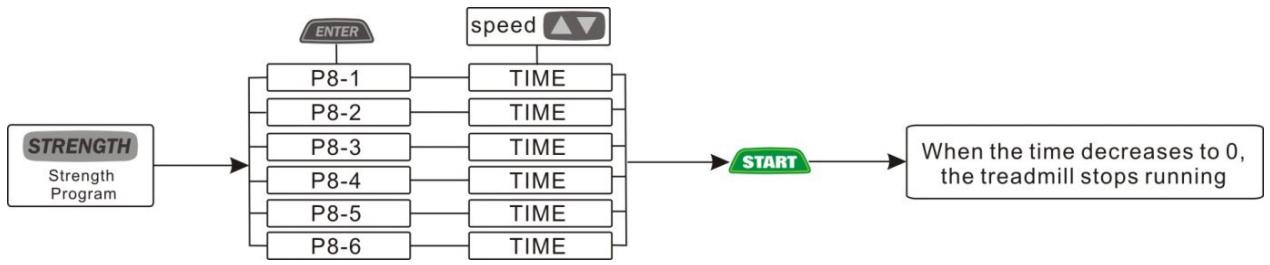
P8 Strength program
STRENGTH
-
Press , enter into the program selection, press ENTER, then you can select different level of P8-1----P8-6, the initial time setting is 30min only time can be set, the time range is 5:00-99:00, press SPEED UP/DOWN to adjust the initial value, then press START, the treadmill starts running, and the speed slowly increases to the value that indicated in the first section of automatic program.
-
Press SPEED UP/DOWN to adjust the speed.
- Press INCLINE UP/DOWN to adjust the incline.
- Press the speed shortcut key to quickly set the speed indicated by the key.
- Press the incline shortcut key to quickly set the incline indicated by the key.
- Each program is divided into 24 segments.
- It chirps when switches between segments.
- When the set time run to zero, the treadmill slows down until stop, then return to standby.
- This program shows changes in the speed graph.
| LEVEL | 1 | 2 | 3 | 4 | 5 | 6 | 7 | 8 | 9 | 10 | 11 | 12 | 13 | 14 | 15 | 16 | 17 | 18 | 19 | 20 | 21 | 22 | 23 | 24 | |
| P8-1 | SPEED | 2 | 4 | 6 | 8 | 10 | 12 | 14 | 2 | 4 | 6 | 8 | 10 | 12 | 14 | 16 | 2 | 4 | 6 | 8 | 10 | 12 | 14 | 12 | 10 |
| INCLINE | 0 | 1 | 1 | 3 | 3 | 4 | 4 | 5 | 4 | 1 | 4 | 4 | 3 | 2 | 1 | 0 | 1 | 1 | 3 | 3 | 4 | 4 | 5 | 4 | |
| P8-2 | SPEED | 3 | 5 | 7 | 9 | 11 | 13 | 15 | 3 | 5 | 7 | 9 | 11 | 13 | 15 | 17 | 3 | 5 | 7 | 9 | 11 | 13 | 15 | 13 | 11 |
| INCLINE | 0 | 1 | 1 | 1 | 3 | 3 | 3 | 2 | 5 | 1 | 4 | 4 | 3 | 2 | 1 | 0 | 1 | 1 | 3 | 3 | 4 | 4 | 5 | 4 | |
| P8-3 | SPEED | 4 | 6 | 8 | 10 | 12 | 14 | 16 | 4 | 6 | 8 | 10 | 12 | 14 | 16 | 18 | 4 | 6 | 8 | 10 | 12 | 14 | 16 | 15 | 12 |
| INCLINE | 2 | 2 | 1 | 2 | 3 | 5 | 5 | 4 | 4 | 2 | 4 | 4 | 3 | 2 | 1 | 0 | 1 | 1 | 3 | 3 | 4 | 4 | 5 | 4 | |
| P8-4 | SPEED | 5 | 7 | 9 | 11 | 13 | 15 | 17 | 5 | 7 | 9 | 11 | 13 | 15 | 17 | 19 | 5 | 7 | 9 | 11 | 13 | 15 | 17 | 16 | 13 |
| INCLINE | 2 | 2 | 1 | 4 | 4 | 5 | 5 | 4 | 4 | 3 | 4 | 4 | 3 | 2 | 1 | 0 | 1 | 1 | 3 | 3 | 4 | 4 | 5 | 4 | |
| P8-5 | SPEED | 6 | 8 | 10 | 12 | 14 | 16 | 18 | 6 | 8 | 10 | 12 | 14 | 16 | 18 | 20 | 6 | 8 | 10 | 12 | 14 | 16 | 18 | 17 | 14 |
| INCLINE | 2 | 1 | 2 | 2 | 3 | 4 | 5 | 4 | 4 | 3 | 4 | 4 | 3 | 2 | 1 | 0 | 1 | 1 | 3 | 3 | 4 | 4 | 5 | 4 | |
| P8-6 | SPEED | 7 | 9 | 11 | 13 | 15 | 17 | 19 | 7 | 9 | 11 | 13 | 15 | 17 | 19 | 21 | 7 | 9 | 11 | 13 | 15 | 17 | 19 | 18 | 15 |
| INCLINE | 2 | 3 | 3 | 4 | 5 | 5 | 6 | 6 | 5 | 1 | 4 | 4 | 3 | 2 | 1 | 0 | 1 | 1 | 3 | 3 | 4 | 4 | 5 | 4 | |
P9 Fit test program
FIT TEST
In standby mode, press , enter into the program, then press ENTER to select gender, age, height, weight. When the incline window displays 5, click START and the time window displays 30s. At this time, hold the heart rate sensor with your both hands. A 30-second countdown begins to perform, and a body mass index test will be performed at the end of the countdown. Fat 100% (Calorie window); Basal metabolic rate % (distance window); BMI (speed window display).
Note: When the treadmill runs continuously for 99 minutes, it will automatically stop for self-protection and turn to be standby state.
Fat percentage reference table
| Age Gender\Body shape | slim | healthy | fleshy | over wt | obese |
| body 1 | body 2 | body 3 | body 4 | body 5 | |
| Male≤30 years old | <14% | 14%-20% | 20.1%-25% | 25.1%-35% | >35% |
| Male>30 years old | <17% | 17%-23% | 23.1%-28% | 28.1%-38% | >38% |
| Female≤30 years old | <17% | 17%-24% | 24.1%-30% | 30.1%-40% | >40% |
| Female>30 years old | <20% | 20%-27% | 27.1%-33% | 33.1%-43% | >43% |
Adult body mass index reference table
| Body condition | Thin | Realistic weight | Overeight | Mild obesity | Moderate obesity | Severely obesity |
| Body mass index(BMI) | <18.5 | 18.5-23 | 23-25 | 25-30 | 30-35 | >35 |
5. Hand pulse test
The test can detect static and dynamic heart rate before and after exercise, and recovery after exercise. The user holds the metal plate of heart rate detection on the left and right horizon handlebar with both hands, then the heart rate value will be displayed on the screen. (Warm reminder: the maximum heart rate of the exerciser should not exceed (220- age). When the heart rate exceeds the maximum, it is recommended to rest for about 30 minutes or slow down and reduce the incline. The detected heart rate is only for the reference of sports and fitness.
6.Music play
Turn on Bluetooth in the phone Settings, then find treadmill Bluetooth (according to the name of the model) and connect.
Application connection
Copy the link here under to your brower (Edge, Firefox, Chrome, Safari etc)
https://cloud-carefitness.com/index.php/s/E2WD22KMNBQzERL
And Followw the detailed instruction
Maintenance and malfunction treatment
-
Clean: The surface of the treadmill should be kept clean, pull out the power cord before cleaning. You can clean the running belt and the surface of the treadmill with a soft and wet cloth, be sure not to use strong solvents.
-
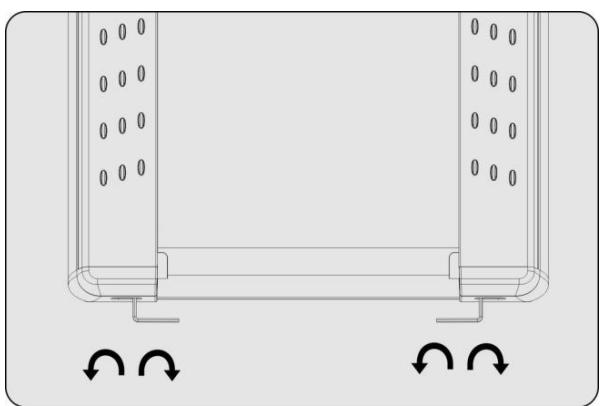
Adjustment of belt deviation: The running belt has been adjusted when manufactured; it may runs defectively after transportation and use. Turn off the treadmill before adjusting, (see figure)adjust theleft and right bolts in rear roller with wrenchIf the belt deviates to the left, clockwise rotate the left bolt. If the belt deviates to the right, counterclockwise rotate the right bolt. It is better to adjust 1/2 circle at a time. After adjustment, turn on the power and start the treadmill to check if the belt back to certer at speed of 4 - 5km / h , repeat the procedure if not.
-
Adjustment of belt slip: After a certain time of using, the belt might turn to be longer or couldn't free roll.. Your should adjustthe left and right bolts in rear roller clockwise at same position till it runs smoothly and freely, it is better to adjust 1/2 circle at a time .But to avoid shortening belt using lifetime, do not adjust it too tight.
-
Lubricate
When the lubricant between the running board and the running belt is used up, please lubricate the running board and adjust the running belt well.
4.1 Power off, loose the belt by using the method of belt deviation adjustment, then brush lubricant to the running board evenly.
4.2 Please do not lubricate excessively, lubricant is not the more the better, reasonable lubrication can improve the service life of the treadmill.
Mulfunction and treatment
| Error code | Description | Treatment countermeasures |
| E01 | Communication failure | 1. Power off for 30 seconds, then power on,if the error still continue, perform the following checks in sequence2. Check whether the wire between console and converter is loose, remove and reinsert3. Replace the console or communication interface4. Replace the converter |
| E02 | Output overcurrent | 1. Power off for 30 seconds, then power on,if the error still continue, perform the following checks in sequence2. Check whether it violates routine use3. Check whether the weight exceeds the limit of treadmill4. Check whether the running belt or running board is badly worn or needs lubricating oil maintenance5. Check whether the running belt is deviated or too tight6. Check whether the roller is stuck7. Replace the converter |
| E03 | Converter overvoltage | 1. Power off for 30 seconds, then power on,if the error still continue, perform the following checks in sequence2. Check whether it violates routine use3. Replace the converter |
| E04 | Converter overload | 1. Power off for 30 seconds, then power on,if the error still continue, perform the following checks in sequence2. Check whether the running belt or running board needs lubricating oil maintenance3. Check whether the running belt is deviated or too tight4. Check whether the weight exceeds the limit of treadmill5. Check whether it violates routine use6. Check whether the roller is stuck |
| E06 | Motor disconnection LF | 1. Power off for 30 seconds, then power on,if the error still continue, perform the following checks in sequence2. Check whether the three wires from the treadmill drive motor to the converter are loose. remove it and reinsert it, pay attention to the order of the lines3. Replace the converter |
To order spare parts
To guarantee an efficient service, make sure you have the following items before you contact our After Sales Service:
The name or reference of the product.
The manufacturing number shown on the main chassis and on the packing box.
The number of the missing or faulty part shown on the exploded view of the product described in this manual.
After Sales Service
Email: service-uk@carefitness.com