25km/h - CARE - CLUB RUNNER - Treadmills CARE FITNESS - Free user manual and instructions
Find the device manual for free 25km/h - CARE - CLUB RUNNER CARE FITNESS in PDF.


User questions about 25km/h - CARE - CLUB RUNNER CARE FITNESS
0 question about this device. Answer the ones you know or ask your own.
Ask a new question about this device
Download the instructions for your Treadmills in PDF format for free! Find your manual 25km/h - CARE - CLUB RUNNER - CARE FITNESS and take your electronic device back in hand. On this page are published all the documents necessary for the use of your device. 25km/h - CARE - CLUB RUNNER by CARE FITNESS.
USER MANUAL 25km/h - CARE - CLUB RUNNER CARE FITNESS
text_image
LED display Program Matrix graphics TIME 8:0:0.0 DISTANCE R-steps Digital display Mp3 USB Status display 8:0.0 8:0.0 8:0.0 8:0.0 8:0.0 Operation console Cup holder Cup holder Left touch pulse monitored metal sensor Safety key Emergency button Right touch pulse monitored metal sensorflowchart
graph LR
    A["START"] --> B["Treadmill Start to Running"]
    B --> C["4 8 12"]
    B --> D["3 6 9"]
    C --> E["Adjust Speed"]
    C --> F["Adjust Incline"]
    D --> G["Incline direct key :4-8-12"]
    D --> H["Speed direct key :3-6-9"]
    E --> I["Treadmill will be running as the adjust speed/incline"]
    F --> I
    G --> I
    H --> I
    I --> J["Press pause /stop key"]
    I --> K["Pull out safety key"]
    J --> L["Treadmill stop running"]
    K --> L
flowchart
graph TD
    A["Heart Rate Control Program"] --> B["ENTER"]
    B --> C["Age setting 20-80 years old"]
    C --> D["ENTER"]
    D --> E["Time setting 0-59 minutes"]
    E --> F["ENTER"]
    F --> G["Max speed"]
    G --> H["ENTER"]
    H --> I["HRC Selection NO.1-NO.4"]
    I --> J["NO.1: 65-103"]
    I --> K["NO.2: 75-119"]
    I --> L["NO.3: 90-143"]
    I --> M["NO.4: PUL 65-110"]
    I --> N["PULSE:50-220"]
    O["Press START Key"] --> P["Hold left & right hands on the pulse sensors or wearing wireless chest strap"]
    P --> Q["Treadmill Start to Running"]
    Q --> R["Press pause /stop key"]
    Q --> S["Pull out safety key"]
    R --> T["Treadmill pause or stop running"]
    S --> T
flowchart
graph TD
    A["Custom Setting Program"] --> B["ENTER"]
    B --> C["1-18 preset programs"]
    B --> D["5 custom program (USER01-05)"]
    C --> E["ENTER"]
    D --> E
    E --> F["Five kinds of Physical training program (TIME) 28-32-40-40-30"]
    E --> G["Five kinds of Physical compliance training program (TIME) 28-34-40-45-40"]
    E --> H["Two kinds of Body fit training program (TIME) 40-48"]
    E --> I["Three kinds of Physical fitness maintaining program (TIME)48-42-30"]
    E --> J["Three kinds of Physical recovery program (TIME) 26-20-16"]
    F --> K["ENTER"]
    G --> K
    H --> K
    I --> K
    J --> K
    K --> L["Press START Key"]
    L --> M["Treadmill Start to Running"]
    M --> N["Press pause /stop key"]
    M --> O["Pull out safety key"]
    N --> P["Treadmill pause or stop running"]
    O --> P
    P --> Q["Press custom to confirm and save"]
    Q --> R["Incline"]
    L --> S["Time"]
    L --> T["ENTER"]
    T --> U["Speed"]
    U --> V["ENTER"]
P3 : Programme
manuel

flowchart
graph LR
    A["Manual Program"] --> B["ENTER"]
    B --> C["△"]
    C --> D["Time"]
    C --> E["Distance"]
    C --> F["Calories"]
    D --> G["ENTER"]
    E --> G
    F --> G
    G --> H["Press START Key"]
    H --> I["Treadmill Start to Running"]
    I --> J["Press pause /stop key"]
    I --> K["Pull out safety key"]
    J --> L["Treadmill pause or stop running"]
flowchart
graph LR
    A["Hill Climbing Program"] --> B["ENTER"]
    B --> C["Three kinds of hill climbing program"]
    C --> D["ENTER"]
    D --> E["Time 10-59 minutes"]
    E --> F["ENTER"]
    F --> G["Press START Key"]
    G --> H["Treadmill Start to Running"]
    H --> I["Press pause /stop key"]
    H --> J["Pull out safety key"]
    I --> K["Treadmill pause or stop running"]
    J --> K
P6: Programme Body Fat
flowchart
graph TD
    A["FATBURN\nFat burn Program"] --> B["ENTER"]
    B --> C["Age 25-59 years old"]
    C --> D["ENTER"]
    D --> E["Three kinds of timing fat burn training program"]
    E --> F["P1: 20 minutes"]
    E --> G["P2: 30 minutes"]
    E --> H["P3: 60 minutes"]
    F --> I["ENTER"]
    G --> I
    H --> I
    I --> J["Press START\nKey"]
    J --> K["Treadmill Start to Running"]
    K --> L["Press pause /stop key"]
    K --> M["Pull out safety key"]
    L --> N["Treadmill pause or stop running"]
    M --> N
    D --> O["Hold left & right hands on the pulse sensors or wearing wireless chest strap"]
P7: Programme cardio
flowchart
graph TD
    A["Cardio Program"] --> B["ENTER"]
    B --> C["Age 25-59 years old"]
    C --> D["ENTER"]
    D --> E["Three kinds of countdown cardio raining program"]
    E --> F["RPE 1 60 minutes"]
    E --> G["RPE 2 30 minutes"]
    E --> H["RPE 3 10 minutes"]
    F --> I["ENTER"]
    G --> I
    H --> I
    I --> J["Press START Key"]
    J --> K["Treadmill Start to Running"]
    K --> L["Treadmill Start to Running"]
    L --> M["Press pause /stop key"]
    L --> N["Pull out safety key"]
    M --> O["Treadmill pause or stop running"]
    N --> O
    B --> P["Hold left & right hands on the pulse sensors or wearing wireless chest strap"]
    P --> Q["Treadmill Start to Running"]
flowchart
graph LR
    A["Strength Exercise Program"] --> B["ENTER"]
    B --> C["△"]
    C --> D["Five level of strength exercise program"]
    D --> E["LEVEL-1 5:08 Minutes"]
    D --> F["LEVEL-2 4:22 Minutes"]
    D --> G["LEVEL-3 4:07 Minutes"]
    D --> H["LEVEL-4 3:48 Minutes"]
    D --> I["LEVEL-5 1:25 Minutes"]
    E --> J["ENTER"]
    F --> J
    G --> J
    H --> J
    I --> J
    J --> K["Press START Key"]
    K --> L["Treadmill Start to Running"]
    L --> M["Press pause /stop key"]
    L --> N["Pull out safety key"]
    M --> O["Treadmill pause or stop running"]
flowchart
graph LR
    A["MP3 Playing"] --> B["Insert USB"]
    A --> C["Using audio wire to connect equipment"]
    B --> D["Press Mp3 play"]
    C --> D
    D --> E["MP3 play /pause"]
    E --> F["MP3 previous song /volume down"]
    E --> G["MP3 next song /Volume up"]
    F --> H["Treadmill Start to Running"]
    G --> H
    H --> I["Press pause /stop key"]
    H --> J["Pull out safety key"]
    I --> K["Treadmill pause or stop running"]
other
| Total running time | Speed/Indine | | ------------------ | ------------ | | 0.0 | 0.0 | | 0.1 | 0.1 | | 0.2 | 0.2 | | 0.3 | 0.3 | | 0.4 | 0.4 | | 0.5 | 0.5 | | 0.6 | 0.6 | | 0.7 | 0.7 | | 0.8 | 0.8 | | 0.9 | 0.9 | | 1.0 | 1.0 |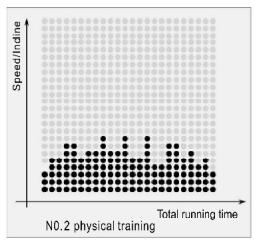
scatter
| Total running time | Speed/indine | | ------------------ | ------------ | | 0 | 0 | | 1 | 1 | | 2 | 2 | | 3 | 3 | | 4 | 4 | | 5 | 5 | | 6 | 6 | | 7 | 7 | | 8 | 8 | | 9 | 9 | | 10 | 10 | | 11 | 11 | | 12 | 12 | | 13 | 13 | | 14 | 14 | | 15 | 15 | | 16 | 16 | | 17 | 17 | | 18 | 18 | | 19 | 19 | | 20 | 20 | | 21 | 21 | | 22 | 22 | | 23 | 23 | | 24 | 24 | | 25 | 25 | | 26 | 26 | | 27 | 27 | | 28 | 28 | | 29 | 29 | | 30 | 30 | | 31 | 31 | | 32 | 32 | | 33 | 33 | | 34 | 34 | | 35 | 35 | | 36 | 36 | | 37 | 37 | | 38 | 38 | | 39 | 39 | | 40 | 40 | | 41 | 41 | | 42 | 42 | | 43 | 43 | | 44 | 44 | | 45 | 45 | | 46 | 46 | | 47 | 47 | | 48 | 48 | | 49 | 49 | | 50 | 50 | | 51 | 51 | | 52 | 52 | | 53 | 53 | | 54 | 54 | | 55 | 55 | | 56 | 56 | | 57 | 57 | | 58 | 58 | | 59 | 59 | | 60 | 60 | | 61 | 61 | | 62 | 62 | | 63 | 63 | | 64 | 64 | | 65 | 65 | | 66 | 66 | | 67 | 67 | | 68 | 68 | | 69 | 69 | | 70 | 70 | | 71 | 71 | | 72 | 72 | | 73 | 73 | | 74 | 74 | | 75 | 75 | | 76 | 76 | | 77 | 77 | | 78 | 78 | | 79 | 79 | | 80 | 80 | | 81 | 81 | | 82 | 82 | | 83 | 83 | | 84 | 84 | | 85 | 85 | | 86 | 86 | | 87 | 87 | | 88 | 88 | | 89 | 89 | | 90 | 90 | | Note: The actual values may vary due to the random nature of the data generation. The provided values are just an example. I have used the same label 'N0.2 physical training'.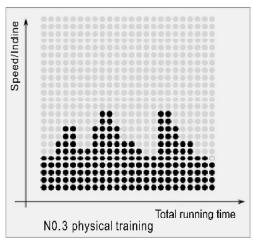
bar
| Total running time | Speed/indine | |---|---| | 1 | 0.5 | | 2 | 0.6 | | 3 | 0.7 | | 4 | 0.8 | | 5 | 0.9 | | 6 | 1.0 | | 7 | 0.9 | | 8 | 0.8 | | 9 | 0.7 | | 10 | 0.6 | | 11 | 0.5 | | 12 | 0.4 | | 13 | 0.3 | | 14 | 0.2 | | 15 | 0.1 | | 16 | 0.0 | | 17 | 0.1 | | 18 | 0.2 | | 19 | 0.3 | | 20 | 0.4 | | 21 | 0.5 | | 22 | 0.6 | | 23 | 0.7 | | 24 | 0.8 | | 25 | 0.9 | | 26 | 1.0 | | 27 | 0.9 | | 28 | 0.8 | | 29 | 0.7 | | 30 | 0.6 | | 31 | 0.5 | | 32 | 0.4 | | 33 | 0.3 | | 34 | 0.2 | | 35 | 0.1 | | 36 | 0.0 | | 37 | 0.1 | | 38 | 0.2 | | 39 | 0.3 | | 40 | 0.4 | | 41 | 0.5 | | 42 | 0.6 | | 43 | 0.7 | | 44 | 0.8 | | 45 | 0.9 | | 46 | 1.0 | | 47 | 0.9 | | 48 | 0.8 | | 49 | 0.7 | | 50 | 0.6 | | 51 | 0.5 | | 52 | 0.4 | | 53 | 0.3 | | 54 | 0.2 | | 55 | 0.1 | | 56 | 0.0 | | 57 | 0.1 | | 58 | 0.2 | | 59 | 0.3 | | 60 | 0.4 | | 61 | 0.5 | | 62 | 0.6 | | 63 | 0.7 | | 64 | 0.8 | | 65 | 0.9 | | 66 | 1.0 | | 67 | 0.9 | | 68 | 0.8 | | 69 | 0.7 | | 70 | 0.6 | | 71 | 0.5 | | 72 | 0.4 | | 73 | 0.3 | | 74 | 0.2 | | 75 | 0.1 | | 76 | 0.0 | | 77 | 0.1 | | 78 | 0.2 | | 79 | 0.3 | | 80 | 0.4 | | 81 | 0.5 | | 82 | 0.6 | | 83 | 0.7 | | 84 | 0.8 | | 85 | 0.9 | | 86 | 1.0 | | 87 | 0.9 | | 88 | 0.8 | | 89 | 0.7 | | 90 | 0.6 | | 91 | 0.5 | | 92 | 0.4 | | 93 | 0.3 | | 94 | 0.2 | | 95 | 0.1 | | 96 | 0.0 | | Note: The data is extracted from the image and presented in the following table as it is a simplified representation of the bar chart data.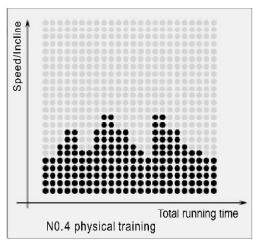
other
| Total running time | Speed/Incline | | ----------------- | ------------- | | 0 | 0 | | 1 | 1 | | 2 | 2 | | 3 | 3 | | 4 | 4 | | 5 | 5 | | 6 | 6 | | 7 | 7 | | 8 | 8 | | 9 | 9 | | 10 | 10 | | 11 | 11 | | 12 | 12 | | 13 | 13 | | 14 | 14 | | 15 | 15 | | 16 | 16 | | 17 | 17 | | 18 | 18 | | 19 | 19 | | 20 | 20 | | 21 | 21 | | 22 | 22 | | 23 | 23 | | 24 | 24 | | 25 | 25 | | 26 | 26 | | 27 | 27 | | 28 | 28 | | 29 | 29 | | 30 | 30 | | 31 | 31 | | 32 | 32 | | 33 | 33 | | 34 | 34 | | 35 | 35 | | 36 | 36 | | 37 | 37 | | 38 | 38 | | 39 | 39 | | 40 | 40 | | 41 | 41 | | 42 | 42 | | 43 | 43 | | 44 | 44 | | 45 | 45 | | 46 | 46 | | 47 | 47 | | 48 | 48 | | 49 | 49 | | 50 | 50 | | 51 | 51 | | 52 | 52 | | 53 | 53 | | 54 | 54 | | 55 | 55 | | 56 | 56 | | 57 | 57 | | 58 | 58 | | 59 | 59 | | 60 | 60 | | 61 | 61 | | 62 | 62 | | 63 | 63 | | 64 | 64 | | 65 | 65 | | 66 | 66 | | 67 | 67 | | 68 | 68 | | 69 | 69 | | 70 | 70 | | 71 | 71 | | 72 | 72 | | 73 | 73 | | 74 | 74 | | 75 | 75 | | 76 | 76 | | 77 | 77 | | 78 | 78 | | 79 | 79 | | 80 | 80 | | Note: The actual values may vary due to the random nature of the data generation. The provided values are just an example.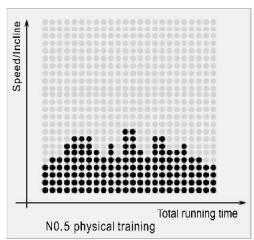
scatter
| Total running time | Speed/incline | | ------------------ | ------------- | | 0 | 0 | | 10 | 1 | | 20 | 2 | | 30 | 3 | | 40 | 4 | | 50 | 5 | | 60 | 6 | | 70 | 7 | | 80 | 8 | | 90 | 9 | | 100 | 10 | | 110 | 11 | | 120 | 12 | | 130 | 13 | | 140 | 14 | | 150 | 15 | | 160 | 16 | | 170 | 17 | | 180 | 18 | | 190 | 19 | | 200 | 20 | | 210 | 21 | | 220 | 22 | | 230 | 23 | | 240 | 24 | | 250 | 25 | | 260 | 26 | | 270 | 27 | | 280 | 28 | | 290 | 29 | | 300 | 30 | | 310 | 31 | | 320 | 32 | | 330 | 33 | | 340 | 34 | | 350 | 35 | | 360 | 36 | | 370 | 37 | | 380 | 38 | | 390 | 39 | | 400 | 40 | | 410 | 41 | | 420 | 42 | | 430 | 43 | | 440 | 44 | | 450 | 45 | | 460 | 46 | | 470 | 47 | | 480 | 48 | | 490 | 49 | | 500 | 50 | | 510 | 51 | | 520 | 52 | | 530 | 53 | | 540 | 54 | | 550 | 55 | | 560 | 56 | | 570 | 57 | | 580 | 58 | | 590 | 59 | | 600 | 60 | | 610 | 61 | | 620 | 62 | | 630 | 63 | | 640 | 64 | | 650 | 65 | | 660 | 66 | | 670 | 67 | | 680 | 68 | | 690 | 69 | | 700 | 70 | | 710 | 71 | | 720 | 72 | | 730 | 73 | | 740 | 74 | | 750 | 75 | | 760 | 76 | | 770 | 77 | | 780 | 78 | | 790 | 79 | | 800 | 80 | | 810 | 81 | | 820 | 82 | | 830 | 83 | | 840 | 84 | | 850 | 85 | | 860 | 86 | | 870 | 87 | | 880 | 88 | | 890 | 89 | | 900 | 90 | | 910 | 91 | | 920 | 92 | | 930 | 93 | | 940 | 94 | | 950 | 95 | | 960 | 96 | | 970 | 97 | | 980 | 98 | | 990 | 99 | | Note: The actual values may vary due to the random nature of the data generation. The provided values are just an example. I have used the same label as 'Total running time'.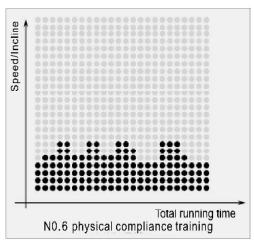
bar
| Total running time | Speed/Incline | |---|---| | 1 | 0.5 | | 2 | 0.7 | | 3 | 0.9 | | 4 | 0.8 | | 5 | 0.6 | | 6 | 0.7 | | 7 | 0.8 | | 8 | 0.9 | | 9 | 0.7 | | 10 | 0.6 |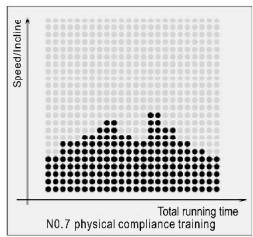
other
| Total running time | Speed/inline | | ----------------- | ------------ | | 0 | 1 | | 1 | 2 | | 2 | 3 | | 3 | 4 | | 4 | 5 | | 5 | 6 | | 6 | 7 | | 7 | 8 | | 8 | 9 | | 9 | 10 | | 10 | 11 | | 11 | 12 | | 12 | 13 | | 13 | 14 | | 14 | 15 | | 15 | 16 | | 16 | 17 | | 17 | 18 | | 18 | 19 | | 19 | 20 | | 20 | 21 | | 21 | 22 | | 22 | 23 | | 23 | 24 | | 24 | 25 | | 25 | 26 | | 26 | 27 | | 27 | 28 | | 28 | 29 | | 29 | 30 | | 30 | 31 | | 31 | 32 | | 32 | 33 | | 33 | 34 | | 34 | 35 | | 35 | 36 | | 36 | 37 | | 37 | 38 | | 38 | 39 | | 39 | 40 | | 40 | 41 | | 41 | 42 | | 42 | 43 | | 43 | 44 | | 44 | 45 | | 45 | 46 | | 46 | 47 | | 47 | 48 | | 48 | 49 | | 49 | 50 | | 50 | 51 | | 51 | 52 | | 52 | 53 | | 53 | 54 | | 54 | 55 | | 55 | 56 | | 56 | 57 | | 57 | 58 | | 58 | 59 | | 59 | 60 | | 60 | 61 | | 61 | 62 | | 62 | 63 | | 63 | 64 | | 64 | 65 | | 65 | 66 | | 66 | 67 | | 67 | 68 | | 68 | 69 | | 69 | 70 | | 70 | 71 | | 71 | 72 | | 72 | 73 | | 73 | 74 | | 74 | 75 | | 75 | 76 | | 76 | 77 | | 77 | 78 | | 78 | 79 | | 79 | 80 | | 80 | 81 | | Note: The speed/inline values are not explicitly labeled in the code provided in the code. The actual values may vary due to the random nature of the data generation. There is only one data series in this case. |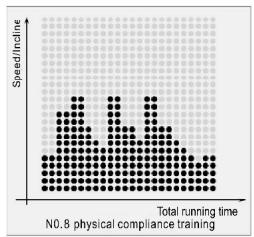
bar
| Total running time | Speed/inline | |---|---| | 1 | 2.5 | | 2 | 3.0 | | 3 | 2.0 | | 4 | 3.5 | | 5 | 2.5 | | 6 | 3.0 | | 7 | 2.0 | | 8 | 3.5 | | 9 | 2.5 | | 10 | 3.0 | | 11 | 2.0 | | 12 | 3.5 | | 13 | 2.5 | | 14 | 3.0 | | 15 | 2.0 | | 16 | 3.5 | | 17 | 2.5 | | 18 | 3.0 | | 19 | 2.0 | | 20 | 3.5 | | 21 | 2.5 | | 22 | 3.0 | | 23 | 2.0 | | 24 | 3.5 | | 25 | 2.5 | | 26 | 3.0 | | 27 | 2.0 | | 28 | 3.5 | | 29 | 2.5 | | 30 | 3.0 | | 31 | 2.0 | | 32 | 3.5 | | 33 | 2.5 | | 34 | 3.0 | | 35 | 2.0 | | 36 | 3.5 | | 37 | 2.5 | | 38 | 3.0 | | 39 | 2.0 | | 40 | 3.5 | | 41 | 2.5 | | 42 | 3.0 | | 43 | 2.0 | | 44 | 3.5 | | 45 | 2.5 | | 46 | 3.0 | | 47 | 2.0 | | 48 | 3.5 | | 49 | 2.5 | | 50 | 3.0 | | 51 | 2.0 | | 52 | 3.5 | | 53 | 2.5 | | 54 | 3.0 | | 55 | 2.0 | | 56 | 3.5 | | 57 | 2.5 | | 58 | 3.0 | | 59 | 2.0 | | 60 | 3.5 | | 61 | 2.5 | | 62 | 3.0 | | 63 | 2.0 | | 64 | 3.5 | | 65 | 2.5 | | 66 | 3.0 | | 67 | 2.0 | | 68 | 3.5 | | 69 | 2.5 | | 70 | 3.0 | | 71 | 2.0 | | 72 | 3.5 | | 73 | 2.5 | | 74 | 3.0 | | 75 | 2.0 | | 76 | 3.5 | | 77 | 2.5 | | 78 | 3.0 | | 79 | 2.0 | | 80 | 3.5 | | 81 | 2.5 | | 82 | 3.0 | | 83 | 2.0 | | 84 | 3.5 | | 85 | 2.5 | | 86 | 3.0 | | 87 | 2.0 | | 88 | 3.5 | | 89 | 2.5 | | 90 | 3.0 | | 91 | 2.0 | | 92 | 3.5 | | 93 | 2.5 | | 94 | 3.0 | | 95 | 2.0 | | 96 | 3.5 | | 97 | 2.5 | | 98 | 3.0 | | 99 | 2.0 | | Note: The speed/inline values are estimated based on the visual data and may be calculated based on the total running time for each data point in the chart (e.g., 'N0.8 physical compliance training'). The values for the 'Total running time' series are estimated based on the chart.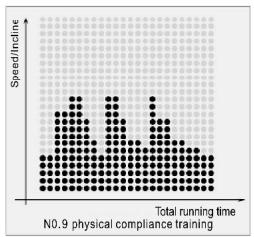
other
| Total running time | Speed/racing | | ------------------ | ------------ | | 0 | 1 | | 1 | 2 | | 2 | 3 | | 3 | 4 | | 4 | 5 | | 5 | 6 | | 6 | 7 | | 7 | 8 | | 8 | 9 | | 9 | 10 | | 10 | 11 | | 11 | 12 | | 12 | 13 | | 13 | 14 | | 14 | 15 | | 15 | 16 | | 16 | 17 | | 17 | 18 | | 18 | 19 | | 19 | 20 | | 20 | 21 | | 21 | 22 | | 22 | 23 | | 23 | 24 | | 24 | 25 | | 25 | 26 | | 26 | 27 | | 27 | 28 | | 28 | 29 | | 29 | 30 | | 30 | 31 | | 31 | 32 | | 32 | 33 | | 33 | 34 | | 34 | 35 | | 35 | 36 | | 36 | 37 | | 37 | 38 | | 38 | 39 | | 39 | 40 | | 40 | 41 | | 41 | 42 | | 42 | 43 | | 43 | 44 | | 44 | 45 | | 45 | 46 | | 46 | 47 | | 47 | 48 | | 48 | 49 | | 49 | 50 | | 50 | 51 | | 51 | 52 | | 52 | 53 | | 53 | 54 | | 54 | 55 | | 55 | 56 | | 56 | 57 | | 57 | 58 | | 58 | 59 | | 59 | 60 | | 60 | 61 | | 61 | 62 | | 62 | 63 | | 63 | 64 | | 64 | 65 | | 65 | 66 | | 66 | 67 | | 67 | 68 | | 68 | 69 | | 69 | 70 | | 70 | 71 | | 71 | 72 | | 72 | 73 | | 73 | 74 | | 74 | 75 | | 75 | 76 | | 76 | 77 | | 77 | 78 | | 78 | 79 | | 79 | 80 | | 80 | 81 | | 81 | 82 | | 82 | 83 | | 83 | 84 | | 84 | 85 | | 85 | 86 | | 86 | 87 | | 87 | 88 | | 88 | 89 | | 89 | 90 | | 90 | 91 | | 91 | 92 | | 92 | 93 | | 93 | 94 | | 94 | 95 | | 95 | 96 | | 96 | 97 | | 97 | 98 | | 98 | 99 | | Note: The actual values may vary due to the random nature of the data generation. The provided values are just an example.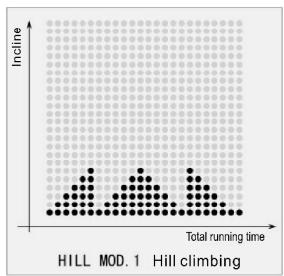
scatter
| Total running time | Incline | | ------------------ | ------- | | 0 | 0 | | 1 | 0.5 | | 2 | 1 | | 3 | 1.5 | | 4 | 2 | | 5 | 2.5 | | 6 | 3 | | 7 | 3.5 | | 8 | 4 | | 9 | 4.5 | | 10 | 5 | | 11 | 5.5 | | 12 | 6 | | 13 | 6.5 | | 14 | 7 | | 15 | 7.5 | | 16 | 8 | | 17 | 8.5 | | 18 | 9 | | 19 | 9.5 | | 20 | 10 | | 21 | 10.5 | | 22 | 11 | | 23 | 11.5 | | 24 | 12 | | 25 | 12.5 | | 26 | 13 | | 27 | 13.5 | | 28 | 14 | | 29 | 14.5 | | 30 | 15 | | 31 | 15.5 | | 32 | 16 | | 33 | 16.5 | | 34 | 17 | | 35 | 17.5 | | 36 | 18 | | 37 | 18.5 | | 38 | 19 | | 39 | 19.5 | | 40 | 20 | | 41 | 20.5 | | 42 | 21 | | 43 | 21.5 | | 44 | 22 | | 45 | 22.5 | | 46 | 23 | | 47 | 23.5 | | 48 | 24 | | 49 | 24.5 | | 50 | 25 | | 51 | 25.5 | | 52 | 26 | | 53 | 26.5 | | 54 | 27 | | 55 | 27.5 | | 56 | 28 | | 57 | 28.5 | | 58 | 29 | | 59 | 29.5 | | 60 | 30 | | 61 | 30.5 | | 62 | 31 | | 63 | 31.5 | | 64 | 32 | | 65 | 32.5 | | 66 | 33 | | 67 | 33.5 | | 68 | 34 | | 69 | 34.5 | | 70 | 35 | | 71 | 35.5 | | 72 | 36 | | 73 | 36.5 | | 74 | 37 | | 75 | 37.5 | | 76 | 38 | | 77 | 38.5 | | 78 | 39 | | 79 | 39.5 | | 80 | 40 | | 81 | 40.5 | | 82 | 41 | | 83 | 41.5 | | 84 | 42 | | 85 | 42.5 | | 86 | 43 | | 87 | 43.5 | | 88 | 44 | | 89 | 44.5 | | 90 | 45 | | 91 | 45.5 | | 92 | 46 | | 93 | 46.5 | | 94 | 47 | | 95 | 47.5 | | 96 | 48 | | 97 | 48.5 | | 98 | 49 | | 99 | 49.5 | | Note: The actual values may vary due to the random nature of the data generation. The provided values are just an example from the code execution.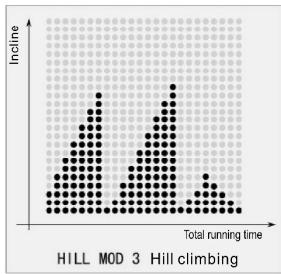
other
| Total running time | Incline | | ------------------ | ------- | | 0 | 0 | | 1 | 1 | | 2 | 2 | | 3 | 3 | | 4 | 4 | | 5 | 5 | | 6 | 6 | | 7 | 7 | | 8 | 8 | | 9 | 9 | | 10 | 10 | | 11 | 11 | | 12 | 12 | | 13 | 13 | | 14 | 14 | | 15 | 15 | | 16 | 16 | | 17 | 17 | | 18 | 18 | | 19 | 19 | | 20 | 20 | | 21 | 21 | | 22 | 22 | | 23 | 23 | | 24 | 24 | | 25 | 25 | | 26 | 26 | | 27 | 27 | | 28 | 28 | | 29 | 29 | | 30 | 30 | | 31 | 31 | | 32 | 32 | | 33 | 33 | | 34 | 34 | | 35 | 35 | | 36 | 36 | | 37 | 37 | | 38 | 38 | | 39 | 39 | | 40 | 40 | | 41 | 41 | | 42 | 42 | | 43 | 43 | | 44 | 44 | | 45 | 45 | | 46 | 46 | | 47 | 47 | | 48 | 48 | | 49 | 49 | | 50 | 50 | | 51 | 51 | | 52 | 52 | | 53 | 53 | | 54 | 54 | | 55 | 55 | | 56 | 56 | | 57 | 57 | | 58 | 58 | | 59 | 59 | | 60 | 60 | | 61 | 61 | | 62 | 62 | | 63 | 63 | | 64 | 64 | | 65 | 65 | | 66 | 66 | | 67 | 67 | | 68 | 68 | | 69 | 69 | | 70 | 70 | | 71 | 71 | | 72 | 72 | | 73 | 73 | | 74 | 74 | | 75 | 75 | | 76 | 76 | | 77 | 77 | | 78 | 78 | | 79 | 79 | | 80 | 80 | | 81 | 81 | | 82 | 82 | | 83 | 83 | | 84 | 84 | | 85 | 85 | | 86 | 86 | | 87 | 87 | | 88 | 88 | | 89 | 89 | | 90 | 90 | | 91 | 91 | | 92 | 92 | | 93 | 93 | | 94 | 94 | | 95 | 95 | | 96 | 96 | | 97 | 97 | | 98 | 98 | | 99 | 99 | | Note: The actual values may vary due to the random nature of the data generation. The provided values are just an example.| Age Gender\bodyshape FAT% | slim | healthy | fleshy | over wt | obese |
| body 1 | body 2 | body 3 | body 4 | body 5 | |
| Male≤30 years old | <14% | 14%-20% | 20.1%-25% | 25.1%-35% | >35% |
| Male>30 years old | <17% | 17%-23% | 23.1%-28% | 28.1%-38% | >38% |
| Female≤30 years old | <17% | 17%-24% | 24.1%-30% | 30.1%-40% | >40% |
| Female>30 years old | <20% | 20%-27% | 27.1%-33% | 33.1%-43% | >43% |
https://cloud.carefitness.com/index.php/s/E2WD22KMNBQzERL
natural_image
Technical diagram of a mechanical component with two curved supports and internal holes, showing rotational arrows (no text or symbols)https://www.carefitness.com/sav
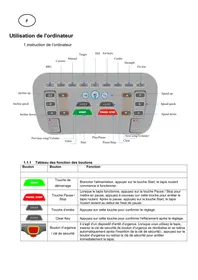
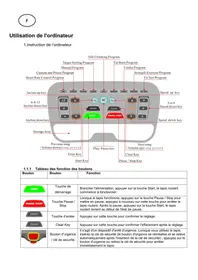
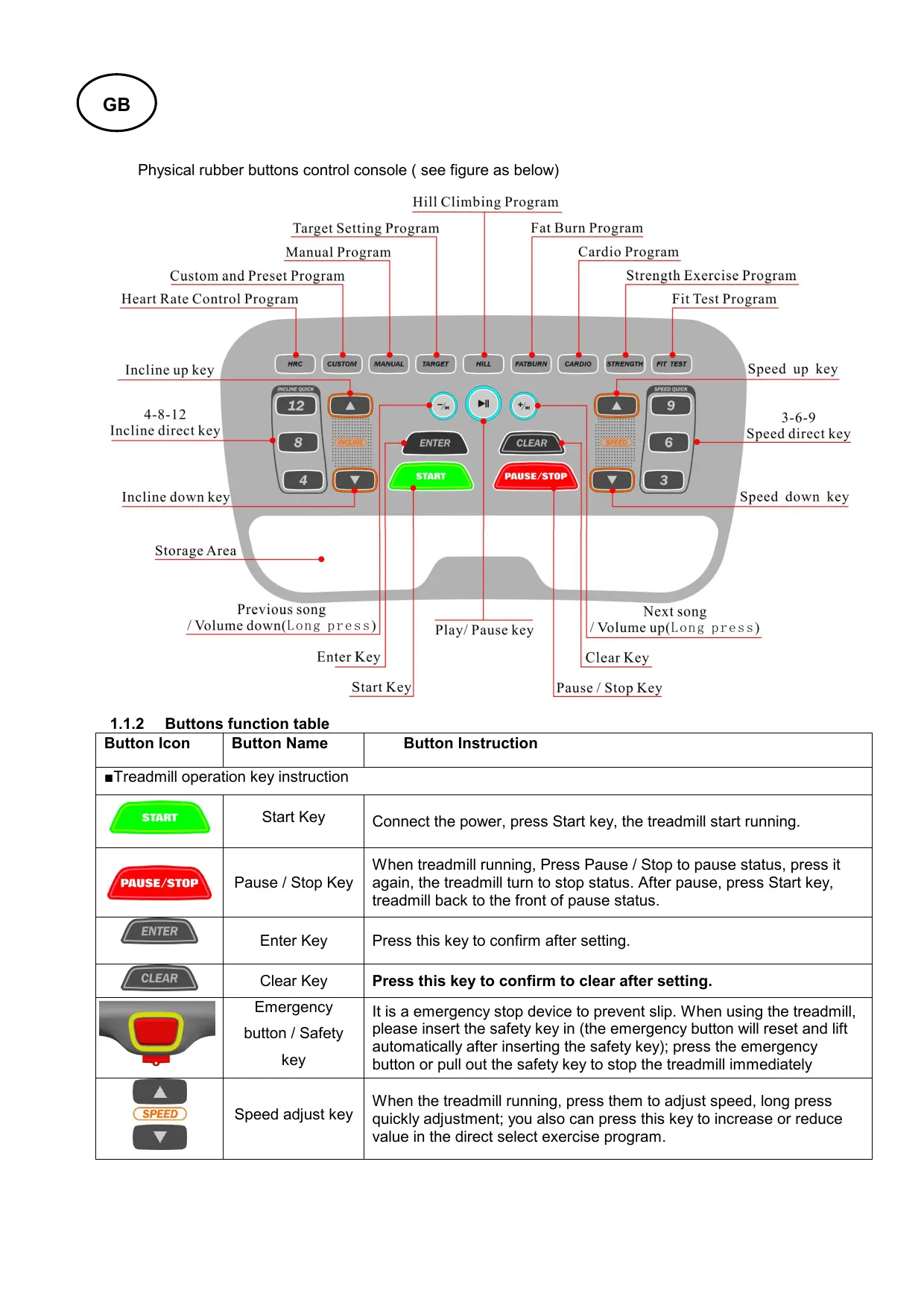
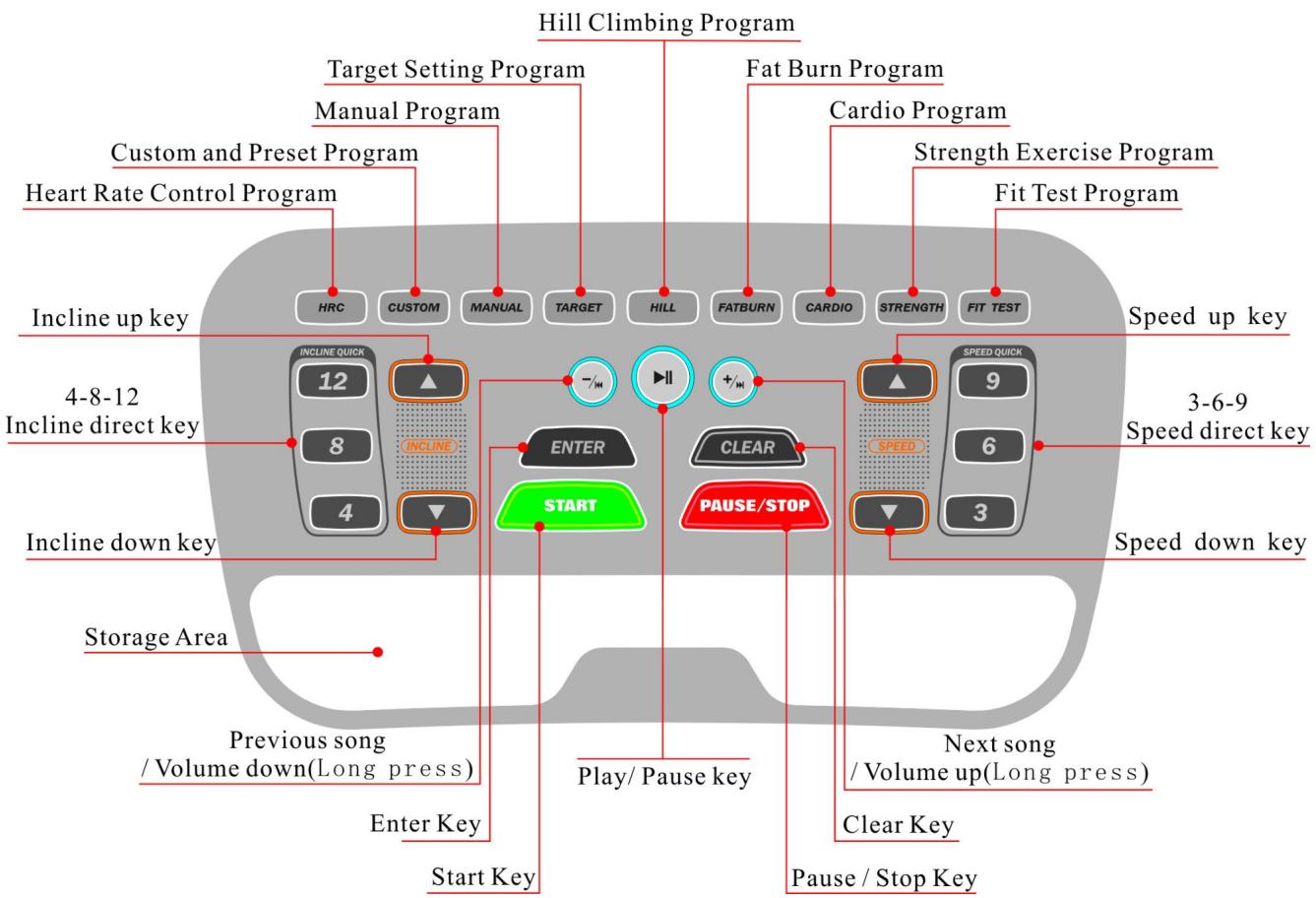
Physical rubber buttons control console (see figure as below)
text_image
Hill Climbing Program Target Setting Program Manual Program Custom and Preset Program Heart Rate Control Program Incline up key 4-8-12 Incline direct key Incline down key Storage Area Previous song / Volume down(Long press) Enter Key Start Key Play/ Pause key Clear Key Pause / Stop Key Next song / Volume up(Long press) Clear Key Speed down key Speed direct key Speed up key 3-6-9 Speed quick SPEED FAST CAPTURES PULSE/STOP CLEAR START +/-/- HILL FATBURN CARDIO STRENGTH FIT TEST Fit Test Program Strength Exercise Program Cardio Program Fat Burn Program HRC CUSTOM MANUAL TARGET HILL FATBURN CARDIO STRENGTH FIT TEST1.1.2 Buttons function table
| Button Icon | Button Name | Button Instruction |
| ■Treadmill operation key instruction | ||
 | Start Key | Connect the power, press Start key, the treadmill start running. |
 | Pause / Stop Key | When treadmill running, Press Pause / Stop to pause status, press it again, the treadmill turn to stop status. After pause, press Start key, treadmill back to the front of pause status. |
 | Enter Key | Press this key to confirm after setting. |
 | Clear Key | Press this key to confirm to clear after setting. |
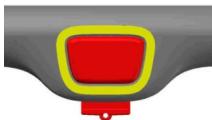 | Emergency button / Safety key | It is a emergency stop device to prevent slip. When using the treadmill, please insert the safety key in (the emergency button will reset and lift automatically after inserting the safety key); press the emergency button or pull out the safety key to stop the treadmill immediately |
 | Speed adjust key | When the treadmill running, press them to adjust speed, long press quickly adjustment; you also can press this key to increase or reduce value in the direct select exercise program. |
| 3 6 9 | Speed direct key | Build-in 3-6-9 three speed direct shortcut keys. (It is effective when the treadmill running) |
 | Incline adjust key | When the treadmill running, press them to adjust incline, long press quickly adjustment, you also can press this key to increase or reduce value in the direct select exercise program. |
| 4 8 12 | Incline direct key | Build-in 4-8-12 three incline direct shortcut keys. |
| ■Audio play key instruction | ||
 | Previous song/Volume down | Press one time to back previous song, long press to volume down. |
 | Play/ Pause key | Press one time to play, press again to pause. |
 | Next song /Volume up | Press one time to select next song, long press to volume up. |
| ■P1-P9 9 kinds of intelligent exercise program direct select instruction. | ||
 | P1:Heart RateControl Program | 4 Level from weak to strong heart rate control speed training: Level 1,long distance running and speed training; Level 2, endurance and stamina training; Level 3, interval running training; Level 4, strength training before the game. |
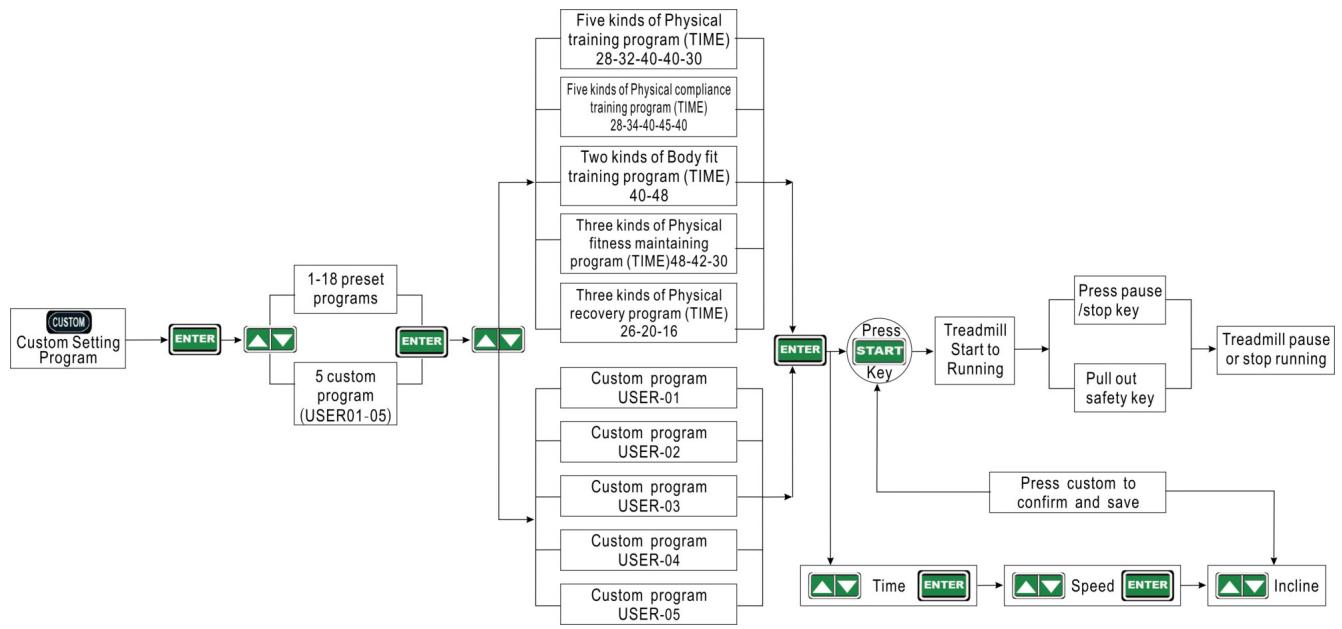
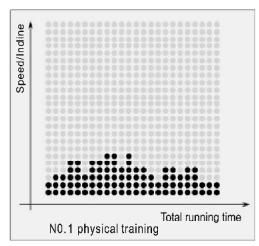
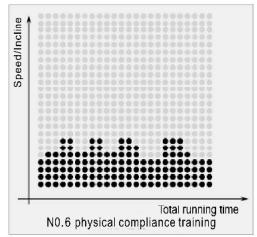
 | P2: Custom andPreset Program | There has 18 preset programs: 1-5 Physical training program; 6-10Physical compliance training program; 11-12 Body fit training program ; 13-15 Physical fitness maintaining program; 16-18 Physical recovery program.5 custom programs (user01-05). |
 | P3:ManualProgram | It is for user to set time, distance and calorie training program, user only need to set of them. |
 | P4:Target SettingProgram | Target training program: you can set exercise intensity (Mets) as target training program. |
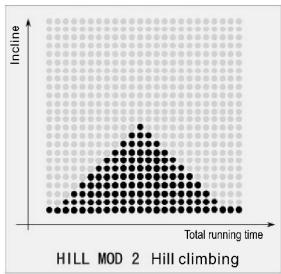
 | P5:Hill ClimbingProgram | Three kinds of different incline hill climbing program. It can be strengthen limbs and muscle training from gentle slope to steep slope. |
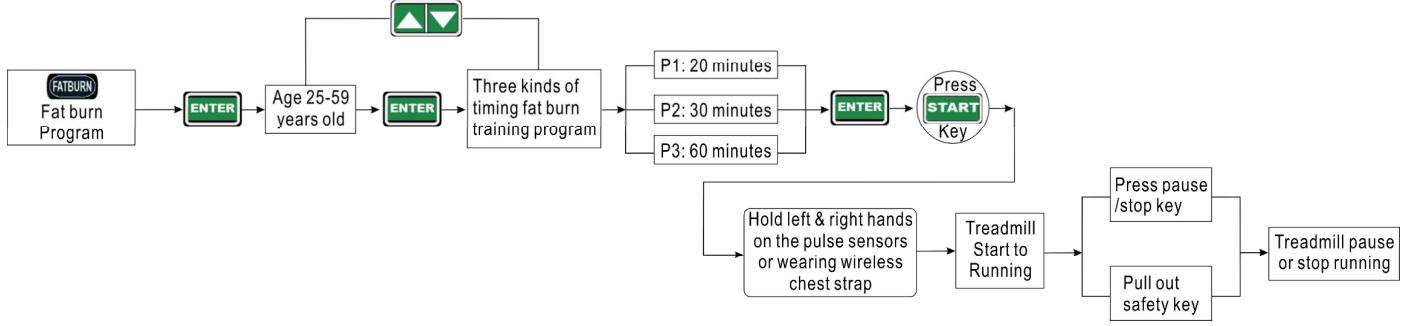
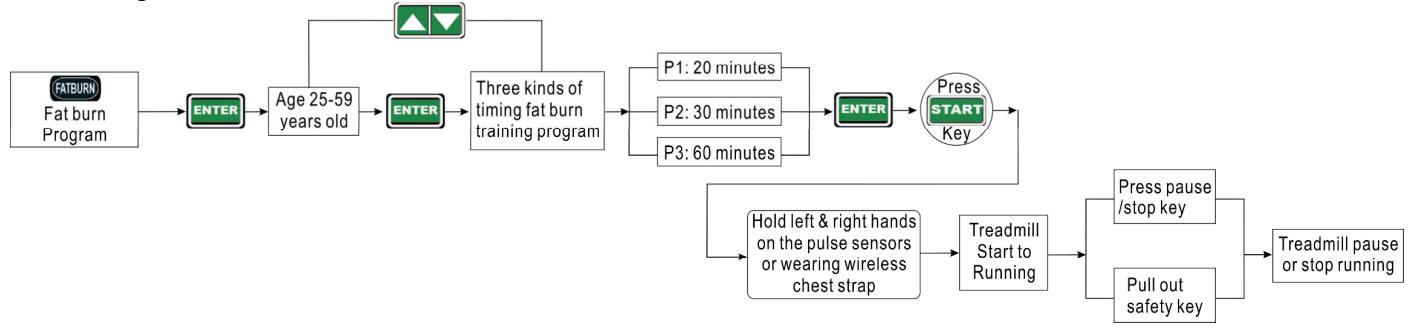
 | P6:Fat BurnProgram | Three kinds of timing fat burn training program: p1 training time of 20 minutes; p2 training time of 30 minutes ; p3 training time of 60 minutes. |
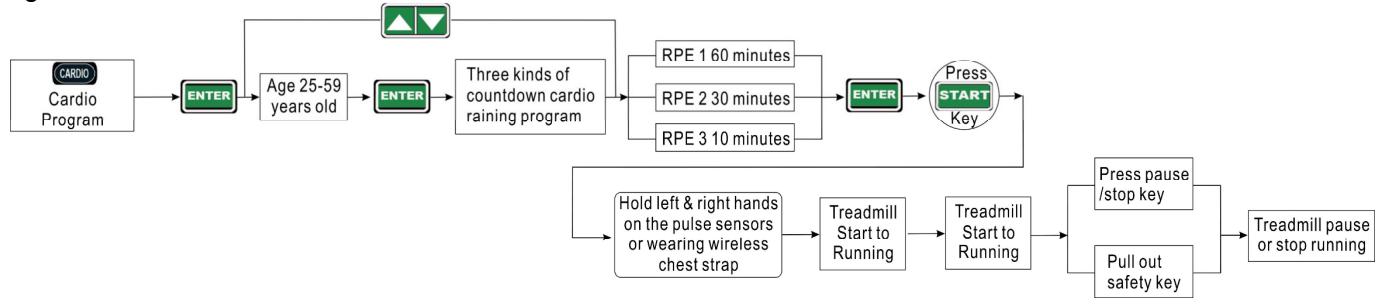
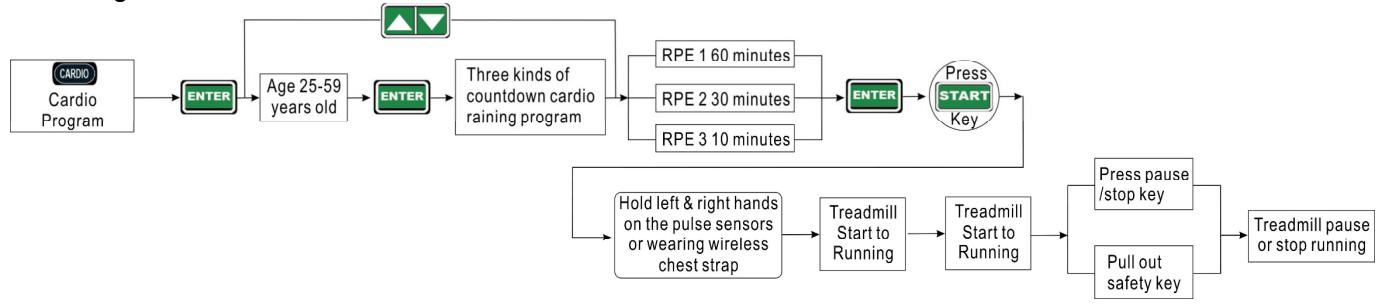
 | P7:CardioProgram | Three kinds of countdown cardio training program: RPE-1 60 minutes of the countdown training; RPE-2 30 minutes of the countdown training; RPE-3 10 minutes of the countdown training. |
| [S 5K57] | P8:StrengthExercise Program | Five level of strength exercise program:LEVEL-1 Easy run ; LEVEL-2 Marathon target pace running; LEVEL-3 Tempo running ; LEVEL-4 interval running; LEVEL-5 Repeats running. |
 | P9:Fit TestProgram | In standby mode, it will countdown 30 seconds for fit test program: fat percentage (Distance window display); Basal metabolism rate (Speed window display); Physique (Rise window display) . |
- Display screen and console
3.1 Display screen and console instruction
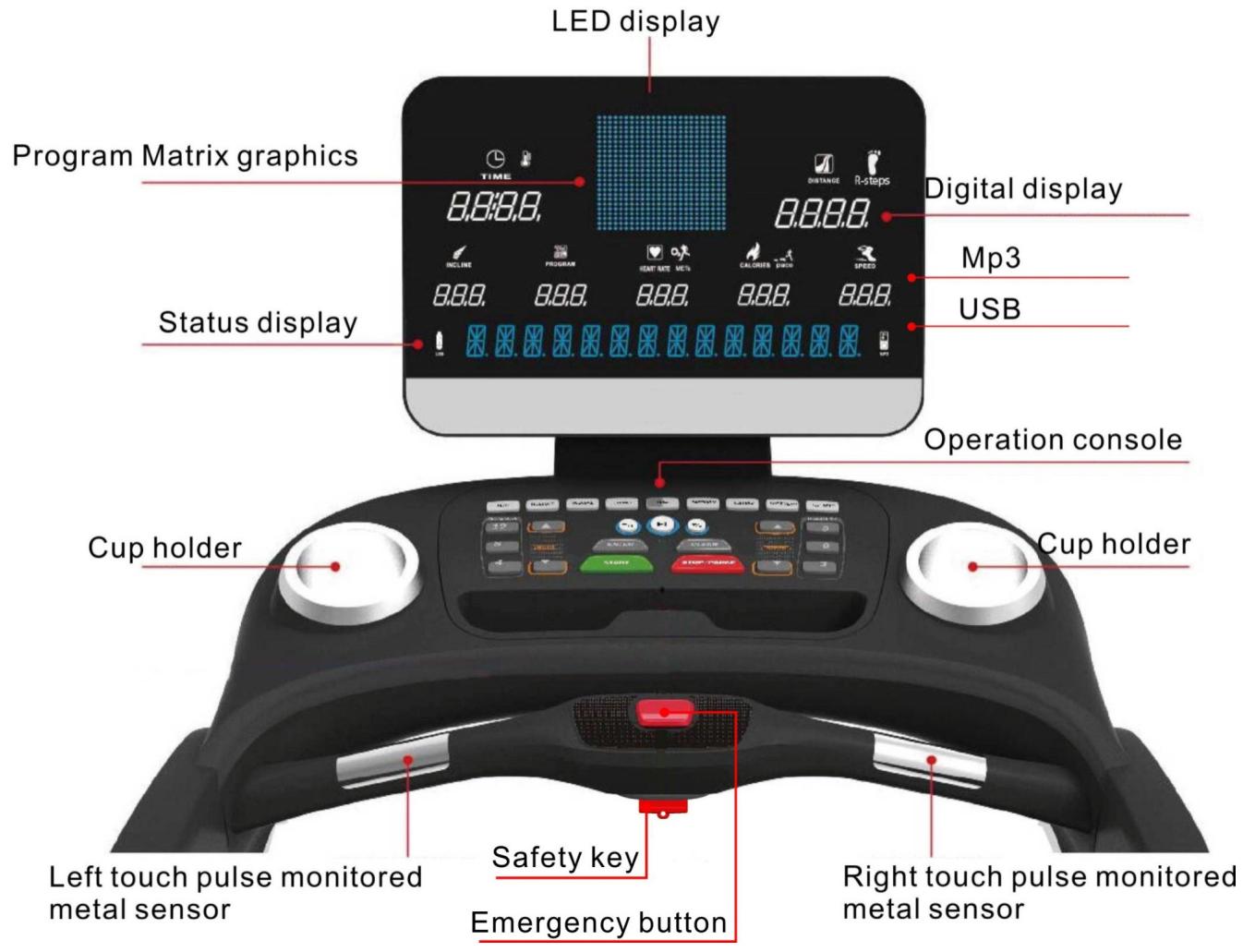
text_image
LED display Program Matrix graphics 8.8:8.8. TIME DISTANCE R-steps Digital display Mp3 USB Status display 8.8.8. 8.8.8. 8.8.8. 8.8.8. Operation console Cup holder Cup holder Left touch pulse monitored metal sensor Safety key Emergency button Right touch pulse monitored metal sensor3.2 Display screen instruction
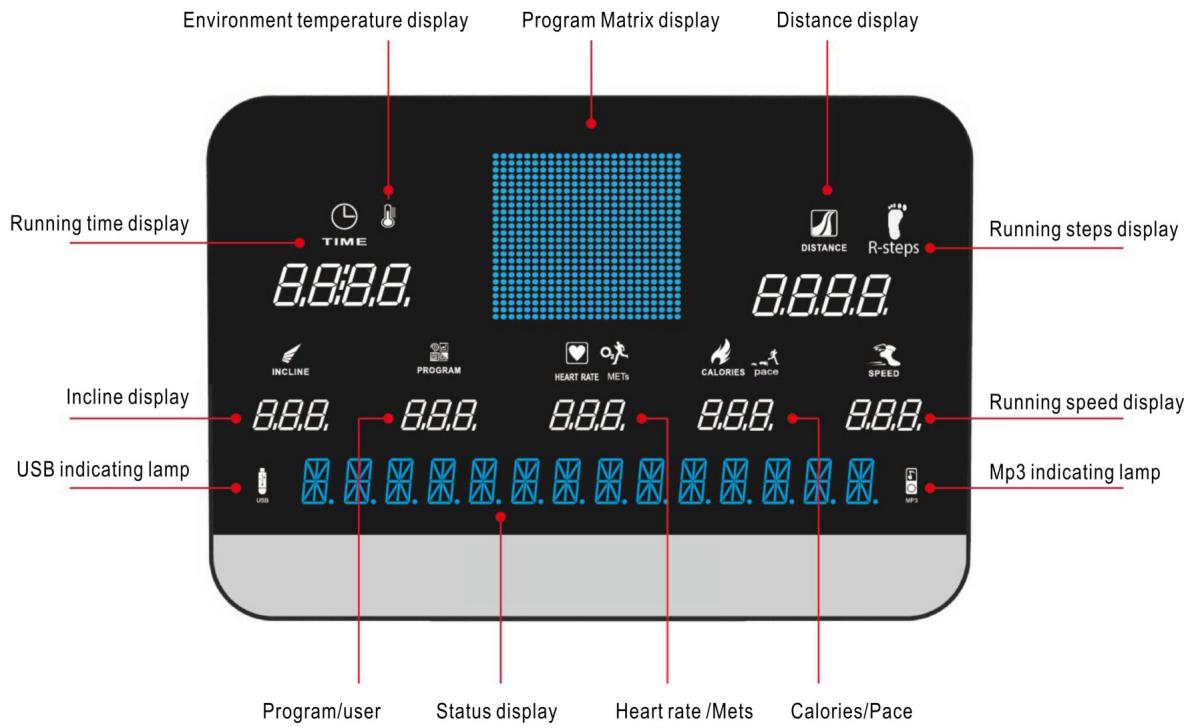
text_image
Environment temperature display Program Matrix display Distance display Running time display TIME 8.8:8.8. Distance R-steps 8.8.8.8. Running steps display INCLINE PROGRAM HEART RATE METs CALORIES pace SPEED Incline display 8.8.8. 8.8.8. 8.8.8. 8.8.8. 8.8.8. 8.8.8. 8.8.8. 8.8.8. 8.8.8. 8.8.8. 8.8.8. 8.8.8. 8.8.8. 8.8.8. 8.8.8. 8. USB indicating lamp USB Program/user Status display Heart rate /Mets Calories/Pace Mp3 indicating lamp4. Operation instruction
4.1 Treadmill operation instruction
4.1.1 Standby mode operation
Put the special power wire insert to treadmill socket, another end of power wire has been connected to the environment working voltage (environment working voltage must be in conformity with requirements of the treadmill). Connect the power, treadmill enter to standby mode, time window shows environment temperature, PROGRAM window shows setting program, other windows will show initial value "0".
4.1.2 Start treadmill operation
In standby mode, press START “START” key, treadmill start to running, each window will show current exercise data accordingly. Matrix window display current position and tracks, length of track 400 meters. At the same time, you can select speed or incline key “▲▼” to adjust speed or incline class as you like, press Pause/Stop key “PAUSE/STOP” to pause or stop running.

flowchart
graph LR
    A["START"] --> B["Treadmill Start to Running"]
    B --> C["4 8 12"]
    B --> D["3 6 9"]
    C --> E["Adjust Speed"]
    C --> F["Adjust Incline"]
    D --> G["Speed direct key :3-6-9"]
    E --> H["Treadmill will be running as the adjust speed/incline"]
    F --> H
    G --> H
    H --> I["Press pause /stop key"]
    H --> J["Pull out safety key"]
    I --> K["Treadmill stop running"]
    J --> K
4.1.3 Exercise program operation instruction
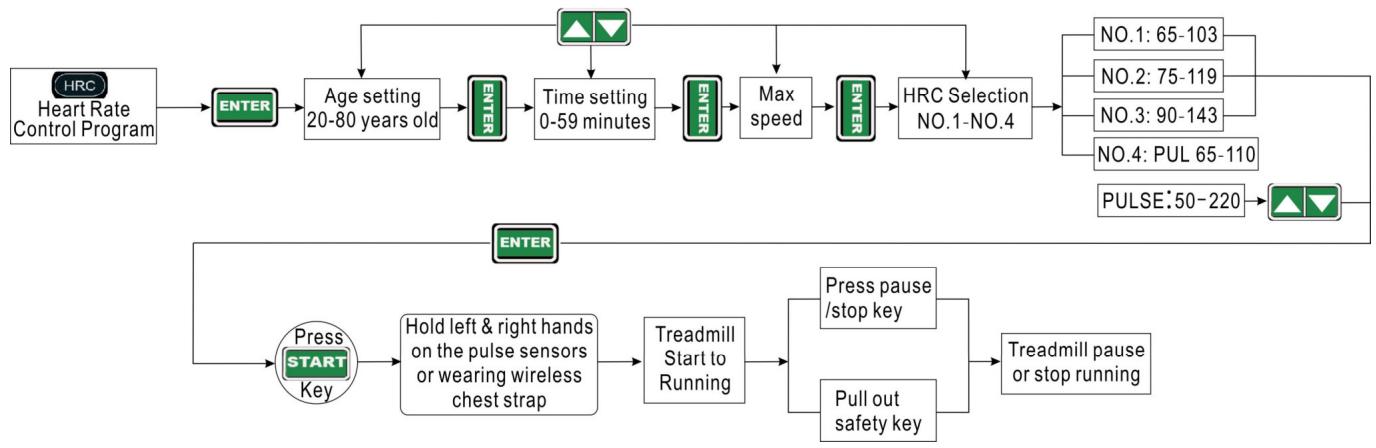
Treadmill used 9 kinds of intelligent exercise program. According to user's age, gender, weight etc, and user's exercise purpose to customize. Exerciser according to intention to choose a appropriate exercise program training. When you use intelligent program, you need to use setting key "▲▼" to proceed relevant setting, press Enter key "ENTER" to confirm; press Clear key "CLEAR" to modify setting; Press P1-P9 direct key "HRC-FIT TEST" to select intelligent program as you like, press Pause/Stop key "PAUSE/STOP" to exit when selected, then you can select another intelligent program after exit.
4.1.4 Intelligent Exercise program operation schematic diagram
P1: Heart Rate Control Program
flowchart
graph TD
    A["Heart Rate Control Program"] --> B["ENTER"]
    B --> C["Age setting 20-80 years old"]
    C --> D["ENTER"]
    D --> E["Time setting 0-59 minutes"]
    E --> F["ENTER"]
    F --> G["Max speed"]
    G --> H["ENTER"]
    H --> I["HRC Selection NO.1-NO.4"]
    I --> J["NO.1: 65-103"]
    I --> K["NO.2: 75-119"]
    I --> L["NO.3: 90-143"]
    I --> M["NO.4: PUL 65-110"]
    I --> N["PULSE:50-220"]
    N --> O["ENTER"]
    O --> P["Press START Key"]
    P --> Q["Hold left & right hands on the pulse sensors or wearing wireless chest strap"]
    Q --> R["Treadmill Start to Running"]
    R --> S["Press pause /stop key"]
    R --> T["Pull out safety key"]
    S --> U["Treadmill pause or stop running"]
    T --> U
P2: Custom and preset program
flowchart
graph TD
    A["Custom Setting Program"] --> B["ENTER"]
    B --> C["1-18 preset programs"]
    B --> D["5 custom program (USER01-05)"]
    C --> E["ENTER"]
    D --> E
    E --> F["Five kinds of Physical training program (TIME) 28-32-40-40-30"]
    E --> G["Five kinds of Physical compliance training program (TIME) 28-34-40-45-40"]
    E --> H["Two kinds of Body fit training program (TIME) 40-48"]
    E --> I["Three kinds of Physical fitness maintaining program (TIME)48-42-30"]
    E --> J["Three kinds of Physical recovery program (TIME) 26-20-16"]
    F --> K["ENTER"]
    G --> K
    H --> K
    I --> K
    J --> K
    K --> L["Press START Key"]
    L --> M["Treadmill Start to Running"]
    M --> N["Press pause /stop key"]
    M --> O["Pull out safety key"]
    N --> P["Treadmill pause or stop running"]
    O --> P
    P --> Q["Press custom to confirm and save"]
    Q --> R["Incline"]
    L --> S["Time ENTER"]
    S --> T["Speed ENTER"]
P3: Manual Program

flowchart
graph LR
    A["Manual Program"] --> B["ENTER"]
    B --> C["Δ"]
    C --> D["Time"]
    C --> E["Distance"]
    C --> F["Calories"]
    D --> G["ENTER"]
    E --> G
    F --> G
    G --> H["Press START Key"]
    H --> I["Treadmill Start to Running"]
    I --> J["Press pause /stop key"]
    I --> K["Pull out safety key"]
    J --> L["Treadmill pause or stop running"]
P4: Target Setting Program

flowchart
graph LR
    A["TARGET Target Setting Program"] --> B["ENTER"]
    B --> C["ENTER"]
    C --> D["△"]
    D --> E["METS"]
    E --> F["ENTER"]
    F --> G["Press START Key"]
    G --> H["Treadmill Start to Running"]
    H --> I["Press pause /stop key"]
    H --> J["Pull out safety key"]
    I --> K["Treadmill pause or stop running"]
    J --> K
P5: Hill Climbing Program

flowchart
graph LR
    A["Hill Climbing Program"] --> B["ENTER"]
    B --> C["Three kinds of hill climbing program"]
    C --> D["ENTER"]
    D --> E["Time 10-59 minutes"]
    E --> F["ENTER"]
    F --> G["Press START Key"]
    G --> H["Treadmill Start to Running"]
    H --> I["Press pause /stop key"]
    H --> J["Pull out safety key"]
    I --> K["Treadmill pause or stop running"]
    J --> K
P6: Fat burn Program
flowchart
graph TD
    A["FATBURN\nFat burn Program"] --> B["ENTER"]
    B --> C["Age 25-59 years old"]
    C --> D["ENTER"]
    D --> E["Three kinds of timing fat burn training program"]
    E --> F["P1: 20 minutes"]
    E --> G["P2: 30 minutes"]
    E --> H["P3: 60 minutes"]
    F --> I["ENTER"]
    G --> I
    H --> I
    I --> J["Press START\nKey"]
    J --> K["Hold left & right hands on the pulse sensors or wearing wireless chest strap"]
    K --> L["Treadmill Start to Running"]
    L --> M["Press pause /stop key"]
    L --> N["Pull out safety key"]
    M --> O["Treadmill pause or stop running"]
    N --> O
P7: Cardio Program
flowchart
graph TD
    A["Cardio Program"] --> B["ENTER"]
    B --> C["Age 25-59 years old"]
    C --> D["ENTER"]
    D --> E["Three kinds of countdown cardio raining program"]
    E --> F["RPE 1 60 minutes"]
    E --> G["RPE 2 30 minutes"]
    E --> H["RPE 3 10 minutes"]
    F --> I["ENTER"]
    G --> I
    H --> I
    I --> J["Press START Key"]
    J --> K["Treadmill Start to Running"]
    K --> L["Treadmill Start to Running"]
    L --> M["Press pause /stop key"]
    L --> N["Pull out safety key"]
    M --> O["Treadmill pause or stop running"]
    N --> O
    B --> P["Hold left & right hands on the pulse sensors or wearing wireless chest strap"]
    P --> Q["Treadmill Start to Running"]
P8: Strength Exercise Program

flowchart
graph LR
    A["Strength Exercise Program"] --> B["ENTER"]
    B --> C["Level 5:1:25 Minutes"]
    C --> D["LEVEL-4:3:48 Minutes"]
    D --> E["LEVEL-3:4:07 Minutes"]
    E --> F["LEVEL-2:4:22 Minutes"]
    F --> G["LEVEL-1:5:08 Minutes"]
    G --> H["Press START Key"]
    H --> I["Treadmill Start to Running"]
    I --> J["Press pause /stop key"]
    I --> K["Pull out safety key"]
    J --> L["Treadmill pause or stop running"]
    K --> L
P9: Fit test Program
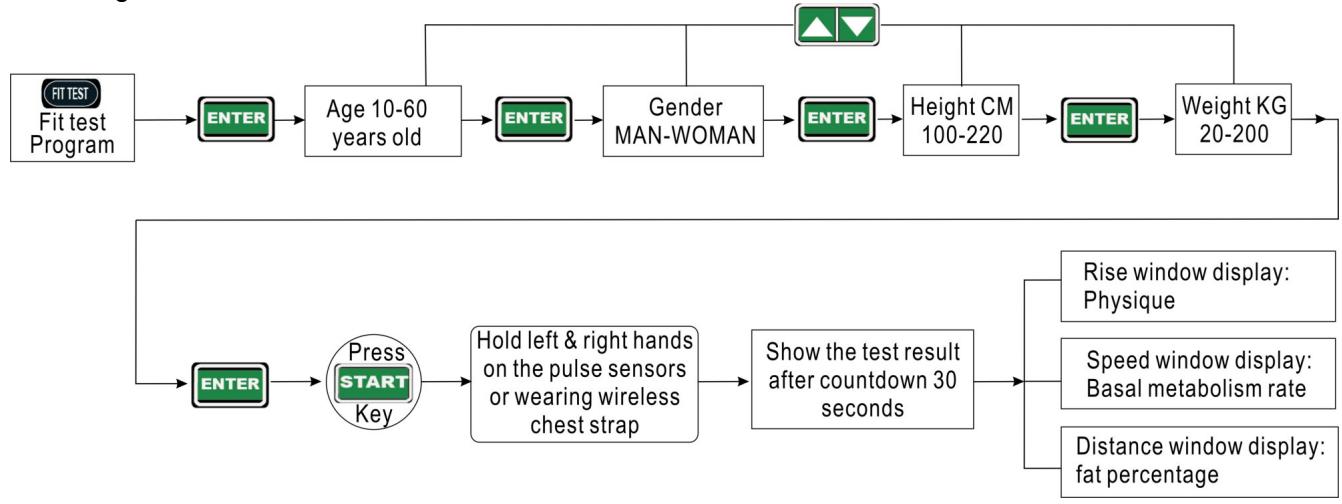
flowchart
graph TD
    A["Fit test Program"] --> B["ENTER"]
    B --> C["Age 10-60 years old"]
    C --> D["ENTER"]
    D --> E["Gender MAN-WOMAN"]
    E --> F["ENTER"]
    F --> G["Height CM 100-220"]
    G --> H["ENTER"]
    H --> I["Weight KG 20-200"]
    I --> J["△ ▼"]
    J --> K["↑"]
    K --> L["→"]
    M["Press START Key"] --> N["Hold left & right hands on the pulse sensors or wearing wireless chest strap"]
    N --> O["Show the test result after countdown 30 seconds"]
    O --> P["Rise window display: Physique"]
    O --> Q["Speed window display: Basal metabolism rate"]
    O --> R["Distance window display: fat percentage"]
4.1.5 MP3 Playing and treadmill operation

flowchart
graph LR
    A["MP3 Playing"] --> B["Insert USB"]
    A --> C["Using audio wire to connect equipment"]
    B --> D["Press Mp3 play"]
    C --> D
    D --> E["MP3 play /pause"]
    E --> F["MP3 previous song /volume down"]
    E --> G["MP3 next song /Volume up"]
    F --> H["Treadmill Start to Running"]
    G --> H
    H --> I["Press pause /stop key"]
    H --> J["Pull out safety key"]
    I --> K["Treadmill pause or stop running"]
    J --> K
Warm tip: When you use P1 Heart Rate Control Program/ P6 Fat burn Program or P7 Cardio Program, do not play MP3 at the same time to avoid audio signal interfere wireless heart rate, and must be wearing special HRC wireless heart rate chest belt. (If have)
4.1.6 Program Matrix graphics and body mass index reference table Custom program graphics
scatter
| Total running time | Speed/indine | | ------------------ | ------------ | | 0 | 0 | | 1 | 1 | | 2 | 2 | | 3 | 3 | | 4 | 4 | | 5 | 5 | | 6 | 6 | | 7 | 7 | | 8 | 8 | | 9 | 9 | | 10 | 10 | | 11 | 11 | | 12 | 12 | | 13 | 13 | | 14 | 14 | | 15 | 15 | | 16 | 16 | | 17 | 17 | | 18 | 18 | | 19 | 19 | | 20 | 20 | | 21 | 21 | | 22 | 22 | | 23 | 23 | | 24 | 24 | | 25 | 25 | | 26 | 26 | | 27 | 27 | | 28 | 28 | | 29 | 29 | | 30 | 30 | | 31 | 31 | | 32 | 32 | | 33 | 33 | | 34 | 34 | | 35 | 35 | | 36 | 36 | | 37 | 37 | | 38 | 38 | | 39 | 39 | | 40 | 40 | | 41 | 41 | | 42 | 42 | | 43 | 43 | | 44 | 44 | | 45 | 45 | | 46 | 46 | | 47 | 47 | | 48 | 48 | | 49 | 49 | | 50 | 50 | | 51 | 51 | | 52 | 52 | | 53 | 53 | | 54 | 54 | | 55 | 55 | | 56 | 56 | | 57 | 57 | | 58 | 58 | | 59 | 59 | | 60 | 60 | | 61 | 61 | | 62 | 62 | | 63 | 63 | | 64 | 64 | | 65 | 65 | | 66 | 66 | | 67 | 67 | | 68 | 68 | | 69 | 69 | | 70 | 70 | | 71 | 71 | | 72 | 72 | | 73 | 73 | | 74 | 74 | | 75 | 75 | | 76 | 76 | | 77 | 77 | | 78 | 78 | | 79 | 79 | | 80 | 80 | | 81 | 81 | | 82 | 82 | | 83 | 83 | | 84 | 84 | | 85 | 85 | | 86 | 86 | | 87 | 87 | | 88 | 88 | | 89 | 89 | | 90 | 90 | | 91 | 91 | | 92 | 92 | | 93 | 93 | | 94 | 94 | | 95 | 95 | | 96 | 96 | | 97 | 97 | | 98 | 98 | | 99 | 99 | | Note: The actual values may vary due to the random nature of the data generation. The provided values are just an example.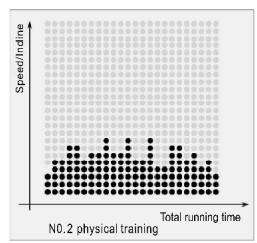
other
| Total running time | Speed/indine | | ------------------ | ------------ | | 0 | 0 | | 1 | 1 | | 2 | 2 | | 3 | 3 | | 4 | 4 | | 5 | 5 | | 6 | 6 | | 7 | 7 | | 8 | 8 | | 9 | 9 | | 10 | 10 | | 11 | 11 | | 12 | 12 | | 13 | 13 | | 14 | 14 | | 15 | 15 | | 16 | 16 | | 17 | 17 | | 18 | 18 | | 19 | 19 | | 20 | 20 | | 21 | 21 | | 22 | 22 | | 23 | 23 | | 24 | 24 | | 25 | 25 | | 26 | 26 | | 27 | 27 | | 28 | 28 | | 29 | 29 | | 30 | 30 | | 31 | 31 | | 32 | 32 | | 33 | 33 | | 34 | 34 | | 35 | 35 | | 36 | 36 | | 37 | 37 | | 38 | 38 | | 39 | 39 | | 40 | 40 | | 41 | 41 | | 42 | 42 | | 43 | 43 | | 44 | 44 | | 45 | 45 | | 46 | 46 | | 47 | 47 | | 48 | 48 | | 49 | 49 | | 50 | 50 | | 51 | 51 | | 52 | 52 | | 53 | 53 | | 54 | 54 | | 55 | 55 | | 56 | 56 | | 57 | 57 | | 58 | 58 | | 59 | 59 | | 60 | 60 | | 61 | 61 | | 62 | 62 | | 63 | 63 | | 64 | 64 | | 65 | 65 | | 66 | 66 | | 67 | 67 | | 68 | 68 | | 69 | 69 | | 70 | 70 | | 71 | 71 | | 72 | 72 | | 73 | 73 | | 74 | 74 | | 75 | 75 | | 76 | 76 | | 77 | 77 | | 78 | 78 | | 79 | 79 | | 80 | 80 | | 81 | 81 | | 82 | 82 | | 83 | 83 | | 84 | 84 | | 85 | 85 | | 86 | 86 | | 87 | 87 | | 88 | 88 | | 89 | 89 | | 90 | 90 | | 91 | 91 | | 92 | 92 | | 93 | 93 | | 94 | 94 | | 95 | 95 | | 96 | 96 | | 97 | 97 | | 98 | 98 | | 99 | 99 | | Note: The actual values may vary due to the random nature of the data generation. The provided values are just an example.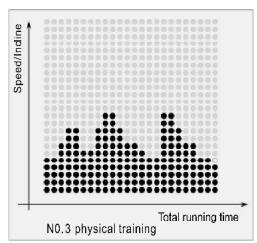
scatter
| Total running time | Speed/mcne | | ------------------ | ---------- | | 0 | 5 | | 10 | 8 | | 20 | 10 | | 30 | 7 | | 40 | 9 | | 50 | 6 | | 60 | 8 | | 70 | 10 | | 80 | 7 | | 90 | 9 | | 100 | 6 |
other
| Total running time | Speed/Incline | | ------------------ | ------------- | | 0 | 0 | | 1 | 1 | | 2 | 2 | | 3 | 3 | | 4 | 4 | | 5 | 5 | | 6 | 6 | | 7 | 7 | | 8 | 8 | | 9 | 9 | | 10 | 10 | | 11 | 11 | | 12 | 12 | | 13 | 13 | | 14 | 14 | | 15 | 15 | | 16 | 16 | | 17 | 17 | | 18 | 18 | | 19 | 19 | | 20 | 20 | | 21 | 21 | | 22 | 22 | | 23 | 23 | | 24 | 24 | | 25 | 25 | | 26 | 26 | | 27 | 27 | | 28 | 28 | | 29 | 29 | | 30 | 30 | | 31 | 31 | | 32 | 32 | | 33 | 33 | | 34 | 34 | | 35 | 35 | | 36 | 36 | | 37 | 37 | | 38 | 38 | | 39 | 39 | | 40 | 40 | | 41 | 41 | | 42 | 42 | | 43 | 43 | | 44 | 44 | | 45 | 45 | | 46 | 46 | | 47 | 47 | | 48 | 48 | | 49 | 49 | | 50 | 50 | | 51 | 51 | | 52 | 52 | | 53 | 53 | | 54 | 54 | | 55 | 55 | | 56 | 56 | | 57 | 57 | | 58 | 58 | | 59 | 59 | | 60 | 60 | | 61 | 61 | | 62 | 62 | | 63 | 63 | | 64 | 64 | | 65 | 65 | | 66 | 66 | | 67 | 67 | | 68 | 68 | | 69 | 69 | | 70 | 70 | | 71 | 71 | | 72 | 72 | | 73 | 73 | | 74 | 74 | | 75 | 75 | | 76 | 76 | | 77 | 77 | | 78 | 78 | | 79 | 79 | | 80 | 80 | | 81 | 81 | | 82 | 82 | | 83 | 83 | | 84 | 84 | | 85 | 85 | | 86 | 86 | | 87 | 87 | | 88 | 88 | | 89 | 89 | | 90 | 90 | | 91 | 91 | | 92 | 92 | | 93 | 93 | | 94 | 94 | | 95 | 95 | | 96 | 96 | | 97 | 97 | | 98 | 98 | | 99 | 99 | | Note: The actual values may vary due to the random nature of the data generation. The provided values are just an example.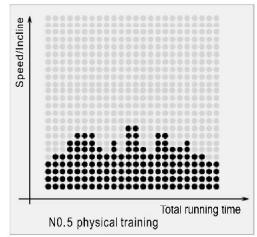
other
| Total running time | Speed/incline | | ------------------ | ------------- | | 0 | 0 | | 50 | 1 | | 100 | 2 | | 150 | 3 | | 200 | 4 | | 250 | 5 | | 300 | 6 | | 350 | 7 | | 400 | 8 | | 450 | 9 | | 500 | 10 | | 550 | 11 | | 600 | 12 | | 650 | 13 | | 700 | 14 | | 750 | 15 | | 800 | 16 | | 850 | 17 | | 900 | 18 | | 950 | 19 | | 1000 | 20 |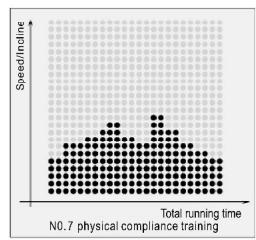
other
| Total running time | Speed/Incline | | ----------------- | ------------- | | 0 | 0 | | 1 | 1 | | 2 | 2 | | 3 | 3 | | 4 | 4 | | 5 | 5 | | 6 | 6 | | 7 | 7 | | 8 | 8 | | 9 | 9 | | 10 | 10 | | 11 | 11 | | 12 | 12 | | 13 | 13 | | 14 | 14 | | 15 | 15 | | 16 | 16 | | 17 | 17 | | 18 | 18 | | 19 | 19 | | 20 | 20 | | 21 | 21 | | 22 | 22 | | 23 | 23 | | 24 | 24 | | 25 | 25 | | 26 | 26 | | 27 | 27 | | 28 | 28 | | 29 | 29 | | 30 | 30 | | 31 | 31 | | 32 | 32 | | 33 | 33 | | 34 | 34 | | 35 | 35 | | 36 | 36 | | 37 | 37 | | 38 | 38 | | 39 | 39 | | 40 | 40 | | 41 | 41 | | 42 | 42 | | 43 | 43 | | 44 | 44 | | 45 | 45 | | 46 | 46 | | 47 | 47 | | 48 | 48 | | 49 | 49 | | 50 | 50 | | 51 | 51 | | 52 | 52 | | 53 | 53 | | 54 | 54 | | 55 | 55 | | 56 | 56 | | 57 | 57 | | 58 | 58 | | 59 | 59 | | 60 | 60 | | 61 | 61 | | 62 | 62 | | 63 | 63 | | 64 | 64 | | 65 | 65 | | 66 | 66 | | 67 | 67 | | 68 | 68 | | 69 | 69 | | 70 | 70 | | 71 | 71 | | 72 | 72 | | 73 | 73 | | 74 | 74 | | 75 | 75 | | 76 | 76 | | 77 | 77 | | 78 | 78 | | 79 | 79 | | 80 | 80 | | Note: The actual values may vary due to the random nature of the data generation. The provided values are just an example.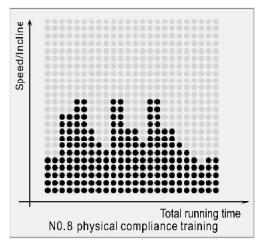
other
| Total running time | Speed/incline | | ------------------ | ------------- | | 0 | 0 | | 10 | 1 | | 20 | 2 | | 30 | 1 | | 40 | 0 | | 50 | 1 | | 60 | 2 | | 70 | 1 | | 80 | 0 | | 90 | 1 | | 100 | 2 | | 110 | 1 | | 120 | 0 | | 130 | 1 | | 140 | 2 | | 150 | 1 | | 160 | 0 | | 170 | 1 | | 180 | 2 | | 190 | 1 | | 200 | 0 | | 210 | 1 | | 220 | 2 | | 230 | 1 | | 240 | 0 | | 250 | 1 | | 260 | 2 | | 270 | 1 | | 280 | 0 | | 290 | 1 | | 300 | 2 | | 310 | 1 | | 320 | 0 | | 330 | 1 | | 340 | 2 | | 350 | 1 | | 360 | 0 | | 370 | 1 | | 380 | 2 | | 390 | 1 | | 400 | 0 | | 410 | 1 | | 420 | 2 | | 430 | 1 | | 440 | 0 | | 450 | 1 | | 460 | 2 | | 470 | 1 | | 480 | 0 | | 490 | 1 | | 500 | 2 | | 510 | 1 | | 520 | 0 | | 530 | 1 | | 540 | 2 | | 550 | 1 | | 560 | 0 | | 570 | 1 | | 580 | 2 | | 590 | 1 | | 600 | 0 | | 610 | 1 | | 620 | 2 | | 630 | 1 | | 640 | 0 | | 650 | 1 | | 660 | 2 | | 670 | 1 | | 680 | 0 | | 690 | 1 | | 700 | 2 | | 710 | 1 | | 720 | 0 | | 730 | 1 | | 740 | 2 | | 750 | 1 | | 760 | 0 | | 770 | 1 | | 780 | 2 | | 790 | 1 | | 800 | 0 | | Note: The actual values may vary due to the random nature of the data generation. The provided values are just an example.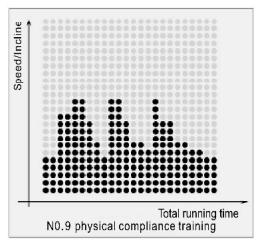
bar
| Total running time | Speed/inline | |---|---| | 1 | 0.8 | | 2 | 1.2 | | 3 | 1.5 | | 4 | 1.3 | | 5 | 1.6 | | 6 | 1.4 | | 7 | 1.7 | | 8 | 1.5 | | 9 | 1.8 | | 10 | 1.6 | | 11 | 1.9 | | 12 | 1.7 | | 13 | 2.0 | | 14 | 1.8 | | 15 | 2.1 | | 16 | 2.0 | | 17 | 2.2 | | 18 | 2.1 | | 19 | 2.3 | | 20 | 2.2 | | 21 | 2.4 | | 22 | 2.3 | | 23 | 2.5 | | 24 | 2.4 | | 25 | 2.6 | | 26 | 2.5 | | 27 | 2.7 | | 28 | 2.6 | | 29 | 2.8 | | 30 | 2.7 | | 31 | 2.9 | | 32 | 2.8 | | 33 | 3.0 | | 34 | 2.9 | | 35 | 3.1 | | 36 | 3.0 | | 37 | 3.2 | | 38 | 3.1 | | 39 | 3.3 | | 40 | 3.2 | | 41 | 3.4 | | 42 | 3.3 | | 43 | 3.5 | | 44 | 3.4 | | 45 | 3.6 | | 46 | 3.5 | | 47 | 3.7 | | 48 | 3.6 | | 49 | 3.8 | | 50 | 3.7 | | 51 | 3.9 | | 52 | 3.8 | | 53 | 4.0 | | 54 | 3.9 | | 55 | 4.1 | | 56 | 4.0 | | 57 | 4.2 | | 58 | 4.1 | | 59 | 4.3 | | 60 | 4.2 | | 61 | 4.4 | | 62 | 4.3 | | 63 | 4.5 | | 64 | 4.4 | | 65 | 4.6 | | 66 | 4.5 | | 67 | 4.7 | | 68 | 4.6 | | 69 | 4.8 | | 70 | 4.7 | | 71 | 4.9 | | 72 | 4.8 | | 73 | 5.0 | | 74 | 4.9 | | 75 | 5.1 | | 76 | 5.0 | | 77 | 5.2 | | 78 | 5.1 | | 79 | 5.3 | | 80 | 5.2 | | 81 | 5.4 | | 82 | 5.3 | | 83 | 5.5 | | 84 | 5.4 | | 85 | 5.6 | | 86 | 5.5 | | 87 | 5.7 | | 88 | 5.6 | | 89 | 5.8 | | 90 | 5.7 | | 91 | 5.9 | | 92 | 5.8 | | 93 | 6.0 | | 94 | 5.9 | | 95 | 6.1 | | 96 | 6.0 | | 97 | 6.2 | | 98 | 6.1 | | 99 | 6.3 | | N0.9 physical compliance training Total running time N0.9 physical compliance training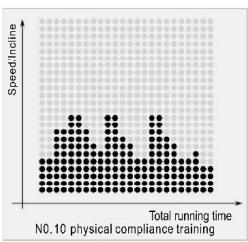
other
| Total running time | Speed/incline | | ------------------ | ------------- | | 0 | 0 | | 1 | 1 | | 2 | 2 | | 3 | 3 | | 4 | 4 | | 5 | 5 | | 6 | 6 | | 7 | 7 | | 8 | 8 | | 9 | 9 | | 10 | 10 | | 11 | 11 | | 12 | 12 | | 13 | 13 | | 14 | 14 | | 15 | 15 | | 16 | 16 | | 17 | 17 | | 18 | 18 | | 19 | 19 | | 20 | 20 | | 21 | 21 | | 22 | 22 | | 23 | 23 | | 24 | 24 | | 25 | 25 | | 26 | 26 | | 27 | 27 | | 28 | 28 | | 29 | 29 | | 30 | 30 | | 31 | 31 | | 32 | 32 | | 33 | 33 | | 34 | 34 | | 35 | 35 | | 36 | 36 | | 37 | 37 | | 38 | 38 | | 39 | 39 | | 40 | 40 | | 41 | 41 | | 42 | 42 | | 43 | 43 | | 44 | 44 | | 45 | 45 | | 46 | 46 | | 47 | 47 | | 48 | 48 | | 49 | 49 | | 50 | 50 | | 51 | 51 | | 52 | 52 | | 53 | 53 | | 54 | 54 | | 55 | 55 | | 56 | 56 | | 57 | 57 | | 58 | 58 | | 59 | 59 | | 60 | 60 | | 61 | 61 | | 62 | 62 | | 63 | 63 | | 64 | 64 | | 65 | 65 | | 66 | 66 | | 67 | 67 | | 68 | 68 | | 69 | 69 | | 70 | 70 | | 71 | 71 | | 72 | 72 | | 73 | 73 | | 74 | 74 | | 75 | 75 | | 76 | 76 | | 77 | 77 | | 78 | 78 | | 79 | 79 | | 80 | 80 | | 81 | 81 | | 82 | 82 | | 83 | 83 | | 84 | 84 | | 85 | 85 | | 86 | 86 | | 87 | 87 | | 88 | 88 | | 89 | 89 | | 90 | 90 | | Note: The actual values may vary due to the random nature of the data generation. The provided values are just an example. I have used a placeholder for this example. You would need to run the code to get the actual values from the code list. You would need to run the code to get the actual values from the code list. You would need to run the code to get the actual values from the code list. You would need to run the code to get the actual values from the code list. You would need to run the code to get the actual values from the code list. You would need to run the code to get the actual values from the code list. You would need to run the code to get the actual values from you would need to run the code.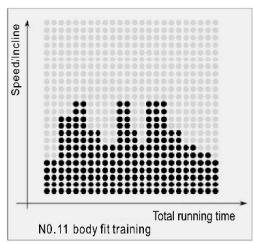
bar
| Speed/income | Total running time | | :--- | :--- | | 0 | 0 | | 1 | 1 | | 2 | 2 | | 3 | 3 | | 4 | 4 | | 5 | 5 | | 6 | 6 | | 7 | 7 | | 8 | 8 | | 9 | 9 | | 10 | 10 | | 11 | 11 | | 12 | 12 | | 13 | 13 | | 14 | 14 | | 15 | 15 | | 16 | 16 | | 17 | 17 | | 18 | 18 | | 19 | 19 | | 20 | 20 | | 21 | 21 | | 22 | 22 | | 23 | 23 | | 24 | 24 | | 25 | 25 | | 26 | 26 | | 27 | 27 | | 28 | 28 | | 29 | 29 | | 30 | 30 | | 31 | 31 | | 32 | 32 | | 33 | 33 | | 34 | 34 | | 35 | 35 | | 36 | 36 | | 37 | 37 | | 38 | 38 | | 39 | 39 | | 40 | 40 | | 41 | 41 | | 42 | 42 | | 43 | 43 | | 44 | 44 | | 45 | 45 | | 46 | 46 | | 47 | 47 | | 48 | 48 | | 49 | 49 | | 50 | 50 | | 51 | 51 | | 52 | 52 | | 53 | 53 | | 54 | 54 | | 55 | 55 | | 56 | 56 | | 57 | 57 | | 58 | 58 | | 59 | 59 | | 60 | 60 | | 61 | 61 | | 62 | 62 | | 63 | 63 | | 64 | 64 | | 65 | 65 | | 66 | 66 | | 67 | 67 | | 68 | 68 | | 69 | 69 | | 70 | 70 | | 71 | 71 | | 72 | 72 | | 73 | 73 | | 74 | 74 | | 75 | 75 | | 76 | 76 | | 77 | 77 | | 78 | 78 | | 79 | 79 | | 80 | 80 | | 81 | 81 | | 82 | 82 | | 83 | 83 | | 84 | 84 | | 85 | 85 | | 86 | 86 | | 87 | 87 | | 88 | 88 | | 89 | 89 | | 90 | 90 | | Note: The 'Total running time' values are estimated based on the visual scale of the bar heights. The 'Speed/income' values are not explicitly labeled in the chart but are inferred from the bar height. There is only one bar to be plotted as a line or a dotted line. The label 'N0.11 body fit training' appears below the bars.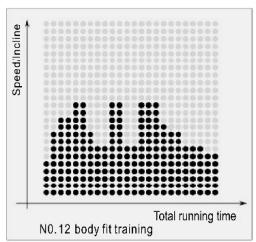
other
| Total running time | Speed/income | | ------------------ | ------------ | | 0 | 0 | | 10 | 1 | | 20 | 2 | | 30 | 3 | | 40 | 4 | | 50 | 5 | | 60 | 6 | | 70 | 7 | | 80 | 8 | | 90 | 9 | | 100 | 10 |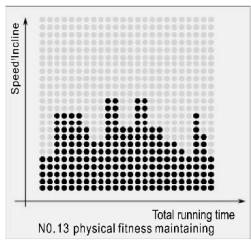
other
| Total running time | Speed/Incline | | ------------------ | -------------- | | 0 | 0 | | 1 | 1 | | 2 | 2 | | 3 | 3 | | 4 | 4 | | 5 | 5 | | 6 | 6 | | 7 | 7 | | 8 | 8 | | 9 | 9 | | 10 | 10 | | 11 | 11 | | 12 | 12 | | 13 | 13 | | 14 | 14 | | 15 | 15 | | 16 | 16 | | 17 | 17 | | 18 | 18 | | 19 | 19 | | 20 | 20 | | 21 | 21 | | 22 | 22 | | 23 | 23 | | 24 | 24 | | 25 | 25 | | 26 | 26 | | 27 | 27 | | 28 | 28 | | 29 | 29 | | 30 | 30 | | 31 | 31 | | 32 | 32 | | 33 | 33 | | 34 | 34 | | 35 | 35 | | 36 | 36 | | 37 | 37 | | 38 | 38 | | 39 | 39 | | 40 | 40 | | 41 | 41 | | 42 | 42 | | 43 | 43 | | 44 | 44 | | 45 | 45 | | 46 | 46 | | 47 | 47 | | 48 | 48 | | 49 | 49 | | 50 | 50 | | 51 | 51 | | 52 | 52 | | 53 | 53 | | 54 | 54 | | 55 | 55 | | 56 | 56 | | 57 | 57 | | 58 | 58 | | 59 | 59 | | 60 | 60 | | 61 | 61 | | 62 | 62 | | 63 | 63 | | 64 | 64 | | 65 | 65 | | 66 | 66 | | 67 | 67 | | 68 | 68 | | 69 | 69 | | 70 | 70 | | 71 | 71 | | 72 | 72 | | 73 | 73 | | 74 | 74 | | 75 | 75 | | 76 | 76 | | 77 | 77 | | 78 | 78 | | 79 | 79 | | 80 | 80 | | Note: The actual values may vary due to the random nature of the data generation. The provided values are just an example.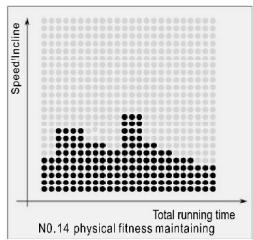
other
| Total running time | Speed/incline | | ------------------ | ------------- | | 0 | 0 | | 10 | 1 | | 20 | 2 | | 30 | 3 | | 40 | 4 | | 50 | 5 | | 60 | 6 | | 70 | 7 | | 80 | 8 | | 90 | 9 | | 100 | 10 | | 110 | 11 | | 120 | 12 | | 130 | 13 | | 140 | 14 | | 150 | 15 | | 160 | 16 | | 170 | 17 | | 180 | 18 | | 190 | 19 | | 200 | 20 | | 210 | 21 | | 220 | 22 | | 230 | 23 | | 240 | 24 | | 250 | 25 | | 260 | 26 | | 270 | 27 | | 280 | 28 | | 290 | 29 | | 300 | 30 | | 310 | 31 | | 320 | 32 | | 330 | 33 | | 340 | 34 | | 350 | 35 | | 360 | 36 | | 370 | 37 | | 380 | 38 | | 390 | 39 | | 400 | 40 | | 410 | 41 | | 420 | 42 | | 430 | 43 | | 440 | 44 | | 450 | 45 | | 460 | 46 | | 470 | 47 | | 480 | 48 | | 490 | 49 | | 500 | 50 | | 510 | 51 | | 520 | 52 | | 530 | 53 | | 540 | 54 | | 550 | 55 | | 560 | 56 | | 570 | 57 | | 580 | 58 | | 590 | 59 | | 600 | 60 | | 610 | 61 | | 620 | 62 | | 630 | 63 | | 640 | 64 | | 650 | 65 | | 660 | 66 | | 670 | 67 | | 680 | 68 | | 690 | 69 | | 700 | 70 | | 710 | 71 | | 720 | 72 | | 730 | 73 | | 740 | 74 | | 750 | 75 | | 760 | 76 | | 770 | 77 | | 780 | 78 | | 790 | 79 | | 800 | 80 | | Note: The actual values may vary due to the random nature of the data generation. The provided values are just an example. I have used the label 'N0.14 physical fitness maintaining'.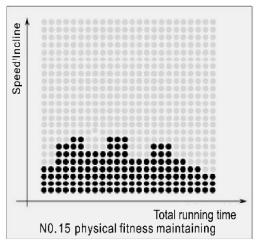
other
| Total running time | Speed/incline | | ------------------ | ------------- | | 0 | 0 | | 1 | 0.5 | | 2 | 1 | | 3 | 0.5 | | 4 | 0.5 | | 5 | 0.5 | | 6 | 0.5 | | 7 | 0.5 | | 8 | 0.5 | | 9 | 0.5 | | 10 | 0.5 | | 11 | 0.5 | | 12 | 0.5 | | 13 | 0.5 | | 14 | 0.5 | | 15 | 0.5 |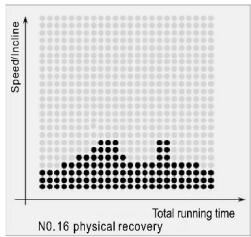
scatter
| Total running time | Speed/incline | | ------------------ | ------------- | | 0.16 | 0 |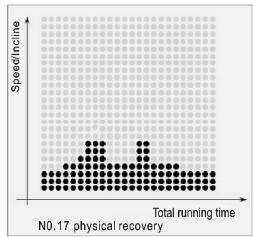
scatter
| Total running time | Speed/Incline | | ------------------ | ------------- | | 0.17 | Peak |
scatter
| Total running time | Speed/Incline | | ------------------ | ------------- | | 0.18 | 0.18 |Hill climbing:
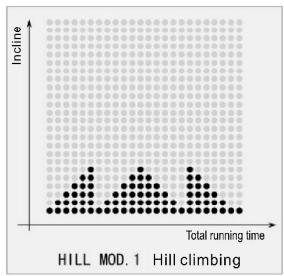
scatter
| Total running time | Incline | | ------------------ | ------- | | 0 | 0 | | 1 | 1 | | 2 | 2 | | 3 | 3 | | 4 | 4 | | 5 | 5 | | 6 | 6 | | 7 | 7 | | 8 | 8 | | 9 | 9 | | 10 | 10 | | 11 | 11 | | 12 | 12 | | 13 | 13 | | 14 | 14 | | 15 | 15 | | 16 | 16 | | 17 | 17 | | 18 | 18 | | 19 | 19 | | 20 | 20 | | 21 | 21 | | 22 | 22 | | 23 | 23 | | 24 | 24 | | 25 | 25 | | 26 | 26 | | 27 | 27 | | 28 | 28 | | 29 | 29 | | 30 | 30 | | 31 | 31 | | 32 | 32 | | 33 | 33 | | 34 | 34 | | 35 | 35 | | 36 | 36 | | 37 | 37 | | 38 | 38 | | 39 | 39 | | 40 | 40 | | 41 | 41 | | 42 | 42 | | 43 | 43 | | 44 | 44 | | 45 | 45 | | 46 | 46 | | 47 | 47 | | 48 | 48 | | 49 | 49 | | 50 | 50 | | 51 | 51 | | 52 | 52 | | 53 | 53 | | 54 | 54 | | 55 | 55 | | 56 | 56 | | 57 | 57 | | 58 | 58 | | 59 | 59 | | 60 | 60 | | 61 | 61 | | 62 | 62 | | 63 | 63 | | 64 | 64 | | 65 | 65 | | 66 | 66 | | 67 | 67 | | 68 | 68 | | 69 | 69 | | 70 | 70 | | 71 | 71 | | 72 | 72 | | 73 | 73 | | 74 | 74 | | 75 | 75 | | 76 | 76 | | 77 | 77 | | 78 | 78 | | 79 | 79 | | 80 | 80 | | 81 | 81 | | 82 | 82 | | 83 | 83 | | 84 | 84 | | 85 | 85 | | 86 | 86 | | 87 | 87 | | 88 | 88 | | 89 | 89 | | 90 | 90 | | 91 | 91 | | 92 | 92 | | 93 | 93 | | 94 | 94 | | 95 | 95 | | 96 | 96 | | 97 | 97 | | 98 | 98 | | 99 | 99 | | Note: The actual values may vary due to the random nature of the data generation. The provided values are just an example. I have used the same variable name 'HILL MOD. MOD. MOD. MOD. MOD. MOD. MOD. MOD. MOD. MOD. MOD. MOD. MOD. MOD. MOD. MOD. MOD. MOD. MOD. MOD. MOD. MOD. MOD. MOD. MOD. MOD. MOD. MOD. MOD. MOD. MOD. MOD. MOD. MOD. MOD. MOD. MOD. MOD. MOD. MOD. MOD. MOD. MOD. MOD. MOD. MOD. MOD. MOD. MOD. MOD. MOD.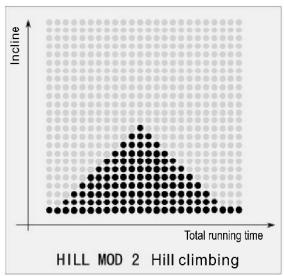
scatter
| Total running time | Incline | | ------------------ | ------- | | 0 | 0 | | 1 | 0.5 | | 2 | 1 | | 3 | 0.8 | | 4 | 0.6 | | 5 | 0.4 | | 6 | 0.3 | | 7 | 0.2 | | 8 | 0.1 | | 9 | 0.05 | | 10 | 0.02 | | 11 | 0.01 | | 12 | 0.005 | | 13 | 0.002 | | 14 | 0.001 | | 15 | 0.0005 | | 16 | 0.0002 | | 17 | 0.0001 | | 18 | 0.00005 | | 19 | 0.00002 | | 20 | 0.00001 | | 21 | 0.000005| | 22 | 0.000002| | 23 | 0.000001| | 24 | 0.0000005| | 25 | 0.0000002| | 26 | 0.0000001| | 27 | 0.00000005| | 28 | 0.00000002| | 29 | 0.00000001| | 30 | 0.000000005| | 31 | 0.000000002| | 32 | 0.000000001| | 33 | 0.0000000005| | 34 | 0.0000000002| | 35 | 0.0000000001| | 36 | 0.00000000005| | 37 | 0.00000000002| | 38 | 0.00000000001| | 39 | 0.000000000005| | 40 | 0.0 | | 41 | 1 | | 42 | 1.5 | | 43 | 2 | | 44 | 2.5 | | 45 | 3 | | 46 | 3.5 | | 47 | 4 | | 48 | 4.5 | | 49 | 5 | | 50 | 5.5 | | 51 | 6 | | 52 | 6.5 | | 53 | 7 | | 54 | 7.5 | | 55 | 8 | | 56 | 8.5 | | 57 | 9 | | 58 | 9.5 | | 59 | 1 | | 60 | 1 | | 61 | 1 | | 62 | 1 | | 63 | 1 | | 64 | 1 | | 65 | 1 | | 66 | 1 | | 67 | 1 | | 68 | 1 | | 69 | 1 | | 70 | 1 | | 71 | 1 | | 72 | 1 | | 73 | 1 | | 74 | 1 | | 75 | 1 | | 76 | 1 | | 77 | 1 | | 78 | 1 | | 79 | 1 | | 80 | 1 | | 81 | 1 | | 82 | 1 | | 83 | 1 | | 84 | 1 | | 85 | 1 | | 86 | 1 | | 87 | 1 | | 88 | 1 | | 89 | 1 | | 90 | 1 | | 91 | 1 | | 92 | 1 | | 93 | 1 | | 94 | 1 | | 95 | 1 | | 96 | 1 | | 97 | 1 | | 98 | 1 | | 99 | 1 | | Note: The actual values may vary due to the random nature of the data generation process. The provided values are just an example from the code execution.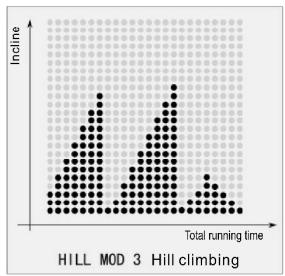
other
| Total running time | Incline | | ------------------ | ------- | | 0 | 0 | | 1 | 1 | | 2 | 2 | | 3 | 3 | | 4 | 4 | | 5 | 5 | | 6 | 6 | | 7 | 7 | | 8 | 8 | | 9 | 9 | | 10 | 10 | | 11 | 11 | | 12 | 12 | | 13 | 13 | | 14 | 14 | | 15 | 15 | | 16 | 16 | | 17 | 17 | | 18 | 18 | | 19 | 19 | | 20 | 20 | | 21 | 21 | | 22 | 22 | | 23 | 23 | | 24 | 24 | | 25 | 25 | | 26 | 26 | | 27 | 27 | | 28 | 28 | | 29 | 29 | | 30 | 30 | | 31 | 31 | | 32 | 32 | | 33 | 33 | | 34 | 34 | | 35 | 35 | | 36 | 36 | | 37 | 37 | | 38 | 38 | | 39 | 39 | | 40 | 40 | | 41 | 41 | | 42 | 42 | | 43 | 43 | | 44 | 44 | | 45 | 45 | | 46 | 46 | | 47 | 47 | | 48 | 48 | | 49 | 49 | | 50 | 50 | | 51 | 51 | | 52 | 52 | | 53 | 53 | | 54 | 54 | | 55 | 55 | | 56 | 56 | | 57 | 57 | | 58 | 58 | | 59 | 59 | | 60 | 60 | | 61 | 61 | | 62 | 62 | | 63 | 63 | | 64 | 64 | | 65 | 65 | | 66 | 66 | | 67 | 67 | | 68 | 68 | | 69 | 69 | | 70 | 70 | | 71 | 71 | | 72 | 72 | | 73 | 73 | | 74 | 74 | | 75 | 75 | | 76 | 76 | | 77 | 77 | | 78 | 78 | | 79 | 79 | | 80 | 80 | | 81 | 81 | | 82 | 82 | | 83 | 83 | | 84 | 84 | | 85 | 85 | | 86 | 86 | | 87 | 87 | | 88 | 88 | | 89 | 89 | | 90 | 90 | | 91 | 91 | | 92 | 92 | | 93 | 93 | | 94 | 94 | | 95 | 95 | | 96 | 96 | | 97 | 97 | | 98 | 98 | | 99 | 99 | | Note: The 'Total running time' is not explicitly labeled in the code. The 'Incline' values are estimated based on the provided code.Fat percentage reference table
| Age Gender\bodyshape FAT% | slim | healthy | fleshy | over wt | obese |
| body 1 | body 2 | body 3 | body 4 | body 5 | |
| Male≤30 years old | <14% | 14%-20% | 20.1%-25% | 25.1%-35% | >35% |
| Male>30 years old | <17% | 17%-23% | 23.1%-28% | 28.1%-38% | >38% |
| Female≤30 years old | <17% | 17%-24% | 24.1%-30% | 30.1%-40% | >40% |
| Female>30 years old | <20% | 20%-27% | 27.1%-33% | 33.1%-43% | >43% |
Adult body mass index(BMI) reference table
| Body condition | Thin | Realistic weight | Overweight | Mild obesity | Moderate obesity | Severely obesity |
| Body mass index(BMI) | < 18.5 | 18.5-23 | 23-25 | 25-30 | 30-35 | <35 |
5. Hand pulse test
5.1 After and before exercise, can monitor exercise's pulse of static and dynamic. The pulse will be restore after finished exercise. Exerciser hold the left and right hand touch pulse monitored metal, show pulse on screen. (Warm tip: the max pulse value do not over (220-age) when exercise. If over the max pulse, suggest to rest for 30 minutes, or reduce speed and incline. The test result is just for your exercise reference.)
6. Play music
6.1 Audio input
Using audio wire to connect treadmill audio interface 3.5mm and audio source (Mobile phone and tablet computer), the treadmill play audio from other audio source.
6.2 Local music playing
Put U disk into right USB interface to play the music from U disk.
https://cloud.carefitness.com/index.php/s/E2WD22KMNBQzERL
Maintenance and malfunction treatment
-
Clean: The surface of the treadmill should be kept clean, pull out the power cord before cleaning. You can clean the running belt and the surface of the treadmill with a soft and wet cloth, be sure not to use strong solvents.
-
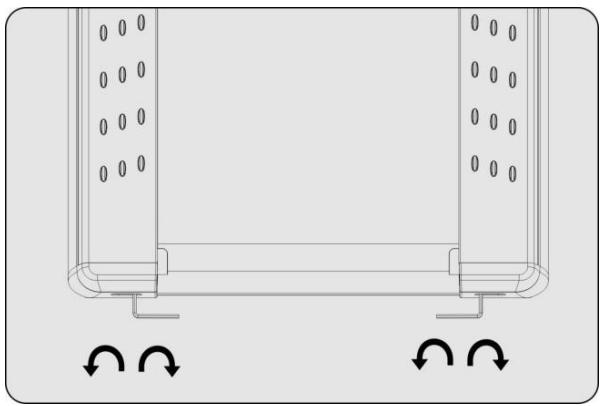
Adjustment of belt deviation: The running belt has been adjusted when manufactured; it may runs defectively after transportation and use. Turn off the treadmill before adjusting, (see figure)adjust theleft and right bolts in rear roller with wrenchIf the belt deviates to the left, clockwise rotate the left bolt. If the belt deviates to the right, counterclockwise rotate the right bolt. It is better to adjust 1/2 circle at a time. After adjustment, turn on the power and start the treadmill to check if the belt back to certer at speed of 4-5km/h, repeat the procedure if not.
natural_image
Technical diagram of a U-shaped structural component with internal holes and directional arrows indicating rotation (no text or symbols)- Adjustment of belt slip: After a certain time of using, the belt might turn to be longer or couldn't free roll.. Your should adjust the left and right bolts in rear roller clockwise at same position till it runs smoothly and freely, it is better to adjust 1/2 circle at a time .But to avoid shortening belt using lifetime, do not adjust it too tight.
4. Lubricate
When the lubricant between the running board and the running belt is used up, please lubricate the running board and adjust the running belt well.
1.1 Power off, loose the belt by using the method of belt deviation adjustment, then brush lubricant to the running board evenly.
4.2 Please do not lubricate excessively, lubricant is not the more the better, reasonable lubrication can improve the service life of the treadmill.

text_image
F F 50 cm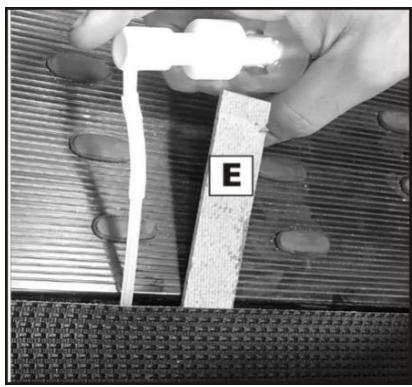
text_image
ETo order spare parts
To guarantee an efficient service, make sure you have the following items before you contact our After Sales Service:
The name or reference of the product.
The manufacturing number shown on the main chassis and on the packing box.
The number of the missing or faulty part shown on the exploded view of the product described in this manual.
After Sales Service
Email: service-uk@carefitness.com