USER MANUAL SmartProjector2 Xiaomi
User Notice 2
Safety Instructions. 2
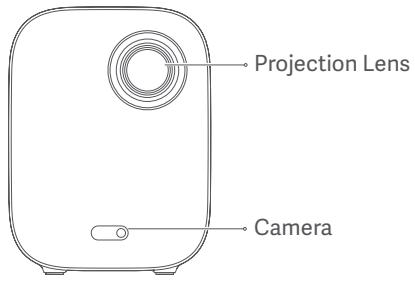
Exterior 4
Connection Ports. 5
Remote Control 6
Auto Focus. 7
Keystone Correction. 7
Frequently Used Menu. 8
Specifications 9
Troubleshooting 10
Regulatory Compliance 11
Product Certifications 12
User Notice
Thank you for choosing the Mi Smart Projector 2.
Read this manual carefully before use, and retain it for future reference.
Illustrations of product, accessories, and user interface in the user manual are for reference purposes only. Actual product and functions may vary due to product enhancements.
Safety Instructions
Before using the product, make sure to carefully read the following safety instructions.

This warning symbol informs the user that this product contains non-insulated voltage sources that can cause an electric shock. Coming into contact with any internal component may result in an electric shock.

This symbol informs the user about important handling and maintenance related information. Please read this information carefully to ensure proper use.

This symbol informs the user to be aware of high temperatures.

This symbol informs the user to avoid touching this part.

Transportation Instructions: It is recommended to transport this projector in its original or similar packaging.

Preventing Electric Shocks and Fire Hazards:
- Only use the provided genuine power adapter.
- Unplug the projector from the electrical outlet during thunderstorms or when it is not being used for a long time, so as to avoid damage caused by a power surge or lightning strike.
- Do not place any flammable objects near this projector so as to avoid fire.
- Do not block any of the vents as this may cause heat build-up inside the projector, and possibly result in a fire.
- Do not block the lens when the projector is turned on. Any object placed close to the lens may get very hot and/or deformed, and may even cause a fire.

Safety Precautions:
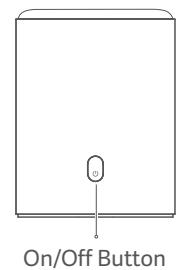
(Press to turn on)
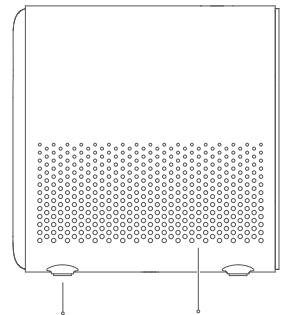
Rubber Feet Air Inlet

Caution
- The air vents allow the air to exchange internally and externally. Do not place any objects within 20~cm of the air vents.
- Do not look directly into the lens to avoid eye damage as the projector will emit strong light during working.
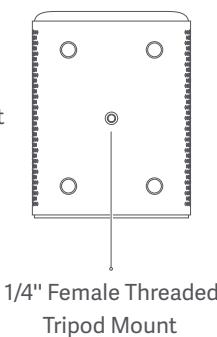
- If you plan to mount the projector on a suspended ceiling, make sure to select the right screws and bracket for it.
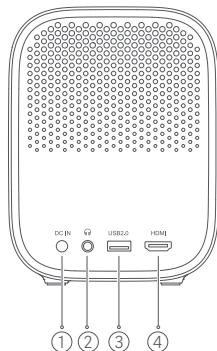
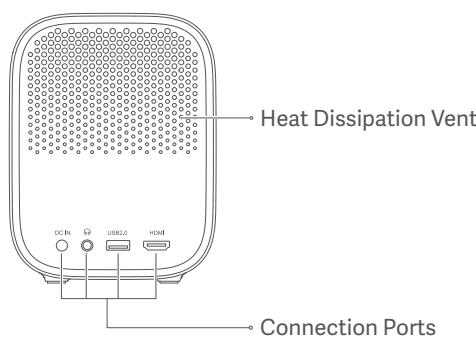
① DCIN
②
③ USB2.0
④ HDMI
-HDMI input port.


Note:
When the projector is off, press to turn on.
When the projector is on, press to open the menu. Then select the right option to turn the projector off.
Google Assistant: Press the Assistant button on your remote to talk to Google Assistant.
Navigation Pad: Move to up, down, left, or right, then press the middle to confirm.
APP:Access the app interface.
Return: Return to the previous menu.
Home: Return to the home screen.
+ Pairing the Remote Control:
Hold the remote control close to the projector within a distance of 20~cm then simultaneously press the app button and the home button to pair.
NETFLIX
NETFLIX: Access the Netflix App.
LIVE
LIVE: Access the Live Channel.

Volume Button: + Increase the volume; - Decrease the volume.
- Pay attention to the positive and negative poles when installing batteries in the remote control.
- Dispos of, or recycle the battery in accordance with local laws and regulations of the country or region it is used in.
- It is recommended that the distance between the remote control and the projector is no more than 5 meters.
- The illustration of the remote control is for reference purposes only. Actual products and functions may vary due to the regions they are used in.
Auto Focus
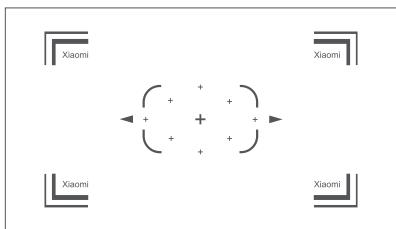
Go to Settings > Projector > Focus and select Execute Focus, the screen will focus and once it is finished you can press the left or right button on the remote control for further fine-tuning.
Go to Settings > Projector > Focus and select the Auto Focus switch, when it is enabled, moving the projector will automatically trigger the screen to focus.
Keystone Correction
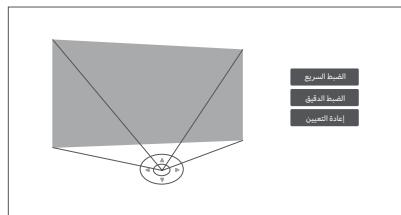
Go to Settings > Projector > Keystone Correction > Keystone Correction, and use the up and down buttons to select Quick Adjustment, Fine Tuning, and Reset, then press the OK button to enter the correction mode.
If the projector is moved, it will start automatic keystone correction and the projected image will be adjusted automatically.
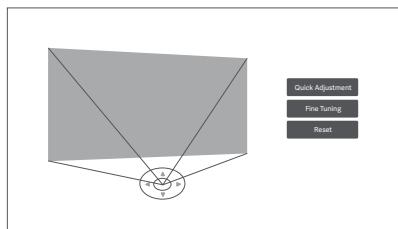
Note: Go to Settings > Projector > Keystone Correction, to configure Auto Keystone. Auto Keystone is enabled by default.
Open the app, then select Launch Board. The frequently used functions are displayed on this page.
Select the User Manual to see the detailed instructions for the users.
Common Functions

Execute Focus

Keystone Correction

Bluetooth Speaker

File Manager
System Apps

Settings

Inputs

User Manual

Note:
The menu page will be updated from time to time, and the current app version shall prevail.
Specifications
| Basic Information | Name | Mi Smart Projector 2 |
| Model | XMTYY02FMGL |
| Item Dimensions | 115x150x150 mm |
| Net Weight | 1.3 kg |
| Electrical Specifications | Power Consumption | Rated Power < 65 W; Standby Power < 0.5 W |
| Rated Input | External Adapter, 19 V = 3.42 A |
| Optical Parameters | Display Technology | LED Light Source with DLP technology |
| Standard Resolution | 1920×1080P |
| Projection Parameters | Projection ratio (TR) | 1.2:1 |
| Screen Size | 60" to 120" |
| Lens Focus | Auto Focus |
| Keystone Correction | Omni-directional auto-keystone correction |
| System | Built-in Storage | 2 GB DDR3 / 16 GB eMMC |
| Operating System | Android TV |
| Bluetooth | Bluetooth 5.0/BLE |
| Wireless Connectivity | Wi-Fi IEEE 802.11 a/b/g/n/ac 2.4GHz/5GHz |
| Audio | Audio Effects | Dolby Audio + DTS-HD |
| Speaker | 2 x 5 W Full-range |
| Others | Noise Level | ≤ 28 dB(A) viewing mode @ ambient temperature of 25 °C |
| Storage Temperature/Humidity | -20 °C to 55 °C / ≤ 90% |
| Operating Temperature/Humidity | 0 °C to 40 °C / 20%-80% |
Troubleshooting
| Fault | Solution |
| No projected image | Turn off the projector and disconnect from the power, then plug in the power cord and turn on the projector. |
| Android system crashes | Turn off the projector and disconnect from the power, then plug in the power cord and turn on the projector. |
| Screen display error | Turn off the projector and disconnect from the power, then plug in the power cord and turn on the projector. |
| Remote control is missing or not paired and the projector cannot be turned on remotely. | Turn off the projector and disconnect from the power. Wait for five minutes, then plug in the power cord and turn on the projector. After the projector has been restarted, pair the remote control again. |
| If the projector overheats, it will automatically turn off. | Please remove any obstacles from the air inlets and outlets so as to ensure a smooth airflow through the projector. Follow the instructions above to restart the projector. |
| Other internal system errors | Please contact a qualified technician to service the device, or return the projector to the after-sales department. |

All products bearing this symbol are waste electrical and electronic equipment (WEEE as in directive 2012/19/EU) which should not be mixed with unsorted household waste. Instead, you should protect human health and the environment by handing over your waste equipment to a designated collection point for the recycling of waste electrical and electronic equipment, appointed by the government or local authorities. Correct disposal and recycling will help prevent potential negative consequences to the environment and human health. Please contact the installer or local authorities for more information about the location as well as terms and conditions of such collection points.

Hereby, [Formovie (Chongqing) Innovative Technology Co., Ltd.] declares that the radio equipment type [Mi Smart Projector 2/ XMTYY02FMGL] is in compliance with Directive 2014/53/EU. The full text of the EU declaration of conformity is available at the following internet address: http://www.mi.com/global/service/support/declaration.html
This device is restricted to indoor use when operating in the 5150 to 5350 MHz frequency range.
Operation Frequency: 2.4 GHz-2.4835 GHz (for Bluetooth)
Maximum RF Power Output: < 10mW (for Bluetooth)
Operation Frequency: 2.4 GHz-2.4835 GHz (for Wi-Fi 2.4 GHz)
Maximum RF Power Output: < 100mW (for Wi-Fi 2.4 GHz)
Operation Frequency: 5.15 GHz-5.35 GHz and 5.47 GHz-5.725 GHz (for Wi-Fi 5 GHz)
Maximum RF Power Output: < 200mW (for Wi-Fi 5 GHz)

Note: Under normal use of condition, this equipment should be kept a separation distance of at least 20 cm between the antenna and the body of the user.
The product complies with "RG1 IEC 62471-5:2015".

Caution:
- Risk of explosion if the battery is replaced by an incorrect type.
- Disposal of a battery into fire or a hot oven, or mechanically crushing or cutting of a battery, that can result in an explosion.
- Leaving a battery in an extremely high temperature surrounding environment that can result in an explosion or the leakage of flammable liquid or gas.
- A battery subjected to extremely low air pressure that may result in an explosion or the leakage of flammable liquid or gas.
dtshD
For DTS patents, see http://patents.dts.com. Manufactured under license from DTS, Inc. (for companies headquartered in the U.S./Japan/Taiwan) or under license from DTS Licensing Limited (for all other companies). DTS, DTS-HD Master Audio, DTS-HD, VirtualX, and the DTS-HD logo are registered trademarks or trademarks of DTS, Inc. in the United States and other countries. © 2020 DTS, Inc. ALL RIGHTS RESERVED.
Dolby Audio
Manufactured under license from Dolby Laboratories. Dolby, Dolby Audio, and the double-D symbol are trademarks of Dolby Laboratories Licensing Corporation.

Bluetooth
The Bluetooth® word mark and logos are registered trademarks owned by Bluetooth SIG, Inc. and any use of such marks by [Xiaomi Inc.] is under license. Other trademarks and trade names are those of their respective owners.
HOMI™
HIGH-DEFINITION MULTIMEDIA INTERFACE
The terms HDMI, HDMI High-Definition Multimedia Interface, and the HDMI Logo are trademarks or registered trademarks of HDMI Licensing Administrator, Inc.
EAC
Manufactured for: Xiaomi Communications Co., Ltd.
Manufactured by: Formovie (Chongqing) Innovative Technology Co., Ltd.
Address: 4-401, #2 Longgang Road, Guojiatuo Area, Jiangbei District, Chongqing, China
For further information, please go to www.mi.com
Production Date: See packaging
Made in China
Inhalt
The Bluetooth® word mark and logos are registered trademarks owned by Bluetooth SIG, Inc. and any use of such marks by [Xiaomi Inc.] is under license. Other trademarks and trade names are those of their respective owners.
HOMI™
HIGH-DEFINITION MULTIMEDIA INTERFACE
The terms HDMI, HDMI High-Definition Multimedia Interface, and the HDMI Logo are trademarks or registered trademarks of HDMI Licensing Administrator, Inc.
EAC
Adresse: 4-401, #2 Longgang Road, Guojiatuo Area, Jiangbei District, Chongqing, China
http://www.mi.com/global/service/support/declaration.html
Indirizzo: 4-401, #2 Longgang Road, Guojiatuo Area, Jiangbei District, Chongqing, China
Fabricant: Formovie (Chongqing) Innovative Technology Co., Ltd.
Adresse: 4-401, #2 Longgang Road, Guojiatuo Area, Jiangbei District, Chongqing, China
Navigation Pad: Move to up, down, left, or right, then press the middle to confirm.

Dirección: 4-401, #2 Longgang Road, Guojiatuo Area, Jiangbei District, Chongqing, China
VCTOHNK BXDHOFO CARMHana

Pykoobocbo nonb3osatena
PpmeHne. CpaHnca MeHIO ByeT BpeM O T BpeMeHn OOBbIaTbc, n HeDaBHe R BpcN pnpIoKeHn 6yTeT OTo6paKaTaC4 Haue.
PnObUHbXyCNOBuaHmEeMyaHTeHHo3OBaHnMaTeHO6OpuBaHnI TeIOM nObl3OBaTeJIaONKHO cooxpaTbcpaCCTOaHne He MeHee 20 cm.
IpoodyKT COOTBETCTByeT CTaHdapTy RG1 IEC 62471-5:2015.

Приимейсане.
- Ecni yctaHOBntb akKymyIaTOp HnpeBaBnBHorO Tnna, cyuIeCTByeT ONaCHocb B3pyBa.
- He n36abIyTeB ot 6bapen cKngar ee n He nomeuai Te ee B ropaU yDxOBky, He noDBeprAte MexaHueckomy pa3pyseHIO n He pa3pezaiTe 6bapen, 3TO MOKET npBcEtn K B3pbyB.
- He octablanie 6aataeio BOKpykaioue cpee c ouheb BbICOKoTemnpaTypoi, KOtopa MoKET npBecTN K B3pBly INy uTeKc roIoue JxNkocTn INI rA3a.
- He noDBepraIe 6aTaapeIO BO3deCTBnIO Upe3BbUaHIO Hm3KOrO daBLeHna BO3dyxa, cTO MOKeT pNBeCTu K b3pyIBy IIn yTeueK rOpOye JxNkOcSTn IIn ra3a.
dtshD
IpoMo600e o nateHax TDS Cm. ha86-caieh'at http:// patents.dts.tps.com.
VioToBAnEO no nuHcEHN KOMAMHIN DTS, Inc. (buaKomAHN co uOta6- kAHTnPOB a CUA/ROHOH/TaBOHAN) IuN no nuHcEHN KOMAMHIN DTS
Licensing Limited (due cctobHxKoCUMAMHIN), DTS, DTH+HD Master Audio, DTS-HD, Virtual:X and ToTOn 175D HADRIOCT 3AEBPCTIRPOBAMHHaTOBAPHMH INZAKAMM IINI TOBAPHMH INZAKAMM KOIMANHIN DTS, INC. b CUA i dpyrnx tchapax.2020 DTS, INC. BCE PIPA 3AUUILHEUJI.
Dolby Audio
IrotoBenoNo no mueHEni Dolby Laboratories.Dolby, Dolby Audio n cHMBoB
IeBOHOrO ^ RbALIOCTCRTObAHBMn 3HKAMKOMTAMHIN Laboratories
Licensing Corporation.

Bluetooth
Слобочьй снанк и логотима Буltotrost® вларок
загерсгтраворathимы Товаротам вларок,
приhalдakшимыBluetooth SIG, Inc.,источько
[ Xiaomi, Inc.] по л�д�им,在 Дураху талбогдakшима вларок
humeMHOBANHAR BILAKTOK COбсвеностькь соовететсьдух�ш:
надларож.
Туларок
Туларок
Туларок
Туларок
Туларок
Туларок
Туларок
Туларок
Туларок
Туларок
Туларок
Туларок
Туларок
Туларок
Туларок
Туларок
Туларок
Тулаг
Тулаг
Тулаг
Тулаг
Тулаг
Тулаг
Тулаг
Тулаг
Тулаг
Тулаг
Тулаг
Тулаг
Тулаг
Тулаг
Тулаг
Тулаг
Тулаг
Тулаг
Тулаг
Тулаг
Тулag
Тулаг
Тулаг
Тулаг
Тулаг
Тулаг
Тулаг
Тулаг
Тулаг
Тулаг
Тулаг
Тулаг
Тулаг
Тулаг
Тулаг
Тулаг
Тулаг
Тулаг
Тулаг
Тулаг
Тулags
Тулags
Тулags
Тулags
Тулags
Тулags
Тулags
Тулags
Тулags
Тулags
Тулags
Тулags
Тулags
Тулags
Тулags
Тулags
Тулags
Тулags
Тулags
Тулags
Тулages
Тулags
Тулags
Тулags
Тулags
Тулags
Тулags
Тулags
Тулags
Тулags
Тулags
Тулags
Тулags
Тулags
Тулags
Тулags
Тулags
Тулags
Тулags
Тулags
Тулagens
Нэггггггггггггггггггггg
HOMI™
Tepimbhu HDMI n HDMI High-Definition Multimedia Interface, a taeak nooritn HDMI RAITOTC ToBAPmHn 3nakamni n 3apertcrntprOBOAHMN ToBAPmHn 3nakamc konomahu HDMI Licensing Administrator, Inc.

Изговлени: Xiaomi Communications Co., Ltd.
Изговпель: Formovie (Chongqing) Innovative Technology Co., Ltd.
Aдес: 4-401, #2 Longgang Road, Guojiatuo Area, Jiangbei District, Chongqing, Kütai
YTO6bI NONYHTB DONOHLHNTeHBHyIO INΦOpMaunIO, NOcETnTe caT www.mi.com
ДаотиЗТ罗TOВLEнHЯ:СМ.НaупakOBKe
CdelaHO B Kntae
Inhoudsopgave
Bluetooth-laidspeakers

Bestandsbeheer
Systeem apps

Instelfingen

lingangsbron

Adres: 4-401, #2 Longgang Road, Guojiatuo Area, Jiangbei District, Chongqing, China
Preventing Electric Shocks and Fire Hazards:
Endereço: 4-401, #2 Longgang Road, Guojiatuo Area, Jiangbei District, Chongqing, China
Adres: 4-401, #2 Longgang Road, Guojiatuo Area, Jiangbei District, Chongqing, China
Wiecej informaci: www.mi.com
http://www.mi.com/global/service/support/declaration.html表从确在能数有
Corporation of the E. coli
の認証協議:Xiaomi Communications Co., Ltd.
Jaceusz Uchek: Formovie (Chongqing) Innovative Technology Co., Ltd.
主社:4-401,#2 Longgang Road, Guojiatuo Area, Jiangbei District, Chongqing, China
a a a a a a a a a a a a a a a a a a a a a a a a a a a a a a a a a a a
aLgS aos o ggs Jg S 1s bS 0gso sds

pIulw pIiwl 1aI aIgloell oIe Ie Jy jy. aIalll g Uglly Aaleall aoall clogell npil lio

ailll aoljolll lgl jn jg jy jy jy jy wall jorll iiae

cJzll liadawolo wixiy jy prsswall joiJI liid poJ

Uuulwlo gaiolllagc ggiigjgllliaJaiyog:JailllaLoi

- aB aJg2aill yIaII aIbll Ig2o sgpsxuW
alggl g aelll oj e jolll lgl agaol al yloie g aedg aol
g 1000000000000000000000000000000000000000000
g 1 g 2 g 3 g 4 g 5 g 6 g 7 g 8 g 9 g 10
g g g g g g g g g g g g g g g g g g g g g g g g g g g g
.1g 1 g aalll aalll g aalall lalalll no alalll g alal alal alal alal alal
pdsolg.qljxllglxai<qljxllglxai< jxggllll< lalllll lall lall lall lall lall lall lall lall lall lall lall lall lall lall lall lall lall lall lall lall lall lall lall lall lall lall lall lall lall lall lall lall lall lalll
aagall bdo aipw g lalal alrnnnnaaaiy i sssssg jgsjg jai 13! .glalal gkgrgll ola aoggr
jcbbcl.1yjxjlll< jgjxjlll < 1111111111111111111111111111111
gagwogjzsslllglzjyjzjlll< gagjzjgjjll< aallll jg j 10aajllg jll j 10aajllg j 10aajllg j 10aajll
yilalllg jllg jlll < gkggg|< |d|lll lalld 1
aaiol oia 8o jssio aogayaoaossll aillgll oj yu jaiwailaggl jzai
aalaaalllalalalol
asjwioiibg9

J


gigly

pIaJI cJIaJI


1122

pustwall
ab > 10

.1111 1111 1111 1111 1111 1111 1111
| Mi بورکنوردی 2 | الام | العربية |
| XMTYY02FMGL | الطلاين |
| ملا 150 × 150 × 115 | اللهالن\Cت |
| الجف †3 | الجف †3 |
| \bgl 0.5 > بورکنوردی 65 > بورکنوردی 84b lbp bgl 65 > بورکنوردی 84b lbp lbp | الهشامالعَلاني |
| \( 19\ \mathrm{V} = 3.42\ \mathrm{A}\ \mathrm{a}\ \mathrm{g}\ \mathrm{d}\ \mathrm{l}\ \mathrm{c}\ \mathrm{d}\ \mathrm{f}\ \mathrm{g}\ \mathrm{h}\ \mathrm{i}\ \mathrm{j}\ \mathrm{k}\ \mathrm{l}\ \mathrm{a}\ \mathrm{d}\ \mathrm{f}\ \mathrm{g}\ \mathrm{h}\ \mathrm{i}\ \mathrm{k}\ \mathrm{l}\ \mathrm{a}\ \mathrm{d}\ \mathrm{f}\ \mathrm{g}\ \mathrm{h}\ \mathrm{i}\ \mathrm{a}\ \mathrm{d}\ \mathrm{f}\ \mathrm{g}\ \mathrm{h}\ \mathrm{i}\ \mathrm{a}\ \mathrm{d}\ \mathrm{f}\ \mathrm{g}\ \mathrm{h}\ \mathrm{i}\ \mathrm{a}\ \mathrm{d}\ \mathrm{f}\ \mathrm{g}\ \mathrm{h}\ \mathrm{i}\ \mathrm{a}\ \mathrm{d}\ \text{العربية} \) | العربية | |
| DLP مصير LED δعس EMPير | العربية الحرفية | العربية |
| p1080 × 1920 | العربية الحرفية |
| 1:1.2 | (TR) بورکنوردی 2 | بورکنوردی |
| \( b\ddot{\mathbf{a}}\ddot{\mathbf{a}}\ddot{\mathbf{a}}\ddot{\mathbf{a}}\ddot{\mathbf{a}}\ddot{\mathbf{a}}\ddot{\mathbf{a}}\ddot{\mathbf{a}}\ddot{\mathbf{a}}\ddot{\mathbf{a}}\ddot{\mathbf{a}}\ddot{\mathbf{a}} \) | \( b\ddot{\mathbf{a}}\ddot{\mathbf{a}}\ddot{\mathbf{a}}\ddot{\mathbf{a}}\ddot{\mathbf{a}}\ddot{\mathbf{a}}\ddot{\mathbf{a}}\ddot{\mathbf{a}}\ddot{\mathbf{a}}\ddot{\mathbf{a}}\ddot{\mathbf{\ell}}\ddot{\mathbf{a}}\ddot{\mathbf{a}}\ddot{\mathbf{a}}\ddot{\mathbf{a}}\ddot{\mathbf{a}}\ddot{\mathbf{a}}\ddot{\mathbf{a}}\ddot{\mathbf{a}}\ddot{\mathbf{a}}\ddot{\mathbf{a}}\ddot{\mathbf{a}}, \) |
| \( b\ddot{\mathbf{a}}\ddot{\mathbf{a}}\ddot{\mathbf{a}}\ddot{\mathbf{a}}\ddot{\mathbf{a}}\ddot{\mathbf{a}}\ddot{\mathbf{a}}\ddot{\mathbf{a}}\ddot{\mathbf{a}}\ddot{\mathbf{a}}\ddot{\ddot{\mathbf{a}}}\ddot{\ddot{\mathbf{a}}}\ddot{\ddot{\mathbf{a}}}\ddot{\ddot{\mathbf{a}}}\ddot{\ddot{\mathbf{a}}}\ddot{\ddot{\mathbf{a}}}\ddot{\ddot{\mathbf{a}}}\ddot{\ddot{\mathbf{a}}}\ddot{\ddot{\mathbf{a}}}\ddot{\mathbf{a}}\ddot{\ddot{\mathbf{a}}}\ddot{\ddot{\mathbf{a}}}\ddot{\ddot{\mathbf{a}}}\ddot{\ddot{\mathbf{a}}}\ddot{\ddot{\mathbf{a}}}\ddot{\ddot{\mathbf{a}}}\ddot{\ddot{\mathbf{a}}}\ddot{\ddot{\ddot{\mathbf{a}}}}\ddot{\ddot{\mathbf{a}}}\ddot{\ddot{\mathbf{a}}}\ddot{\ddot{\mathbf{a}}}\ddot{\ddot{\mathbf{a}}}\ddot{\ddot{\mathbf{a}}}\ddot{\ddot{\mathbf{a}}}\ddot{\ddot{\mathbf{a}}}\ddot{\ddot{\mathbf{a}}}\ddOT\ddot{\ddot{\mathbf{a}}}\ddot{\ddot{\mathbf{a}}}\ddot{\ddot{\mathbf{a}}}\ddot{\ddot{\mathbf{a}}}\ddot{\ddot{\mathbf{a}}}\ddot{\ddot{\mathbf{a}}}\ddot{\ddot{\mathbf{a}}}\ddot{\ddot{\mathbf{a}}}\ddot{a}\ddot{\ddot{\mathbf{a}}}\ddot{\ddot{\mathbf{a}}}\ddot{\ddot{\mathbf{a}}}\ddot{\ddot{\mathbf{a}}}\ddot{\ddot{\mathbf{a}}}\ddot{\ddot{\mathbf{a}}}\ddot{\ddot{\mathbf{a}}}\ddot{\ddot{\mathbf{a}}}\ddot{b}\ddot{\ddot{\mathbf{a}}} \) | |
| eMMC جبيبيبيبيبيبيبيبيبيبيبيبيبيبيبيبيبيبيبيبيبيبيبيبيبيبيبيبيبيبيبيبيبيبيبيبيبيبيبيبيبيبيبيبيبيبيبيبيبيبيبيبيبيبيبيبيبيبيبيبيبيبيبيبيبيبيبيبيبيبيبيبيبيبيبيبيبيبيبيبيبيبيبيبيبيبيبيبيبيبيبيبيبيبيبيبيبيبيبيبيÃ | \( بورکنوردی 2 \) | \( بورکنوردی 2 \) |
| Android TV | \( بورکنوردی 2 \) |
| BLE/5.0 بورکن ldl | \( بورکن ldl \) |
| \( b\ddot{\mathbf{a}}\ddot{\mathbf{a}}\ddot{\mathbf{a}}\ddot{\mathbf{a}}\ddot{\mathbf{a}}\ddot{\mathbf{a}}\ddot{\mathbf{a}}\ddot{\mathbf{a}}\ddot{\mathbf{a}}\ddot{\mathbf{a}}\mathbf{l}\ddot{\mathbf{b}}\ddot{\mathbf{a}}\ddot{\mathbf{b}}\ddot{\mathbf{b}}\ddot{\mathbf{b}}\ddot{\mathbf{b}}\ddot{\mathbf{b}}\ddot{\mathbf{b}}\ddot{\mathbf{b}}\ddot{\mathbf{b}}\ddot{\mathbf{b}}\ddot{\mathbf{b}}\ddot{\mathbf{b}}\ddot{\mathbf{b}}, \) | \( b\ddot{\mathbf{a}}\ddot{\mathbf{a}}\ddot{\mathbf{a}}\ddot{\mathbf{a}}\ddot{\mathbf{a}}\ddot{\mathbf{a}}\ddot{\mathbf{a}}\ddot{\mathbf{a}}\ddot{\mathbf{a}}\ddot{\mathbf{a}}\ddot{\ddot{b}}\ddot{\mathbf{b}}\ddot{\mathbf{b}}\ddot{\mathbf{b}}\ddot{\mathbf{b}}\ddot{\mathbf{b}}\ddot{\mathbf{b}}\ddot{\mathbf{b}}\ddot{\mathbf{b}}\ddot{\mathbf{b}}\ddot{\mathbf{b}}\ddot{\mathbf{\ell}}\ddot{\mathbf{b}}\ddot{\mathbf{b}}\ddot{\mathbf{b}}\ddot{\mathbf{b}}\ddot{\mathbf{b}}\ddot{\mathbf{b}}\ddot{\mathbf{b}}\ddot{\mathbf{b}}\ddot{\mathbf{b}}\ddot{\mathbf{b}}\ddot{\mathbf{b}},{\mathrm{~d}}\ddot{\mathbf{a}}\ddot{\mathbf{a}}\ddot{\mathbf{a}}\ddot{\mathbf{a}}\ddot{\mathbf{a}}\ddot{\mathbf{a}}\ddot{\mathbf{a}}\ddot{\mathbf{a}}\ddot{\mathbf{a}}\ddot{\mathbf{a}}\ddot{\mathbf{a}},{\mathrm{~d}}\ddot{\mathbf{a}}\ddot{\mathbf{a}}\ddot{\mathbf{a}}\ddot{\mathbf{a}}\ddot{\mathbf{a}}\ddot{\mathbf{a}}\ddot{\mathbf{a}}\ddot{\mathbf{a}}\ddot{\mathbf{a}}\ddot{\mathbf{a}}\mathbf{l}, \) | \( b\ddot{\mathbf{a}}\ddot{\mathbf{a}}\ddot{\mathbf{a}}\ddot{\mathbf{a}}\ddot{\mathbf{a}}\ddot{\mathbf{a}}\ddot{\mathbf{a}}\ddot{\mathbf{a}}\ddot{\mathbf{a}}\ddot{\mathbf{a}}\ddot{\text{العربية}} \) |
| DTS-HD + ص敗 بورکنوردی 5 × 2 | \( ص敗 بورکنوردی 5 × 2 \) | \( ص敗 بورکنوردی 5 × 2 \) |
| \( b\ddot{\mathbf{a}}\ddot{\mathbf{a}}\ddot{\mathbf{a}}\ddot{\mathbf{a}}\ddot{\mathbf{a}}\ddot{\mathbf{a}}\ddot{\mathbf{a}}\ddot{\mathbf{a}}\ddot{\mathbf{a}}\ddot{\mathbf{a}}\ddot{\text{رعة}}\ddot{\text{رعة}}\ddot{\text{رعة}}\ddot{\text{رعة}}\ddot{\text{رعة}}\ddot{\text{رعة}}\ddot{\text{رعة}}\ddot{\text{رعة}}\ddot{\text{رعة}}\ddot{\text{رعة}}\ddot{\text{رعة}}\ddot{\text{رعة}},{\mathrm{~d}}\ddot{\mathbf{a}}\ddot{\mathbf{a}}\ddot{\mathbf{a}}\ddot{\mathbf{a}}\ddot{\mathbf{a}}\ddot{\mathbf{a}}\ddot{\mathbf{a}}\ddot{\mathbf{a}}\ddot{\mathbf{a}}\ddot{\mathbf{a}}\text{~d}} \) | \( b\ddot{\mathbf{a}}\ddot{\mathbf{a}}\ddot{\mathbf{a}}\ddot{\mathbf{a}}\ddot{\mathbf{a}}\ddot{\mathbf{a}}\ddot{\mathbf{a}}\ddot{\mathbf{a}}\ddot{\mathbf{a}}\ddot{\mathbf{a}}\ddot{b} \) | \( b\ddot{\mathbf{a}}\ddot{\mathbf{a}}\ddot{\mathbf{a}}\ddot{\mathbf{a}}\ddot{\mathbf{a}}\ddot{\mathbf{a}}\ddot{\mathbf{a}}\ddot{\mathbf{a}}\ddot{\mathbf{a}}\ddot{\mathbf{a}}\ddot{\boldsymbol{b}} \) |
| \( 90\% ≥/a/a/a/a/a/a/a/a/a/a/a/a/a/a/a/a/a/a/a/a/a/a/a/a/a/a/a/a/a/a/a/a/a/a/a/a/a/a/a/a/a/a/a/a/a/a/a/a/a/a/a/a/a/a/a/a/a/a/a/a/a/a/a/a/a/a/a/a/a/a/a/a/a/a/a/a/a/a/a/a/a/a/a/a/a/a/a/a/a/a/a/a/a/a/a/a/a/a/a/a/a/\$ | \( d\ddot{\mathbf{a}}\ddot{\mathbf{a}}\ddot{\mathbf{a}}\ddot{\mathbf{a}}\ddot{\mathbf{a}}\ddot{\mathbf{a}}\ddot{\mathbf{a}}\ddot{\mathbf{a}}\ddot{\mathbf{a}}\ddot{\mathbf{a}}\ddot{\mathbf{a}}\) | \( d\ddot{\mathbf{a}}\ddot{\mathbf{a}}\ddot{\mathbf{a}}\ddot{\mathbf{a}}\ddot{\mathbf{a}}\ddot{\mathbf{a}}\ddot{\mathbf{a}}\ddot{\mathbf{a}}\ddot{\mathbf{a}}\ddot{\mathbf{a}}\ddot{\mathbf{x}} \) |
| \( 80\% -20\% /a/a/a/a/a/a/a/a/a/a/a/a/a/a/a/a/a/a/a/a/a/a/a/a/a/a/a/a/a/a/a/a/a/a/a/a/a/a/a/a/a/a/a/a/a/a/a/a/a/a/a/a/a/a/a/a/a/a/a/a/a/a/a/a/a/a/a/a/a/a/a/a/a/a/a/a/a/a/a/a/a/a/a/a/a/a/a/a/a/a/a/a/a/a/a/a/a/a/a/\% \) | \( d\ddot{\mathbf{a}}\ddot{\mathbf{a}}\ddot{\mathbf{a}}\ddot{\mathbf{a}}\ddot{\mathbf{a}}\ddot{\mathbf{a}}\ddot{\mathbf{a}}\ddot{\mathbf{a}}\ddot{\mathbf{a}}\ddot{\mathbf{a}}\ddot{\mathbf{n}} \) | \( d\ddot{\mathbf{a}}\ddot{\mathbf{a}}\ddot{\mathbf{a}}\ddot{\mathbf{a}}\ddot{\mathbf{a}}\ddot{\mathbf{n}} \) |
| الله | الشام |
| . . . . . . . . . . . . . . . . . . . . . . . . . . . . . . . . . . . . . . . . . . . . . . . . . . . . . . . . . . . . . . . . . . . . . . . . . . . . . . . . . . . . . . . . . . . . . . . . . . . . . .
. . . . . . . . . . . . . . . . . . . . . . . . . . . . . . . . . . . . . . . . . . . . . . . . . . . . . . . . . . . . . . . . . . . . . . . . . . . . . . . . . . . . . . . . . . . . . . . . . . . .
.
. . . . . . . . . . . . . . . . . . . . . . . . . . . . . . . . . . . . . . . . . . . . . . . . . . . . . . . . . . . . . . . . . . . . . . . . . . . . . . . . . . . . . . . . . . . . . . . . . . ..
. . . . . . . . . . . . . . . . . . . . . . . . . . . . . . . . . . . . . . . . . . . . . . . . . . . . . . . . . . . . . . . . . . . . . . .
.
. . . . . . . . . . . . . . . . . . . . . . . . . . . . .
.
. . . . . . . . . . . . . . . . . . . . . . . . . . . .
.
. . . . . . . . . . . . . . . . . . .
.
. . . . . . . . . . . . . .
.
.
. . . . . . . . . . .
.
.
.
.
.
.
.
.
.
.
.
.
.
.
.
.
.
.
.
.
.
.
.
.
.
.
.
.
.
.
.
.
.
.
.
.
.
.
.
.
.
.
.
.
.
.
.
.
.
.
.
.
.
.
.
.
.
.
.
.
.
.
.
.
.
.
.
.
.
.
.
.
.
.
.
.
.
.
.
.
.
.
.
.
.
.
.
.
.
.
.
.
.
.
.
.
.
.
.
.
?
.
.
.
.
.
.
.
.
.
.
.
.
.
.
.
.
.
.
.
.
.
.
.
.
.
.
.
.
.
.
.
.
.
.
.
.
.
.
.
.
.
.
.
.
.
.
.
.
.
.
.
.
.
.
.
.
.
.
.
.
.
.
.
.
.
.
.
.
.
.
.
.
.
.
.
.
.
.
.
.
.
.
.
.
.
.
.
.
.
.
.
.
.
.
.
.
.
.
.
-
.
.
.
.
.
.
.
.
.
.
.
.
.
.
.
.
.
.
.
.
.
.
.
.
.
.
.
.
.
.
.
.
.
.
.
.
.
.
.
.
.
.
.
.
.
.
.
.
.
.
.
.
.
.
.
.
.
.
.
.
.
.
.
.
.
.
.
.
.
.
.
.
.
.
.
.
.
.
.
.
.
.
.
.
.
.
.
.
.
.
.
.
.
.
.
.
.
.
.
- - - -
- - - -
- - - -
- - - -
- - - -
- - - -
- - - -
- - - -
- - - -
- - - -
- - - -
- - - -
- - - -
- - - -
- - - -
- - - -
- - - -
- - - -
- - - -
- - - -
- - - -
- - - -
- - - -
- - - -
- - - -
- - - - -
- - - - -
- - - - -
- - - - -
- - - - -
- - - - -
- - - - -
- - - - -
- - - - -
- - - - -
- - - - -
- - - - -
- - - - -
- - - - -
- - - - -
- - - - -
- - - - -
- - - - -
- - - - -
- - - - -
- -
- -
- -
- -
- -
- -
- -
- -
- -
- -
- -
- -
- -
- -
- -
- -
- -
- -
- -
- -
- -
- -
- -
- -
- -
- -
- -
- -
- -
- -
- -
- -
- -
- -
- -
- -
- -
- -
- -
- -
- -
- -
- -
- -
- -
- -
- -
- -
- -
- -
-
- -
- -
- -
- -
- -
- -
- -
- -
- -
- -
- -
- -
- -
- -
- -
- -
- -
- -
- -
- -
- -
- -
- -
- -
- -
- -
- -
- -
- -
- -
- -
- -
- -
- -
- -
- -
- -
- -
- -
- -
- -
- -
- -
- -
- -
- -
- -
- -
- -
- - -
- -
- -
- -
- -
- -
- -
- -
- -
- -
- -
- -
- -
- -
- -
- -
- -
- -
- -
- -
- -
- -
- -
- -
- -
- -
- -
- -
- -
- -
- -
- -
- -
- -
- -
- -
- -
- -
- -
- -
- -
- -
- -
- -
- -
- -
- -
- -
- -
- - - -
- - - -
- - - -
- - - -
- - - -
- - - -
- - - -
- - - -
- - - -
- - - -
- - - -
- - - -
- - - -
- - - -
- - - -
- - - -
- - - -
- - - -
- - - -
- - - -
- - - -
- - - -
- - - -
- - - -
- - -
- -
- -
- -
- -
- -
- -
- -
- -
- -
- -
- -
- -
- -
- -
- -
- -
- -
- -
- -
- -
- -
- -
- -
- -
- -
- -
- -
- -
- -
- -
- -
- -
- -
- -
- -
- -
- -
- -
- -
- -
- -
- -
- -
- -
- -
- -
- -
- - -
- - -
- -
- -
- -
- -
- -
- -
- -
- -
- -
- -
- -
- -
- -
- -
- -
- -
- -
- -
- -
- -
- -
- -
- -
- -
- -
- -
- -
- -
- -
- -
- -
- -
- -
- -
- -
- -
- -
- -
- -
- -
- -
- -
- -
- -
- -
- -
- -
-
- -
- - -
- -
- -
- -
- -
- -
- -
- -
- -
- -
- -
- -
- -
- -
- -
- -
- -
- -
- -
- -
- -
- -
- -
- -
- -
- -
- -
- -
- -
- -
- -
- -
- -
- -
- -
- -
- -
- -
- -
- -
- -
- -
- -
- -
- -
- -
- -
- -
-
-
- -
- -
- -
- -
- -
- -
- -
- -
- -
- -
- -
- -
- -
- -
- -
- -
- -
- -
- -
- -
- -
- -
- -
- -
- -
- -
- -
- -
- -
- -
- -
- -
- -
- -
- -
- -
- -
- -
- -
- -
- -
- -
- -
- -
- -
- -
- -
- -
- -
-
-
- -
-
- -
- -
- -
- -
- -
- -
- -
- -
- -
- -
- -
- -
- -
- -
- -
- -
- -
- -
- -
- -
- -
- -
- -
- -
- -
- -
- -
- -
- -
- -
- -
- -
- -
- -
- -
- -
- -
- -
- -
- -
- -
- -
- -
- -
- -
- -
- -
- -
-
- -
-
- -
- -
- -
- -
- -
- -
- -
- -
- -
- -
- -
- -
- -
- -
- -
- -
- -
- -
- -
- -
- -
- -
- -
- -
- -
- -
- -
- -
- -
- -
- -
- -
- -
- -
- -
- -
- -
- -
- -
- -
- -
- -
- -
- -
- -
- -
- -
- - -
- -
-
- -
- -
- -
- -
- -
- -
- -
- -
- -
- -
- -
- -
- -
- -
- -
- -
- -
- -
- -
- -
- -
- -
- -
- -
- -
- -
- -
- -
- -
- -
- -
- -
- -
- -
- -
- -
- -
- -
- -
- -
- -
- -
- -
- -
- -
- -
- -
- - - -
- -
- -
- -
- -
- -
- -
- -
- -
- -
- -
- -
- -
- -
- -
- -
- -
- -
- -
- -
- -
- -
- -
- -
- -
- -
- -
- -
- -
- -
- -
- -
- -
- -
- -
- -
- -
- -
- -
- -
- -
- -
- -
- -
- -
- -
- -
- -
- -
-
- - - -
- - - -
- - - -
- - - -
- - - -
- - - -
- - - -
- - - -
- - - -
- - - -
- - - -
- - - -
- - - -
- - - -
- - - -
- - - -
- - - -
- - - -
- - - -
- - - -
- - - -
- - - -
- - - -
- - - -
- - - \n
- - - \n
- - - \n
- - - \n
- - - \n
- - - \n
- - - \n
- - - \n
- - - \n
- - - \n
- - - \n
- - - \n
- - - \n
- - - \n
- - - \n
- - - \n
- - - \n
- - -
- - - \n
- - - \n
- - - \n
- - - \n
- - - \n
- - - \n
- - - \n
- - - \n
- - - \n
- - - \n
- - - \n
- - - \n
- - - \n
- - - \n
- - - \n
- - - \n
- - - | |
.12019/19Uaag WEE) aigg y 1oJl Jaoi jll aaiiaag
y lalalalalalalalalalalalalalalalalalalalalalalalalalalalalalalalalalalalalal
[Mi Smart Projector 2/XMTYY02FMGL] [Formovie (Chongqing) Innovative Technology Co., Ltd.] àzshu
:Jlll l jn jn jn jn jn jn jn jn jn jn jn jn jn jn jn jn jn jn jn jn jn jn jn jn jn jn jn jn jn jn jn jn jn jn jn jn jn jn jn jn jn jn jn jn jn jn jn jn jn jn j
http://www.mi.com/global/service/support/declaration.html
5350 5150 5150 5150 5150 5150 5150 5150 5150 5150 5150 5150 5150 5150 5150 5150 5150 5150 5150 5150 5150 5
(gigU)jzal2.4835-2jralz2.4:Jz
(△gglu)blgUu10>:sLwUuuaaBcJx
(jzjz2.4glgll)jjzjz2.4835-jzjz2.4:Jz
(jzal2.4glslgl1)blgUu100>:sLwUuDaaBc
(jzalg5glgll)5.725-jjalg5.47gjjralg5.35-jjralg5.15:J
(jzglg>5glggl)blgll200>:sllwllsslaibc
pssuoll pwsg 20 2e jai sla ule jgall lia slal y, gall plaswll slil: abdo


"RG1 IEC 62471-5:2015"
4

aegai jai bai jai ai 1jai jia
Jzaii d 1n jy a yjllal gglgglgglgglgglgglg
JaiwU jIg Jilw gJgJgai ggsyBssyBnSsOa aalaa oJrAol aol aol aol
Jzlll jie g jilw wjg gl jiaiy baiy j koy a yao yao yao yao yao yao yao
EAC

Bluetooth
alaaa aai bai calele a Bluetooth' caiag caiolg al g iip ai aai bai tai aai caiallg aai gai gai [Xiaomi Inc.] aai caiallal gai al al aai gai al al aai al al al
HOMI™
HIGH-DEFINITION MULTIMEDIA INTERFACE
HDMI High-Definition HDMI clllalll a
aJcJcJcJcJcHDMI JlaJc Multimedia Interface
HDMI Licensing. asJcJcJcJcJcJcJcJcJcJcJcJcJcJcJcJcJcJcJcJcJcJcJcJcJcJcJcJcJcJcJcJcJcJcJcJcJcJcJcJcJc
dtshD
http://patents.dts.com.gjy.DTS gjzdlccll yge jgssall
laagao gai lll glssll).DTS, INC. no gao ayogao gao gao gao 0
no gao ayogao gao gao (g)glg /jglalf fiaaaolll gld g sasllll DTS. gao.(g)dlcll glssll gaoa) DTS Licensing Limited
DTS-HD.Jdaog. DTS-HD Master Audio. DTS-HD. Virtual:X
ctgld. DTS, Inc.aqalj ayo calele g al aaoa oiae
abgaagagagagag. DTS, INC 2020 @ gajd aagaaia
Dolby Audio
4-401, #2 Longgang Road, Guojiatuo Area, Jiangbei District, Chongqing, China
www.mi.com gagogolallllglalldlogloalldo
aIell jbl:clllj
本页内容为印刷说明,不包含在印刷品中。