
Mi Smart Compact Projector - Projector Xiaomi - Free user manual and instructions
Find the device manual for free Mi Smart Compact Projector Xiaomi in PDF.


| Product type | Compact projector |
| Brand | Xiaomi |
| Model | Mi Smart Compact Projector |
| Display technology | DLP |
| Native resolution | 1920 x 1080 pixels (Full HD) |
| Brightness | 500 ANSI lumens |
| Contrast ratio | 1000:1 |
| Lamp life | 30,000 hours |
| Dimensions (L x W x H) | 150 x 150 x 150 mm |
| Weight | 1.3 kg |
| Power supply | 100-240 V AC, 50/60 Hz |
| Power consumption | 65 W (max) |
| Operating system | Android TV 9.0 |
| Connectivity | Wi-Fi 802.11 a/b/g/n/ac, Bluetooth 4.2, HDMI, USB 2.0, 3.5mm audio jack |
| Main features | Projection, Smart TV, streaming, automatic keystone correction, automatic focus |
| Built-in speakers | 2 x 3 W |
| Maintenance and cleaning | Clean the lens with a soft, dry cloth, avoid chemicals |
| Safety | Do not look directly at the light source, turn off before cleaning |
| Spare parts and repairability | Remote control, power adapter, HDMI cable available as options |
| General information | 2-year warranty, made in China |
Frequently Asked Questions - Mi Smart Compact Projector Xiaomi
User questions about Mi Smart Compact Projector Xiaomi
0 question about this device. Answer the ones you know or ask your own.
Ask a new question about this device
Download the instructions for your Projector in PDF format for free! Find your manual Mi Smart Compact Projector - Xiaomi and take your electronic device back in hand. On this page are published all the documents necessary for the use of your device. Mi Smart Compact Projector by Xiaomi.
USER MANUAL Mi Smart Compact Projector Xiaomi
Regulatory Compliance 4
Safety Instructions....5
Package Contents....7
Product Overview 8
Exterior 8
Connection Ports....9
Power Indicator 10
Remote Control 11
Projection Distance & Screen Size....12
Quick Start Guide 13
Pairing the Remote Control....13
Auto Focus 14
Keystone Correction....14
Bluetooth Speakers....15
Smart Temperature Control 15
Routine Maintenance 16
Heat Dissipation Requirements....16
Cleaning & Maintenance....16
Product Certifications 17
Read this manual carefully before use, and retain it for future reference.
User Notice
Thank you for choosing the Mi Smart Compact Projector.
Illustrations of product, accessories, and user interface in the user manual are for reference purposes only. Actual product and functions may vary due to product enhancements.
Regulatory Compliance

All products bearing this symbol are waste electrical and electronic equipment (WEEE as in directive 2012/19/EU) which should not be mixed with unsorted household waste. Instead, you should protect human health and the environment by handing over your waste equipment to a designated collection point for the recycling of waste electrical and electronic equipment, appointed by the government or local authorities. Correct disposal and recycling will help prevent potential negative consequences to the environment and human health. Please contact the installer or local authorities for more information about the location as well as terms and conditions of such collection points.

Hereby, Fengmi (Beijing) Technology Co., Ltd declares that the radio equipment type Mi Smart Compact Projector is in compliance with Directive 2014/53/EU. The full text of the EU declaration of conformity is available at the following internet address: http://www.mi.com/global/service/support/declaration.html
This device is restricted to indoor use when operating in the 5150 to 5350 MHz frequency range.
Operating Frequency: 2.4 GHz–2.4835 GHz (for Bluetooth)
Maximum RF Power Output: < 20 mW (for Bluetooth)
Operating Frequency: 2.4 GHz–2.4835 GHz (for Wi-Fi 2.4 GHz)
Maximum RF Power Output: < 100 mW (for Wi-Fi 2.4 GHz)
Operating Frequency: 5.15 GHz–5.35 GHz and 5.47 GHz–5.725 GHz (for Wi-Fi 5 GHz)
Maximum RF Power Output: < 200 mW (for Wi-Fi 5 GHz)
The product complies with "RG1 IEC 62471-5:2015".

Note: Under normal use of condition, this equipment should be kept a separation distance of at least 20 cm between the antenna and the body of the user.
Safety Instructions
Before using the product, make sure to carefully read the following safety instructions and safety labels descriptions.
Preventing Electric Shocks and Fire Hazards:
- Only use the provided genuine power adapter.
- Unplug the projector from the electrical outlet during thunderstorms or when it is not being used for a long time, so as to avoid damage caused by a power surge or lightning strike.
- Do not place any flammable objects near this projector so as to avoid fire.
- Do not block any of the vents as this may cause heat build-up inside the projector, and possibly result in a fire.
- Do not block the lens when the projector is turned on. Any object placed close to the lens may get very hot and/or deformed, and may even cause a fire.
Safety Precautions:
- Do not place this projector on an unstable platform, stand or table so as to prevent it from falling and causing serious damage or personal injuries.
- Do not look directly into the lens to avoid eye damage as the projector will emit strong light during working.
- Do not attempt to disassemble this projector as there are dangerous high voltage components inside that can cause personal injuries. This projector must only be maintained or repaired by a highly experienced or qualified technician.
- Do not expose this projector to rain or moisture (its operating humidity is 20–80%).
- Do not immerse this projector in, nor expose it to water or other liquids. Immediately unplug the projector if any liquid or object got into its housing, and have it checked by a qualified technician before using it again.
- Do not place this projector in any of the following environments:
- In poorly ventilated or narrow spaces.
- Near devices that produce a strong magnetic field.
- In direct sunlight.
- Close to a fire alarm.
• In extremely hot, cold or humid environments.
Safety Label Description

This warning symbol informs the user that this product contains non-insulated voltage sources that can cause an electric shock. Coming into contact with any internal component may result in an electric shock.

This symbol informs the user about important handling and maintenance related information. Please read this information carefully to ensure proper use.

This symbol informs the user to be aware of high temperatures.

This symbol informs the user to avoid touching this part.

Transportation Instructions: It is recommended to transport this projector in its original or similar packaging.
Package Contents
When opening the packaging, check the contents of the box against the list below. If there is anything missing, please contact the seller in time.

natural_image
Simple line drawing of a rectangular electronic device with a circular top and side ports (no text or symbols)


Warranty Notice
Mi Smart Compact Projector Remote Control Power Adapter User Manual

Note:
- The actual contents vary depending on the country (or region) of sale, please refer to the actual product.
- Retain the original packaging for future storage or transportation.
Product Overview
Exterior
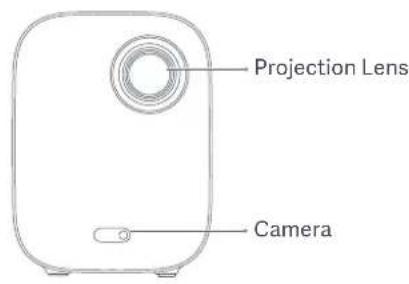
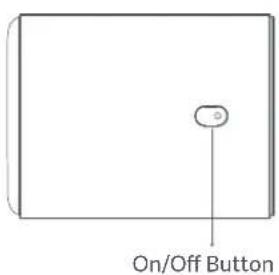
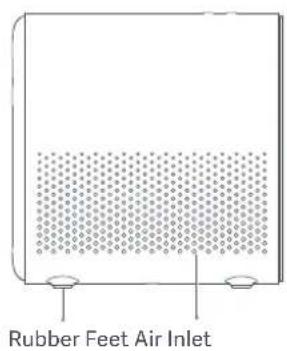


natural_image
Simple diagram with four circles arranged in a square pattern and a vertical line extending from the center (no text or symbols)1/4" Female Threaded Tripod MountConnection Ports eye damage as the projector will emit strong light during working.

Caution
- Do not place any flammable objects near the heat dissipation vent.
- Do not block any of the vents as this may cause heat build-up inside the projector.
- Do not look directly into the lens to avoid eye damage as the projector will emit strong light during working.
Connection Ports

① DC IN
- DC in port
②
③ USB2.0
④ HDMI
- Headphone port - HDMI input port- Supports the USB 2.0 protocol
- Supports USB to Ethernet adapters
Power Indicator
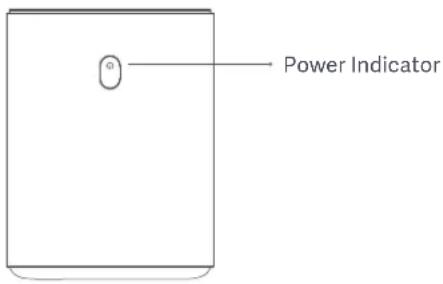
The power indicator (white light) indicates the projector status as follows:
- After plugging in the power adapter, the indicator will blink and then turn off. Press the on/off button to turn on the projector.
- While turning on the projector, the indicator light will blink.
-
After loading the system, the indicator light will turn off.
-
After turning off the screen, the indicator light will turn on.
- While turning off the projector, the indicator light will blink.
- After shutting down the system, the indicator light will turn off.
Remote Control
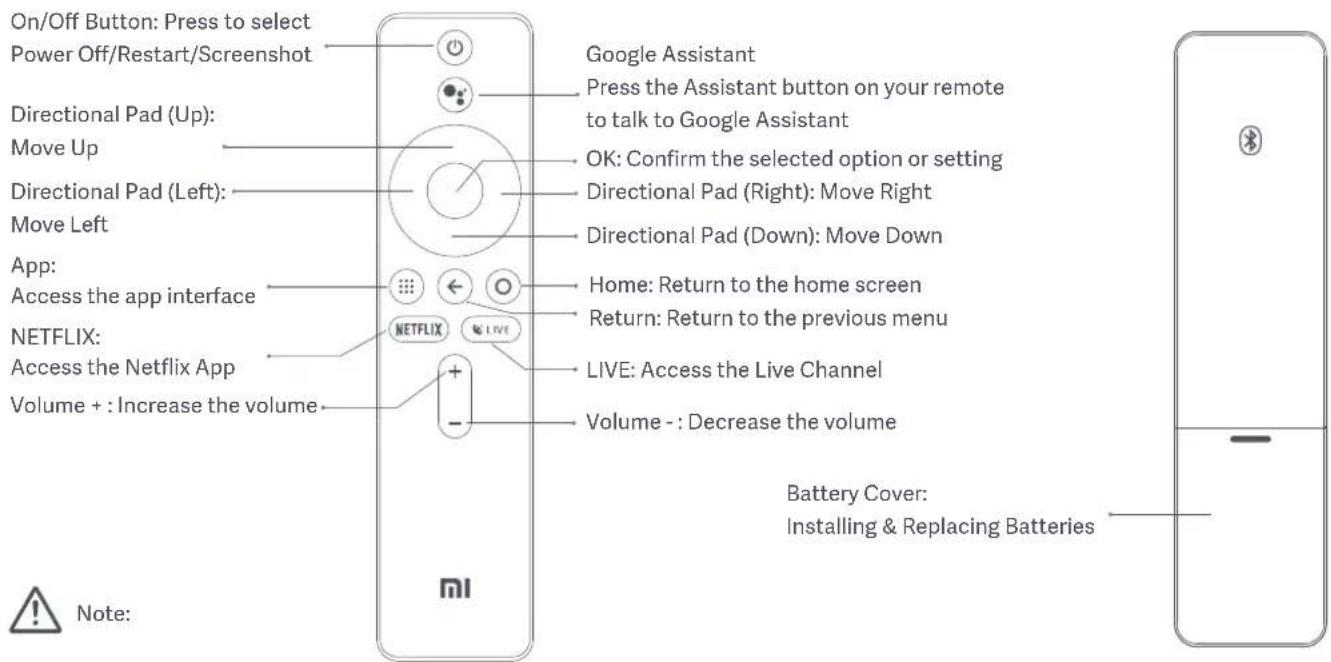
- The remote uses two AAA batteries.
- Pay attention to the positive and negative poles when installing batteries in the remote control.
- When battery leaks, immediately wipe away any fluid with a dry cloth and replace the batteries with new ones.
- Dispose of used batteries according to local waste disposal rules and regulations of the country or area you live in.
Projection Distance & Screen Size

Determine the distance between the projector and the wall or screen according to the desired screen size.
| Screen Dimensions (SD) | Projection Distance (D) | Relative Height (H) |
| 60" 159.8 cm 11.1 cm | ||
| 80" 213.5 cm 11.1 cm | ||
| 100" 267.3 cm 11.1 cm | ||
| 120" 321 cm 11.1 cm |
Screen Dimensions (SD):
The diagonal size of the projection screen (in inches).
Projection Distance (D):
The distance between the projector and the wall or screen (in cm).
Relative Height (H):
The distance from the bottom of the projector to the bottom edge of the projected image (in cm).

Note:
The dimensions in the table above are for reference only, they are approximate and may slightly differ from the actual values.
Quick Start Guide
Pairing the Remote Control

After installing the batteries in the remote control, press the OK button to start pairing.
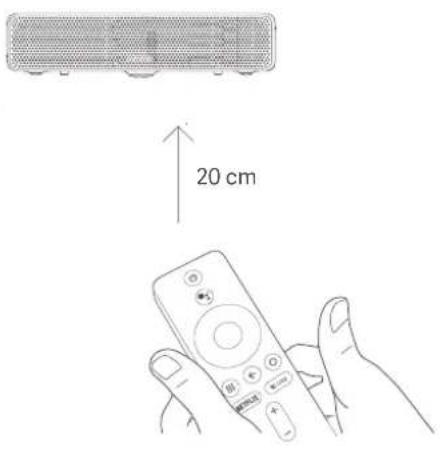
Point the remote at the bottom right corner of the projector, then simultaneously press and hold the APP and the Home button. Once you hear a beep, it indicates that the pairing process has started. Release the buttons and wait for the process to complete.

natural_image
Line drawing of a Xiaomi remote control with signal waves (no text or symbols)"Remote paired successfully" will appear on the projection screen to indicate the remote was paired with the projector successfully.
Note: Keep the remote control within 20 cm of the projector during the pairing process.
Auto Focus Keystone Correction
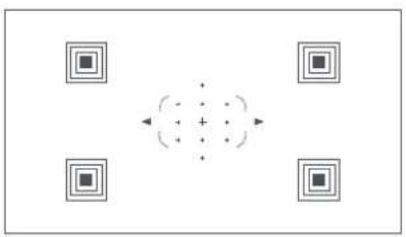
Go to Settings > Image > Focus. Auto focus will complete automatically in about 10 seconds. Afterwards, press the left and right button on the remote control to manually fine tune.
When the projector does not focus after moving its position, there are two possible causes:
- Auto Focus in not enabled. Go to Settings > Projector > Auto Focus to enable it. 2. The projector's internal sensor was not triggered when the projector was moved. Simply wiggle the projector to trigger its sensor or manually focus the projector.
natural_image
Abstract diagram with four square frames surrounding a central dot pattern (no text or symbols)Go to Settings > Image > Keystone Correction. Use the left and right buttons to select Coarse Tune, Fine Tune, or Reset. Use the up and down buttons to adjust the screen shape.
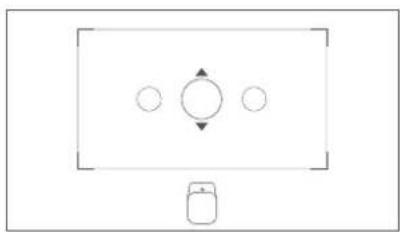
natural_image
Simple diagram with three circles and a device icon, no text or symbols presentBluetooth Speakers
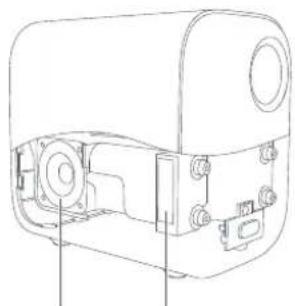
The projector has two high-quality built-in speakers with a total output of ≈ 10 W.
These speakers can be used as stand-alone Bluetooth speakers..
natural_image
Technical line drawing of a mechanical device with ports and mounting brackets (no text or symbols)
natural_image
Technical line drawing of a mechanical device housing with mounting holes and internal components (no text or symbols)Full Range Speaker Full Range Speaker Air Vent Air Vent
Note: This projector can also be connected to other Bluetooth devices, such as headsets, speakers, game controllers, and keyboards. When connecting to a Bluetooth speaker or headset, Bluetooth audio needs to be set to output.
Smart Temperature Control
The LED light source and motherboard temperature are monitored by the projector's system and the fan speed is automatically adjusted based on the temperature detected by the sensor.
When the projector's temperature gets too hot, an on-screen warning will appear.
When the projector's temperature exceeds the limit, an on-screen warning will appear, and the projector will turn off automatically.
Routine Maintenance
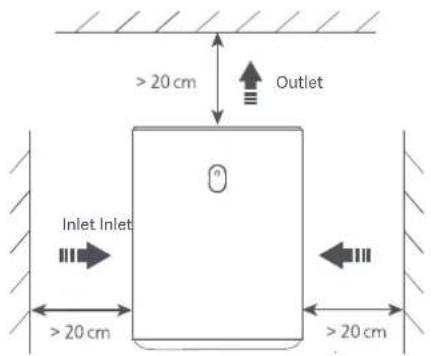
Heat Dissipation Requirements
Cleaning & Maintenance

natural_image
Line drawing of a hand holding a circular device with a black clip, no text or symbols present


Note: Avoid touching the heat dissipation vent on the rear, as it can become very hot.

Note:
Do not place any objects within 20 cm of the projector's air vents, as this will affect the heat dissipation effect.
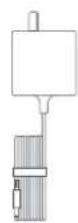
Turn off and unplug the projector before cleaning.
Gently wipe the projector's housing and lens with a suitable cleaning cloth, periodically. Do not use any abrasive cleaning products, solvents, chemicals, or other rough objects so as to avoid scratches or corrosion.

Note:
- This projector is not water resistant. Do not allow any liquid to get into the projector's power indicator, air vents, connection ports, and speaker grilles.
- Only use a cleaning cloth that is suitable for cleaning lenses.
Product Certifications
HDMI™
HIGH-DEFINITION MULTIMEDIA INTERFACE
The terms HDMI, HDMI High-Definition Multimedia Interface, and the HDMI Logo are trademarks or registered trademarks of HDMI Licensing Administrator, Inc.


For DTS patents, see http://patents.dts.com. Manufactured under license from DTS Licensing Limited. DTS, the Symbol, DTS and the Symbol together, DTS-HD, and the DTS-HD logo are registered trademarks and/or trademarks of DTS, Inc. in the United States and/or other countries. © DTS, Inc. All Rights Reserved.

Bluetooth®
The Bluetooth ^® word mark and logos are registered trademarks owned by Bluetooth SIG, Inc. and any use of such marks by [Xiaomi Communications Co., Ltd.] is under license. Other trademarks and trade names are those of their respective owners.

Manufactured under license from Dolby Laboratories. Dolby, Dolby Audio, and the double-D symbol are trademarks of Dolby Laboratories.
Model: M055MGN
Color: White
Input: 19 V =3.42 A
Net Weight: 1.3 kg
Item Dimensions: 115 × 150 × 150 mm
Manufactured for: Xiaomi Communications Co., Ltd.
Manufactured by: Fengmi (Beijing) Technology Co., Ltd.
(a Mi Ecosystem company)
Address: 301, 3F, Building 3, No.10 Yard, Barracks South Street, Renhe Town, Shunyi District, Beijing, China
For further information, please go to www.mi.com
Inhalt
Note: Under normal use of condition, this equipment should be kept a separation distance of at least 20 cm between the antenna and the body of the user.
Sicherheitshinweise
natural_image
Line drawing of a white rectangular electronic device with a circular top and small base (no text or symbols)natural_image
Simple line drawing of a container with a perforated interior and two side supports (no text or symbols)natural_image
Front view of a Xiaomi remote control with buttons and ports (no readable text or symbols beyond branding)natural_image
Line drawing of a Xiaomi remote control with signal waves (no text or symbols on the device itself)natural_image
Abstract diagram with four square frames surrounding a central dotted circle and directional arrows (no text or symbols)natural_image
Simple diagram with three circles and a device icon, no text or symbols presentnatural_image
Technical line drawing of a mechanical device with ports and mounting brackets (no text or symbols)
natural_image
Technical line drawing of a mechanical device housing with mounting holes and internal components (no text or symbols)natural_image
Line drawing of a hand inserting a circular component into a device (no text or symbols)
Adresse: 301, 3F, Building 3, No.10 Yard, Barracks South Street, Renhe Town, Shunyi District, Beijing, China
natural_image
Line drawing of a white rectangular electronic device with a circular top and small base (no text or symbols)


Garantie
natural_image
Simple line drawing of a rectangular frame with a small oval labeled 'a' at the bottom (no text or symbols beyond the label)
natural_image
Simple line drawing of a container with a perforated interior and two small circular buttons at the bottom (no text or symbols)natural_image
Simple diagram with four circles and a vertical line, no text or symbols presentnatural_image
Front view of a Xiaomi remote control with no visible text or symbols on the device surfacenatural_image
Line drawing of a Xiaomi remote control with signal waves (no text or symbols)natural_image
Abstract diagram with four square patterns and a central dot pattern (no text or symbols)natural_image
Simple diagram with a rectangle containing three circles and a small icon below (no text or symbols)Enceintes Bluetooth
natural_image
Technical line drawing of a mechanical device with ports and components (no text or symbols)
natural_image
Technical line drawing of a mechanical device housing with mounting holes and internal components (no text or symbols)natural_image
Line drawing of a hand holding a circular device with a scroll wheel (no text or symbols)Fabricant: Fengmi (Beijing) Technology Co., Ltd.
(une société Mi Ecosystem)
Adresses : 301, 3F, Building 3, No.10 Yard, Barracks South Street, Renhe Town, Shunyi District, Beijing, Chine
Operating Frequency: 2.4 GHz–2.4835 GHz (for Bluetooth)
Maximum RF Power Output: < 20 mW (for Bluetooth)
Operating Frequency: 2.4 GHz–2.4835 GHz (for Wi-Fi 2.4 GHz)
Maximum RF Power Output: < 100 mW (for Wi-Fi 2.4 GHz)
Operating Frequency: 5.15 GHz–5.35 GHz and 5.47 GHz–5.725 GHz (for Wi-Fi 5 GHz)
Maximum RF Power Output: < 200 mW (for Wi-Fi 5 GHz)
natural_image
Line drawing of a Xiaomi remote control with signal waves (no text or symbols on the device itself)natural_image
Abstract diagram with four square frames surrounding a central dot pattern (no text or symbols)natural_image
Simple diagram with a rectangle containing three circles and a small icon below (no text or symbols)Altavoces Bluetooth
natural_image
Technical line drawing of a mechanical device with ports and mounting brackets (no text or symbols)
natural_image
Technical line drawing of a mechanical device housing with mounting holes and internal components (no text or symbols)natural_image
Line drawing of a hand inserting a cable into a device (no text or symbols)Dirección: 301, 3F, Building 3, No.10 Yard, Barracks South Street, Renhe Town, Shunyi District, Beijing, China
Preventing Electric Shocks and Fire Hazards:
natural_image
Simple line drawing of a rectangular electronic device with a circular top and base (no text or symbols)

natural_image
Simple line drawing of a container with a perforated interior and two small handles at the bottom (no text or symbols)natural_image
Simple diagram with four circles arranged in a square pattern and a vertical line extending from the center (no text or symbols)natural_image
Simple line drawing of a rectangular container with a small oval and horizontal line extending from its side (no text or symbols)natural_image
Simple line drawing of a door with a small mark and a circular symbol on top (no text or labels)
Nota:
natural_image
Front view of a Xiaomi remote control with buttons and ports (no readable text or symbols beyond branding)natural_image
Line drawing of a Xiaomi remote control with signal waves (no text or symbols)natural_image
Abstract diagram with four square frames surrounding a central dot pattern (no text or symbols)natural_image
Simple diagram with three circles and a device icon, no text or symbols presentAltoparlanti Bluetooth
natural_image
Technical line drawing of a mechanical device with ports and mounting brackets (no text or symbols)natural_image
Technical line drawing of a mechanical device housing with mounting holes and internal components (no text or symbols)Altoparlante full-range
natural_image
Line drawing of a hand holding a camera lens on a device (no text or symbols)
Nota:

Indirizzo: 301, 3F, Building 3, No.10 Yard, Barracks South Street, Renhe Town, Shunyi District, Beijing, Cina
natural_image
Line drawing of a Xiaomi remote control with signal waves (no text or symbols on the device itself)natural_image
Abstract diagram with four square frames surrounding a central dot pattern (no text or symbols)natural_image
Simple diagram with three circles inside a rectangle and a small figure below (no text or symbols)Bluetooth-динамики
natural_image
Technical line drawing of a mechanical device with ports and mounting brackets (no text or symbols)natural_image
Technical line drawing of a mechanical device housing with mounting holes and internal components (no text or symbols)natural_image
Line drawing of a hand holding a circular device with a black clip, no text or symbols present


Адрес: 301, 3F, Building 3, No.10 Yard, Barracks South Street, Renhe Town, Shunyi District, Beijing, Китай
natural_image
Simple line drawing of a rectangular device with a circular top and base (no text or symbols)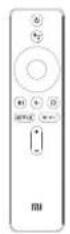

natural_image
Line drawing of a Xiaomi remote control with signal waves (no text or symbols)natural_image
Abstract diagram with four square frames surrounding a central dot pattern (no text or symbols)natural_image
Simple diagram with a rectangle containing three circles and a small device icon (no text or labels)블루투스 스피커
natural_image
Technical line drawing of a mechanical device with ports and mounting brackets (no text or symbols)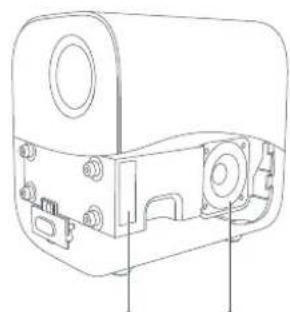
natural_image
Technical line drawing of a mechanical device housing with mounting holes and internal components (no text or symbols)natural_image
Line drawing of a hand inserting a circular component into a device (no text or symbols)natural_image
Line drawing of a Xiaomi remote control with signal waves (no text or symbols on the device itself)natural_image
Front view of a Xiaomi remote control with no visible text or symbols on the device surfacenatural_image
Simple diagram with three circles and a device icon, no text or symbols presentnatural_image
Abstract diagram with four square frames surrounding a central dotted pattern (no text or symbols)سماعات بلوتوث
natural_image
Technical line drawing of a mechanical device with ports and mounting brackets (no text or symbols)natural_image
Technical line drawing of a mechanical device housing with mounting holes and internal components (no text or symbols)natural_image
Line drawing of a hand holding a circular device with a black clip (no text or symbols)
HDMI™
HIGH-DEFINITION MULTIMEDIA INTERFACE
301, 3F, Building 3, No.10 Yard, Barracks South Street, Renhe Town, Shunyi District, العناين، الصين
Specifications....137
natural_image
Simple line drawing of a rectangular electronic device with a circular top and base (no text or symbols)
Warranty Notice
Mi Smart Compact Projector Remote Control Power Adapter User Manual

Opmerking:
natural_image
Simple line drawing of a door with a small mark and a small Bluetooth symbol on top (no text or labels)
Note:
natural_image
Line drawing of a Xiaomi remote control with signal waves (no text or symbols)natural_image
Abstract diagram with four square frames surrounding a central dotted pattern (no text or symbols)Keystone correctie
natural_image
Technical line drawing of a mechanical device with ports and mounting brackets (no text or symbols)
natural_image
Technical line drawing of a mechanical device housing with mounting holes and internal components (no text or symbols)natural_image
Line drawing of a hand holding a camera lens on a device (no text or symbols)Ingangs: 19 V = 3.42 A
Nettogewicht: 1.3 kg
Itemafmetingen: 115 × 150 × 150 mm
Adres: 301, 3F, Gebouw 3, No.10, Barracks South Street, Renhe Town, Shunyi District, Beijing, China
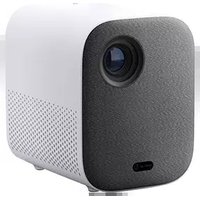
Brand : Xiaomi
Model : Mi Smart Compact Projector
Category : Projector