BAP007X01 - Air purifier BREVILLE - Free user manual and instructions
Find the device manual for free BAP007X01 BREVILLE in PDF.

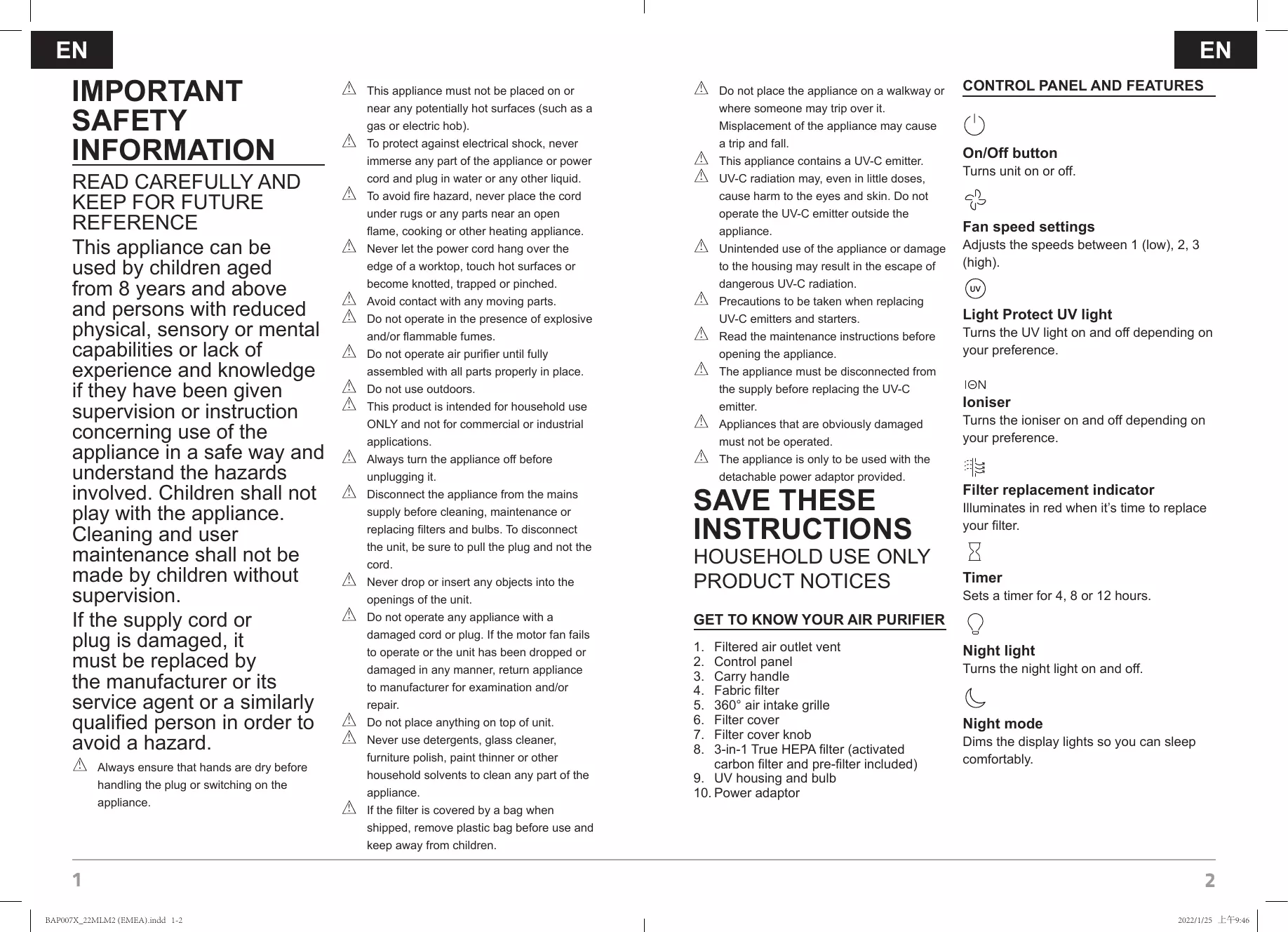


| Brand | Breville |
| Model | BAP007X01 |
| Product type | Air purifier |
| Main filter | True 3-in-1 HEPA filter (pre-filter, activated carbon, HEPA) |
| HEPA filter efficiency | Removes up to 99.97% of particles of 0.3 microns |
| Additional technologies | UV-C radiation, ionizer, exterior fabric filter |
| Clean Air Delivery Rate (CADR) | Smoke: 191 m³/h, Dust: 190 m³/h, Pollen: 205 m³/h |
| Fan speeds | 3 (low, medium, high) |
| Maximum noise level | 59 dB (at high speed) |
| Power consumption | 38 W |
| Power supply | Detachable mains adapter supplied |
| Timer | 4, 8 or 12 hours |
| Additional functions | Night mode, night light, filter replacement indicator |
| Fabric filter maintenance | Vacuum cleaning or damp cloth every 3 months |
| HEPA filter replacement | Every 12 months (reference BAPF70) |
| UV bulb replacement | Every 12 months (reference BAP0041-2852, 3.5 W max) |
| Safety | Child lock (not specified), auto shut-off, UV-C protection |
| Use | Domestic only, stable and dry surface |
| After-sales service | France: 0805 542055, UK: 0800 0287154, email: BrevilleEurope@newellco.com |
| Warranty | Return to point of sale with proof of purchase |
Frequently Asked Questions - BAP007X01 BREVILLE
User questions about BAP007X01 BREVILLE
0 question about this device. Answer the ones you know or ask your own.
Ask a new question about this device
Download the instructions for your Air purifier in PDF format for free! Find your manual BAP007X01 - BREVILLE and take your electronic device back in hand. On this page are published all the documents necessary for the use of your device. BAP007X01 by BREVILLE.
USER MANUAL BAP007X01 BREVILLE
Turn on your creativity®
BAP007X
EN Light Protect Air Purifier Instructions for Use. 1
FR Purificateur d'air Light Protect Notice d'utilisation. 7
DE Light Protect Luftreiniger Bedienungsanleitung 15
ES Purificador de aire Light Protect Instrucciones de uso. 23
NE Luchtreiniger Light Protect Gebruiksaanwijizing 31
Light Protect-luftrenare Bruksanvisning 39
Light Protect -ilmanpuhdistin
Käytöohjeet. 45
Light Protect luftrener Bruksinstruktjoner 53
DA Light Protect-luftrenser Brugsanvising. 59
PL Oczyszczaczgowrza Light Protect Instrukcja uzytkowania 65
IT Purificatore d'aria Light Protect Istruzioni per l'uso. 73
CE Čisticka vzduchu Light Protect Uživatelská príručka 81
PT Purificador de ar Light Protect Instruções de utilização 89
IMPORTANT SAFETY INFORMATION
READ CAREFULLY AND KEEP FOR FUTURE REFERENCE
This appliance can be used by children aged from 8 years and above and persons with reduced physical, sensory or mental capabilities or lack of experience and knowledge if they have been given supervision or instruction concerning use of the appliance in a safe way and understand the hazards involved. Children shall not play with the appliance. Cleaning and user maintenance shall not be made by children without supervision.
If the supply cord or plug is damaged, it must be replaced by the manufacturer or its service agent or a similarly qualified person in order to avoid a hazard.
Always ensure that hands are dry before handling the plug or switching on the appliance.
This appliance must not be placed on or near any potentially hot surfaces (such as a gas or electric hob).
To protect against electrical shock, never immerse any part of the appliance or power cord and plug in water or any other liquid.
To avoid fire hazard, never place the cord under rugs or any parts near an open flame, cooking or other heating appliance.
Never let the power cord hang over the edge of a worktop, touch hot surfaces or become knotted, trapped or pinched.
Avoid contact with any moving parts.
Do not operate in the presence of explosive and/or flammable fumes.
Do not operate air purifier until fully assembled with all parts properly in place.
Do not use outdoors.
This product is intended for household use ONLY and not for commercial or industrial applications.
Always turn the appliance off before unplugging it.
Disconnect the appliance from the mains supply before cleaning, maintenance or replacing filters and bulbs. To disconnect the unit, be sure to pull the plug and not the cord.
Never drop or insert any objects into the openings of the unit.
Do not operate any appliance with a damaged cord or plug. If the motor fan fails to operate or the unit has been dropped or damaged in any manner, return appliance to manufacturer for examination and/or repair.
Do not place anything on top of unit.
Never use detergents, glass cleaner, furniture polish, paint thinner or other household solvents to clean any part of the appliance.
If the filter is covered by a bag when shipped, remove plastic bag before use and keep away from children.
Do not place the appliance on a walkway or where someone may trip over it. Misplacement of the appliance may cause a trip and fall.
This appliance contains a UV-C emitter.
UV-C radiation may, even in little doses, cause harm to the eyes and skin. Do not operate the UV-C emitter outside the appliance.
Unintended use of the appliance or damage to the housing may result in the escape of dangerous UV-C radiation.
Precautions to be taken when replacing UV-C emitters and starters.
Read the maintenance instructions before opening the appliance.
The appliance must be disconnected from the supply before replacing the UV-C emitter.
Appliances that are obviously damaged must not be operated.
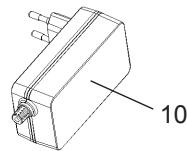
The appliance is only to be used with the detachable power adaptor provided.
SAVE THESE INSTRUCTIONS
HOUSEHOLD USE ONLYPRODUCT NOTICES
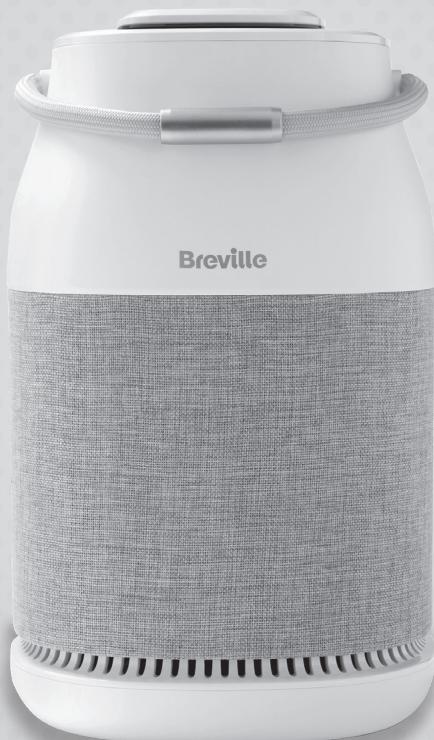
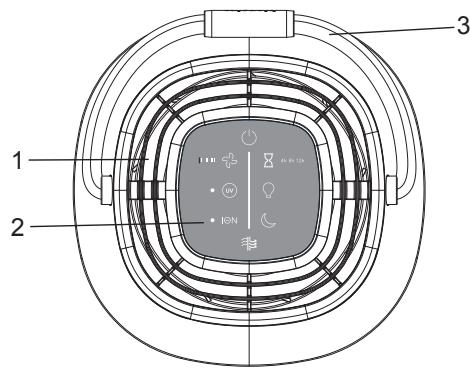
GET TO KNOW YOUR AIR PURIFIER
- Filtered air outlet vent
- Control panel
- Carry handle
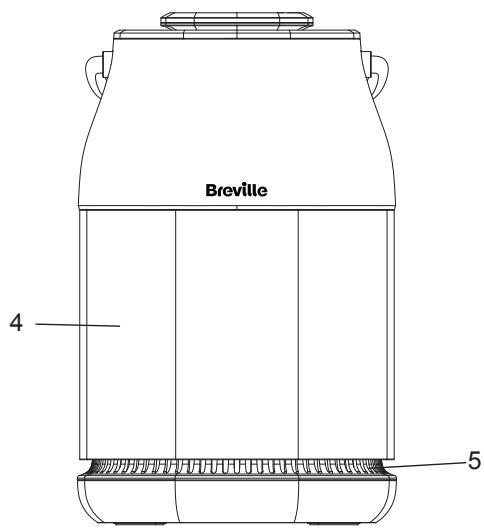
- Fabric filter
- 360^ air intake grille
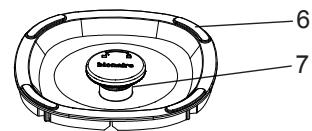
- Filter cover
- Filter cover knob
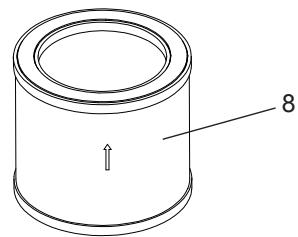
- 3-in-1 True HEPA filter (activated carbon filter and pre-filter included)
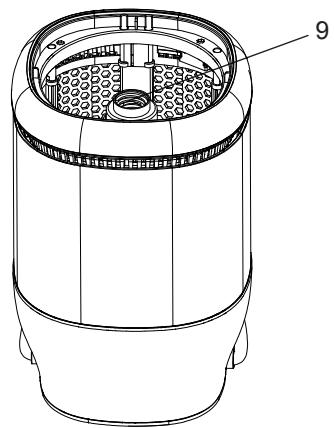
- UV housing and bulb
- Power adaptor
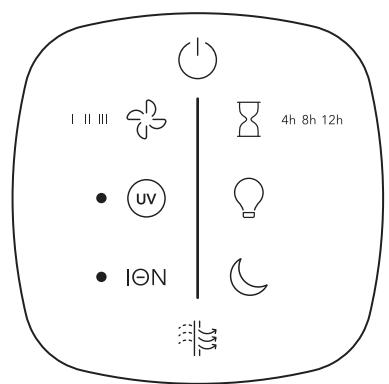
CONTROL PANEL AND FEATURES

On/Off button
Turns unit on or off.

Fan speed settings
Adjusts the speeds between 1 (low), 2, 3 (high).

Light Protect UV light
Turns the UV light on and off depending on your preference.
ION
Ioniser
Turns the ioniser on and off depending on your preference.

Filter replacement indicator
Illuminates in red when it's time to replace your filter.

Timer
Sets a timer for 4, 8 or 12 hours.

Night light
Turns the night light on and off.

Night mode
Dims the display lights so you can sleep comfortably.
FEATURES OF YOUR AIR PURIFIER
True HEPA filter
Your air purifier features a True HEPA filter which removes up to 99.97% of airborne dust and pollen as small as 0.3 microns and helps reduce smoke, mould spores and pet dander from the air passing through the filter.
Pre-filter
The pre-filter captures large particles from dust, hair, pet dander to help extend the filter's efficiency and life.
Activated carbon filter
Designed to reduce and neutralize odours, vapours and gases from cooking, smoke, chemicals, pets, and other unwanted scents.
Light Protect UV light
Germs, viruses, bacteria, mold and fungi trapped in the filter are exposed to UV light to reduce re-production.*
*Results are based on the microbial reduction rate of 99.9% with unit on the high setting, UV light ON and lonizer ON for 2 hours. Tested at a third-party, Intertek Microbiological Laboratory in the US. Report #104730711COL-001.
Fabric filter
The vacuum-friendly outer fabric catches larger particles, extending the life of the main filter.
Ioniser
This appliance has an ioniser feature which releases negative ions into outgoing filtered air to help the air purification process.
What are lons?
Ions are tiny particles that carry a positive or negative charge. They exist naturally around us in the air, water, and ground. Both positive and negative ions are colourless, odourless, and completely harmless.
How does the ioniser work?
Negative ions help air purification by attaching themselves to very small airborne particles in the room. These particles take on a negative charge and
may join with positively charged particles such as dust, pollen, smoke, and pet dander to form larger particles. The larger particles are then more easily captured by the filter system.
Important notes:
Your ioniser may produce an occasional popping or cracking sound. This is normal and occurs when a small buildup of ions is discharged.
After extended use, you may notice dust around the grilles or panels.
This is caused by negative ions exiting the air outlet, evidence of the ioniser's air cleaning effectiveness.
- You can remove the dust with a soft brush or clean, damp cloth. Larger particles may be attracted to positively charged surfaces throughout the home, like walls or floors.
- This may occur more frequently when the filter is nearing the end of its useful product life and unable to capture as many charged particles.
- Excessive amounts of pet dander, dust, or smoke may decrease the life expectancy of the filters and interfere with the ionisation process.
PRODUCT SPECIFICATIONS
| CADR | Smoke 191m3/h / 113 CFM Dust 190m3/h / 112 CFM Pollen 205m3/h / 121 CFM |
| Fan speeds | 3 |
| Noise level on high speed | 59 dB max |
| Power consumption | 38W |
GETTING STARTED
Installing the True HEPA filter
- Turn OFF and unplug the air purifier.
- Locate the filter cover on the bottom of the unit.
- Rotate the knob counterclockwise to remove the cover and expose the filter (Figure 1-2).
-
Remove the plastic bag from the filter and re-insert the filter (Figure 3).
-
Re-align the filter cover and turn the knob clockwise to close.
- Your unit is equipped with one 3-in-1 True HEPA filter that lasts up to 12 month depending on usage.
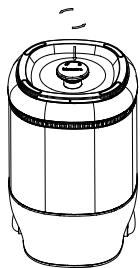
Figure 1
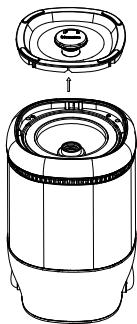
Figure 2
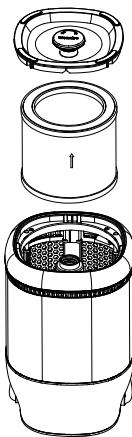
Figure 3
OPERATING INSTRUCTIONS
- Place the unit on a dry, stable, and firm surface. Make sure not to block the top air outlet vent and air intake grille.
- Connect the power adaptor to the power jack located on the rear base of the unit. Plug the power adaptor into the supply socket. Note: The display lights will initially flash on and then turn off. The power button will remain illuminated when the unit is plugged in.
- Tap the power button to turn the unit ON.
- When starting up, the appliance will operate in fan speed 3 by default.
- To select a desired fan speed, tap the fan button to cycle through the speeds 1 (low), 2 and 3 (high) until the desired speed setting is illuminated.
- To set the timer for 4, 8 or 12 hours, tap the timer button until the desired setting is illuminated. When the set time has elapsed, the appliance will automatically switch off. To deactivate the timer, tap the timer button repeatedly until the timer setting lights are turned off.
- To turn the ioniser ON, press the ION
button once until the white LED light next to the button is illuminated. Press the I^ button again to turn the ioniser OFF.
- To turn UV ON, press the button once until the white LED light next to the button is illuminated. Press the button again to turn the UV OFF.
- To turn night mode ON, tap the button once. The button will illuminate and turn the display lights off. Tap the button again to turn night mode OFF. Note: Night mode will maintain your previous fan speed setting.
- To turn the night light ON, press the button. To turn the night light OFF, press the button once more.
- Important: Always turn OFF and unplug the unit when not in use.
CARE AND MAINTENANCE
Before cleaning the air purifier, always turn OFF and unplug the unit.
Clean the exterior surface with a clean, damp cloth.
- The top air outlet vent can be cleaned of dust with a small, soft brush.
If you would like to clean the inside of your filter compartment, ONLY use a dry, soft cloth to wipe it down.
WARNING: Do not allow moisture to come into contact with the main housing of the air purifier. NEVER use detergents, glass cleaner, furniture polish, paint thinner, or other household solvents to clean any part of the appliance.
HOW TO CLEAN THE FABRIC FILTER
It is recommended to clean the outer fabric filter every 3 months or when dust appears.
- Turn the unit OFF and unplug.
- Gently vacuum the dust from the fabric or wipe clean with a damp cloth.
HOW TO REPLACE THE TRUE HEPA FILTER
It is recommended to replace the 3-in-1 True HEPA filter every 12 months depending on usage.
EN
- The filter replacement indicator light will illuminate red when it is time to replace the filter.
- Turn OFF and unplug the air purifier.
- Locate the filter cover on the bottom of the unit.
- Rotate the knob counterclockwise to remove the cover and expose the filter (Figure 1-2).
- Remove and discard the filter and reinsert a new filter (Figure 3).
- Re-align the filter cover and turn the knob clockwise to close.
- Plug the unit and turn the power ON.
- To reset the filter status on the air purifier, press & hold the filter replacement button for 3 seconds. The filter icon will turn off.
(See section 'Installing the True HEPA filter' for Figures 1-3).
Information on where to purchase replacement filters can be found on our website at www.breville.eu.
WARNING: Only use the original Breville filter model BAPF70 specially intended for this appliance. Do not use any other filters.
HOW TO REPLACE THE UV LIGHT BULB
It is recommended to replace the UV light bulb every 12 months.
CAUTION: The UV bulb has a maximum wattage of 3.5 Watts.
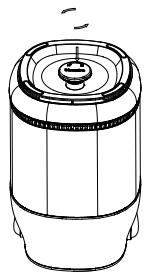
Figure 1
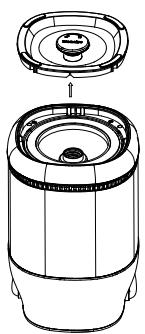
Figure 2
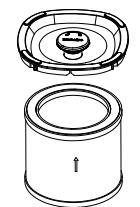
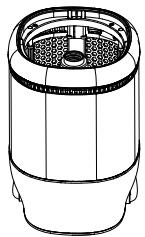
Figure 3
WARNING: Always disconnect the power before replacing the UV bulb or servicing.
- Turn the unit OFF and unplug the air purifier.
- Locate the filter cover on the bottom of the unit.
- Rotate the knob counterclockwise to remove the cover and expose the filter (Figure 1-2).
- Remove the filter and set aside (Figure 3).
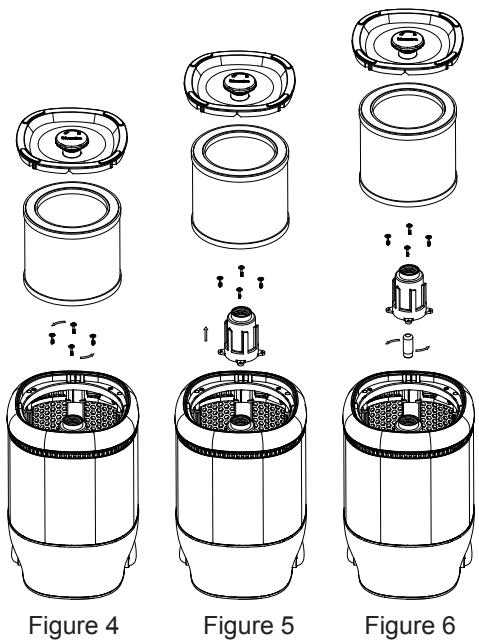
- Remove the UV bulb housing by using a screwdriver to remove the four screws (Figure 4-5).
- Carefully remove the UV bulb by rotating the bulb counterclockwise (Figure 6). Discard the old UV bulb.
- Install the new UV bulb by rotating the bulb clockwise.
- Re-install the UV bulb housing by using a screwdriver to secure the four screws
- Re-insert the filter.
- Re-align the filter cover and turn the knob clockwise to close.
WARNING: Only use the original Breville UV bulb model BAP0041-2852 specially intended for this appliance. Do not use any other bulbs. See section 'After sales service and replacement parts' for contact information for ordering replacement parts.
TROUBLESHOOTING AND SUPPORT
For troubleshooting and FAQs visit www.breville.eu.
| Problem | Cause | Solution |
| The air purifier is not working. | The appliance is not plugged in. | Check if unit is properly plugged in and outlet is working. |
| The appliance is not switched on. | Make sure unit is turned ON. | |
| Incorrect power adaptor used. | Use the power adaptor that is supplied with the air purifier. | |
| The filter is not properly installed. | Make sure filters are properly installed. | |
| The filter cover is not fully assembled. | Check that the filter cover is correctly assembled by re-aligning the filter cover and turn the knob clockwise to close. | |
| The air flow has decreased. | The air intake grille and filtered air outlet may be obstructed. | Turn OFF and unplug the appliance. Remove any obstructions blocking the air intake grille, fabric filter and filtered air outlet. |
| The filter is nearing the end of its useful product life. | Check the condition of the filters and replace if necessary. | |
| Pre-installed filter is covered by a protective plastic packaging. | Check filter to remove any plastic packaging and re-install the filter. | |
| The air purifier is making a loud noise. | Pre-installed filter is covered by a protective plastic packaging. | Check filter to remove any plastic packaging and re-install the filter. |
| The ioniser may produce an occasional popping or cracking sound. | This is normal and occurs when a small buildup of ions is discharged. |
AFTER SALES SERVICE & REPLACEMENT PARTS
In the case the appliance does not operate but is under warranty, return the product to the place it was purchased for a replacement. Please be aware that a valid form of proof of purchase will be required. For additional support, please contact our Consumer Service Department at United Kingdom: 0800 028 7154 | Spain: 0900 81 65 10 | France: 0805 542 055. For all other countries, please call +44 800 028 7154. International rates may apply. Alternatively, e-mail: BrevilleEurope@newellco.com.
WASTE DISPOSAL
Waste electrical products should not be disposed of with household waste. Please recycle where facilities exist. E-mail us at BrevilleEurope@newellco.com for further recycling and WEEE information.
CONSIGNES DE SECURITE IMPORTANTES
REEMPLACEMENT DE L'AMPOULE UV
Luz UV Light Protect
Luz UV Light Protect
Indicator for filterbyte
TUOTTEEN TEKNISET TIEDOT
Light Protect UV-lys
Light Protect UV-lys
person for at undgå sikkerhedsfarer.
SÄDAN UDSKIFTES UV-PÄEREN
ROZWIAZYWANIE PROBLEMOW I WSPARCIE
RESENI PROBLEM A PODPORA
Luz UV Light Protect
Luz UV Light Protect
Jarden Consumer Solutions (Europe) Limited
5400 Lakeside, Cheadle Royal Business Park,
Cheadle, SK8 3GQ, United Kingdom
Newell Poland Services Sp. z o.o.,
Plac Andersa 7, Poznan, 61-894, Poland.
e-mail: BrevilleEurope@newellco.com
Telephones:
United Kingdom: 0800 028 7154
Spain: 0900 81 65 10
France:0805542055
For all other countries, please call +44 800 028 7154.
International rates may apply.
Jarden Consumer Solutions (Europe) Limited
5400 Lakeside, Cheadle Royal Business Park,
Newell Poland Services Sp. z o.o.,
Plac Andersa 7, Poznan, 61-894, Pologne
Adresse e-mail:BrevilleEurope@newellco.com
© 2022 Jarden Consumer Solutions (Europe) Limited. All rights reserved.
Jarden Consumer Solutions (Europe) Limited, 5400 Lakeside, Cheadle Royal Business Park, Cheadle, Cheshire, SK8 3GQ, United Kingdom. Newell Poland
Services Sp. z o.o., Plac Andersa 7, Poznan, 61-894, Poland. Jarden Consumer Solutions (Europe) Limited and Newell Poland Services Sp. z o.o. are
subsidiaries of Newell Brands Inc. The product you buy may differ slightly from the one shown on this carton due to continuing product development.
Made in China.

- IMPORTANT SAFETY INFORMATION
- SAVE THESE INSTRUCTIONS
- HOUSEHOLD USE ONLYPRODUCT NOTICES
- GET TO KNOW YOUR AIR PURIFIER
- CONTROL PANEL AND FEATURES
- FEATURES OF YOUR AIR PURIFIER
- True HEPA filter
- Pre-filter
- Activated carbon filter
- Light Protect UV light
- Fabric filter
- Ioniser
- What are lons?
- How does the ioniser work?
- Important notes:
- GETTING STARTED
- Installing the True HEPA filter
- OPERATING INSTRUCTIONS
- CARE AND MAINTENANCE
- HOW TO CLEAN THE FABRIC FILTER
- HOW TO REPLACE THE TRUE HEPA FILTER
- EN
- HOW TO REPLACE THE UV LIGHT BULB
- TROUBLESHOOTING AND SUPPORT
- AFTER SALES SERVICE & REPLACEMENT PARTS
- WASTE DISPOSAL
- CONSIGNES DE SECURITE IMPORTANTES
- REEMPLACEMENT DE L'AMPOULE UV
- Luz UV Light Protect
- Indicator for filterbyte
- TUOTTEEN TEKNISET TIEDOT
- Light Protect UV-lys
- person for at undgå sikkerhedsfarer.
- SÄDAN UDSKIFTES UV-PÄEREN
- ROZWIAZYWANIE PROBLEMOW I WSPARCIE
- RESENI PROBLEM A PODPORA
Brand : BREVILLE
Model : BAP007X01
Category : Air purifier