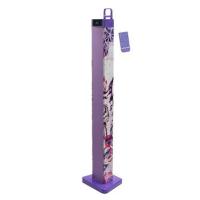
TOUR BT1000 VIOLET - Bluetooth speaker LEXIBOOK - Free user manual and instructions
Find the device manual for free TOUR BT1000 VIOLET LEXIBOOK in PDF.



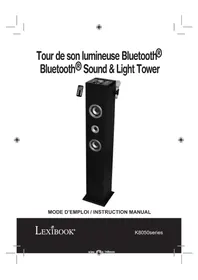
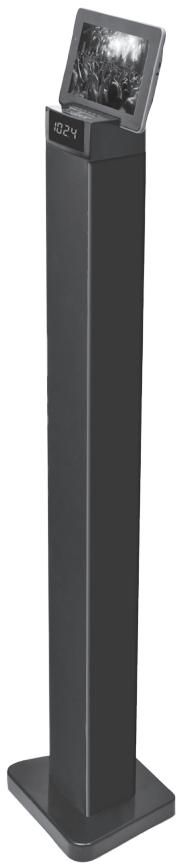
| Product type | Bluetooth® Tower Speaker |
| Brand | LEXIBOOK |
| Model | TOUR BT1000 VIOLET |
| Dimensions | 100 x 23 x 18.5 cm |
| Weight | 4.5 kg |
| Power supply | AC adapter 100-240 V, 50/60 Hz, output 18 V = 1.6 A |
| Power consumption | > 50 W |
| Total audio power | Baffle: 30 W, Left channel: 10 W, Right channel: 10 W |
| Speaker impedance | Woofer: 8 Ohm, 25 W x 2; Side channels: 4 Ohm, 15 W each |
| Radio receiver | FM 87.5 – 108.0 MHz |
| Wireless connectivity | Bluetooth® |
| Audio inputs | AUX IN (RCA), LINE IN (3.5 mm jack) |
| USB port | Device charging (5 V DC) |
| Functions | Bluetooth, FM radio, alarm, timer (SLEEP), equalizer (Music/Movie/Voice), remote control, USB charging |
| Remote control | Yes, with included CR2025 lithium battery |
| Included accessories | Remote control, AC adapter, 3.5 mm LINE IN cable, RCA cable x2, tablet/smartphone holder |
| Care and cleaning | Unplug before cleaning; use a soft cloth and mild soap |
| Operating temperature | -20 °C to +35 °C |
| Safety | Surge protection recommended; do not expose to water or humidity |
| Warranty | 2 years, excluding damage due to misuse |
| Repairability | Refer to qualified personnel; use spare parts specified by the manufacturer |
| Origin | Designed in Europe, made in China |
Frequently Asked Questions - TOUR BT1000 VIOLET LEXIBOOK
User questions about TOUR BT1000 VIOLET LEXIBOOK
0 question about this device. Answer the ones you know or ask your own.
Ask a new question about this device
Download the instructions for your Bluetooth speaker in PDF format for free! Find your manual TOUR BT1000 VIOLET - LEXIBOOK and take your electronic device back in hand. On this page are published all the documents necessary for the use of your device. TOUR BT1000 VIOLET by LEXIBOOK.
USER MANUAL TOUR BT1000 VIOLET LEXIBOOK
Bluetooth® Sound Tower

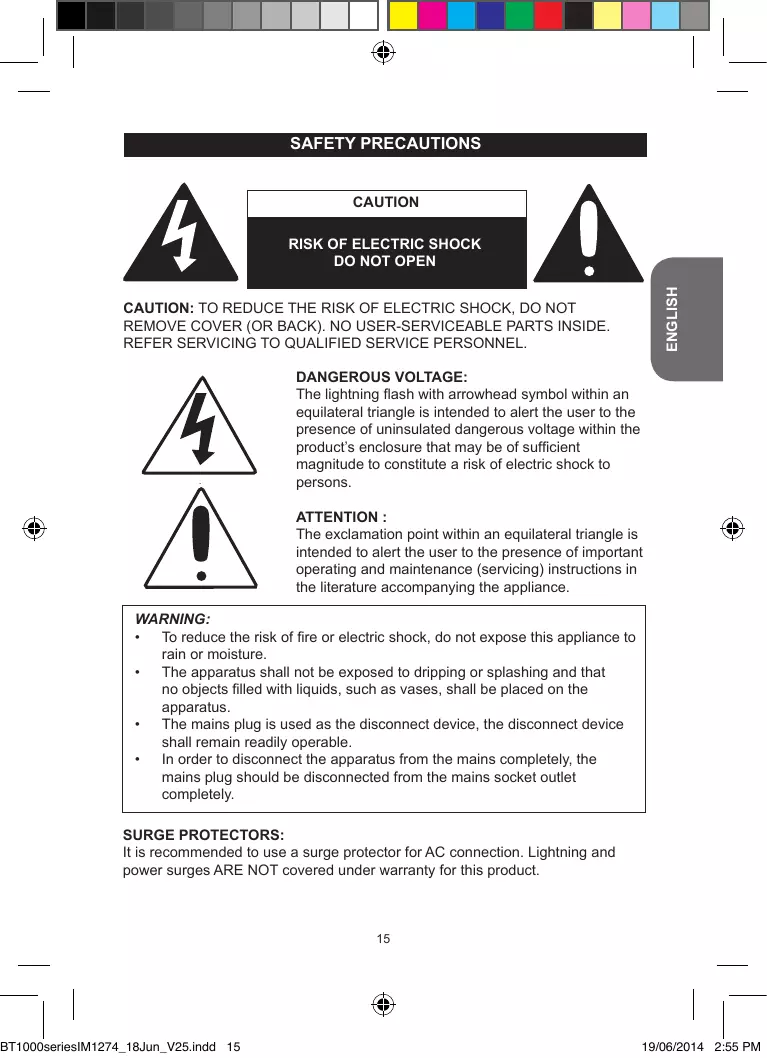
MISE EN GARDE
RISQUE D'ÉLECTROCUTION NE PAS OUVRIR

MISE EN GARDE: AFIN DE RÉDUIRE LES RISQUES D'ÉLECTROCUTION, NE PAS ENLEVER LE COUVERCLE (NI L'ARRÊRE). NE CONTIENT AUCUNE PIECE POUVANT ÉTRE RÉPARENE NI REMPLÉE PAR L'UTILISATEUR. CONFIER TOUTE RÉPARATION À UN TECHNICIEN QUALIFIÉ.
EMPLACEMENT DES TOUCHES
Avant
© 2014 Bluetooth SIG, Inc.
Association initiale
The lightning flash with arrowhead symbol within an equilateral triangle is intended to alert the user to the presence of uninsulated dangerous voltage within the product's enclosure that may be of sufficient magnitude to constitute a risk of electric shock to persons.
ATTENTION :
The exclamation point within an equilateral triangle is intended to alert the user to the presence of important operating and maintenance (servicing) instructions in the literature accompanying the appliance.
WARNING:
- To reduce the risk of fire or electric shock, do not expose this appliance to rain or moisture.
- The apparatus shall not be exposed to dripping or splashing and that no objects filled with liquids, such as vases, shall be placed on the apparatus.
- The mains plug is used as the disconnect device, the disconnect device shall remain readily operable.
- In order to disconnect the apparatus from the mains completely, the mains plug should be disconnected from the mains socket outlet completely.
SURGE PROTECTORS:
It is recommended to use a surge protector for AC connection. Lightning and power surges ARE NOT covered under warranty for this product.
SAFETY INSTRUCTIONS
PLEASE READ BEFORE OPERATING THIS EQUIPMENT.
Before using the unit, be sure to read all operating instructions carefully. Please note that these are general precautions and may not pertain to your unit.
- Read these instructions.
- Keep these instructions.
- Heed all warnings.
- Follow all instructions.
- Do not use this product near water and moisture, for example: near a bathtub, washbowl, kitchen sink or laundry tub; in a wet basement; or near a swimming pool. No objects such as vases should be placed on the unit.
- Unplug this product from the wall outlet before cleaning. Do not use liquid cleaners or aerosol cleaners. It may damage the screen. Use a dry cloth for cleaning only.
- Slots and openings in the cabinet and in the back or bottom are provided for ventilation, to ensure reliable operation of the product and to protect it from overheating. These openings must not be blocked or covered. The openings should never be blocked by placing the product on a bed, sofa, rug or other similar surface. This product should never be placed near or over a radiator or heat source. This product should not be placed in a built-in installation such as a bookcase or rack unless proper ventilation is provided or the manufacturer's instructions have been adhered to.
- Minimum distances 10cm around the apparatus for sufficient ventilations.
- Do not install near any heat sources such as radiators, heat registers, stoves, or other apparatus (including amplifiers) that produce heat.
- Do not defeat the safety purpose of the polarized or grounding type plug. A polarized plug has two blades with one wider than the other. A grounding type plug has two blades and a third grounding prong. The wide blade or the third prong is provided for your safety. If the provided plug does not fit into your outlet, consult an electrician for replacement of the obsolete outlet.
- Protect the power cord from being walked on or pinched particularly at plugs, convenience receptacles, and the point where they exit from the apparatus.
- Only use attachments/accessories specified by the manufacturer.
- Unplug this apparatus during lightning storms or when unused for long periods of time.
- Refer all servicing to qualified service personnel. Servicing is required when the apparatus has been damaged in any way, such as power-supply cord or plug is damaged, liquid has been spilled or objects have fallen into the apparatus; and/or the apparatus has been exposed to rain or moisture and does not operate normally, or has been dropped.
-
This product should be operated only from the type of power source indicated on the marking label. If you are not sure of the type of power supply to your home, consult your appliance dealer or local power company. For products intended to operate from battery power, or other sources, refer to the operating instructions.
-
Do not overload wall outlets and extension cords as this can result in a risk of fire or electric shock. Use only power source as indicated.
- Never push objects of any kind into this product through openings as they may touch dangerous voltage points or short out parts that could result in fire or electric shock. Never spill or spray any type of liquid on the product.
- Do not attempt to service this product yourself as opening or removing covers may expose you to dangerous voltage or other hazards. Refer all servicing to qualified service personnel.
- Upon completion of any service or repairs to this product, ask the service technician to perform safety checks to determine that the product is in proper operating condition.
- Batteries shall not be exposed to excessive heat such as sunshine, fire or the like.
- Attention should be drawn to the environmental aspects of battery disposal.
- Use the apparatus in moderate climates. (Work temperature -20^ +35^
- The socket-outlet shall be installed near the equipment and must be easily accessible.
- The AC/DC adaptor should not be obstructed OR should be easily accessed during intended use.
- To completely disconnect the power input, the AC/DC adaptor shall be disconnected from the mains, as the disconnecting part is the AC/DC adaptor.
- The apparatus and AC/DC adaptor shall not be exposed to dripping or splashing and no objects filled with liquids, such as vases, shall be placed near them.
- Excessive sound pressure from earphones and headphones can cause hearing loss.
- "Maximum output voltage: ≤ 150mV
- At full power, listening to a music player for prolonged periods can damage the user's hearing.
UNPACKING THE DEVICE
When unpacking, ensure that the following elements are included:
1 x Bluetooth® Sound Tower
1 x Remote control (CR2025 lithium type battery already inside)
1 x AC/DC adaptor
1 x Instruction manual
1 x 3.5mm Line In cable
1 x Twin male RCA cable
1 x Docking station for tablet or smartphone
WARNING: All packaging materials, such as tape, plastic sheets, wire ties and tags are not part of this product and should be discarded.
POWER SOURCES
The Bluetooth® Sound Tower operates on AC~100-240V, 50/60Hz.
AC operation
- Check that the unit is switched off.
- Insert the small end of the AC adapter into the DC IN socket at the back of the unit.
- Plug the other end of the AC adapter into any convenient AC~100-240V, 50/60Hz power outlet.
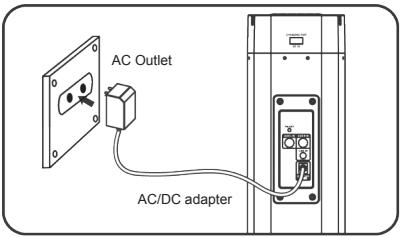
NOTE:
- Only use the adapter supplied with the product. Do not use other adapter.
- The socket-outlet shall be installed near the equipment and shall be easily accessible.
WARNING: Malfunction or loss of memory may be caused by strong frequency interference or electrostatic discharge. Should any abnormal function occur, unplug the AC adapter from the mains socket and plug it back in.
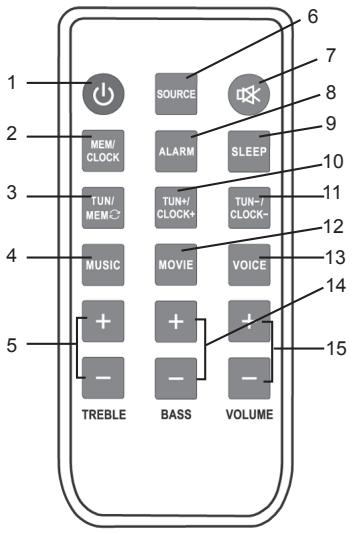
- POWER button
- MEM/CLOCK button
- TUN/MEM button
- MUSIC button
- TREBLE +/- buttons
- SOURCE button
- MUTE button
- ALARM button
- SLEEP button
- TUN+CLOCK+ button
- TUN-/CLOCK- button
- MOVIE button
- VOICE button
- BASS +/- buttons
- VOLUME +/- buttons
Battery information
The first time you use the remote control, remove the battery tab located at the rear of the unit.
Battery replacement
- Open the battery compartment cover by pressing the unlock switch to the right and then sliding the battery holder out.
- Remove the used battery and insert one lithium CR2025 3V --- type battery (included) as illustrated.
- Slide the battery cover in until it clicks firmly into place.
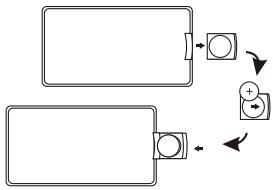
Non-rechargeable batteries are not to be recharged. Rechargeable batteries are to be removed from the product before being charged. Rechargeable batteries are only to be charged under adult supervision. Different types of batteries or new and used batteries are not to be mixed. Only batteries of the same or equivalent type as recommended are to be used. Batteries are to be inserted with the correct polarity. Exhausted batteries are to be removed from the product. The supply terminals are not to be short circuited. Do not throw batteries into a fire. Remove the batteries if you are not going to use the unit for a long period of time.
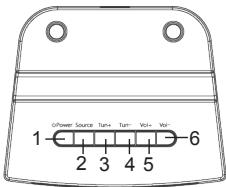
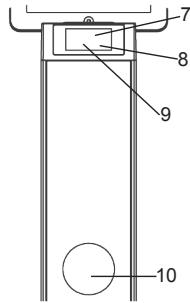
LOCATION OF CONTROLS
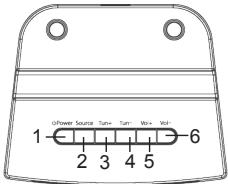
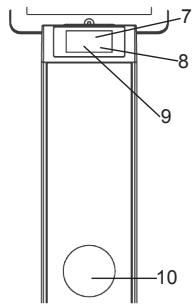
Front
- POWER button
- SOURCE button
- TUN+ button
- TUN- button
- VOL+ button
- VOL- button
- Bluetooth® LED indicator
- Remote sensor
- LCD screen
- Speaker
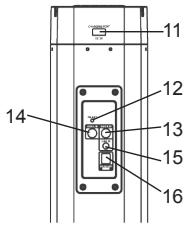
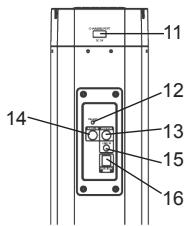
Back
- USB charging port
- FM antenna
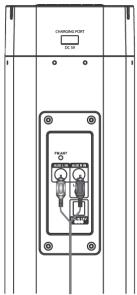
- AUX IN (right) jack
- AUX IN (left) jack
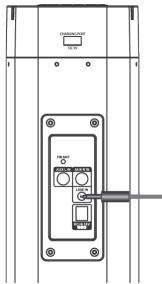
- LINE IN jack (3.5mm)
- DC IN jack
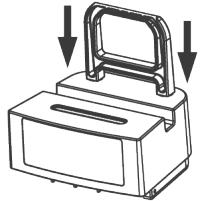
CHARGING A PERSONAL DEVICE USING THE BUILT-IN USB PORT
- Fix the device holder in the two holes on top of the Bluetooth® tower.
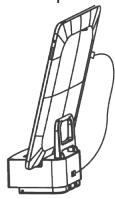
- Place your device over the slot.
- Connect one end of a cable (not included) to your device and the USB end to the USB DC 5V ______ charging port at the rear of the tower.
Notes: the personal device automatically charges when it is connected to the Bluetooth® tower. Make sure the tower is supplied with power.
BLUETOOTH® SET UP
The Bluetooth® word mark and logos are registered trademarks owned by Bluetooth SIG, Inc. and any use of such marks by Lexbook® is under license. Other trademarks and trade names are those of their respective owners.
© 2014 Bluetooth SIG, Inc.
Initial Pairing
- Switch on the Bluetooth® tower and press the SOURCE button to select Bluetooth® mode (bt). The Bluetooth® LED blinks while searching for a device.
- Activate the Bluetooth® function on your personal device. Please refer to the instruction manual of your device on how to active this function.
- Select the Bluetooth® tower name and start pairing your personal device with the tower.
- Once both device and tower are connected, play an audio or a video file. Adjust the sound volume level using the keys on your personal device or the volume buttons of the tower or remote control.
Re-pairing
When the tower or Bluetooth® mode has been switched off:
- Switch on the Bluetooth® tower and press the SOURCE button to select Bluetooth® mode (bt).
- The Bluetooth® LED blinks for 3 seconds and automatically finds the last device it was paired with.
- If no device is found, the Bluetooth® LED continues to blink. Press SOURCE to select other modes: FM, AUX or L IN.
Notes:
- The Bluetooth® tower only connects to one device at a time.
- The maximum transmission between the Bluetooth® speaker and a device is 10 meters or 32 feet.
- Interference may occur during playback when using the Bluetooth® function near other wireless devices. If playback through Bluetooth® is problematic, move the Bluetooth® speaker and the playback device to a different location, or use the 3.5mm LINE IN jack instead of the Bluetooth® function.
CLOCK FUNCTIONS
Setting the Clock
- Press the POWER button to turn off (standby mode) the tower.
- Press the MEM/CLOCK button on the remote control.
- The left digits blink. Press the TUN+/CLOCK+ or TUN-/CLOCK- button on the remote control to set the hour.
- Press MEM/CLOCK again to confirm the hour setting. The minutes automatically blink.
- Press the TUN+/CLOCK+ or TUN-/CLOCK- button to set the minutes.
- Press MEM/CLOCK again to confirm the minute setting.
Setting the Alarm (with a preset radio station)
- Press the POWER button to switch on the unit.
- Press the SOURCE button repeatedly to select the FM mode.
- Select a desired radio frequency by pressing the TUN+/CLOCK+ or TUN-/CLOCK- button.
- Press the POWER button to turn off (standby mode) the tower.
- Press the ALARM button on the remote. The time on the LCD screen blinks.
- The left digits blink. Press the TUN+/CLOCK+ or TUN-/CLOCK- button on the remote control to set the hour.
- Press ALARM to confirm the hour setting. The minutes automatically blink.
- Press the TUN+//CLOCK+ or TUN-/CLOCK- button to set the minutes.
- Press ALARM again to confirm the minute setting.
- The alarm goes off with the preset radio frequency at the set time.
- To deactivate the alarm, press the alarm button on the remote for 3 seconds. The bell symbol disappears.
Setting the Timer
- Press the POWER button to switch on the unit.
- Press the SLEEP button repeatedly to select a preset timer: 5, 10, 15, 30, 60 or 90 minutes.
- The LCD automatically enters sleep mode when the timer has been reached.
RADIO FUNCTIONS
Note: for a good reception signal, adjust the FM wire antenna (included).
Tuning the FM Radio
- Press the POWER button to turn the unit on.
- Press the SOURCE button to select FM radio mode.
- Press the TUN+/CLOCK+ or TUN-/CLOCK- button to set a desired frequency.
- Press and hold the TUN+/CLOCK+ or TUN-/CLOCK- button for an automatic tuning.
Saving a Radio Station
- Tune the FM radio.
- Select a desired frequency and press the MEM/CLOCK button to save the current radio station. Up to 30 stations can be saved to the Bluetooth® tower's memory.
Listening to a Saved Radio Station
- Press the POWER button to turn the unit on.
- Press the SOURCE button to select FM radio mode.
- Press the TUN/MEM button to cycle through saved radio stations.
CONNECTING AN EXTERNAL DEVICE USING AUX IN
- Connect an AUX out cable to the AUX IN jacks at the back of the tower.
- Supply the tower with power. The standby indicator turns on.
- Press the POWER button to turn the tower on and press the SOURCE button repeatedly to select AUX mode.
- Turn on the connected external player and start playback.
- Press the volume buttons to adjust the volume level.
- Press the TREBLE buttons on the remote control to adjust treble levels as desired.
- Press the BASS buttons on the remote control to adjust bass levels as desired.
- Press the equalisation pre-set mode buttons MUSIC, MOVIE or VOICE to turn on the pre-set equalisation effect as desired.
- Press the MUTE button to turn off the sound. Press again to resume.
- When you are done listening, press the POWER button to turn off (standby mode) the tower.
CONNECTING AN EXTERNAL DEVICE USING LINE IN
- Connect one end of the LINE IN cable to the headphone jack of your external device.
- Connect the other end of the cable to the LINE IN jack at the back of the tower.
- Connect the tower to the power source. The standby indicator turns on.
- Press the POWER button to turn the tower on and press the SOURCE button repeatedly to select LINE IN mode (L In).
- Turn on the connected external player and start playback.
- Press the volume buttons to adjust the volume level.
- Press the TREBLE buttons on the remote control to adjust treble levels as desired.
- Press the BASS buttons on the remote control to adjust bass levels as desired.
- Press the equalisation preset mode buttons MUSIC, MOVIE or VOICE to turn on the preset equalisation effect as desired.
- Press the MUTE button to turn off the sound, press again to resume.
- When you are done listening, press the POWER button to turn off (standby mode) the tower.
TROUBLESHOOTING GUIDE
| SYMPTOM | SOLUTION |
| No power. | Check the connection of the AC/DC adapter between the tower speaker and wall outlet. |
| No sound. | Check that the volume control is NOT at minimum. |
| Check that it is NOT set to mute. | |
| The remote control won’t work. | Inspect or replace the battery. |
| Make sure there are no obstacles obscuring the front of the tower speaker. | |
| No sound from the Bluetooth® mode. | Check if you have pairing or not. |
SPECIFICATIONS
General
| AC/DC Adaptor | Input AC 100-240V, 50/60 Hz; Output 18V = 1.6A |
| Power Consumption | >50W |
| Audio Power | Woofer: 30W Left Channel: 10W Right Channel: 10W |
| Radio Coverage | FM 87.5-108.0 MHz |
| Impedance of Speakers | Woofer: 8 Ohm, 25W x 2 Left Channel: 4 Ohm, 15W Right Channel: 4 Ohm, 15W |
| Dimensions | 100 x 23 x 18.5 cm |
| Weight | 4.5 kg |
CONFORMITY DECLARATION
We, Lexibook® S.A.
Declare under our sole responsibility that the following product:
Kind of product: Bluetooth® Tower
Type designation: BT1000series
Is in compliance with the following standards:
EN60065:2002+A1:2006+A11:2008+A2:2010+A12:2011
EN55013:2013
EN55020:2007+A11:2011
EN61000-3-2:2006+A1:2009+A2:2009
EN61000-3-3:2013
ETSI EN 300 328 V1.7.1
ETSI EN 301 489-1 V 1.9.2
ETSI EN 301 489-17 V 2.2.1
EN 62479:2010
We hereby declare that the above mentioned product is in compliance with the EMC Directive (2004/108/EC), with the Low Voltage Directive (2006/95/EC) and with the R&TTE Directive (1999/5/EC) of the European Commission.

Yiu Wai Man
Product Development Manager
27/05/2014 (Hong Kong)
C €0700
MAINTENANCE
To prevent fire or shock hazard, disconnect your unit from the power source when cleaning. The finish on your unit may be cleaned with a dust cloth and cared for as other furniture. Use a soft, clean cloth moistened with plain, lukewarm water to clean the exterior of the unit. Use caution when cleaning and wiping the plastic parts. Mild soap and a damp cloth may be used on the front panel.
WARRANTY
This product is covered by our 2-years warranty.
For any claim under the warranty or after sale service, please contact your distributor and present a valid proof of purchase. Our warranty covers any manufacturing material and workmanship defect, with the exception of any deterioration arising from the non-observation of the instruction manual or from any careless action implemented on this item (such as dismantling, exposition to heat and humidity, etc.). It is recommended to keep the packaging for any further reference.
In a bid to keep improving our services, we could implement modification on the colours and the details of the product shown on the packaging.
NOTE: Please keep this instruction manual, it contains important information.
Reference: BT1000series
Designed and developed in Europe - Made in China
© 2014 LEXIBOOK®
United Kingdom & Ireland
For any further information, please call Helpline: 0808 1003015
www.lexibook.com

This product is not a toy.

Environmental Protection
Unwanted electrical appliances can be recycled and should not be discarded along with regular household waste! Please actively support the conservation of resources and help protect the environment by returning this appliance to a collection centre (if available).


PRECAUCION
RIESGO DE DESCARGA ELECTRICA NO ABRIR

PRECAUCION: PARA REDUCIR EL RIESGO DE DESCARGA ELECTRICA, NO RETIRE LA CUBIERTA (O PARTE TRASERA). NO HAY PIEZAS EN EL INTERIOR SUSCEPTIBLES DE SER MANIPULADAS POR EL USUARIO. EN CASO DE AVERIA, SOLICITE ASISTENCIA TECNICA DE PERSONAL CUALIFICADO.
© 2014 Bluetooth SIG, Inc.
Emparejamento inicial
27/05/2014 (Hong Kong)
C €0700
MANTENIMIENTO
© 2014 Bluetooth SIG, Inc.
Emparelhamento inicial
© 2014 Bluetooth SIG, Inc.
Appaimento iniziale
27/05/2014 (Hong Kong)
C €0700
MANUTENZIONE
© 2014 Bluetooth SIG, Inc.
© 2014 Bluetooth SIG, Inc.
Initièle koppeling
27/05/2014 (Hong Kong)
C €0700