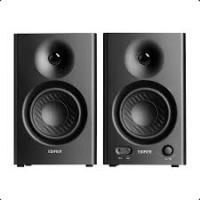
HIFIMR4 - Speaker EDIFIER - Free user manual and instructions
Find the device manual for free HIFIMR4 EDIFIER in PDF.



User questions about HIFIMR4 EDIFIER
0 question about this device. Answer the ones you know or ask your own.
Ask a new question about this device
Download the instructions for your Speaker in PDF format for free! Find your manual HIFIMR4 - EDIFIER and take your electronic device back in hand. On this page are published all the documents necessary for the use of your device. HIFIMR4 by EDIFIER.
USER MANUAL HIFIMR4 EDIFIER
EN Important safety instruction
- Please read the instructions carefully. Keep it in safe place for future reference.
- Use only accessories approved by the manufacturer.
- Install the instrument properly by following the instructions in the device connection section.
- Using the product in a 0-35 C environment is recommended.
- To reduce the risk of fire and electric shock, do not expose the product to rain or moisture.
- Do not use this product near water. Do not immerge the product into any liquid or have it exposed to dripping or splashing.
- Do not install or use this product near any heat source (e.g. radiator, heater, stove, or other devices that generate heat).
- Do not place any object filled with liquids, such as vases on the product; neither should any open fire, such as lighted candles be placed on the product.
- Do not block any ventilation openings. Do not insert any object into ventilation openings or slots. It may cause fire or electric shock.
- Keep sufficient clearance around the product to maintain good ventilation (minimum 5cm is recommended).
- Do not force a plug into the jack. Before connection, check for blockage in the jack and whether the plug matches the jack and is oriented to the right direction.
- Keep the provided accessories and parts (such as screws) away from children to prevent from being swallowed by mistake.
- Do not open or remove the housing yourself. It may expose you to dangerous voltage or other hazardous risks. Regardless the cause of damage (such as damaged wire or plug, exposure to liquid splash or foreign object falling in, exposure to rain or moisture, product not working or being dropped, etc.), the repair has to be performed by an authorized service professional immediately.
- Before cleaning the product with dry cloth, always turn off the product and disconnect the power plug first.
- Never use strong acid, alkali, gasoline, alcohol, or other chemical solvents to clean the product surface. Use only neutral solvent or clear water for cleaning.

Excessively loud music may lead to hearing loss. Please keep the volume in a safe range.

Correct Disposal of this product. This marking indicates that this product should not be disposed with other household wastes throughout the EU. To prevent possible harm to the environment or human health from uncontrolled waste disposal, recycle it responsibly to promote the sustainable reuse of material resources. To return your used device, please use the return and collection systems or contact the retailer where the product was purchased. They can take this product for environmental safe recycling.

Use only with the cart, stand, tripod, bracket, or table specified by the manufacturer, or sold with the apparatus. When a cart is used, use caution when moving the cart/apparatus combination to avoid injury from tip-over.
Important safety instruction
Power warning:
- Place the product near the power outlet for easy use.
- Before use, make sure that the operating voltage is the same as your local power supply. Correct operating voltage can be found on the product plate.
- For safety purpose, unplug the product during lightning storms or when unused for extended periods of time.
- Under normal conditions, the power supply may get hot. Please keep good ventilation in the area and exercise caution.
- Safety warning labels on the housing or bottom of the product or power adaptor.

This symbol is to alert the user to the presence of un-insulated dangerous voltage within the product's enclosure that may be of sufficient magnitude to constitute a risk of electric shock to persons.

This symbol is to warn the user not to disassemble the enclosure of the product and there is no user-replaceable part inside. Take the product to an authorized service center for repair.

This symbol indicates that the product is for indoor use only.

This symbol indicates that the product is a CLASS II or double insulated electrical device with no earth requirement.
The MAINS plug is used as the disconnect device, the disconnect device shall remain readily operable.
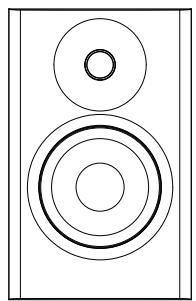
Passive (left) speaker
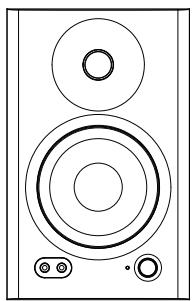
Active (right) speaker
Speaker connecting cable

3.5mm - RCA audio cable

3.5mm - 3.5mm audio cable
User manual
Note: Images are for illustrative purposes only and may differ from the actual product.
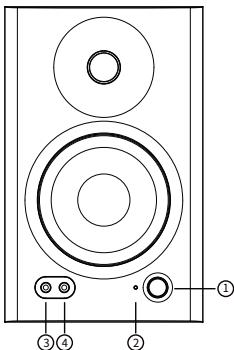
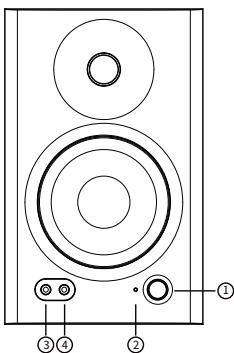
- Multi-function dial
Rotate: volume control
Press: sound effects toggle (Monitor/Music)
Press and hold: power on/off - Indicator
Red: monitor mode
Green: music mode - AUX unbalanced input
- Headphone output
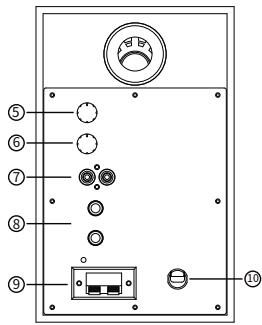
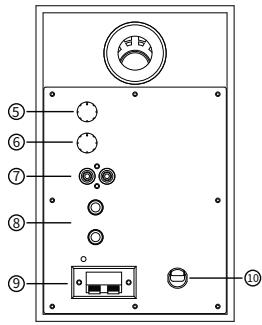
- Low frequency trimmer (adjust frequencies around 100Hz by ± 6 dB.)
- High frequency trimmer (adjust frequencies above 10kHz by ± 6 dB.)
- RCA unbalanced input
- TRS balanced input
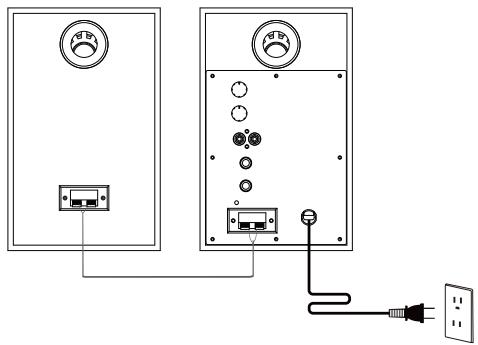
- Connect to passive (left) speaker
- Power cable
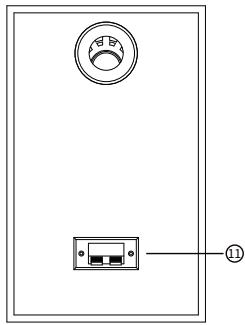
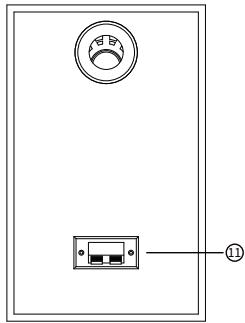
- Connect to active (right) speaker
Connection
1. Basic connection
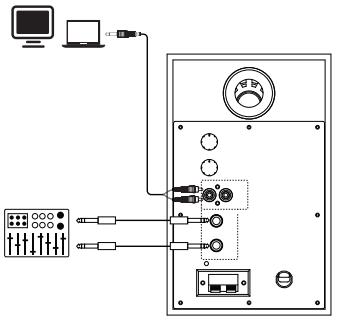
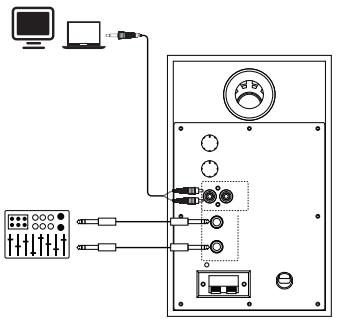
2. Connect to audio sources
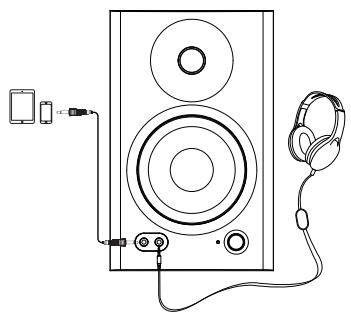
Audio inputs
EDIFIER MR4 provides you with three different input methods, and the three inputs can be used in parallel.
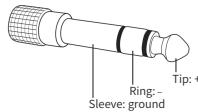
1. TRS balanced input
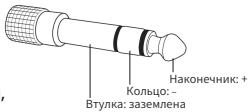
TRS balanced input refers to a 6.35mm (1/4 inch) three-stage balanced port for connecting to audio devices with 6.35mm balanced output (nominal input level: +4dBu), such as audio interfaces, mixers, audio production devices, etc.
2. RCA unbalanced input
RCA unbalanced port is used for connecting to audio devices with unbalanced output (nominal input level: -10dBV), such as personal music players, desktop computers, CD players, etc.
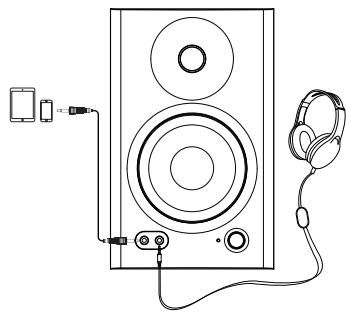
3. AUX unbalanced input
AUX port is a 3.5mm unbalanced input port used for connecting to computers, mobile phones, tablets, etc.
Note:
Please rotate the multi-function dial counterclockwise to the lowest volume level before connections.
Audio output
Headphone output
Insert the headphones into the "I" port on the front panel of the active speaker, then the speaker will be muted and the headphones will output sound.
Note:
You can control the headphone volume with the multi-function dial.
Specifications
Input sensitivity: TRS balanced input: +4dBu
AUX/RCA unbalanced input: -10dBV
Power output: 21W+21W
Frequency response: 60Hz-20KHz
Signal to noise ratio ≥ 85dBA
Distortion ≤slant 0.2%
Treble unit: 1 inch
Woofer unit: 4 inch
Active speaker dimension: 140 × 228 × 197.5 ~mm
Passive speaker dimension: 140 × 228 × 184 ~mm
Prouduct weight (net): 4.5Kg
Audio inputs: TRS balanced input, RCA unbalanced input, AUX unbalanced input
No sound
- Check if the speaker is ON.
- Try to turn up the volume using the volume control.
- Ensure the audio cables are firmly connected and the input is set correctly on the speaker.
- Check if there is a signal output from the audio source.
The MR4 does not turn on
- Check if main power is connected, or if the wall outlet is switched on.
Noise coming from speakers
- EDIFIER speakers generate little noise, while the background noise of some audio devices are too high. Please unplug audio cables and turn the volume up, if no sound can be heard at 1 meter away from the speaker, then there is no problem with this product.
To learn more about EDIFIER, please visit www.edifier.com
For EDIFIER warranty queries, please visit the relevant country page on www.edifier.com and review the section titled Warranty Terms.
USA and Canada: service@edifier.ca
South America: Please visit www.edifier.com (English) or www.edifierra.com (Spanish/Portuguese) for local contact information.

@Editierglobal

@EditerGLOBAL

@EditerGLOBAL
Model: EDF100024
Edifier International Limited
P.O.Box 6264
General Post Office
Hong Kong
www.edifier.com
© 2021 Edifier International Limited. All rights reserved.
Printed in China
NOTICE:
For the need of technical improvement and system upgrade, information contained herein may be subject to change from time to time without prior notice.
Products of EDIFIER will be customized for different applications. Pictures and illustrations shown on this manual may be slightly different from actual product. If any difference is found, the actual product prevails.
General Post Off ice
Hong Kong
www.edifier.com
General Post Off ice
Hong Kong
www.edifier.com
General Post Off ice
Hong Kong
www.edifier.com
General Post Off ice
Hong Kong
www.edifier.com
© 2021 Edifier International Limited. Tutti i diritti riservati.
Stampato in China
COMUNICAZIONE:
General Post Off ice
Hong Kong
www.edifier.com
General Post Off Ice
Hong Kong
www.edifier.com
© 2021 Edifier International Limited. 禁無斷軌載
印刷:中国
注意
PykoBODCTBO nIb3ObaTeNa
PpMueHne: 306paXeHne npBedeHO dA cnpaBKn. KoHCTpyKzma MoKet OTnuaTbcra.
1.MHoroΦyHKUHOHaJIbHaN KpyROBaIshkaIa
BpaueHne:peryunipobAHne rpomKoCTn
Haxmnte: nepeKlnoueHne 3bYx peXIMOB 3ByKObBix 3ΦΦeKTOB (ynpaBJIeHne/My3bika)
Haxmnte u ydepXnBaIte: BKJIIOueHne/BbIKIOueHne
2.Индикатор
Kpachb:pexmymynpaBneHnA
3eJHbI:peKIM My3bIKN
3.BcnoMOraTeNbHbI HeCnMMeTpHuBb BXoD
4. BbIXoD nIaHayuHnKOB
5. TpIMMep noCTpoKn H3KO uactOtby (peyInpye TaCtOtbl BOKpyr 100 _u Ha ± 6 deun6eJ)
6. Tpnmmp noctpoikn cactotb Blicokoi cactotbl (perynipyet cactotbl BOKpyr 10 KfHa ± 6 deun6e)
7. HecmmMeTpHbB BXoD Tnna RCA
8.CmmMeTpHbB BXoTnTaTRS
9. CoeunheHne c naccBHO (JeBOI) KOJOHKOI
10. Ka6eIb nHTaHnIa
11. CoeINHeHne cakTNBHO (npaBO) KOJIOHKO
1.OchOBHoe coeHNHeHne
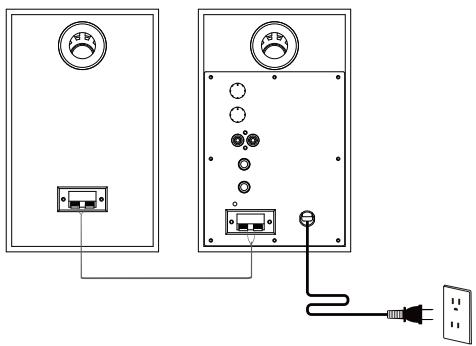
- CoeHHeHc nToHnKaMn 3ByKOBOr BOcnpOn3BeDeHn
AynobXoDbI
EDIFIER MR4 obecneuBaet trp pa3nunbix cnoc6a npdkluoyenra, n BCE trp cnoc6a moxho nCnoIb3OBAb napalnnelbHO.
1.CmmMeTpnuHbBxOaTtnaTRS
CmmETPnHbI BXoD TnA TRS OTHOCTCA K TpExPO3NIOOHOMY CmmETPnHOMy BXOyΦ6,35MM (1/4 ΜΟΠΑ)ДгLoCoEINHEHc AynOyCTPOHCTBAMN, NmEIoUIMN CmmETPnHbI BxOb6,35MM (HOMNaHbI yPOBeHb BXOa; +4dBu), TAKIMK aayDNIOHTpeFcebl, MKNkEpHbI neMbTb, yCTPOHCTBa 3yBkONpON3BOCDtBa I T.I.
2. HecmmMeTpHbB BXoD Tuna RCA
HecnmMmTePnHyB BxOJ RCA nCnoIb3yETc JnA coeHHeHn C ayDIOuCTPoIcTBAMn, IMMeUIMn HecnmMmTePnHyB BxOJ (HomHaNbHb yPOBeHb BxOa: -10dBV), TAKIMN KAK nepcoHaNbHbIe My3bKaIbHbIe PnEepbI, NaCToIbHbIe KOMMbIOtepe, PnEepblr IpnOurpBaHn KOMNaKT-DiCKOB I.T.I.
3.BcnomoraTeNbHbI HecmMmTePnUHbI BXoD
BcnoMOraTeNbHbHeNCmMMeTpnuHbBXoA RbIaTeTcHecnMMeTpnuHbIM BXoDM 3,5MM dIa CoeINHeHnC KOMMbHTepaM,MO6uNbHbHm TelefoHAM,IIaHaWetNtKAMn I.T.D.
Приимechanical:
Do coeHHeHn BpaaIte MHOrOfoHyKNUHOHaJIbHyIO KpyroByIO uKaIy Do MmHImaJIbHO rPOBn rPOMKOcTn.
AydnoBbIXoA
BbIXoI dIa HayuHnKOB
BctabTe HauyuHKn B npot"Ha nepeJeHne NaeHn AKTUBHO KOLOHKn, 3ByKOBo CnHn KOLOHKn 6ydt BbKIOueH, a 3ByKOBo CNrHn HauyuHKnOB 6ydt BkIOueH.
Приимechanicals:
Bb mojTe peRyIuPObaT bpOMKocTb HayUHnKOB C nOMOUsbIO MHOrOfoYHKUHOHaJIbHOJ KpyroBoI WkaJIbl.
YyBCTBnTeNbHOCTb: CmmMeTpnuHbI BXoD TnPa TRS:+4dBu
BcnoMOraTeIbHbI/HeCnMMeTpNHyb IBXoD Tnna RCA: -10dBV
BbIXoHaMoUHocTb: 21BT+21BT
YachToTHbIy dIana3OH: 60Tc-20KtU
OTHOSeHHe CnHnA/7uM 85dA
Искажения ≤0,2%
BCHINHAMK: 1IIOIM
HUYINHAMIK: 4IOIMa
Pa3MepbAkTNBHaKoJOnHka: 140x228x197,5MM
PazmepbI naccBnHa KOnOHka: 140 x 228 x 184 MM
Bec n3dEJIa (HeTTO): 4,5 Kr
AynOBxObl: CmmMeTnHbBxOa TnTa TRS, HecmMeTnHb BxOa TnRa RCA,
BcnoMOraTeNbHbI HeCnMMeTpNHyB BXoD
yctpaHHeHne
- PpOBepe, BKNIOeH JIN DnHaMnK.
-Порpoьут eувеличт b Гомковс b с пomoью глав Horo perylaTopa. - y6eIntecb,чTO aydIOKa6eI INOdkNIOueHb I npaBnIbHO,I B 3ByKOBbIX KOLOHKax npaBnIbHO Bbl6paH BXoI.
-Поверпсигнан На ВьхODEИСТОЧИКА 3Byka.
KoJohKa MR4 He BkJIouaETcA
- Y6eɪnteɪcB, UTO KɔlonHka NɔdklIoUeHa K Cetɪn əJIeKtpoɪntaɪnɪya, U TO pɔ3eTka cETɪn BkIIOUeHa.
TOMEXNOTINHAMNKOB
- Kolonokн Фирмь EDIFIER rehepinpyot He6obIbIwe nomexn,В To BpeM kak fOHOBble nomexn HeKOTOpbIX ayDINO yCTpoiCTB YABJIaTc8 ouChE b 6oIbIbIMN. OTCoeDNHITe ayDINO ka6eINu yVeINuHTe rPOMKOCTb,ecIn Ha paCCTOHN 1 M n3 dINHaMnKa HnueTo He CblIshO,3HaUHT y 3TOrO u3DeJnA Het npo6Iem.
DOnonHnteIbIbIe CBeDeHnO EDIFIER cm. Ha Be6-caTe www.edifier.com
ДязапсовкEDIFIER no rapaHTиньIM o63aTeBCTbAM NOcETnTE CTpaHnCy COOTBETCTBYUOeI
CTpaHbI Ha WWW.edifier.com I O3HaKOMbTeCb C pa3DeJOM rapaHTnHbIX 68a3aTeJIbCTB.
CUSA n Kaanda: service@edifier.ca
IOxHnAmePnKa:INHΦOpMaunO MeCTHbIX npeDcTaNtBcTBax CM. Na Be6-caTe
www.edifier.com (aHrnnckn 3bik) nwn www.edifierla.com (ncnAchkn/npOpyraBckn 3bik).

@Edifierglobal

@EditerGLOBAL

@EditerGLOBAL
Model: EDF100024
Edifier International Limited
P.O.Box 6264
General Post Office
Hong Kong (TônkoHr)
Ten.: +852 2522 6989
ΦaKc: +852 2522 1989
www.edifier.com
Edifier International Limited, 2021 r. Bce npaba zauniuehbl.
HaneuataHO B Kntae
PIMMEYAHNE.
BcIeCTBVE yCOBepHEnCTBOBAHn I MOepeHn3aun CnCTembl NHOFPMaun, PpeCTabJIeHHa B DaHHOM
pykoBODCTBe, moKet 6bItb n3MeHeHa 6e3 npEaBapTeNbHO yBeOMneHn.
Ipondyukya EDIFIER hactpanBaetcna pa3nHybIX o6laTe npimehen. N3o6paKeHn n nnIOCTpaun B
HACTOJEM PYKOBODCTBE MORYT HEMHORO OTNIUATbCRAOT peaIbHbIX N3dJIIN. B CNYae pa3JIuNn npnpOTET
OTdaeTcpeaIbHOMy n3dennIO.